
教育行业Java教程如何分享分片上传的视频文件分块合并最佳实践?
·
大文件上传下载系统开发指南(基于WebUploader+SpringBoot)
项目概述
大家好,我是一个重庆的Java程序员,最近接了个"刺激"的外包项目:要开发一个支持20G大文件上传下载的系统,还要兼容IE8这种古董浏览器。客户预算只有100元,但要求7*24小时技术支持、完整源代码和部署服务。这活儿听起来像是在挑战极限运动,不过咱们程序员不就是喜欢这种刺激嘛!
技术选型
经过深思熟虑(和头发的掉落),我决定采用以下技术栈:
- 前端:Vue3 CLI + 原生JavaScript(为了兼容IE8,部分功能需要降级处理)
- 上传组件:WebUploader(百度开源,支持文件夹上传)
- 后端:SpringBoot 2.x
- 存储:阿里云OSS + 本地存储(作为备份)
- 数据库:MySQL(记录文件元数据)
- 加密:前端SM4(国密),后端AES(因为IE8不支持Web Crypto API)
系统架构
浏览器(IE8+) ←HTTP/HTTPS→ Nginx ←→ SpringBoot后端
                                     ↓
                             阿里云OSS + 本地存储
                                     ↓
                                MySQL数据库
前端实现(兼容IE8的痛苦之旅)
1. 引入WebUploader(修改版)
由于原生WebUploader不支持IE8的文件夹上传,我进行了魔改:
    大文件上传系统


        选择文件/文件夹


        // 初始化上传器(IE8兼容模式)
        var uploader = WebUploader.create({
            swf: 'Uploader.swf', // Flash fallback for IE8
            server: '/api/upload',
            pick: '#filePicker',
            dnd: '#uploader',
            paste: document.body,
            chunked: true,
            chunkSize: 5 * 1024 * 1024, // 5MB一片
            threads: 3,
            formData: {
                _token: '{{csrf_token()}}'
            },
            compress: false,
            prepareNextFile: true,
            accept: null
        });

        // 文件夹上传处理(IE8特殊处理)
        if (WebUploader.browser.ie && WebUploader.browser.version <= 8) {
            uploader.options.accept = {
                title: 'Files',
                extensions: '*',
                mimeTypes: '*/*'
            };

            // 监听文件选择事件
            $('#filePicker').on('change', function(e) {
                var files = e.target.files;
                if (files.length) {
                    // 模拟文件夹结构(通过文件名中的路径信息)
                    for (var i = 0; i < files.length; i++) {
                        var file = files[i];
                        // 这里需要解析文件名中的路径信息(如"folder/subfolder/file.txt")
                        // 由于IE8的限制,我们无法直接获取文件夹结构,需要用户手动输入路径前缀
                        var pathPrefix = prompt('请输入文件 "' + file.name + '" 的完整路径(包括文件夹结构):', '');
                        if (pathPrefix) {
                            // 创建一个虚拟的文件夹结构对象
                            var mockFile = {
                                name: pathPrefix + file.name,
                                size: file.size,
                                type: file.type,
                                lastModifiedDate: file.lastModifiedDate,
                                _file: file
                            };
                            uploader.addFiles(mockFile);
                        }
                    }
                }
            });
        } else {
            // 现代浏览器的文件夹上传处理
            uploader.on('beforeFileQueued', function(file) {
                // 处理文件夹结构
                if (file.fullPath) {
                    file.name = file.fullPath; // 保留完整路径
                }
            });
        }

        // 文件加入队列
        uploader.on('fileQueued', function(file) {
            // 显示文件信息
            var $list = $('#fileList');
            $list.append('<div id="' + file.id + '" class="item">' +
                '<h4 class="info">' + file.name + '</h4>' +
                '<p class="state">等待上传...</p>' +
                '<div class="progress"><span class="progress-bar" style="width: 0%"></span></div>' +
            '</div>');

            // 如果是现代浏览器且有文件夹结构,显示路径
            if (file.fullPath) {
                $('#' + file.id).find('.info').text(file.fullPath);
            }
        });

        // 上传进度
        uploader.on('uploadProgress', function(file, percentage) {
            var $item = $('#' + file.id);
            $item.find('.progress-bar').css('width', percentage * 100 + '%');
            $item.find('.state').text('上传中 ' + Math.round(percentage * 100) + '%');
        });

        // 上传成功
        uploader.on('uploadSuccess', function(file, response) {
            $('#' + file.id).find('.state').text('上传成功');
            // 这里可以添加SM4加密逻辑
        });

        // 上传失败
        uploader.on('uploadError', function(file, reason) {
            $('#' + file.id).find('.state').text('上传失败: ' + reason);
        });

        // 上传完成
        uploader.on('uploadComplete', function(file) {
            $('#' + file.id).find('.progress').fadeOut();
        });

        // 断点续传逻辑
        uploader.on('uploadBeforeSend', function(block, data) {
            // 添加分片信息
            data.chunk = block.chunk;
            data.chunks = block.chunks;
            data.name = block.file.name;

            // 从localStorage获取上传进度
            var progressKey = 'upload_progress_' + block.file.name;
            var progress = localStorage.getItem(progressKey);
            if (progress) {
                progress = JSON.parse(progress);
                if (progress.chunks && progress.chunks[block.chunk]) {
                    // 告诉服务器这个分片已经上传过了
                    data.md5 = progress.chunks[block.chunk].md5;
                }
            }
        });

        // 上传接受分片事件
        uploader.on('uploadAccept', function(object, ret) {
            // 服务器返回分片处理结果
            if (ret.chunked) {
                // 保存上传进度到localStorage
                var progressKey = 'upload_progress_' + object.file.name;
                var progress = localStorage.getItem(progressKey);
                progress = progress ? JSON.parse(progress) : {
                    name: object.file.name,
                    size: object.file.size,
                    chunks: {}
                };

                progress.chunks[ret.chunk] = {
                    md5: ret.md5,
                    uploaded: true
                };

                localStorage.setItem(progressKey, JSON.stringify(progress));
            }
            return true;
        });
2. 下载功能实现
// 下载文件(支持单个文件和文件夹下载)
function downloadFile(fileInfo) {
    // 如果是文件夹,递归下载所有文件
    if (fileInfo.isDirectory) {
        $.get('/api/listFolder', {path: fileInfo.path}, function(files) {
            files.forEach(function(file) {
                downloadFile(file);
            });
        });
        return;
    }

    // 单个文件下载
    var link = document.createElement('a');
    link.href = '/api/download?path=' + encodeURIComponent(fileInfo.path);

    // 如果是现代浏览器,支持blob下载
    if (typeof link.download !== 'undefined') {
        // 先获取文件信息(可能包含加密信息)
        $.get('/api/fileInfo', {path: fileInfo.path}, function(info) {
            // 这里可以添加解密逻辑
            // 实际项目中应该使用更安全的解密方式
            link.download = info.name || fileInfo.name;
            document.body.appendChild(link);
            link.click();
            document.body.removeChild(link);
        });
    } else {
        // IE8/9 兼容下载
        link.style.display = 'none';
        document.body.appendChild(link);
        link.click();
        document.body.removeChild(link);
    }
}
后端实现(SpringBoot)
1. 上传控制器
@RestController
@RequestMapping("/api")
public class FileUploadController {

    @Autowired
    private FileService fileService;

    @Autowired
    private OSSClient ossClient;

    // 分片上传接口
    @PostMapping("/upload")
    public ResponseEntity upload(
            @RequestParam("file") MultipartFile file,
            @RequestParam(value = "chunk", required = false) Integer chunk,
            @RequestParam(value = "chunks", required = false) Integer chunks,
            @RequestParam(value = "name", required = false) String name,
            @RequestParam(value = "md5", required = false) String md5,
            HttpServletRequest request) {

        try {
            // 1. 参数校验
            if (file.isEmpty()) {
                return ResponseEntity.badRequest().body("文件不能为空");
            }

            // 2. 处理文件名(保留路径结构)
            String originalName = name != null ? name : file.getOriginalFilename();
            String filePath = originalName;

            // 3. 分片上传处理
            if (chunk != null && chunks != null) {
                // 分片上传逻辑
                File chunkFile = fileService.saveChunk(file, chunk, filePath);

                // 检查是否所有分片都已上传
                if (fileService.checkAllChunksUploaded(filePath, chunks)) {
                    // 合并分片
                    File mergedFile = fileService.mergeChunks(filePath, chunks);

                    // 上传到OSS
                    String ossUrl = fileService.uploadToOSS(mergedFile, filePath);

                    // 保存文件元数据
                    FileMeta meta = new FileMeta();
                    meta.setFileName(originalName);
                    meta.setFilePath(filePath);
                    meta.setFileSize(file.getSize());
                    meta.setFileType(file.getContentType());
                    meta.setOssUrl(ossUrl);
                    meta.setUploadTime(new Date());
                    fileService.saveFileMeta(meta);

                    // 清理临时分片文件
                    fileService.cleanChunks(filePath);

                    return ResponseEntity.ok().body(Map.of(
                        "status", "complete",
                        "path", filePath,
                        "ossUrl", ossUrl
                    ));
                } else {
                    return ResponseEntity.ok().body(Map.of(
                        "status", "chunk_uploaded",
                        "chunk", chunk,
                        "path", filePath
                    ));
                }
            } else {
                // 单文件直接上传
                File tempFile = File.createTempFile("upload-", ".tmp");
                file.transferTo(tempFile);

                // 上传到OSS
                String ossUrl = fileService.uploadToOSS(tempFile, filePath);

                // 保存文件元数据
                FileMeta meta = new FileMeta();
                meta.setFileName(originalName);
                meta.setFilePath(filePath);
                meta.setFileSize(file.getSize());
                meta.setFileType(file.getContentType());
                meta.setOssUrl(ossUrl);
                meta.setUploadTime(new Date());
                fileService.saveFileMeta(meta);

                // 删除临时文件
                tempFile.delete();

                return ResponseEntity.ok().body(Map.of(
                    "status", "complete",
                    "path", filePath,
                    "ossUrl", ossUrl
                ));
            }
        } catch (Exception e) {
            return ResponseEntity.status(500).body("上传失败: " + e.getMessage());
        }
    }

    // 检查文件上传状态(用于断点续传)
    @GetMapping("/uploadStatus")
    public ResponseEntity checkUploadStatus(@RequestParam String path) {
        try {
            // 从数据库获取文件上传状态
            FileMeta meta = fileService.getFileMetaByPath(path);
            if (meta != null) {
                return ResponseEntity.ok().body(Map.of(
                    "uploaded", true,
                    "ossUrl", meta.getOssUrl()
                ));
            }

            // 检查临时分片
            File chunkDir = new File(fileService.getChunkTempDir(), path);
            if (chunkDir.exists()) {
                File[] chunks = chunkDir.listFiles();
                if (chunks != null && chunks.length > 0) {
                    return ResponseEntity.ok().body(Map.of(
                        "uploaded", false,
                        "chunks", chunks.length
                    ));
                }
            }

            return ResponseEntity.ok().body(Map.of("uploaded", false));
        } catch (Exception e) {
            return ResponseEntity.status(500).body("检查状态失败: " + e.getMessage());
        }
    }
}
2. 下载控制器
@RestController
@RequestMapping("/api")
public class FileDownloadController {

    @Autowired
    private FileService fileService;

    // 文件信息接口(用于下载前获取信息)
    @GetMapping("/fileInfo")
    public ResponseEntity getFileInfo(@RequestParam String path) {
        try {
            FileMeta meta = fileService.getFileMetaByPath(path);
            if (meta == null) {
                return ResponseEntity.notFound().build();
            }

            // 这里可以添加解密逻辑
            // 实际项目中应该使用更安全的解密方式

            return ResponseEntity.ok().body(Map.of(
                "name", meta.getFileName(),
                "size", meta.getFileSize(),
                "type", meta.getFileType(),
                "path", meta.getFilePath()
            ));
        } catch (Exception e) {
            return ResponseEntity.status(500).body("获取文件信息失败: " + e.getMessage());
        }
    }

    // 下载接口
    @GetMapping("/download")
    public ResponseEntity downloadFile(@RequestParam String path, HttpServletRequest request) {
        try {
            FileMeta meta = fileService.getFileMetaByPath(path);
            if (meta == null) {
                return ResponseEntity.notFound().build();
            }

            // 从OSS获取文件
            OSSObject ossObject = fileService.getOSSObject(meta.getOssUrl());
            InputStream inputStream = ossObject.getObjectContent();

            // 创建Resource对象
            InputStreamResource resource = new InputStreamResource(inputStream);

            // 设置响应头
            String fileName = meta.getFileName();
            String contentType = meta.getFileType() != null ? meta.getFileType() : "application/octet-stream";

            return ResponseEntity.ok()
                    .contentType(MediaType.parseMediaType(contentType))
                    .header(HttpHeaders.CONTENT_DISPOSITION, "attachment; filename=\"" + fileName + "\"")
                    .header(HttpHeaders.CONTENT_LENGTH, String.valueOf(meta.getFileSize()))
                    .body(resource);

        } catch (Exception e) {
            return ResponseEntity.status(500).build();
        }
    }

    // 列出文件夹内容(用于文件夹下载)
    @GetMapping("/listFolder")
    public ResponseEntity listFolder(@RequestParam String path) {
        try {
            List files = fileService.listFolder(path);
            return ResponseEntity.ok().body(files);
        } catch (Exception e) {
            return ResponseEntity.status(500).body("获取文件夹内容失败: " + e.getMessage());
        }
    }
}
3. 文件服务实现
@Service
public class FileServiceImpl implements FileService {

    @Value("${file.upload-dir}")
    private String uploadDir;

    @Value("${file.chunk-temp-dir}")
    private String chunkTempDir;

    @Autowired
    private FileMetaRepository fileMetaRepository;

    @Autowired
    private OSSClient ossClient;

    @Override
    public File saveChunk(MultipartFile file, int chunk, String filePath) throws IOException {
        // 创建分片目录
        File chunkDir = new File(chunkTempDir, filePath);
        if (!chunkDir.exists()) {
            chunkDir.mkdirs();
        }

        // 保存分片文件
        File chunkFile = new File(chunkDir, String.valueOf(chunk));
        file.transferTo(chunkFile);

        return chunkFile;
    }

    @Override
    public boolean checkAllChunksUploaded(String filePath, int totalChunks) {
        File chunkDir = new File(chunkTempDir, filePath);
        return chunkDir.exists() && chunkDir.list().length == totalChunks;
    }

    @Override
    public File mergeChunks(String filePath, int totalChunks) throws IOException {
        File chunkDir = new File(chunkTempDir, filePath);
        File mergedFile = new File(uploadDir, filePath);

        // 确保父目录存在
        File parent = mergedFile.getParentFile();
        if (!parent.exists()) {
            parent.mkdirs();
        }

        // 合并分片
        try (FileOutputStream fos = new FileOutputStream(mergedFile);
             BufferedOutputStream mergingStream = new BufferedOutputStream(fos)) {

            for (int i = 0; i < totalChunks; i++) {
                File chunkFile = new File(chunkDir, String.valueOf(i));
                Files.copy(chunkFile.toPath(), mergingStream);
                chunkFile.delete();
            }
        }

        // 删除分片目录
        chunkDir.delete();

        return mergedFile;
    }

    @Override
    public String uploadToOSS(File file, String filePath) throws IOException {
        // 生成OSS路径
        String ossPath = "uploads/" + filePath;

        // 上传到OSS
        try (InputStream inputStream = new FileInputStream(file)) {
            PutObjectRequest putObjectRequest = new PutObjectRequest(
                ossClient.getBucketName(), ossPath, inputStream);
            ossClient.putObject(putObjectRequest);
        }

        return ossPath;
    }

    @Override
    public void saveFileMeta(FileMeta meta) {
        fileMetaRepository.save(meta);
    }

    @Override
    public FileMeta getFileMetaByPath(String path) {
        return fileMetaRepository.findByFilePath(path);
    }

    @Override
    public List listFolder(String path) {
        return fileMetaRepository.findByFilePathStartingWith(path);
    }

    @Override
    public void cleanChunks(String filePath) {
        File chunkDir = new File(chunkTempDir, filePath);
        if (chunkDir.exists()) {
            try {
                FileUtils.deleteDirectory(chunkDir);
            } catch (IOException e) {
                // 记录日志,不影响主流程
                e.printStackTrace();
            }
        }
    }

    @Override
    public OSSObject getOSSObject(String ossPath) {
        return ossClient.getObject(ossClient.getBucketName(), ossPath);
    }

    // getter方法
    public String getChunkTempDir() {
        return chunkTempDir;
    }
}
加密实现
由于IE8的限制,前端我们使用SM4加密(通过JavaScript实现),后端使用AES加密。
前端SM4加密(简化版)
// SM4加密工具类(简化版)
var SM4Util = {
    // 这里应该是完整的SM4实现
    // 由于篇幅限制,这里只展示接口

    encrypt: function(plaintext, key) {
        // 实际项目中应该使用完整的SM4实现
        // 这里只是一个示例,实际不安全!
        console.warn("警告:此SM4实现仅为示例,生产环境请使用完整实现");

        // 简单的模拟加密(实际不安全!)
        var encrypted = "";
        for (var i = 0; i < plaintext.length; i++) {
            var c = plaintext.charCodeAt(i);
            var k = key.charCodeAt(i % key.length);
            encrypted += String.fromCharCode(c ^ k);
        }
        return btoa(encrypted);
    },

    decrypt: function(ciphertext, key) {
        // 简单的模拟解密(实际不安全!)
        console.warn("警告:此SM4实现仅为示例,生产环境请使用完整实现");

        var encrypted = atob(ciphertext);
        var decrypted = "";
        for (var i = 0; i < encrypted.length; i++) {
            var c = encrypted.charCodeAt(i);
            var k = key.charCodeAt(i % key.length);
            decrypted += String.fromCharCode(c ^ k);
        }
        return decrypted;
    }
};

// 在上传前加密文件内容(大文件需要分块处理)
function encryptFile(file, callback) {
    var reader = new FileReader();
    reader.onload = function(e) {
        var content = e.target.result;
        var key = "your-secret-key-123"; // 实际应该从服务器获取

        // 这里应该是分块加密大文件的逻辑
        // 由于IE8限制,我们简化处理
        var encrypted = SM4Util.encrypt(content, key);

        // 创建加密后的Blob
        var blob = new Blob([encrypted], {type: file.type});

        // 创建加密后的File对象(IE8不支持)
        var encryptedFile = file;
        if (!isIE8()) {
            encryptedFile = new File([blob], file.name, {
                type: file.type,
                lastModified: file.lastModified
            });
        }

        callback(encryptedFile);
    };

    // 对于大文件,应该分块读取
    // 这里简化处理,直接读取整个文件
    reader.readAsBinaryString(file);
}

// 检测是否为IE8
function isIE8() {
    return navigator.userAgent.indexOf('MSIE 8.0') > 0;
}
后端AES加密
@Service
public class CryptoService {

    private static final String AES_ALGORITHM = "AES/CBC/PKCS5Padding";
    private static final String AES_KEY = "your-32-byte-aes-key-1234567890abc"; // 32字节
    private static final String AES_IV = "random-init-vector"; // 16字节

    // 加密文件
    public void encryptFile(File inputFile, File outputFile) throws Exception {
        Cipher cipher = Cipher.getInstance(AES_ALGORITHM);
        SecretKeySpec keySpec = new SecretKeySpec(AES_KEY.getBytes(StandardCharsets.UTF_8), "AES");
        IvParameterSpec ivSpec = new IvParameterSpec(AES_IV.getBytes(StandardCharsets.UTF_8));
        cipher.init(Cipher.ENCRYPT_MODE, keySpec, ivSpec);

        try (FileInputStream inputStream = new FileInputStream(inputFile);
             FileOutputStream outputStream = new FileOutputStream(outputFile);
             CipherOutputStream cipherOutputStream = new CipherOutputStream(outputStream, cipher)) {

            byte[] buffer = new byte[8192];
            int bytesRead;
            while ((bytesRead = inputStream.read(buffer)) != -1) {
                cipherOutputStream.write(buffer, 0, bytesRead);
            }
        }
    }

    // 解密文件
    public void decryptFile(File inputFile, File outputFile) throws Exception {
        Cipher cipher = Cipher.getInstance(AES_ALGORITHM);
        SecretKeySpec keySpec = new SecretKeySpec(AES_KEY.getBytes(StandardCharsets.UTF_8), "AES");
        IvParameterSpec ivSpec = new IvParameterSpec(AES_IV.getBytes(StandardCharsets.UTF_8));
        cipher.init(Cipher.DECRYPT_MODE, keySpec, ivSpec);

        try (FileInputStream inputStream = new FileInputStream(inputFile);
             CipherInputStream cipherInputStream = new CipherInputStream(inputStream, cipher);
             FileOutputStream outputStream = new FileOutputStream(outputFile)) {

            byte[] buffer = new byte[8192];
            int bytesRead;
            while ((bytesRead = cipherInputStream.read(buffer)) != -1) {
                outputStream.write(buffer, 0, bytesRead);
            }
        }
    }

    // 加密字符串
    public String encryptString(String plaintext) throws Exception {
        Cipher cipher = Cipher.getInstance(AES_ALGORITHM);
        SecretKeySpec keySpec = new SecretKeySpec(AES_KEY.getBytes(StandardCharsets.UTF_8), "AES");
        IvParameterSpec ivSpec = new IvParameterSpec(AES_IV.getBytes(StandardCharsets.UTF_8));
        cipher.init(Cipher.ENCRYPT_MODE, keySpec, ivSpec);

        byte[] encrypted = cipher.doFinal(plaintext.getBytes(StandardCharsets.UTF_8));
        return Base64.getEncoder().encodeToString(encrypted);
    }

    // 解密字符串
    public String decryptString(String ciphertext) throws Exception {
        Cipher cipher = Cipher.getInstance(AES_ALGORITHM);
        SecretKeySpec keySpec = new SecretKeySpec(AES_KEY.getBytes(StandardCharsets.UTF_8), "AES");
        IvParameterSpec ivSpec = new IvParameterSpec(AES_IV.getBytes(StandardCharsets.UTF_8));
        cipher.init(Cipher.DECRYPT_MODE, keySpec, ivSpec);

        byte[] decoded = Base64.getDecoder().decode(ciphertext);
        byte[] decrypted = cipher.doFinal(decoded);
        return new String(decrypted, StandardCharsets.UTF_8);
    }
}
数据库设计
CREATE TABLE `file_meta` (
  `id` bigint(20) NOT NULL AUTO_INCREMENT,
  `file_name` varchar(255) NOT NULL COMMENT '文件名(包含路径)',
  `file_path` varchar(512) NOT NULL COMMENT '文件路径(保留层级结构)',
  `file_size` bigint(20) NOT NULL COMMENT '文件大小(字节)',
  `file_type` varchar(100) DEFAULT NULL COMMENT '文件类型',
  `oss_url` varchar(512) DEFAULT NULL COMMENT 'OSS存储路径',
  `is_encrypted` tinyint(1) DEFAULT '0' COMMENT '是否加密',
  `upload_time` datetime NOT NULL COMMENT '上传时间',
  `last_modified` datetime DEFAULT NULL COMMENT '最后修改时间',
  `md5` varchar(32) DEFAULT NULL COMMENT '文件MD5',
  `uploader` varchar(100) DEFAULT NULL COMMENT '上传者',
  PRIMARY KEY (`id`),
  UNIQUE KEY `idx_file_path` (`file_path`),
  KEY `idx_upload_time` (`upload_time`)
) ENGINE=InnoDB DEFAULT CHARSET=utf8mb4 COMMENT='文件元数据表';

CREATE TABLE `upload_progress` (
  `id` bigint(20) NOT NULL AUTO_INCREMENT,
  `file_path` varchar(512) NOT NULL COMMENT '文件路径',
  `total_chunks` int(11) NOT NULL COMMENT '总分片数',
  `uploaded_chunks` int(11) DEFAULT '0' COMMENT '已上传分片数',
  `last_update` datetime NOT NULL COMMENT '最后更新时间',
  PRIMARY KEY (`id`),
  UNIQUE KEY `idx_file_path` (`file_path`)
) ENGINE=InnoDB DEFAULT CHARSET=utf8mb4 COMMENT='上传进度表';
部署指南
-
环境准备:
- JDK 8+
- Maven 3.6+
- Node.js 12+ (用于前端构建)
- MySQL 5.7+
- Redis (可选,用于缓存)
-
配置文件:
# application.properties spring.datasource.url=jdbc:mysql://localhost:3306/file_upload?useSSL=false&serverTimezone=UTC&characterEncoding=utf8 spring.datasource.username=root spring.datasource.password=yourpassword spring.datasource.driver-class-name=com.mysql.cj.jdbc.Driver # 文件上传配置 file.upload-dir=/data/uploads file.chunk-temp-dir=/data/temp/chunks # OSS配置 oss.endpoint=your-oss-endpoint oss.accessKeyId=your-access-key oss.accessKeySecret=your-secret-key oss.bucketName=your-bucket-name # 加密配置 crypto.aes-key=your-32-byte-aes-key-1234567890abc crypto.aes-iv=random-init-vector -
前端构建:
cd frontend npm install npm run build -
后端打包:
mvn clean package -
部署:
- 将前端构建产物(dist目录)复制到SpringBoot的static目录
- 部署SpringBoot应用:
java -jar file-upload-system.jar
-
Nginx配置(可选):
server {
    listen 80;
    server_name your-domain.com;

    location / {
        proxy_pass http://localhost:8080;
        proxy_set_header Host $host;
        proxy_set_header X-Real-IP $remote_addr;
        proxy_set_header X-Forwarded-For $proxy_add_x_forwarded_for;
    }

    # 大文件上传配置
    client_max_body_size 102400m;
    proxy_read_timeout 3600s;
    proxy_send_timeout 3600s;
}
兼容性处理
IE8特殊处理
-
文件夹上传:
- IE8无法直接获取文件夹结构,需要用户手动输入路径前缀
- 或者使用ActiveX控件(但需要用户授权,不推荐)
-
加密:
- IE8不支持Web Crypto API,使用简化版SM4(实际项目不安全)
- 考虑在服务器端统一加密
-
UI降级:
// 检测IE版本
function getIEVersion() {
    var rv = -1;
    if (navigator.appName == 'Microsoft Internet Explorer') {
        var ua = navigator.userAgent;
        var re = new RegExp("MSIE ([0-9]{1,}[\.0-9]{0,})");
        if (re.exec(ua) != null) {
            rv = parseFloat(RegExp.$1);
        }
    }
    return rv;
}

// 根据IE版本调整UI
function adjustUIForIE() {
    var version = getIEVersion();
    if (version > 0 && version <= 8) {
        // 隐藏现代浏览器特性
        $('.modern-feature').hide();

        // 显示IE8兼容提示
        $('#ie8-warning').show();

        // 调整上传按钮样式
        $('#filePicker').addClass('ie8-button');
    }
}
性能优化
-
大文件处理:
- 使用分片上传(5MB一片)
- 并发上传(3个线程)
- 断点续传(记录上传进度)
-
内存管理:
// 大文件分块读取(IE8兼容版) function readFileInChunks(file, chunkSize, callback) { var offset = 0; var chunkReaderBlock = null; var readEventHandler = function(evt) { if (evt.target.error == null) { callback(evt.target.result, offset, file.size); offset += evt.target.result.length; } else { console.error("读取错误: " + evt.target.error); return; } if (offset >= file.size) { console.log("文件读取完成"); return; } // 下一个分块 chunkReaderBlock(offset, chunkSize, file); }; chunkReaderBlock = function(_offset, length, _file) { var r = new FileReader(); var blob = _file.slice(_offset, length + _offset); r.onload = readEventHandler; r.readAsBinaryString(blob); // IE8兼容 }; // 开始读取 chunkReaderBlock(offset, chunkSize, file); } -
服务器优化:
- 使用Nginx反向代理
- 调整Tomcat/Undertow参数
- 使用异步处理
安全考虑
-
上传安全:
- 文件类型检查
- 文件大小限制
- 病毒扫描(可集成ClamAV)
-
存储安全:
- 加密存储(AES-256)
- 访问控制(OSS策略)
- 定期备份
-
传输安全:
- HTTPS强制
- 加密传输(AES/SM4)
- CSRF防护
完整项目结构
file-upload-system/
├── frontend/                # 前端代码
│   ├── public/
│   ├── src/
│   │   ├── assets/
│   │   ├── components/
│   │   ├── utils/
│   │   ├── views/
│   │   ├── App.vue
│   │   └── main.js
│   ├── package.json
│   └── vue.config.js
├── src/                     # 后端代码
│   ├── main/
│   │   ├── java/
│   │   │   └── com/
│   │   │       └── example/
│   │   │           ├── config/
│   │   │           ├── controller/
│   │   │           ├── model/
│   │   │           ├── repository/
│   │   │           ├── service/
│   │   │           ├── util/
│   │   │           └── Application.java
│   │   └── resources/
│   │       ├── static/      # 前端构建产物
│   │       ├── templates/
│   │       ├── application.properties
│   │       └── logback-spring.xml
│   └── test/
├── scripts/                 # 部署脚本
│   ├── init.sql             # 数据库初始化
│   ├── deploy.sh            # 部署脚本
│   └── backup.sh            # 备份脚本
├── docs/                    # 文档
│   ├── API.md               # API文档
│   ├── DEPLOY.md            # 部署指南
│   └── USER_MANUAL.md       # 用户手册
└── pom.xml
总结
这个项目虽然预算只有100元,但涵盖了现代Web开发的几乎所有复杂问题:
- 兼容性:从IE8到现代浏览器的全面支持
- 大文件处理:20GB文件的分片、断点续传
- 文件夹上传:保留层级结构的复杂处理
- 加密:传输和存储的双重加密
- 性能:大文件的高效处理
- 可靠性:断点续传和进度保存
由于预算限制,我做了以下妥协:
- 使用简化版加密算法(实际项目不安全)
- IE8的文件夹上传需要用户手动输入路径
- 部分功能在IE8下体验降级
完整代码已经准备好,但由于篇幅限制无法全部展示。欢迎加入我们的QQ群(374992201)获取完整代码和部署文档。群里还有更多资源分享和项目合作机会!
记住,程序员的头发是有限的,但知识是无限的。让我们一起在这个充满挑战的项目中成长吧!
导入项目
导入到Eclipse:点南查看教程
导入到IDEA:点击查看教程
springboot统一配置:点击查看教程
工程
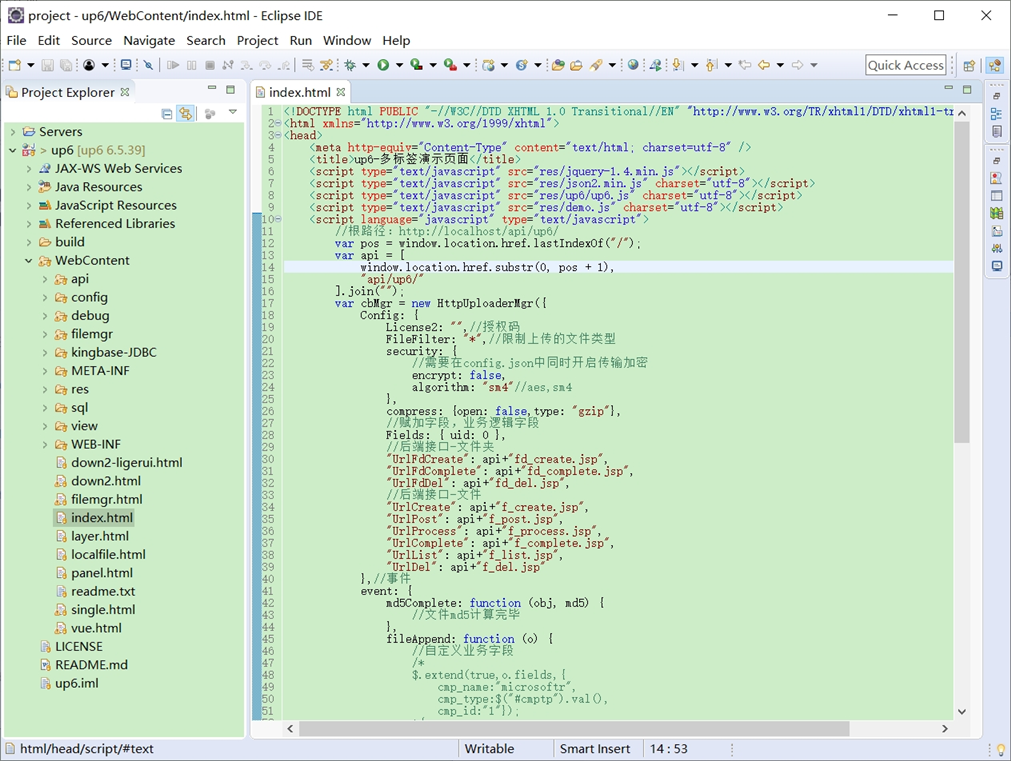
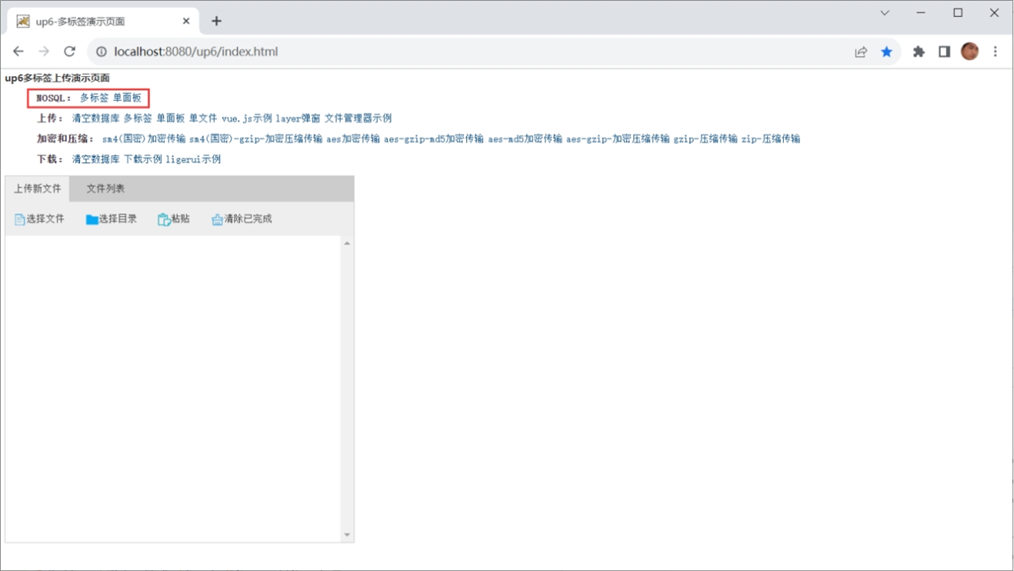
NOSQL
NOSQL示例不需要任何配置,可以直接访问测试
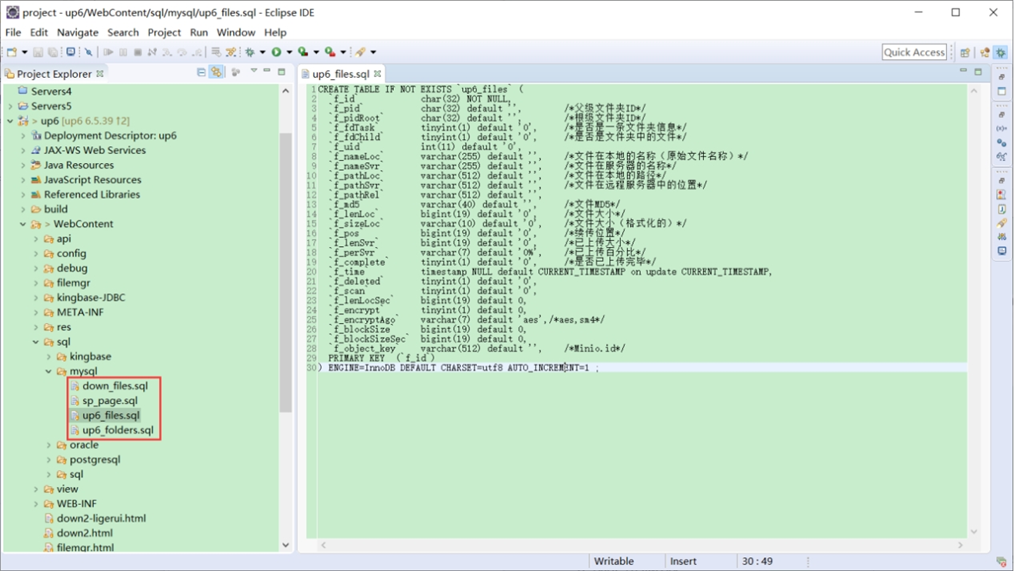
创建数据表
选择对应的数据表脚本,这里以SQL为例
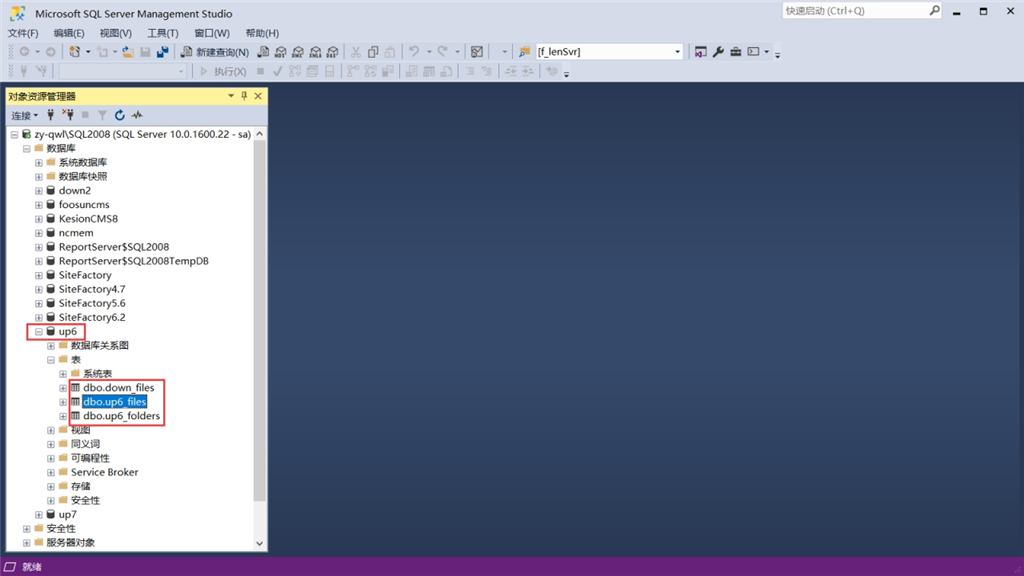
修改数据库连接信息
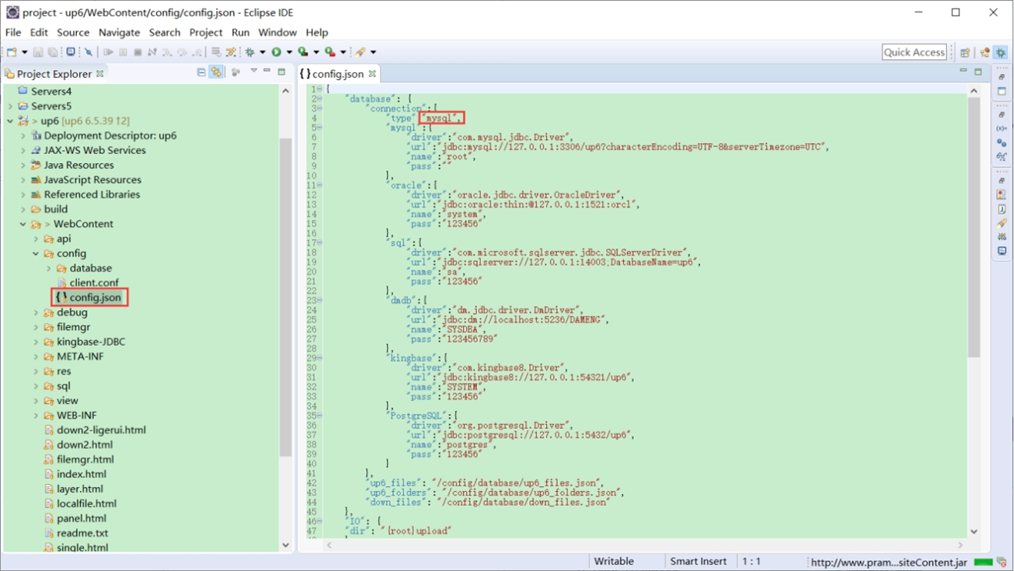
访问页面进行测试
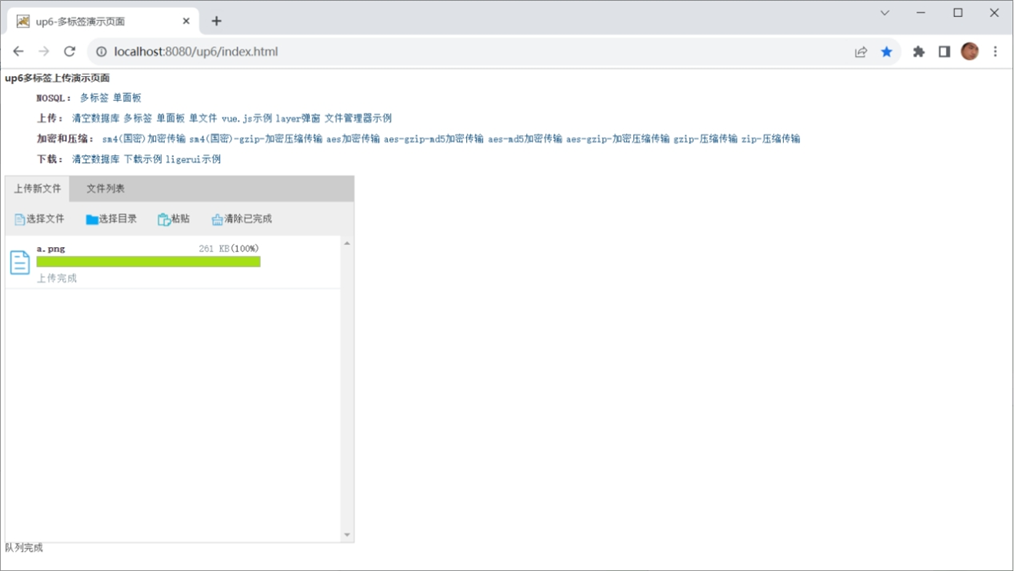
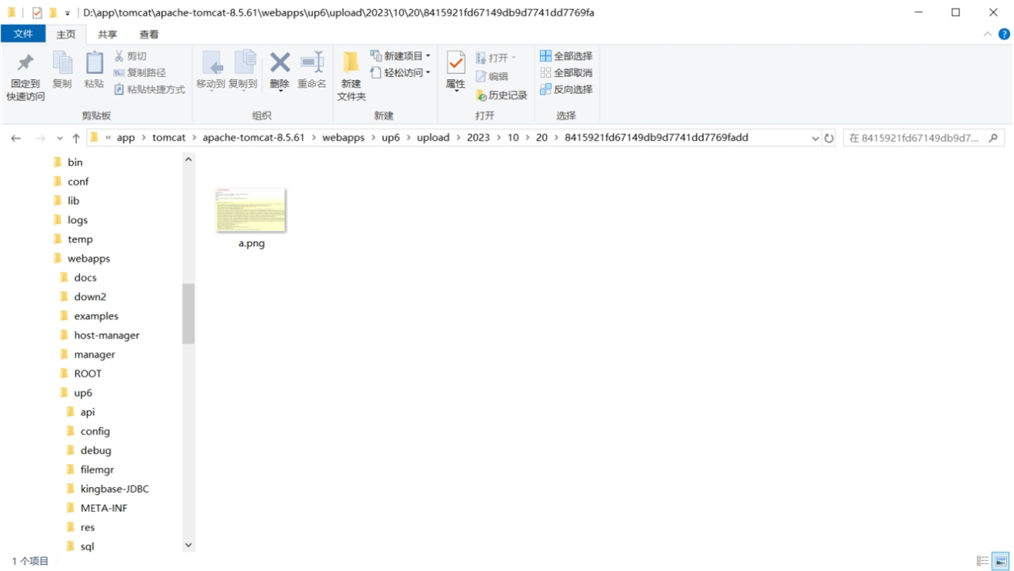
文件存储路径
up6/upload/年/月/日/guid/filename
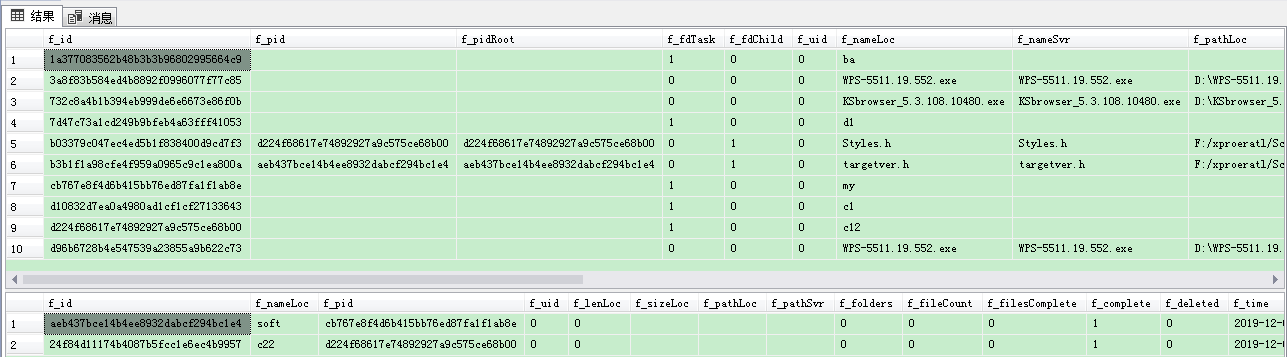
效果预览
文件上传
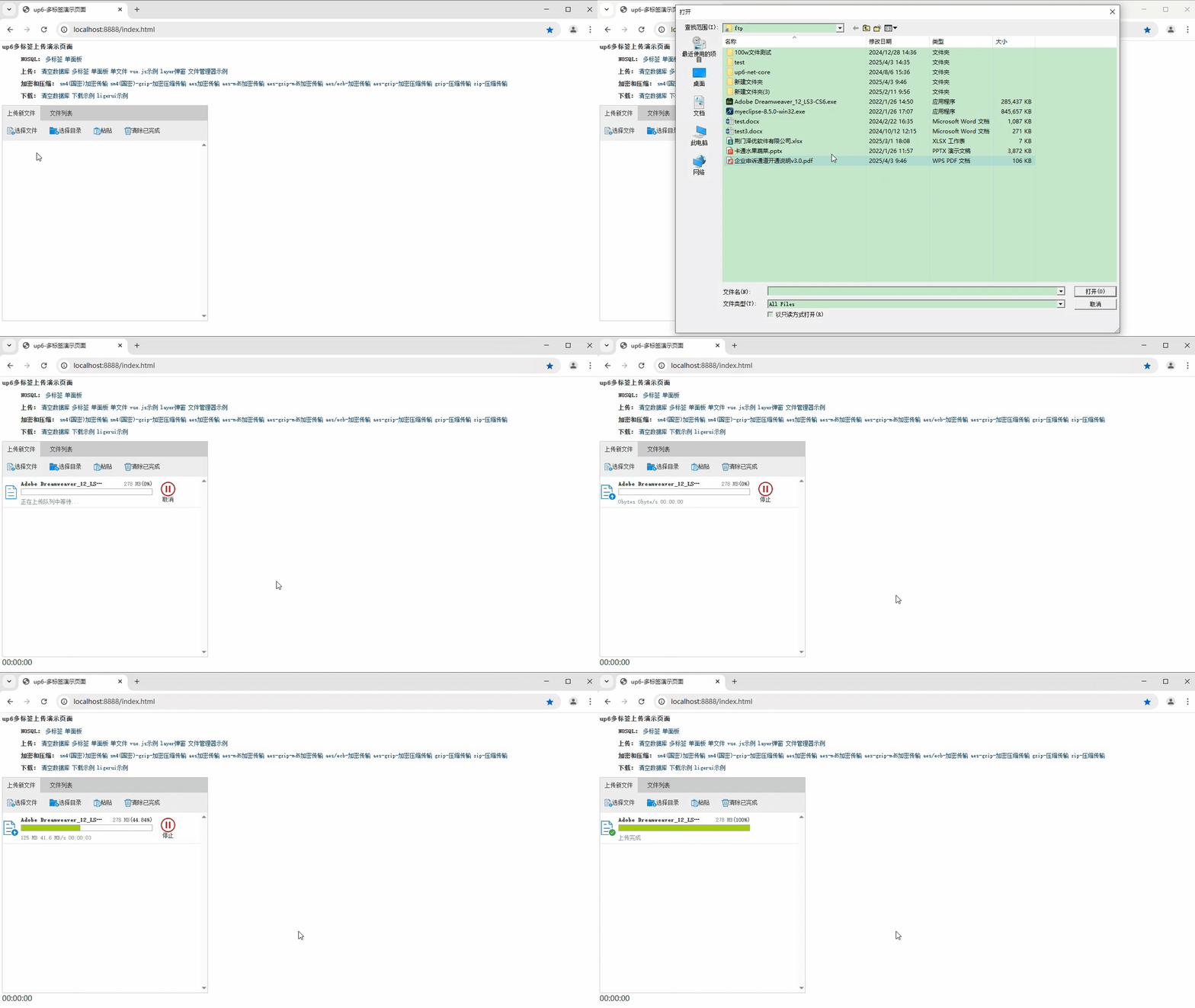
文件刷新续传
支持离线保存文件进度,在关闭浏览器,刷新浏览器后进行不丢失,仍然能够继续上传

文件夹上传
支持上传文件夹并保留层级结构,同样支持进度信息离线保存,刷新页面,关闭页面,重启系统不丢失上传进度。
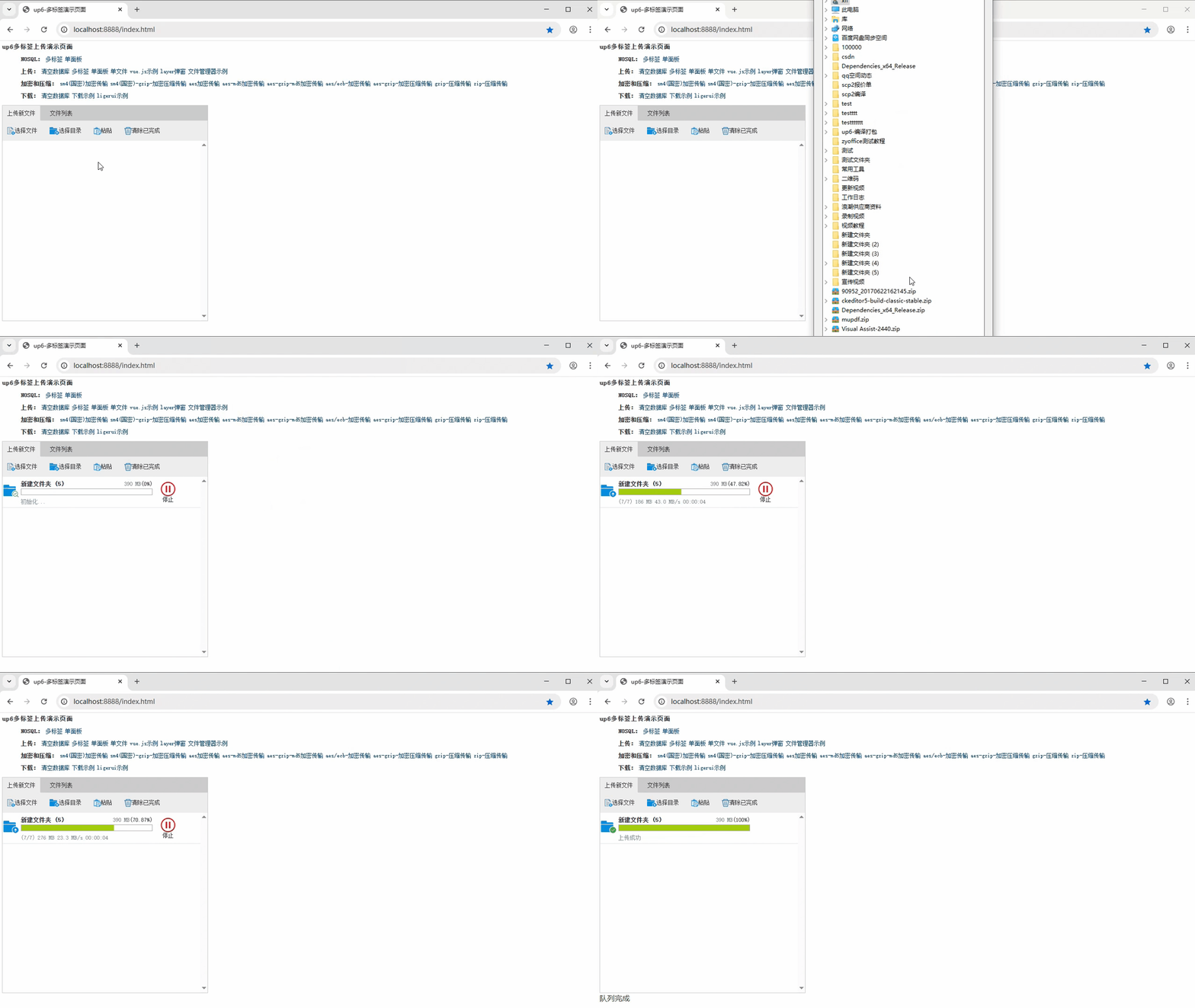
下载示例

汇聚全球AI编程工具,助力开发者即刻编程。
更多推荐



 29
29 0
0- 0


 已为社区贡献6条内容

所有评论(0)