
云原生-Nginx
·
1.Web 服务基础介绍
正常情况下的单次web服务访问流程:
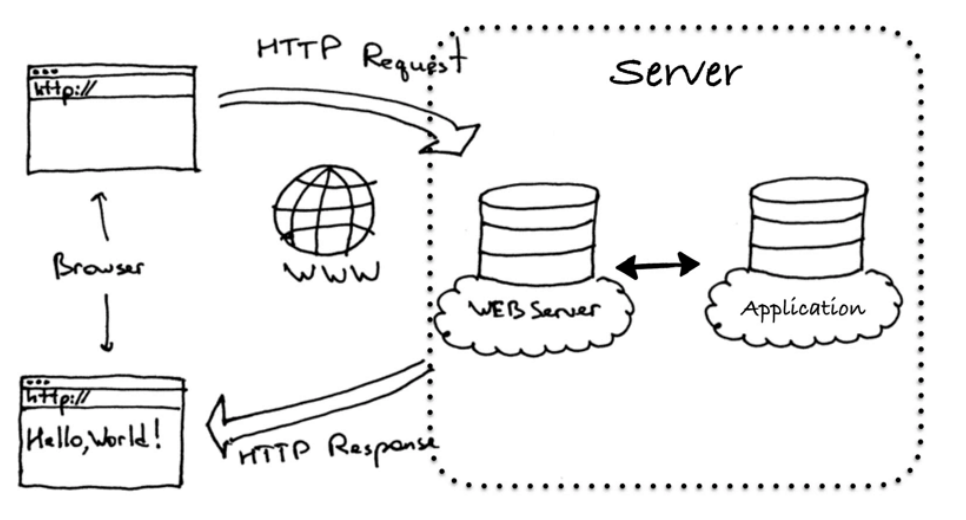
1.1Apache : 经典的 Web 服务端
Apache起初由美国的伊利诺伊大学香槟分校的国家超级计算机应用中心开发
目前经历了两大版本分别是1.X和2.X
其可以通过编译安装实现特定的功能
Apache prefork 模型
预派生模式,有一个主控制进程,然后生成多个子进程,使用select模型,最大并发1024
每个子进程有一个独立的线程响应用户请求
相对比较占用内存,但是比较稳定,可以设置最大和最小进程数
是最古老的一种模式,也是最稳定的模式,适用于访问量不是很大的场景
优点:稳定
缺点:每个用户请求需要对应开启一个进程,占用资源较多,并发性差,不适用于高并发场景
Apache worker 模型
一种多进程和多线程混合的模型
有一个控制进程,启动多个子进程
每个子进程里面包含固定的线程
使用线程程来处理请求
当线程不够使用的时候会再启动一个新的子进程,然后在进程里面再启动线程处理请求,
由于其使用了线程处理请求,因此可以承受更高的并发
优点:相比prefork 占用的内存较少,可以同时处理更多的请求
缺点:使用keepalive的长连接方式,某个线程会一直被占据,即使没有传输数据,也需要一直等待到超
时才会被释放。如果过多的线程,被这样占据,也会导致在高并发场景下的无服务线程可用(该问题在
prefork模式下,同样会发生)
Apache event模型
Apache中最新的模式,2012年发布的apache 2.4.X系列正式支持event 模型,属于事件驱动模型(epoll)
每个进程响应多个请求,在现在版本里的已经是稳定可用的模式
它和worker模式很像,最大的区别在于,它解决了keepalive场景下长期被占用的线程的资源浪费问题
(某些线程因为被keepalive,空挂在哪里等待,中间几乎没有请求过来,甚至等到超时)event MPM中,会有一个专门的线程来管理这些keepalive类型的线程
当有真实请求过来的时候,将请求传递给服务线程,执行完毕后,又允许它释放。这样增强了高并发场
景下的请求处理能力
优点:单线程响应多请求,占据更少的内存,高并发下表现更优秀,会有一个专门的线程来管理keep
alive类型的线程,当有真实请求过来的时候,将请求传递给服务线程,执行完毕后,又允许它释放
缺点:没有线程安全控制
1.2.Nginx-高性能的 Web 服务端
Nginx是由1994年毕业于俄罗斯国立莫斯科鲍曼科技大学的同学 伊戈尔·赛索耶夫 为俄罗斯著名搜索网站
rambler.ru开发的,开发工作最早从2002年开始,第一次公开发布时间是2004年10月4日,版本号是
0.1.0
2019年3月11日F5 与 NGINX达成协议,F5 将收购 NGINX 的所有已发行股票,总价值约为 6.7 亿美元。
6.7亿美金约合44.97亿人民币,nginx核心模块代码长度198430(包括空格、注释),所以一行代码约为
2.2万人民币
官网地址 www.nginx.org
Nginx历经十几年的迭代更新(https://nginx.org/en/CHANGES), 目前功能已经非常完善且运行稳
定,另外Nginx的版本分为开发版、稳定版和过期版,nginx以功能丰富著称,它即可以作为http服务
器,也可以作为反向代理服务器或者邮件服务器能够快速的响应静态网页的请求
支持FastCGI/SSL/Virtual Host/URL Rwrite /Gzip / HTTP Basic Auth/http或者TCP的负载均衡(1.9版本以
上且开启stream模块)等功能,并且支持第三方的功能扩展。
天猫 淘宝 京东 小米 163 新浪等一线互联网公司都在用Nginx或者进行二次开发
基于Nginx的工作场景:
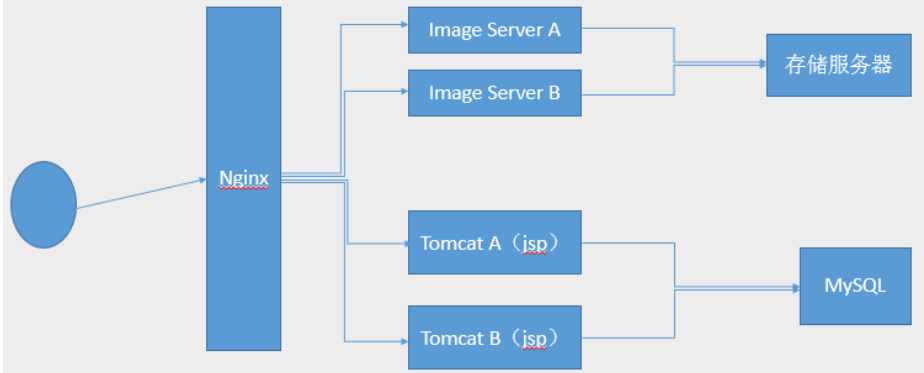
2.Nginx的源码编译
2.1.下载软件
[root@Nginx ~]# wget https://nginx.org/download/nginx-1.28.1.tar.gz2.2.解压
[root@Nginx ~]# tar zxf nginx-1.28.1.tar.gz
[root@Nginx ~]# cd nginx-1.28.1/
[root@Nginx nginx-1.28.1]# ls
auto     CHANGES.ru          conf       contrib          html     man        SECURITY.md
CHANGES  CODE_OF_CONDUCT.md  configure  CONTRIBUTING.md  LICENSE  README.md  src
2.3.检测环境
#安装依赖性
[root@Nginx ~]# dnf install gcc openssl-devel.x86_64 pcre2-devel.x86_64 zlib-devel -y

[root@Nginx nginx-1.28.1]# ./configure --prefix=/usr/local/nginx --user=nginx --group=nginx --with-http_ssl_module --with-http_v2_module --with-http_realip_module --with-http_stub_status_module --with-http_gzip_static_module --with-pcre --with-stream --with-stream_ssl_module --with-stream_realip_module
2.4.编译
[root@Nginx nginx-1.28.1]# make
[root@Nginx nginx-1.28.1]# make install
2.5.nginx启动
#设定环境变量
[root@Nginx sbin]# vim  ~/.bash_profile
export PATH=$PATH:/usr/local/nginx/sbin

[root@Nginx sbin]# source   ~/.bash_profile


[root@Nginx logs]# useradd  -s /sbin/nologin -M nginx
[root@Nginx logs]# nginx
[root@Nginx logs]# ps aux | grep nginx
root       44012  0.0  0.1  14688  2356 ?        Ss   17:01   0:00 nginx: master process nginx
nginx      44013  0.0  0.2  14888  3892 ?        S    17:01   0:00 nginx: worker process
root       44015  0.0  0.1   6636  2176 pts/0    S+   17:01   0:00 grep --color=auto nginx


#测试
[root@Nginx logs]# echo timinglee > /usr/local/nginx/html/index.html

[root@Nginx logs]# curl  172.25.254.100
timinglee
2.6.编写启动文件
[root@Nginx ~]# vim /lib/systemd/system/nginx.service
[Unit]
Description=The NGINX HTTP and reverse proxy server
After=syslog.target network-online.target remote-fs.target nss-lookup.target
Wants=network-online.target

[Service]
Type=forking
ExecStartPre=/usr/local/nginx/sbin/nginx -t
ExecStart=/usr/local/nginx/sbin/nginx
ExecReload=/usr/local/nginx/sbin/nginx -s reload
ExecStop=/bin/kill -s QUIT $MAINPID
PrivateTmp=true

[Install]
WantedBy=multi-user.target

[root@Nginx ~]# systemctl daemon-reload

#验证
[root@Nginx ~]# systemctl status nginx.service
○ nginx.service - The NGINX HTTP and reverse proxy server
     Loaded: loaded (/usr/lib/systemd/system/nginx.service; disabled; preset: disabled)
     Active: inactive (dead)

[root@Nginx ~]# systemctl enable --now nginx
[root@Nginx ~]# ps aux | grep nginx
root        1839  0.0  0.1  14688  2356 ?        Ss   09:53   0:00 nginx: master process /usr/local/nginx/sbin/nginx
nginx       1840  0.0  0.2  14888  3828 ?        S    09:53   0:00 nginx: worker process

[root@Nginx ~]# reboot
[root@Nginx ~]# systemctl status nginx.service
3.Nginx的平滑升级及回滚
3.1.下载高版本的软件
[root@Nginx ~]# wget https://nginx.org/download/nginx-1.29.4.tar.gz3.2.对于新版本的软件进行源码编译并进行平滑升级
#编译nginx隐藏版本
[root@Nginx ~]# tar zxf nginx-1.29.4.tar.gz
[root@Nginx ~]# cd nginx-1.29.4/src/core/
[root@Nginx core]# vim nginx.h
#define nginx_version      1029004
#define NGINX_VERSION      ""
#define NGINX_VER          "TIMINGLEE/" NGINX_VERSION
#文件编辑完成后进行源码编译即可

[root@Nginx core]# cd ../../
[root@Nginx nginx-1.29.4]# ./configure   --prefix=/usr/local/nginx --user=nginx --group=nginx --with-http_ssl_module --with-http_v2_module --with-http_realip_module --with-http_stub_status_module --with-http_gzip_static_module --with-pcre --with-stream --with-stream_ssl_module --with-stream_realip_module

[root@Nginx nginx-1.29.4]# make
[root@Nginx nginx-1.29.4]# cd objs/
[root@Nginx objs]# ls
autoconf.err  nginx    ngx_auto_config.h   ngx_modules.c  src
Makefile      nginx.8  ngx_auto_headers.h  ngx_modules.o


[root@Nginx objs]# cd /usr/local/nginx/sbin/
[root@Nginx sbin]# ls
nginx

[root@Nginx sbin]# \cp -f /root/nginx-1.29.4/objs/nginx  /usr/local/nginx/sbin/nginx

[root@Nginx sbin]# ls /usr/local/nginx/logs/
access.log  error.log  nginx.pid


[root@Nginx sbin]# ps aux | grep nginx
root        1643  0.0  0.1  14688  2360 ?        Ss   09:55   0:00 nginx: master process /usr/local/nginx/sbin/nginx
nginx       1644  0.0  0.2  14888  3896 ?        S    09:55   0:00 nginx: worker process

[root@Nginx sbin]# kill -USR2 1643   #nginx master进程id

[root@Nginx sbin]# ps aux | grep nginx
root        1643  0.0  0.1  14688  2744 ?        Ss   09:55   0:00 nginx: master process /usr/local/nginx/sbin/nginx
nginx       1644  0.0  0.2  14888  3896 ?        S    09:55   0:00 nginx: worker process
root        4919  0.0  0.4  14716  7936 ?        S    10:24   0:00 nginx: master process /usr/local/nginx/sbin/nginx
nginx       4921  0.0  0.2  14916  4156 ?        S    10:24   0:00 nginx: worker process
root        4923  0.0  0.1   6636  2176 pts/0    S+   10:25   0:00 grep --color=auto nginx

[root@Nginx sbin]# ls /usr/local/nginx/logs/
access.log  error.log  nginx.pid  nginx.pid.oldbin

#测试效果
[root@Nginx sbin]# nginx -V
nginx version: TIMINGLEE/
built by gcc 11.5.0 20240719 (Red Hat 11.5.0-5) (GCC)
built with OpenSSL 3.2.2 4 Jun 2024
TLS SNI support enabled
configure arguments: --prefix=/usr/local/nginx --user=nginx --group=nginx --with-http_ssl_module --with-http_v2_module --with-http_realip_module --with-http_stub_status_module --with-http_gzip_static_module --with-pcre --with-stream --with-stream_ssl_module --with-stream_realip_module


#回收旧版本子进程
[root@Nginx sbin]# ps aux | grep nginx
root        1643  0.0  0.1  14688  2744 ?        Ss   09:55   0:00 nginx: master process /usr/local/nginx/sbin/nginx
nginx       1644  0.0  0.2  14888  3896 ?        S    09:55   0:00 nginx: worker process
root        4919  0.0  0.4  14716  7936 ?        S    10:24   0:00 nginx: master process /usr/local/nginx/sbin/nginx
nginx       4921  0.0  0.2  14916  4156 ?        S    10:24   0:00 nginx: worker process
root        4929  0.0  0.1   6636  2176 pts/0    S+   10:27   0:00 grep --color=auto nginx
[root@Nginx sbin]# kill -WINCH 1643
[root@Nginx sbin]# ps aux | grep nginx
root        1643  0.0  0.1  14688  2744 ?        Ss   09:55   0:00 nginx: master process /usr/local/nginx/sbin/nginx
root        4919  0.0  0.4  14716  7936 ?        S    10:24   0:00 nginx: master process /usr/local/nginx/sbin/nginx
nginx       4921  0.0  0.2  14916  4156 ?        S    10:24   0:00 nginx: worker process
root        4932  0.0  0.1   6636  2176 pts/0    S+   10:28   0:00 grep --color=auto nginx
3.3.版本回退|版本回滚
[root@Nginx sbin]# cd /usr/local/nginx/sbin/
[root@Nginx sbin]# cp nginx nginx.new -p
[root@Nginx sbin]# \cp nginx.old  nginx -pf
[root@Nginx sbin]# ps aux | grep nginx
root        1643  0.0  0.1  14688  2744 ?        Ss   09:55   0:00 nginx: master process /usr/local/nginx/sbin/nginx
root        4919  0.0  0.4  14716  7936 ?        S    10:24   0:00 nginx: master process /usr/local/nginx/sbin/nginx
nginx       4921  0.0  0.2  14916  4156 ?        S    10:24   0:00 nginx: worker process

[root@Nginx sbin]# kill -HUP 1643
[root@Nginx sbin]# ps aux | grep nginx
root        1643  0.0  0.1  14688  2744 ?        Ss   09:55   0:00 nginx: master process /usr/local/nginx/sbin/nginx
root        4919  0.0  0.4  14716  7936 ?        S    10:24   0:00 nginx: master process /usr/local/nginx/sbin/nginx
nginx       4921  0.0  0.2  14916  4156 ?        S    10:24   0:00 nginx: worker process
nginx       4963  0.0  0.2  14888  3896 ?        S    10:32   0:00 nginx: worker process
root        4965  0.0  0.1   6636  2176 pts/0    S+   10:32   0:00 grep --color=auto nginx
[root@Nginx sbin]# nginx -V
nginx version: nginx/1.28.1
built by gcc 11.5.0 20240719 (Red Hat 11.5.0-5) (GCC)
built with OpenSSL 3.2.2 4 Jun 2024
TLS SNI support enabled
configure arguments: --prefix=/usr/local/nginx --user=nginx --group=nginx --with-http_ssl_module --with-http_v2_module --with-http_realip_module --with-http_stub_status_module --with-http_gzip_static_module --with-pcre --with-stream --with-stream_ssl_module --with-stream_realip_module

#回收新版本进程
[root@Nginx sbin]# kill -WINCH 4919
[root@Nginx sbin]# ps aux | grep nginx
root        1643  0.0  0.1  14688  2744 ?        Ss   09:55   0:00 nginx: master process /usr/local/nginx/sbin/nginx
root        4919  0.0  0.4  14716  7936 ?        S    10:24   0:00 nginx: master process /usr/local/nginx/sbin/nginx
nginx       4963  0.0  0.2  14888  3896 ?        S    10:32   0:00 nginx: worker process
root        4969  0.0  0.1   6636  2176 pts/0    S+   10:34   0:00 grep --color=auto nginx
4.Nginx配置文件的管理及优化参数
[root@Nginx ~]# vim /usr/local/nginx/conf/nginx.conf
user  nginx;

[root@Nginx ~]# nginx  -t
nginx: the configuration file /usr/local/nginx/conf/nginx.conf syntax is ok
nginx: configuration file /usr/local/nginx/conf/nginx.conf test is successful

[root@Nginx ~]# nginx -s reload

[root@Nginx ~]# ps aux | grep nginx
root        5506  0.0  0.2  14564  3912 ?        Ss   14:40   0:00 nginx: master process /usr/local/nginx/sbin/nginx
nginx       5511  0.0  0.2  14996  4032 ?        S    14:41   0:00 nginx: worker process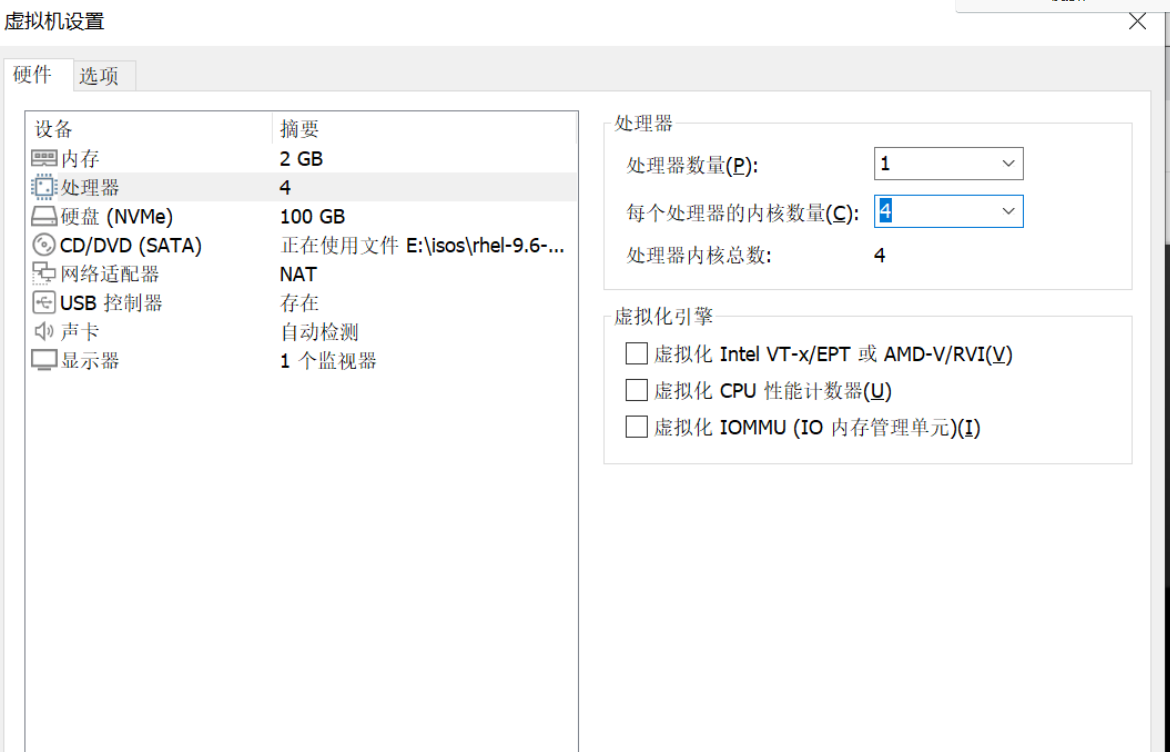
[root@Nginx ~]# vim /usr/local/nginx/conf/nginx.conf
worker_processes  2;
[root@Nginx ~]# nginx -s reload
[root@Nginx ~]# ps aux | grep nginx
root        5506  0.0  0.2  14796  4040 ?        Ss   14:40   0:00 nginx: master process /usr/local/nginx/sbin/nginx
nginx       5516  0.0  0.2  15012  4048 ?        S    14:42   0:00 nginx: worker process
nginx       5517  0.0  0.2  15012  4048 ?        S    14:42   0:00 nginx: worker process


#在vmware中更改硬件cpu核心个数,然后重启

[root@Nginx ~]# vim /usr/local/nginx/conf/nginx.conf
worker_processes  auto;
worker_cpu_affinity 0001 0010 0100 1000;

[root@Nginx ~]# ps aux | grep nginx
root         887  0.0  0.1  14564  2212 ?        Ss   14:51   0:00 nginx: master process /usr/local/nginx/sbin/nginx
nginx        889  0.0  0.2  14964  3748 ?        S    14:51   0:00 nginx: worker process
nginx        890  0.0  0.2  14964  3748 ?        S    14:51   0:00 nginx: worker process
nginx        891  0.0  0.2  14964  3748 ?        S    14:51   0:00 nginx: worker process
nginx        892  0.0  0.2  14964  3748 ?        S    14:51   0:00 nginx: worker process


[root@Nginx ~]# ps axo pid,cmd,psr | grep nginx
    887 nginx: master process /usr/   3
   1635 nginx: worker process         0
   1636 nginx: worker process         1
   1637 nginx: worker process         2
   1638 nginx: worker process         3
[root@Nginx ~]# vim /usr/local/nginx/conf/nginx.conf
events {
    worker_connections  10000;
    use epoll;
    accept_mutex on;
    multi_accept on;
}

[root@Nginx ~]# nginx -s reload

#测试并发
[root@Nginx ~]# dnf install httpd-tools -y
[root@Nginx ~]# ab  -n 100000 -c5000 http://172.25.254.100/index.html
This is ApacheBench, Version 2.3 <$Revision: 1913912 $>
Copyright 1996 Adam Twiss, Zeus Technology Ltd, http://www.zeustech.net/
Licensed to The Apache Software Foundation, http://www.apache.org/

Benchmarking 172.25.254.100 (be patient)
socket: Too many open files (24)				#并发数量过多导致访问失败


#处理本地文件系统的并发文件数量
[root@Nginx ~]# vim /etc/security/limits.conf
*               -       nofile          100000
*               -       noproc          100000
root			-		nofile			100000
[root@Nginx ~]# sudo -u nginx ulimit -n
100000
[root@Nginx ~]# ulimit  -n 10000
100000

#测试
[root@Nginx ~]# ab  -n 100000 -c10000 http://172.25.254.100/index.html
This is ApacheBench, Version 2.3 <$Revision: 1913912 $>
Copyright 1996 Adam Twiss, Zeus Technology Ltd, http://www.zeustech.net/
Licensed to The Apache Software Foundation, http://www.apache.org/

Benchmarking 172.25.254.100 (be patient)
Completed 10000 requests
Completed 20000 requests
Completed 30000 requests
Completed 40000 requests
Completed 50000 requests
5.Nginx下构建PC站点
5.1.location中的root
[root@Nginx conf]# cd /usr/local/nginx/conf/
[root@Nginx conf]# mkdir  conf.d
[root@Nginx conf]# vim nginx.conf
82     include "/usr/local/nginx/conf/conf.d/*.conf";

[root@Nginx conf]# nginx -s reload
[root@Nginx conf]# cd conf.d/

[root@Nginx ~]# mkdir  -p /webdata/nginx/timinglee.org/lee/html
[root@Nginx ~]# echo lee.timinglee.org > /webdata/nginx/timinglee.org/lee/html/index.html

[root@Nginx conf.d]# vim vhosts.conf
server {
    listen 80;
    server_name lee.timinglee.org;
    location / {
        root /webdata/nginx/timinglee.org/lee/html;
    }
}

root@Nginx conf.d]# systemctl restart nginx.service

#测试
[root@Nginx conf.d]# vim /etc/hosts
172.25.254.100     Nginx www.timinglee.org lee.timinglee.org

[root@Nginx conf.d]# curl  www.timinglee.org
timinglee
[root@Nginx conf.d]# curl  lee.timinglee.org
lee.timinglee.org


#local示例需要访问lee.timinglee.org/lee/目录
[root@Nginx conf.d]# vim vhosts.conf
server {
    listen 80;
    server_name lee.timinglee.org;
    location / {
        root /webdata/nginx/timinglee.org/lee/html;
    }
    location /lee {			#lee标识location中的root值+location 后面指定的值代表目录的路径
        root /webdata/nginx/timinglee.org/lee/html;
    }

}

[root@Nginx conf.d]# systemctl restart nginx.service
[root@Nginx conf.d]# mkdir  -p /webdata/nginx/timinglee.org/lee/html/lee
[root@Nginx conf.d]# echo lee > /webdata/nginx/timinglee.org/lee/html/lee/index.html
[root@Nginx conf.d]# curl  lee.timinglee.org/lee/
lee
5.2.location中的alias
[root@Nginx conf.d]# vim vhosts.conf
server {
    listen 80;
    server_name lee.timinglee.org;

    location /passwd {				#标识文件
        alias /etc/passwd;
    }


    location /passwd/ {				#表示目录
        alias /mnt/;
    }

}

[root@Nginx conf.d]# nginx -s reload
[root@Nginx conf.d]# echo passwd > /mnt/index.html

#测试
[root@Nginx conf.d]# curl  lee.timinglee.org/passwd/
passwd
[root@Nginx conf.d]# curl  lee.timinglee.org/passwd
root:x:0:0:root:/root:/bin/bash
bin:x:1:1:bin:/bin:/sbin/nologin
daemon:x:2:2:daemon:/sbin:/sbin/nologin
6.KeepAlived长链接优化
6.1.设定长链接时间
[root@Nginx ~]# vim /usr/local/nginx/conf/nginx.conf
keepalive_timeout   5;
[root@Nginx ~]# nginx -s reload

#测试
[root@Nginx ~]# dnf install telnet -y
[root@Nginx ~]# telnet www.timinglee.org 80
Trying 172.25.254.100...
Connected to www.timinglee.org.
Escape character is '^]'.
GET / HTTP/1.1     <<<<
Host: www.timinglee.org    <<<<
							<<<
HTTP/1.1 200 OK
Server: nginx/1.28.1
Date: Sat, 31 Jan 2026 08:27:02 GMT
Content-Type: text/html
Content-Length: 10
Last-Modified: Thu, 29 Jan 2026 09:02:15 GMT
Connection: keep-alive
ETag: "697b2217-a"
Accept-Ranges: bytes

timinglee    显示的页面出现后根据设定的长链接时间会等待,超过时间后会自动退出
Connection closed by foreign host.
6.2.设定长链接次数
[root@Nginx ~]# vim /usr/local/nginx/conf/nginx.conf
keepalive_requests 3;
[root@Nginx ~]# nginx -s reload

#测试
[root@Nginx ~]# telnet  www.timinglee.org 80
Trying 172.25.254.100...
Connected to www.timinglee.org.
Escape character is '^]'.
GET / HTTP/1.1
Host: www.timinglee.org

HTTP/1.1 200 OK					#第一次
Server: nginx/1.28.1
Date: Sat, 31 Jan 2026 08:32:14 GMT
Content-Type: text/html
Content-Length: 10
Last-Modified: Thu, 29 Jan 2026 09:02:15 GMT
Connection: keep-alive
Keep-Alive: timeout=100
ETag: "697b2217-a"
Accept-Ranges: bytes

timinglee
GET / HTTP/1.1
Host: www.timinglee.org

HTTP/1.1 200 OK				#第二次
Server: nginx/1.28.1
Date: Sat, 31 Jan 2026 08:32:24 GMT
Content-Type: text/html
Content-Length: 10
Last-Modified: Thu, 29 Jan 2026 09:02:15 GMT
Connection: keep-alive
Keep-Alive: timeout=100
ETag: "697b2217-a"
Accept-Ranges: bytes

timinglee
GET / HTTP/1.1
Host: www.timinglee.org

HTTP/1.1 200 OK			#第三次
Server: nginx/1.28.1
Date: Sat, 31 Jan 2026 08:32:35 GMT
Content-Type: text/html
Content-Length: 10
Last-Modified: Thu, 29 Jan 2026 09:02:15 GMT
Connection: close
ETag: "697b2217-a"
Accept-Ranges: bytes

timinglee
Connection closed by foreign host.
7.Location 字符匹配详解
7.1.Location后什么都不带直接指定目录
[root@Nginx conf.d]# vim vhosts.conf
server {
    listen 80;
    server_name lee.timinglee.org;
    location /null {
        return 200 "/null-1";
    }
}

[root@Nginx conf.d]# curl lee.timinglee.org/null/
/null-1

[root@Nginx conf.d]# curl lee.timinglee.org/NULL/
<html>
<head><title>404 Not Found</title></head>
<body>
<center><h1>404 Not Found</h1></center>
<hr><center>nginx/1.28.1</center>
</body>
</html>
[root@Nginx conf.d]# curl lee.timinglee.org/test/null
<html>
<head><title>404 Not Found</title></head>
<body>
<center><h1>404 Not Found</h1></center>
<hr><center>nginx/1.28.1</center>
</body>
</html>
7.2.location 后用 =
[root@Nginx conf.d]# vim vhosts.conf
server {
    listen 80;
    server_name lee.timinglee.org;
    location /null {
        return 200 "null-1";
    }

    location = /null {				#精确匹配到此结束
        return 200 "null-2";
    }

    location ~ /null {
        return 200 "null-3";
    }

}

[root@Nginx conf.d]# nginx -s reload
[root@Nginx conf.d]# curl lee.timinglee.org/null
null-2
7.3.location 后用"^~”
[root@Nginx conf.d]# vim vhosts.conf
server {
    listen 80;
    server_name lee.timinglee.org;
    location /null {
        return 200 "null-1";
    }

    location = /null {
        return 200 "null-2";
    }

    location ~ /null {
        return 200 "null-3";
    }

    location ^~ /lee {
        return 200 "lee";
    }

}
[root@Nginx conf.d]# nginx -s reload
lee
[root@Nginx conf.d]# curl  lee.timinglee.org/lee
lee
[root@Nginx conf.d]# curl  lee.timinglee.org/test/lee
<html>
<head><title>404 Not Found</title></head>
<body>
<center><h1>404 Not Found</h1></center>
<hr><center>nginx/1.28.1</center>
</body>
</html>
[root@Nginx conf.d]# curl  lee.timinglee.org/lee/test
lee
[root@Nginx conf.d]# curl  lee.timinglee.org/aleea/test
<html>
<head><title>404 Not Found</title></head>
<body>
<center><h1>404 Not Found</h1></center>
<hr><center>nginx/1.28.1</center>
</body>
</html>
[root@Nginx conf.d]# curl  lee.timinglee.org/leeab/test
lee
7.4.location 后用"~”
[root@Nginx conf.d]# vim vhosts.conf
server {
    listen 80;
    server_name lee.timinglee.org;
    location /null {
        return 200 "null-1";
    }

    location = /null {
        return 200 "null-2";
    }

    location ~ /null {
        return 200 "null-3";
    }

    location ^~ /lee {
        return 200 "lee";
    }

    location ~ /timing/ {
        return 200 "timing";
    }
}

[root@Nginx conf.d]# nginx -s reload

[root@Nginx conf.d]# curl  lee.timinglee.org/timinga/
timing
[root@Nginx conf.d]# curl  lee.timinglee.org/timing/
timing
[root@Nginx conf.d]# curl  lee.timinglee.org/a/timing/
timing
[root@Nginx conf.d]# curl  lee.timinglee.org/a/timinga/
timing
[root@Nginx conf.d]# curl  lee.timinglee.org/a/atiming/
<html>
<head><title>404 Not Found</title></head>
<body>
<center><h1>404 Not Found</h1></center>
<hr><center>nginx/1.28.1</center>
</body>
</html>
[root@Nginx conf.d]# curl  lee.timinglee.org/aTiminga/a/
<html>
<head><title>404 Not Found</title></head>
<body>
<center><h1>404 Not Found</h1></center>
<hr><center>nginx/1.28.1</center>
</body>
</html>
[root@Nginx conf.d]# curl  lee.timinglee.org/Timinga/a/
<html>
<head><title>404 Not Found</title></head>
<body>
<center><h1>404 Not Found</h1></center>
<hr><center>nginx/1.28.1</center>
</body>
</html>
7.5.location 后用"~*”
[root@Nginx conf.d]# vim vhosts.conf
server {
    listen 80;
    server_name lee.timinglee.org;
    location /null {
        return 200 "null-1";
    }

    location = /null {
        return 200 "null-2";
    }

    location ~ /null {
        return 200 "null-3";
    }

    location ^~ /lee {
        return 200 "lee";
    }

    location ~ /timing/ {
        return 200 "timing";
    }

    location ~* /timinglee {
        return 200 "timinglee";
    }

}

[root@Nginx conf.d]# nginx -s reload

[root@Nginx conf.d]# curl  lee.timinglee.org/Timinglee/
timinglee
[root@Nginx conf.d]# curl  lee.timinglee.org/timinglee/
timinglee
[root@Nginx conf.d]# curl  lee.timinglee.org/timinglee/a
timinglee
[root@Nginx conf.d]# curl  lee.timinglee.org/a/timinglee/a
timinglee
[root@Nginx conf.d]# curl  lee.timinglee.org/a/atiminglee/a
<html>
<head><title>404 Not Found</title></head>
<body>
<center><h1>404 Not Found</h1></center>
<hr><center>nginx/1.28.1</center>
</body>
</html>
[root@Nginx conf.d]# curl  lee.timinglee.org/a/timingleea/a
timinglee
[root@Nginx conf.d]# curl  lee.timinglee.org/a/Timinglee/a
timinglee
7.6.location 后用"\”
[root@Nginx conf.d]# vim vhosts.conf
server {
    listen 80;
    server_name lee.timinglee.org;
    location /null {
        return 200 "null-1";
    }

    location = /null {
        return 200 "null-2";
    }

    location ~ /null {
        return 200 "null-3";
    }

    location ^~ /lee {
        return 200 "lee";
    }

    location ~ /timing/ {
        return 200 "timing";
    }

    location ~* /timinglee {
        return 200 "timinglee";
    }

    location ~* \.(img|php|jsp)$ {
        return 200 "app";
    }

}

[root@Nginx conf.d]# nginx -s reload
[root@Nginx conf.d]# curl  lee.timinglee.org/test.php
app
[root@Nginx conf.d]# curl  lee.timinglee.org/test.jsp
app
8.服务访问的用户认证
[root@Nginx ~]# htpasswd  -cmb /usr/local/nginx/conf/.htpasswd admin  lee
Adding password for user admin

[root@Nginx ~]# vim /usr/local/nginx/conf/conf.d/vhosts.conf
server {
    listen 80;
    server_name lee.timinglee.org;
    location /admin {
        root /usr/local/nginx/html;
        auth_basic "login passwd";
        auth_basic_user_file "/usr/local/nginx/conf/.htpasswd";
    }
}

[root@Nginx ~]# systemctl restart nginx.service

#测试:
root@Nginx ~]# curl  lee.timinglee.org/admin/
<html>
<head><title>401 Authorization Required</title></head>
<body>
<center><h1>401 Authorization Required</h1></center>
<hr><center>nginx/1.28.1</center>
</body>
</html>


[root@Nginx ~]# curl  -uadmin:lee http://lee.timinglee.org/admin/
admin
9.自定义错误页面
[root@Nginx ~]# mkdir  /usr/local/nginx/errorpage
[root@Nginx ~]# echo "太不巧了,你要访问的页面辞职了!!" > /usr/local/nginx/errorpage/errormessage
[root@Nginx ~]# cat /usr/local/nginx/errorpage/errormessage
太不巧了,你要访问的页面辞职了!!


[root@Nginx ~]# vim /usr/local/nginx/conf/conf.d/vhosts.conf
server {
    listen 80;
    server_name lee.timinglee.org;
    error_page 404 405 503 502 /error;
    location /lee {
        root /usr/local/nginx/html;
    }

    location /error {
        alias /usr/local/nginx/errorpage/errormessage;
    }
}


[root@Nginx ~]# curl  lee.timinglee.org/lee/
太不巧了,你要访问的页面辞职了!!
10.自定义错误日志
[root@Nginx ~]# mkdir  -p /usr/local/nginx/logs/timinglee.org/
	[root@Nginx ~]# vim /usr/local/nginx/conf/conf.d/vhosts.conf
	server {
    listen 80;
    server_name lee.timinglee.org;
    error_page 404 405 503 502 /error;
    error_log logs/timinglee.org/lee.error error;
    location /lee {
        root /usr/local/nginx/html;
    }

    location /error {
        alias /usr/local/nginx/errorpage/errormessage;
    }
}

[root@Nginx ~]# systemctl restart nginx.service

#测试
[root@Nginx ~]# cd  /usr/local/nginx/logs/timinglee.org/
[root@Nginx timinglee.org]# ls
lee.error
[root@Nginx timinglee.org]# cat lee.error
[root@Nginx timinglee.org]# curl  lee.timinglee.org/lee/
太不巧了,你要访问的页面辞职了!!
[root@Nginx timinglee.org]# cat lee.error
2026/02/01 11:10:57 [error] 2467#0: *1 "/usr/local/nginx/html/lee/index.html" is not found (2: No such file or directory), client: 172.25.254.100, server: lee.timinglee.org, request: "GET /lee/ HTTP/1.1", host: "lee.timinglee.org"
11.Nginx中建立下载服务器
[root@Nginx ~]# mkdir  -p /usr/local/nginx/download
[root@Nginx ~]# cp /etc/passwd  /usr/local/nginx/download/
[root@Nginx ~]# dd if=/dev/zero of=/usr/local/nginx/download/bigfile bs=1M count=100
记录了100+0 的读入
记录了100+0 的写出
104857600字节(105 MB,100 MiB)已复制,0.152409 s,688 MB/s

[root@Nginx ~]# vim /usr/local/nginx/conf/conf.d/vhosts.conf
server {
    listen 80;
    server_name lee.timinglee.org;
    error_page 404 405 503 502 /error;
    error_log logs/timinglee.org/lee.error error;
    location /lee {
        root /usr/local/nginx/html;
    }

    location /error {
        alias /usr/local/nginx/errorpage/errormessage;
    }


    location /download {
        root /usr/local/nginx;
    }
}
[root@Nginx ~]# nginx -s reload
访问
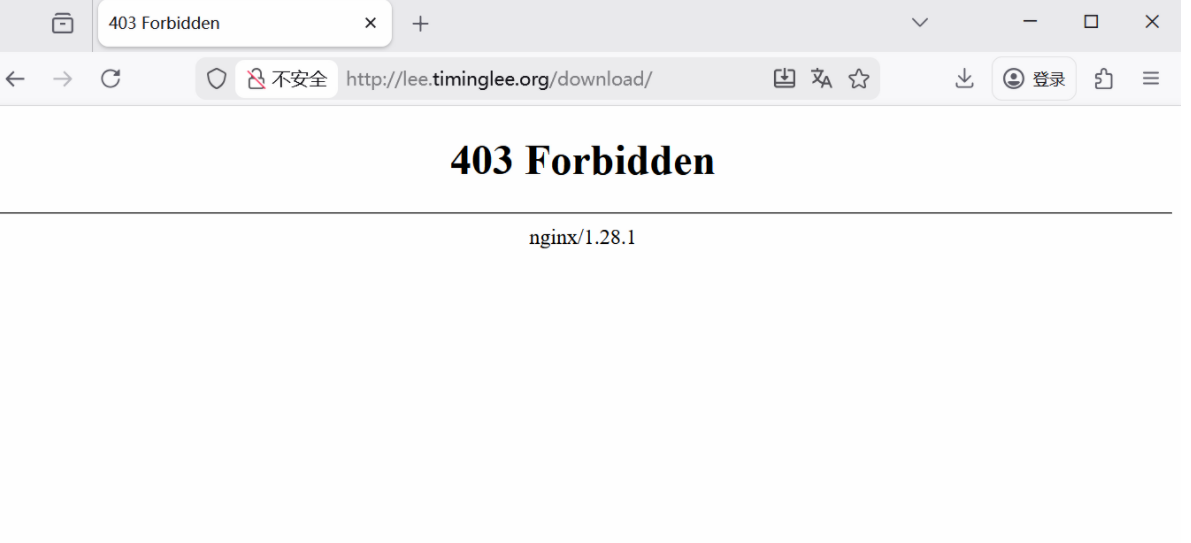
11.1.启用列表功能
[root@Nginx ~]# vim /usr/local/nginx/conf/conf.d/vhosts.conf
server {
    listen 80;
    server_name lee.timinglee.org;
    error_page 404 405 503 502 /error;
    error_log logs/timinglee.org/lee.error error;
    location /lee {
        root /usr/local/nginx/html;
    }

    location /error {
        alias /usr/local/nginx/errorpage/errormessage;
    }


    location /download {
        root /usr/local/nginx;
        autoindex on;
    }
}
[root@Nginx ~]# nginx -s reload
访问效果
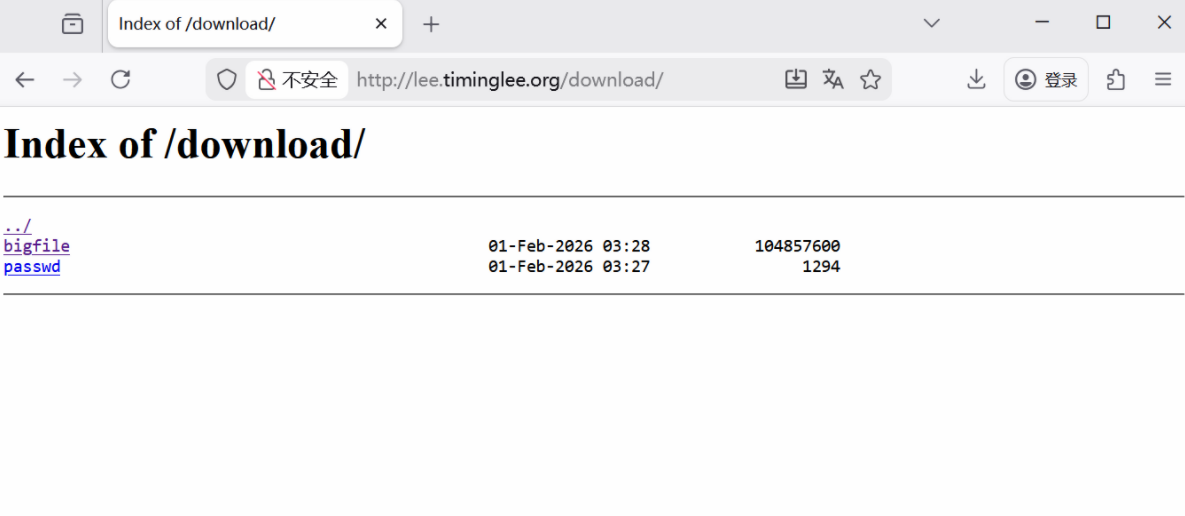
11.2.下载控速
[root@Nginx ~]# wget http://lee.timinglee.org/download/bigfile
--2026-02-01 11:37:52--  http://lee.timinglee.org/download/bigfile
正在解析主机 lee.timinglee.org (lee.timinglee.org)... 172.25.254.100
正在连接 lee.timinglee.org (lee.timinglee.org)|172.25.254.100|:80... 已连接。
已发出 HTTP 请求,正在等待回应... 200 OK
长度:104857600 (100M) [application/octet-stream]
正在保存至: “bigfile”

bigfile                  100%[=================================>] 100.00M   232MB/s  用时 0.4s

2026-02-01 11:37:52 (232 MB/s) - 已保存 “bigfile” [104857600/104857600])

[root@Nginx ~]# rm -fr bigfile

[root@Nginx ~]# vim /usr/local/nginx/conf/conf.d/vhosts.conf
server {
    listen 80;
    server_name lee.timinglee.org;
    error_page 404 405 503 502 /error;
    error_log logs/timinglee.org/lee.error error;
    location /lee {
        root /usr/local/nginx/html;
    }

    location /error {
        alias /usr/local/nginx/errorpage/errormessage;
    }


    location /download {
        root /usr/local/nginx;
        autoindex on;
        limit_rate 1024k;
    }
}
[root@Nginx ~]# nginx -s reload

[root@Nginx ~]# wget http://lee.timinglee.org/download/bigfile
--2026-02-01 11:39:09--  http://lee.timinglee.org/download/bigfile
正在解析主机 lee.timinglee.org (lee.timinglee.org)... 172.25.254.100
正在连接 lee.timinglee.org (lee.timinglee.org)|172.25.254.100|:80... 已连接。
已发出 HTTP 请求,正在等待回应... 200 OK
长度:104857600 (100M) [application/octet-stream]
正在保存至: “bigfile”

bigfile                   12%[===>                              ]  12.00M  1.00MB/s  剩余 88s
11.3.显示文件大小优化
[root@Nginx ~]# vim /usr/local/nginx/conf/conf.d/vhosts.conf
server {
    listen 80;
    server_name lee.timinglee.org;
    error_page 404 405 503 502 /error;
    error_log logs/timinglee.org/lee.error error;
    location /lee {
        root /usr/local/nginx/html;
    }

    location /error {
        alias /usr/local/nginx/errorpage/errormessage;
    }


    location /download {
        root /usr/local/nginx;
        autoindex on;
        limit_rate 1024k;
        autoindex_exact_size off;
    }
}
[root@Nginx ~]# nginx -s reload
效果
[root@Nginx ~]# curl  lee.timinglee.org/download
<html>
<head><title>301 Moved Permanently</title></head>
<body>
<center><h1>301 Moved Permanently</h1></center>
<hr><center>nginx/1.28.1</center>
</body>
</html>
[root@Nginx ~]# curl  lee.timinglee.org/download/
<html>
<head><title>Index of /download/</title></head>
<body>
<h1>Index of /download/</h1><hr><pre><a href="../">../</a>
<a href="bigfile">bigfile</a>                                            01-Feb-2026 03:28    100M
<a href="passwd">passwd</a>                                             01-Feb-2026 03:27    1294
</pre><hr></body>
</html>
11.4.时间显示调整
[root@Nginx ~]# vim /usr/local/nginx/conf/conf.d/vhosts.conf
server {
    listen 80;
    server_name lee.timinglee.org;
    error_page 404 405 503 502 /error;
    error_log logs/timinglee.org/lee.error error;
    location /lee {
        root /usr/local/nginx/html;
    }

    location /error {
        alias /usr/local/nginx/errorpage/errormessage;
    }


    location /download {
        root /usr/local/nginx;
        autoindex on;
        limit_rate 1024k;
        autoindex_exact_size off;
        autoindex_localtime on;
    }
}
[root@Nginx ~]# nginx -s reload
效果
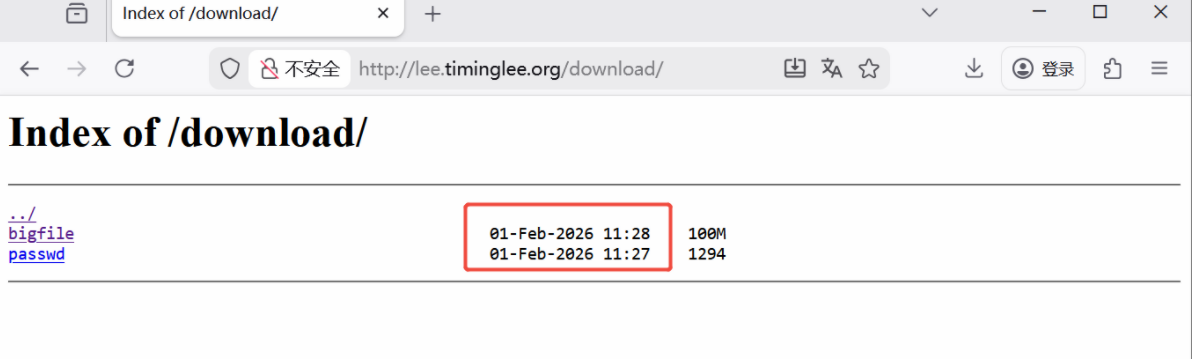
11.5.设定页面风格
[root@Nginx ~]# vim /usr/local/nginx/conf/conf.d/vhosts.conf
server {
    listen 80;
    server_name lee.timinglee.org;
    error_page 404 405 503 502 /error;
    error_log logs/timinglee.org/lee.error error;
    location /lee {
        root /usr/local/nginx/html;
    }

    location /error {
        alias /usr/local/nginx/errorpage/errormessage;
    }


    location /download {
        root /usr/local/nginx;
        autoindex on;
        limit_rate 1024k;
        autoindex_exact_size off;
        autoindex_localtime on;
        autoindex_format html | xml | json | jsonp;
    }
}
[root@Nginx ~]# nginx -s reload
xml风格
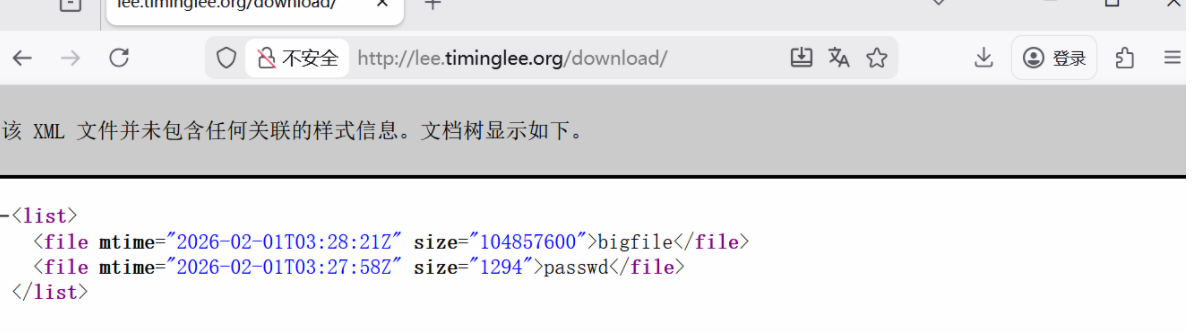
json风格
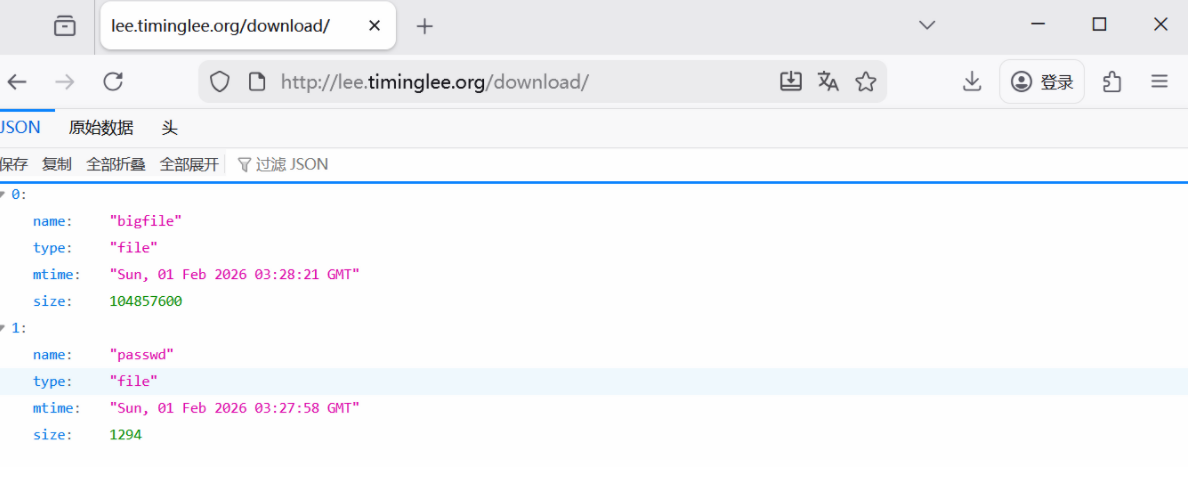
12.Nginx的文件检测
[root@Nginx ~]# echo default > /usr/local/nginx/errorpage/default.html
[root@Nginx ~]# cat /usr/local/nginx/errorpage/default.html
default


[root@Nginx ~]# vim /usr/local/nginx/conf/conf.d/vhosts.conf
server {
    listen 80;
    server_name lee.timinglee.org;
    error_page 404 405 503 502 /error;
    error_log logs/timinglee.org/lee.error error;
    root /usr/local/nginx/errorpage;
    try_files $uri $uri.html $uri/index.html /default.html;
}

[root@Nginx ~]# nginx -s reload

#测试:
[root@Nginx ~]# curl -v  lee.timinglee.org/aaaaaaaaaa/
*   Trying 172.25.254.100:80...
* Connected to lee.timinglee.org (172.25.254.100) port 80 (#0)
> GET /aaaaaaaaaa/ HTTP/1.1
> Host: lee.timinglee.org
> User-Agent: curl/7.76.1
> Accept: */*
>
* Mark bundle as not supporting multiuse
< HTTP/1.1 200 OK
< Server: nginx/1.28.1
< Date: Sun, 01 Feb 2026 06:25:45 GMT
< Content-Type: text/html
< Content-Length: 8
< Last-Modified: Sun, 01 Feb 2026 06:17:57 GMT
< Connection: keep-alive
< Keep-Alive: timeout=100
< ETag: "697ef015-8"
< Accept-Ranges: bytes
<
default
* Connection #0 to host lee.timinglee.org left intact
13.Nginx的状态页
[root@Nginx ~]# vim /usr/local/nginx/conf/conf.d/vhosts.conf
server {
    listen 80;
    server_name lee.timinglee.org;

    location /nginx_status{
        stub_status;
        auth_basic "auth login";
        auth_basic_user_file /usr/local/nginx/conf/.htpasswd;
        allow 172.25.254.0/24;
        deny all;
    }
}

[root@Nginx ~]# nginx -s reload
访问效果
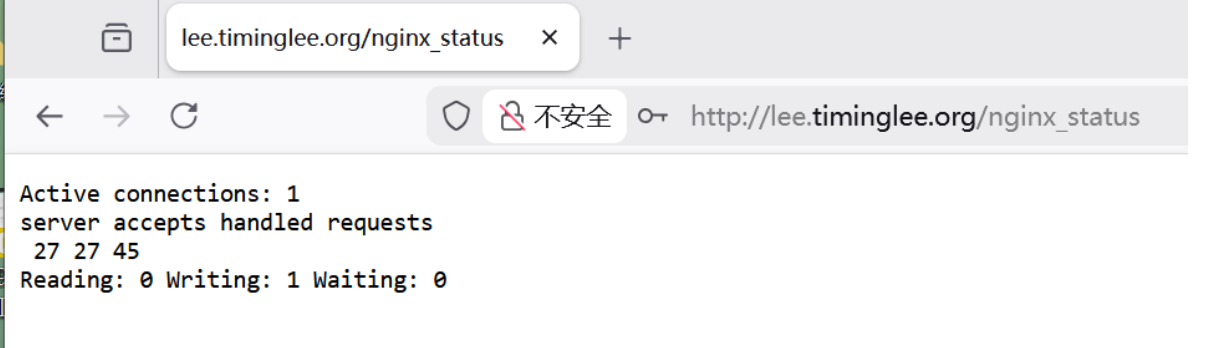
14.Nginx的压缩功能
[root@Nginx ~]# mkdir  /usr/local/nginx/timinglee.org/lee/html -p
[root@Nginx ~]# echo  hello lee > /usr/local/nginx/timinglee.org/lee/html/index.html
[root@Nginx html]# cp /usr/local/nginx/logs/access.log /usr/local/nginx/timinglee.org/lee/html/bigfile.txt


[root@Nginx ~]# vim /usr/local/nginx/conf/nginx.conf
    gzip  on;
    gzip_comp_level 4;
    gzip_disable "MSIE [1-6]\.";
    gzip_min_length 1024k;
    gzip_buffers 32 1024k
    gzip_types text/plain application/javascript application/x-javascript text/css  application/xml text/javascript application/x-httpd-php image/gif image/png;
    gzip_vary on;
    gzip_static on;


[root@Nginx ~]# vim /usr/local/nginx/conf/conf.d/vhosts.conf
server {
    listen 80;
    server_name lee.timinglee.org;
    root /usr/local/nginx/timinglee.org/lee/html;
    location /nginx_status{
        stub_status;
        auth_basic "auth login";
        auth_basic_user_file /usr/local/nginx/conf/.htpasswd;
        allow 172.25.254.0/24;
        deny all;
    }
}

[root@Nginx ~]# nginx -s reload


#测试
[root@Nginx html]# curl  --head --compressed  lee.timinglee.org/bigfile.txt
HTTP/1.1 200 OK
Server: nginx/1.28.1
Date: Sun, 01 Feb 2026 07:32:10 GMT
Content-Type: text/plain
Last-Modified: Sun, 01 Feb 2026 07:29:53 GMT
Connection: keep-alive
Keep-Alive: timeout=100
Vary: Accept-Encoding
ETag: W/"697f00f1-2ca84bd"
Content-Encoding: gzip

[root@Nginx html]# curl  --head --compressed  lee.timinglee.org/index.html
HTTP/1.1 200 OK
Server: nginx/1.28.1
Date: Sun, 01 Feb 2026 07:32:19 GMT
Content-Type: text/html
Content-Length: 10
Last-Modified: Sun, 01 Feb 2026 07:19:59 GMT
Connection: keep-alive
Keep-Alive: timeout=100
ETag: "697efe9f-a"
Accept-Ranges: bytes
15.Nginx 变量
15.1.升级Nginx支持echo
[root@Nginx ~]# systemctl stop nginx.service
[root@Nginx ~]# ps aux | grep nginx
root        5193  0.0  0.1   6636  2176 pts/1    S+   16:08   0:00 grep --color=auto nginx


[root@Nginx ~]# tar zxf echo-nginx-module-0.64.tar.gz
[root@Nginx ~]# cd nginx-1.28.1/

[root@Nginx nginx-1.28.1]# make clean

[root@Nginx nginx-1.28.1]# ./configure  --prefix=/usr/local/nginx --user=nginx --group=nginx --with-http_ssl_module --with-http_v2_module --with-http_realip_module --with-http_stub_status_module --with-http_gzip_static_module --with-pcre --with-stream --with-stream_ssl_module --with-stream_realip_module  --add-module=/root/echo-nginx-module-0.64

[root@Nginx nginx-1.28.1]# make
[root@Nginx nginx-1.28.1]# rm -rf /usr/local/nginx/sbin/nginx
[root@Nginx nginx-1.28.1]# cp objs/nginx /usr/local/nginx/sbin/ -p

#测试
[root@Nginx nginx-1.28.1]# vim /usr/local/nginx/conf/conf.d/vhosts.conf
server {
    listen 80;
    server_name lee.timinglee.org;
    root /usr/local/nginx/timinglee.org/lee/html;
    location /vars {
        default_type text/html;
        echo $remote_addr;
    }
}

[root@Nginx nginx-1.28.1]# nginx -t
nginx: the configuration file /usr/local/nginx/conf/nginx.conf syntax is ok
nginx: configuration file /usr/local/nginx/conf/nginx.conf test is successful


[root@Nginx nginx-1.28.1]# systemctl start nginx.service
15.2.理解内建变量
[root@Nginx nginx-1.28.1]# vim /usr/local/nginx/conf/conf.d/vhosts.conf
server {
    listen 80;
    server_name lee.timinglee.org;
    root /usr/local/nginx/timinglee.org/lee/html;
    location /vars {
        default_type text/html;
        echo $remote_addr;
    }
}

[root@Nginx nginx-1.28.1]# nginx -s reload
[root@Nginx nginx-1.28.1]# curl  lee.timinglee.org/vars/
172.25.254.100
[root@Nginx nginx-1.28.1]# vim /usr/local/nginx/conf/conf.d/vhosts.conf
server {
listen 80;
server_name lee.timinglee.org;
root /usr/local/nginx/timinglee.org/lee/html;
location /vars {
default_type text/html;
echo $args;
}
}
[root@Nginx nginx-1.28.1]# nginx -s reload
[root@Nginx nginx-1.28.1]# curl "http://lee.timinglee.org/vars?key=lee&id=11"
key=lee&id=11[root@Nginx nginx-1.28.1]# vim /usr/local/nginx/conf/conf.d/vhosts.conf
server {
listen 80;
server_name lee.timinglee.org;
root /usr/local/nginx/timinglee.org/lee/html;
location /vars {
default_type text/html;
echo $args;
echo $is_args;
}
}
[root@Nginx nginx-1.28.1]# nginx -s reload
[root@Nginx nginx-1.28.1]# curl "http://lee.timinglee.org/vars?key=lee&id=11"
172.25.254.100
key=lee&id=11
?
[root@Nginx nginx-1.28.1]# curl "http://lee.timinglee.org/vars"
172.25.254.100[root@Nginx nginx-1.28.1]# vim /usr/local/nginx/conf/conf.d/vhosts.conf
server {
listen 80;
server_name lee.timinglee.org;
root /usr/local/nginx/timinglee.org/lee/html;
location /vars {
default_type text/html;
echo $document_root;
}
}
[root@Nginx nginx-1.28.1]# nginx -s reload
[root@Nginx nginx-1.28.1]# curl "http://lee.timinglee.org/vars?key=lee&id=11"
/usr/local/nginx/timinglee.org/lee/html
[root@Nginx nginx-1.28.1]# vim /usr/local/nginx/conf/conf.d/vhosts.conf
    listen 80;
    server_name lee.timinglee.org;
    root /usr/local/nginx/timinglee.org/lee/html;
    location /vars {
        default_type text/html;
        echo $remote_addr;
        echo $args;
        echo $is_args;
        echo $document_root;
        echo $document_uri;
        echo $host;
        echo $remote_port;
        echo $remote_user;
        echo $request_method;
        echo $request_filename;
        echo $request_uri;
        echo $scheme;
        echo $server_protocol;
        echo $server_addr;
        echo $server_name;
        echo $server_port;
        echo $http_user_agent;
        echo $cookie_key2;
        echo $http_user_agent;
        echo $sent_http_content_type;
    }
}

[root@Nginx nginx-1.28.1]# nginx -s reload
[root@Nginx nginx-1.28.1]# curl -b "key1=hello,key2=timinglee" -A "haha" -ulee:lee "http://lee.timinglee.org/vars?key=lee&id=11"
172.25.254.100
key=lee&id=11
?
/usr/local/nginx/timinglee.org/lee/html
/vars
lee.timinglee.org
45156
lee
GET
/usr/local/nginx/timinglee.org/lee/html/vars
/vars?key=lee&id=11
http
HTTP/1.1
172.25.254.100
lee.timinglee.org
80
haha
timinglee
haha
text/html
16.自定义变量
[root@Nginx ~]# vim /usr/local/nginx/conf/conf.d/vhosts.conf
server {
    listen 80;
    server_name lee.timinglee.org;
    root /usr/local/nginx/timinglee.org/lee/html;
    location /vars {
        default_type text/html;
        echo $remote_addr;
        echo $args;
        echo $is_args;
        echo $document_root;
        echo $document_uri;
        echo $host;
        echo $remote_port;
        echo $remote_user;
        echo $request_method;
        echo $request_filename;
        echo $request_uri;
        echo $scheme;
        echo $server_protocol;
        echo $server_addr;
        echo $server_name;
        echo $server_port;
        echo $http_user_agent;
        echo $cookie_key2;
        echo $http_user_agent;
        echo $sent_http_content_type;
        set $test lee;					#手动设定变量值
     	echo $test;
        set $web_port $server_port;		#变量个传递
        echo $web_port;
    }
}

[root@Nginx ~]# nginx -s reload
[root@Nginx ~]# curl  lee.timinglee.org/vars/
172.25.254.100


/usr/local/nginx/timinglee.org/lee/html
/vars/
lee.timinglee.org
42538

GET
/usr/local/nginx/timinglee.org/lee/html/vars/
/vars/
http
HTTP/1.1
172.25.254.100
lee.timinglee.org
80
curl/7.76.1

curl/7.76.1
text/html
lee
80
17.网页从写
17.1.网页重写中的指令
#if
[root@Nginx ~]# vim /usr/local/nginx/conf/conf.d/vhosts.conf
server {
    listen 80;
    server_name lee.timinglee.org;
    root /webdir/timinglee.org/lee/html;
    location /vars {
        echo $remote_user;
        echo $request_method;
        echo $request_filename;
        echo $request_uri;
        echo $scheme;
    }

    location / {
        if ( $http_user_agent ~* firefox ) {
            return 200 "test if messages";
        }
    }
}

[root@Nginx ~]# nginx -s reload
[root@Nginx ~]# curl  lee.timinglee.org
lee page

[root@Nginx ~]# curl  -A "firefox" lee.timinglee.org
test if messages[root@Nginx ~]#
#set
[root@Nginx ~]# vim /usr/local/nginx/conf/conf.d/vhosts.conf
server {
listen 80;
server_name lee.timinglee.org;
root /webdir/timinglee.org/lee/html;
location /vars {
echo $remote_user;
echo $request_method;
echo $request_filename;
echo $request_uri;
echo $scheme;
}
location / {
set $testname timinglee;
echo $testname;
}
}
[root@Nginx ~]# nginx -s reload
[root@Nginx ~]# curl lee.timinglee.org
timinglee#return
[root@Nginx ~]# vim /usr/local/nginx/conf/conf.d/vhosts.conf
server {
listen 80;
server_name lee.timinglee.org;
root /webdir/timinglee.org/lee/html;
location /vars {
echo $remote_user;
echo $request_method;
echo $request_filename;
echo $request_uri;
echo $scheme;
}
location / {
return 200 "hello world";
}
}
[root@Nginx ~]# nginx -s reload
[root@Nginx ~]# curl lee.timinglee.org
hello world#break
[root@Nginx ~]# vim /usr/local/nginx/conf/conf.d/vhosts.conf
server {
listen 80;
server_name lee.timinglee.org;
root /webdir/timinglee.org/lee/html;
location /vars {
echo $remote_user;
echo $request_method;
echo $request_filename;
echo $request_uri;
echo $scheme;
}
location / {
set $test1 lee1;
set $test2 lee2;
if ($http_user_agent = firefox){
break;
}
set $test3 lee3;
echo $test1 $test2 $test3;
}
}
[root@Nginx ~]# nginx -s reload
[root@Nginx ~]# curl lee.timinglee.org
lee1 lee2 lee3
[root@Nginx ~]# curl -A "firefox" lee.timinglee.org
lee1 lee217.2 flag
#redirect;
[root@Nginx ~]# vim /usr/local/nginx/conf/conf.d/vhosts.conf

server {
    listen 80;
    server_name lee.timinglee.org;
    root /webdir/timinglee.org/lee/html;
    location /vars {
        echo $remote_user;
        echo $request_method;
        echo $request_filename;
        echo $request_uri;
        echo $scheme;
    }

    location / {
        rewrite / http://www.baidu.com redirect;
    }
}
[root@Nginx ~]# nginx -s reload

[root@Nginx ~]# curl -I lee.timinglee.org
HTTP/1.1 302 Moved Temporarily			#定向方式返回值
Server: nginx/1.28.1
Date: Tue, 03 Feb 2026 02:43:47 GMT
Content-Type: text/html
Content-Length: 145
Connection: keep-alive
Keep-Alive: timeout=100
Location: http://www.baidu.com			#定向效果
#permanent
[root@Nginx ~]# vim /usr/local/nginx/conf/conf.d/vhosts.conf
server {
listen 80;
server_name lee.timinglee.org;
root /webdir/timinglee.org/lee/html;
location /vars {
echo $remote_user;
echo $request_method;
echo $request_filename;
echo $request_uri;
echo $scheme;
}
location / {
rewrite / http://www.baidu.com permanent;
}
}
[root@Nginx ~]# nginx -s reload
[root@Nginx ~]# curl -I lee.timinglee.org
HTTP/1.1 301 Moved Permanently
Server: nginx/1.28.1
Date: Tue, 03 Feb 2026 02:45:38 GMT
Content-Type: text/html
Content-Length: 169
Connection: keep-alive
Keep-Alive: timeout=100
Location: http://www.baidu.com#break 和 last
[root@Nginx ~]# mkdir /webdir/timinglee.org/lee/html/{break,last,test1,test2}
[root@Nginx ~]# echo break > /webdir/timinglee.org/lee/html/break/index.html
[root@Nginx ~]# echo last > /webdir/timinglee.org/lee/html/last/index.html
[root@Nginx ~]# echo test1 > /webdir/timinglee.org/lee/html/test1/index.html
[root@Nginx ~]# echo test2 > /webdir/timinglee.org/lee/html/test2/index.html
#break
[root@Nginx ~]# vim /usr/local/nginx/conf/conf.d/vhosts.conf
server {
listen 80;
server_name lee.timinglee.org;
root /webdir/timinglee.org/lee/html;
location /vars {
echo $remote_user;
echo $request_method;
echo $request_filename;
echo $request_uri;
echo $scheme;
}
location /break {
rewrite /break/(.*) /test1/$1 break;
rewrite /test1 /test2;
}
location /test1 {
return 200 "test1 end page";
}
location /test2 {
return 200 "TEST2 END PAGE";
}
}
root@Nginx ~]# nginx -s reload
[root@Nginx ~]# curl -L lee.timinglee.org/break/index.html
test1
#last
[root@Nginx ~]# vim /usr/local/nginx/conf/conf.d/vhosts.conf
server {
listen 80;
server_name lee.timinglee.org;
root /webdir/timinglee.org/lee/html;
location /vars {
echo $remote_user;
echo $request_method;
echo $request_filename;
echo $request_uri;
echo $scheme;
}
location /break {
rewrite /break/(.*) /test1/$1 last;
rewrite /test1 /test2;
}
location /test1 {
return 200 "test1 end page";
}
location /test2 {
return 200 "TEST2 END PAGE";
}
}
root@Nginx ~]# nginx -s reload
[root@Nginx ~]# curl -L lee.timinglee.org/break/index.html
test1 end page18.Nginx利用网页重写实现全站加密
18.1.制作key
[root@Nginx ~]# openssl req -newkey rsa:2048 -nodes -sha256 -keyout /usr/local/nginx/certs/timinglee.org.key -x509 -days 365 -out /usr/local/nginx/certs/timinglee.org.crt2.编辑加密配置文件
[root@Nginx ~]# vim /usr/local/nginx/conf/conf.d/vhosts.conf
server {
    listen 80;
    listen 443 ssl;
    ssl_certificate /usr/local/nginx/certs/timinglee.org.crt;
    ssl_certificate_key /usr/local/nginx/certs/timinglee.org.key;
    ssl_session_cache shared:sslcache:20m;
    ssl_session_timeout 10m;
    server_name lee.timinglee.org;
    root /webdir/timinglee.org/lee/html;
    location / {
        if ($scheme = http ){
            rewrite /(.*) https://$host/$1 redirect;
        }
    }

}

[root@Nginx ~]# systemctl restart nginx.service

#测试
[root@Nginx ~]# curl  -I  http://lee.timinglee.org/test1/
HTTP/1.1 302 Moved Temporarily
Server: nginx/1.28.1
Date: Tue, 03 Feb 2026 03:21:22 GMT
Content-Type: text/html
Content-Length: 145
Connection: keep-alive
Keep-Alive: timeout=100
Location: https://lee.timinglee.org/test1/
19.防盗链
[root@Nginx ~]# vim /usr/local/nginx/conf/conf.d/vhosts.conf

server {
    listen 80;
    server_name lee.timinglee.org;
    root /webdir/timinglee.org/lee/html;
    location / {
        valid_referers none blocked server_names *.timinglee.org ~/.baidu/.;
        if ($invalid_referer){
            return 404;
        }
    }
    location /img {
        valid_referers none blocked server_names *.timinglee.org ~/.baidu/.;
        if ($invalid_referer){
            rewrite ^/ http://lee.timinglee.org/daolian/daolian.png;
        }
    }

}

[root@Nginx ~]# nginx -s reload
在测试时:
#另外的web服务器
[root@RS1 ~]# vim /var/www/html/index.html
<html>

  <head>
    <meta http-equiv=Content-Type content="text/html;charset=utf-8">
    <title>盗链</title>
</head>

  <body>
    <img src="http://lee.timinglee.org/img/lee.png" >
    <h1 style="color:red">欢迎大家</h1>
    <p><a href=http://lee.timinglee.org>狂点老李</a>出门见喜</p>
  </body>

</html>


#在浏览器中访问看效果
20.Nginx反向代理
20.1.实验环境
#172.25.254.10 RS1	172.25.254.20 RS2


[root@RSX ~]# dnf install httpd -y
[root@RSX ~]# systemctl enable --now httpd
[root@RSX ~]# echo 172.25.254.20 > /var/www/html/index.html


#测试 在Nginx主机中
[root@Nginx ~]# curl  172.25.254.10
172.25.254.10
[root@Nginx ~]# curl  172.25.254.20
172.25.254.20
20.2.简单的代理方法
[root@RS2 ~]# mkdir  /var/www/html/web
[root@RS2 ~]# echo 172.25.254.20 web > /var/www/html/web/index.html


[root@Nginx ~]# vim /usr/local/nginx/conf/conf.d/vhosts.conf
server {
    listen 80;
    server_name lee.timinglee.org;
    location / {
        proxy_pass http://172.25.254.10:80;
    }

    location /web {
        proxy_pass http://172.25.254.20:80;
    }

}


[root@Nginx ~]# nginx -s reload

#测试
[root@Nginx ~]# curl  172.25.254.20/web/
172.25.254.20 web
[root@Nginx ~]# curl  172.25.254.10
172.25.254.10
20.3.proxy_hide_header filed
[Administrator.DESKTOP-VJ307M3] ➤ curl -v lee.timinglee.org
*   Trying 172.25.254.100:80...
* TCP_NODELAY set
* Connected to lee.timinglee.org (172.25.254.100) port 80 (#0)
> GET / HTTP/1.1
> Host: lee.timinglee.org
> User-Agent: curl/7.65.0
> Accept: */*
>
* Mark bundle as not supporting multiuse
< HTTP/1.1 200 OK
< Server: nginx/1.28.1
< Date: Tue, 03 Feb 2026 06:31:03 GMT
< Content-Type: text/html; charset=UTF-8
< Content-Length: 14
< Connection: keep-alive
< Keep-Alive: timeout=100
< Last-Modified: Tue, 03 Feb 2026 06:20:50 GMT
< ETag: "e-649e570e8a49f"					#可以看到ETAG信息
< Accept-Ranges: bytes
<
172.25.254.10
* Connection #0 to host lee.timinglee.org left intact

[root@Nginx ~]# vim /usr/local/nginx/conf/conf.d/vhosts.conf
server {
    listen 80;
    server_name lee.timinglee.org;
    location / {
        proxy_pass http://172.25.254.10:80;
        proxy_hide_header ETag;
    }

    location /web {
        proxy_pass http://172.25.254.20:80;
    }

}
[root@Nginx ~]# nginx -s reload

#测试
[Administrator.DESKTOP-VJ307M3] ➤ curl -v lee.timinglee.org
*   Trying 172.25.254.100:80...
* TCP_NODELAY set
* Connected to lee.timinglee.org (172.25.254.100) port 80 (#0)
> GET / HTTP/1.1
> Host: lee.timinglee.org
> User-Agent: curl/7.65.0
> Accept: */*
>
* Mark bundle as not supporting multiuse
< HTTP/1.1 200 OK
< Server: nginx/1.28.1
< Date: Tue, 03 Feb 2026 06:33:11 GMT
< Content-Type: text/html; charset=UTF-8
< Content-Length: 14
< Connection: keep-alive
< Keep-Alive: timeout=100
< Last-Modified: Tue, 03 Feb 2026 06:20:50 GMT
< Accept-Ranges: bytes
<
172.25.254.10
20.4.proxy_pass_header
[Administrator.DESKTOP-VJ307M3] ➤ curl -v lee.timinglee.org
*   Trying 172.25.254.100:80...
* TCP_NODELAY set
* Connected to lee.timinglee.org (172.25.254.100) port 80 (#0)
> GET / HTTP/1.1
> Host: lee.timinglee.org
> User-Agent: curl/7.65.0
> Accept: */*
>
* Mark bundle as not supporting multiuse
< HTTP/1.1 200 OK
< Server: nginx/1.28.1						#默认访问不透传server信息
< Date: Tue, 03 Feb 2026 06:35:35 GMT
< Content-Type: text/html; charset=UTF-8
< Content-Length: 14
< Connection: keep-alive
< Keep-Alive: timeout=100
< Last-Modified: Tue, 03 Feb 2026 06:20:50 GMT
< Accept-Ranges: bytes
<
172.25.254.10
* Connection #0 to host lee.timinglee.org left intact

[root@Nginx ~]# vim /usr/local/nginx/conf/conf.d/vhosts.conf
server {
    listen 80;
    server_name lee.timinglee.org;
    location / {
        proxy_pass http://172.25.254.10:80;
        proxy_pass_header Server;
    }

    location /web {
        proxy_pass http://172.25.254.20:80;
    }

}

[root@Nginx ~]# nginx -s reload
Administrator.DESKTOP-VJ307M3] ➤ curl -v lee.timinglee.org
*   Trying 172.25.254.100:80...
* TCP_NODELAY set
* Connected to lee.timinglee.org (172.25.254.100) port 80 (#0)
> GET / HTTP/1.1
> Host: lee.timinglee.org
> User-Agent: curl/7.65.0
> Accept: */*
>
* Mark bundle as not supporting multiuse
< HTTP/1.1 200 OK
< Date: Tue, 03 Feb 2026 06:37:25 GMT
< Content-Type: text/html; charset=UTF-8
< Content-Length: 14
< Connection: keep-alive
< Keep-Alive: timeout=100
< Server: Apache/2.4.62 (Red Hat Enterprise Linux)			#透传结果
< Last-Modified: Tue, 03 Feb 2026 06:20:50 GMT
< Accept-Ranges: bytes
<
172.25.254.10
* Connection #0 to host lee.timinglee.org left intact
20.5.透传信息
[root@RS1 ~]# vim /etc/httpd/conf/httpd.conf
    LogFormat "%h %l %u %t \"%r\" %>s %b \"%{Referer}i\" \"%{User-Agent}i\" \"%{X-Forwarded-For}i\"" combined


[root@RS1 ~]# systemctl restart httpd

[root@Nginx ~]# vim /usr/local/nginx/conf/conf.d/vhosts.conf
server {
    listen 80;
    server_name lee.timinglee.org;
    location / {
        proxy_pass http://172.25.254.10:80;
        proxy_set_header X-Forwarded-For $remote_addr;

    }

    location /web {
        proxy_pass http://172.25.254.20:80;
    }

[root@Nginx ~]# nginx -s reload

[Administrator.DESKTOP-VJ307M3] ➤ curl  lee.timinglee.org
172.25.254.10


[root@RS1 ~]# cat /etc/httpd/logs/access_log
172.25.254.100 - - [03/Feb/2026:14:47:37 +0800] "GET / HTTP/1.0" 200 14 "-" "curl/7.65.0" "172.25.254.1"
21.利用反向代理实现动静分离
21.1.试验机环境
#在10中
[root@RS1 ~]# dnf install php -y
[root@RS1 ~]# systemctl restart httpd

[root@RS1 ~]# vim /var/www/html/index.php
<?php
    echo "<h2>172.25.254.10</h2>";
    phpinfo();
?>
21.2.动静分离的实现
[root@Nginx ~]# vim /usr/local/nginx/conf/conf.d/vhosts.conf
server {
    listen 80;
    server_name lee.timinglee.org;
    location / {
        proxy_pass http://172.25.254.20:80;

    }

    location ~* \.(php|js)$ {
        proxy_pass http://172.25.254.10:80;
    }

}
[root@Nginx ~]# nginx -s reload
测试
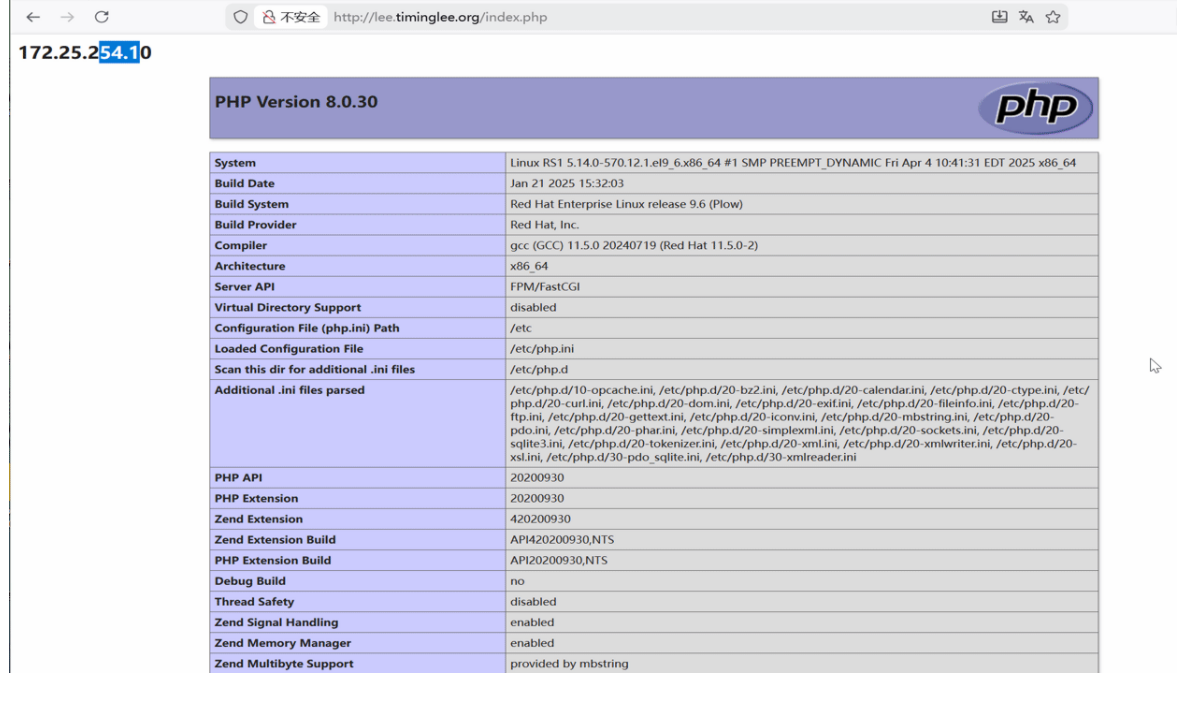
22.缓存加速
22.1.当未启用缓存时进行压测
[Administrator.DESKTOP-VJ307M3] ➤ ab -n 10000 -c 50 lee.timinglee.org/index.php
This is ApacheBench, Version 2.3 <$Revision: 1807734 $>
Copyright 1996 Adam Twiss, Zeus Technology Ltd, http://www.zeustech.net/
Licensed to The Apache Software Foundation, http://www.apache.org/

Benchmarking lee.timinglee.org (be patient)
Completed 1000 requests
Completed 2000 requests
Completed 3000 requests
Completed 4000 requests
Completed 5000 requests
Completed 6000 requests
Completed 7000 requests
Completed 8000 requests
Completed 9000 requests
Completed 10000 requests
Finished 10000 requests


Server Software:        nginx/1.28.1
Server Hostname:        lee.timinglee.org
Server Port:            80

Document Path:          /index.php
Document Length:        72921 bytes

Concurrency Level:      50
Time taken for tests:   13.678 seconds
Complete requests:      10000
Failed requests:        9963				#失败的
   (Connect: 0, Receive: 0, Length: 9963, Exceptions: 0)
Total transferred:      731097819 bytes
HTML transferred:       729237819 bytes
Requests per second:    731.10 [#/sec] (mean)
Time per request:       68.390 [ms] (mean)
Time per request:       1.368 [ms] (mean, across all concurrent requests)
Transfer rate:          52197.72 [Kbytes/sec] received

Connection Times (ms)
              min  mean[+/-sd] median   max
Connect:        0    7   4.0      6      26
Processing:     4   61 168.8     44    3405
Waiting:        2   38 129.9     26    3316
Total:          5   68 168.7     51    3405

Percentage of the requests served within a certain time (ms)
  50%     51
  66%     61
  75%     68
  80%     71
  90%     83
  95%     92
  98%    105
  99%    506
 100%   3405 (longest request)
22.2.设定缓存加速
[root@Nginx ~]# vim /usr/local/nginx/conf/nginx.conf
proxy_cache_path /usr/local/nginx/proxy_cache levels=1:2:2 keys_zone=proxycache:20m inactive=120s max_size=1g;

server {
    listen 80;
    server_name lee.timinglee.org;
    location / {
        proxy_pass http://172.25.254.20:80;

    }

    location ~* \.(php|js)$ {
        proxy_pass http://172.25.254.10:80;
        proxy_cache proxycache;
        proxy_cache_key $request_uri;
        proxy_cache_valid 200 302 301 10m;
        proxy_cache_valid any 1m;
    }

}


[root@Nginx ~]# systemctl restart nginx.service
[root@Nginx ~]# tree  /usr/local/nginx/proxy_cache/
/usr/local/nginx/proxy_cache/

0 directories, 0 files

#测试
[Administrator.DESKTOP-VJ307M3] ➤ ab -n 10000 -c 50 lee.timinglee.org/index.php
This is ApacheBench, Version 2.3 <$Revision: 1807734 $>
Copyright 1996 Adam Twiss, Zeus Technology Ltd, http://www.zeustech.net/
Licensed to The Apache Software Foundation, http://www.apache.org/

Benchmarking lee.timinglee.org (be patient)
Completed 1000 requests
Completed 2000 requests
Completed 3000 requests
Completed 4000 requests
Completed 5000 requests
Completed 6000 requests
Completed 7000 requests
Completed 8000 requests
Completed 9000 requests
Completed 10000 requests
Finished 10000 requests


Server Software:        nginx/1.28.1
Server Hostname:        lee.timinglee.org
Server Port:            80

Document Path:          /index.php
Document Length:        72925 bytes

Concurrency Level:      50
Time taken for tests:   4.365 seconds
Complete requests:      10000
Failed requests:        0
Total transferred:      731110000 bytes
HTML transferred:       729250000 bytes
Requests per second:    2290.76 [#/sec] (mean)
Time per request:       21.827 [ms] (mean)
Time per request:       0.437 [ms] (mean, across all concurrent requests)
Transfer rate:          163554.31 [Kbytes/sec] received

Connection Times (ms)
              min  mean[+/-sd] median   max
Connect:        0    4   1.8      4      11
Processing:     4   18  31.3     15     734
Waiting:        1    9  30.7      5     726
Total:          6   22  31.2     20     734

Percentage of the requests served within a certain time (ms)
  50%     20
  66%     21
  75%     21
  80%     22
  90%     27
  95%     32
  98%     41
  99%     46
 100%    734 (longest request)


[root@Nginx ~]# tree  /usr/local/nginx/proxy_cache/
/usr/local/nginx/proxy_cache/
└── 1
    └── af
        └── 15
            └── e251273eb74a8ee3f661a7af00915af1

3 directories, 1 file
23.反向代理负载均衡
23.1.实验环境
172.25.254.100  #Nginx 代理服务器
172.25.254.10  #后端web A,Apache部署
172.25.254.20  #后端web B,Apache部署
23.2.实现负载均衡
[root@Nginx ~]# mkdir  /usr/local/nginx/conf/upstream/
[root@Nginx ~]# vim /usr/local/nginx/conf/nginx.conf
events {
    worker_connections  10000;
    use epoll;
    accept_mutex on;
    multi_accept on;
}

http {
    include       mime.types;
    default_type  application/octet-stream;
	include "/usr/local/nginx/conf/upstream/*.conf";		#子配置目录


[root@Nginx ~]# vim /usr/local/nginx/conf/upstream/loadbalance.conf
upstream webserver {
    server 172.25.254.10:80 weight=1 fail_timeout=15s max_fails=3;
    server 172.25.254.20:80 weight=1 fail_timeout=15s max_fails=3;
    server 172.25.254.100:8888 backup;

}
server {
    listen 80;
    server_name www.timinglee.org;

    location ~ / {
        proxy_pass http://webserver;
    }
}


[root@Nginx ~]# mkdir  /webdir/timinglee.org/error/html -p
[root@Nginx ~]# echo error > /webdir/timinglee.org/error/html/index.html

[root@Nginx ~]# vim /usr/local/nginx/conf/conf.d/vhosts.conf
server {
    listen 8888;
    root /webdir/timinglee.org/error/html;
}


#测试:
[root@Nginx ~]# curl www.timinglee.org
172.25.254.10
[root@Nginx ~]# curl www.timinglee.org
172.25.254.20
[root@Nginx ~]# curl www.timinglee.org
172.25.254.10
[root@Nginx ~]# curl www.timinglee.org
172.25.254.20
[root@Nginx ~]# curl www.timinglee.org
172.25.254.20
[root@Nginx ~]# curl www.timinglee.org
172.25.254.20


[root@RS1+2 ~]# systemctl stop httpd

[root@Nginx ~]# curl www.timinglee.org
error
24.Nginx负载均衡算法
[root@Nginx ~]# vim /usr/local/nginx/conf/upstream/loadbalance.conf
upstream webserver {
    #ip_hash;
    #hash $request_uri consistent;
    #least_conn;
    hash $cookie_lee;
    server 172.25.254.10:80 weight=1 fail_timeout=15s max_fails=3;
    server 172.25.254.20:80 weight=1 fail_timeout=15s max_fails=3;
    #server 172.25.254.100:8888 backup;

}
server {
    listen 80;
    server_name www.timinglee.org;

    location ~ / {
        proxy_pass http://webserver;
    }
}


#
[root@Nginx ~]# curl  -b lee=20 www.timinglee.org
[root@Nginx ~]# curl   www.timinglee.org/web1/index.html
[root@Nginx ~]# curl   www.timinglee.org/
25.PHP的源码编译
25.1.下载源码包
[root@Nginx ~]# wget https://www.php.net/distributions/php-8.3.30.tar.gz
[root@Nginx ~]# wget https://mirrors.aliyun.com/rockylinux/9.7/devel/x86_64/os/Packages/o/oniguruma-devel-6.9.6-1.el9.6.x86_64.rpm     #依赖
25.2.解压
[root@Nginx ~]# tar zxf php-8.3.30.tar.gz
[root@Nginx ~]# ls
anaconda-ks.cfg                lee.png              nginx-1.29.4.tar.gz  test.c
daolian.png                    nginx-1.28.1         php-8.3.30
echo-nginx-module-0.64         nginx-1.28.1.tar.gz  php-8.3.30.tar.gz
echo-nginx-module-0.64.tar.gz  nginx-1.29.4         test
[root@Nginx ~]# cd php-8.3.30
25.3.源码编译
[root@Nginx ~]# dnf install gcc systemd-devel-252-51.el9.x86_64 libxml2-devel.x86_64 sqlite-devel.x86_64  libcurl-devel.x86_64  libpng-devel.x86_64 oniguruma-devel-6.9.6-1.el9.6.x86_64.rpm -y

[root@Nginx ~]# cd php-8.3.30/
[root@Nginx php-8.3.30]# ./configure \
--prefix=/usr/local/php \		#安装路径
--with-config-file-path=/usr/local/php/etc \	#指定配置路径
--enable-fpm  \			#用cgi方式启动程序
--with-fpm-user=nginx \	#指定运行用户身份
--with-fpm-group=nginx \
--with-curl \			#打开curl浏览器支持
--with-iconv \			#启用iconv函数,转换字符编码
--with-mhash \			#mhash加密方式扩展库
--with-zlib \			#支持zlib库,用于压缩http压缩传输
--with-openssl \		#支持ssl加密
--enable-mysqlnd \		#mysql数据库
--with-mysqli \
--with-pdo-mysql \
--disable-debug \		#关闭debug功能
--enable-sockets \		#支持套接字访问
--enable-soap \			#支持soap扩展协议
--enable-xml \			#支持xml
--enable-ftp \			#支持ftp
--enable-gd \			#支持gd库
--enable-exif \			#支持图片元数据
--enable-mbstring \		#支持多字节字符串
--enable-bcmath \		#打开图片大小调整,用到zabbix监控的时候用到了这个模块
--with-fpm-systemd		#支持systemctl 管理cgi

[root@Nginx php-8.3.30]# make && make instsall
25.4.配置PHP
[root@Nginx php-8.3.30]# cd /usr/local/php/etc
[root@Nginx etc]# cp -p php-fpm.conf.default  php-fpm.conf

[root@Nginx etc]# vim php-fpm.conf
[global]
; Pid file
; Note: the default prefix is /usr/local/php/var
; Default Value: none
pid = run/php-fpm.pid


[root@Nginx etc]# cd php-fpm.d/
[root@Nginx php-fpm.d]# cp www.conf.default www.conf
[root@Nginx php-fpm.d]# vim www.conf
41 listen = 0.0.0.0:9000

[root@Nginx php-fpm.d]# cp /root/php-8.3.30/php.ini-production  /usr/local/php/etc/php.ini

[root@Nginx php-fpm.d]# vim /usr/local/php/etc/php.ini
989 date.timezone = Asia/Shangha

[root@Nginx ~]# cp /root/php-8.3.30/sapi/fpm/php-fpm.service /lib/systemd/system/
[root@Nginx ~]# vim /lib/systemd/system/php-fpm.service

# Mounts the /usr, /boot, and /etc directories read-only for processes invoked by this unit.
#ProtectSystem=full		#注释此参数
[root@Nginx ~]# systemctl daemon-reload
[root@Nginx ~]# systemctl enable --now php-fpm

[root@Nginx ~]# netstat -antlupe | grep php
tcp        0      0 0.0.0.0:9000            0.0.0.0:*               LISTEN      0          329917     165562/php-fpm: mas
25.5.为php设定环境变量
[root@Nginx ~]# vim ~/.bash_profile
export PATH=$PATH:/usr/local/nginx/sbin:/usr/local/php/sbin:/usr/local/php/bin

[root@Nginx ~]# source   ~/.bash_profile
[root@Nginx ~]# php -m
26.Nginx整合PHP
[root@Nginx conf.d]# mkdir  /webdir/timinglee.org/php/html -p
[root@Nginx conf.d]# vim /webdir/timinglee.org/php/html/index.html
php.timinglee.org

[root@Nginx conf.d]# vim /webdir/timinglee.org/php/html/index.php
<?php
  phpinfo();
?>


[root@Nginx ~]# cd /usr/local/nginx/conf/conf.d/
[root@Nginx conf.d]# vim php.conf
server {
  listen 80;
  server_name php.timinglee.org;
  root /webdir/timinglee.org/php/html;
  location ~ \.php$ {
    fastcgi_pass 127.0.0.1:9000;
    fastcgi_index index.php;
    include fastcgi.conf;
  }
}

[root@Nginx conf.d]# nginx -s reload

#测试
http://php.timinglee.org

http://php.timinglee.org/index.php
27.利用memcache实现php的缓存加速
27.1.安装memcache
[root@Nginx ~]# dnf install memcached.x86_64 -y27.2.配置memcache
[root@Nginx ~]# vim /etc/sysconfig/memcached
PORT="11211"
USER="memcached"
MAXCONN="1024"
CACHESIZE="64"
OPTIONS="-l 0.0.0.0,::1"

[root@Nginx ~]# systemctl enable --now memcached.service

[root@Nginx ~]# netstat -antlupe | grep memcache
tcp        0      0 0.0.0.0:11211           0.0.0.0:*               LISTEN      991        437305     166169/memcached
tcp6       0      0 ::1:11211               :::*                    LISTEN      991        437306     166169/memcached
27.3.升级php对于memcache的支持
[root@Nginx ~]# php -m	#查看php支持的插件

[root@Nginx ~]# tar zxf memcache-8.2.tgz
[root@Nginx ~]# cd memcache-8.2/
[root@Nginx memcache-8.2]# dnf install autoconf -y
[root@Nginx memcache-8.2]# phpize
[root@Nginx memcache-8.2]# ./configure  && make && make install

[root@Nginx memcache-8.2]# ls /usr/local/php/lib/php/extensions/no-debug-non-zts-20230831/
memcache.so  opcache.so

[root@Nginx memcache-8.2]# vim /usr/local/php/etc/php.ini
939  extension=memcache

[root@Nginx memcache-8.2]# systemctl restart php-fpm.service
[root@Nginx memcache-8.2]# php -m  | grep memcache
memcache
27.4.测试性能
[root@Nginx memcache-8.2]# vim memcache.php
define('ADMIN_USERNAME','admin');   // Admin Username
define('ADMIN_PASSWORD','lee');     // Admin Password
$MEMCACHE_SERVERS[] = '172.25.254.100:11211'; // add more as an array
#$MEMCACHE_SERVERS[] = 'mymemcache-server2:11211'; // add more as an array

[root@Nginx memcache-8.2]# cp -p memcache.php  /webdir/timinglee.org/php/html/
[root@Nginx memcache-8.2]# cp -p example.php /webdir/timinglee.org/php/html/

#测试
http://php.timinglee.org/memcache.php			#数据页面,在浏览器中可以直接访问
[root@Nginx memcache-8.2]# ab -n 1000 -c 300  php.timinglee.org/example.php
28.nginx+memcache实现高速缓存解
28.1.重新编译nginx
[root@Nginx ~]# systemctl stop nginx.service
[root@Nginx ~]# cp /usr/local/nginx/conf/    /mnt/ -r
[root@Nginx ~]# rm -fr /usr/local/nginx/

[root@Nginx ~]# rm -rf nginx-1.29.4 nginx-1.28.1

[root@Nginx ~]# tar zxf nginx-1.28.1.tar.gz
[root@Nginx ~]# cd nginx-1.28.1/

[root@Nginx ~]# tar zxf srcache-nginx-module-0.33.tar.gz
[root@Nginx ~]# tar zxf memc-nginx-module-0.20.tar.gz

[root@Nginx ~]# cd nginx-1.28.1/
[root@Nginx nginx-1.28.1]# ./configure  --prefix=/usr/local/nginx --user=nginx --group=nginx --with-http_ssl_module --with-http_v2_module --with-http_realip_module --with-http_stub_status_module --with-http_gzip_static_module --with-pcre --with-stream --with-stream_ssl_module --with-stream_realip_module --add-module=/root/echo-nginx-module-0.64  --add-module=/root/memc-nginx-module-0.20 --add-module=/root/srcache-nginx-module-0.33
[root@Nginx nginx-1.28.1]# make && make install

[root@Nginx ~]# cd /usr/local/nginx/conf
[root@Nginx conf]# rm -fr nginx.conf
[root@Nginx conf]# cp /mnt/conf/nginx.conf /mnt/conf/conf.d/ . -r
[root@Nginx conf]# systemctl start nginx.service
28.2.整合memcache
[root@Nginx conf]# vim /usr/local/nginx/conf/conf.d/php.conf
upstream memcache {
   server 127.0.0.1:11211;
   keepalive 512;
}
server {
    listen 80;
    server_name php.timinglee.org;
    root /webdir/timinglee.org/php/html;
    index index.php index.html;

    location /memc {
        internal;
        memc_connect_timeout 100ms;
        memc_send_timeout 100ms;
        memc_read_timeout 100ms;
        set $memc_key $query_string;
        set $memc_exptime 300;
        memc_pass memcache;
    }
    location ~ \.php$ {
        set $key $uri$args;
        srcache_fetch GET /memc $key;
        srcache_store PUT /memc $key;
        fastcgi_pass 127.0.0.1:9000;
        fastcgi_index index.php;
        include fastcgi.conf;
  }
}

[root@Nginx conf]# nginx  -s reload
#测试
[root@Nginx conf]# ab -n 10000 -c500 http://php.timinglee.org/example.php
29.Nginx的四层负载均衡代理
29.1.实验环境(Mysql)
[root@RS1 ~]# dnf install mariadb-server -y
[root@RS2 ~]#  dnf install mariadb-server -y

[root@RS1 ~]# vim /etc/my.cnf.d/mariadb-server.cnf
server-id=10

[root@RS2 ~]# vim /etc/my.cnf.d/mariadb-server.cnf
server-id=20
[root@RS1 ~]# systemctl enable --now mariadb
[root@RS2 ~]# systemctl enable --now mariadb

[root@RS1 ~]# mysql
Welcome to the MariaDB monitor.  Commands end with ; or \g.
Your MariaDB connection id is 3
Server version: 10.5.27-MariaDB MariaDB Server

Copyright (c) 2000, 2018, Oracle, MariaDB Corporation Ab and others.

Type 'help;' or '\h' for help. Type '\c' to clear the current input statement.

MariaDB [(none)]> CREATE USER lee@'%' IDENTIFIED BY 'lee';
Query OK, 0 rows affected (0.001 sec)

MariaDB [(none)]> GRANT ALL ON *.* TO lee@'%';
Query OK, 0 rows affected (0.001 sec)

MariaDB [(none)]>

[root@RS2 ~]# mysql
Welcome to the MariaDB monitor.  Commands end with ; or \g.
Your MariaDB connection id is 3
Server version: 10.5.27-MariaDB MariaDB Server

Copyright (c) 2000, 2018, Oracle, MariaDB Corporation Ab and others.

Type 'help;' or '\h' for help. Type '\c' to clear the current input statement.

MariaDB [(none)]>  CREATE USER lee@'%' IDENTIFIED BY 'lee';
Query OK, 0 rows affected (0.001 sec)

MariaDB [(none)]> GRANT ALL ON *.* TO lee@'%';
Query OK, 0 rows affected (0.001 sec)
29.2.实验环境(dns)
[root@RS1 ~]# dnf install bind -y
[root@RS2 ~]# dnf install bind -y

[root@RS1 ~]# vim /etc/named.conf
[root@RS2 ~]# vim /etc/named.conf

options {
//      listen-on port 53 { 127.0.0.1; };
//      listen-on-v6 port 53 { ::1; };
        directory       "/var/named";
        dump-file       "/var/named/data/cache_dump.db";
        statistics-file "/var/named/data/named_stats.txt";
        memstatistics-file "/var/named/data/named_mem_stats.txt";
        secroots-file   "/var/named/data/named.secroots";
        recursing-file  "/var/named/data/named.recursing";
//      allow-query     { localhost; };
        dnssec-validation no;

[root@RS1 ~]# vim /etc/named.rfc1912.zones
[root@RS2 ~]# vim /etc/named.rfc1912.zones

zone "timinglee.org" IN {
        type master;
        file "timinglee.org.zone";
        allow-update { none; };
};

[root@RS1 ~]# cd /var/named/
[root@RS2 ~]# cd /var/named/
[root@RS1 named]# cp -p named.localhost  timinglee.org.zone
[root@RS2 named]# cp -p named.localhost  timinglee.org.zone


[root@RS1 named]# vim timinglee.org.zone
$TTL 1D
@       IN SOA  dns.timingle.org. rname.invalid. (
                                        0       ; serial
                                        1D      ; refresh
                                        1H      ; retry
                                        1W      ; expire
                                        3H )    ; minimum
        NS      dns.timinglee.org.
dns     A       172.25.254.10

[root@RS2 named]# vim timinglee.org.zone
$TTL 1D
@       IN SOA  dns.timingle.org. rname.invalid. (
                                        0       ; serial
                                        1D      ; refresh
                                        1H      ; retry
                                        1W      ; expire
                                        3H )    ; minimum
        NS      dns.timinglee.org.
dns     A       172.25.254.20


[root@RS2 named]# systemctl enable --now named

#测试
[root@RS1 named]# dig dns.timinglee.org @172.25.254.10

; <<>> DiG 9.16.23-RH <<>> dns.timinglee.org @172.25.254.10
;; global options: +cmd
;; Got answer:
;; ->>HEADER<<- opcode: QUERY, status: NOERROR, id: 24486
;; flags: qr aa rd ra; QUERY: 1, ANSWER: 1, AUTHORITY: 0, ADDITIONAL: 1

;; OPT PSEUDOSECTION:
; EDNS: version: 0, flags:; udp: 1232
; COOKIE: 4bb88849cac36aa4010000006982fef4676bf81574ab80b7 (good)
;; QUESTION SECTION:
;dns.timinglee.org.             IN      A

;; ANSWER SECTION:
dns.timinglee.org.      86400   IN      A       172.25.254.10

;; Query time: 3 msec
;; SERVER: 172.25.254.10#53(172.25.254.10)
;; WHEN: Wed Feb 04 16:10:28 CST 2026
;; MSG SIZE  rcvd: 90

[root@RS1 named]# dig dns.timinglee.org @172.25.254.20

; <<>> DiG 9.16.23-RH <<>> dns.timinglee.org @172.25.254.20
;; global options: +cmd
;; Got answer:
;; ->>HEADER<<- opcode: QUERY, status: NOERROR, id: 42456
;; flags: qr aa rd ra; QUERY: 1, ANSWER: 1, AUTHORITY: 0, ADDITIONAL: 1

;; OPT PSEUDOSECTION:
; EDNS: version: 0, flags:; udp: 1232
; COOKIE: 7c088d4822b8f1c1010000006982fef9047f3812bdaf7c0e (good)
;; QUESTION SECTION:
;dns.timinglee.org.             IN      A

;; ANSWER SECTION:
dns.timinglee.org.      86400   IN      A       172.25.254.20

;; Query time: 1 msec
;; SERVER: 172.25.254.20#53(172.25.254.20)
;; WHEN: Wed Feb 04 16:10:33 CST 2026
;; MSG SIZE  rcvd: 90
29.3.tcp四层负载
[root@Nginx conf]# mkdir  /usr/local/nginx/conf/tcp -p
[root@Nginx conf]# mkdir  /usr/local/nginx/conf/udp -p
[root@Nginx conf]# vim /usr/local/nginx/conf/nginx.conf
include "/usr/local/nginx/conf/tcp/*.conf";

[root@Nginx conf]# vim /usr/local/nginx/conf/tcp/mariadb.conf
stream {
  upstream mysql_server {
    server 172.25.254.10:3306  max_fails=3 fail_timeout=30s;
    server 172.25.254.20:3306  max_fails=3 fail_timeout=30s;
  }

  server {
    listen 172.25.254.100:3306;
    proxy_pass mysql_server;
    proxy_connect_timeout 30s;
    proxy_timeout 300s;
  }

}
[root@Nginx conf]# nginx  -s reload

#检测
[root@Nginx ~]#dnf install mariadb
[root@Nginx ~]# mysql -ulee -plee -h172.25.254.100
Welcome to the MariaDB monitor.  Commands end with ; or \g.
Your MariaDB connection id is 4
Server version: 10.5.27-MariaDB MariaDB Server

Copyright (c) 2000, 2018, Oracle, MariaDB Corporation Ab and others.

Type 'help;' or '\h' for help. Type '\c' to clear the current input statement.

MariaDB [(none)]> SELECT @@server_id;
+-------------+
| @@server_id |
+-------------+
|          10 |
+-------------+
1 row in set (0.001 sec)

MariaDB [(none)]> quit
Bye
[root@Nginx ~]# mysql -ulee -plee -h172.25.254.100
Welcome to the MariaDB monitor.  Commands end with ; or \g.
Your MariaDB connection id is 4
Server version: 10.5.27-MariaDB MariaDB Server

Copyright (c) 2000, 2018, Oracle, MariaDB Corporation Ab and others.

Type 'help;' or '\h' for help. Type '\c' to clear the current input statement.

MariaDB [(none)]> SELECT @@server_id;
+-------------+
| @@server_id |
+-------------+
|          20 |
+-------------+
1 row in set (0.001 sec)
29.4.udp四层负载
[root@Nginx ~]# vim /usr/local/nginx/conf/tcp/mariadb.conf
stream {
  upstream mysql_server {
    server 172.25.254.10:3306  max_fails=3 fail_timeout=30s;
    server 172.25.254.20:3306  max_fails=3 fail_timeout=30s;
  }

  upstream dns_server{
    server 172.25.254.10:53 max_fails=3 fail_timeout=30s;
    server 172.25.254.20:53 max_fails=3 fail_timeout=30s;
  }

  server {
    listen 172.25.254.100:3306;
    proxy_pass mysql_server;
    proxy_connect_timeout 30s;
    proxy_timeout 300s;
  }

  server {
        listen 172.25.254.100:53 udp;
        proxy_pass dns_server;
        proxy_timeout 1s;
        proxy_responses 1;
        error_log logs/dns.log;
    }
}
[root@Nginx ~]# nginx  -s reload


#测试

[root@Nginx ~]# dig dns.timinglee.org @172.25.254.100

; <<>> DiG 9.16.23-RH <<>> dns.timinglee.org @172.25.254.100
;; global options: +cmd
;; Got answer:
;; ->>HEADER<<- opcode: QUERY, status: NOERROR, id: 32224
;; flags: qr aa rd ra; QUERY: 1, ANSWER: 1, AUTHORITY: 0, ADDITIONAL: 1

;; OPT PSEUDOSECTION:
; EDNS: version: 0, flags:; udp: 1232
; COOKIE: 9ac742ccc566d4450100000069830452db8dce1f1b224c9f (good)
;; QUESTION SECTION:
;dns.timinglee.org.             IN      A

;; ANSWER SECTION:
dns.timinglee.org.      86400   IN      A       172.25.254.10

;; Query time: 2 msec
;; SERVER: 172.25.254.100#53(172.25.254.100)
;; WHEN: Wed Feb 04 16:33:22 CST 2026
;; MSG SIZE  rcvd: 90

[root@Nginx ~]# dig dns.timinglee.org @172.25.254.100

; <<>> DiG 9.16.23-RH <<>> dns.timinglee.org @172.25.254.100
;; global options: +cmd
;; Got answer:
;; ->>HEADER<<- opcode: QUERY, status: NOERROR, id: 2259
;; flags: qr aa rd ra; QUERY: 1, ANSWER: 1, AUTHORITY: 0, ADDITIONAL: 1

;; OPT PSEUDOSECTION:
; EDNS: version: 0, flags:; udp: 1232
; COOKIE: 7f9ffa4884c0b685010000006983045565fd892fc72c5514 (good)
;; QUESTION SECTION:
;dns.timinglee.org.             IN      A

;; ANSWER SECTION:
dns.timinglee.org.      86400   IN      A       172.25.254.20

;; Query time: 2 msec
;; SERVER: 172.25.254.100#53(172.25.254.100)
;; WHEN: Wed Feb 04 16:33:25 CST 2026
;; MSG SIZE  rcvd: 90
30.编译安装 openresty
[root@Nginx src]#wget https://openresty.org/download/openresty-1.27.1.2.tar.gz
[root@Nginx ~]#dnf -yq install gcc pcre-devel openssl-devel perl zlib-devel
[root@Nginx ~]#useradd -r -s /sbin/nologin nginx
[root@Nginx ~]#tar zxf openresty-1.27.1.2
[root@webserver ~]# cd openresty-1.27.1.2/
[root@Nginx openresty-1.17.8.2]#./configure \
--prefix=/usr/local/openresty \
--user=nginx --group=nginx \
--with-http_ssl_module \
--with-http_v2_module \
--with-http_stub_status_module \
--with-http_gzip_static_module
--with-pcre --with-stream \
--with-stream_ssl_module \
--with-stream_realip_module

[root@Nginx openresty-1.17.8.2]#gmake && gmake install
[root@webserver openresty-1.27.1.2]# cd /usr/local/openresty/
[root@webserver openresty]# ls
bin  COPYRIGHT  luajit  lualib  nginx  pod  resty.index  site
[root@webserver openresty]# vim ~/.bash_profile
export PATH=$PATH:/usr/local/openresty/bin

source  ~/.bash_profile


[root@Nginx openresty-1.17.8.2]#openresty -v
nginx version: openresty/1.17.8.2

[root@Nginx openresty-1.17.8.2]#openresty

[root@Nginx openresty-1.17.8.2]#ps -ef |grep nginx

[root@webserver openresty]# echo hello test > /usr/local/openresty/nginx/html/index.html
[root@webserver openresty]# curl  172.25.254.200
hello test
汇聚全球AI编程工具,助力开发者即刻编程。
更多推荐



 9
9 0
0- 0


 已为社区贡献1条内容

所有评论(0)