
Thymeleaf 模板引擎实战:Spring Boot 后端渲染的优雅方案
在 Spring Boot 开发中,前后端交互有两种主流模式:前后端分离(Vue/React + 后端接口)和后端渲染(后端直接生成 HTML 页面)。对于管理后台、企业官网、小型应用等场景,后端渲染开发效率更高、部署更简单。而 Thymeleaf 作为 Spring Boot 官方推荐的模板引擎,以自然模板(不依赖服务器也能在浏览器直接预览)、无缝整合 Spring 等优势,成为后端渲染的首选
一、什么是thymeleaf模板引擎
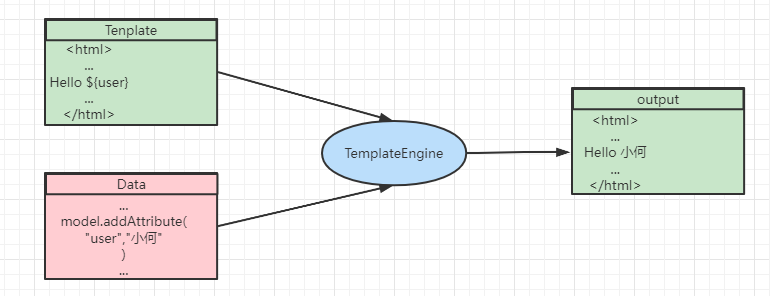
模板引擎是为了解决用户界面(显示)与业务数据(内容)分离而产生的。 它可以生成特定格式的文档,常用的如格式如HTML、xml以及其他格式的文本格式,可以让(网站)程序实现界面与数据分离,业务代码与逻辑代码的分离,这就大大提升了开发效率,良好的设计也使得代码重用变得更加容易。
 二、课前准备:Spring Boot 整合 Thymeleaf
2.1 创建 Spring Boot 项目
通过 Spring Initializr(https://start.spring.io/)创建项目,选择以下依赖:
- Spring Web:提供 MVC 核心功能;
- Thymeleaf:Thymeleaf 模板引擎核心依赖;
- Lombok(可选):简化实体类代码。
2.2 核心依赖(pom.xml)
创建完成后,pom.xml 中会自动引入 Thymeleaf 核心依赖,无需手动添加:
<!-- Thymeleaf 核心依赖 -->
<dependency>
    <groupId>org.springframework.boot</groupId>
    <artifactId>spring-boot-starter-thymeleaf</artifactId>
</dependency>
<!-- Spring Web -->
<dependency>
    <groupId>org.springframework.boot</groupId>
    <artifactId>spring-boot-starter-web</artifactId>
</dependency>
2.3 核心配置(application.yml)
Spring Boot 对 Thymeleaf 有默认配置(如模板存放路径、缓存策略),开发时建议关闭缓存,避免修改模板后需重启服务才能生效:
spring:
  # Thymeleaf 配置
  thymeleaf:
    prefix: classpath:/templates/  # 模板文件存放路径(默认,可省略)
    suffix: .html                  # 模板文件后缀(默认,可省略)
    mode: HTML                     # 模板模式(支持 HTML5、XML 等)
    encoding: UTF-8                # 编码格式
    cache: false                   # 开发环境关闭缓存(生产环境建议开启)
2.4 访问页面
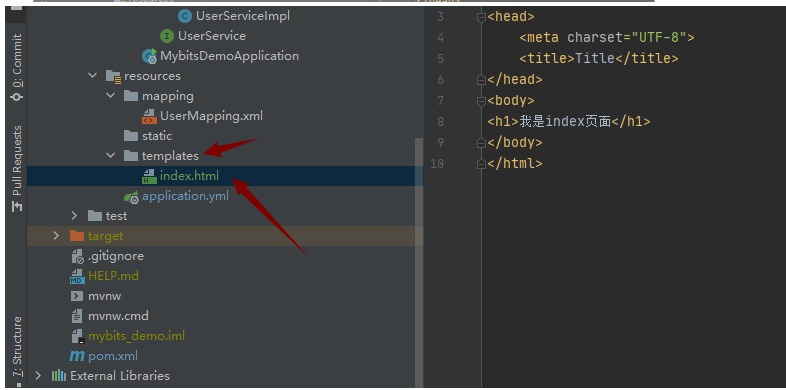
controller层
import org.springframework.stereotype.Controller;
import org.springframework.web.bind.annotation.RequestMapping;


@Controller
public class IndexController {

    @RequestMapping("/")
    public String index(){
        return "index";
    }

}
2.5 访问静态资源
在配置文件当中配置 .yml
spring:
    mvc:
      static-path-pattern: /static/**
2.6 目录结构
Thymeleaf 模板文件默认存放在 src/main/resources/templates 目录下,静态资源(CSS、JS、图片)存放在 src/main/resources/static 目录下,这是 Spring Boot 的标准目录结构:
src
└── main
    ├── java
    │   └── com
    │       └── example
    │           ├── controller  # 控制器(处理请求,传递数据)
    │           └── entity      # 实体类
    └── resources
        ├── static              # 静态资源(css、js、img)
        │   ├── css
        │   │   └── index.css
        │   └── js
        │       └── index.js
        └── templates           # Thymeleaf 模板文件
            ├── index.html      # 首页模板
            └── user            # 模块分目录
                └── list.html   # 用户列表模板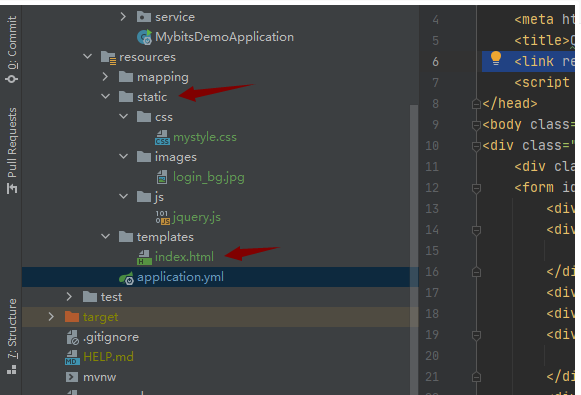
2.6 引用格式
<link rel="stylesheet" href="../static/css/mystyle.css"/>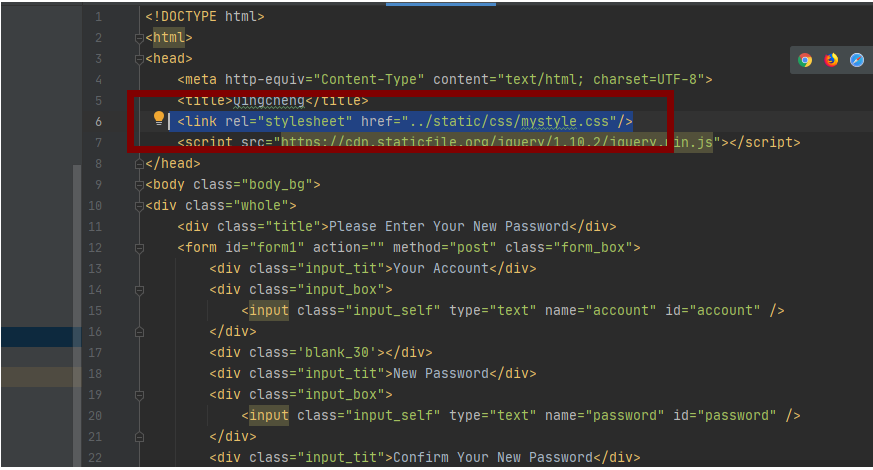
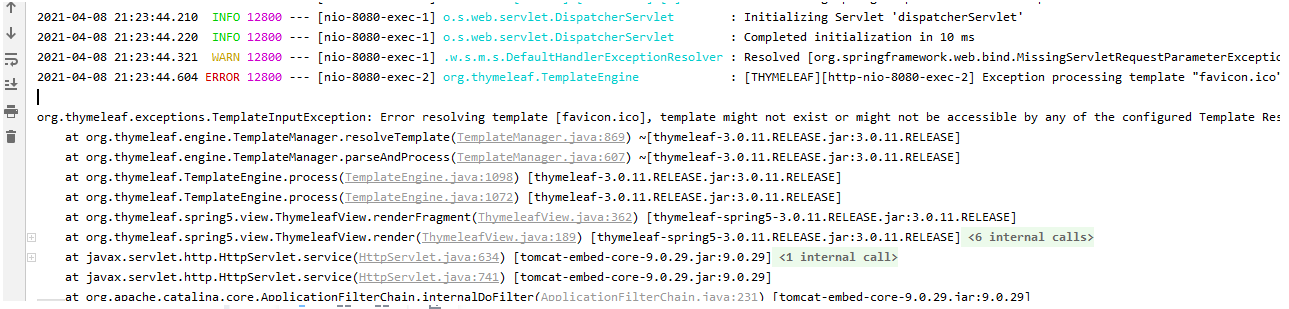
我们在进行正常访问的时候会报一下的错误,这是因为我们需要给网页标题前添加一个小图标favicon.ico
我们需要加上这一句话在页面上
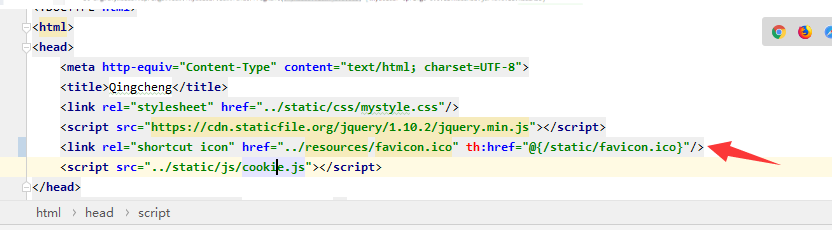
<link rel="shortcut icon" href="../resources/favicon.ico" th:href="@{/static/favicon.ico}"/>三、thymeleaf使用模板
在java代码中写入如下代码:
@RequestMapping("/hello")
public String hello(Model model){
   model.addAttribute("msg","Hello");

   return "hello";
}
html页面中写入如下代码:
<!DOCTYPE html>
<html lang="en" xmlns:th="http://www.thymeleaf.org">
<body>
<h1>Hello</h1>
<div th:text="${msg}"></div>
</body>
</html>
四、thymeleaf实例演示
①、th:text :设置当前元素的文本内容,相同功能的还有th:utext,两者的区别在于前者不会转义html标签,后者会。优先级不高:order=7
②、th:value:设置当前元素的value值,类似修改指定属性的还有th:src,th:href。优先级不高:order=6
@RequestMapping("thymeleaf")
public String thymeleaf(ModelMap map){
    map.put("thText","th:text设置文本内容 <b>加粗</b>");
    map.put("thUText","th:utext 设置文本内容 <b>加粗</b>");
    map.put("thValue","thValue 设置当前元素的value值");
    return "thymeleaf";
}
<p th:text="${thText}"></p>
<p th:utext="${thUText}"></p>
<input type="text" th:value="${thValue}">③、th:each:遍历循环元素,和th:text或th:value一起使用。注意该属性修饰的标签位置,详细往后看。优先级很高:order=2
@RequestMapping("/thymeleaf")
public String  listUser(Model model) {
    List<Person> userList = new ArrayList<Person>();
    for (int i = 0; i <10; i++) {
        userList.add(new Person(i,"张三"+i,20+i,'男'));
    }

    model.addAttribute("users", userList);
    return "thymeleaf";
}
<div>
<ul>
<li th:each="user:${users}">
<span th:text="${user.id}"></span>-
<span th:text="${user.name}"></span>-
<span th:text="${user.age}"></span>-
<span th:text="${user.sex}"></span>
</li>
</ul>
</div>④、th:if:条件判断,类似的还有th:unless,th:switch,th:case。优先级较高:order=3
判断表达式:
gt:great than(大于)>
ge:great equal(大于等于)>=
eq:equal(等于)==
lt:less than(小于)<
le:less equal(小于等于)<=
ne:not equal(不等于)!=
<div th:if=" ${userCarSize} eq '3'">
<div>你好</div>
</div>questMapping("/thymeleaf")
public String listUser(Model model) {
model.addAttribute("size", 3);
return "thymeleaf";
}
汇聚全球AI编程工具,助力开发者即刻编程。
更多推荐



 23
23 0
0- 0


 已为社区贡献37条内容

所有评论(0)