
Go Protobuf 简明教程
文章目录
1 Protocol Buffers 简介
protobuf 即 Protocol Buffers,是一种轻便高效的结构化数据存储格式,与语言、平台无关,可扩展可序列化。protobuf 性能和效率大幅度优于 JSON、XML 等其他的结构化数据格式。protobuf 是以二进制方式存储的,占用空间小,但也带来了可读性差的缺点。protobuf 在通信协议和数据存储等领域应用广泛。例如著名的分布式缓存工具 Memcached 的 Go 语言版本groupcache 就使用了 protobuf 作为其 RPC 数据格式。
Protobuf 在 .proto 定义需要处理的结构化数据,可以通过 protoc 工具,将 .proto 文件转换为 C、C++、Golang、Java、Python 等多种语言的代码,兼容性好,易于使用。
2 安装
2.1 protoc
protoc 是 Protocol Buffers(protobuf) 的“编译器”(全称常叫 protocol buffer compiler)


root@GoLang:~/proj1/GoDistributeCache# protoc \
  --go_out=. --go_opt=paths=source_relative \
  --go-grpc_out=. --go-grpc_opt=paths=source_relative \
  pb/gdc.proto
root@GoLang:~/proj1/GoDistributeCache#

从 Protobuf Releases 下载最先版本的发布包安装。如果是 Ubuntu,可以按照如下步骤操作(以3.11.2为例)。
# 下载安装包
$ wget https://github.com/protocolbuffers/protobuf/releases/download/v3.11.2/protoc-3.11.2-linux-x86_64.zip
# 解压到 /usr/local 目录下
$ sudo 7z x protoc-3.11.2-linux-x86_64.zip -o/usr/local
如果不想安装在 /usr/local 目录下,可以解压到其他的其他,并把解压路径下的 bin 目录 加入到环境变量即可。
如果能正常显示版本,则表示安装成功。
$ protoc --version
libprotoc 3.11.2
因为我之前做的项目已经安装过protoc了,所以版本是
root@GoLang:~/proj/goforjob# protoc --version
libprotoc 3.12.4
2.2 protoc-gen-go
我们需要在 Golang 中使用 protobuf,还需要安装 protoc-gen-go,这个工具用来将 .proto 文件转换为 Golang 代码。
go get -u github.com/golang/protobuf/protoc-gen-go
protoc-gen-go 将自动安装到 $GOPATH/bin 目录下,也需要将这个目录加入到环境变量中。
因为我之前做项目安装过了
root@GoLang:~/proj/goforjob# which protoc-gen-go
/root/go/bin/protoc-gen-go
root@GoLang:~/proj/goforjob# protoc-gen-go --version
protoc-gen-go v1.36.10
3 定义消息类型
接下来,我们创建一个非常简单的示例,student.proto
syntax = "proto3";
package pb;

// go_package 用来指定生成的 Go 包路径
option go_package = "./";

// this is a comment
message Student {
  string name = 1;
  bool male = 2;
  repeated int32 scores = 3;
}
在当前目录下执行:
root@GoLang:~/proj/goforjob# protoc --go_out=. --go_opt=paths=source_relative pb/student.proto

将该 pb 目录下的所有的 .proto 文件转换为 Go 代码,我们可以看到该目录下多出了一个 Go 文件 student.pb.go。这个文件内部定义了一个结构体 Student,以及相关的方法:
// this is a comment
type Student struct {
	state         protoimpl.MessageState `protogen:"open.v1"`
	Name          string                 `protobuf:"bytes,1,opt,name=name,proto3" json:"name,omitempty"`
	Male          bool                   `protobuf:"varint,2,opt,name=male,proto3" json:"male,omitempty"`
	Scores        []int32                `protobuf:"varint,3,rep,packed,name=scores,proto3" json:"scores,omitempty"`
	unknownFields protoimpl.UnknownFields
	sizeCache     protoimpl.SizeCache
}
// Code generated by protoc-gen-go. DO NOT EDIT.
// versions:
// 	protoc-gen-go v1.36.10
// 	protoc        v3.12.4
// source: pb/student.proto

package __

import (
	protoreflect "google.golang.org/protobuf/reflect/protoreflect"
	protoimpl "google.golang.org/protobuf/runtime/protoimpl"
	reflect "reflect"
	sync "sync"
	unsafe "unsafe"
)

const (
	// Verify that this generated code is sufficiently up-to-date.
	_ = protoimpl.EnforceVersion(20 - protoimpl.MinVersion)
	// Verify that runtime/protoimpl is sufficiently up-to-date.
	_ = protoimpl.EnforceVersion(protoimpl.MaxVersion - 20)
)

// this is a comment
type Student struct {
	state         protoimpl.MessageState `protogen:"open.v1"`
	Name          string                 `protobuf:"bytes,1,opt,name=name,proto3" json:"name,omitempty"`
	Male          bool                   `protobuf:"varint,2,opt,name=male,proto3" json:"male,omitempty"`
	Scores        []int32                `protobuf:"varint,3,rep,packed,name=scores,proto3" json:"scores,omitempty"`
	unknownFields protoimpl.UnknownFields
	sizeCache     protoimpl.SizeCache
}

func (x *Student) Reset() {
	*x = Student{}
	mi := &file_pb_student_proto_msgTypes[0]
	ms := protoimpl.X.MessageStateOf(protoimpl.Pointer(x))
	ms.StoreMessageInfo(mi)
}

func (x *Student) String() string {
	return protoimpl.X.MessageStringOf(x)
}

func (*Student) ProtoMessage() {}

func (x *Student) ProtoReflect() protoreflect.Message {
	mi := &file_pb_student_proto_msgTypes[0]
	if x != nil {
		ms := protoimpl.X.MessageStateOf(protoimpl.Pointer(x))
		if ms.LoadMessageInfo() == nil {
			ms.StoreMessageInfo(mi)
		}
		return ms
	}
	return mi.MessageOf(x)
}

// Deprecated: Use Student.ProtoReflect.Descriptor instead.
func (*Student) Descriptor() ([]byte, []int) {
	return file_pb_student_proto_rawDescGZIP(), []int{0}
}

func (x *Student) GetName() string {
	if x != nil {
		return x.Name
	}
	return ""
}

func (x *Student) GetMale() bool {
	if x != nil {
		return x.Male
	}
	return false
}

func (x *Student) GetScores() []int32 {
	if x != nil {
		return x.Scores
	}
	return nil
}

var File_pb_student_proto protoreflect.FileDescriptor

const file_pb_student_proto_rawDesc = "" +
	"\n" +
	"\x10pb/student.proto\x12\x02pb\"I\n" +
	"\aStudent\x12\x12\n" +
	"\x04name\x18\x01 \x01(\tR\x04name\x12\x12\n" +
	"\x04male\x18\x02 \x01(\bR\x04male\x12\x16\n" +
	"\x06scores\x18\x03 \x03(\x05R\x06scoresB\x04Z\x02./b\x06proto3"

var (
	file_pb_student_proto_rawDescOnce sync.Once
	file_pb_student_proto_rawDescData []byte
)

func file_pb_student_proto_rawDescGZIP() []byte {
	file_pb_student_proto_rawDescOnce.Do(func() {
		file_pb_student_proto_rawDescData = protoimpl.X.CompressGZIP(unsafe.Slice(unsafe.StringData(file_pb_student_proto_rawDesc), len(file_pb_student_proto_rawDesc)))
	})
	return file_pb_student_proto_rawDescData
}

var file_pb_student_proto_msgTypes = make([]protoimpl.MessageInfo, 1)
var file_pb_student_proto_goTypes = []any{
	(*Student)(nil), // 0: pb.Student
}
var file_pb_student_proto_depIdxs = []int32{
	0, // [0:0] is the sub-list for method output_type
	0, // [0:0] is the sub-list for method input_type
	0, // [0:0] is the sub-list for extension type_name
	0, // [0:0] is the sub-list for extension extendee
	0, // [0:0] is the sub-list for field type_name
}

func init() { file_pb_student_proto_init() }
func file_pb_student_proto_init() {
	if File_pb_student_proto != nil {
		return
	}
	type x struct{}
	out := protoimpl.TypeBuilder{
		File: protoimpl.DescBuilder{
			GoPackagePath: reflect.TypeOf(x{}).PkgPath(),
			RawDescriptor: unsafe.Slice(unsafe.StringData(file_pb_student_proto_rawDesc), len(file_pb_student_proto_rawDesc)),
			NumEnums:      0,
			NumMessages:   1,
			NumExtensions: 0,
			NumServices:   0,
		},
		GoTypes:           file_pb_student_proto_goTypes,
		DependencyIndexes: file_pb_student_proto_depIdxs,
		MessageInfos:      file_pb_student_proto_msgTypes,
	}.Build()
	File_pb_student_proto = out.File
	file_pb_student_proto_goTypes = nil
	file_pb_student_proto_depIdxs = nil
}
逐行解读student.proto
- protobuf 有2个版本,默认版本是 proto2,如果需要 proto3,则需要在非空非注释第一行使用 syntax = “proto3” 标明版本。
- package,即包名声明符是可选的,用来防止不同的消息类型有命名冲突。
- 消息类型 使用 message 关键字定义,Student 是类型名,name, male, scores 是该类型的 3 个字段,类型分别为 string, bool 和 []int32。字段可以是标量类型,也可以是合成类型。
- 每个字段的修饰符默认是 singular,一般省略不写,repeated 表示字段可重复,即用来表示 Go 语言中的数组类型。
- 每个字符 =后面的数字称为标识符,每个字段都需要提供一个唯一的标识符。标识符用来在消息的二进制格式中识别各个字段,一旦使用就不能够再改变,标识符的取值范围为 [1, 2^29 - 1] 。
- .proto 文件可以写注释,单行注释 //,多行注释 /* … */
- 一个 .proto 文件中可以写多个消息类型,即对应多个结构体(struct)。
接下来,就可以在项目代码中直接使用了,以下是一个非常简单的例子,即证明被序列化的和反序列化后的实例,包含相同的数据。
package main

import (
	"log"
	pb "test/pb"

	"google.golang.org/protobuf/proto"
)

func main() {
	test := &pb.Student{
		Name:   "Simon",
		Male:   true,
		Scores: []int32{98, 85, 88},
	}
	// 把 protobuf 对象编码成二进制
	// proto.Marshal 会把 test 按 protobuf 的编码规则变成 []byte(二进制字节流)
	data, err := proto.Marshal(test)
	if err != nil {
		log.Fatal("marshaling error: ", err)
	}
	// 准备一个空对象,用来接收反序列化结果
	newTest := &pb.Student{}
	// 把二进制解码成 protobuf 对象
	// proto.Unmarshal 把 data 里的二进制解析出来,填充到 newTest 指向的结构体里。
	// 成功后,newTest 的字段应和 test 一样
	err = proto.Unmarshal(data, newTest)
	if err != nil {
		log.Fatal("unmarshaling error: ", err)
	}
	// Now test and newTest contain the same data.
	if test.GetName() != newTest.GetName() {
		log.Fatalf("data mismatch %q != %q", test.GetName(), newTest.GetName())
	}
}
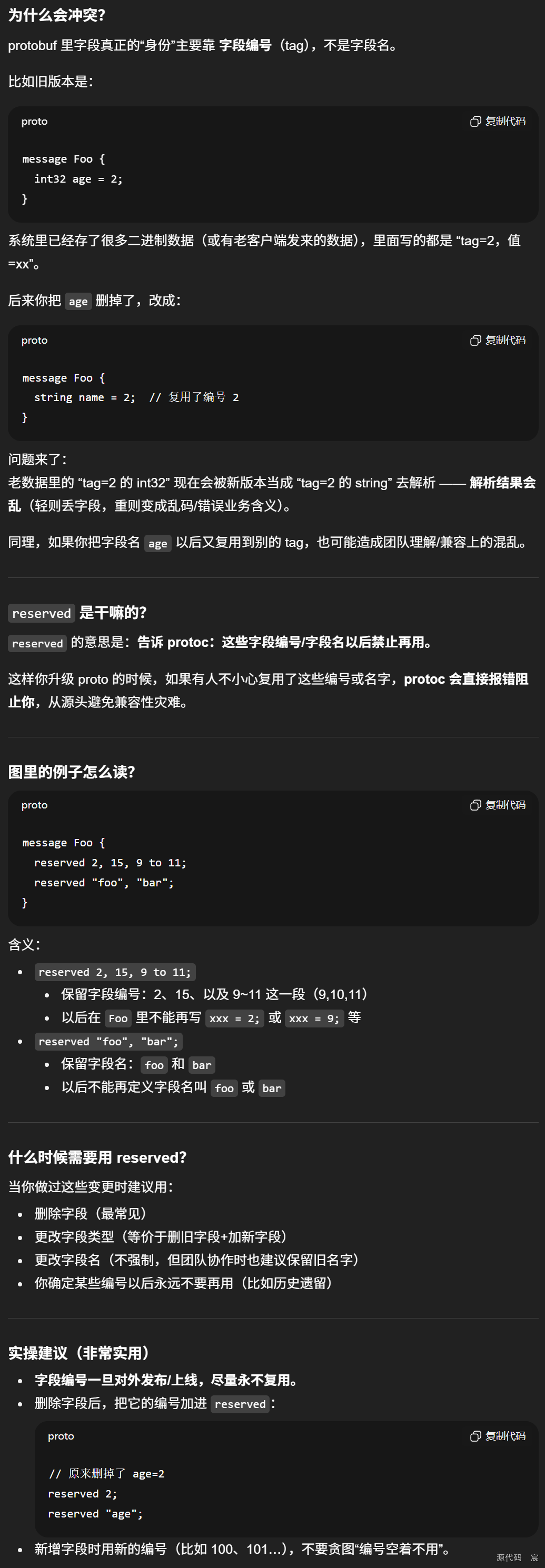
- 保留字段(Reserved Field)
更新消息类型时,可能会将某些字段/标识符删除。这些被删掉的字段/标识符可能被重新使用,如果加载老版本的数据时,可能会造成数据冲突,在升级时,可以将这些字段/标识符保留(reserved),这样就不会被重新使用了,protoc 会检查。
“保留字段(reserved)”,本质是在解决 protobuf 的一个大坑:你删掉/改掉字段后,如果未来又把同一个字段编号(tag)或字段名拿来复用,会导致老数据被错误解释,产生数据冲突。
message Foo {
  reserved 2, 15, 9 to 11;
  reserved "foo", "bar";
}
4 字段类型
4.1 标量类型(Scalar)

标量类型如果没有被赋值,则不会被序列化,解析时,会赋予默认值。
- strings:空字符串
- bytes:空序列
- bools:false
- 数值类型:0
4.2 枚举(Enumerations)
枚举类型适用于提供一组预定义的值,选择其中一个。例如我们将性别定义为枚举类型。
message Student {
  string name = 1;
  enum Gender {
    FEMALE = 0;
    MALE = 1;
  }
  Gender gender = 2;
  repeated int32 scores = 3;
}
- 枚举类型的第一个选项的标识符必须是0,这也是枚举类型的默认值。
- 别名(Alias),允许为不同的枚举值赋予相同的标识符,称之为别名,需要打开allow_alias选项。
message EnumAllowAlias {
  enum Status {
    option allow_alias = true;
    UNKOWN = 0;
    STARTED = 1;
    RUNNING = 1;
  }
}
4.3 使用其他消息类型
Result是另一个消息类型,在 SearchReponse 作为一个消息字段类型使用。
message SearchResponse {
  repeated Result results = 1;
}

message Result {
  string url = 1;
  string title = 2;
  repeated string snippets = 3;
}
嵌套写也是支持的:
message SearchResponse {
  message Result {
    string url = 1;
    string title = 2;
    repeated string snippets = 3;
  }
  repeated Result results = 1;
}
如果定义在其他文件中,可以导入其他消息类型来使用:
import "myproject/other_protos.proto";
4.4 任意类型(Any)
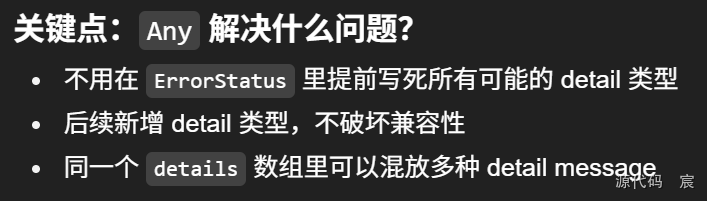
Any 可以表示不在 .proto 中定义任意的内置类型。
import "google/protobuf/any.proto";

message ErrorStatus {
  string message = 1;
  repeated google.protobuf.Any details = 2;
}
4.5 oneof
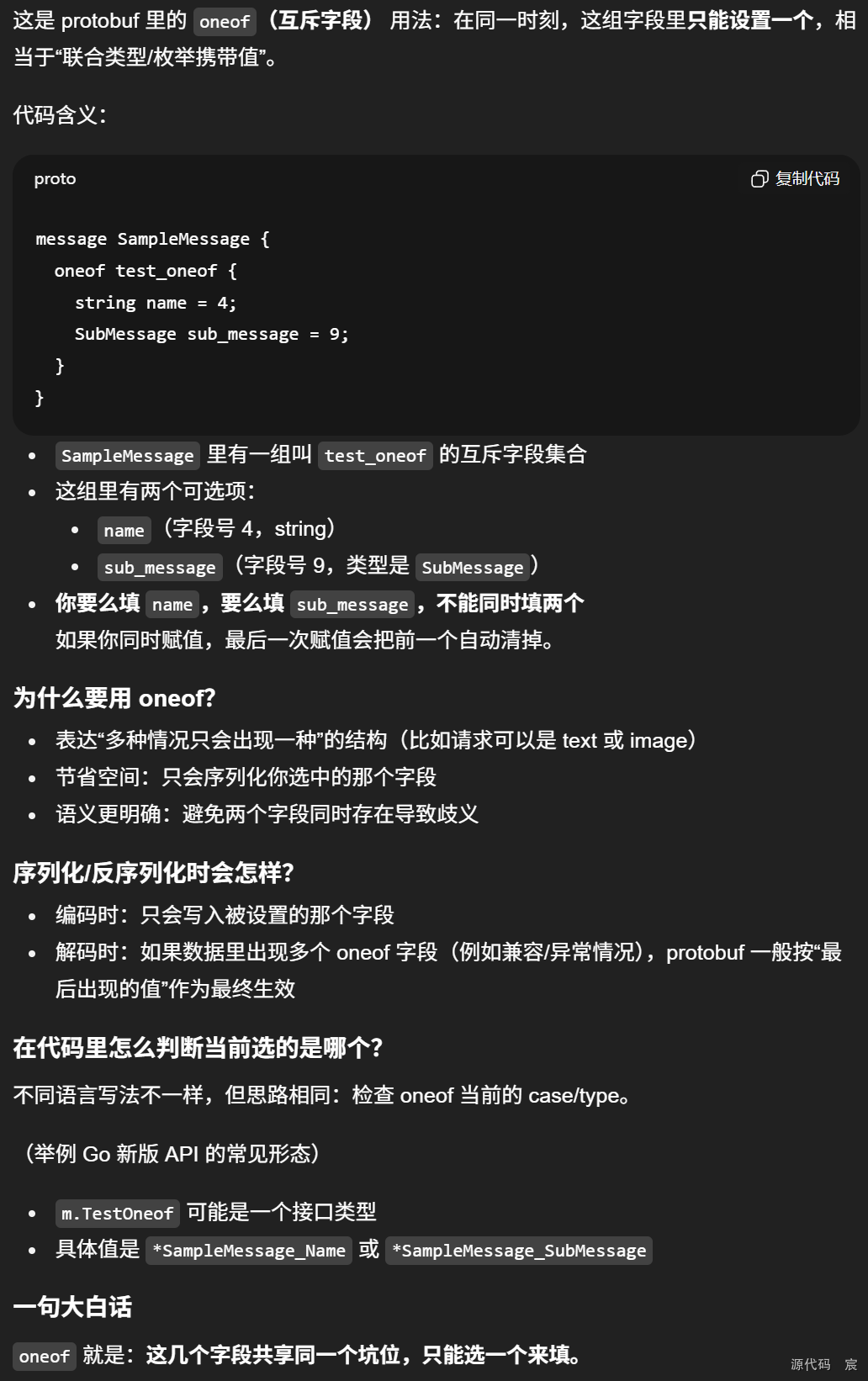
message SampleMessage {
  oneof test_oneof {
    string name = 4;
    SubMessage sub_message = 9;
  }
}
4.6 map
message MapRequest {
  map<string, int32> points = 1;
}
5 定义服务(Services)
如果消息类型是用来远程通信的(Remote Procedure Call, RPC),可以在 .proto 文件中定义 RPC 服务接口。例如我们定义了一个名为 SearchService 的 RPC 服务,提供了 Search 接口,入参是 SearchRequest 类型,返回类型是 SearchResponse
service SearchService {
  rpc Search (SearchRequest) returns (SearchResponse);
}
官方仓库也提供了一个插件列表,帮助开发基于 Protocol Buffer 的 RPC 服务。
6 protoc 其他参数
命令行使用方法
protoc --proto_path=IMPORT_PATH --<lang>_out=DST_DIR path/to/file.proto
- –proto_path=IMPORT_PATH:可以在 .proto 文件中 import 其他的 .proto 文件,proto_path 即用来指定其他 .proto 文件的查找目录。如果没有引入其他的 .proto 文件,该参数可以省略。
- –<lang>_out=DST_DIR:指定生成代码的目标文件夹,例如 –go_out=. 即生成 GO 代码在当前文件夹,另外支持 cpp/java/python/ruby/objc/csharp/php 等语言
7 推荐风格

之后我会持续更新,如果喜欢我的文章,请记得一键三连哦,点赞关注收藏,你的每一个赞每一份关注每一次收藏都将是我前进路上的无限动力 !!!↖(▔▽▔)↗感谢支持!

汇聚全球AI编程工具,助力开发者即刻编程。
更多推荐

 16
16 0
0- 0


 已为社区贡献5条内容

所有评论(0)