
java 代码审计 - 目录穿越(遍历)
目录穿越(遍历)漏洞是一种允许攻击者在未授权的状态下读取应用服务器上任意文件的安全漏洞。
漏洞原理
目录穿越(遍历)漏洞往往出现在需要用户提供路径或文件名的地方,如文件上传或下载。
当用户发起前端请求时,文件名或路径传递到后端,后端直接接收没有进行严格的过滤和安全检查,攻击者可能会通过../等手段让后端打开或执行其他文件,从而实现任意文件的读取、下载、删除或将文件上传到指定目录,导致后台服务器上的其他目录被遍历,形成目录穿越(遍历)漏洞。
审计的关键函数
需要关注的一些关键函数、类及关键字:
-
sun.nio.ch.FileChannelImpl
-
java.io.File
-
java.io.FileInputStream
-
java.io.FileOutputStream
-
java.io.FileSystem
-
java.io.RandomAccessFile
-
sun.nio.fs.CopyFile
-
filePath
-
getFile
-
new FileInputStream
-
new FileOutputStream
-
new File
-
mkdirs
-
getOriginalFilename
-
UrlResource(Spring)
-
FileSystemResource(Spring)
-
ClassPathResource(Spring)
-
ServletContextResource(Spring)
除以上关键函数、类及关键字外,还可以排查程序的安全策略配置文件,全局搜素permission、java.io.FilePermission、grant等,确保没有给程序的某部分路径赋予不必要的读写权限。
Spring Framework 目录穿越漏洞审计
漏洞背景简述
-
漏洞编号:CVE-2024-38816
-
漏洞名称:Spring Framework 路径遍历漏洞(Path Traversal Vulnerability)
-
漏洞类型:路径遍历(Directory/Path Traversal)
-
影响版本:5.3.0 - 5.3.39,6.0.0 - 6.0.23,6.1.0 - 6.1.12
-
影响范围:使用 Spring WebMvc.fn 或 WebFlux.fn 功能性 Web 框架,并通过 RouterFunctions 提供静态资源的应用程序
-
利用条件:
-
使用 RouterFunctions 提供静态资源:应用程序通过 RouterFunctions.resources 方法配置静态资源路由。
-
资源处理明确配置了 FileSystemResource:静态资源的路径使用了 FileSystemResource 进行定义。
-
环境搭建
pom.xml
<?xml version="1.0" encoding="UTF-8"?>
<project xmlns="http://maven.apache.org/POM/4.0.0" xmlns:xsi="http://www.w3.org/2001/XMLSchema-instance"
         xsi:schemaLocation="http://maven.apache.org/POM/4.0.0 https://maven.apache.org/xsd/maven-4.0.0.xsd">
    <modelVersion>4.0.0</modelVersion>
    <groupId>directory.traversal</groupId>
    <artifactId>CVE-2024-38816</artifactId>
    <version>0.0.1-SNAPSHOT</version>
    <name>CVE-2024-38816</name>
    <description>CVE-2024-38816</description>
    <properties>
        <java.version>17</java.version>
        <project.build.sourceEncoding>UTF-8</project.build.sourceEncoding>
        <project.reporting.outputEncoding>UTF-8</project.reporting.outputEncoding>
        <spring-boot.version>3.0.2</spring-boot.version>
    </properties>
    <dependencies>
        <!-- Spring Boot Starter Web,排除默认的 Tomcat -->
        <dependency>
            <groupId>org.springframework.boot</groupId>
            <artifactId>spring-boot-starter-web</artifactId>
            <exclusions>
                <exclusion>
                    <groupId>org.springframework.boot</groupId>
                    <artifactId>spring-boot-starter-tomcat</artifactId>
                </exclusion>
            </exclusions>
        </dependency>
        <!-- Spring Boot Starter Undertow 代替默认的 Tomcat -->
        <dependency>
            <groupId>org.springframework.boot</groupId>
            <artifactId>spring-boot-starter-undertow</artifactId>
        </dependency>
    </dependencies>
    <dependencyManagement>
        <dependencies>
            <dependency>
                <groupId>org.springframework.boot</groupId>
                <artifactId>spring-boot-dependencies</artifactId>
                <version>${spring-boot.version}</version>
                <type>pom</type>
                <scope>import</scope>
            </dependency>
        </dependencies>
    </dependencyManagement>
    <build>
        <plugins>
            <plugin>
                <groupId>org.apache.maven.plugins</groupId>
                <artifactId>maven-compiler-plugin</artifactId>
                <version>3.8.1</version>
                <configuration>
                    <source>17</source>
                    <target>17</target>
                    <encoding>UTF-8</encoding>
                </configuration>
            </plugin>
            <plugin>
                <groupId>org.springframework.boot</groupId>
                <artifactId>spring-boot-maven-plugin</artifactId>
                <version>${spring-boot.version}</version>
                <configuration>
                    <mainClass>directory.traversal.cve202438816.Cve202438816Application</mainClass>
                    <skip>true</skip>
                </configuration>
                <executions>
                    <execution>
                        <id>repackage</id>
                        <goals>
                            <goal>repackage</goal>
                        </goals>
                    </execution>
                </executions>
            </plugin>
        </plugins>
    </build>
</project>
创建一个类,用于自定义静态资源的访问路径或位置。
package directory.traversal.cve202438816;

import org.springframework.context.annotation.Bean;
import org.springframework.context.annotation.Configuration;
import org.springframework.core.io.FileSystemResource;
import org.springframework.web.servlet.function.RouterFunction;
import org.springframework.web.servlet.function.RouterFunctions;
import org.springframework.web.servlet.function.ServerResponse;

@Configuration
public class WebConfig {
    @Bean
    public RouterFunction <ServerResponse> route(){
return RouterFunctions.resources("/static/**", new FileSystemResource("D:/learn/java/CVE-2024-38816/src/main/resources/static/"));
    }
}
创建资源文件resources,在该目录下创建static目录。在static目录下创建文本文件1.txt ,内容随意。
运行项目,访问static/1.txt。

开始审计
apply方法是 Spring WebFlux(或 Spring Web MVC)中用于静态资源处理的方法,其作用是根据传入的请求路径,判断是否匹配某个预定义的资源路径模式,并尝试定位并返回一个可读的Resource对象。
public Optional<Resource> apply(ServerRequest request){
    PathContainer pathContainer = request.requestPath().pathWithinApplication();
if (!this.pattern.matches(pathContainer)) {
return Optional.empty();
    } else {
        pathContainer = this.pattern.extractPathWithinPattern(pathContainer);
        String path = this.processPath(pathContainer.value());
if (path.contains("%")) {
            path = StringUtils.uriDecode(path, StandardCharsets.UTF_8);
        }

if (StringUtils.hasLength(path) && !this.isInvalidPath(path)) {
try {
                Resource resource = this.location.createRelative(path);
return resource.isReadable() && this.isResourceUnderLocation(resource) ? Optional.of(resource) : Optional.empty();
            } catch (IOException ex) {
thrownew UncheckedIOException(ex);
            }
        } else {
return Optional.empty();
        }
    }
}
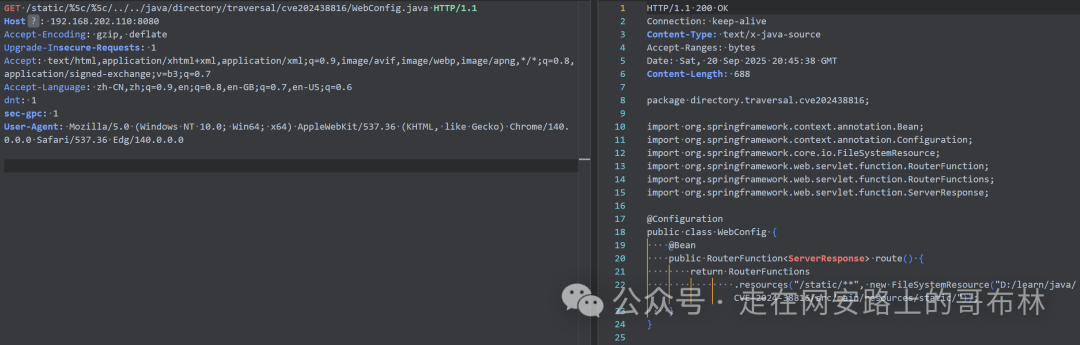
以 POC /static/%5c/%5c/../../java/directory/traversal/cve202438816/WebConfig.java 进行调试。
在org.springframework.web.servlet.function.PathResourceLookupFunction#apply打上断点。
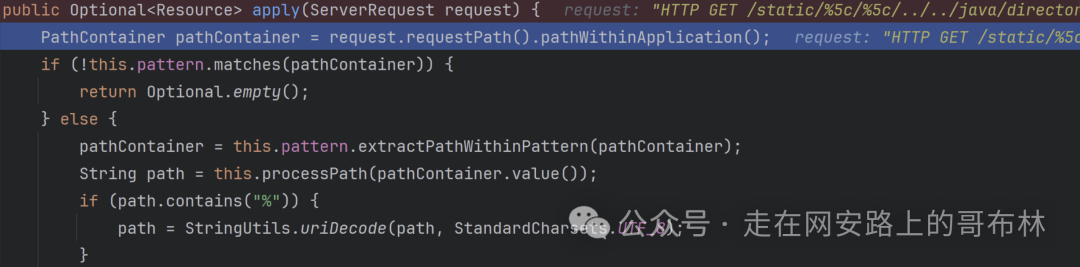
首先进入到PathContainer pathContainer = request.requestPath().pathWithinApplication();获取当前请求在应用程序上下文内的路径。
然后进行请求路径匹配模式检查if (!this.pattern.matches(pathContainer)) {return Optional.empty();}。
接着通过pathContainer = this.pattern.extractPathWithinPattern(pathContainer);获取真正需要映射到资源文件系统路径的相对部分。

进入到processPath,移除路径开头的无效字符。比如///1.txt处理后就变成了/1.txt。
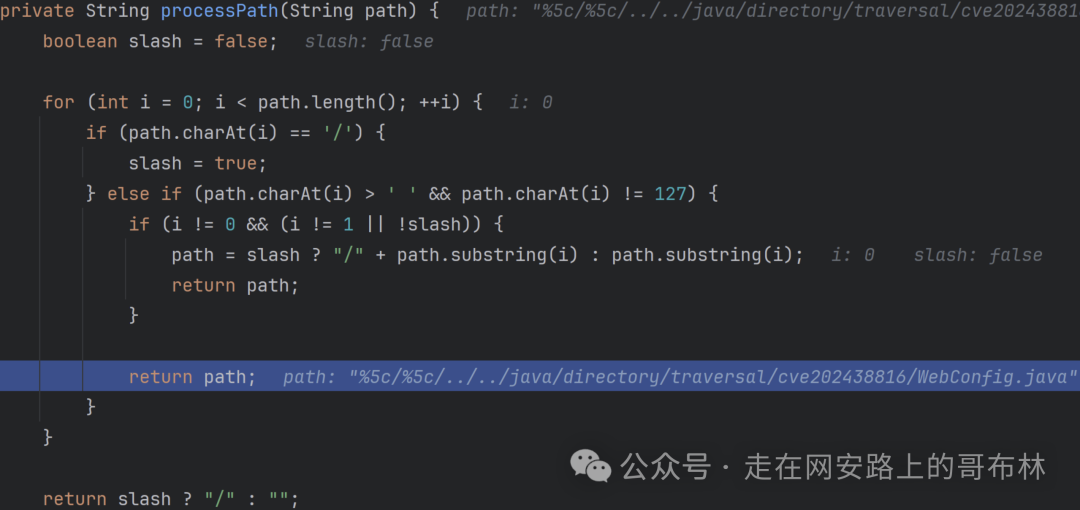
可以看到processPath方法并未处理掉%5c。
接下来判断是否存在%,若存在通过StringUtils.uriDecode进行 url 解码。
if (path.contains("%")) {
    path = StringUtils.uriDecode(path, StandardCharsets.UTF_8);
}
解码前:

解码后:

然后调用isInvalidPath进行安全性检查。
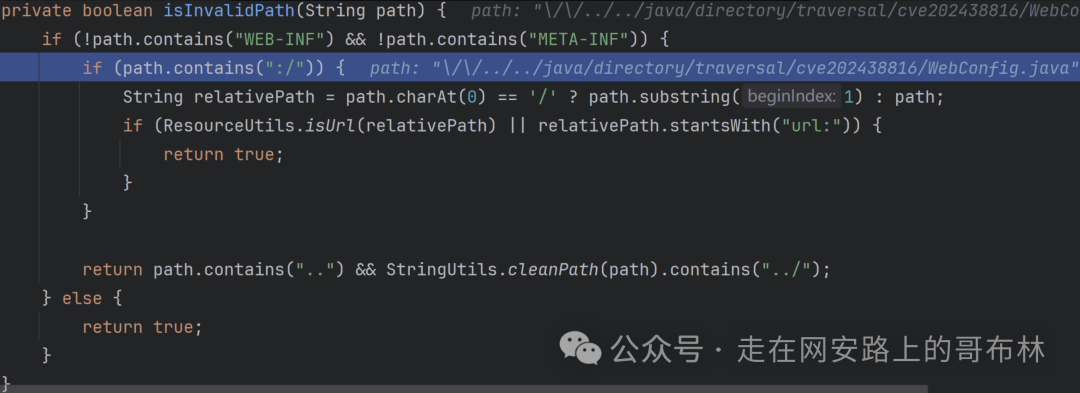
由于不包含WEB-INF、META-INF以及:/,继而走到了path.contains("..") && StringUtils.cleanPath(path).contains("../");。
public static String cleanPath(String path) {
// 如果路径为空或 null,直接返回原值(不处理)。
if (!hasLength(path)) {
return path;
    } else {
// 将所有反斜杠 \ 替换为正斜杠 /。
        String normalizedPath = replace(path, "\\", "/");
        String pathToUse = normalizedPath;
// 如果路径中没有 .,说明不可能有 .(当前目录)或 ..(上级目录)这类相对路径符号
if (normalizedPath.indexOf(46) == -1) {
return normalizedPath;
        } else {
// 查找第一个 : 的位置,用于识别“协议/驱动器前缀”。
int prefixIndex = normalizedPath.indexOf(58);
            String prefix = "";
if (prefixIndex != -1) {
                prefix = normalizedPath.substring(0, prefixIndex + 1);
if (prefix.contains("/")) {
                    prefix = "";
                } else {
                    pathToUse = normalizedPath.substring(prefixIndex + 1);
                }
            }

if (pathToUse.startsWith("/")) {
                prefix = prefix + "/";
                pathToUse = pathToUse.substring(1);
            }
// 用 / 分割路径,得到路径段数组(如 ["dir", "sub", "..", "file.txt"])
            String[] pathArray = delimitedListToStringArray(pathToUse, "/");
            Deque<String> pathElements = new ArrayDeque(pathArray.length);
int tops = 0; // // 记录未解析的 ".." 数量
// 从后往前处理路径段
for(int i = pathArray.length - 1; i >= 0; --i) {
                String element = pathArray[i];
if (!".".equals(element)) {
if ("..".equals(element)) {
                        ++tops;
                    } elseif (tops > 0) {
                        --tops;
                    } else {
                        pathElements.addFirst(element);
                    }
                }
            }
// 如果原始路径段数量==处理后数量,说明没有发生 . 或 .. 的清理,直接返回原路径
if (pathArray.length == pathElements.size()) {
return normalizedPath;
            } else {
for(int i = 0; i < tops; ++i) {
                    pathElements.addFirst("..");
                }

if (pathElements.size() == 1 && ((String)pathElements.getLast()).isEmpty() && !prefix.endsWith("/")) {
                    pathElements.addFirst(".");
                }
// 将 Deque 中的路径段用 / 连接成字符串,加上前缀后返回完整路径。
                String joined = collectionToDelimitedString(pathElements, "/");
return prefix.isEmpty() ? joined : prefix + joined;
            }
        }
    }
}
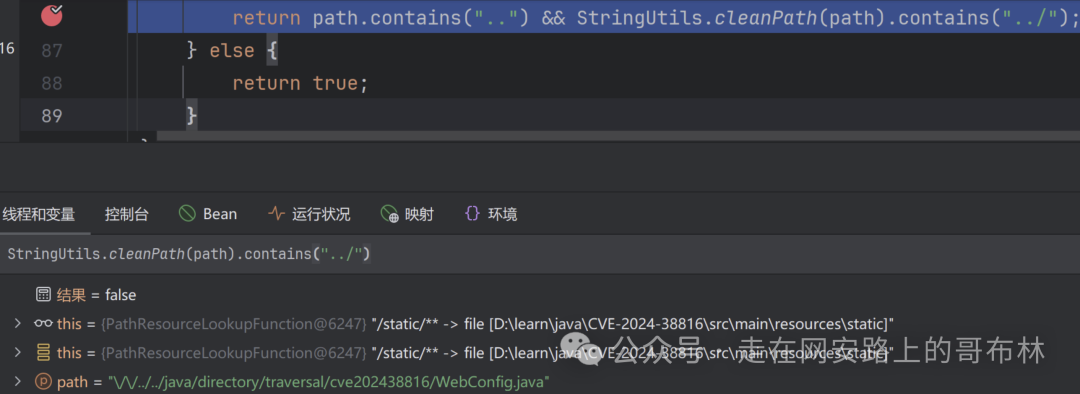
此方法在处理路径时有个特点,比如传入是//../../1.txt,它会将//当作是目录,所以//../../1.txt就变成了/1.txt,使StringUtils.cleanPath(path).contains("../")为False,但是在文件系中//../../1.txt会被认为是/../../1.txt。

返回的结果不包含../,成功绕过检测。
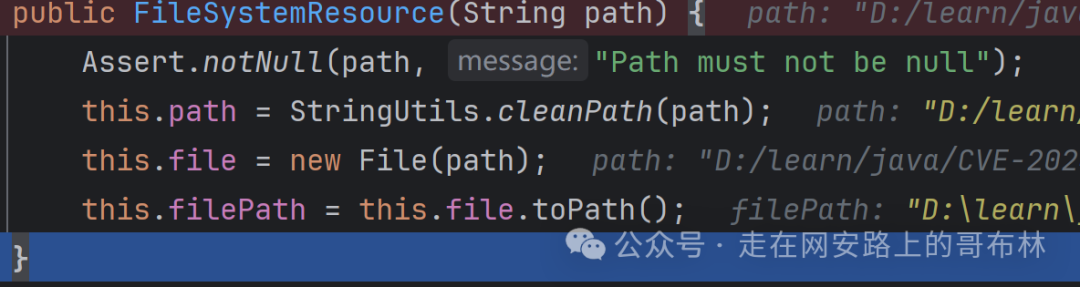
后而调用createRelative创建资源对象。


创建的File对象使用的是传入的参数path,从而实现了目录穿越。

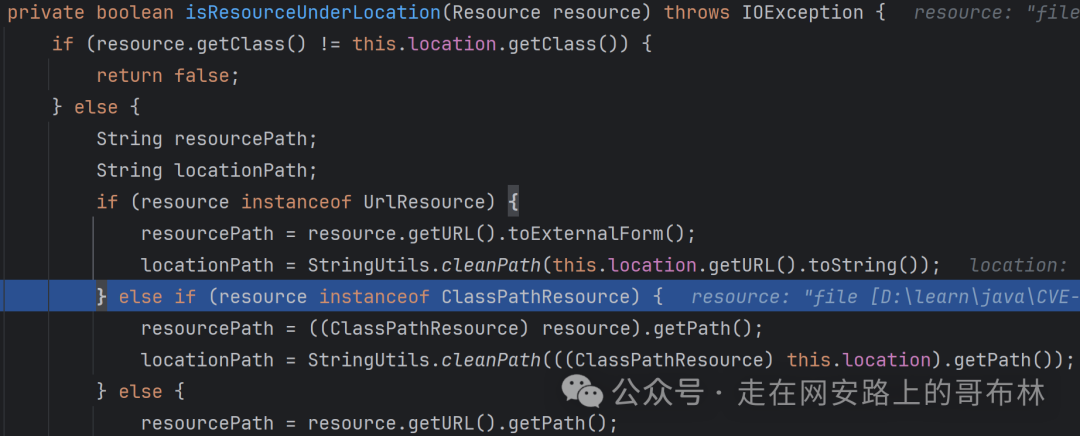
后续又调用了isResourceUnderLocation,它是静态资源处理链中的最后一道安全防线。
最后通过writeToInternal写入 HTTP 响应体。


汇聚全球AI编程工具,助力开发者即刻编程。
更多推荐



 22
22 0
0- 0


 已为社区贡献14条内容

所有评论(0)