
05 Backend Web API Service / REST API / 后端网络API服务/REST API
Backend Web API Service / REST API / 后端网络API服务/REST API
Overview 概述
The Template Kit creates a back-end Web API Service (Web API) with integrated authorization and CRUD operations powered by Microsoft EF Core and DevExpress XPO ORM library. You can use OAuth2, JWT, or custom strategies for authentication. The built-in Security System also filters out secure server data based on permissions granted to users.
模板工具包创建了一个后端Web API服务(Web API),集成了由Microsoft EF Core和DevExpress XPO ORM库驱动的授权与CRUD操作功能。您可以使用OAuth2、JWT或自定义策略进行身份验证。内置的安全系统还会根据授予用户的权限过滤掉服务器上的敏感数据。
The Web API creates URLs (endpoints) that allow you to perform CRUD operations from your non-XAF UI applications (for instance, .NET MAUI, JavaScript, or Blazor clients). It uses ASP.NET Core OData to support paging, filters, and other OData options. This service can be hosted as part of a Blazor Server project or as a standalone ASP.NET Core project.
Web API 创建了 URL(端点),允许您从非 XAF UI 应用程序(例如 .NET MAUI、JavaScript 或 Blazor 客户端)执行 CRUD 操作。它使用 ASP.NET Core OData 来支持分页、过滤器和其他 OData 选项。该服务可以作为 Blazor Server 项目的一部分托管,也可以作为独立的 ASP.NET Core 项目托管。
The Web API utilizes Swagger (OpenAPI) to display and test endpoints. You can also test endpoints or consume the Web API with other platforms (for example, Postman, .NET, or JavaScript).
Web API 使用 Swagger(OpenAPI)来展示和测试端点。您也可以使用其他平台(例如 Postman、.NET 或 JavaScript)来测试端点或使用 Web API。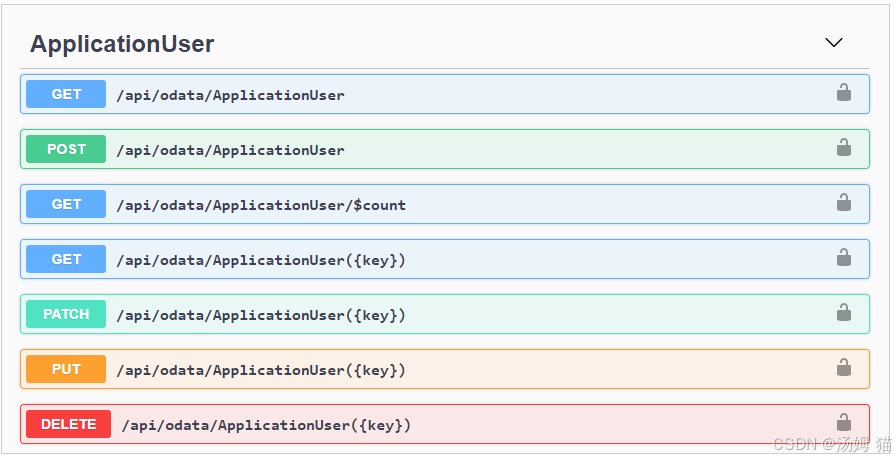
The basic functions of our Web API Service (including the Template Kit) are available for free as part of our .NET App Security & Web API Service free offer. To register your free copy today, please visit our .NET App Security & Web API – Free Offer from DevExpress page.
我们的Web API服务(包括模板工具包)基本功能作为**.NET应用安全与Web API服务免费套餐**的一部分可免费使用。立即注册免费版本,请访问我们的DevExpress .NET应用安全与Web API免费套餐页面。
Additional services/benefits of our Web API Service ship as part of the DevExpress Universal Subscription and include:
我们的Web API服务的附加服务/福利作为DevExpress通用订阅的一部分提供,包括:
- Technical support and full source code. 技术支持与完整源代码。
- XAF’s administrative UI to manage users and roles at runtime using
WinForms and ASP.NET Core Blazor apps: Getting Started Tutorial |
Demos. XAF 运行时管理用户和角色的管理界面(支持 WinForms 和 ASP.NET Core Blazor 应用):入门教程
| 演示示例 - Localization functions (endpoints to obtain localized captions for
classes, members, and custom UI elements).
本地化功能(用于获取类、成员和自定义UI元素本地化说明的端点)。 - Advanced/enterprise functions such as audit trail, endpoints to
download reports, file attachments, check validation, etc.
审计跟踪、下载报告的端点、文件附件、检查验证等高级/企业功能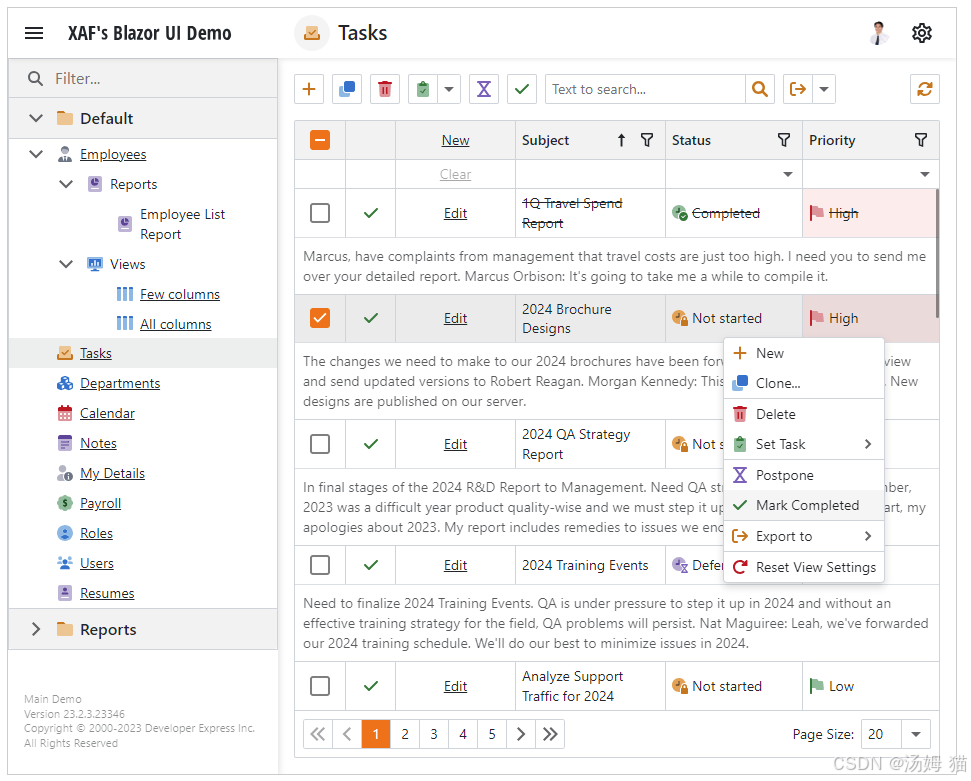
See Also / 另请参阅
-
Frequently Asked Questions / 常见问题
-
Overview and Tutorial Videos / 概述和教程视频
-
Survey - Your Feedback Matters / 调查 - 您的反馈很重要
Note
The Solution Wizard template for Web API .NET-based projects is available in Visual Studio 2022+ after you run the Universal Component Installer from the Download Manager.
适用于基于Web API .NET项目的解决方案向导模板,在您从下载管理器运行通用组件安装程序后,可在Visual Studio 2022及以上版本中使用。
See the Get Started with Web API Service topic for information on how to install all tools required to start a new Web API Service project.
请参阅“Web API 服务入门指南”主题,了解如何安装启动新 Web API 服务项目所需的所有工具。
How to Use 如何使用
You can add the Web API to an existing Blazor Server project or create a new project with this service:
您可以将 Web API 添加到现有的 Blazor Server 项目中,或创建一个包含此服务的新项目:
- Create a Standalone Web API Application 创建一个独立的 Web API 应用程序
- Integrate the Web API into an Existing XAF Blazor Application 将Web
API集成到现有的XAF Blazor应用程序中
After you add the Web API to your project, you can use it as described in the following topics:
在项目中添加 Web API 后,您可以按照以下主题中的说明使用它:
- Add and Protect CRUD Web API Endpoints 添加并保护CRUD Web API端点
- Make HTTP Requests to the Web API from .NET Applications 从 .NET 应用程序向
Web API 发起 HTTP 请求 - Execute Custom Operations on Endpoint Requests 在端点请求上执行自定义操作
- Create Custom Endpoints 创建自定义端点
- Access Object Space, Security System, and Caption Helper in Custom
Endpoint Methods 在自定义端点方法中访问对象空间、安全系统和标题助手
Additionally, review our GitHub examples:
此外,请查阅我们的GitHub示例:
- JavaScript with DevExtreme + ASP.NET Core Web API/OData App
/ 使用DevExtreme的JavaScript + ASP.NET Core Web API/OData应用程序 - JavaScript with Svelte + ASP.NET Core Web API/OData App / 带有 Svelte 的
JavaScript + ASP.NET Core Web API/OData 应用 - Blazor WebAssembly App / Blazor WebAssembly 应用
- .NET MAUI (iOS/Android) App / .NET MAUI(iOS/安卓)应用
- WinForms Application (with OData) / WinForms 应用程序(使用 OData)
Authentication Options / 认证选项
The Web API supports all standard ASP.NET Core authentication techniques that you can specify in the MySolution.WebApi\Startup.cs (MySolution.Blazor.Server.Startup.cs) file. See the following topic for details: Authentication in Web API Projects.
Web API 支持所有标准的 ASP.NET Core 身份验证技术,您可以在 MySolution.WebApi\Startup.cs(MySolution.Blazor.Server.Startup.cs) 文件中进行配置。详情请参阅以下主题:Web API 项目中的身份验证。
Performance Considerations / 性能考量
You can disable logging to improve the Web API performance. To do this, set the LogLevel.DevExpress.ExpressApp option to None.
你可以禁用日志记录以提高Web API性能。为此,请将LogLevel.DevExpress.ExpressApp选项设置为None。
File: MySolution.Blazor.Server\appsettings.json
(MySolution.Blazor.Server\appsettings.Development.json for debugging)
JSON

// ...
"LogLevel": {
    "Default": "Information",
    "Microsoft": "Warning",
    "Microsoft.Hosting.Lifetime": "Information",
    "DevExpress.ExpressApp": "None"
}
// ...
Use logging options other than None (for example, DevExpress.ExpressApp = Debug) only for debugging purposes because logging reduces performance. See the following topic for more information: Log Files.
除调试目的外,请勿使用无以外的日志记录选项(例如 DevExpress.ExpressApp = Debug),因为日志记录会降低性能。更多信息请参阅以下主题:日志文件。
Limitations / 限制
The capability to use custom fields in an XPO data model is not supported. The underlying ASP.NET Core Web API / OData v4 infrastructure accesses type information directly through reflection in the form of System.Type objects, which do not contain information about custom fields.
不支持在XPO数据模型中使用自定义字段的功能。底层的ASP.NET Core Web API / OData v4基础设施通过反射直接以System.Type对象的形式访问类型信息,这些对象不包含有关自定义字段的信息。
FAQ / 常见问题
Q: Is the .NET App Security & Web API free for commercial use?
Q: .NET 应用安全和 Web API 是否可以免费用于商业用途?
A: Absolutely. .NET App Security & Web API is available free-of-charge. To download your copy, visit: https://www.devexpress.com/security-api-free/.
A: 当然可以。.NET应用安全和Web API是免费提供的。要下载您的副本,请访问:https://www.devexpress.com/security-api-free/。
When you register for a free DevExpress product, you can use your registered product for as long as your needs dictate. Should an update be made available free-of-charge, you will be notified by email or on this website. Updates that are issued free-of-charge can also be used indefinitely. Please refer to the DevExpress End User License Agreement for detailed licensing information.
当您注册免费的DevExpress产品时,可根据实际需求无限期使用该产品。若发布免费更新版本,我们将通过电子邮件或本网站通知您。免费发布的更新同样可永久使用。详细授权条款请参阅《DevExpress最终用户许可协议》。
Q: Do I have to include XAF UI dependencies in my project?
问:我必须在项目中包含 XAF UI 依赖项吗?
A: Our Web API Service relies on Visual Studio 2022 and a few non-visual cross-platform .NET packages (example). These include DevExpress.Data, DevExpress.Xpo, DevExpress.Document.Processor, and other core libraries. Though these packages have “XAF” or “ExpressApp” in their names, you do not need to pull XAF WinForms and ASP.NET Core Blazor dependencies in your projects.
A: 我们的Web API服务依赖于Visual Studio 2022和若干非可视化的跨平台.NET包(示例)。这些包包括DevExpress.Data、DevExpress.Xpo、DevExpress.Document.Processor以及其他核心库。虽然这些包的名称中包含"XAF"或"ExpressApp",但您无需在项目中引入XAF WinForms和ASP.NET Core Blazor的依赖项。
In other words, if you do not require XAF, you are not forced to use it. Optionally, you can tell the Template Kit to create the Web API Service inside an XAF Blazor UI app. This could be helpful to those who wish to incorporate a web Admin Panel (watch the video) and an embedded API server within the same package (for easier hosting and maintenance). Again, this is entirely up to you. You can always use the Web API Service on a standalone basis.
换句话说,如果您不需要 XAF,您并非必须使用它。您也可以选择让模板工具包在 XAF Blazor UI 应用程序中创建 Web API 服务。这对于希望将网页管理面板(观看视频)和嵌入式 API 服务器整合到同一个包中(便于托管和维护)的用户会有所帮助。重申一次,这完全取决于您的需求。您始终可以独立使用 Web API 服务。
Q: Will I benefit from the Web API Service if I’m not developing XAF UI apps?
问:如果我不开发XAF UI应用程序,Web API服务对我有好处吗?
A: Our Web API Service can be used outside of XAF-powered UI apps. Numerous developers have successfully used our Web API Service as a backend for their Angular, Vue, React, Blazor WebAssembly, Xamarin, and other .NET/JavaScript UI clients.
A: 我们的Web API服务可在非XAF驱动的UI应用中使用。众多开发者已成功将我们的Web API服务用作Angular、Vue、React、Blazor WebAssembly、Xamarin及其他.NET/JavaScript UI客户端的后端。
For more information in this regard, check out our DevExtreme example on GitHub. This example uses our client-side dxDataGrid with DevExpress.Data.ODataStore (just like many other CRUD apps powered by DevExtreme). We’ve also published a video series where we built a .NET MAUI mobile app that consumes our Web API Service (see also .NET MAUI example sources).
有关这方面的更多信息,请查看我们在GitHub上的DevExtreme示例。该示例使用了我们客户端的dxDataGrid与DevExpress.Data.ODataStore(就像许多其他由DevExtreme驱动的CRUD应用程序一样)。我们还发布了一个视频系列,其中我们构建了一个使用我们Web API服务的.NET MAUI移动应用程序(另请参阅.NET MAUI示例源代码)。
Q: Do I have to learn a lot of XAF terminology to consume the Web API?
问:我必须学习大量XAF术语才能使用Web API吗?
A: As far as clients or consumers are concerned, our Web API Service is a standard ASP.NET Core OData 8.0 service – use the standard OData v4 query options to consume our API. You can also use Swagger UI, Postman, developer tools within your favorite web browser, or standard .NET/JavaScript API.
答: 对客户端或消费者而言,我们的Web API服务是一个标准的ASP.NET Core OData 8.0服务——使用标准OData v4查询选项即可调用接口。您还可以使用Swagger UI、Postman、常用网页浏览器的开发者工具或标准.NET/JavaScript API进行交互。
We have published dozens of .NET code examples with the standard HttpClient: Make HTTP Requests to the Web API from .NET Applications. You can find other examples in public community resources for your favorite client UI technology.
我们已发布数十个使用标准HttpClient的.NET代码示例:从.NET应用程序向Web API发起HTTP请求。您可以在公共社区资源中找到针对您喜爱的客户端UI技术的其他示例。
Q: Will it take hours to get started?
问:上手需要几个小时吗?
A: We ship a 1-Click solution to build CRUD REST API for popular usage scenarios – from zero to a running Swagger UI.
答: 我们提供一键式解决方案,为零基础的常见使用场景构建CRUD REST API——从零开始直达可运行的Swagger UI界面。
Simply run the Universal Component Installer from the Download Manager and enter the credentials for your DevExpress account (free or paid/Universal). Then, use the free Template Kit in Visual Studio 2022+ to create Web API Service. The Template Kit adds all required dependencies, Entity Framework DbContext, default access control rights, connection string, etc. For more information, refer to the following help topic: Create a Standalone Web API Application.
只需从下载管理器运行通用组件安装程序,并输入您的 DevExpress 账户(免费版或付费/通用版)凭据。然后,在 Visual Studio 2022+ 中使用免费模板工具包创建 Web API 服务。该模板工具包会自动添加所有必需的依赖项、Entity Framework 的 DbContext、默认访问控制权限、连接字符串等。更多信息请参考以下帮助主题:创建独立 Web API 应用程序。
Q: Can I customize the API (add custom endpoints, remove data from response, and so on)?
问:我可以自定义API(添加自定义端点、从响应中移除数据等)吗?
A: You can do everything that you can do with ASP.NET Core OData. Microsoft published lots of information in this regard here: Create web APIs with ASP.NET Core.
A: 你可以完成所有在 ASP.NET Core OData 中能实现的功能。微软在此发布了大量相关信息:使用 ASP.NET Core 创建 Web API。
To save time for our Web API Service users, we documented highly popular OData customizations on our website:
为节省我们的Web API服务用户的时间,我们在网站上记录了高度流行的OData自定义设置:
- Create Custom Endpoints | Expose or Hide Business Object Properties
创建自定义端点 | 暴露或隐藏业务对象属性 - Change an EDM Model Structure using ODataModelBuilder | Customize
OData Options 使用ODataModelBuilder更改EDM模型结构 | 自定义OData选项 - Authenticate Users & Authorize CRUD Operations in .NET MAUI Apps with
Web API Service & EF Core (videos on YouTube) 在.NET MAUI应用中通过Web
API服务和EF Core验证用户身份并授权CRUD操作(YouTube上有相关视频) - Add Custom Web API Endpoints To Check Permissions & Query Media Data
in .NET MAUI Apps with EF Core (videos on YouTube) 在 .NET MAUI 应用中通过
EF Core 添加自定义 Web API 端点来检查权限和查询媒体数据(YouTube 上有相关视频) - Preview Reports as PDF in .NET MAUI Apps using Backend Web API
Service Endpoints with EF Core (videos on YouTube) 在.NET MAUI应用中通过EF
Core后端Web API服务端点预览PDF报告(YouTube视频教程)
You can customize your own EF Core or XPO data model and fine-tune things at the XAF layer (security permissions, CRUD behavior, and so on).
您可以自定义自己的EF Core或XPO数据模型,并在XAF层微调各项设置(如安全权限、CRUD行为等)。

汇聚全球AI编程工具,助力开发者即刻编程。
更多推荐

 29
29 0
0- 0


 已为社区贡献2条内容

所有评论(0)