
【Springboot3】SpringCache、微信支付、Spring Task、cron表达式、WebSocket 协议、ApacheECharts
SpringCache
不用到处写Redis代码,直接用注解表示
@Cacheable
public Dish getById(Long id) {
    return dishMapper.getById(id);
}
-
先查缓存,缓存有 → 直接返,缓存没有 → 查数据库,把结果放进缓存
1、添加依赖
<!-- Spring Cache -->
<dependency>
    <groupId>org.springframework.boot</groupId>
    <artifactId>spring-boot-starter-cache</artifactId>
</dependency>

<!-- Redis -->
<dependency>
    <groupId>org.springframework.boot</groupId>
    <artifactId>spring-boot-starter-data-redis</artifactId>
</dependency>
2、在启动配置类中加上,开启缓存功能
@SpringBootApplication
@EnableCaching
public class SkyApplication {
    public static void main(String[] args) {
        SpringApplication.run(SkyApplication.class, args);
    }
}
3、Service层进行
用@Cacheable查数据
@Cacheable(cacheNames = "dish", key = "#id")//Redis命名空间,方法id
public Dish getById(Long id) {
    return dishMapper.getById(id);
}
用@CacheEvict 新增修改删除后,清空 dish 相关缓存,防止脏数据
@CacheEvict(cacheNames = "dish", key="#dish.id")
public void update(Dish dish) {
    dishMapper.update(dish);
}
用@CachePut 强制执行方法,并把返回值更新到缓存(修改后马上要用新数据)
@CacheEvict(cacheNames = "dish", key="#dish.id")//动态取dish的id
public void save(Dish dish) {
    dishMapper.insert(dish);
    dishMapper.update(dish);
}
微信支付
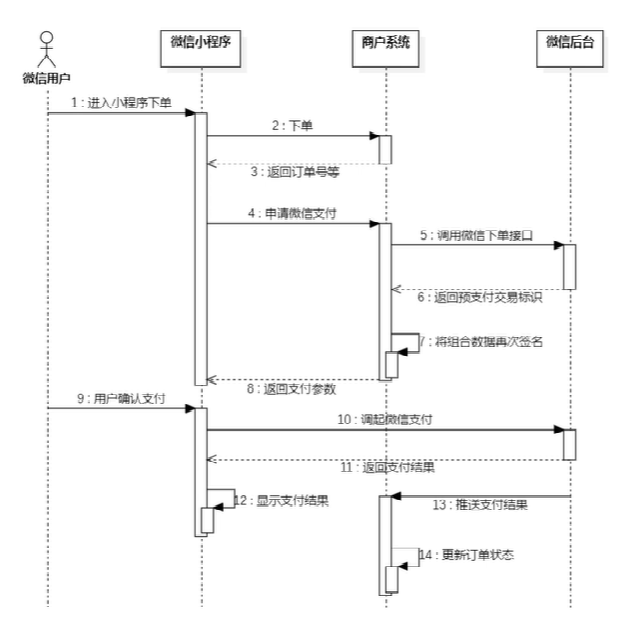
获取临时域名
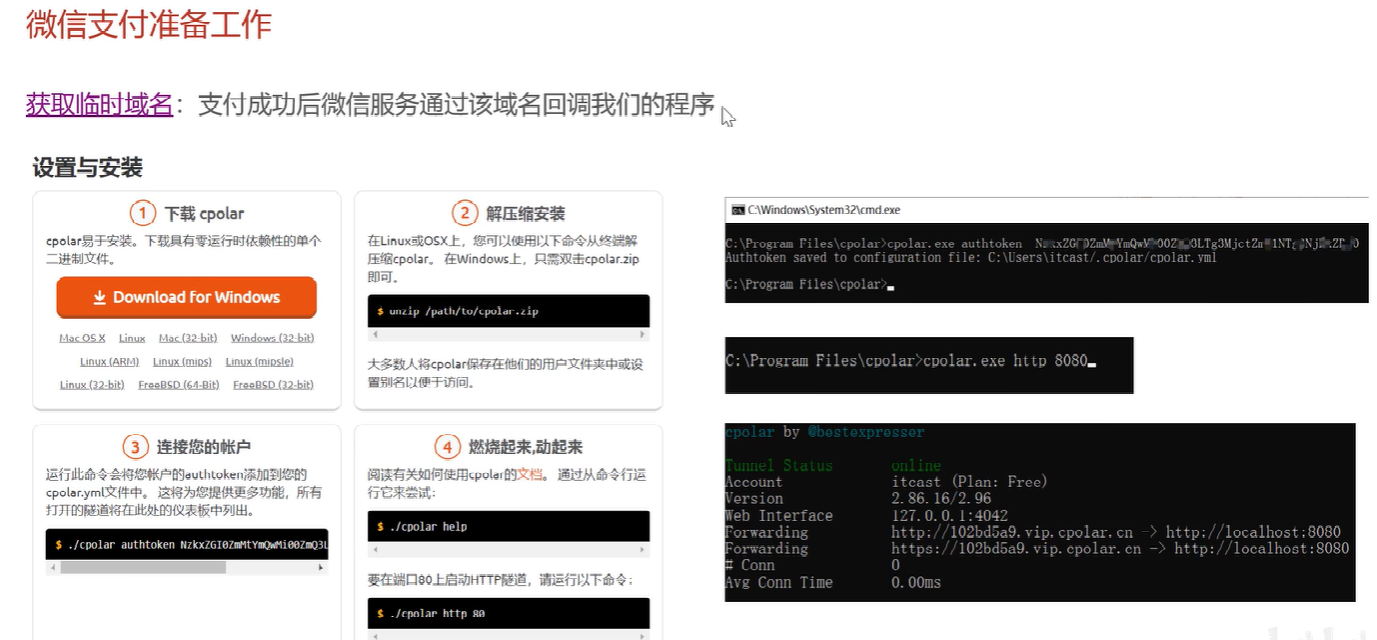
1、注册并获取商户信息
在微信支付官网(https://pay.weixin.qq.com),注册并完成相关认证
-
appid:公众账号ID -
mch_id:商户号 -
api_key:商户支付密钥 -
secret:应用密钥(用于微信登录时获取openid)
2、配置微信SDK
<dependency>
    <groupId>com.github.wxpay</groupId>
    <artifactId>wechat-pay-java</artifactId>
    <version>3.0.10</version> <!-- 根据最新版调整 -->
</dependency>
在application.properties 或 application.yml配置自己的信息
wechat.pay.appid=your_appid
wechat.pay.mch_id=your_mch_id
wechat.pay.key=your_api_key
wechat.pay.notify_url=your_notify_url
wechat.pay.trade_type=JSAPI
3、在支付Controller层
  @PutMapping("/payment")
    @ApiOperation("订单支付")
    public Result<OrderPaymentVO> payment(@RequestBody OrdersPaymentDTO ordersPaymentDTO) throws Exception {
        log.info("订单支付:{}", ordersPaymentDTO);
        log.info("订单支付:{}", ordersPaymentDTO);
        OrderPaymentVO orderPaymentVO = orderService.payment(ordersPaymentDTO);
        log.info("生成预支付交易单:{}", orderPaymentVO);
        return Result.success(orderPaymentVO);
    }
4、ServiceImpl层
/**
     * 订单支付
     *
     * @param ordersPaymentDTO
     * @return
     */
    public OrderPaymentVO payment(OrdersPaymentDTO ordersPaymentDTO) throws Exception {
        // 当前登录用户id
        // Long userId = BaseContext.getCurrentId();
        // User user = userMapper.getById(userId);

        // 直接调用paySuccess方法,模拟支付成功
        paySuccess(ordersPaymentDTO.getOrderNumber());

        // 调用微信支付接口,生成预支付交易单
        // JSONObject jsonObject = weChatPayUtil.pay(
        // ordersPaymentDTO.getOrderNumber(), // 商户订单号
        // new BigDecimal(0.01), // 支付金额,单位 元
        // "订单", // 商品描述
        // user.getOpenid() // 微信用户的openid
        // );

        // if (jsonObject.getString("code") != null &&
        // jsonObject.getString("code").equals("ORDERPAID")) {
        // throw new OrderBusinessException("该订单已支付");
        // }

        // OrderPaymentVO vo = jsonObject.toJavaObject(OrderPaymentVO.class);
        // vo.setPackageStr(jsonObject.getString("package"));

        // return vo;
        return null;
    }

    /**
     * 支付成功,修改订单状态
     *
     * @param outTradeNo
     */
    public void paySuccess(String outTradeNo) {

        // 根据订单号查询订单
        Orders ordersDB = orderMapper.getByNumber(outTradeNo);

        // 根据订单id更新订单的状态、支付方式、支付状态、结账时间
        Orders orders = Orders.builder()
                .id(ordersDB.getId())
                .status(Orders.TO_BE_CONFIRMED)
                .payStatus(Orders.PAID)
                .checkoutTime(LocalDateTime.now())
                .build();

        orderMapper.update(orders);

        // 通过websocket通知商家
        Map<String, Object> map = new HashMap<>();
        map.put("type", 1); // 1:来单通知
        map.put("orderId", ordersDB.getId());
        map.put("content", "订单号: " + outTradeNo);
        String msg = JSON.toJSONString(map);
        webSocketServer.sendToAllClient(msg);
    }
5、前端生成支付参数
接收到后端返回的 prepay_id,前端需要调用微信支付的 JSAPI 来进行支付
// 获取后端返回的 prepay_id
let prepayId = "xxx"; // 后端传递的 prepay_id

// 准备支付参数
let payData = {
    appId: "your_appid",
    timeStamp: "" + new Date().getTime(),
    nonceStr: "random_string",
    package: "prepay_id=" + prepayId,
    signType: "MD5"
};

// 生成支付签名
let sign = generatePaySign(payData); // 使用微信的支付签名方法生成签名

// 发起支付
wx.chooseWXPay({
    timestamp: payData.timeStamp,
    nonceStr: payData.nonceStr,
    package: payData.package,
    signType: payData.signType,
    paySign: sign,
    success: function (res) {
        console.log("支付成功");
    },
    fail: function (res) {
        console.log("支付失败");
    }
});
6、Util封装微信支付工具类
/**
 * 微信支付工具类
 */
@Component
public class WeChatPayUtil {

    //微信支付下单接口地址
    public static final String JSAPI = "https://api.mch.weixin.qq.com/v3/pay/transactions/jsapi";

    //申请退款接口地址
    public static final String REFUNDS = "https://api.mch.weixin.qq.com/v3/refund/domestic/refunds";

    @Autowired
    private WeChatProperties weChatProperties;

    /**
     * 获取调用微信接口的客户端工具对象
     *
     * @return
     */
    private CloseableHttpClient getClient() {
        PrivateKey merchantPrivateKey = null;
        try {
            //merchantPrivateKey商户API私钥,如何加载商户API私钥请看常见问题
            merchantPrivateKey = PemUtil.loadPrivateKey(new FileInputStream(new File(weChatProperties.getPrivateKeyFilePath())));
            //加载平台证书文件
            X509Certificate x509Certificate = PemUtil.loadCertificate(new FileInputStream(new File(weChatProperties.getWeChatPayCertFilePath())));
            //wechatPayCertificates微信支付平台证书列表。你也可以使用后面章节提到的“定时更新平台证书功能”,而不需要关心平台证书的来龙去脉
            List<X509Certificate> wechatPayCertificates = Arrays.asList(x509Certificate);

            WechatPayHttpClientBuilder builder = WechatPayHttpClientBuilder.create()
                    .withMerchant(weChatProperties.getMchid(), weChatProperties.getMchSerialNo(), merchantPrivateKey)
                    .withWechatPay(wechatPayCertificates);

            // 通过WechatPayHttpClientBuilder构造的HttpClient,会自动的处理签名和验签
            CloseableHttpClient httpClient = builder.build();
            return httpClient;
        } catch (FileNotFoundException e) {
            e.printStackTrace();
            return null;
        }
    }

    /**
     * 发送post方式请求
     *
     * @param url
     * @param body
     * @return
     */
    private String post(String url, String body) throws Exception {
        CloseableHttpClient httpClient = getClient();

        HttpPost httpPost = new HttpPost(url);
        httpPost.addHeader(HttpHeaders.ACCEPT, ContentType.APPLICATION_JSON.toString());
        httpPost.addHeader(HttpHeaders.CONTENT_TYPE, ContentType.APPLICATION_JSON.toString());
        httpPost.addHeader("Wechatpay-Serial", weChatProperties.getMchSerialNo());
        httpPost.setEntity(new StringEntity(body, "UTF-8"));

        CloseableHttpResponse response = httpClient.execute(httpPost);
        try {
            String bodyAsString = EntityUtils.toString(response.getEntity());
            return bodyAsString;
        } finally {
            httpClient.close();
            response.close();
        }
    }

    /**
     * 发送get方式请求
     *
     * @param url
     * @return
     */
    private String get(String url) throws Exception {
        CloseableHttpClient httpClient = getClient();

        HttpGet httpGet = new HttpGet(url);
        httpGet.addHeader(HttpHeaders.ACCEPT, ContentType.APPLICATION_JSON.toString());
        httpGet.addHeader(HttpHeaders.CONTENT_TYPE, ContentType.APPLICATION_JSON.toString());
        httpGet.addHeader("Wechatpay-Serial", weChatProperties.getMchSerialNo());

        CloseableHttpResponse response = httpClient.execute(httpGet);
        try {
            String bodyAsString = EntityUtils.toString(response.getEntity());
            return bodyAsString;
        } finally {
            httpClient.close();
            response.close();
        }
    }

    /**
     * jsapi下单
     *
     * @param orderNum    商户订单号
     * @param total       总金额
     * @param description 商品描述
     * @param openid      微信用户的openid
     * @return
     */
    private String jsapi(String orderNum, BigDecimal total, String description, String openid) throws Exception {
        JSONObject jsonObject = new JSONObject();
        jsonObject.put("appid", weChatProperties.getAppid());
        jsonObject.put("mchid", weChatProperties.getMchid());
        jsonObject.put("description", description);
        jsonObject.put("out_trade_no", orderNum);
        jsonObject.put("notify_url", weChatProperties.getNotifyUrl());

        JSONObject amount = new JSONObject();
        amount.put("total", total.multiply(new BigDecimal(100)).setScale(2, BigDecimal.ROUND_HALF_UP).intValue());
        amount.put("currency", "CNY");

        jsonObject.put("amount", amount);

        JSONObject payer = new JSONObject();
        payer.put("openid", openid);

        jsonObject.put("payer", payer);

        String body = jsonObject.toJSONString();
        return post(JSAPI, body);
    }

    /**
     * 小程序支付    对于图片方法5
     *
     * @param orderNum    商户订单号
     * @param total       金额,单位 元
     * @param description 商品描述
     * @param openid      微信用户的openid
     * @return
     */
    public JSONObject pay(String orderNum, BigDecimal total, String description, String openid) throws Exception {
        //统一下单,生成预支付交易单
        String bodyAsString = jsapi(orderNum, total, description, openid);
        //解析返回结果
        JSONObject jsonObject = JSON.parseObject(bodyAsString);
        System.out.println(jsonObject);

        String prepayId = jsonObject.getString("prepay_id");
        if (prepayId != null) {
            String timeStamp = String.valueOf(System.currentTimeMillis() / 1000);
            String nonceStr = RandomStringUtils.randomNumeric(32);
            ArrayList<Object> list = new ArrayList<>();
            list.add(weChatProperties.getAppid());
            list.add(timeStamp);
            list.add(nonceStr);
            list.add("prepay_id=" + prepayId);
            //二次签名,调起支付需要重新签名
            StringBuilder stringBuilder = new StringBuilder();
            for (Object o : list) {
                stringBuilder.append(o).append("\n");
            }
            String signMessage = stringBuilder.toString();
            byte[] message = signMessage.getBytes();

            Signature signature = Signature.getInstance("SHA256withRSA");
            signature.initSign(PemUtil.loadPrivateKey(new FileInputStream(new File(weChatProperties.getPrivateKeyFilePath()))));
            signature.update(message);
            String packageSign = Base64.getEncoder().encodeToString(signature.sign());

            //构造数据给微信小程序,用于调起微信支付
            JSONObject jo = new JSONObject();
            jo.put("timeStamp", timeStamp);
            jo.put("nonceStr", nonceStr);
            jo.put("package", "prepay_id=" + prepayId);
            jo.put("signType", "RSA");
            jo.put("paySign", packageSign);

            return jo;
        }
        return jsonObject;
    }

    /**
     * 申请退款
     *
     * @param outTradeNo    商户订单号
     * @param outRefundNo   商户退款单号
     * @param refund        退款金额
     * @param total         原订单金额
     * @return
     */
    public String refund(String outTradeNo, String outRefundNo, BigDecimal refund, BigDecimal total) throws Exception {
        JSONObject jsonObject = new JSONObject();
        jsonObject.put("out_trade_no", outTradeNo);
        jsonObject.put("out_refund_no", outRefundNo);

        JSONObject amount = new JSONObject();
        amount.put("refund", refund.multiply(new BigDecimal(100)).setScale(2, BigDecimal.ROUND_HALF_UP).intValue());
        amount.put("total", total.multiply(new BigDecimal(100)).setScale(2, BigDecimal.ROUND_HALF_UP).intValue());
        amount.put("currency", "CNY");

        jsonObject.put("amount", amount);
        jsonObject.put("notify_url", weChatProperties.getRefundNotifyUrl());

        String body = jsonObject.toJSONString();

        //调用申请退款接口
        return post(REFUNDS, body);
    }
}
Spring Task 处理定时任务
轻量级的任务调度功能,它可以帮助我们定时执行某些任务
-
定时任务 Scheduled:你可以设置某些方法在指定的时间或者间隔内定时执行。
-
异步任务 Async:可以将某些任务设为异步执行,提升程序效率。
1、启用
在使用 Spring Task 时,首先需要启用任务调度功能。通常在 @SpringBootApplication 或者配置类上加上 @EnableScheduling 注解。
2、定时任务,新建Task类
-
fixedRate:以固定时间间隔执行任务,从上一次任务开始执行,到下一次任务开始执行之间的间隔。 -
fixedDelay:每次任务完成后,等待指定时间后再执行下一个任务。 -
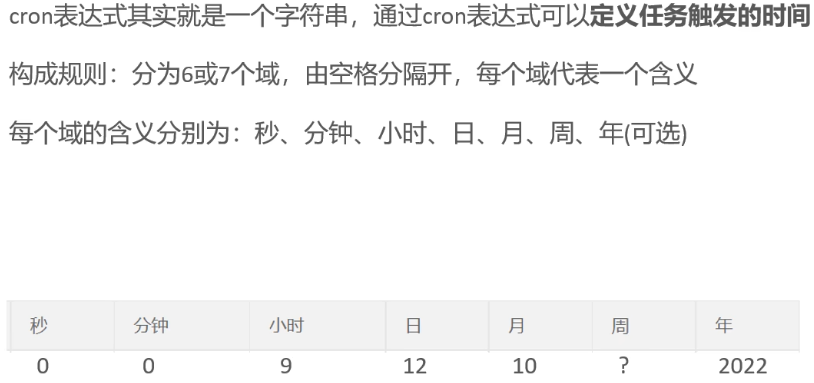
cron:使用 cron 表达式来定义任务的执行时间,可以非常灵活地设置定时任务的执行周期。
@Component
public class MyTask {

    @Scheduled(fixedRate = 5000)  // 每5秒执行一次
    public void task() {
        System.out.println("任务正在执行...");
    }

    @Scheduled(cron = "0 0/1 * * * ?")  // 每分钟执行一次
    public void cronTask() {
        System.out.println("定时任务按 cron 表达式执行");
    }
}
3、异步任务,新建Task类
@Async 注解用于标记一个方法为异步方法,即任务在另一个线程中执行,不会阻塞当前线程。通常需要配合 @EnableAsync 注解来启用异步任务。
//注解启动
@EnableAsync
@SpringBootApplication
public class MyApp {
    public static void main(String[] args) {
        SpringApplication.run(MyApp.class, args);
    }
}
@Component
public class MyTask {

    @Async
    public void asyncTask() {
        System.out.println("异步任务正在执行...");
    }
}
cron表达式
用在线生成器可生成
WebSocket 协议
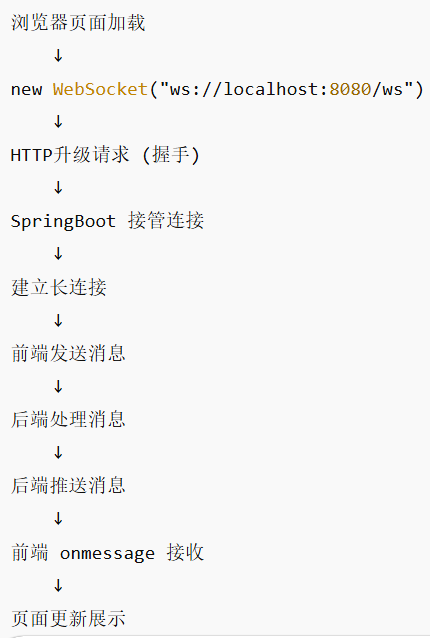
在客户端和服务器之间建立持久连接的协议
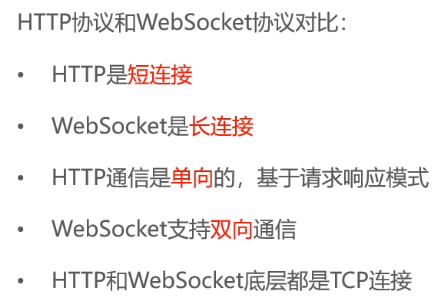
运行流程:
1、配置依赖
<dependency>
    <groupId>org.springframework.boot</groupId>
    <artifactId>spring-boot-starter-websocket</artifactId>
</dependency>
2、添加配置类,给spring注册@ServerEndpoint
@Configuration
public class WebSocketConfig {

    @Bean
    public ServerEndpointExporter serverEndpointExporter() {
        return new ServerEndpointExporter();
    }
}
3、写WebSocket服务类
/**
 * WebSocket服务
 */
@Component
@ServerEndpoint("/ws/{sid}")
public class WebSocketServer {

    //存放会话对象
    private static Map<String, Session> sessionMap = new HashMap();

    /**
     * 连接建立成功调用的方法,自动执行。
     */
    @OnOpen
    public void onOpen(Session session, @PathParam("sid") String sid) {
        System.out.println("客户端:" + sid + "建立连接");
        sessionMap.put(sid, session);
    }

    /**
     * 收到客户端消息后调用的方法
     *
     * @param message 客户端发送过来的消息
     */
    @OnMessage
    public void onMessage(String message, @PathParam("sid") String sid) {
        System.out.println("收到来自客户端:" + sid + "的信息:" + message);
    }

    /**
     * 连接关闭调用的方法
     *
     * @param sid
     */
    @OnClose
    public void onClose(@PathParam("sid") String sid) {
        System.out.println("连接断开:" + sid);
        sessionMap.remove(sid);
    }

    /**
     * 群发
     *
     * @param message
     */
    public void sendToAllClient(String message) {
        Collection<Session> sessions = sessionMap.values();
        for (Session session : sessions) {
            try {
                //服务器向客户端发送消息
                session.getBasicRemote().sendText(message);
                System.out.println("发送websocket");
            } catch (Exception e) {
                e.printStackTrace();
            }
        }
    }

}
4、在ServiceImpl层添加
// 通过websocket通知商家
        Map<String, Object> map = new HashMap<>();
        map.put("type", 1); // 1:来单通知
        map.put("orderId", ordersDB.getId());
        map.put("content", "订单号: " + outTradeNo);
        String msg = JSON.toJSONString(map);
        webSocketServer.sendToAllClient(msg);
5、在前端vue上添加
let socket = new WebSocket("ws://localhost:8080/ws");

socket.onopen = function() {
    console.log("连接成功");
};

socket.onmessage = function(event) {
    console.log("收到服务器消息:", event.data);
};
Apache ECharts
在vue插入以下
import * as echarts from 'echarts'
Controller层
@RestController
@RequestMapping("/admin/report")
public class ReportController {

    @Autowired
    private ReportService reportService;

    @GetMapping("/orderStatistics")
    public Result<OrderStatisticsVO> orderStatistics() {

        OrderStatisticsVO vo = reportService.getOrderStatistics();

        return Result.success(vo);
    }
}
ServiceImpl层
@Service
public class ReportServiceImpl implements ReportService {

    @Autowired
    private OrderMapper orderMapper;

    @Override
    public OrderStatisticsVO getOrderStatistics() {

        List<Integer> counts = orderMapper.countByDay();

        OrderStatisticsVO vo = new OrderStatisticsVO();
        vo.setDays(Arrays.asList("周一","周二","周三"));
        vo.setCounts(counts);

        return vo;
    }
}

汇聚全球AI编程工具,助力开发者即刻编程。
更多推荐



 7
7 0
0- 0


 已为社区贡献5条内容

所有评论(0)