
Flink 1.20 实战:零代码配置实现 MySQL 百表到 ClickHouse 实时同步
用配置驱动代替重复编码,一行配置搞定百表同步。本文提供完整可运行的代码,拿走即用。
前言
在数据集成领域,我们经常面临这样的困境:业务系统中有几十甚至上百张表需要实时同步,而传统的单表同步方案意味着我们需要为每张表编写单独的同步程序。这种"复制粘贴式"开发不仅效率低下,而且维护成本极高 —— 写100个类?想想就头皮发麻!
本文将带你构建一个基于配置驱动的通用数据同步解决方案,基于 Flink 1.20 + Flink CDC 3.5,实现 MySQL 到 ClickHouse 的多表实时同步。这是我们在MySQL到ClickHouse单表同步实战基础上的升级版,从"写一个类"进化到"写一套配置" —— 让我们从"码农"回归到"工程师"的本质!
前置依赖:
- Flink 环境:Flink 1.20 基于 Docker 单机部署实战指南
- ClickHouse 环境:ClickHouse 25.4 基于 Docker 单机部署实战指南
一、痛点分析与方案设计
1.1 开篇灵魂拷问:你还在为百表同步"提桶跑路"吗?
想象这样一个场景:老板说"我们要把业务数据库的100张表实时同步到数仓",你的心跳是不是瞬间加速?如果还要为每张表写一个同步程序,是不是已经开始考虑"提桶跑路"了?
这就是我们今天要解决的核心痛点 —— 如何用一套代码搞定百表同步!
1.2 核心设计理念
面对百表同步的挑战,我们的设计围绕四个核心要点展开:
- 配置驱动:新增表无需改动代码,纯配置即可生效(详见 2.1 多表同步)
- 智能映射:启动时自动加载 MySQL 表结构,建立字段类型映射缓存(详见 2.3 表结构自动加载)
- 类型转换:自动处理 Debezium 对
DECIMAL、DATETIME、DATE的特殊编码(详见 2.4~2.6) - 容错保障:基于 Checkpoint + ReplacingMergeTree 实现精确一次语义
二、7 种同步场景全解析
MySQL 虽然有严格 Schema,但 Debezium CDC 输出的 JSON 中,时间、小数等类型的编码方式并不直观。下面逐个拆解本方案覆盖的 7 种场景。
2.1 多表同步:正则匹配 + 精确映射
场景:业务库中有几十甚至上百张表需要同步到 ClickHouse ODS 层,如果每张表写一个 Flink 作业,维护成本直线上升。
期望:一个 Flink 作业同时监听多张表,写入对应的 CK 表。
配置方案(二选一):
# 方式1:正则匹配(推荐)—— 自动发现 biz_ 开头的表
sync.table.pattern=biz_.*
sync.table.prefix=ods_

# 方式2:精确映射 —— 手动指定每张表的映射关系
sync.tables=user_profile:ods_user_profile,\
  order_records:ods_order_records
引擎启动时,自动为每张表注册 CDC 监听,按目标表名分发写入。正则模式下新增表无需改配置,只要表名匹配即自动同步。
2.2 动态发现新表
场景:业务不断迭代,MySQL 中随时可能新增表。如果每次加表都要重启 Flink 作业、改配置,运维成本太高。
解决方案:开启 Flink CDC 的动态表发现功能,运行时自动感知新表并做全量同步,无需重启作业。
# 默认开启
sync.scan.newly.added.table=true
新增的表会自动触发一次全量快照同步,随后进入增量同步模式。配合正则匹配模式效果最佳——新表只要命名符合规则,全程零人工干预。
2.3 MySQL 表结构自动加载
场景:不同表的字段类型各异——有的表有 DECIMAL,有的有 DATETIME,有的有 DATE。如果为每张表硬编码类型转换逻辑,代码会迅速膨胀。
解决方案:Sink 启动时自动查询 information_schema.COLUMNS,拉取所有同步表的字段类型信息,建立 表名 → (字段名 → 类型) 的映射缓存。数据到达时,根据缓存自动执行对应的类型转换,无需额外配置。
启动阶段:
  information_schema.COLUMNS  →  tableColumnTypes 缓存
    user_profile.balance      →  DECIMAL
    user_profile.created_at   →  DATETIME
    order_records.order_date  →  DATE

运行阶段:
  每条数据到达 → 查缓存 → 自动转换对应字段
新增表时,如果使用了动态发现新表功能,需要重启作业才能加载新表的字段类型信息。
2.4 DECIMAL 类型 Base64 解码
场景:MySQL 中的 DECIMAL/NUMERIC 类型,经过 Debezium CDC 后会被编码为 Base64 字符串(而不是直观的数字)。如果不处理,写到 CK 里就是一串乱码。
数据示例:
// MySQL: balance DECIMAL(10,2) = 99.99
// Debezium 输出:
{ "balance": "JxA=" }
看到 "JxA=" 你能猜到它是 99.99 吗?这是 Debezium 把 BigInteger(9999) 的字节数组做了 Base64 编码。
解决方案:引擎自动识别 DECIMAL 字段,Base64 解码后还原为 BigDecimal,无需额外配置。
Debezium: { "balance": "JxA=" }
  ↓  Base64 解码 → BigInteger(9999) → BigDecimal(99.99, scale=2)
CK:      balance = 99.99
注意:当前代码中 scale 硬编码为 2,即默认所有 DECIMAL 字段都是 2 位小数。如果你的表中有
DECIMAL(10,4)等非 2 位小数的字段,解码结果会出错(如99.9999会被错误解析为999999 × 10⁻² = 9999.99)。如需支持不同精度,需要在loadMySQLTableSchema中保存NUMERIC_SCALE,并在decodeDecimal时传入实际 scale 值。
2.5 DATETIME 毫秒时间戳转换
场景:MySQL 中的 DATETIME/TIMESTAMP 类型,Debezium 会将其转为毫秒级时间戳(基于 UTC)。直接写到 CK 里就是一个大数字,分析师看到 1736935200000 只会一脸懵。
数据示例:
// MySQL: created_at DATETIME = '2025-01-15 18:00:00'
// Debezium 输出:
{ "created_at": 1736935200000 }
解决方案:引擎自动将毫秒时间戳转为 yyyy-MM-dd HH:mm:ss 格式字符串,无需额外配置。
Debezium: { "created_at": 1736935200000 }
  ↓  Instant.ofEpochMilli → LocalDateTime.format
CK:      created_at = '2025-01-15 18:00:00'
注意:Debezium 对
DATETIME的编码使用 UTC 时区(即原始值不做时区偏移),解码时同样使用 UTC,保证值不变。
2.6 DATE 天数转日期
场景:MySQL 中的 DATE 类型,Debezium 会编码为从 1970-01-01 开始的天数。如果直接写入 CK,20088 这个数字毫无可读性。
数据示例:
// MySQL: birth_date DATE = '2025-01-15'
// Debezium 输出:
{ "birth_date": 20103 }
解决方案:引擎自动将天数转为 yyyy-MM-dd 格式字符串,无需额外配置。
Debezium: { "birth_date": 20103 }
  ↓  LocalDate.ofEpochDay(20103)
CK:      birth_date = '2025-01-15'
2.7 字段直通
场景:MySQL 字段名与 CK 字段名一致,且类型无需特殊转换(如 INT、VARCHAR、BIGINT 等)。
这是最常见的情况——MySQL 有严格 Schema,大部分字段可以直接透传。无需任何配置。
MySQL:  { "id": 1001, "name": "张三", "email": "zhangsan@example.com" }
  ↓
CK:     id = 1001, name = '张三', email = 'zhangsan@example.com'
2.8 场景速查表
| 场景 | 触发条件 | 是否需要配置 |
|---|---|---|
| 多表同步 | 正则匹配或精确映射 | 是 |
| 动态发现新表 | sync.scan.newly.added.table=true |
是(默认开启) |
| 表结构自动加载 | Sink 启动时自动执行 | 否 |
| DECIMAL Base64 解码 | 字段类型为 DECIMAL/NUMERIC | 否 |
| DATETIME 毫秒时间戳转换 | 字段类型为 DATETIME/TIMESTAMP | 否 |
| DATE 天数转日期 | 字段类型为 DATE | 否 |
| 字段直通 | 其他类型 | 否 |
三、部署与验证
3.1 项目依赖配置(pom.xml)
<?xml version="1.0" encoding="UTF-8"?>
<project xmlns="http://maven.apache.org/POM/4.0.0"
         xmlns:xsi="http://www.w3.org/2001/XMLSchema-instance"
         xsi:schemaLocation="http://maven.apache.org/POM/4.0.0 http://maven.apache.org/xsd/maven-4.0.0.xsd">
    <modelVersion>4.0.0</modelVersion>

    <groupId>com.cloud</groupId>
    <artifactId>bi-flink</artifactId>
    <version>1.0-SNAPSHOT</version>

    <properties>
        <maven.compiler.source>17</maven.compiler.source>
        <maven.compiler.target>17</maven.compiler.target>
        <project.build.sourceEncoding>UTF-8</project.build.sourceEncoding>
        <flink.version>1.20.1</flink.version>
    </properties>

    <dependencies>
        <!-- Flink 核心库 -->
        <dependency>
            <groupId>org.apache.flink</groupId>
            <artifactId>flink-java</artifactId>
            <version>${flink.version}</version>
        </dependency>

        <!-- Table API 与 DataStream API 桥梁 -->
        <dependency>
            <groupId>org.apache.flink</groupId>
            <artifactId>flink-table-api-java-bridge</artifactId>
            <version>${flink.version}</version>
        </dependency>

        <!-- flink cdc 依赖 -->
        <dependency>
            <groupId>org.apache.flink</groupId>
            <artifactId>flink-connector-base</artifactId>
            <version>${flink.version}</version>
        </dependency>

        <!-- MySQL CDC 连接器 -->
        <dependency>
            <groupId>org.apache.flink</groupId>
            <artifactId>flink-connector-mysql-cdc</artifactId>
            <version>3.5.0</version>
        </dependency>

        <!-- MySQL 驱动 -->
        <dependency>
            <groupId>com.mysql</groupId>
            <artifactId>mysql-connector-j</artifactId>
            <version>8.4.0</version>
        </dependency>
    </dependencies>

    <build>
        <plugins>
            <!-- 编译插件 -->
            <plugin>
                <groupId>org.apache.maven.plugins</groupId>
                <artifactId>maven-compiler-plugin</artifactId>
                <version>3.8.1</version>
                <configuration>
                    <source>17</source>
                    <target>17</target>
                </configuration>
            </plugin>

            <!-- 打包插件 -->
            <plugin>
                <groupId>org.apache.maven.plugins</groupId>
                <artifactId>maven-shade-plugin</artifactId>
                <version>3.5.0</version>
                <executions>
                    <execution>
                        <phase>package</phase>
                        <goals>
                            <goal>shade</goal>
                        </goals>
                        <configuration>
                            <transformers>
                                <transformer implementation="org.apache.maven.plugins.shade.resource.ServicesResourceTransformer"/>
                                <transformer implementation="org.apache.maven.plugins.shade.resource.ManifestResourceTransformer">
                                    <mainClass>com.cloud.flink.MySQLToClickHouseRealtimeSyncV2</mainClass>
                                </transformer>
                            </transformers>
                            <filters>
                                <filter>
                                    <artifact>*:*</artifact>
                                    <excludes>
                                        <exclude>META-INF/*.SF</exclude>
                                        <exclude>META-INF/*.DSA</exclude>
                                        <exclude>META-INF/*.RSA</exclude>
                                    </excludes>
                                </filter>
                            </filters>
                        </configuration>
                    </execution>
                </executions>
            </plugin>
        </plugins>
    </build>
</project>
3.2 前置准备
在正式部署前,确保已在 ClickHouse 中创建对应的表结构。推荐使用 ReplacingMergeTree 引擎:
CREATE TABLE ods.ods_user_profile (
    id UInt64,
    name String,
    email String,
    created_at DateTime,
    balance Decimal(10, 2)
) ENGINE = ReplacingMergeTree()
ORDER BY id
SETTINGS index_granularity = 8192;
3.3 构建与部署
# 编译项目
mvn clean package -P test -DskipTests

# 运行作业(命令行方式)
flink run -c com.cloud.flink.MySQLToClickHouseRealtimeSyncV2 \
  target/bi-flink-1.0-SNAPSHOT.jar \
  --env test

# 或者指定配置文件
flink run -c com.cloud.flink.MySQLToClickHouseRealtimeSyncV2 \
  target/bi-flink-1.0-SNAPSHOT.jar \
  --config /path/to/application-prod.properties
3.4 通过 Flink Web UI 部署
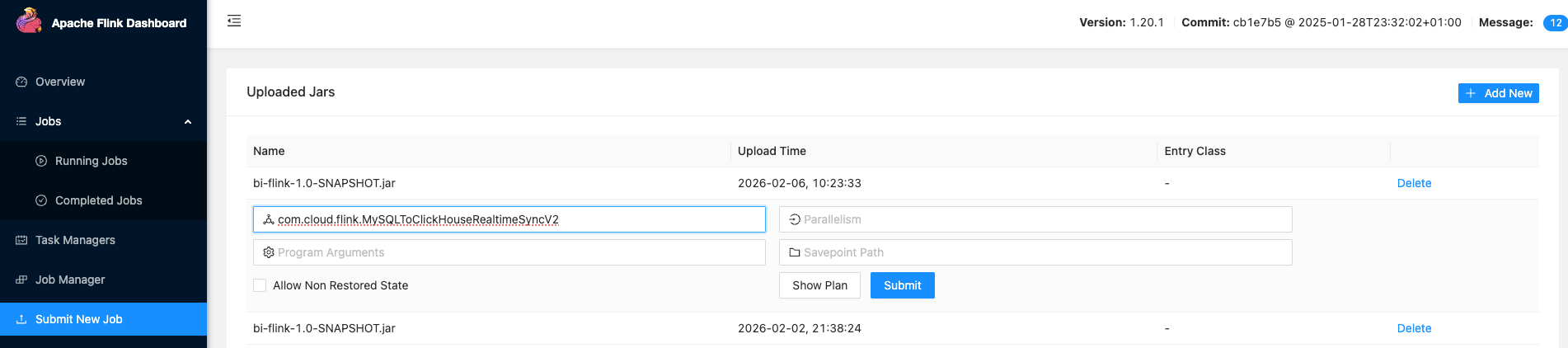
-
访问 Flink Web UI:
http://<Flink-Host>:8081 -
点击 Submit New Job
-
上传编译好的 JAR 文件
-
在 Program Arguments 中输入:
--env test或--config /path/to/config.properties -
点击 Submit 启动作业
3.5 实时监控与验证
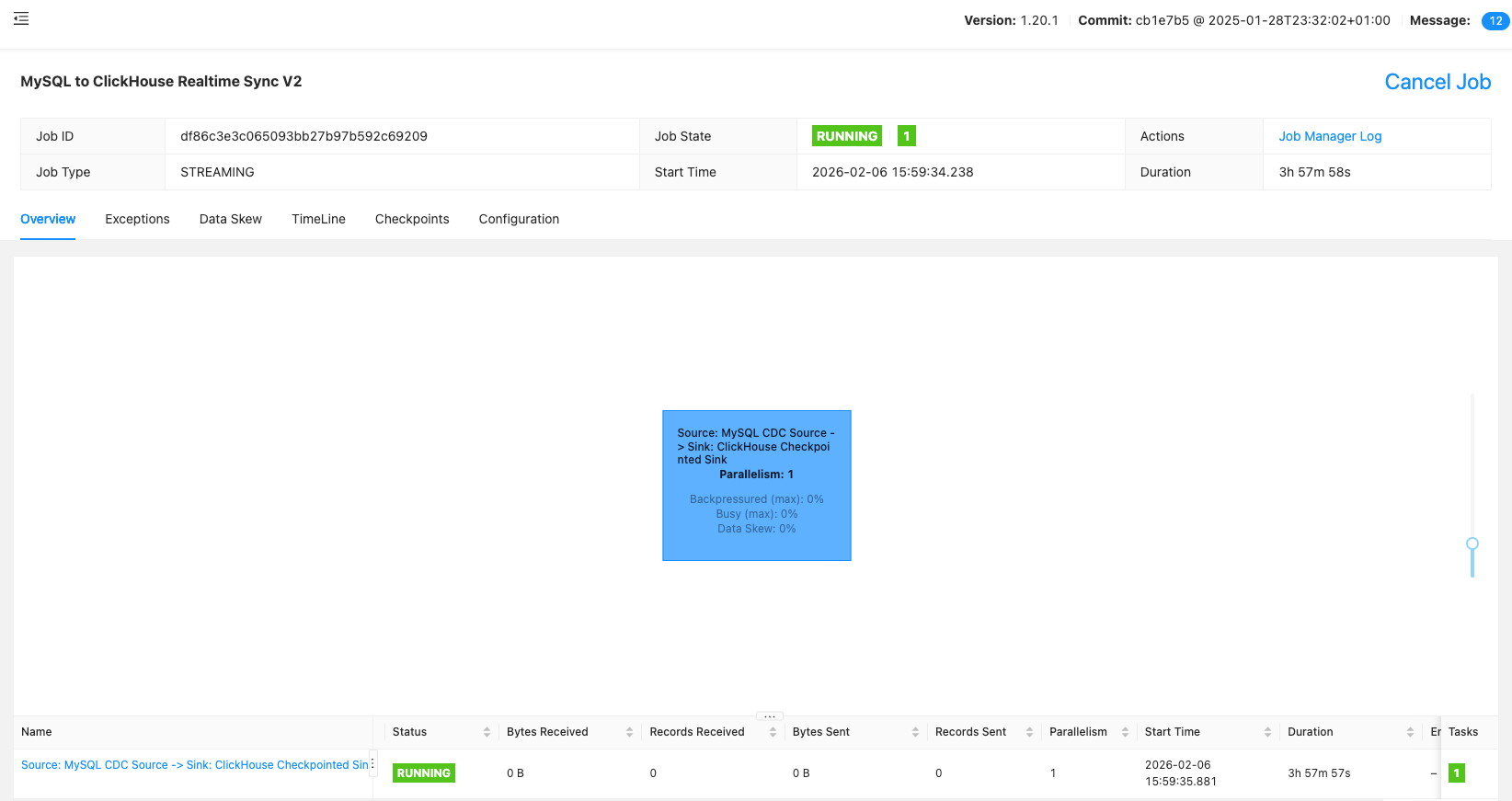
3.5.1 作业状态监控
成功提交后,在 Jobs → Running Jobs 页面可以看到作业运行状态。

点击 具体 Job,进入任务运行详情:
3.5.2 数据同步验证
-- MySQL 中插入数据
INSERT INTO user_profile (id, name, email, created_at)
VALUES (1001, '张三', 'zhangsan@example.com', NOW());

-- 等待几秒钟后,在 ClickHouse 中验证
SELECT * FROM ods.ods_user_profile
WHERE id = 1001
ORDER BY _version DESC
LIMIT 1;
3.6 性能调优建议
根据实际运行情况,可以通过调整以下参数优化性能:
- 批处理大小:
flink.batch.size=5000(根据内存和网络带宽调整) - 并行度:
flink.parallelism=4(根据 CPU 核心数和数据量调整) - 批量间隔:
flink.batch.interval=10000(平衡实时性和吞吐量)
四、注意事项与最佳实践
4.1 数据一致性保证
- 本方案采用
Checkpoint机制,确保精确一次(Exactly-Once)语义 - ClickHouse 使用
ReplacingMergeTree引擎,自动处理重复数据 - 支持断点续传,作业重启后不会丢失数据
4.2 当前限制
- 数据操作类型:目前主要支持 INSERT 和 UPDATE 操作
- DELETE 操作:暂时只支持逻辑删除(通过标志位),物理删除需要额外处理
- DDL 变更:表结构变更需要重启作业才能生效
4.3 生产环境部署建议
- 资源配置:根据数据量合理分配内存和 CPU 资源
- 监控告警:设置同步延迟、失败率等关键指标的监控告警
- 日志管理:定期清理日志,保留足够的调试信息
- 备份策略:定期备份配置文件和重要元数据
五、附录:完整源码参考
5.1 完整 Java 代码
package com.cloud.flink;
import com.fasterxml.jackson.databind.JsonNode;
import com.fasterxml.jackson.databind.ObjectMapper;
import org.apache.flink.api.common.eventtime.WatermarkStrategy;
import org.apache.flink.api.common.state.ListState;
import org.apache.flink.api.common.state.ListStateDescriptor;
import org.apache.flink.api.java.utils.ParameterTool;
import org.apache.flink.cdc.connectors.mysql.source.MySqlSource;
import org.apache.flink.cdc.connectors.mysql.table.StartupOptions;
import org.apache.flink.cdc.debezium.JsonDebeziumDeserializationSchema;
import org.apache.flink.configuration.Configuration;
import org.apache.flink.runtime.state.FunctionInitializationContext;
import org.apache.flink.runtime.state.FunctionSnapshotContext;
import org.apache.flink.streaming.api.checkpoint.CheckpointedFunction;
import org.apache.flink.streaming.api.environment.StreamExecutionEnvironment;
import org.apache.flink.streaming.api.functions.sink.RichSinkFunction;
import org.slf4j.Logger;
import org.slf4j.LoggerFactory;
import java.io.BufferedReader;
import java.io.InputStream;
import java.io.InputStreamReader;
import java.io.OutputStream;
import java.math.BigDecimal;
import java.math.BigInteger;
import java.net.HttpURLConnection;
import java.net.URL;
import java.nio.charset.StandardCharsets;
import java.time.Instant;
import java.time.LocalDateTime;
import java.time.format.DateTimeFormatter;
import java.util.*;
import java.util.regex.Pattern;
import java.util.stream.Collectors;
/**
* MySQL 到 ClickHouse 多表实时同步 V2
* - 支持配置文件(test/prod 环境)
* - 支持正则匹配或精确指定表
* - 实现 CheckpointedFunction,保证数据一致性
* - 仅支持 INSERT/UPDATE(不支持 DELETE)
*
* 使用方式:
* flink run -c com.cloud.flink.MySQLToClickHouseRealtimeSyncV2 bi-flink.jar --env test
* flink run -c com.cloud.flink.MySQLToClickHouseRealtimeSyncV2 bi-flink.jar --env prod
* flink run -c com.cloud.flink.MySQLToClickHouseRealtimeSyncV2 bi-flink.jar --config /path/to/config.properties
*/
public class MySQLToClickHouseRealtimeSyncV2 {
private static final Logger LOG = LoggerFactory.getLogger(MySQLToClickHouseRealtimeSyncV2.class);
public static void main(String[] args) throws Exception {
// 解析命令行参数
ParameterTool params = ParameterTool.fromArgs(args);
// 加载配置
ParameterTool config = loadConfig(params);
// 解析表映射配置
TableMappingConfig tableMappingConfig = parseTableMapping(config);
LOG.info("========== 配置信息 ==========");
LOG.info("MySQL: {}:{}/{}", config.get("mysql.hostname"), config.get("mysql.port"), config.get("mysql.database"));
LOG.info("ClickHouse: {}/{}", config.get("clickhouse.url"), config.get("clickhouse.database"));
LOG.info("Parallelism: {}", config.get("flink.parallelism"));
LOG.info("表映射模式: {}", tableMappingConfig.isPatternMode() ? "正则匹配" : "精确指定");
LOG.info("同步表数量: {}", tableMappingConfig.getTableList().length);
LOG.info("==============================");
StreamExecutionEnvironment env = StreamExecutionEnvironment.getExecutionEnvironment();
env.setParallelism(config.getInt("flink.parallelism", 1));
env.getConfig().setGlobalJobParameters(config);
// Checkpoint 配置(可选:代码配置会覆盖集群默认配置)
// 如果集群 flink-conf.yaml 已配置 execution.checkpointing.interval,这里可以不设置
if (config.has("flink.checkpoint.interval")) {
long checkpointInterval = config.getLong("flink.checkpoint.interval");
env.enableCheckpointing(checkpointInterval);
env.getCheckpointConfig().setMinPauseBetweenCheckpoints(checkpointInterval / 2);
env.getCheckpointConfig().setCheckpointTimeout(checkpointInterval * 2);
LOG.info("使用作业级 Checkpoint 配置: interval={}ms", checkpointInterval);
} else {
LOG.info("使用集群默认 Checkpoint 配置");
}
// Checkpoint 存储位置(可选:集群已配置 s3://state/checkpoint)
String checkpointDir = config.get("flink.checkpoint.dir", "");
if (!checkpointDir.isEmpty()) {
env.getCheckpointConfig().setCheckpointStorage(checkpointDir);
LOG.info("Checkpoint 目录: {}", checkpointDir);
}
// 创建 MySQL CDC Source
// 注意:时间戳转换在 Sink 端处理,无需 Debezium converter
MySqlSource<String> mySqlSource = MySqlSource.<String>builder()
.hostname(config.get("mysql.hostname"))
.port(config.getInt("mysql.port"))
.databaseList(config.get("mysql.database"))
.tableList(tableMappingConfig.getTableList())
.username(config.get("mysql.username"))
.password(config.get("mysql.password"))
.serverTimeZone(config.get("mysql.timezone", "Asia/Shanghai"))
.startupOptions(StartupOptions.initial())
.deserializer(new JsonDebeziumDeserializationSchema())
.includeSchemaChanges(false)
// 启用动态发现新表:新增表会自动做全量同步
.scanNewlyAddedTableEnabled(config.getBoolean("sync.scan.newly.added.table", true))
.build();
env.fromSource(mySqlSource, WatermarkStrategy.noWatermarks(), "MySQL CDC Source")
.addSink(new ClickHouseCheckpointedSink(
// MySQL 连接信息(用于查询表结构)
config.get("mysql.hostname"),
config.getInt("mysql.port"),
config.get("mysql.database"),
config.get("mysql.username"),
config.get("mysql.password"),
// ClickHouse 连接信息
config.get("clickhouse.url"),
config.get("clickhouse.username"),
config.get("clickhouse.password"),
config.get("clickhouse.database"),
tableMappingConfig,
config.getInt("flink.batch.size", 2000),
config.getLong("flink.batch.interval", 5000L)
))
.name("ClickHouse Checkpointed Sink");
env.execute("MySQL to ClickHouse Realtime Sync V2");
}
/**
* 加载配置文件
*/
private static ParameterTool loadConfig(ParameterTool params) throws Exception {
ParameterTool config;
if (params.has("config")) {
String configPath = params.get("config");
LOG.info("从文件加载配置: {}", configPath);
config = ParameterTool.fromPropertiesFile(configPath);
} else if (params.has("env")) {
String env = params.get("env");
String resourcePath = "application-" + env + ".properties";
LOG.info("从资源文件加载配置: {}", resourcePath);
config = loadFromResource(resourcePath);
} else {
LOG.info("未指定环境,默认使用 test");
config = loadFromResource("application-test.properties");
}
return config.mergeWith(params);
}
private static ParameterTool loadFromResource(String resourcePath) throws Exception {
try (InputStream is = MySQLToClickHouseRealtimeSyncV2.class.getClassLoader().getResourceAsStream(resourcePath)) {
if (is == null) {
throw new RuntimeException("配置文件不存在: " + resourcePath);
}
Properties props = new Properties();
props.load(is);
return ParameterTool.fromMap(props.entrySet().stream()
.collect(Collectors.toMap(
e -> e.getKey().toString(),
e -> e.getValue().toString()
)));
}
}
/**
* 解析表映射配置
*/
private static TableMappingConfig parseTableMapping(ParameterTool config) {
String database = config.get("mysql.database");
// 方式1:正则匹配
if (config.has("sync.table.pattern")) {
String pattern = config.get("sync.table.pattern");
String prefix = config.get("sync.table.prefix", "ods_");
LOG.info("使用正则匹配模式: pattern={}, prefix={}", pattern, prefix);
return new TableMappingConfig(database, pattern, prefix);
}
// 方式2:精确指定表
if (config.has("sync.tables")) {
String tablesStr = config.get("sync.tables");
Map<String, String> tableMapping = new LinkedHashMap<>();
// 解析格式:user_profile:ods_user_profile,order_records:ods_order_records
String[] pairs = tablesStr.split(",");
for (String pair : pairs) {
pair = pair.trim();
if (pair.isEmpty()) continue;
String[] parts = pair.split(":");
if (parts.length == 2) {
tableMapping.put(parts[0].trim(), parts[1].trim());
} else if (parts.length == 1) {
// 如果只指定了 MySQL 表名,自动生成 ClickHouse 表名
String mysqlTable = parts[0].trim();
tableMapping.put(mysqlTable, "ods_" + mysqlTable);
}
}
LOG.info("使用精确指定模式: {} 个表", tableMapping.size());
return new TableMappingConfig(database, tableMapping);
}
throw new RuntimeException("未配置表映射,请设置 sync.table.pattern 或 sync.tables");
}
/**
* 表映射配置
*/
public static class TableMappingConfig implements java.io.Serializable {
private static final long serialVersionUID = 1L;
private final String database;
private final boolean patternMode;
private final String pattern;
private final String prefix;
private final Map<String, String> tableMapping;
// 正则模式
public TableMappingConfig(String database, String pattern, String prefix) {
this.database = database;
this.patternMode = true;
this.pattern = pattern;
this.prefix = prefix;
this.tableMapping = null;
}
// 精确指定模式
public TableMappingConfig(String database, Map<String, String> tableMapping) {
this.database = database;
this.patternMode = false;
this.pattern = null;
this.prefix = null;
this.tableMapping = tableMapping;
}
public boolean isPatternMode() {
return patternMode;
}
/**
* 获取 Flink CDC 的 tableList 参数
*/
public String[] getTableList() {
if (patternMode) {
// 正则模式:返回 database.pattern
return new String[]{database + "." + pattern};
} else {
// 精确模式:返回所有表
return tableMapping.keySet().stream()
.map(t -> database + "." + t)
.toArray(String[]::new);
}
}
/**
* 根据 MySQL 表名获取 ClickHouse 表名
*/
public String getClickHouseTable(String mysqlTable) {
if (patternMode) {
// 正则模式:自动添加前缀
return prefix + mysqlTable;
} else {
// 精确模式:从映射中查找
return tableMapping.get(mysqlTable);
}
}
/**
* 检查表是否在同步范围内
*/
public boolean shouldSync(String mysqlTable) {
if (patternMode) {
return Pattern.matches(pattern, mysqlTable);
} else {
return tableMapping.containsKey(mysqlTable);
}
}
}
/**
* 实现 CheckpointedFunction 的 ClickHouse Sink
*/
public static class ClickHouseCheckpointedSink extends RichSinkFunction<String>
implements CheckpointedFunction {
private static final Logger LOG = LoggerFactory.getLogger(ClickHouseCheckpointedSink.class);
// MySQL 连接信息(用于查询表结构)
private final String mysqlHost;
private final int mysqlPort;
private final String mysqlDatabase;
private final String mysqlUsername;
private final String mysqlPassword;
// ClickHouse 连接信息
private final String clickhouseUrl;
private final String ckUsername;
private final String ckPassword;
private final String ckDatabase;
private final TableMappingConfig tableMappingConfig;
private final int batchSize;
private final long batchIntervalMs;
private transient ObjectMapper objectMapper;
private transient String authHeader;
private transient Map<String, List<String>> buffer;
private transient long lastFlushTime;
private transient ListState<String> checkpointedState;
// 表结构信息:MySQL表名 -> (字段名 -> 字段类型信息)
private transient Map<String, Map<String, ColumnType>> tableColumnTypes;
public ClickHouseCheckpointedSink(String mysqlHost, int mysqlPort, String mysqlDatabase,
String mysqlUsername, String mysqlPassword,
String clickhouseUrl, String ckUsername, String ckPassword,
String ckDatabase, TableMappingConfig tableMappingConfig,
int batchSize, long batchIntervalMs) {
this.mysqlHost = mysqlHost;
this.mysqlPort = mysqlPort;
this.mysqlDatabase = mysqlDatabase;
this.mysqlUsername = mysqlUsername;
this.mysqlPassword = mysqlPassword;
this.clickhouseUrl = clickhouseUrl;
this.ckUsername = ckUsername;
this.ckPassword = ckPassword;
this.ckDatabase = ckDatabase;
this.tableMappingConfig = tableMappingConfig;
this.batchSize = batchSize;
this.batchIntervalMs = batchIntervalMs;
}
/**
* 字段类型信息
*/
public enum ColumnType {
DECIMAL, // DECIMAL/NUMERIC -> Base64 解码
DATETIME, // DATETIME/TIMESTAMP -> 毫秒时间戳
DATE, // DATE -> 天数
OTHER // 其他类型,不转换
}
@Override
public void open(Configuration parameters) throws Exception {
objectMapper = new ObjectMapper();
String auth = ckUsername + ":" + ckPassword;
authHeader = "Basic " + Base64.getEncoder().encodeToString(auth.getBytes(StandardCharsets.UTF_8));
buffer = new HashMap<>();
lastFlushTime = System.currentTimeMillis();
// 查询 MySQL 表结构,获取字段类型
tableColumnTypes = new HashMap<>();
loadMySQLTableSchema();
LOG.info("ClickHouse Sink 初始化完成: url={}, database={}, batchSize={}, batchInterval={}ms, 已加载 {} 个表结构",
clickhouseUrl, ckDatabase, batchSize, batchIntervalMs, tableColumnTypes.size());
}
/**
* 从 MySQL 加载表结构信息
*/
private void loadMySQLTableSchema() {
String jdbcUrl = String.format("jdbc:mysql://%s:%d/%s?useSSL=false&serverTimezone=Asia/Shanghai",
mysqlHost, mysqlPort, mysqlDatabase);
String sql = "SELECT TABLE_NAME, COLUMN_NAME, DATA_TYPE, NUMERIC_SCALE " +
"FROM information_schema.COLUMNS " +
"WHERE TABLE_SCHEMA = ? " +
"ORDER BY TABLE_NAME, ORDINAL_POSITION";
try (java.sql.Connection conn = java.sql.DriverManager.getConnection(jdbcUrl, mysqlUsername, mysqlPassword);
java.sql.PreparedStatement stmt = conn.prepareStatement(sql)) {
stmt.setString(1, mysqlDatabase);
try (java.sql.ResultSet rs = stmt.executeQuery()) {
while (rs.next()) {
String tableName = rs.getString("TABLE_NAME");
String columnName = rs.getString("COLUMN_NAME");
String dataType = rs.getString("DATA_TYPE").toUpperCase();
int scale = rs.getInt("NUMERIC_SCALE");
// 判断字段类型
ColumnType columnType = mapMySQLType(dataType, scale);
tableColumnTypes
.computeIfAbsent(tableName, k -> new HashMap<>())
.put(columnName, columnType);
}
}
// 打印加载的表结构摘要
for (Map.Entry<String, Map<String, ColumnType>> entry : tableColumnTypes.entrySet()) {
String tableName = entry.getKey();
Map<String, ColumnType> columns = entry.getValue();
long decimalCount = columns.values().stream().filter(t -> t == ColumnType.DECIMAL).count();
long datetimeCount = columns.values().stream().filter(t -> t == ColumnType.DATETIME).count();
long dateCount = columns.values().stream().filter(t -> t == ColumnType.DATE).count();
if (decimalCount > 0 || datetimeCount > 0 || dateCount > 0) {
LOG.info("表 {} 特殊字段: DECIMAL={}, DATETIME={}, DATE={}",
tableName, decimalCount, datetimeCount, dateCount);
}
}
} catch (Exception e) {
LOG.error("加载 MySQL 表结构失败: {}", e.getMessage(), e);
throw new RuntimeException("Failed to load MySQL schema", e);
}
}
/**
* 将 MySQL 数据类型映射为内部类型
*/
private ColumnType mapMySQLType(String dataType, int scale) {
switch (dataType) {
case "DECIMAL":
case "NUMERIC":
case "DEC":
case "FIXED":
return ColumnType.DECIMAL;
case "DATETIME":
case "TIMESTAMP":
return ColumnType.DATETIME;
case "DATE":
return ColumnType.DATE;
default:
return ColumnType.OTHER;
}
}
// 时间格式化器
private static final DateTimeFormatter DATE_TIME_FORMATTER =
DateTimeFormatter.ofPattern("yyyy-MM-dd HH:mm:ss");
private static final DateTimeFormatter DATE_FORMATTER =
DateTimeFormatter.ofPattern("yyyy-MM-dd");
@Override
public void invoke(String value, Context context) throws Exception {
try {
JsonNode root = objectMapper.readTree(value);
String op = root.path("op").asText();
JsonNode source = root.path("source");
String mysqlTable = source.path("table").asText();
// 检查表是否在同步范围内
if (!tableMappingConfig.shouldSync(mysqlTable)) {
return;
}
// 获取 ClickHouse 目标表名
String ckTable = tableMappingConfig.getClickHouseTable(mysqlTable);
if (ckTable == null) {
return;
}
// 只处理 INSERT/UPDATE
if ("c".equals(op) || "r".equals(op) || "u".equals(op)) {
JsonNode data = root.path("after");
if (data != null && !data.isMissingNode()) {
// 获取该表的字段类型映射(从启动时加载的 MySQL schema)
Map<String, ColumnType> columnTypes = tableColumnTypes.get(mysqlTable);
// 转换特殊类型字段(时间、Decimal)
String convertedJson = convertFields(data, columnTypes);
buffer.computeIfAbsent(ckTable, k -> new ArrayList<>())
.add(convertedJson);
}
}
if (shouldFlush()) {
flush();
}
} catch (Exception e) {
LOG.error("处理数据失败: {}", value, e);
throw e;
}
}
/**
* 根据 MySQL 表结构转换字段值(时间、Decimal)
* @param data 数据节点
* @param columnTypes 该表的字段类型映射(从 MySQL schema 加载)
*/
private String convertFields(JsonNode data, Map<String, ColumnType> columnTypes) {
try {
Map<String, Object> map = objectMapper.convertValue(data, Map.class);
Map<String, Object> converted = new LinkedHashMap<>();
for (Map.Entry<String, Object> entry : map.entrySet()) {
String key = entry.getKey();
Object value = entry.getValue();
if (value == null) {
converted.put(key, null);
continue;
}
// 获取字段类型
ColumnType colType = (columnTypes != null) ? columnTypes.get(key) : null;
if (colType == null) {
converted.put(key, value);
continue;
}
// 根据类型转换
switch (colType) {
case DECIMAL:
// Debezium 将 DECIMAL 编码为 Base64 字符串
if (value instanceof String) {
BigDecimal decimalValue = decodeDecimal((String) value);
converted.put(key, decimalValue != null ? decimalValue : value);
} else {
converted.put(key, value);
}
break;
case DATETIME:
// Debezium 将 DATETIME 作为本地时间转为毫秒(使用 UTC)
// 所以解析时也用 UTC,保持原始值不变
if (value instanceof Number) {
long millis = ((Number) value).longValue();
String dateTime = LocalDateTime.ofInstant(
Instant.ofEpochMilli(millis), java.time.ZoneOffset.UTC)
.format(DATE_TIME_FORMATTER);
converted.put(key, dateTime);
} else {
converted.put(key, value);
}
break;
case DATE:
// Debezium 将 DATE 编码为从 1970-01-01 开始的天数
if (value instanceof Number) {
int days = ((Number) value).intValue();
String date = java.time.LocalDate.ofEpochDay(days)
.format(DATE_FORMATTER);
converted.put(key, date);
} else {
converted.put(key, value);
}
break;
default:
converted.put(key, value);
}
}
return objectMapper.writeValueAsString(converted);
} catch (Exception e) {
LOG.warn("转换字段失败,使用原始数据: {}", e.getMessage());
return data.toString();
}
}
/**
* 解码 Debezium 的 Decimal 类型(Base64 编码)
* 默认使用 scale=2(如需更高精度,可从 MySQL schema 获取)
*/
private BigDecimal decodeDecimal(String base64Value) {
try {
byte[] bytes = Base64.getDecoder().decode(base64Value);
BigInteger unscaled = new BigInteger(bytes);
// 默认 2 位小数,Debezium 的值是 unscaled,需要除以 10^scale
// 但这里我们不知道 scale,所以按原值返回,让 BigDecimal 自动处理
// 实际上 Debezium 已经把 scale 编码在值里了
return new BigDecimal(unscaled, 2);
} catch (Exception e) {
LOG.debug("解码 Decimal 失败: {}", e.getMessage());
return null;
}
}
private boolean shouldFlush() {
int totalSize = buffer.values().stream().mapToInt(List::size).sum();
return totalSize >= batchSize ||
System.currentTimeMillis() - lastFlushTime >= batchIntervalMs;
}
private void flush() throws Exception {
if (buffer.isEmpty()) {
lastFlushTime = System.currentTimeMillis();
return;
}
for (Map.Entry<String, List<String>> entry : buffer.entrySet()) {
String table = entry.getKey();
List<String> rows = entry.getValue();
if (!rows.isEmpty()) {
String data = String.join("\n", rows);
// 添加 max_partitions_per_insert_block 设置,解决跨分区过多的问题
String url = String.format("%s/?database=%s&max_partitions_per_insert_block=0&query=%s",
clickhouseUrl, ckDatabase,
java.net.URLEncoder.encode("INSERT INTO " + table + " FORMAT JSONEachRow", StandardCharsets.UTF_8));
LOG.info("准备写入 {}.{} 表 {} 条数据", ckDatabase, table, rows.size());
executeHttpPost(url, data);
LOG.info("写入 {}.{} 表 {} 条数据完成", ckDatabase, table, rows.size());
}
}
buffer.clear();
lastFlushTime = System.currentTimeMillis();
}
private void executeHttpPost(String urlStr, String data) throws Exception {
LOG.debug("请求 URL: {}", urlStr);
LOG.info("请求数据(前500字符): {}", data.length() > 500 ? data.substring(0, 500) + "..." : data);
URL url = new URL(urlStr);
HttpURLConnection conn = (HttpURLConnection) url.openConnection();
try {
conn.setRequestMethod("POST");
conn.setRequestProperty("Authorization", authHeader);
conn.setRequestProperty("Content-Type", "application/json; charset=UTF-8");
conn.setDoOutput(true);
conn.setConnectTimeout(30000);
conn.setReadTimeout(60000);
try (OutputStream os = conn.getOutputStream()) {
os.write(data.getBytes(StandardCharsets.UTF_8));
}
int code = conn.getResponseCode();
String responseBody = readResponse(conn, code != 200);
if (code != 200) {
LOG.error("ClickHouse 写入失败: code={}, response={}", code, responseBody);
throw new RuntimeException("Insert failed: " + responseBody);
} else {
// 成功时也打印响应(ClickHouse 成功时通常返回空或写入统计)
if (responseBody != null && !responseBody.isEmpty()) {
LOG.debug("ClickHouse 响应: {}", responseBody);
}
}
} finally {
conn.disconnect();
}
}
private String readResponse(HttpURLConnection conn, boolean isError) {
try {
InputStream is = isError ? conn.getErrorStream() : conn.getInputStream();
if (is == null) {
return "";
}
try (BufferedReader br = new BufferedReader(new InputStreamReader(is, StandardCharsets.UTF_8))) {
return br.lines().collect(Collectors.joining("\n"));
}
} catch (Exception e) {
LOG.warn("读取响应失败: {}", e.getMessage());
return "";
}
}
@Override
public void snapshotState(FunctionSnapshotContext context) throws Exception {
LOG.info("Checkpoint #{} 触发,flush 缓存数据", context.getCheckpointId());
flush();
checkpointedState.clear();
}
@Override
public void initializeState(FunctionInitializationContext context) throws Exception {
ListStateDescriptor<String> descriptor = new ListStateDescriptor<>(
"clickhouse-sink-state", String.class);
checkpointedState = context.getOperatorStateStore().getListState(descriptor);
if (context.isRestored()) {
LOG.info("从 Checkpoint 恢复状态");
for (String record : checkpointedState.get()) {
JsonNode root = objectMapper.readTree(record);
JsonNode source = root.path("source");
String mysqlTable = source.path("table").asText();
if (tableMappingConfig.shouldSync(mysqlTable)) {
String ckTable = tableMappingConfig.getClickHouseTable(mysqlTable);
if (ckTable != null) {
JsonNode data = root.path("after");
if (data != null && !data.isMissingNode()) {
// 使用 MySQL 表结构进行类型转换
Map<String, ColumnType> columnTypes = tableColumnTypes.get(mysqlTable);
String convertedJson = convertFields(data, columnTypes);
buffer.computeIfAbsent(ckTable, k -> new ArrayList<>())
.add(convertedJson);
}
}
}
}
}
}
@Override
public void close() throws Exception {
if (buffer != null && !buffer.isEmpty()) {
flush();
}
}
}
}
5.2 配置文件模板
# ========================
# MySQL CDC 配置
# ========================
mysql.hostname=your-mysql-host
mysql.port=3306
mysql.database=your_database
mysql.username=sync_user
mysql.password=your_password
mysql.timezone=Asia/Shanghai

# ========================
# ClickHouse 配置
# ========================
clickhouse.url=http://your-clickhouse-host:8123
clickhouse.database=ods
clickhouse.username=default
clickhouse.password=your_password

# ========================
# Flink 作业配置
# ========================
flink.parallelism=2
flink.batch.size=2000
flink.batch.interval=5000

# ========================
# 表同步策略配置
# ========================
# 动态发现新表(默认开启)
sync.scan.newly.added.table=true

# 选择同步策略(二选一):
# 策略1:正则匹配(推荐)
# sync.table.pattern=biz_.*
# sync.table.prefix=ods_

# 策略2:精确指定表(示例)
sync.tables=user_profile:ods_user_profile,\
  user_account:ods_user_account,\
  product_catalog:ods_product_catalog,\
  order_records:ods_order_records,\
  payment_transaction:ods_payment_transaction
😄 结语与互动
通过这套配置驱动的同步方案,你可以轻松管理数百张表的实时同步任务,真正实现了"一次配置,长期受益"的目标!从最初的"写100个类"噩梦,到现在的一套配置搞定百表同步,这就是技术的魅力所在 —— 不是在重复劳动中消耗生命,而是创造工具解放自己!
你觉得这套方案怎么样? 欢迎在评论区留下你的想法:
- 是不是已经迫不及待想要试试看了?
- 还是觉得有更好的解决方案?
- 或者你在实际使用中遇到了什么有趣的坑?
毕竟"独乐乐不如众乐乐",一起踩坑才更有意思嘛!如果你觉得这个方案有用,不妨点个赞👍,或者分享给同样在"百表同步"泥潭中挣扎的小伙伴,让我们一起从重复劳动中解脱出来,做真正的技术创造者!

汇聚全球AI编程工具,助力开发者即刻编程。
更多推荐

 15
15 0
0- 0


 已为社区贡献31条内容

所有评论(0)