
Poiji高效实现Excel至Java对象映射
1. 简介
Poiji是一个小巧且线程安全的Java库,它提供了一种将Excel表格数据单向映射到Java类的方式。从某种意义上说,它允许我们将指定Excel数据中的每一行转换为Java对象。Poiji在底层使用Apache Poi(用于处理微软文档的Java API)来完成这一映射过程。
2.实战案例
2.1 准备环境
<dependency>
  <groupId>com.github.ozlerhakan</groupId>
  <artifactId>poiji</artifactId>
  <version>5.2.0</version>
  <scope>compile</scope>
</dependency>
2.2 核心接口
com.poiji.option.PoijiOptions.PoijiOptionsBuilder 结构
fromExcel(File, Class<T>)
fromExcel(File, Class<T>, Consumer<? super T>)
fromExcel(File, Class<T>, PoijiOptions)
fromExcel(File, Class<T>, PoijiOptions, Consumer<? super T>)
fromExcel(InputStream, PoijiExcelType, Class<T>)
fromExcel(InputStream, PoijiExcelType, Class<T>, Consumer<? super T>)
fromExcel(InputStream, PoijiExcelType, Class<T>, PoijiOptions)
fromExcel(InputStream, PoijiExcelType, Class<T>, PoijiOptions, Consumer<? super T>)
fromExcel(Sheet, Class<T>)Poiji#fromExcel(Sheet, Class<T>, PoijiOptions)
fromExcel(Sheet, Class<T>, PoijiOptions, Consumer<? super T>)
fromExcelProperties(File, Class<T>)
fromExcelProperties(File, Class<T>, PoijiOptions)
fromExcelProperties(InputStream, PoijiExcelType, Class<T>)
fromExcelProperties(InputStream, PoijiExcelType, Class<T>, PoijiOptions)
com.poiji.option.PoijiOptions.PoijiOptionsBuilder 结构
PoijiOptionsBuilder
 .settings()
 .build()
 .dateLenient(boolean)
 .dateRegex(String)
 .timeRegex(String)
 .dateTimeRegex(String)
 .datePattern(String)
 .dateFormatter(DateTimeFormatter)
 .timeFormatter(DateTimeFormatter)
 .dateTimeFormatter(DateTimeFormatter)
 .ignoreHiddenSheets(boolean)
 .password(String)
 .preferNullOverDefault(boolean)
 .settings(int)
 .sheetIndex(int)
 .sheetName(String)
 .skip(int)
 .limit(int)
 .trimCellValue(boolean)
 .headerStart(int)
 .headerCount(int)
 .withCasting(Casting)
 .withFormatting(Formatting)
 .caseInsensitive(boolean)
 .ignoreWhitespaces(boolean)
 .poijiNumberFormat(PoijiNumberFormat)
 .poijiLogCellFormat(PoijiLogCellFormat)
 .disableXLSXNumberCellFormat()
 .addListDelimiter(String)
 .setLocale(java.util.Locale)
 .rawData(boolean)
 .setIgnoreFileExtension(boolean)
2.3 读取Excel到对象
准备如下Excel数据(employees.xlsx)
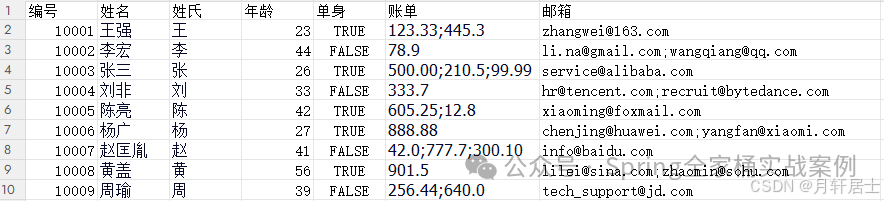
定义Java对象
public class Employee {
// 可选地,我们可通过ExcelRow注解访问每行项的索引。注解变量应为int、double、float或long类型
@ExcelRow  private int rowIndex;
// 字段必须使用@ExcelCell注解并指定其属性,才能从目标Excel工作表的正确坐标获取值。  // 注解字段可以是受保护、私有或公有的修饰符。该字段可以是布尔型、整型、长整型、浮点型、双精度型,或其包装类。  // 你还可以添加java.util.Date、java.time.LocalDate、java.time.LocalTime、java.time.LocalDateTime 以及 String 类型的字段。
@ExcelCell(0)
private long employeeId;
@ExcelCell(1)
private String name;
@ExcelCell(2)
private String surname;
@ExcelCell(3)
private int age;
@ExcelCell(4)
private boolean single;  // 如果某列包含多个值,可通过列表字段获取它们。列表字段可存储以下类型的项目:BigDecimal、Long、Double、Float、Integer、Boolean 和 String。
@ExcelCellName("emails")
List<String> emails;
@ExcelCell(5)
List<BigDecimal> bills;  // 无需使用getter/setter方法将Excel单元格映射到字段}
使用Poiji读取Excel数据
File file = new File("C:\\Users\\Administrator\\Desktop\\employees.xlsx");
PoijiOptions options = PoijiOptions.PoijiOptionsBuilder
.settings().addListDelimiter(";").build();
List<Employee> employees = Poiji.fromExcel(file, Employee.class, options);
System.err.println(employees) ;
// 或者
InputStream stream = new FileInputStream(file);
employees = Poiji.fromExcel(stream, PoijiExcelType.XLSX, Employee.class, options);
System.out.println(employees) ;
默认情况下,Poiji 会忽略 Excel 数据的标题行。若需忽略数据的第一行,需使用 PoijiOptions 进行设置,如下示例:
PoijiOptions options = PoijiOptions.PoijiOptionsBuilder
 // 跳过的行数
 .settings(1)
// 设置分隔符
.addListDelimiter(";")
.build();
2.4高级用法
设置读取工作簿名称
@ExcelSheet("Sheet2")
public class Employee {
}
通过 @ExcelSheet 可以设置具体你要读取的哪个工作簿。
受保护的Excel文件
假设你的Excel文件设置了密码保护,可通过PoijiOptionsBuilder定义密码以读取行数据:
PoijiOptions options = PoijiOptionsBuilder.settings()
   .addListDelimiter(";")
   .password("123123")
   .build();
设置单元格名称
使用 @ExcelCellName,我们可以直接通过列名读取数值。
public class Employee {
@ExcelCellName("姓名")
private String name;
}
默认情况下,@ExcelCellName 区分大小写,且 Excel 文件不应包含重复的列名。不过,你可以通过 PoijiOptionsBuilder#caseInsensitive(boolean) 方法调整此特性,并使用 PoijiOptionsBuilder#ignoreWhitespaces(boolean) 忽略空格。
使用继承
我们定义的数据模型还可以使用继承关系,如下示例:
public abstract class BaseEntity {
@ExcelCell(1)
protected String name;
@ExcelCell(3)
protected int age;
}
// 子类
public class Employee extends BaseEntity {
@ExcelRow
private int rowIndex;
@ExcelCell(0)
private long employeeId;
@ExcelCell(2)
private String surname;
@ExcelCell(4)
private boolean single;
@ExcelCellName("emails")
List<String> emails;
@ExcelCell(5)
List<BigDecimal> bills;
}
测试示例
File file = new File("C:\\Users\\Administrator\\Desktop\\employees.xlsx");
PoijiOptions options = PoijiOptionsBuilder.settings()
 .addListDelimiter(";")
 .password("123123")
 .build();List<Employee> employees = Poiji.fromExcel(file, Employee.class, options);
 System.err.println(employees.get(0));
输出结果
Employee [
rowIndex=1,
employeeId=10001,
surname=王,
single=true,
emails=null,
bills=[123.33, 445.3],
name=王强,
age=23]
准备如下Excel内容

准备模型数据
@ExcelSheet("Sheet2")
public class PersonCreditInfo {
@ExcelCellName("编号")
private Integer no;
@ExcelCellRange
private PersonInfo personInfo;
@ExcelCellRange
private CardInfo cardInfo;
public static class PersonInfo {
 @ExcelCellName("姓名")
 private String name;
 @ExcelCellName("年龄")
 private Integer age;
 @ExcelCellName("城市")
 private String city;
 @ExcelCellName("国家")
 private String state;
 @ExcelCellName("邮编")
 private String zipCode;
 }
public static class CardInfo {
 @ExcelCellName("类型")
 private String type;
 @ExcelCellName("末尾号码")
 private String last4Digits;
 @ExcelCellName("有效期")
 private String expirationDate;
 }}
测试程序
File file = new File("C:\\Users\\Administrator\\Desktop\\employees.xlsx");
PoijiOptions options = PoijiOptions.PoijiOptionsBuilder
 .settings()
 .headerCount(2)
 .build();
List<PersonCreditInfo> persons = Poiji.fromExcel(file, PersonCreditInfo.class, options);
System.err.println(persons);
自定义消费接口
我们可以将读取到的每一条数据进行处理。这在如下场景下非常有用:
-
处理超大Excel文件(无需全部加载内存)
-
运行时数据处理/过滤
-
数据库批量插入
Poiji.fromExcel(file, Employee.class, options, employee -> {
System.err.println(employee) ;
});
自定义类型转换
可以通过Casting接口创建自己的转换实现,而无需依赖默认的Poiji转换配置。
public class ModifiedBooleanCasting extends DefaultCasting {
@Override
protected Boolean booleanValue(String value, String sheetName, int row, int col, PoijiOptions options) {
    if (!value.equals("TRUE") && !value.equals("FLASE")) {
      return onError(value, sheetName, row, col, new RuntimeException("数据类型错误"), options.preferNullOverDefault() ? null : false);
   } else {
     return value.equals("y");
   }  }}
使用
PoijiOptions options = PoijiOptions.PoijiOptionsBuilder
.settings()
.withCasting(new ModifiedBooleanCasting())
.password("123123")
.build();
poiJi 源码

汇聚全球AI编程工具,助力开发者即刻编程。
更多推荐


 10
10 0
0- 0


 已为社区贡献2条内容

所有评论(0)