
搭建增量订阅&消费组件 Canal
·
开始搭建
用的是 阿里巴巴 MySQL binlog 增量订阅&消费组件 Canal
项目Github地址:https://github.com/alibaba/canal
Mysql 相关配置
Mysql版本为5.7.43
- 开启
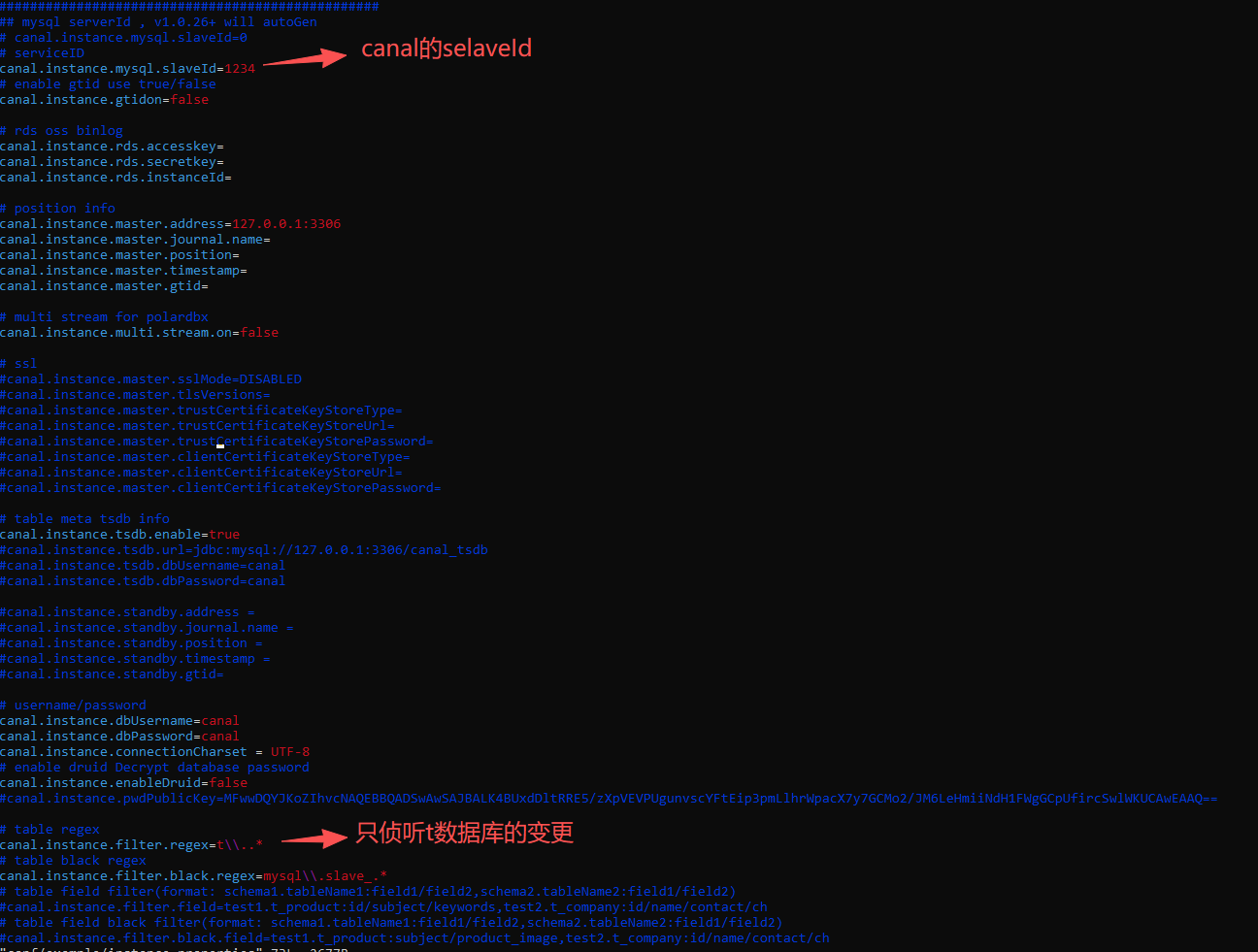
Binlog binlog-format为ROW模式server_id不要和canal的slaveId重复
示例:
[mysqld]
log-bin=mysql-bin  # 开启 binlog
binlog-format=ROW  # 选择 ROW 模式
server_id=1        # 当前 mysql 实例的唯一ID
创建对应的账户,用来侦听binlog
CREATE USER canal IDENTIFIED BY 'canal';
GRANT SELECT, REPLICATION SLAVE, REPLICATION CLIENT ON *.* TO 'canal'@'%';
FLUSH PRIVILEGES;
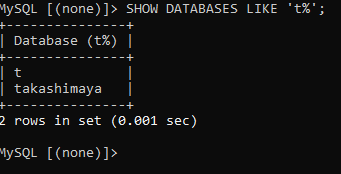
我这边测试是侦听单个数据库,所以新创建了个数据库t,
Canal的搭建
需要先安装Java环境,因为我机器上有了java 11,这一步就略过…

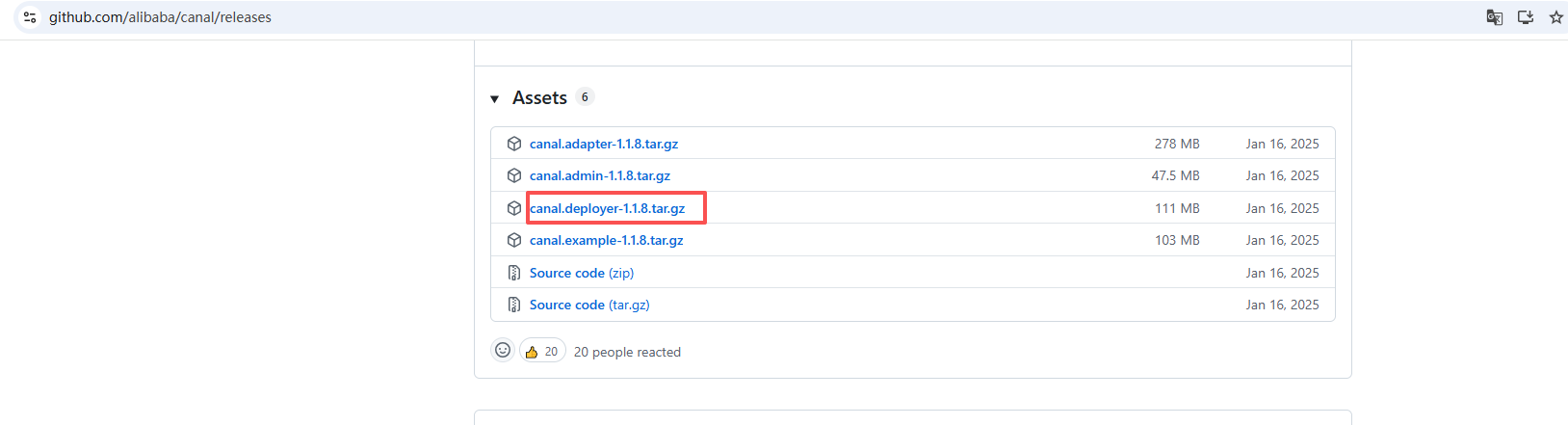
canal我这边下载的是最新版的 1.1.8
canal版本:https://github.com/alibaba/canal/releases
# 下载canal包
wget https://github.com/alibaba/canal/releases/download/canal-1.1.8/canal.deployer-1.1.8.tar.gz

# 创建文件夹
mkdir /tmp/canal
# 解压到canal文件夹
tar zxvf /mnt/d/googledowonds/canal.deployer-1.1.8.tar.gz -C /tmp/canal
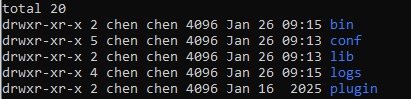
解压完成后,进入 /tmp/canal 目录,可以看到如下结构:
配置修改
vim conf/example/instance.properties
启动
# 启动
sh bin/startup.sh
# 查看日志
cat logs/canal/canal.log
-2026-01-26 09:15:31.501 [main] INFO  com.alibaba.otter.canal.deployer.CanalLauncher - ## set ---default uncaught exception handler
-2026-01-26 09:15:31.508 [main] INFO  com.alibaba.otter.canal.deployer.CanalLauncher - ## load canal configurations
-2026-01-26 09:15:31.523 [main] INFO  com.alibaba.otter.canal.deployer.CanalStarter - ## start the canal server.
-2026-01-26 09:15:31.597 [main] INFO  com.alibaba.otter.canal.deployer.CanalController - ## start the canal server[172.18.0.1(172.18.0.1):11111]
-2026-01-26 09:15:33.098 [main] INFO  com.alibaba.otter.canal.deployer.CanalStarter - ## the canal server is running now ......


# 查看 instance 的日志
cat logs/example/example.log
-2026-01-26 09:15:32.349 [main] INFO  c.a.otter.canal.instance.spring.CanalInstanceWithSpring - start CannalInstance for 1-example
-2026-01-26 09:15:33.056 [main] WARN  c.a.o.canal.parse.inbound.mysql.dbsync.LogEventConvert - --> init table filter : ^t\..*$
-2026-01-26 09:15:33.057 [main] WARN  c.a.o.canal.parse.inbound.mysql.dbsync.LogEventConvert - --> init table black filter : ^mysql\.slave_.*$
-2026-01-26 09:15:33.067 [main] INFO  c.a.otter.canal.instance.core.AbstractCanalInstance - start successful....
-2026-01-26 09:15:33.154 [destination = example , address = /127.0.0.1:3306 , EventParser] WARN  c.a.o.c.p.inbound.mysql.rds.RdsBinlogEventParserProxy - ---> begin to find start position, it will be long time for reset or first position
-2026-01-26 09:15:33.154 [destination = example , address = /127.0.0.1:3306 , EventParser] WARN  c.a.o.c.p.inbound.mysql.rds.RdsBinlogEventParserProxy - prepare to find start position just show master status
-2026-01-26 09:15:33.166 [destination = example , address = /127.0.0.1:3306 , EventParser] WARN  c.a.otter.canal.parse.inbound.mysql.MysqlConnection - load MySQL @@version_comment : Source distribution
-2026-01-26 09:15:34.273 [destination = example , address = /127.0.0.1:3306 , EventParser] WARN  c.a.o.c.p.inbound.mysql.rds.RdsBinlogEventParserProxy - ---> find start position successfully, EntryPosition[included=false,journalName=mysql-bin.000153,position=4,serverId=1,gtid=<null>,timestamp=1769389143000] cost : 1112ms , the next step is binlog dump
-2026-01-26 09:15:34.300 [destination = example , address = /127.0.0.1:3306 , EventParser] WARN  c.a.otter.canal.parse.inbound.mysql.MysqlConnection - load MySQL @@version_comment : Source distribution
-2026-01-26 09:39:35.854 [New I/O server worker #1-3] INFO  c.a.otter.canal.instance.core.AbstractCanalInstance - subscribe filter change to .*\..*
-2026-01-26 09:39:35.855 [New I/O server worker #1-3] WARN  c.a.o.canal.parse.inbound.mysql.dbsync.LogEventConvert - --> init table filter : ^.*\..*$

#查看端口占用
netstat -lntp | grep 11111
(Not all processes could be identified, non-owned process info
will not be shown, you would have to be root to see it all.)
tcp        0      0 0.0.0.0:11111           0.0.0.0:*               LISTEN      15843/java
测试
# clone canal php客户端
git clone https://github.com/xingwenge/canal-php.git
cd canal-php
composer update

# 启动 demo
php ./src/sample/client.php
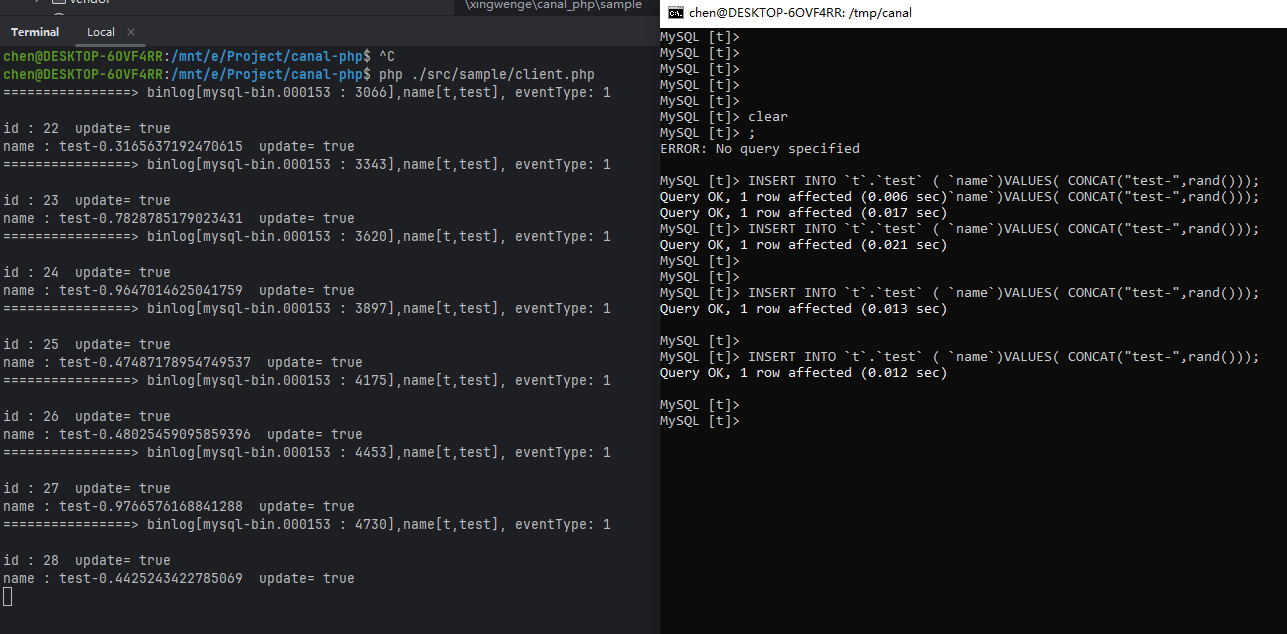
可以看到,右侧插入数据,左侧canal-php客户端可以收到对应的binlog数据

汇聚全球AI编程工具,助力开发者即刻编程。
更多推荐

 4
4 0
0- 0


 已为社区贡献1条内容

所有评论(0)