
Java 网络通信编程(2):私聊功能
·
在上期文章,我们介绍了广播功能的思路并成功实现。今天我们在原代码基础上改进,进一步拓展简易的私聊功能。
1.建立哈希表
要想指定唯一的聊天对象,我们需要给予每个客户端一个唯一特征,即 userId 。如此 userId 就与每个客户端的 Socket 对象建立了一一对应关系。对于这种映射关系,我们考虑使用哈希表,以 userId 为 key,以 socket 为 value 。userId 从 1 开始自增。
public void startServer() throws Exception {
        ServerSocket server = new ServerSocket(2000);
        System.out.println("启动服务器");

        int userId = 1;
        Map<Integer, Socket> map = new HashMap<Integer, Socket>();

        //重复监听连接过来的客户端
        while (true) {
            //阻塞监听连接过来的客户端
            Socket socket = server.accept();
            map.put(userId++, socket);

            //启动线程,保持通信
            ServerThread serverThread = new ServerThread(socket, map);
            new Thread(serverThread).start();
        }
    }
2.群发和私聊消息处理
为了区分群发消息和私聊消息,我们给消息内容加以格式规范。
- 群发消息:“ g:……”
- 私聊消息:“ userId(1、2……):……”
为了分割和识别服务端接收的消息在冒号前后的内容,我们需要用到字符串的 split() 方法,在括号里输入“:”,字符串会以此为界分开并存入字符串数组 str 中。str[0] 是判断消息类型的标志,str[1] 是具体的消息内容。之后我们再分析 str[0] ,若为 “g” ,则遍历哈希表,将 str[1] 作为消息广播;若不是 “g” ,则需要将字符串转为数字,将数字作为键去查询对应的 socket 。拿到 socket 后把 str[1] 送给对应输出流。
public void run() {
        while (true) {
            try {
                //接收信息
                String msg = readMsg();
                System.out.println("client:" + msg);

                String[] str = msg.split(":");
                if (str[0].equals("g")) {//前缀为“g:”是全体消息
                    //广播功能
                    for (Map.Entry<Integer, Socket> entry : map.entrySet()) {
                        Socket s = entry.getValue();
                        if (s != socket) {//排除自己客户端
                            OutputStream os = s.getOutputStream();
                            sendMsg(os, str[1]);
                        }
                    }
                } else {
                    //私聊功能
                    int userId = Integer.parseInt(str[0]);
                    Socket s = map.get(userId);
                    OutputStream os = s.getOutputStream();
                    sendMsg(os, str[1]);
                }
            } catch (Exception e) {
                throw new RuntimeException(e);
            }

        }
    }
3.结果演示
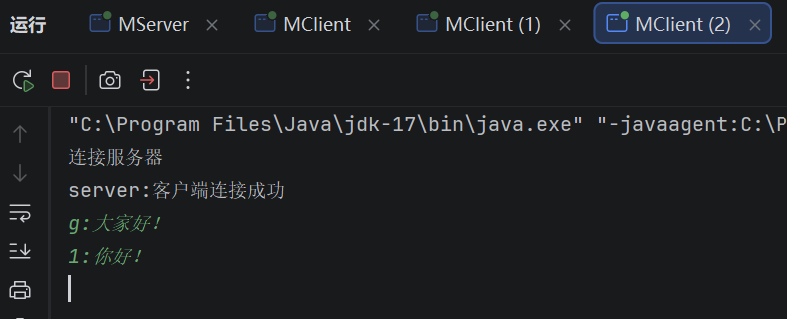
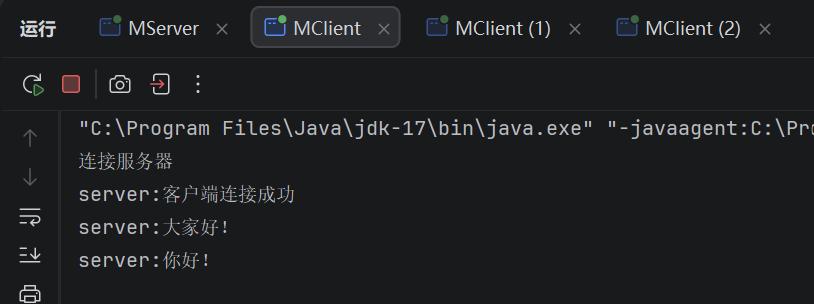
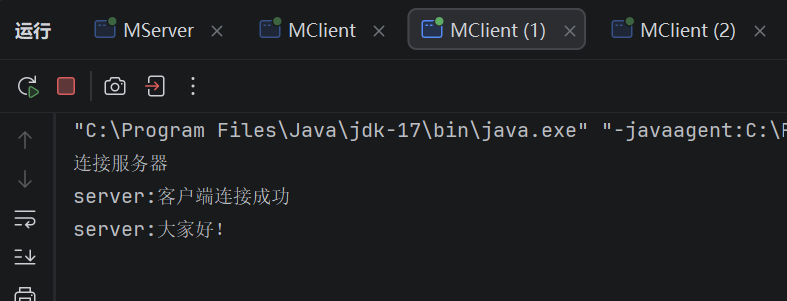
如此我们便在保留广播功能的基础上拓展出了简易私聊功能。以下为效果演示。
3号客户端先后群发消息和私聊一号客户端,结果都符合预期。
4.参考代码
以下是改进后的服务端和通信线程完整代码。
import java.net.ServerSocket;
import java.net.Socket;
import java.util.HashMap;
import java.util.Map;

public class MServer {
    public static void main(String[] args) {
        try {
            new MServer().startServer();
        } catch (Exception e) {
            throw new RuntimeException(e);
        }
    }

    public void startServer() throws Exception {
        ServerSocket server = new ServerSocket(2000);
        System.out.println("启动服务器");

        int userId = 1;
        Map<Integer, Socket> map = new HashMap<Integer, Socket>();

        //重复监听连接过来的客户端
        while (true) {
            //阻塞监听连接过来的客户端
            Socket socket = server.accept();
            map.put(userId++, socket);

            //启动线程,保持通信
            ServerThread serverThread = new ServerThread(socket, map);
            new Thread(serverThread).start();
        }
    }
}
import java.io.InputStream;
import java.io.OutputStream;
import java.net.Socket;
import java.util.Map;

public class ServerThread implements Runnable {
    public Socket socket;
    public InputStream is;
    public OutputStream os;
    public Map<Integer, Socket> map;

    public ServerThread(Socket socket, Map<Integer, Socket> map) {
        this.socket = socket;
        this.map = map;
        //获取客户端输入输出流
        try {
            is = socket.getInputStream();
            os = socket.getOutputStream();
            sendMsg(os, "客户端连接成功");
        } catch (Exception e) {
            throw new RuntimeException(e);
        }
    }

    public void run() {
        while (true) {
            try {
                //接收信息
                String msg = readMsg();
                System.out.println("client:" + msg);

                String[] str = msg.split(":");
                if (str[0].equals("g")) {//前缀为“g:”是全体消息
                    //广播功能
                    for (Map.Entry<Integer, Socket> entry : map.entrySet()) {
                        Socket s = entry.getValue();
                        if (s != socket) {//排除自己客户端
                            OutputStream os = s.getOutputStream();
                            sendMsg(os, str[1]);
                        }
                    }
                } else {
                    //私聊功能
                    int userId = Integer.parseInt(str[0]);
                    Socket s = map.get(userId);
                    OutputStream os = s.getOutputStream();
                    sendMsg(os, str[1]);
                }
            } catch (Exception e) {
                throw new RuntimeException(e);
            }

        }
    }

    //发送消息方法体
    public void sendMsg(OutputStream os, String msg) throws Exception {
        String str = msg + "\r\n";//拼接换行
        os.write(str.getBytes());
        os.flush();
    }

    //读取消息方法体
    public String readMsg() throws Exception {
        byte[] bytes = new byte[1024];//保存消息的缓存区
        is.read(bytes);
        String msg = new String(bytes);//将 byte 数组转为字符串
        return msg.trim();//去除空位
    }
}
当然这个私聊功能还有许多可以完善的地方,例如遇到不符合格式的消息报错,私聊时接收消息方不知道发送方 ID 等,读者们可提出建议或自行探索。

汇聚全球AI编程工具,助力开发者即刻编程。
更多推荐

 5
5 0
0- 0


 已为社区贡献6条内容

所有评论(0)