
适合初学者:RocketMQ 下载实现9876
·
下载前要知道 jdk 17版本---Rocket MQ 5.X.X 版本对应,要去搜一下就好了省去版本不配对的麻烦
1.下载网址可选择版本:
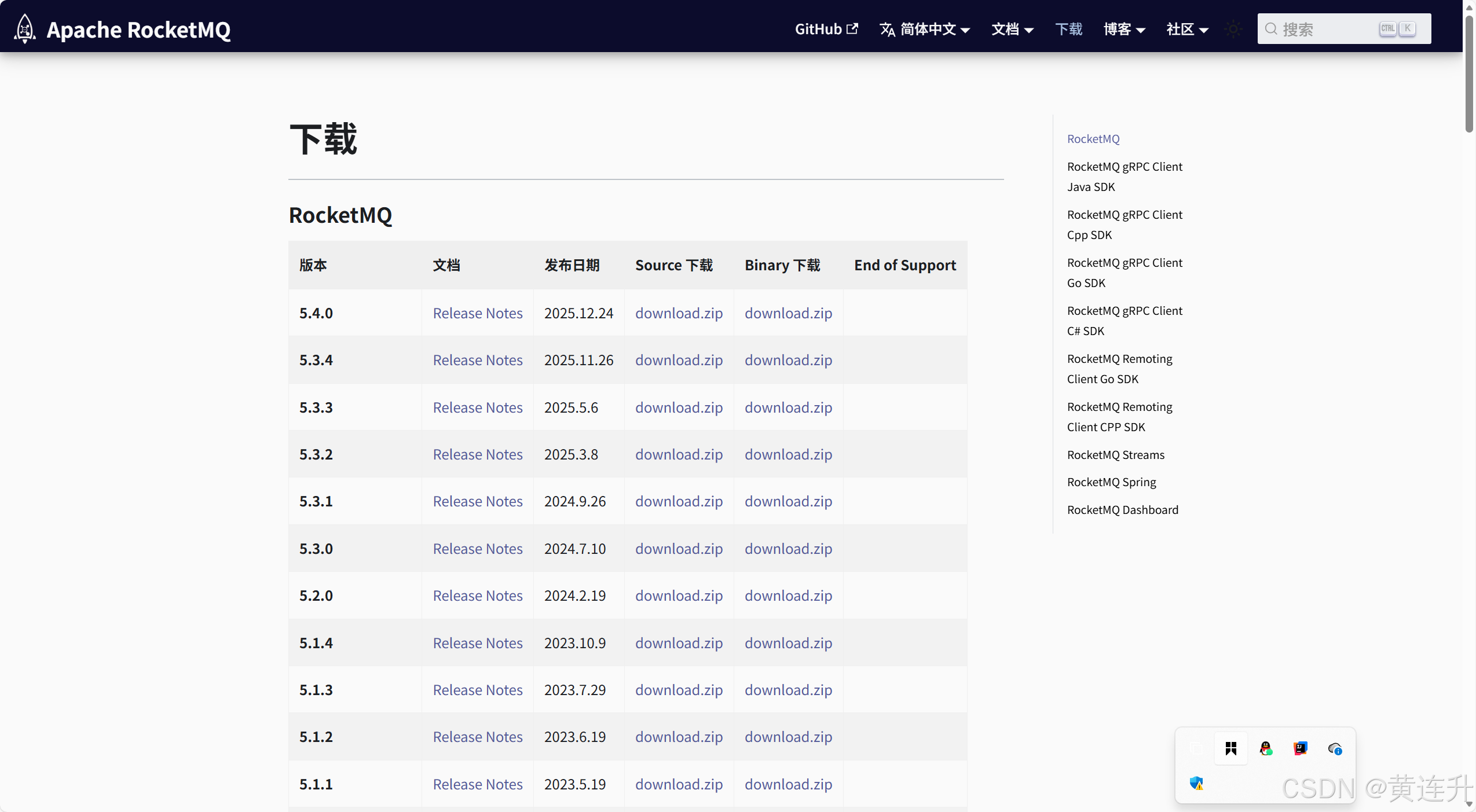
下载 | RocketMQ https://rocketmq.apache.org/zh/download/RocketMQ
阿里巴巴,为电商而生,国产,支持事务,处理订单支付,扣减库存,等实时性,一致性,吞吐量10万Qps (每秒钟请求)NameServer (记录broker 路由端口的服务器) ,Broker(接受消息,分发消息),Consumer (Listener 消费者==监听器,实现RocketMQListener),Topic 消息分类,Service (订单服务==生产者),RocketTemplate (使用发送不同消息类型的对象(顺序消息,同步消息(阻塞等待),异步消息,延迟消息(按等级等级3==10秒延迟后发送))+事务消费组,事务订单服务@Trascational
2.在D:盘,新建一个文件夹,将压缩包解压进去
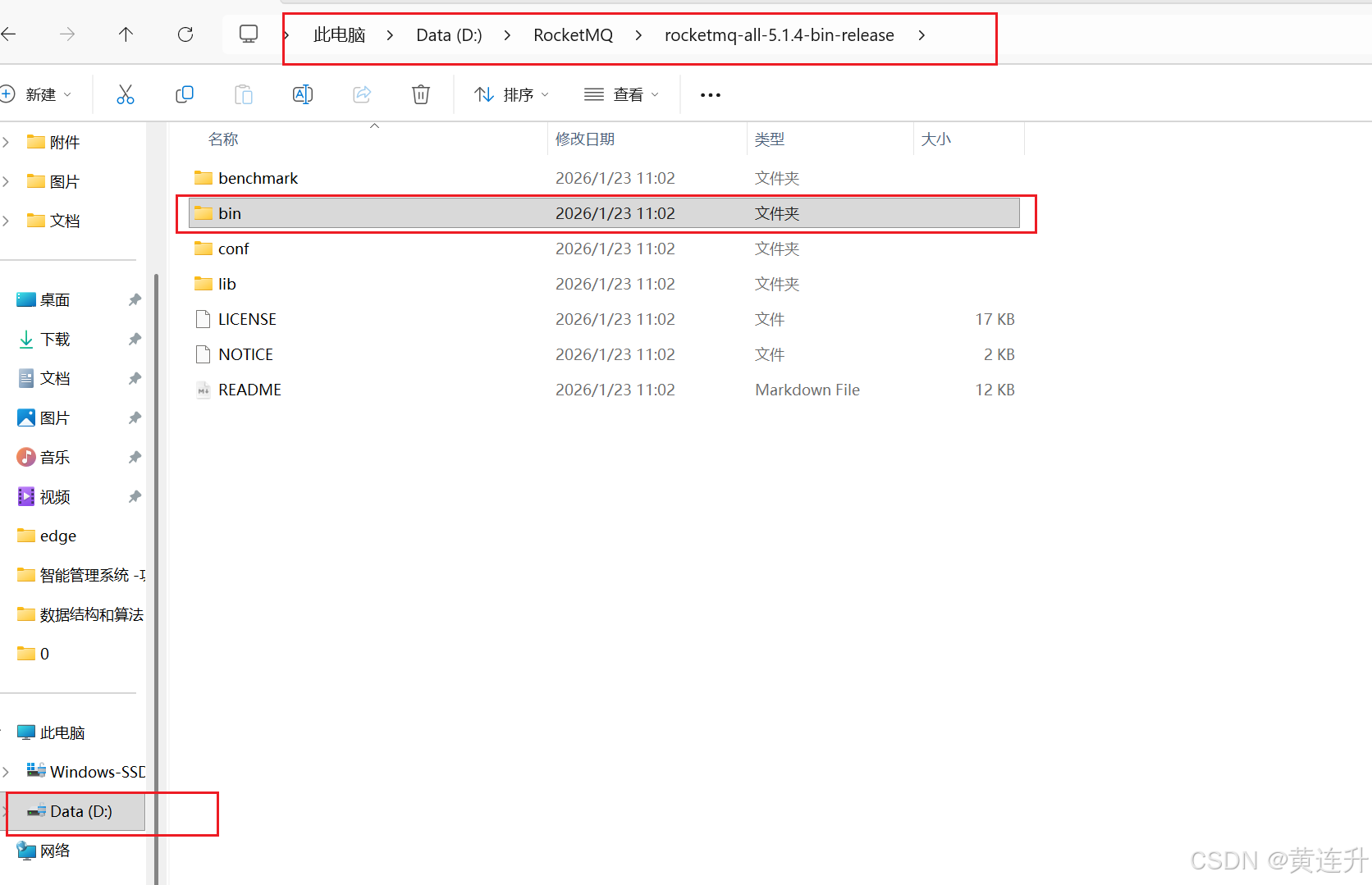
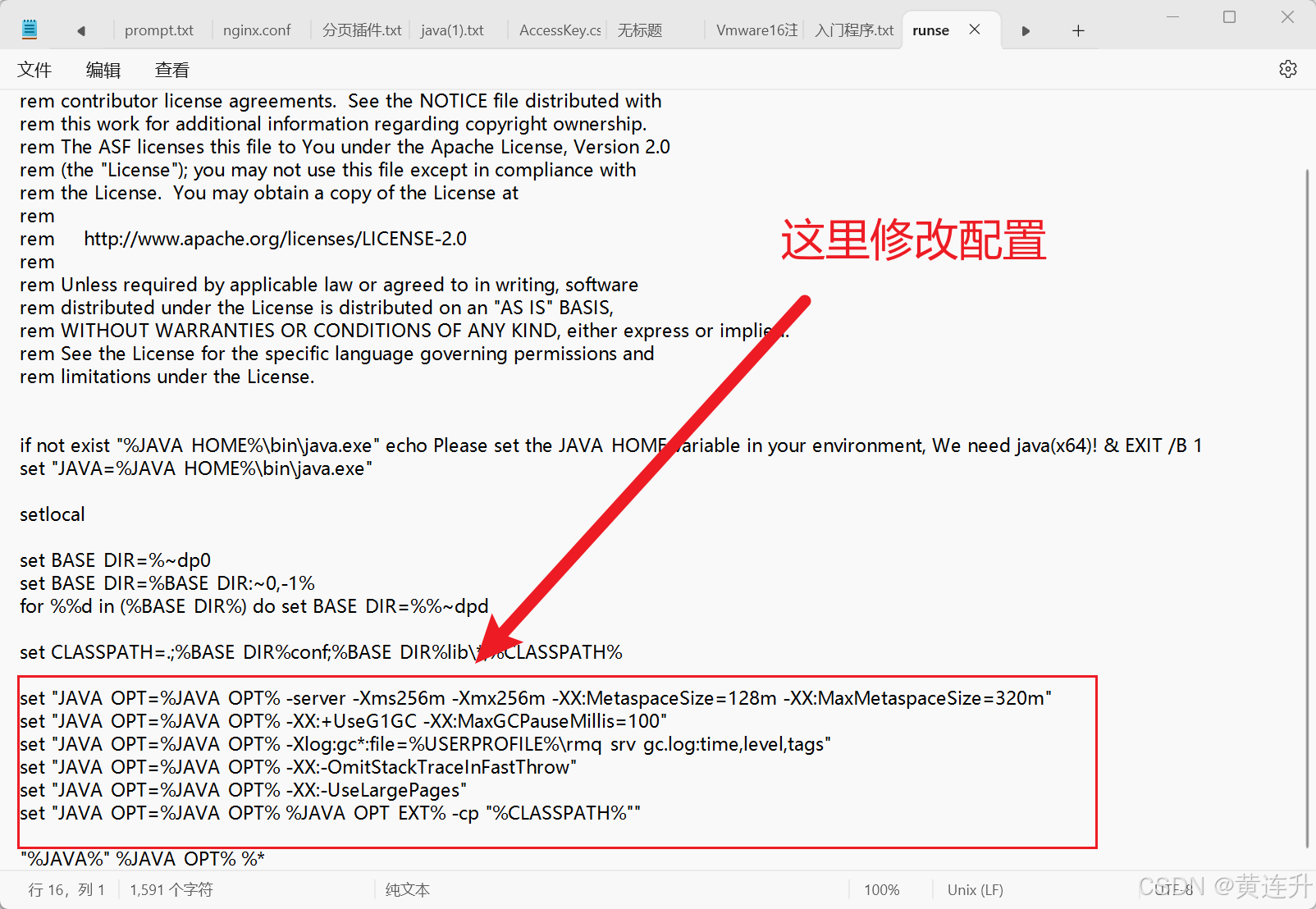
3.这里可以用记事本来修改配置(运行大小,JVM ,垃圾回收器(CMS,G1不同版本不同配置))
修改配置:(记得ctrl+s 保存)
4.配置RocketMQ 的环境变量
右击“此电脑”,点击 “属性” 选项 ,继续操作下面
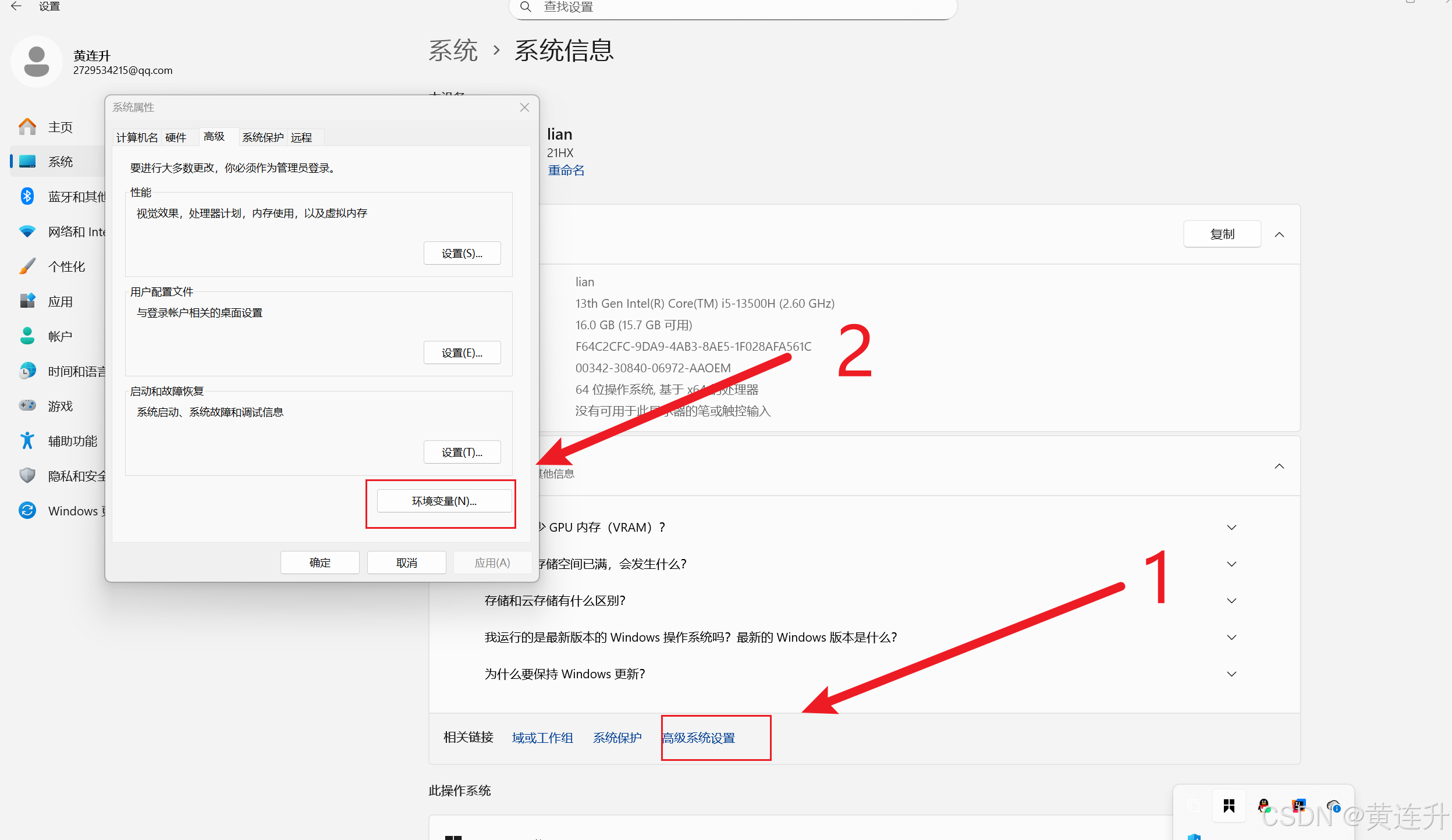
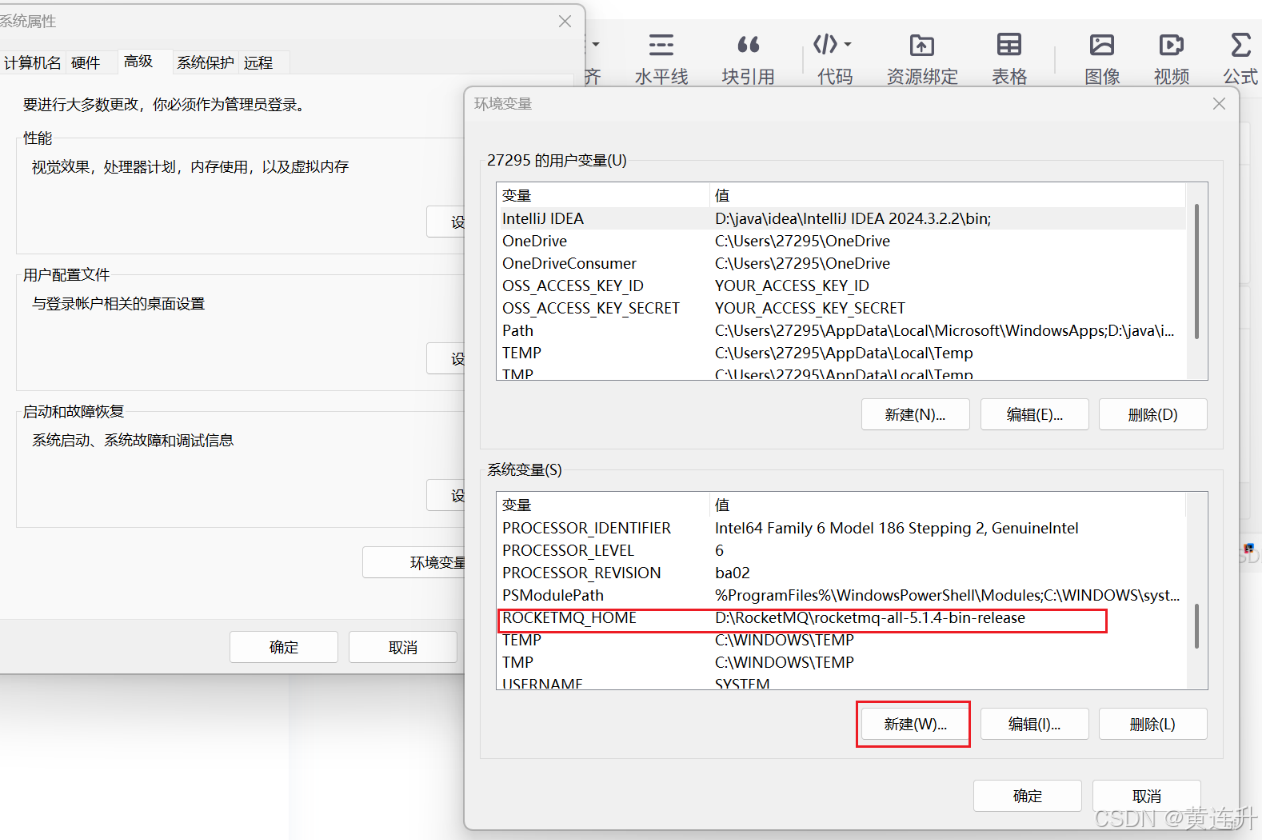
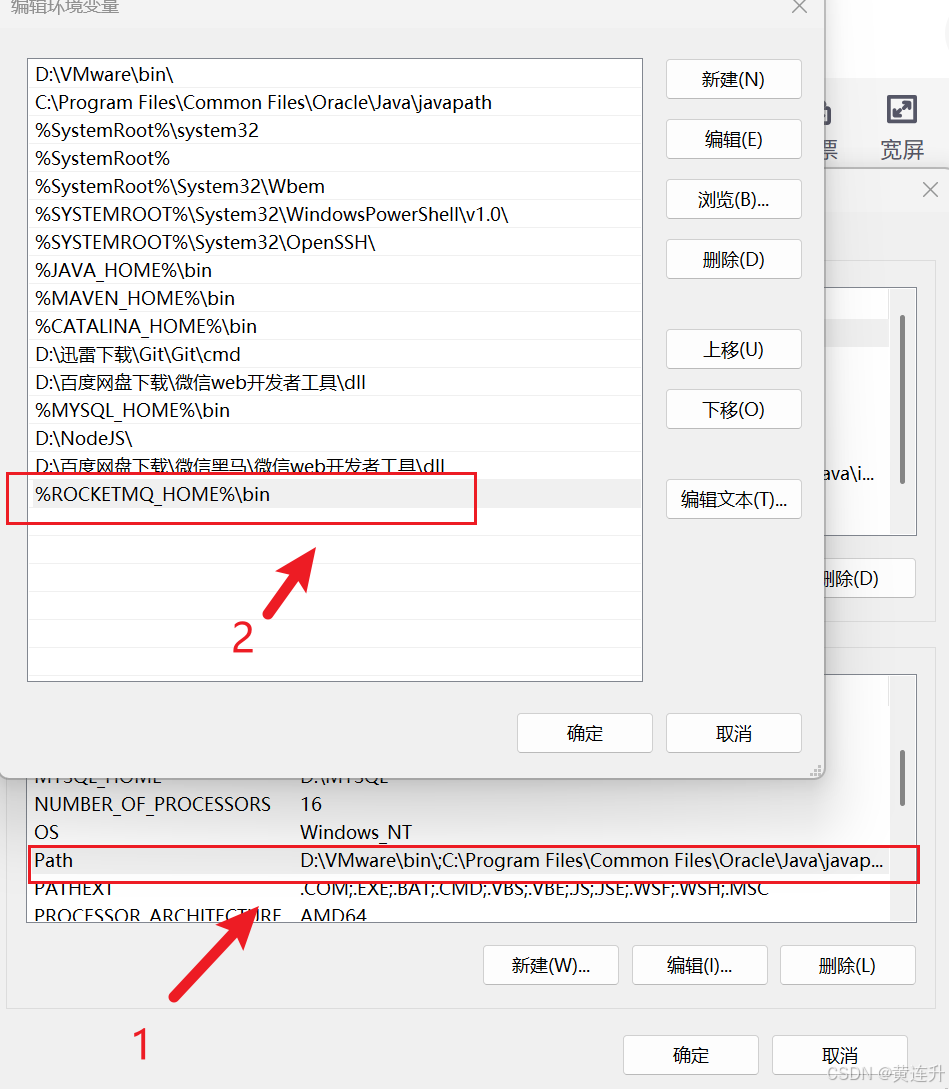
记得都得点击确认!!!!!!!!,空格注意,大小写,!!!!!
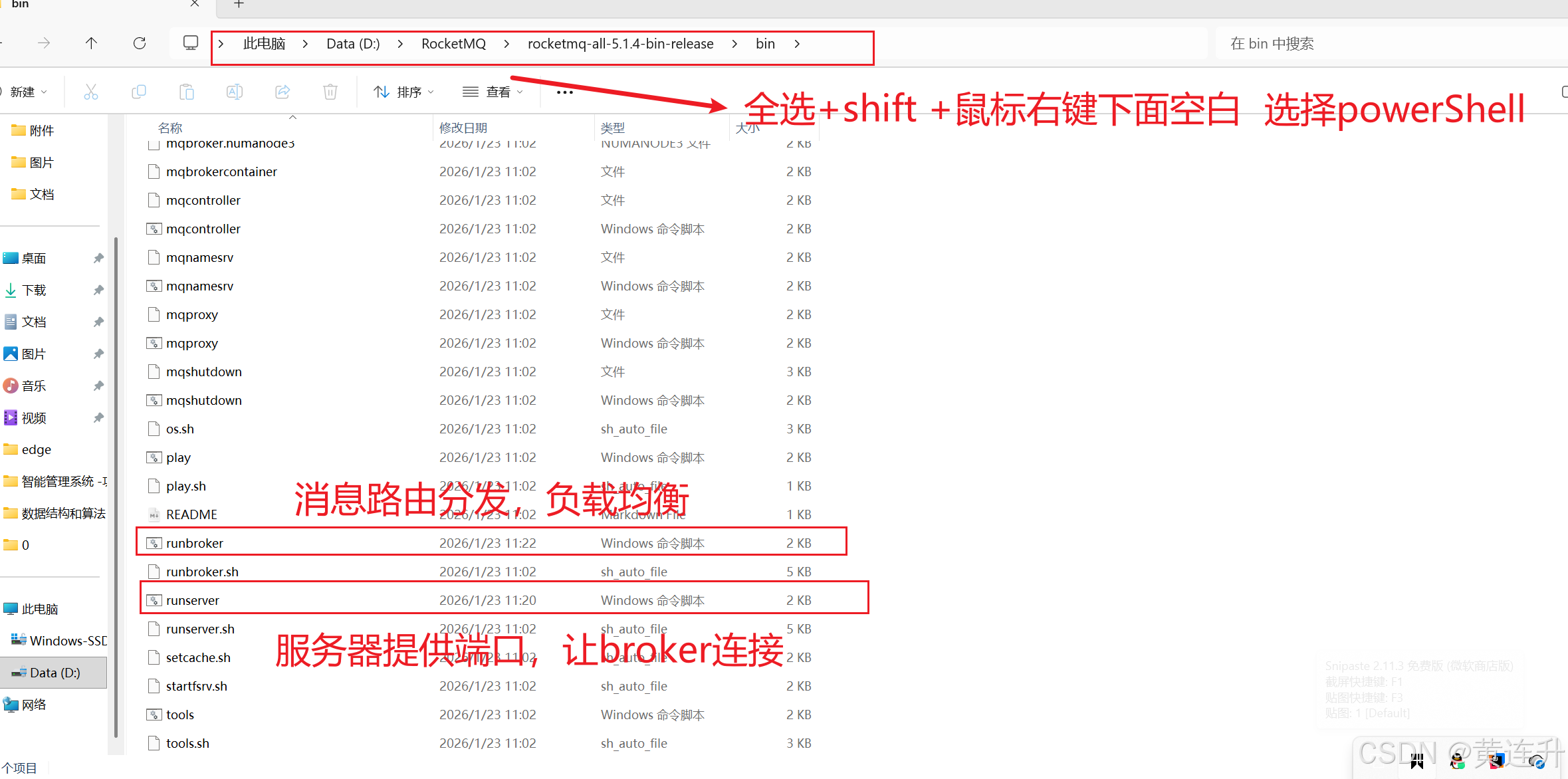
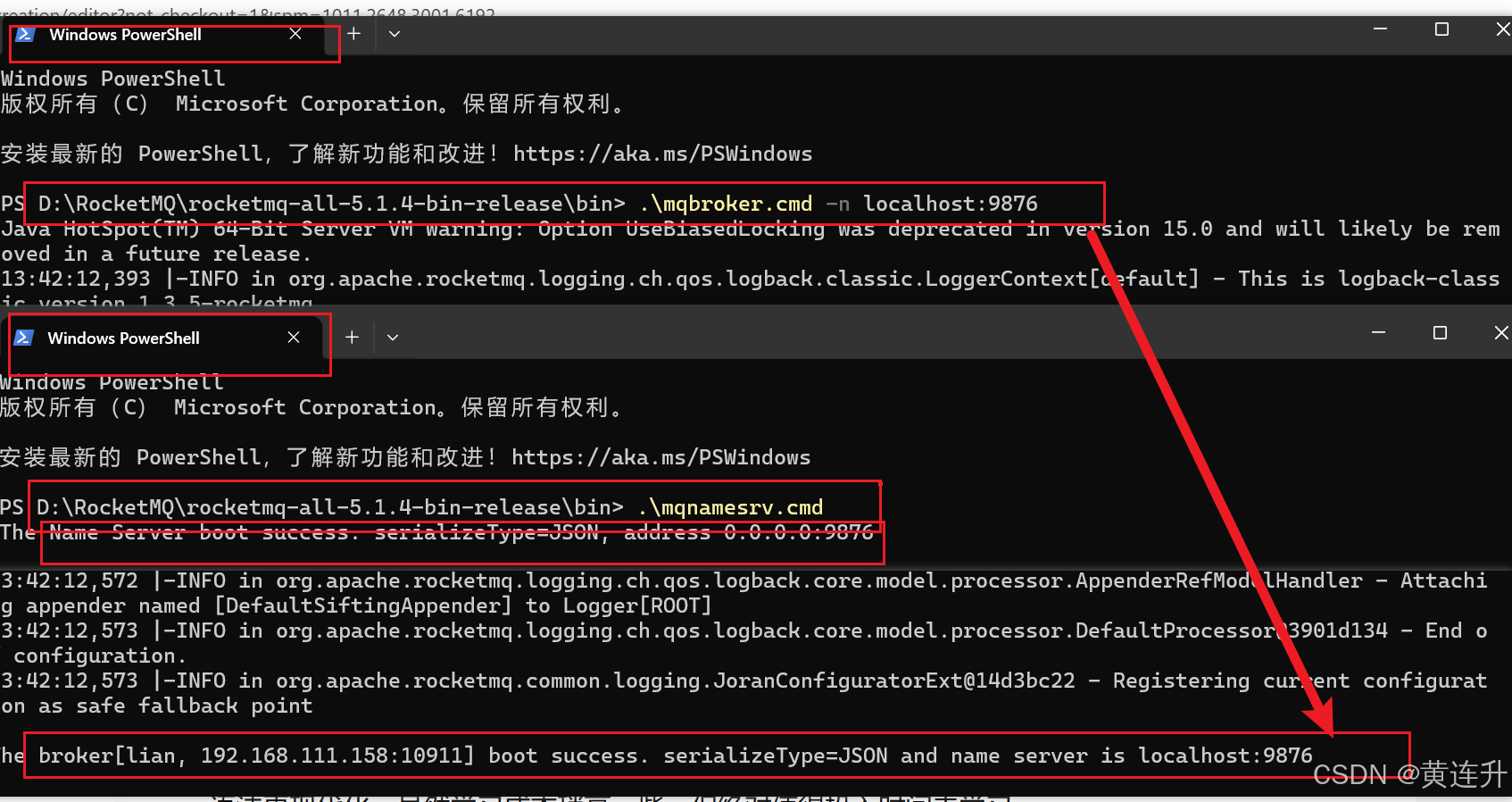
5.用powerShell--->启动 nameServer +Broker
解释:
- PowerShell和CMD最大的区别就是数据处理方式不同,PowerShell面向对象,功能更强大,语法更现代化。虽然学习成本稍高一些,但绝对值得投入时间去学习。
- PowerShell的命令虽然看起来复杂,但遵循统一的动词-名词格式,掌握了规律后其实很好记忆。而且它的帮助系统非常完善,Get-Help命令能解决大部分问题。
- 如果你现在还在纠结要不要学PowerShell,我的建议是赶紧开始吧。不管是日常的系统管理,还是复杂的自动化任务,PowerShell都能让你事半功倍。
- 当然,这不意味着要完全抛弃CMD。在某些简单场景下,CMD可能更直接一些。关键是要根据实际需求选择合适的工具。
- 先启动nameServer 9876, 再让broker 连接 ,可以多个broker 负载均衡,显示success 连接成功!!!!!!!!
接下来用SpringBoot +Rocket MQ 新建项目学习实现
1.创建一个idea新项目+Maven,导入依赖swagger,lombook,
<?xml version="1.0" encoding="UTF-8"?>
<project xmlns="http://maven.apache.org/POM/4.0.0" xmlns:xsi="http://www.w3.org/2001/XMLSchema-instance"
         xsi:schemaLocation="http://maven.apache.org/POM/4.0.0 https://maven.apache.org/xsd/maven-4.0.0.xsd">
    <modelVersion>4.0.0</modelVersion>

    <parent>
        <groupId>org.springframework.boot</groupId>
        <artifactId>spring-boot-starter-parent</artifactId>
        <version>3.2.5</version>
        <relativePath/>
    </parent>

    <groupId>com.sang</groupId>
    <artifactId>demo-rocketmq</artifactId>
    <version>0.0.1-SNAPSHOT</version>
    <name>demo-rocketmq</name>
    <description>demo-rocketmq</description>

    <properties>
        <java.version>17</java.version>
        <!-- 自定义版本管理 -->
        <rocketmq-spring-boot-starter.version>2.3.4</rocketmq-spring-boot-starter.version>
        <rocketmq-client.version>5.1.4</rocketmq-client.version>
        <fastjson.version>2.0.43</fastjson.version>
        <lombok.version>1.18.30</lombok.version>
        <!-- SpringDoc OpenAPI 版本 -->
        <springdoc.version>2.5.0</springdoc.version>
    </properties>

    <dependencies>
        <!-- Spring Boot Web -->
        <dependency>
            <groupId>org.springframework.boot</groupId>
            <artifactId>spring-boot-starter-web</artifactId>
        </dependency>

        <!-- ========== RocketMQ 依赖 ========== -->
        <dependency>
            <groupId>org.apache.rocketmq</groupId>
            <artifactId>rocketmq-spring-boot-starter</artifactId>
            <version>${rocketmq-spring-boot-starter.version}</version>
        </dependency>
        <dependency>
            <groupId>jakarta.annotation</groupId>
            <artifactId>jakarta.annotation-api</artifactId>
            <version>2.1.1</version>
        </dependency>
        <!-- ========== SpringDoc OpenAPI (Swagger 3) ========== -->
        <dependency>
            <groupId>org.springdoc</groupId>
            <artifactId>springdoc-openapi-starter-webmvc-ui</artifactId>
            <version>${springdoc.version}</version>
        </dependency>
//事务@Transcational 注解
        <dependency>
            <groupId>org.springframework.boot</groupId>
            <artifactId>spring-boot-starter-data-jpa</artifactId>
        </dependency>

        <!-- ========== 工具依赖 ========== -->
        <dependency>
            <groupId>org.projectlombok</groupId>
            <artifactId>lombok</artifactId>
            <version>${lombok.version}</version>
            <optional>true</optional>
        </dependency>
        <dependency>
            <groupId>com.alibaba</groupId>
            <artifactId>fastjson</artifactId>
            <version>${fastjson.version}</version>
        </dependency>
        <dependency>
            <groupId>org.apache.commons</groupId>
            <artifactId>commons-lang3</artifactId>
        </dependency>
    </dependencies>

    <build>
        <plugins>
            <plugin>
                <groupId>org.springframework.boot</groupId>
                <artifactId>spring-boot-maven-plugin</artifactId>
                <configuration>
                    <excludes>
                        <exclude>
                            <groupId>org.projectlombok</groupId>
                            <artifactId>lombok</artifactId>
                        </exclude>
                    </excludes>
                </configuration>
            </plugin>
        </plugins>
    </build>
</project>
2.创建包和类
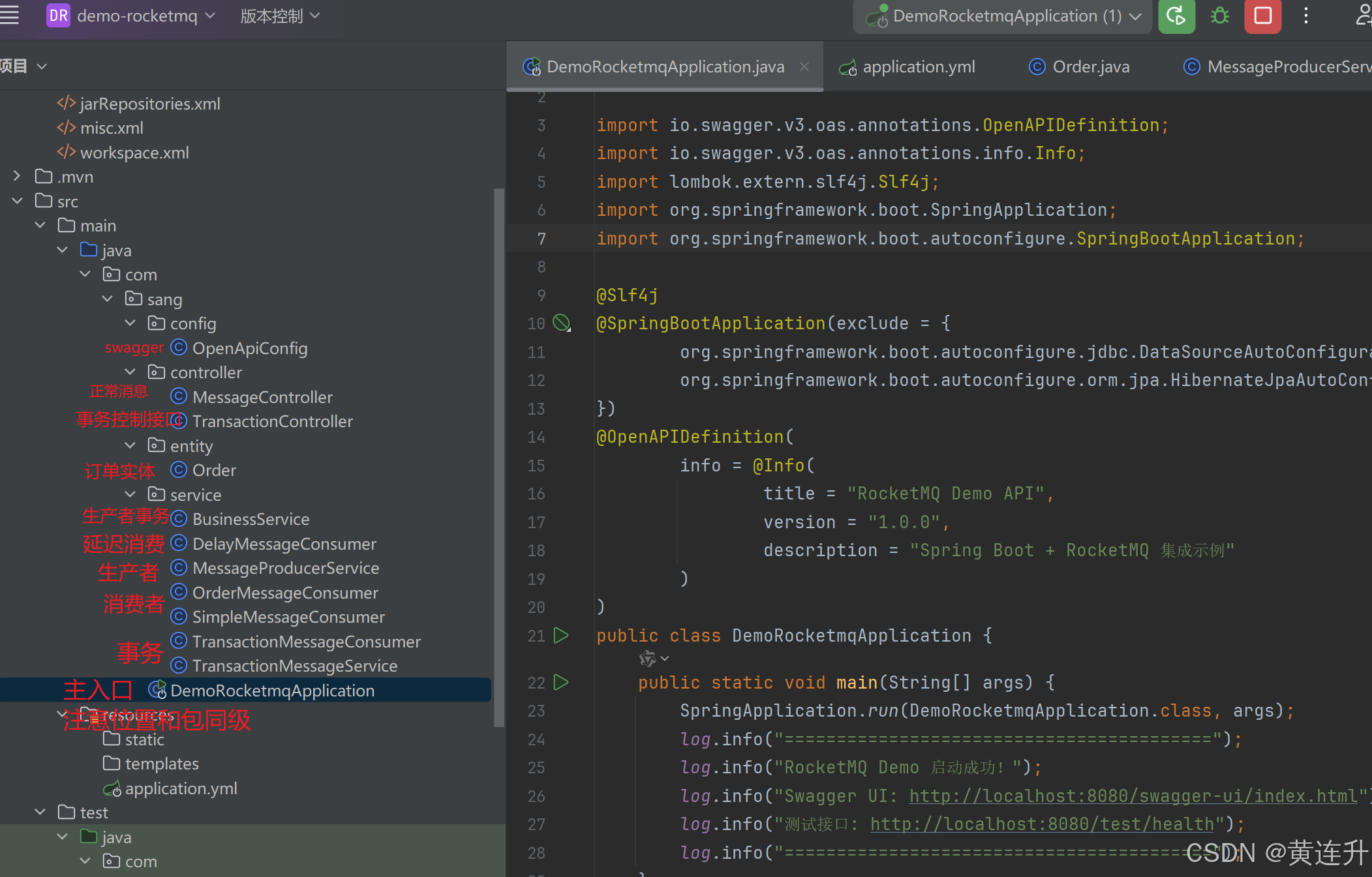
3.application.yml 配置文件
# 应用配置
spring:
  application:
    name: demo-rocketmq
  mvc:
    pathmatch:
      matching-strategy: ant_path_matcher

# 服务器配置
server:
  port: 8080
  # 删除这行 ↓
  # servlet:
  #   context-path: /api
  tomcat:
    uri-encoding: UTF-8

# RocketMQ 配置
rocketmq:
  name-server: 127.0.0.1:9876
  producer:
    group: demo-producer-group
    send-message-timeout: 3000
    retry-times-when-send-failed: 2
  consumer:
    group: demo-consumer-group

# SpringDoc OpenAPI 配置
springdoc:
  api-docs:
    path: /v3/api-docs
  swagger-ui:
    path: /swagger-ui.html
    enabled: true
    operations-sorter: alpha
    tags-sorter: alpha
  show-actuator: true
  default-produces-media-type: application/json
  default-consumes-media-type: application/json
  # 如果Controller在子包,可以配置扫描
  packages-to-scan: com.sang.controller
  paths-to-match: /**

# 日志配置
logging:
  level:
    com.sang: DEBUG
    org.apache.rocketmq: INFO
    org.springdoc: INFO
  pattern:
    console: "%d{yyyy-MM-dd HH:mm:ss} [%thread] %-5level %logger{36} - %msg%n"
4.代码实现
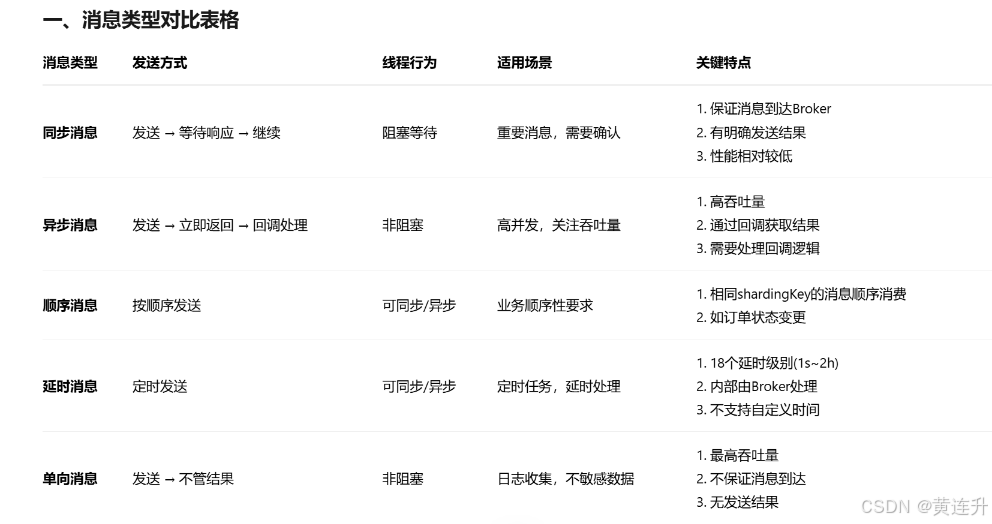
1.测试消息类型(同步,异步,顺序,延时,单向(无所谓返回))
- 同步:生产者,发送消息给broker ,等broker响应给生产者(已接收处理),线程才继续往下,处理代码==阻塞
- 异步:生产者,发消息给broker,直接处理下面的代码,不会等待,等确认收到消息,第二个线程会回掉给生产者
- 顺序:按顺序消费
- 延时:按延时等级的时间,最晚2H(18级别)
- 单项:无所谓返回,只管发
/**
 * 消息控制器
 */
@Tag(name = "测试接口", description = "系统健康检查和基础功能测试")
@Slf4j
@RestController
@RequestMapping("/message")
public class MessageController {

    @Autowired
    private MessageProducerService messageProducerService;

    /**
     * 发送同步消息
     */
    @Operation(summary = "发送同步消息")
    @PostMapping("/sync")
    public Map<String, Object> sendSyncMessage(
            @Parameter (description = "消息内容")
            @RequestParam String content) {
        SendResult result = messageProducerService.sendSyncMessage("DEMO_TOPIC", content);

        Map<String, Object> response = new HashMap<>();
        response.put("code", 200);
        response.put("message", "同步消息发送成功");
        response.put("data", result);
        return response;
    }

    /**
     * 发送异步消息
     */
    @Operation(summary = "发送异步消息")
    @PostMapping("/async")
    public Map<String, Object> sendAsyncMessage(
            @Parameter (description = "消息内容")
            @RequestParam String content) {
        messageProducerService.sendAsyncMessage("DEMO_TOPIC", content);

        Map<String, Object> response = new HashMap<>();
        response.put("code", 200);
        response.put("message", "异步消息发送中,请查看日志");
        return response;
    }

    /**
     * 发送单向消息
     */
    @Operation(summary = "发送单向消息")
    @PostMapping("/oneway")
    public Map<String, Object> sendOnewayMessage(
            @Parameter (description = "消息内容")
            @RequestParam String content) {
        messageProducerService.sendOnewayMessage("DEMO_TOPIC", content);

        Map<String, Object> response = new HashMap<>();
        response.put("code", 200);
        response.put("message", "单向消息已发送");
        return response;
    }

    /**
     * 发送带Tag的消息
     */
    @PostMapping("/with-tag")
    public Map<String, Object> sendMessageWithTag(
            @RequestParam String content,
            @RequestParam(defaultValue = "TEST_TAG") String tag) {

        SendResult result = messageProducerService.sendMessageWithTag("DEMO_TOPIC", tag, content);

        Map<String, Object> response = new HashMap<>();
        response.put("code", 200);
        response.put("message", "带Tag消息发送成功");
        response.put("data", result);
        return response;
    }

    /**
     * 创建并发送订单消息
     */
    @PostMapping("/order")
    public Map<String, Object> createOrder(
            @Parameter (description = "订单信息")
            @RequestBody Order order
    ) {
//        // 创建测试订单
//        Order order = new Order()
//                .setOrderId("ORD" + System.currentTimeMillis())
//                .setUserId(10001L)
//                .setAmount(new BigDecimal("5999.00"))
//                .setStatus("CREATED")
//                .setCreateTime(new Date())
//                .setProductName("iPhone 15 Pro")
//                .setQuantity(1);

        SendResult result = messageProducerService.sendOrderMessage("ORDER_TOPIC", order);

        Map<String, Object> response = new HashMap<>();
        response.put("code", 200);
        response.put("message", "订单消息发送成功");
        response.put("order", order);
        response.put("result", result);
        return response;
    }

    /**
     * 发送延时消息
     */
    @PostMapping("/delay")
    public Map<String, Object> sendDelayMessage(
            @RequestParam String content,
            @RequestParam(defaultValue = "3") int delayLevel) {

        SendResult result = messageProducerService.sendDelayMessage("DELAY_TOPIC", content, delayLevel);

        Map<String, Object> response = new HashMap<>();
        response.put("code", 200);
        response.put("message", "延时消息发送成功");
        response.put("delayLevel", delayLevel);
        response.put("delayTime", getDelayTime(delayLevel));
        response.put("result", result);
        return response;
    }

    /**
     * 发送顺序消息(支持批量)
     */
    @PostMapping("/orderly")
    public Map<String, Object> sendOrderlyMessage(
            @RequestParam String content,
            @RequestParam String userId,
            @RequestParam(defaultValue = "1") int count) {  // 发送数量,默认1条

        // 批量发送相同shardingKey的消息
        java.util.List<SendResult> results = new java.util.ArrayList<>();
        for (int i = 1; i <= count; i++) {
            String message = content + " - " + i;
            SendResult result = messageProducerService.sendOrderlyMessage(
                    "ORDERLY_TOPIC",
                    message,
                    userId
            );
            results.add(result);
        }

        Map<String, Object> response = new HashMap<>();
        response.put("code", 200);
        response.put("message", "顺序消息批量发送成功");
        response.put("shardingKey", userId);
        response.put("totalSent", count);
        response.put("results", results);
        return response;
    }

    /**
     * 测试接口
     */
    @GetMapping("/test")
    public Map<String, Object> test() {
        Map<String, Object> response = new HashMap<>();
        response.put("code", 200);
        response.put("message", "RocketMQ Demo 服务正常运行");
        response.put("timestamp", System.currentTimeMillis());
        response.put("endpoints", new String[]{
                "POST /message/sync?content=消息内容",
                "POST /message/async?content=消息内容",
                "POST /message/oneway?content=消息内容",
                "POST /message/with-tag?content=消息内容&tag=标签",
                "POST /message/order",
                "POST /message/delay?content=消息内容&delayLevel=3",
                "POST /message/orderly?content=消息内容&userId=1001"
        });
        return response;
    }

    /**
     * 根据延时级别获取延时时间描述
     */
    private String getDelayTime(int delayLevel) {
        switch (delayLevel) {
            case 1: return "1秒";
            case 2: return "5秒";
            case 3: return "10秒";
            case 4: return "30秒";
            case 5: return "1分钟";
            case 6: return "2分钟";
            case 7: return "3分钟";
            case 8: return "4分钟";
            case 9: return "5分钟";
            case 10: return "6分钟";
            case 11: return "7分钟";
            case 12: return "8分钟";
            case 13: return "9分钟";
            case 14: return "10分钟";
            case 15: return "20分钟";
            case 16: return "30分钟";
            case 17: return "1小时";
            case 18: return "2小时";
            default: return "立即";
        }
    }
}

/**
 * 订单实体类
 */
@Data
@NoArgsConstructor
@AllArgsConstructor
@Accessors(chain = true)
@Schema(description = "订单实体类")
public class Order implements Serializable {
    private static final long serialVersionUID = 1L;

    @Schema(
            description = "订单ID",
            example = "ORD202401011200001",
            requiredMode = Schema.RequiredMode.REQUIRED
    )
    private String orderId;

    @Schema(
            description = "用户ID",
            example = "10001",
            requiredMode = Schema.RequiredMode.REQUIRED
    )
    private Long userId;

    @Schema(
            description = "订单金额",
            example = "5999.00",
            requiredMode = Schema.RequiredMode.REQUIRED
    )
    private BigDecimal amount;

    @Schema(
            description = "订单状态",
            example = "CREATED",
            requiredMode = Schema.RequiredMode.REQUIRED,
            allowableValues = {"CREATED", "PAID", "SHIPPED", "COMPLETED", "CANCELLED"}
    )
    private String status;

    @Schema(
            description = "创建时间",
            example = "2024-01-01T12:00:00.000+00:00"
    )
    private Date createTime;

    @Schema(
            description = "商品名称",
            example = "iPhone 15 Pro",
            requiredMode = Schema.RequiredMode.REQUIRED
    )
    private String productName;

    @Schema(
            description = "商品数量",
            example = "1",
            defaultValue = "1",
            minimum = "1"
    )
    private Integer quantity = 1;

    /**
     * 获取订单摘要信息
     */
    public String getOrderSummary() {
        return String.format("订单[%s]: %s * %d = %.2f元",
                orderId, productName, quantity, amount);
    }
}
2.消息生产者服务
/**
 * 消息生产者服务
 */
@Slf4j
@Service
public class MessageProducerService {

    @Autowired
    private RocketMQTemplate rocketMQTemplate;

    public SendResult sendSyncMessage(String topic, String message) {
        log.info("【同步消息】开始发送: topic={}, message={}", topic, message);

        long startTime = System.currentTimeMillis();

        // 同步发送:这里会阻塞等待Broker响应
        SendResult sendResult = rocketMQTemplate.syncSend(topic, message);

        long endTime = System.currentTimeMillis();
        long costTime = endTime - startTime;

        log.info("【同步消息】发送完成,耗时 {}ms,结果: {}", costTime, sendResult);

        return sendResult;
    }

    public void sendAsyncMessage(String topic, String message) {
        log.info("【异步消息】开始发送: topic={}, message={}", topic, message);

        long startTime = System.currentTimeMillis();

        // 异步发送:立即返回,不等待
        rocketMQTemplate.asyncSend(topic, message, new SendCallback() {
            @Override
            public void onSuccess(SendResult sendResult) {
                long endTime = System.currentTimeMillis();
                long costTime = endTime - startTime;
                log.info("【异步消息】发送成功,耗时 {}ms,结果: {}", costTime, sendResult);
            }

            @Override
            public void onException(Throwable throwable) {
                log.error("【异步消息】发送失败", throwable);
            }
        });

        log.info("【异步消息】方法调用立即返回,不等待结果");
    }

    /**
     * 3. 单向发送消息(不关心结果)
     */
    public void sendOnewayMessage(String topic, String message) {
        log.info("单向发送消息: topic={}, message={}", topic, message);
        rocketMQTemplate.sendOneWay(topic, message);
    }

    /**
     * 4. 发送带Tag的消息
     */
    public SendResult sendMessageWithTag(String topic, String tag, String message) {
        String destination = topic + ":" + tag;
        log.info("发送带Tag的消息: destination={}, message={}", destination, message);

        Message<String> msg = MessageBuilder.withPayload(message).build();
        SendResult sendResult = rocketMQTemplate.syncSend(destination, msg);

        log.info("带Tag发送结果: {}", sendResult);
        return sendResult;
    }

    /**
     * 5. 发送订单消息(JSON格式)
     */
    public SendResult sendOrderMessage(String topic, Order order) {
        log.info("发送订单消息: topic={}, order={}", topic, order.getOrderSummary());

        // 可以设置消息延迟
        Message<Order> message = MessageBuilder
                .withPayload(order)
                .setHeader("KEYS", order.getOrderId())  // 设置业务Key
                .build();

        // 同步发送订单消息
        SendResult sendResult = rocketMQTemplate.syncSend(topic, message);
        log.info("订单消息发送结果: {}", sendResult);

        return sendResult;
    }

    /**
     * 6. 发送延时消息
     */
    public SendResult sendDelayMessage(String topic, String message, int delayLevel) {
        log.info("发送延时消息: topic={}, message={}, delayLevel={},time={}", topic, message, delayLevel, LocalDateTime.now());

        Message<String> msg = MessageBuilder
                .withPayload(message)
                .build();

        // 延时级别: 1s 5s 10s 30s 1m 2m 3m 4m 5m 6m 7m 8m 9m 10m 20m 30m 1h 2h
        SendResult sendResult = rocketMQTemplate.syncSend(topic, msg, 3000, delayLevel);

        log.info("延时消息发送结果: {}", sendResult);
        return sendResult;
    }

    /**
     * 7. 发送顺序消息
     */
    public SendResult sendOrderlyMessage(String topic, String message, String shardingKey) {
        log.info("发送顺序消息: topic={}, message={}, shardingKey={}",
                topic, message, shardingKey);

        SendResult sendResult = rocketMQTemplate.syncSendOrderly(topic, message, shardingKey);


        log.info("顺序消息发送结果: {}", sendResult);

        return sendResult;
    }
}
3.消息消费者(多个消费群组)
/**
 *111111 简单消息消费者
 * 消费DEMO_TOPIC主题的所有消息
 */
@Slf4j
@Service
@RocketMQMessageListener(
        topic = "DEMO_TOPIC",
        consumerGroup = "${rocketmq.consumer.group}",
        selectorExpression = "*"  // 消费所有Tag
)
public class SimpleMessageConsumer implements RocketMQListener<String> {

    @Override
    public void onMessage(String message) {
        log.info("【普通消费者】收到消息: {}", message);

        // 模拟业务处理
        try {
            Thread.sleep(500);  // 模拟处理耗时
            log.info("【普通消费者】消息处理完成: {}", message);
        } catch (InterruptedException e) {
            Thread.currentThread().interrupt();
            log.error("处理被中断", e);
        }
    }
}

/**
 *222222 订单消息消费者
 * 只消费ORDER_TOPIC主题下ORDER_TAG标签的消息
 */
@Slf4j
@Service
@RocketMQMessageListener(
        topic = "ORDER_TOPIC",
        consumerGroup = "order-consumer-group",
        selectorExpression = "ORDER_TAG"  // 只消费ORDER_TAG
)
public class OrderMessageConsumer implements RocketMQListener<String> {

    @Override
    public void onMessage(String message) {
        log.info("【订单消费者】收到订单消息: {}", message);

        try {
            // 解析JSON消息
            Order order = JSON.parseObject(message, Order.class);

            log.info("【订单消费者】开始处理订单: {}", order.getOrderSummary());

            // 模拟业务处理
            processOrder(order);

            log.info("【订单消费者】订单处理完成: {}", order.getOrderId());

        } catch (Exception e) {
            log.error("【订单消费者】处理订单消息失败: ", e);
            // 这里可以抛出异常,让消息重试
            throw new RuntimeException("订单处理失败", e);
        }
    }

    private void processOrder(Order order) throws InterruptedException {
        // 模拟订单处理步骤
        log.info("1. 验证订单信息...");
        Thread.sleep(300);

        log.info("2. 扣减库存...");
        Thread.sleep(300);

        log.info("3. 更新订单状态为已处理...");
        Thread.sleep(300);

        order.setStatus("PROCESSED");
        log.info("4. 发送处理完成通知...");
    }
}

/**
 * 3333333延时消息消费者
 */
@Slf4j
@Service
@RocketMQMessageListener(
        topic = "DELAY_TOPIC",
        consumerGroup = "delay-consumer-group"
)
public class DelayMessageConsumer implements RocketMQListener<String> {

    private static final DateTimeFormatter formatter =
            DateTimeFormatter.ofPattern("yyyy-MM-dd HH:mm:ss");

    @Override
    public void onMessage(String message) {
        String currentTime = LocalDateTime.now().format(formatter);
        log.info("【延时消息消费者】{} 收到延时消息: {}", currentTime, message);
    }
}
事务消费实现
1.事务Controller
/**
 * 事务消息控制器
 */
@Tag(name = "事务消息", description = "RocketMQ事务消息测试接口")
@Slf4j
@RestController
@RequestMapping("/transaction")
public class TransactionController {

    // 事务消息服务生产者
    @Autowired
    private TransactionMessageService transactionMessageService;

    @Autowired
    private BusinessService businessService;

    /**
     * 发送事务消息(创建订单)
     */
    @Operation(
            summary = "发送事务消息",
            description = "发送事务消息创建订单,演示分布式事务"
    )
    @PostMapping("/order/create")
    public Map<String, Object> createOrderWithTransaction(
            @Parameter(description = "用户ID", example = "1001", required = true)
            @RequestParam Long userId,

            @Parameter(description = "商品名称", example = "iPhone 15 Pro", required = true)
            @RequestParam String productName,

            @Parameter(description = "金额", example = "5999.00", required = true)
            @RequestParam BigDecimal amount) {

        log.info("【事务消息】开始创建订单,userId={}, product={}, amount={}",
                userId, productName, amount);

        SendResult result = transactionMessageService.sendTransactionMessage(
                userId, productName, amount);

        Map<String, Object> response = new HashMap<>();
        response.put("code", 200);
        response.put("message", "事务消息发送成功");
        response.put("transactionId", result.getTransactionId());
        response.put("msgId", result.getMsgId());
        response.put("status", result.getSendStatus().toString());
        response.put("description",
                "1. Half消息已发送到Broker\n" +
                        "2. 正在执行本地事务(创建订单)\n" +
                        "3. 根据本地事务结果提交/回滚消息\n" +
                        "4. 消费者最终会收到确认的消息");

        return response;
    }

    /**
     * 直接创建订单(对比测试)
     */
    @Operation(
            summary = "直接创建订单(对比测试)",
            description = "不使用事务消息,直接创建订单"
    )
    @PostMapping("/order/create-direct")
    public Map<String, Object> createOrderDirect(
            @Parameter(description = "用户ID", example = "1001", required = true)
            @RequestParam Long userId,

            @Parameter(description = "商品名称", example = "iPhone 15 Pro", required = true)
            @RequestParam String productName,

            @Parameter(description = "金额", example = "5999.00", required = true)
            @RequestParam BigDecimal amount) {

        try {
            Order order = businessService.createOrder(userId, productName, amount, 1);

            Map<String, Object> response = new HashMap<>();
            response.put("code", 200);
            response.put("message", "订单创建成功");
            response.put("order", order);

            return response;

        } catch (Exception e) {
            Map<String, Object> response = new HashMap<>();
            response.put("code", 500);
            response.put("message", "订单创建失败: " + e.getMessage());
            return response;
        }
    }

    /**
     * 测试事务回滚
     */
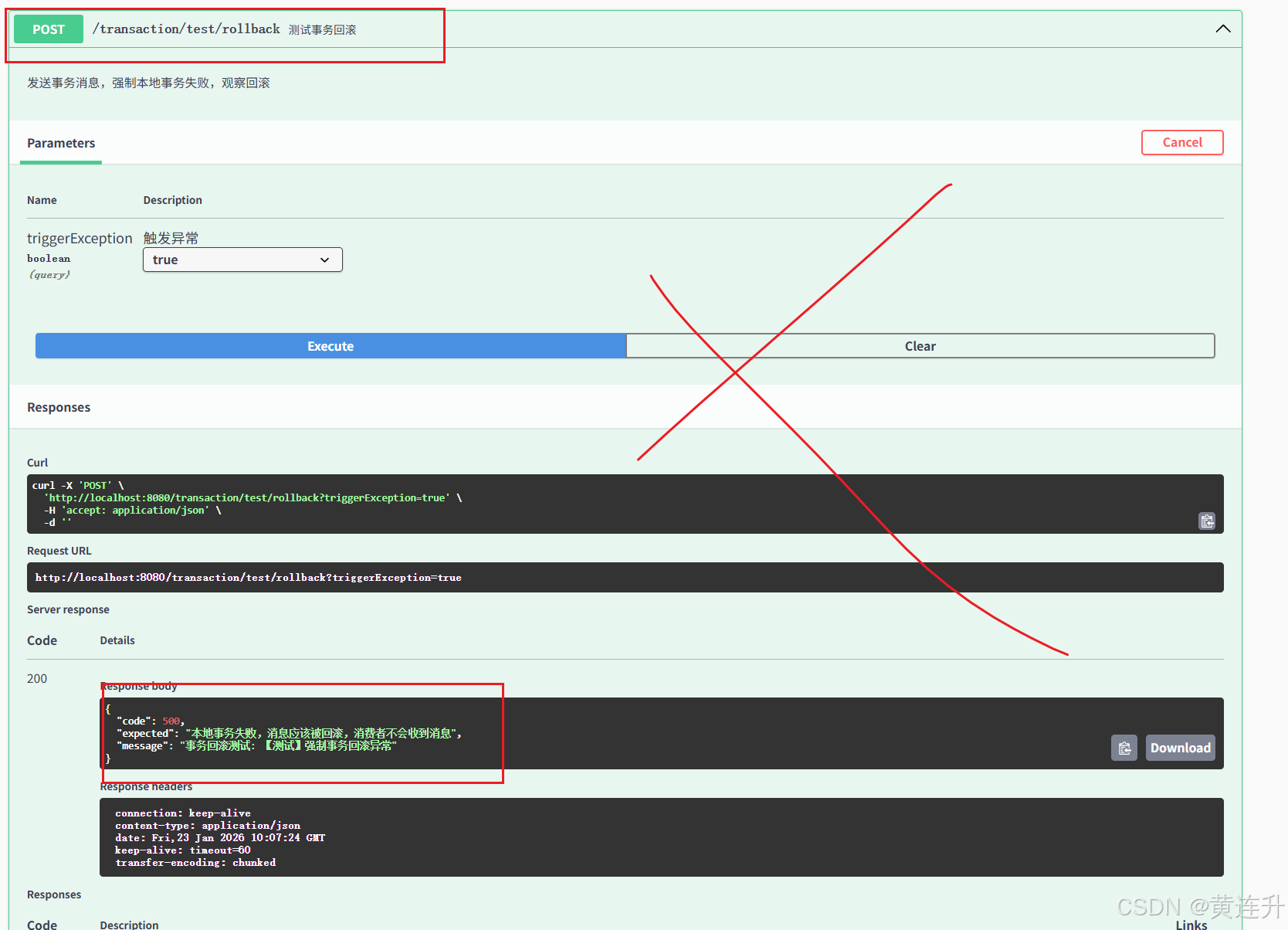
    @Operation(
            summary = "测试事务回滚",
            description = "发送事务消息,强制本地事务失败,观察回滚"
    )
    @PostMapping("/test/rollback")
    public Map<String, Object> testTransactionRollback(
            @Parameter(description = "触发异常", example = "true")
            @RequestParam(defaultValue = "true") boolean triggerException) {

        Map<String, Object> response = new HashMap<>();

        if (triggerException) {
            try {
                // 强制抛出异常,测试事务回滚
                throw new RuntimeException("【测试】强制事务回滚异常");
            } catch (Exception e) {
                response.put("code", 500);
                response.put("message", "事务回滚测试: " + e.getMessage());
                response.put("expected", "本地事务失败,消息应该被回滚,消费者不会收到消息");
            }
        } else {
            response.put("code", 200);
            response.put("message", "正常执行事务");
        }

        return response;
    }

    /**
     * 事务消息流程图
     */
    @Operation(summary = "事务消息流程图", description = "展示事务消息的完整流程")
    @GetMapping("/flow")
    public Map<String, Object> getTransactionFlow() {
        Map<String, Object> response = new HashMap<>();
        response.put("code", 200);
        response.put("title", "RocketMQ事务消息流程图");
        response.put("steps", new String[]{
                "1. 生产者发送Half消息到Broker",
                "2. Broker返回发送成功",
                "3. 生产者执行本地事务",
                "4. 生产者根据本地事务结果发送Commit/Rollback",
                "5. Broker检查事务状态(如果需要)",
                "6. 消息变为可消费状态",
                "7. 消费者消费消息"
        });
        response.put("states", new String[]{
                "COMMIT_MESSAGE: 提交消息,消费者可以消费",
                "ROLLBACK_MESSAGE: 回滚消息,消息被删除",
                "UNKNOW: 未知状态,等待回查"
        });
        return response;
    }
}
2.事务生产服务
/**
 * 事务消息生产者服务
 */
@Slf4j
@Service
public class TransactionMessageService {

    @Autowired
    private BusinessService businessService;

    private TransactionMQProducer transactionProducer;
    private final AtomicInteger transactionIndex = new AtomicInteger(0);

    /**
     * 初始化事务生产者
     */
    @PostConstruct
    public void init() throws Exception {
        log.info("初始化事务消息生产者...");

        // 创建事务生产者
        transactionProducer = new TransactionMQProducer("transaction-producer-group");
        transactionProducer.setNamesrvAddr("127.0.0.1:9876");
        transactionProducer.setSendMsgTimeout(5000);

        // 设置事务监听器
        transactionProducer.setTransactionListener(new TransactionListener() {
            /**
             * 执行本地事务
             * @param msg 半消息
             * @param arg 业务参数
             */
            @Override
            public LocalTransactionState executeLocalTransaction(Message msg, Object arg) {
                try {
                    log.info("【事务监听器】开始执行本地事务,消息: {}, 参数: {}",
                            new String(msg.getBody()), arg);

                    // 解析业务参数
                    Object[] args = (Object[]) arg;
                    Long userId = (Long) args[0];
                    String productName = (String) args[1];
                    BigDecimal amount = (BigDecimal) args[2];

                    // 执行本地业务(创建订单)
                    Order order = businessService.createOrder(userId, productName, amount, 1);

                    log.info("【事务监听器】本地事务执行成功,订单: {}", order.getOrderId());
                    return LocalTransactionState.COMMIT_MESSAGE;

                } catch (Exception e) {
                    log.error("【事务监听器】本地事务执行失败: ", e);
                    return LocalTransactionState.ROLLBACK_MESSAGE;
                }
            }

            /**
             * 回查本地事务状态
             * @param msg 需要回查的消息
             */
            @Override
            public LocalTransactionState checkLocalTransaction(MessageExt msg) {
                String transactionId = msg.getTransactionId();
                log.info("【事务回查】检查事务状态,transactionId: {}", transactionId);

                // 这里应该查询本地数据库,判断事务是否成功
                // 模拟:随机返回状态
                int status = (int) (Math.random() * 3);

                if (status == 0) {
                    log.info("【事务回查】事务提交");
                    return LocalTransactionState.COMMIT_MESSAGE;
                } else if (status == 1) {
                    log.info("【事务回查】事务回滚");
                    return LocalTransactionState.ROLLBACK_MESSAGE;
                } else {
                    log.info("【事务回查】事务未知,稍后重试");
                    return LocalTransactionState.UNKNOW;
                }
            }
        });

        // 设置线程池
        ExecutorService executorService = new ThreadPoolExecutor(
                2, 5, 100, TimeUnit.SECONDS,
                new ArrayBlockingQueue<>(2000),
                r -> {
                    Thread thread = new Thread(r);
                    thread.setName("transaction-thread-" + transactionIndex.incrementAndGet());
                    return thread;
                });
        transactionProducer.setExecutorService(executorService);

        // 启动生产者
        transactionProducer.start();
        log.info("事务消息生产者启动成功");
    }

    /**
     * 发送事务消息
     */
    public SendResult sendTransactionMessage(Long userId, String productName, BigDecimal amount) {
        try {
            // 构建消息
            String messageBody = String.format("创建订单: userId=%d, product=%s, amount=%s",
                    userId, productName, amount);

            Message msg = new Message(
                    "TRANSACTION_ORDER_TOPIC",
                    "ORDER_CREATE",
                    messageBody.getBytes(StandardCharsets.UTF_8)
            );

            // 设置业务Key
            msg.setKeys("order_" + System.currentTimeMillis());

            // 发送事务消息
            SendResult sendResult = transactionProducer.sendMessageInTransaction(
                    msg,
                    new Object[]{userId, productName, amount}  // 业务参数
            );

            log.info("【事务消息】发送成功,结果: {}", sendResult);
            return sendResult;

        } catch (Exception e) {
            log.error("【事务消息】发送失败: ", e);
            throw new RuntimeException("事务消息发送失败", e);
        }
    }

    /**
     * 销毁资源
     */
    @PreDestroy
    public void destroy() {
        if (transactionProducer != null) {
            transactionProducer.shutdown();
            log.info("事务消息生产者已关闭");
        }
    }
}
3.事务消费者
/**
 * 事务消息消费者
 */
@Slf4j
@Service
@RocketMQMessageListener(
        topic = "TRANSACTION_ORDER_TOPIC",
        consumerGroup = "transaction-consumer-group",
        selectorExpression = "ORDER_CREATE"
)
public class TransactionMessageConsumer implements RocketMQListener<String> {

    private static final DateTimeFormatter formatter =
            DateTimeFormatter.ofPattern("yyyy-MM-dd HH:mm:ss.SSS");

    @Override
    public void onMessage(String message) {
        String consumeTime = LocalDateTime.now().format(formatter);
        log.info("【事务消息消费者】[{}] 收到消息: {}", consumeTime, message);

        try {
            // 模拟消息处理
            processTransactionMessage(message);

            log.info("【事务消息消费者】事务消息处理完成");

        } catch (Exception e) {
            log.error("【事务消息消费者】处理消息失败: ", e);
            throw new RuntimeException("事务消息处理失败", e);
        }
    }

    /**
     * 处理事务消息
     */
    private void processTransactionMessage(String message) throws InterruptedException {
        log.info("1. 解析事务消息");
        // 这里可以解析消息内容,执行相应的业务逻辑

        log.info("2. 更新订单状态为已确认");
        Thread.sleep(300);

        log.info("3. 发送订单确认通知");
        Thread.sleep(300);

        log.info("4. 记录操作日志");
        Thread.sleep(300);

        log.info("事务消息处理流程完成");
    }
}
Swagger测试
1.前面application.xml 配置好了即可,可以在类上给出中文注释
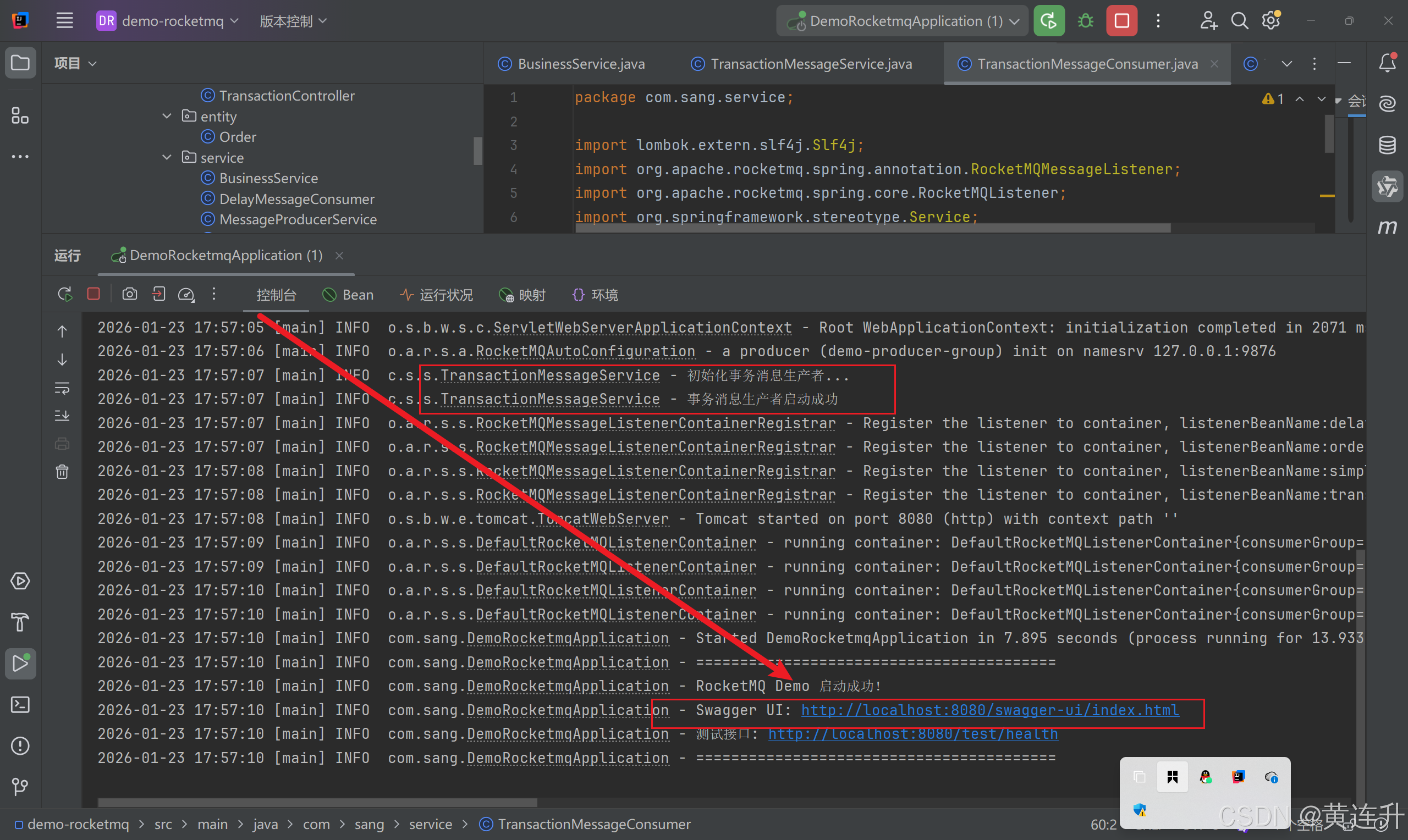
2.访问网页
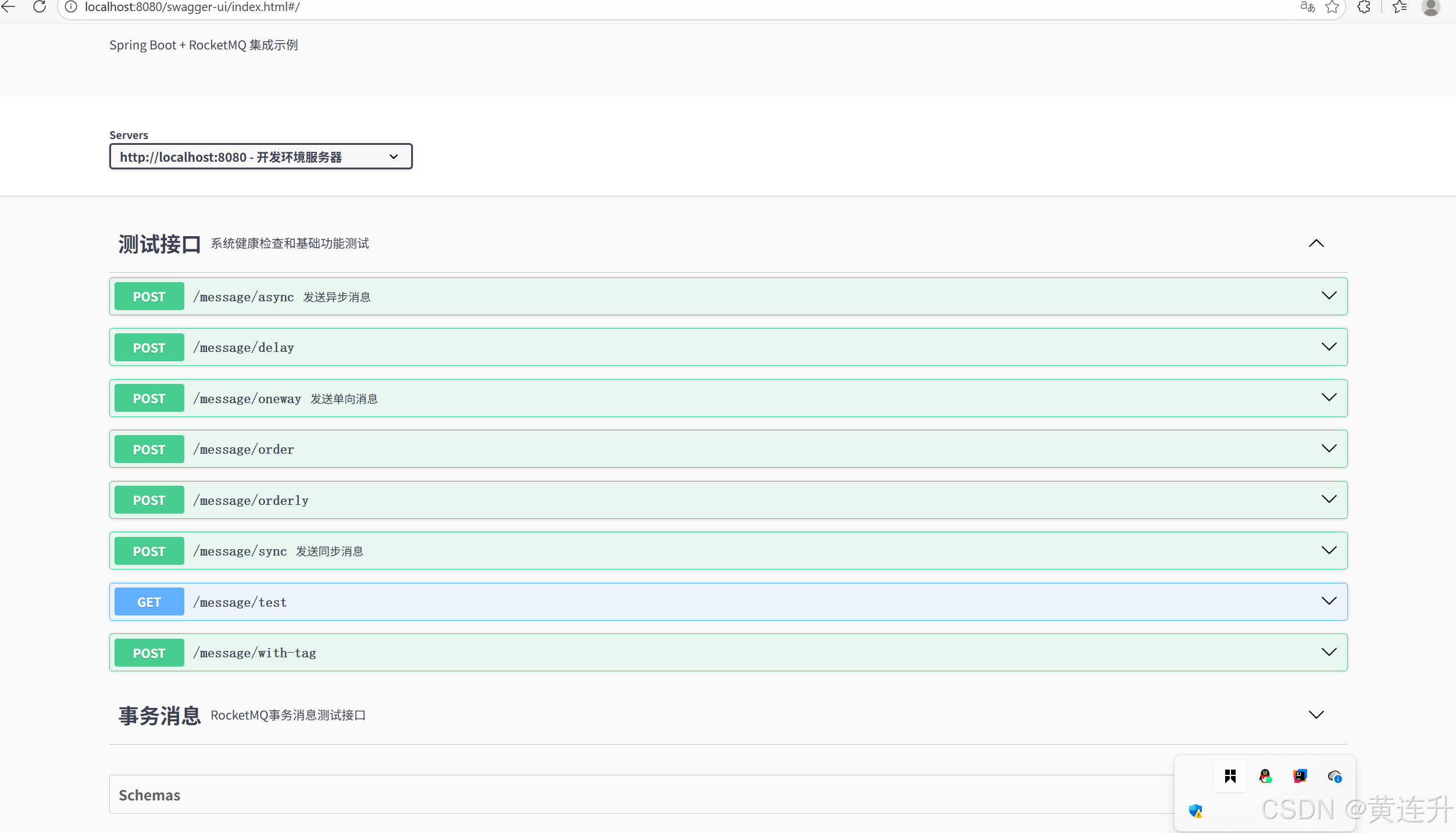
3.测试操作
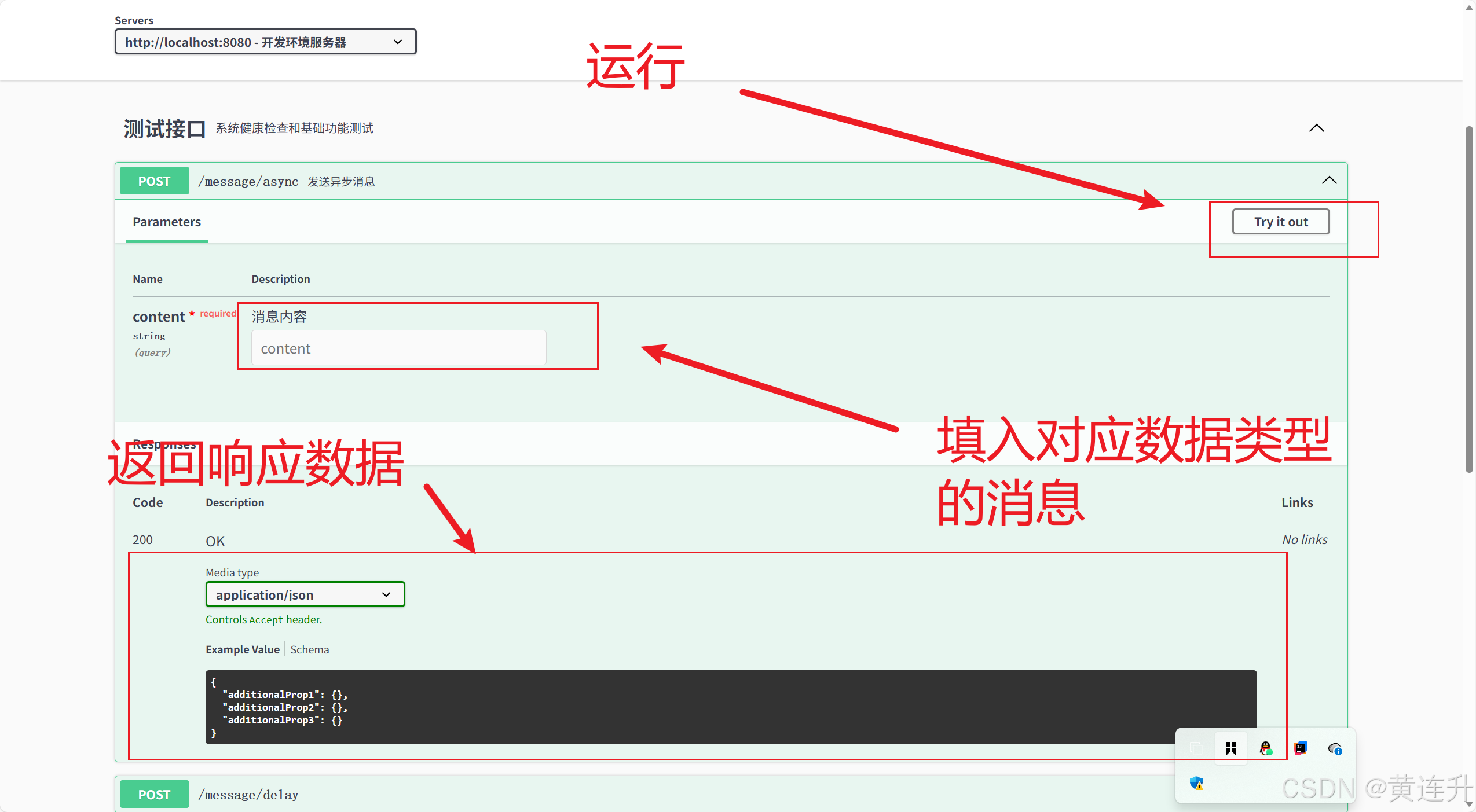
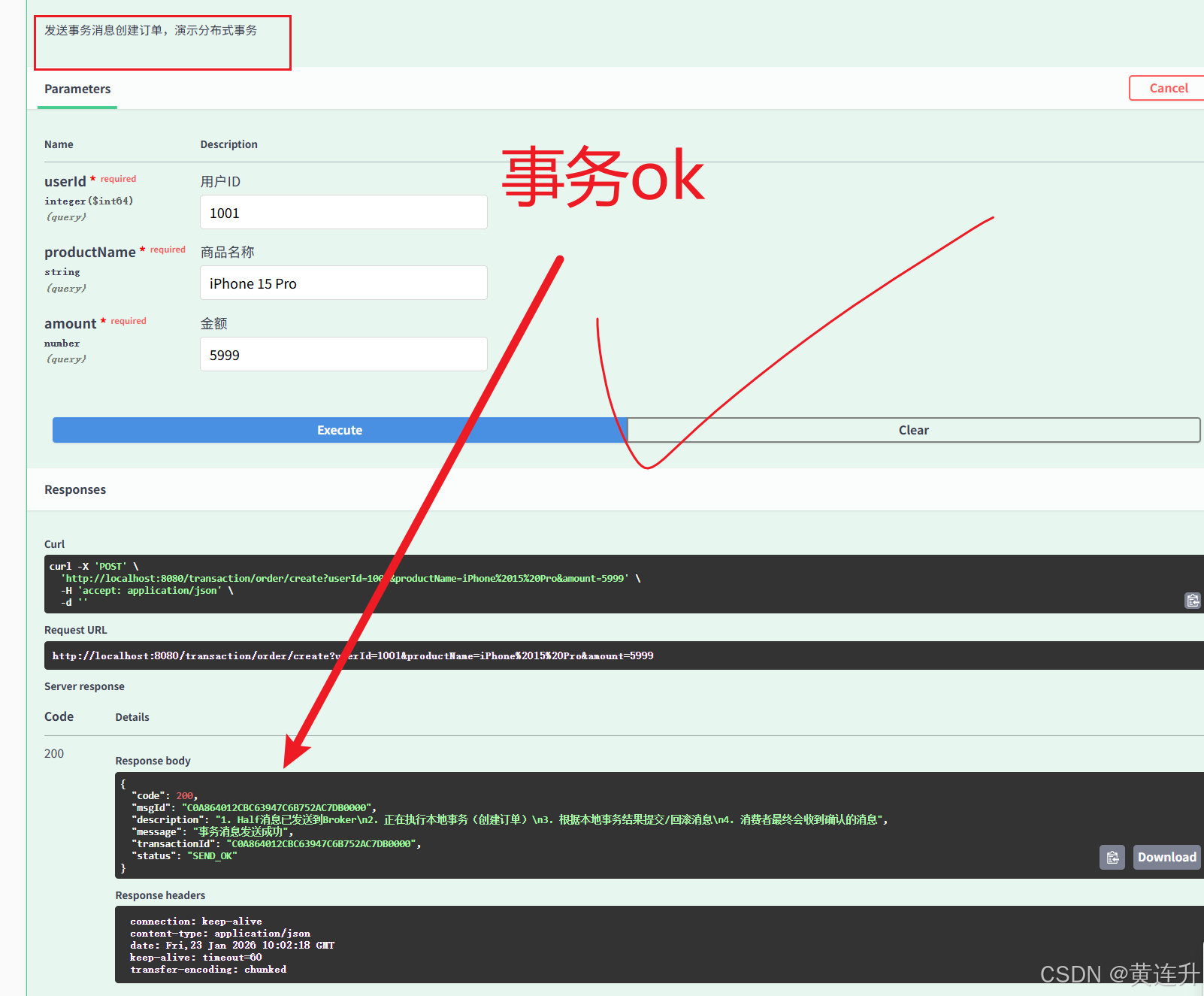
4.看idea 控制台输出
1.事务成功

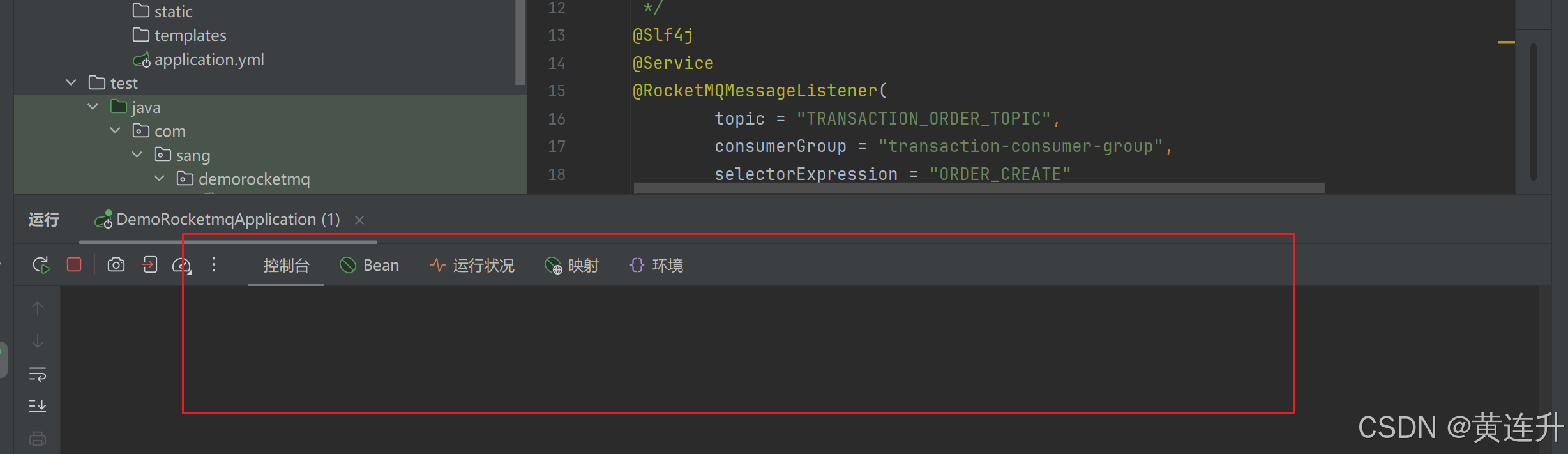
2.事务失败,回滚
控制台无消费消息

汇聚全球AI编程工具,助力开发者即刻编程。
更多推荐

 28
28 0
0- 0


 已为社区贡献3条内容

所有评论(0)