
Android实现一键调用扣子(Coze)的Agent服务
·
首先导入:
implementation 'com.coze:coze-api:0.4.2'获取必要的信息。
注册登录coze。
然后,自己创建一个Agent。可以直接复制生成一个Agent。
获取 bot_id
在这里测试接口。
https://code.coze.cn/playground
熟悉接口调用。
更多接口调用可以看:
https://github.com/coze-dev/coze-java/blob/main/example/src/main/java/example/chat/ChatExample.java
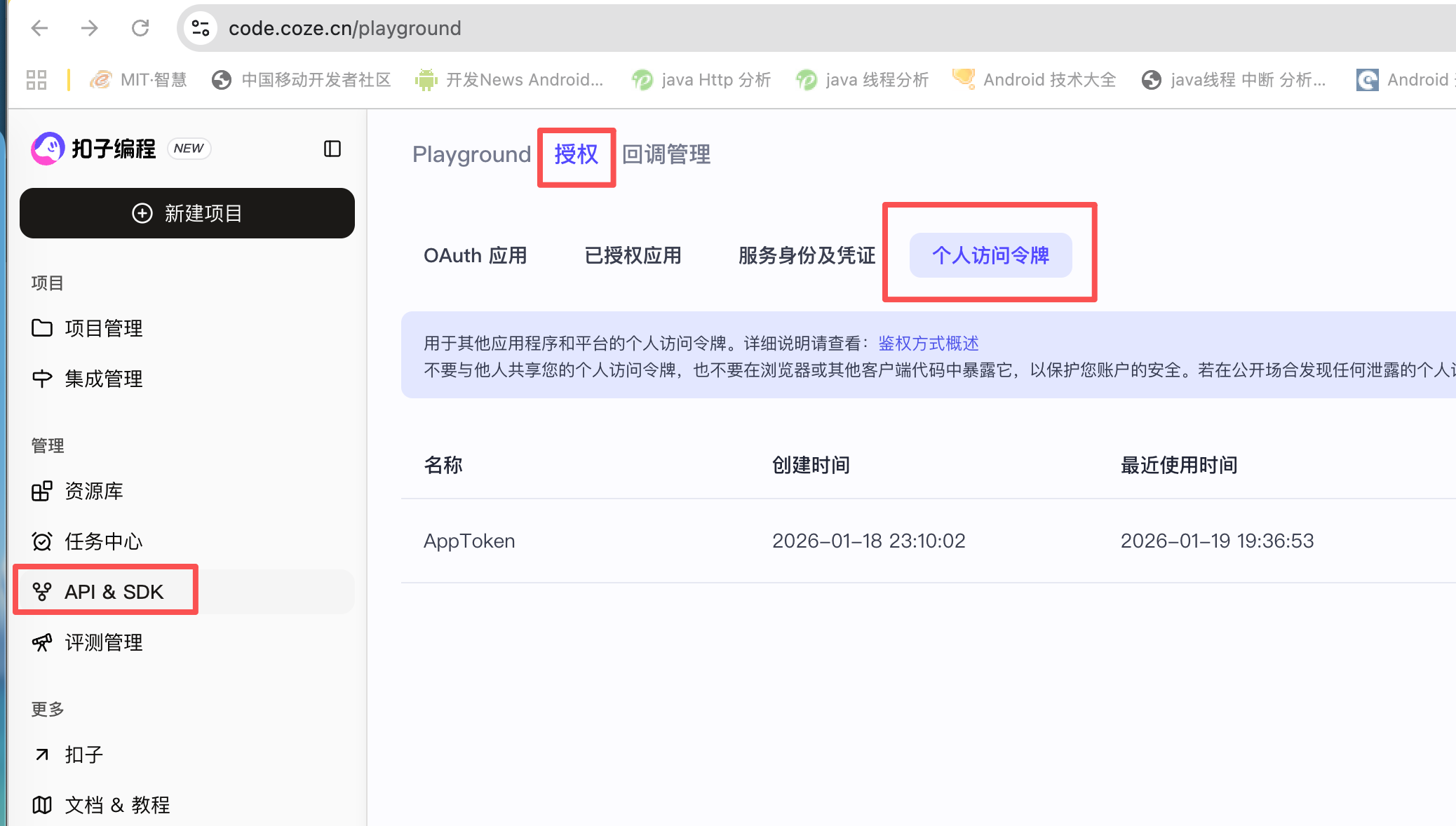
获取Token ,个人Token 可以用1个月。
package com.lxp.app.attendnow.agent

import android.text.TextUtils
import com.coze.openapi.client.chat.CreateChatReq
import com.coze.openapi.client.chat.model.ChatPoll
import com.coze.openapi.client.connversations.message.model.Message
import com.coze.openapi.client.connversations.message.model.MessageType
import com.coze.openapi.service.auth.TokenAuth
import com.coze.openapi.service.service.CozeAPI
import com.lxp.app.attendnow.agent.model.AdditionalMessage
import com.lxp.app.attendnow.agent.model.ChatRequest
import com.lxp.app.attendnow.data.RetrofitFactory
import com.lxp.app.attendnow.utils.LogUtils
import java.util.Collections


data class RespData(var content: String, var reasoning: String, var relate: List<String>) {
    companion object {
        val EMPTY = RespData("", "", listOf())
    }
}

class CozeService private constructor() {

    companion object {
        @Volatile
        private var INSTANCE: CozeService? = null
        fun getInstance(): CozeService {
            return INSTANCE ?: synchronized(this) {
                INSTANCE ?: CozeService().also { INSTANCE = it }
            }
        }
    }


    private val bot_id = "75000000000"

    // 2027年2月17日 左右到期
    private var token = "pat_0Tmo00000009999999000000"
    private var uid = "anyone" + System.currentTimeMillis()
    private val COZE_API_BASE = "https://api.coze.cn"

    private val agentServie = RetrofitFactory.instance.getService(AgentServie::class.java)
    private var conversationId = ""

    fun setUserId(userId: String) {
        this.uid = userId
    }


    private lateinit var cozeApi: CozeAPI
    private var conversationID = ""

    suspend fun sendQuestion(question: String): RespData {
        LogUtils.e("ask the question: $question ")
        // Init the Coze client through the access_token.
        if (!::cozeApi.isInitialized) {
            LogUtils.e("init token")
            val authCli = TokenAuth(token)
            LogUtils.e("init token ok")
            cozeApi =
                CozeAPI.Builder()
                    .baseURL(COZE_API_BASE)
                    .auth(authCli)
                    .readTimeout(30000) // Increased timeout for better reliability
                    .build()
            LogUtils.e("Builder coze  ...")
        }

        var req: CreateChatReq? =
            CreateChatReq.builder()
                .botID(bot_id)
                .userID(uid)
                .apply {
                    if (!TextUtils.isEmpty(conversationID)) {
                        conversationID(conversationID)
                    }
                }
                .messages(Collections.singletonList(Message.buildUserQuestionText(question)))
                .build()

        LogUtils.e("CreateChatReq.builder ok  ...")

        val chatResp: ChatPoll = cozeApi?.chat()?.createAndPoll(req, 10 * 1000)!!
        println(chatResp)
        var chat = chatResp?.getChat()
        // get chat id and conversationID
        val chatID = chat?.getID()
        if (TextUtils.isEmpty(conversationID)) {
            conversationID = chat?.getConversationID() ?: ""
        }
        LogUtils.e("chatID ============ $chatID")
        LogUtils.e("conversationID ============== $conversationID")

        // Use createAndPoll for automatic polling with timeout
        LogUtils.e("createAndPoll  ok  ...")

        val respData = RespData.EMPTY
        val follows = mutableListOf<String>()
        req?.conversationID = conversationID

        // Process messages to find answer and follow-up questions
        chatResp?.messages?.forEach {
            LogUtils.e(" message is $it ")
            val messageType = it.type
            when (messageType) {
                MessageType.ANSWER -> {
                    respData.content = it.content
                    respData.reasoning = it.reasoningContent
                }

                MessageType.FOLLOW_UP -> {
                    follows.add(it.content)
                }
            }
        }

        respData.relate = follows
        return respData
    }

}
当然,也可以自己实现请求接口。
import retrofit2.http.Body
import retrofit2.http.Field
import retrofit2.http.FormUrlEncoded
import retrofit2.http.GET
import retrofit2.http.Header
import retrofit2.http.POST
import retrofit2.http.Path
import retrofit2.http.Query
import retrofit2.http.QueryName

interface AgentServie {

    /**
     * 创建会话
     *curl -X POST 'https://api.coze.cn/v1/conversation/create' \
     * -H "Authorization: Bearer cztei_hh6X" \
     * -H "Content-Type: application/json" \
     * -d '{
     *   "bot_id": "7583723296207110194",
     *   "name": "问问题xxx"
     * }'
     *
     * {"code":0,"data":{"created_at":1768563421,"id":"7595921922019819530","last_section_id":"7595921922019819530","meta_data":{},"name":"问问题xxx","updated_at":1768563421},"detail":{"logid":"2026011619370185426EC653967A562C0C"},"msg":""}
     */
    @POST("https://api.coze.cn/v1/conversation/create")
    @FormUrlEncoded
    suspend fun createConversation(
        @Header("Authorization")
        token: String = "Bearer cztei_hWjyaMW7OoRzMq4Q2Udb1iKpdeRxalfnYxuOWPFMt2Y2Y5r52t5YFdspCEf2Hlqov",
        @Field("botId")
        botId: String = "7583723296207110194",
        @Field("name")
        name: String = "Agent" + System.currentTimeMillis(),
    ): AgentMessage

    /**
     * 创建消息
     * https://api.coze.cn/v1/conversation/message/create
     *
     */
    @POST("https://api.coze.cn/v1/conversation/message/create")
    @FormUrlEncoded
    suspend fun createMessage(
        @Query("conversation_id")
        conversationId: String,
        //发送这条消息的实体。取值:
        //user:代表该条消息内容是用户发送的。
        //assistant:代表该条消息内容是 Bot 发送的。
        @Field("role")
        role: String = "user",
        //消息的内容,支持纯文本、多模态(文本、图片、文件混合输入)、卡片等多种类型的内容。
        @Field("content")
        content: String = "",
        //消息内容的类型,支持设置为:
        //text:文本
        //object_string:多模态内容,即文本和文件的组合、文本和图片的组合
        @Field("content_type")
        contentType: String = "text"
    ): AgentMessage


    /**
     * 发起对话
     * request:
     * curl -X POST 'https://api.coze.cn/v3/chat?conversation_id=7595489997593460787&' \
     * -H "Authorization: Bearer cztei_qED" \
     * -H "Content-Type: application/json" \
     * -d '{
     *   "bot_id": "758394",
     *   "user_id": "1122",
     *   "stream": false,
     *   "additional_messages": [
     *     {
     *       "role": "user",
     *       "type": "question",
     *       "content_type": "text",
     *       "content": "7个月的狗狗不吃饭怎么办?"
     *     },
     *     {
     *       "role": "user",
     *       "type": "question",
     *       "content_type": "text",
     *       "content": "狗狗是拉布拉多犬"
     *     }
     *   ]
     * }'
     *
     *  response:
     * {"data":
     * {"id":"7595566720938639386","conversation_id":"7595489997593460787",
     * "bot_id":"7594","created_at":1768480689,"last_error":{"code":0,"msg":""}
     * ,"status":"in_progress"},
     * "code":0,"msg":""}
     *
     */
    @POST("https://api.coze.cn/v3/chat")
    @FormUrlEncoded
    suspend fun sendChatMessage(
        @Query("conversation_id") conversationId: String,
        @Header("Authorization") authorization: String = "cztei_hdPjvGSwtgf0SE5jvdpPYr3u107XOdhjeq76TNNO8jzyxlKJlYsrfE80IVnvtgmdj",
        @Body request: ChatRequest
    ): ChatResponse

    /**
     * 查看对话详情
     * request:
     * curl -X GET 'https://api.coze.cn/v3/chat/retrieve?conversation_id=75987&chat_id=7595586&' \
     * -H "Authorization: Bearer cztei_hkpbG" \
     * -H "Content-Type: application/json"
     *
     * response:
     * {"code":0,"data":{"bot_id":"75894","completed_at":1768480747,"conversation_id":"757","created_at":1768480689,"id":"7595566720938639386","status":"completed","usage":{"input_count":7446,"input_tokens_details":{"cached_tokens":0},"output_count":2111,"output_tokens_details":{"reasoning_tokens":1664},"token_count":9557}},"detail":{"logid":"2026011619055935A6F2DCA5BFB9FAB885"},"msg":""}
     */
    @GET("https://api.coze.cn/v3/chat/retrieve")
    suspend fun retrieveChat(
        @Query("conversation_id") conversationId: String,
        @Query("chat_id") chatId: String,
        @Header("Authorization") authorization: String = "Bearer cztei_hkL72G"
    ): ChatRetrieveResponse

    /**
     * 查看对话消息详情
     * request:
     * curl -X GET '' \
     * -H "Authorization: Bearer cztei_qouI" \
     * -H "Content-Type: application/json"
     *
     * response:
     * {"code":0,"data":[{"bot_id":"754","chat_id":"75986","content":"...","content_type":"text","conversation_id":"7595489997593460787","created_at":1768480705,"id":"7595566791943209010","meta_data":{...},"role":"assistant","type":"function_call","updated_at":1768480705},...]}
     */
    @GET("https://api.coze.cn/v3/chat/messages")
    suspend fun retrieveChatMessages(
        @Query("conversation_id") conversationId: String,
        @Query("chat_id") chatId: String,
        @Header("Authorization") authorization: String = "Bearer cztei_qoukNCUc9cc1pGg6TYlETzUsZ9AO6ybGjKYypft4JNiy8wOTpDYed89adUxXuN7eI"
    ): ChatMessagesResponse
}
集成Coze API实现智能对话功能。主要内容包括:
1) 通过添加依赖implementation'com.coze:coze-api:0.4.2'引入SDK;
2) 注册Coze账号并创建Agent获取bot_id;
3) 使用TokenAuth进行认证,有效期1个月;
4) 通过CozeAPI.Builder构建客户端,设置超时时间;
5) 实现sendQuestion方法发送问题并处理响应,包括获取对话ID、解析回答内容和后续问题;
6) 提供完整的代码示例,包含请求构建、消息处理和错误日志记录等功能。

汇聚全球AI编程工具,助力开发者即刻编程。
更多推荐



 0
0 0
0- 0


 已为社区贡献2条内容

所有评论(0)