
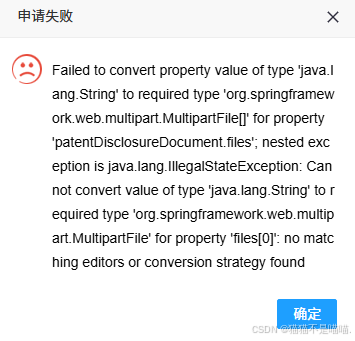
Failed to convert property value of type ‘java.lang.String‘ to required type ‘org.springframework.we
·
前端表单设置

这个异常是String转换为MulitpartFile类型失败,private MultipartFile[] files; 属性在嵌套的实体中,即实体类A嵌套实体类B, files属性是在实体类B中。当没有传递附件时,浏览器默认为空字符串,在进行数据绑定时由于类型不符,就会提示如上的错误。
下面是前端发送请求后,后台执行的步骤:
客户端提交表单
↓
DispatcherServlet接收到请求
↓
检查Content-Type是否为multipart/form-data
↓
是 → MultipartResolver解析请求 → 创建MultipartHttpServletRequest
↓
查找合适的HandlerMapping和HandlerMethod
↓
解析方法参数(包括@ModelAttribute)
↓
创建WebDataBinder进行数据绑定 ←─── 错误发生在这里!
↓
调用Converter/Editor将String转换为目标类型
↓
类型转换失败 → 抛出异常
通过FormData对象自动收集表单中的所有数据,使用FormData时,浏览器会自动设置Content-Type,这样就不会转换异常了。
window.apply = function () {
            $('#submitBtn').addClass('layui-btn-disabled');
            $('#submitBtn').attr('disabled', true);

            const formData = new FormData($('#myForm')[0]);


            $.ajax({
                url: '/***/***',
                type: 'post',
                data: formData,
                processData: false,
                contentType: false,
                success: function(obj) {
                    const data = JSON.parse(obj); // 解析 JSON 字符串
                    if (data.code == 0) {
                        layer.msg(data.msg, {icon: 1, time: 2000}, function() {
                            window.close();
                        });
                    } else {
                        layer.alert(data.msg, {
                            title: '申请失败', icon: 5, time: 5000
                        });
                    }
                },
                error: function(xhr, status, error) {
                    console.error('请求失败:', error);
                    layer.alert('请求失败,请重试', {
                        title: '错误', icon: 5, time: 5000
                    });
                },
                complete: function() {
                    $('#submitBtn').removeClass('layui-btn-disabled').attr('disabled', false);
                }
            });
        }
汇聚全球AI编程工具,助力开发者即刻编程。
更多推荐



 2
2 0
0- 0


 已为社区贡献4条内容

所有评论(0)