
JavaSE(五)
四、异常
1、为什么要有异常?
System.out.println(6 / 0);
//问题:程序出错后则不再往下运行
System.out.println("---------------");
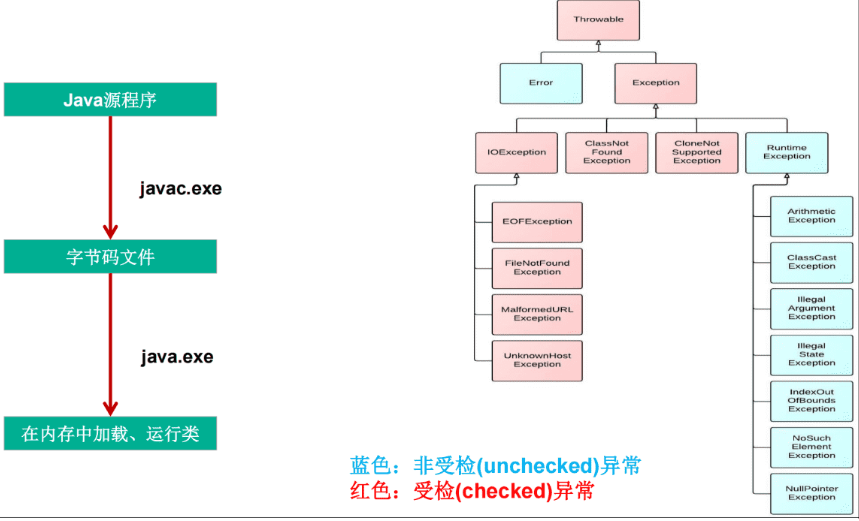
2、异常体系结构
Throwable
|
|--编译时异常(受检异常checkedException):
Exception:
|--FileNotFoundException:文件找不到
|--IOException:io异常
|--ClassNotFoundException:找不到类
|--运行时异常(非受检异常UncheckedException):
RuntimeException:
|--ArrayIndexOutOfBounds:下标越界异常
|--NullPointerException:空指针异常
|--ArithmeticException:算数运算异常
|--ClassCastException:类型转型异常
|--NumberFormatException:数字格式化异常
3、异常的处理方式
1、try-catch方式
try{
//可能发生异常的语句
}catch(异常类型1 变量名1){
//处理异常1
}catch(异常类型2 变量名2){
//处理异常2
}finally{
//无条件执行的语句
}
注意:finally在return之后返回调用处之前
package com.hg.tryCatch;

public class TryCatchFinallyTest2 {
    public static void main(String[] args) {
        //test2();
        System.out.println("test1()" + test1());
    }

    private static void test2() {
        try {
            int a =10;
            int b =0;
            System.out.println(a/b);
            System.out.println("hello------------");
        }catch (ArithmeticException e){
            e.printStackTrace();
            System.out.println("这是catch");
            int[] arr = new int[10];
            System.out.println(arr[10]);
        }finally {
            System.out.println("这是finally");
        }
    }

    private static int test1() {
        int a = 1;
        try {
            System.out.println("try中的代码块");
            //返回到方法调用处
            return a += 1;//a=2
        }catch (Exception e){
            System.out.println("catch中的代码块");
        }finally {
            System.out.println("finally中的代码块");
            if (a > 1){
                System.out.println("a > 1,a=" + a);
            }
        }
        return a += 5;
    }
}
2、throws方式
public void method() throws 异常类型1,异常类型2{
}
package com.hg.Throws;

import java.io.FileInputStream;
import java.io.FileNotFoundException;
import java.util.Scanner;

public class ThrowsTest {
    public static void main(String[] args) {
        //inputAge();
        try {
            readTxt("D:/a.txt");
        } catch (FileNotFoundException e) {
            System.out.println("读取文件出错了:" + e.getMessage());
        }
    }

    private static void readTxt(String txt) throws FileNotFoundException {
        method(txt);
    }

    private static void method(String txt) throws FileNotFoundException {
        new FileInputStream(txt);
    }

    private static void inputAge() {
        Scanner scanner = new Scanner(System.in);
        int age;
        while (true){
            try {
                System.out.println("请输入您的年龄:");
                String input = scanner.next();
                age = Integer.valueOf(input);
                break;
            }catch (Exception e){
                System.out.println("输入错误,请重新输入:");
            }
        }
        System.out.println("您的年龄是:" + age);
        scanner.close();
    }
}
4、手动创建异常
IOException e = new IOException();
throw e;//手动创建异常,等价于6/0
或
throw new IOException();
package com.hg.Throw;

public class ThrowTest {
    public static void main(String[] args) {
        try {
            register("admin","1111");
        } catch (Exception e) {
            e.printStackTrace();
        }

    }


    private static void register(String username, String password) {
        if (username == null){
            //此时,不希望后续程序再执行,要throw异常
            throw new IllegalArgumentException("账户不能为空");
        }
        if (password == null){
            throw new IllegalArgumentException("密码不能为空");
        }
        if (password.length() < 4){
            throw new RuntimeException("密码要求最少4位");
        }
        System.out.println("INSERT INTO t_user(username,password) VALUES("+username+ ","+password+")");
    }
}
5、使用场景
try-catch 后续还有程序要执行
throws 把异常交给调用者处理
throw 不希望后续程序继续执行
6、自定义异常
class MyException extends RuntimeException{
public MyException(String s) {
super(s);
}
}
package com.hg.CustomizeException;

public class CustomizeExceptionTest {
    public static void main(String[] args) {
        try {
            login("admin","111");
        } catch (Exception e) {
            e.printStackTrace();
            System.out.println("登录错误:" + e.getMessage());
        }
    }

    private static void login(String inputUsername, String inputPassword) {
        String username = "admin";
        String password = "1111";
        //账户不能为空
        if (inputUsername == null){
            throw new IllegalArgumentException("账户不能为空");
        }
        //密码不能为空
        if (inputPassword == null){
            throw new IllegalArgumentException("密码不能为空");
        }
        //账号正确
        if (inputUsername != username){
            throw new UsernameErrorException("账号错误");
        }
        //密码正确
        if (inputPassword != password){
            throw new PasswordErrorException("密码错误");
        }
        System.out.println("登录成功");
    }
}

class UsernameErrorException extends RuntimeException{
    public UsernameErrorException() {
        super();
    }

    public UsernameErrorException(String s) {
        super(s);
    }
}

class PasswordErrorException extends RuntimeException{
    public PasswordErrorException() {
        super();
    }

    public PasswordErrorException(String s) {
        super(s);
    }
}

汇聚全球AI编程工具,助力开发者即刻编程。
更多推荐



 13
13 0
0- 0


 已为社区贡献29条内容

所有评论(0)