
【Java基础】异常捕获与处理实战
一、异常概述
1.1 为什么要学习异常
Java 程序运行时若出现异常,强制退出程序 —— 这在实际应用中完全无法被用户接受。
反例:未处理异常的程序
java
public class ExceptionTest1 {
    public static void main(String[] args) {
        System.out.println("hello---1");
        int a = 10;
        int b = 0;
        System.out.println(a / b); // 除数为0,触发异常
        System.out.println("hello---2"); // 不会执行
    }
}
运行结果:程序崩溃,hello---2 无法输出。
正例:捕获异常并处理
public class ExceptionTest2 {
    public static void main(String[] args) {
        try {
            System.out.println("hello---1");
            int a = 10;
            int b = 0;
            System.out.println(a / b); // 可能触发异常的代码
        } catch (Exception e) {
            e.printStackTrace(); // 打印异常信息
            System.out.println("系统出错了\n已经紧急处理,请联系tel:110");
        }
        System.out.println("hello---2"); // 正常执行
    }
}
运行结果:捕获异常并提示,hello---2 正常输出,程序未崩溃。
1.2 异常体系结构
Java 中所有异常的根类是 java.lang.Throwable,其下分为两大子类:Error 和 Exception,体系结构如下:
图示:
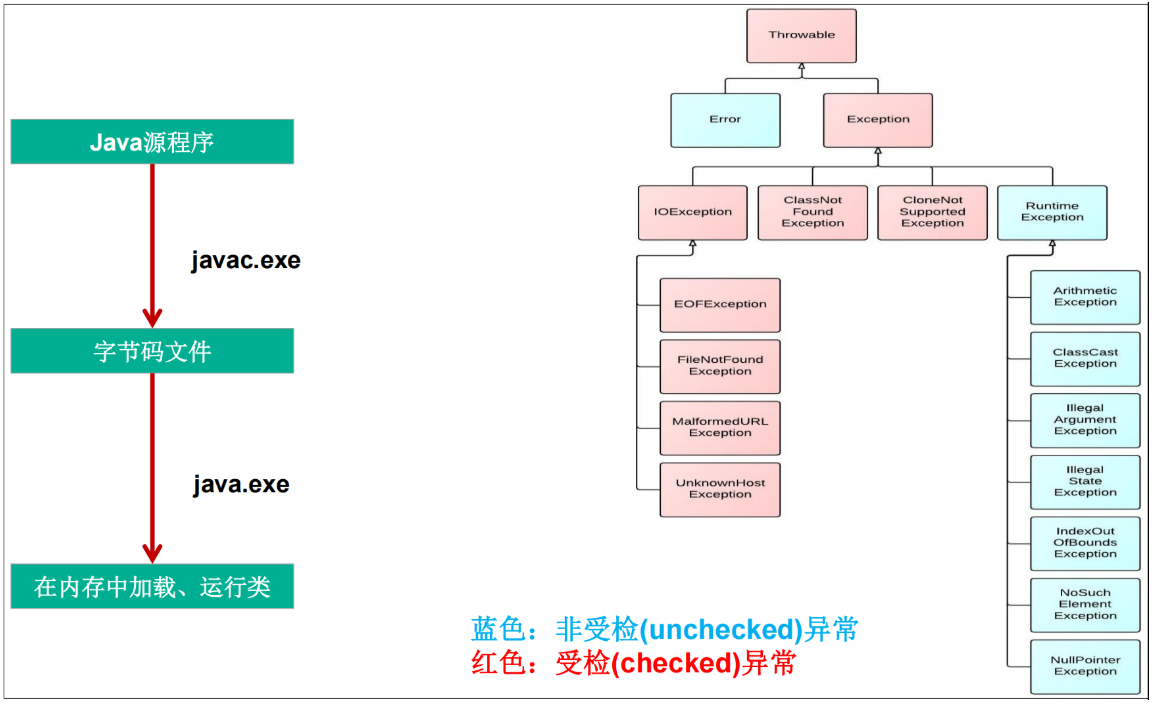
plaintext
java.lang.Throwable
├─ java.lang.Error: 严重错误(如内存溢出),一般不编写针对性代码处理
└─ java.lang.Exception: 可处理的异常(开发核心关注)
   ├─ 编译时异常(checked):编译阶段强制要求处理,否则报错
   │  ├─ IOException
   │  │  └─ FileNotFoundException(文件未找到)
   │  └─ ClassNotFoundException(类未找到)
   └─ 运行时异常(unchecked, RuntimeException):编译不报错,运行时触发
      ├─ NullPointerException(空指针)
      ├─ ArrayIndexOutOfBoundsException(数组下标越界)
      ├─ ClassCastException(类型转换异常)
      ├─ NumberFormatException(数值转换异常)
      └─ ArithmeticException(算术异常)
- 编译时异常:必须显式处理(try-catch 或 throws),否则无法通过编译
- 运行时异常:可选择性处理,通常由代码逻辑错误导致(如空指针、数组越界)
二、常见异常
2.1 运行时异常(RuntimeException)
运行时异常 编译阶段不报错,运行时才会触发。
2.1.1 ArrayIndexOutOfBoundsException(数组下标越界)
java
public class IndexOutExceptionTest {
    public static void main(String[] args) {
        String friends[] = new String[]{ "lisa", "bily", "kessy" };
        System.out.println(friends[4]); // 数组长度为3,下标最大为2
    }
}
2.1.2 NullPointerException(空指针异常)
public class NullPointerExceptionTest {
    public static void main(String[] args) {
        String str = "abc";
        str = null; // 字符串赋值为null
        System.out.println(str.charAt(0)); // 调用null对象的方法
    }
}
2.1.3 ArithmeticException(算术异常)
public class ArithmeticExceptionTest {
    public static void main(String[] args) {
        int a = 10;
        int b = 0;
        System.out.println(a / b); // 除数为0
    }
}
2.1.4 ClassCastException(类型转换异常)
import java.util.Date;

public class ClassCastExceptionTest {
    public static void main(String[] args) {
        Object obj = new Date(); // obj实际是Date类型
        String str = (String)obj; // 强制转换为String类型
    }
}
2.1.5 NumberFormatException(数值转换异常)
public class NumberFormatExceptionTest {
    public static void main(String[] args) {
        String str = "123";
        str = "abc"; // 非数字字符串
        int num = Integer.parseInt(str); // 尝试转为整数
    }
}
......
2.2 编译时异常(Checked Exception)
编译时异常必须显式处理,否则编译失败,通常由外部环境问题导致(如文件未找到、类未加载)。
2.2.1 IOException 和 FileNotFoundException
java
import java.io.File;
import java.io.FileInputStream;
import java.io.IOException;

public class IOExceptionTest {
    public static void main(String[] args) throws IOException {
        File file = new File("hello.txt");
        FileInputStream fis = new FileInputStream(file); // 可能找不到文件

        int data = fis.read(); // 可能读取失败
        while(data != -1){
            System.out.print((char)data);
            data = fis.read();
        }
        fis.close();
    }
}
2.2.2 ClassNotFoundException
public class ClassNotFoundExceptionTest {
    public static void main(String[] args) throws ClassNotFoundException {
        Class.forName("oracle.jdbc.driver.OracleDriver"); // 可能找不到驱动类
    }
}
2.3 出现异常的后果
程序执行过程中触发异常时,JVM 会在异常代码处生成对应异常对象并抛出,抛出后后续代码不再执行,程序默认崩溃(未处理时)。
三、异常处理机制一:try-catch-finally
try-catch-finally 是直接处理异常的核心机制,能捕获异常并执行自定义逻辑,保证程序继续运行。
3.1 语法格式
java
try{
    // 可能出现异常的代码(监控区域)
}catch(异常类型1 变量名1){
    // 处理异常类型1的逻辑
}catch(异常类型2 变量名2){
    // 处理异常类型2的逻辑
}catch(异常类型3 变量名3){
    // 处理异常类型3的逻辑
}finally{
    // 无论是否发生异常,都必须执行的代码(如资源关闭)
}
3.2 核心说明
3.2.1 try 语句块
- 用于包裹可能触发异常的代码,是异常捕获的前提
- 若 try 块中无异常,直接跳过所有 catch 块,执行 finally(若有)
- 若 try 块中触发异常,立即跳转到对应的 catch 块处理
3.2.2 catch 语句块
- 用于匹配和处理异常,可多个 catch 块并列(捕获多种异常)
- 异常匹配规则:根据异常对象的类型,从上到下匹配 catch 块中的异常类型
- 注意事项:
- 若 catch 块的异常类型无父子关系,声明顺序无要求
- 若有父子关系,子类异常必须声明在父类异常之前(否则子类 catch 块永远无法执行)
错误示例(子类异常在父类之后)
java
// 错误:NumberFormatException是Exception的子类,声明在后面会报错
try{
    int num = Integer.parseInt("abc");
}catch(Exception e){
    System.out.println("出现异常");
}catch(NumberFormatException e){
    System.out.println("数值转换异常"); // 永远无法执行
}
异常对象的常用处理方法
String getMessage():获取异常描述信息printStackTrace():打印异常详细堆栈信息(开发调试核心方法)
正确示例
java
public class TryCatchFinallyTest {
    public static void main(String[] args) {
        String str = "123";
        str = "abc";
        int num = 0;
        try{
            num = Integer.parseInt(str); // 可能触发NumberFormatException
            System.out.println("hello-----1");
        }catch(NumberFormatException e){
            System.out.println("异常描述:" + e.getMessage()); // 输出:For input string: "abc"
            e.printStackTrace(); // 打印完整堆栈信息
        }catch(NullPointerException e){
            System.out.println("出现空指针异常");
        }catch(Exception e){
            System.out.println("其他异常");
        }
        System.out.println(num); // 0
        System.out.println("hello-----2"); // 正常执行
    }
}
3.2.3 finally 语句块
finally语句在return语句执行之后return返回之前执行的
- 无论是否发生异常、是否执行 return,finally 块都必须执行
- 核心用途:关闭资源(如文件流、数据库连接、网络连接等)
示例 1:finally 必执行
java
public class FinallyTest1 {
    public static void main(String[] args) {
        try{
            int a = 10;
            int b = 0;
            System.out.println(a/b); // 触发ArithmeticException
        }catch(ArithmeticException e){
            e.printStackTrace();
            int[] arr = new int[10];
            System.out.println(arr[10]); // 触发ArrayIndexOutOfBoundsException
        }finally{
            System.out.println("我好帅啊~~"); // 依然执行
        }
    }
}
示例 2:finally 在 return 之前执行
java
public class FinallyTest2 {
    public static void main(String[] args) {
        System.out.println(test2()); // 输出结果:2
    }

    public static int test2(){
        int a = 1;
        try{
            System.out.println("try中的代码块");
            return a += 1; // 执行到此处时,先记录返回值2,再执行finally
        }catch (Exception e){
            System.out.println("catch中的代码块");
        }finally {
            System.out.println("finally中的代码块");
            if(a > 1){
                System.out.println("a > 1, a="+a); // 输出:a > 1, a=2
            }
        }
        return a += 5; // 不会执行
    }
}
运行结果:
plaintext
try中的代码块
finally中的代码块
a > 1, a=2
2
四、异常处理机制二:throws
throws 用于声明方法可能抛出的异常,不直接处理异常,而是将异常抛给方法的调用者,由调用者处理。
4.1 语法格式
java
public 返回值类型 方法名(参数列表) throws 异常类型1, 异常类型2... {
    // 可能触发异常的代码
}
4.2 核心说明
throws仅声明异常,不处理异常,最终需由调用链的某个环节用try-catch处理- 若方法调用了声明异常的方法,必须处理该异常(要么
try-catch,要么继续throws) - 父类方法若未声明异常,子类重写该方法时不能声明异常(否则编译报错)
示例
java
import java.io.File;
import java.io.FileInputStream;
import java.io.FileNotFoundException;

public class ThrowsTest {
    public static void main(String[] args){
        try{
            method2(); // 调用声明异常的方法,需try-catch处理
        }catch(FileNotFoundException e){
            e.printStackTrace();
        }
        method3(); // 内部已处理异常,无需额外处理
    }

    // 声明抛出FileNotFoundException,由调用者处理
    public static void method2() throws FileNotFoundException{
        method1();
    }

    // 声明抛出FileNotFoundException
    public static void method1() throws FileNotFoundException {
        File file = new File("hello.txt");
        FileInputStream fis = new FileInputStream(file); // 可能触发异常
    }

    // 内部用try-catch处理异常,无需声明
    public static void method3(){
        try {
            method2();
        } catch (FileNotFoundException e) {
            e.printStackTrace();
        }
    }
}
思考练习
- 父类中被重写的方法没有用
throws处理异常,子类重写的方法能使用throws吗? 答:不能,否则编译报错(子类重写方法不能抛出比父类更多的异常)。 - 若子类重写的方法中有异常怎么办? 答:必须在子类方法内部用
try-catch处理,不能向外抛出。
五、手动抛出异常:throw
除了 JVM 自动抛出异常,还可通过 throw 关键字手动创建并抛出异常对象,用于自定义异常场景(如参数校验)。
语法格式
java
// 方式1:先创建异常对象,再抛出
异常类型 异常对象 = new 异常类型(异常描述);
throw 异常对象;

// 方式2:直接抛出
throw new 异常类型(异常描述);
示例:参数校验时手动抛异常
java
public class StudentTest {
    public static void main(String[] args) {
        try {
            Student s = new Student();
            int age = s.regist(-1001); // 传入非法年龄
            System.out.println("年龄是"+ age +"的学生成功插入数据库");
        } catch (Exception e) {
            e.printStackTrace(); // 输出:java.lang.Exception: 您输入的数据非法!
        }
    }
}

class Student{
    private int age;

    public int regist(int age) throws Exception {
        if(age > 0){
            this.age = age;
            System.out.println("插入到数据库的操作......");
            return age;
        }else{
            // 手动抛出异常,提示非法参数
            throw new Exception("您输入的数据非法!");
        }
    }
}
六、用户自定义异常类
Java 内置异常无法满足所有业务场景(如 “年龄必须在 1-120 之间”“余额不足”),此时可自定义异常类。
自定义异常的步骤
- 继承现有异常结构:
- 若为运行时异常:继承
RuntimeException - 若为编译时异常:继承
Exception
- 若为运行时异常:继承
- 提供重载的构造器(默认构造器 + 带异常描述的构造器)
示例:自定义 “非法年龄异常”
java
// 自定义运行时异常(继承RuntimeException)
public class IllegalAgeException extends RuntimeException {
    // 无参构造器
    public IllegalAgeException(){}

    // 带异常描述的构造器
    public IllegalAgeException(String msg){
        super(msg);
    }
}

// 测试自定义异常
public class StudentTest2 {
    public static void main(String[] args) {
        Student2 s = new Student2();
        try {
            s.regist(-20); // 非法年龄
        } catch (IllegalAgeException e) {
            System.out.println(e.getMessage()); // 输出:年龄必须大于0!
            e.printStackTrace();
        }
    }
}

class Student2{
    private int age;

    public int regist(int age) {
        if(age > 0){
            this.age = age;
            System.out.println("注册成功!");
            return age;
        }else{
            // 抛出自定义异常
            throw new IllegalAgeException("年龄必须大于0!");
        }
    }
}
七、练习题(含答案)
练习 1
java
class Demo {
    public static void main(String[] args) {
        try {
            showExce();
            System.out.println("A");
        } catch (Exception e) {
            System.out.println("B");
        } finally {
            System.out.println("C");
        }
        System.out.println("D");
    }

    public static void showExce() throws Exception {
        throw new Exception();
    }
}
答案:B → C → D解析:showExce () 抛出异常,进入 catch 打印 B,finally 必执行打印 C,最后执行循环外的 D。
练习 2
java
class Demo2 {
    public static void func() {
        try {
            throw new Exception();
            System.out.println("A");
        } catch (Exception e) {
            System.out.println("B");
        }
    }

    public static void main(String[] args) {
        try {
            func();
        } catch (Exception e) {
            System.out.println("C");
        }
        System.out.println("D");
    }
}
答案:B → D解析:func () 内部抛出异常并 catch 打印 B,未向外抛出异常,main 方法的 catch 不执行,最后打印 D。
八、总结
异常处理是 Java 开发的必备技能,核心目标是保证程序健壮性。本文重点总结:
- 异常体系:根类 Throwable,核心关注 Exception(编译时异常 + 运行时异常)
- 处理机制:
try-catch-finally:直接处理异常,finally 用于关闭资源throws:声明异常,抛给调用者处理throw:手动抛出异常,用于自定义校验场景- 使用场景
try-catch 后续还有程序要执行
throws 把异常交给调用者处理
throw 不希望后续程序再执行
- 自定义异常:继承 Exception(编译时)或 RuntimeException(运行时),扩展业务异常场景
实际开发中,应遵循 “预判异常、精准捕获、合理处理” 的原则:避免捕获所有异常(如直接 catch Exception),按需处理具体异常;优先使用 try-with-resources(JDK7+)自动关闭资源,减少 finally 冗余代码。掌握异常处理,能让你的程序更稳定、更易维护!

汇聚全球AI编程工具,助力开发者即刻编程。
更多推荐


 25
25 0
0- 0


 已为社区贡献33条内容

所有评论(0)