
[spring cloud] OpenFeign远程调用
1. OpenFeign 核心原理
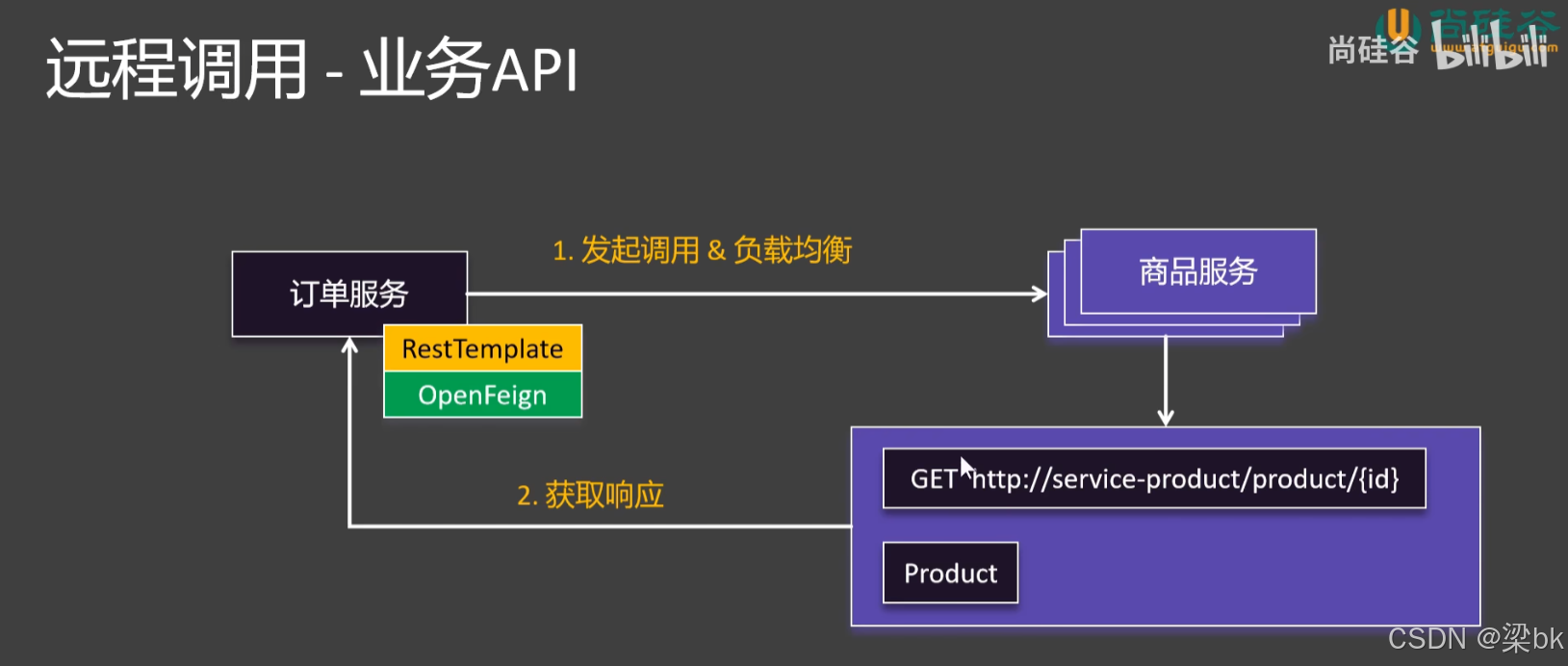
用一句话总结:OpenFeign 是一个声明式的 HTTP 客户端,通过动态代理将接口方法映射为 HTTP 请求。
它的核心工作流程如下:
- 启动扫描:Spring Boot 启动时,
@EnableFeignClients注解会扫描所有标有@FeignClient的接口。 - 动态代理 (Dynamic Proxy):Spring 会为这些接口生成动态代理对象(JDK Proxy),并注入到 Spring 容器中。
- 请求拦截:当你调用接口方法(如
orderService.createOrder())时,代理对象拦截该调用。 - 构造请求:根据接口上的注解(
@GetMapping,@PathVariable等),解析出 URL、Method、Headers、Body 等信息,构建一个 HTTP Request Template。 - 服务发现与负载均衡:
- Feign 拦截到请求后,通过服务名(Service Name)去 Nacos 查找可用的 IP 列表。
- 结合 Spring Cloud LoadBalancer (在 Boot 3.x 中替代了 Ribbon) 选择一个最佳实例。
- 发送请求:通过底层的 HTTP 客户端(默认是 JDK
HttpURLConnection,生产环境通常替换为OkHttp或Apache HttpClient)发送真正的网络请求。 - 解码响应:拿到 HTTP 响应后,通过
Decoder(通常是 Jackson) 将 JSON 字符串反序列化成你定义的 Java 对象。
2. Java 代码实战
假设场景:你的 service-order (订单服务) 需要调用 service-stock (库存服务) 来扣减库存。
第一步:引入依赖 (pom.xml)
在 service-order (消费者) 中添加 OpenFeign 和 负载均衡器依赖。
注意:Spring Boot 3.x (Spring Cloud 2022.x) 彻底移除了 Ribbon,必须确保有 LoadBalancer。
<dependencies>
    <dependency>
        <groupId>org.springframework.cloud</groupId>
        <artifactId>spring-cloud-starter-openfeign</artifactId>
    </dependency>
    <dependency>
        <groupId>org.springframework.cloud</groupId>
        <artifactId>spring-cloud-starter-loadbalancer</artifactId>
    </dependency>
</dependencies>
第二步:开启 Feign (启动类)
在 service-order 的启动类上添加注解。
@SpringBootApplication
@EnableFeignClients // 开启 Feign 扫描
public class OrderApplication {
    public static void main(String[] args) {
        SpringApplication.run(OrderApplication.class, args);
    }
}
第三步:编写 Feign 接口 (核心)
创建一个接口,这就相当于以前写的 Controller 的方法签名,但是这里没有方法体。
package com.example.order.feign;

import com.example.order.dto.StockDTO; // 假设有一个传输对象
import org.springframework.cloud.openfeign.FeignClient;
import org.springframework.web.bind.annotation.GetMapping;
import org.springframework.web.bind.annotation.PathVariable;
import org.springframework.web.bind.annotation.PostMapping;
import org.springframework.web.bind.annotation.RequestParam;

// name: 指定要调用的 Nacos 服务名称 (非常重要,必须匹配)
// path: 可选,如果对方 Controller 类上有 @RequestMapping("/stock"),这里可以统一加
@FeignClient(name = "service-stock", path = "/stock")
public interface StockFeignClient {

    /**
     * 查询库存
     * 对应 GET http://service-stock/stock/{id}
     */
    @GetMapping("/{id}")
    StockDTO getById(@PathVariable("id") Long id);

    /**
     * 扣减库存
     * 对应 POST http://service-stock/stock/deduct?count=xxx
     */
    @PostMapping("/deduct")
    String deduct(@RequestParam("count") Integer count);
}
第四步:在业务代码中使用
在 OrderService 中直接注入接口使用,就像调用本地代码一样。
@Service
public class OrderService {

    @Autowired
    private StockFeignClient stockFeignClient; // 注入动态代理对象

    public void createOrder(Long stockId) {
        // 1. 远程调用查询库存
        StockDTO stock = stockFeignClient.getById(stockId);
        System.out.println("当前库存:" + stock.getCount());

        // 2. 远程调用扣减库存
        stockFeignClient.deduct(1);
    }
}
3. 生产环境必配:日志与超时
默认情况下,OpenFeign 是“哑巴”(不打印日志)且“急性子”(超时时间短),这在开发和生产中都不好用。
3.1 开启详细日志
Feign 的日志级别分为:NONE (默认), BASIC, HEADERS, FULL。开发环境建议开 FULL。
import feign.Logger;
import org.springframework.context.annotation.Bean;
import org.springframework.context.annotation.Configuration;

@Configuration
public class FeignConfig {
    @Bean
    public Logger.Level feignLoggerLevel() {
        return Logger.Level.FULL; // 打印 请求头、请求体、响应头、响应体
    }
}
注意:还需要在 application.yml 中将该 Feign 接口包路径的日志级别设为 DEBUG,否则 Logback 不会输出。
logging:
  level:
    com.example.order.feign: DEBUG
3.2 配置超时时间
spring:
  cloud:
    openfeign:
      client:
        config:
          default: # 对所有服务生效,也可以替换为具体的服务名 "service-stock"
            connect-timeout: 5000 # 连接超时 (毫秒)
            read-timeout: 5000    # 读取/处理超时 (毫秒)
            logger-level: full    # 也可以在这里配日志级别
2.OpenFeign 拦截器 (RequestInterceptor)
1. 原理
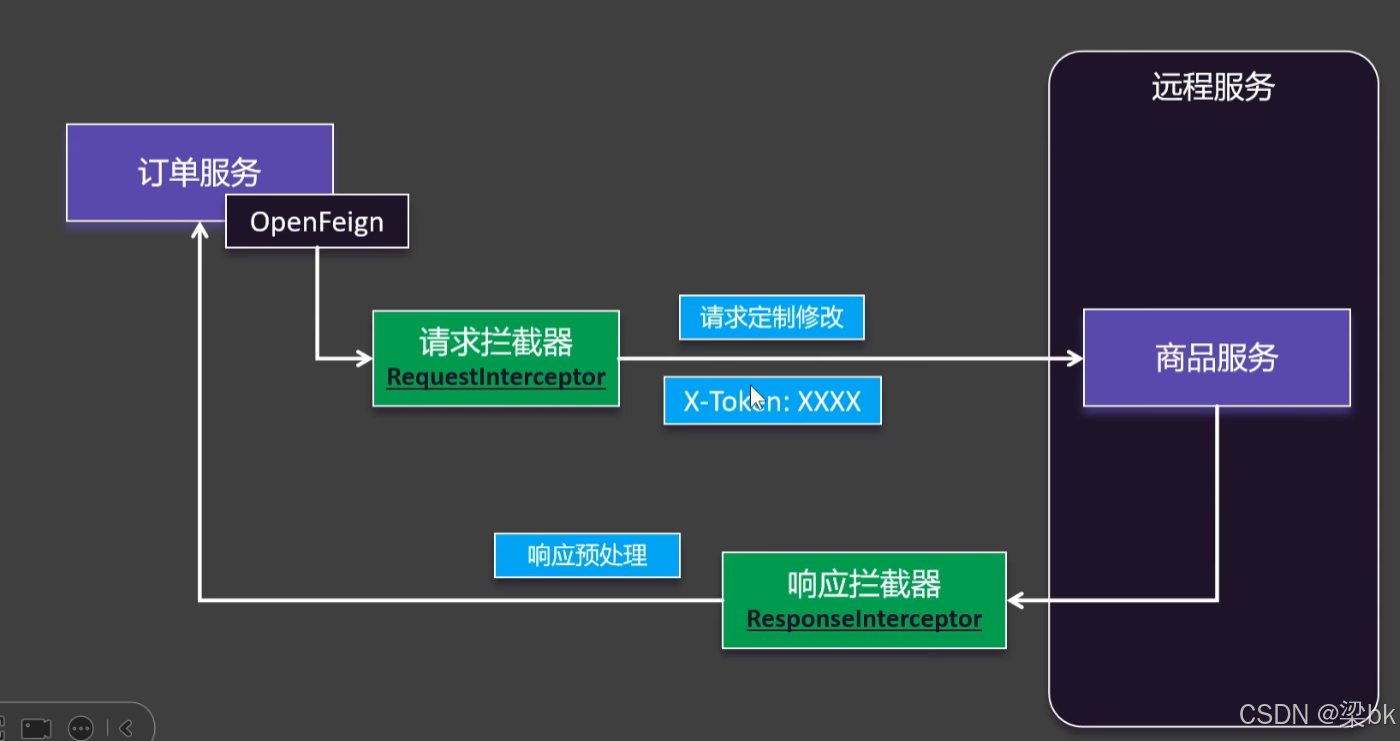
OpenFeign 允许我们定义一个或多个拦截器 (RequestInterceptor)。在 Feign 生成 HTTP 请求模板 (RequestTemplate) 之后、真正发送请求之前,这些拦截器会被执行。
核心作用:Token 中继。
- 场景:用户访问 Service-A (带了 Token),Service-A 调用 Service-B。如果不做处理,Service-B 会报“未登录”,因为 Token 在 A 这里断掉了。拦截器可以把 A 收到的 Token 塞到去往 B 的请求头里。
2. Java 代码实战
步骤一:编写拦截器类
package com.example.order.config;

import feign.RequestInterceptor;
import feign.RequestTemplate;
import jakarta.servlet.http.HttpServletRequest;
import org.springframework.context.annotation.Configuration;
import org.springframework.web.context.request.RequestContextHolder;
import org.springframework.web.context.request.ServletRequestAttributes;

@Configuration
public class FeignTokenInterceptor implements RequestInterceptor {

    @Override
    public void apply(RequestTemplate template) {
        // 1. 获取当前请求的上下文(即用户发给 Order 服务的请求)
        ServletRequestAttributes attributes = (ServletRequestAttributes) RequestContextHolder.getRequestAttributes();

        if (attributes != null) {
            HttpServletRequest request = attributes.getRequest();
            // 2. 获取原始请求中的 Token
            String token = request.getHeader("Authorization");

            // 3. 将 Token 传递给下游服务(Stock 服务)
            if (token != null) {
                template.header("Authorization", token);
            }
        }

        // 也可以加一些自定义的内部 Header
        template.header("X-From-Service", "service-order");
    }
}
步骤二:生效配置
只要加上 @Configuration,这个拦截器就是全局生效的,所有 Feign 接口都会自动带上 Token。
3.Fallback 兜底机制 (结合 Sentinel)
在 Spring Cloud Alibaba 中,Feign 的熔断降级官方推荐使用 Sentinel。
1. 原理
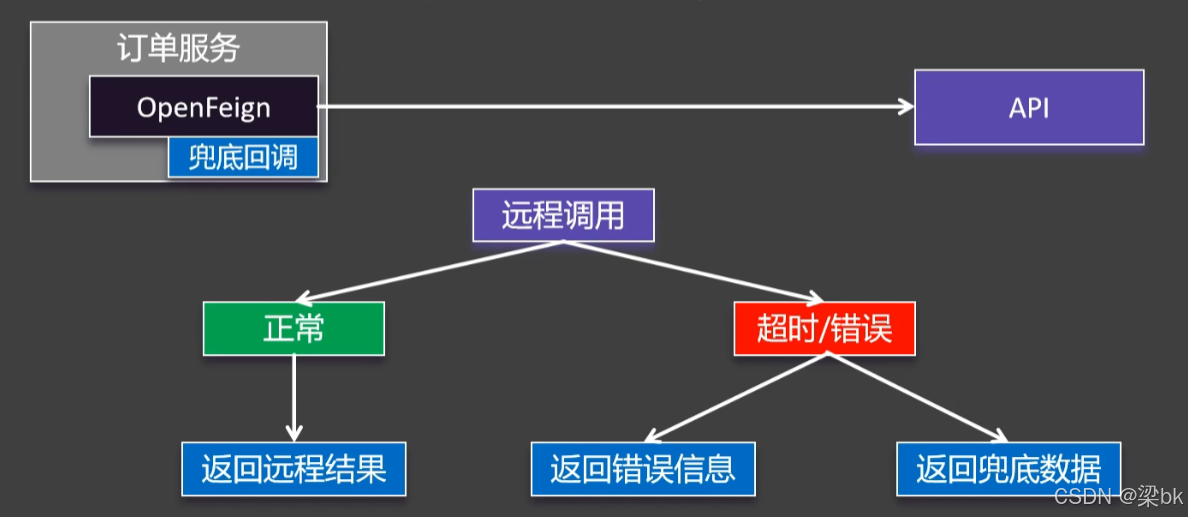
OpenFeign 会利用动态代理,在发送请求时包裹一层 Sentinel 的资源保护逻辑。
- 正常情况:执行远程调用。
- 异常情况(网络超时、对方报错、对方宕机):捕获异常,不再抛给前端,而是执行配置好的
fallback逻辑,返回默认值。
2. 准备工作
引入 Sentinel 依赖 (pom.xml)
<dependency>
    <groupId>com.alibaba.cloud</groupId>
    <artifactId>spring-cloud-starter-alibaba-sentinel</artifactId>
</dependency>
开启 Sentinel 对 Feign 的支持 (application.yml)
这是最容易忘的一步! 默认是关闭的。
spring:
  cloud:
    openfeign:
      client:
        config:
          default:
            connect-timeout: 2000
            read-timeout: 2000
    sentinel:
      enabled: true # 【关键】开启 Sentinel 对 Feign 的支持
3. Java 代码实战 (推荐使用 FallbackFactory)
Feign 提供了两种方式:fallback (简单类) 和 fallbackFactory (工厂类)。
**强烈推荐使用 fallbackFactory**,因为它 可以拿到具体的异常信息(是超时了?还是 404?还是 500?),方便记录日志。
步骤一:定义 Feign 接口
@FeignClient(name = "service-stock", fallbackFactory = StockFeignClientFallbackFactory.class)
public interface StockFeignClient {

    @PostMapping("/deduct")
    String deduct(@RequestParam("count") Integer count);
}
步骤二:编写 FallbackFactory 实现类
这个类必须注册为 Spring Bean (@Component)。
package com.example.order.feign.fallback;

import com.example.order.feign.StockFeignClient;
import org.springframework.cloud.openfeign.FallbackFactory;
import org.springframework.stereotype.Component;
import lombok.extern.slf4j.Slf4j;

@Slf4j
@Component
public class StockFeignClientFallbackFactory implements FallbackFactory<StockFeignClient> {

    @Override
    public StockFeignClient create(Throwable cause) {
        // 这里可以拿到具体的异常 'cause'

        // 返回一个实现了原接口的匿名内部类
        return new StockFeignClient() {
            @Override
            public String deduct(Integer count) {
                // 1. 记录降级日志,方便运维排查
                log.error("调用库存服务失败,触发兜底降级。原因:{}", cause.getMessage());

                // 2. 返回兜底数据
                // 比如:返回一个特定的 JSON 结构告诉前端"系统繁忙,请稍后"
                // 或者:如果是查询操作,可以返回缓存中的旧数据
                return "fallback-value: 库存扣减失败,服务忙";
            }
        };
    }
}
总结与最佳实践
| 功能 | 核心类/接口 | 作用 | 关键配置 |
|---|---|---|---|
| 拦截器 | RequestInterceptor | 传递 Token、TraceID | @Configuration 全局注入 |
| 兜底(简单) | fallback = X.class | 仅返回默认值,不知异常原因 | feign.sentinel.enabled: true |
| 兜底(推荐) | fallbackFactory = X.class | 返回默认值 + 获取异常堆栈 | feign.sentinel.enabled: true |
开发建议:
- 必须要有兜底:永远不要相信网络和下游服务是 100% 稳定的。没有兜底的微服务就是裸奔。
- 兜底逻辑要简单:Fallback 方法里的逻辑不能太复杂(例如不要再去调数据库或另一个远程服务),否则兜底逻辑自己也挂了就尴尬了。通常只做日志记录 + 返回静态默认值。

汇聚全球AI编程工具,助力开发者即刻编程。
更多推荐



 24
24 0
0- 0


 已为社区贡献4条内容

所有评论(0)