
Linux firewall防火墙管理
Linux 防火墙管理
防火墙介绍
防火墙( FireWall ),工作在网络或主机边缘,对进出网络或主机的数据包基于一定的规则检查,并在匹配某规则时由规则定义的行为进行处理的一组功能的组件。基本上的实现都是默认情况下关闭所有的通过型访问,只开放允许访问的策略,将希望外网访问的主机放在 DMZ(demilitarized zone)网络中。
Netfilter 子系统
Netfilter子系统是Linux内核中一个强大的网络过滤子系统,对进入系统的每个数据包,在到达用户空间组件或应用之前进行检查,通过编程方式来修改、丟弃或路由数据包。
Netfilter子系统工作在内核态,用户使用以下命令配置防火墙规则,告诉Netfilter子系统如何处理数据包:
iptables,用于过滤 IPv4 协议的数据包。
如果 Linux 系统连接到LAN或因特网, 则iptables可用于在 Linux 系统上更好地控制 IP 信息
包过滤和防火墙配置。
ip6tables,用于过滤 IPv6 协议的数据包,效果等同iptables工具。
arptables,用于过滤 arp 协议的数据包。
arptables既能防止别的机器对自己进行arp欺骗,又能防止本机病毒或错误程序向其他机器发起arp攻击。如果善于运用的话,不失为一个优秀的arp防火墙。
ebtables,用于过滤数据链路层数据包。
ebtables 过滤数据包比 iptables 更靠前,获得的数据更“原始”,ebtables 多用于桥模式,比如控制 VLAN ID 等。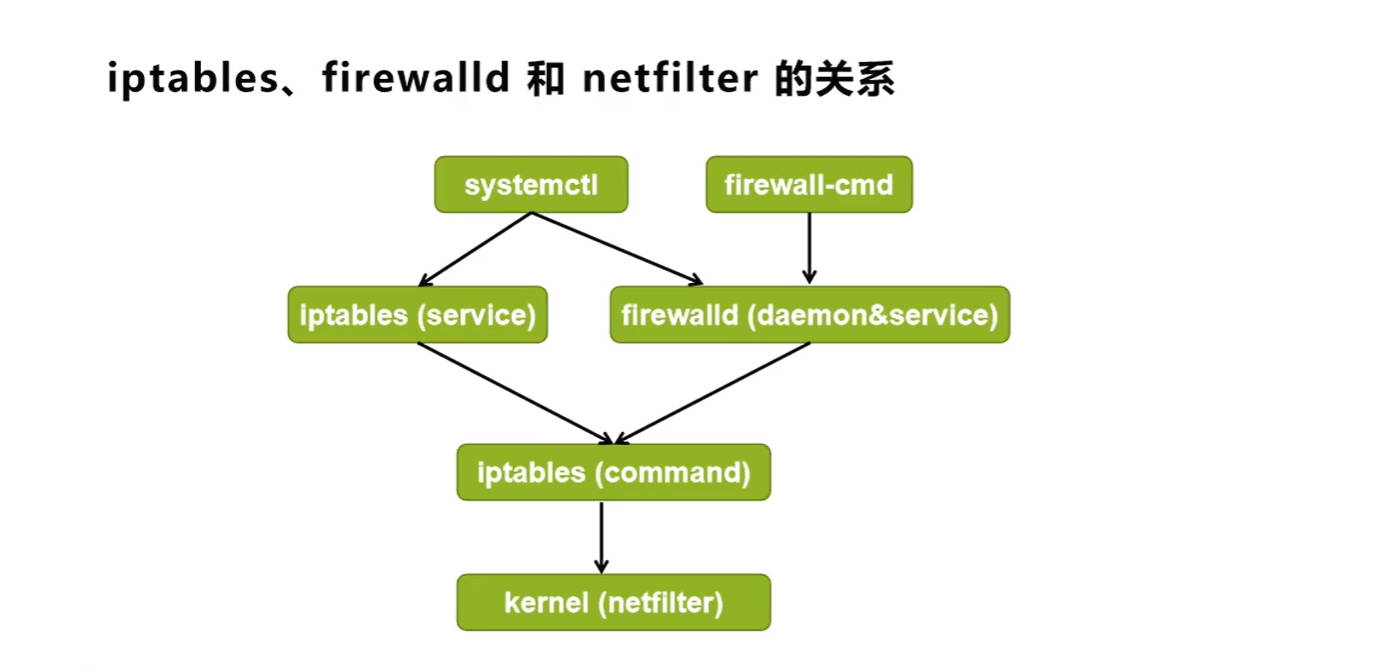
Nftables 子系统
Nftables子系统是netfilter的增强版,其仍保留了netfilter的架构。
nftables优点:
更快的数据包处理
更快的规则集更新
使用单个 nft 用户空间实用程序,通过一个接口来管理所有协议,消除了以往不同前端和多个netfilter接口引起的争用问题.
静态防火墙和动态防火墙
静态防火墙
用户管理防火墙规则时,为了让规则永久保存,防火墙服务会重新加载所有防火墙规则,哪怕只修改一条规则也要重新读取所有规则,这种载入模式称为静态模式。静态模式加载规则时,会导致网络连接丢失。
我们称使用静态模式载入规则的防火墙为静态防火墙。例如iptables,用户执行service
iptables reload 命令将变更的规则保存到配置文件里,并重新加载所有防火墙规则。
动态防火墙用户管理防火墙规则时,为了让规则永久保存,防火墙只需要将变更部分保存并更新到运行中的iptables 即可,而不需要对整个防火墙规则列表进行重新加载,这种载入模式称为动态模式。
我们称使用动态模式载入规则的防火墙为动态防火墙,例如 firewalld。
Firewalld 防火墙
Firewalld 是 Red Hat 公司开发的防火墙软件,默认后端为 nftables
在 CentOS 7 之前的发行版中,默认使用 iptables 命令来管理防火墙
在 CentOS 7 之后的发行版中,firewalld 取代 iptables 成为了默认防火墙软件
用户可以同时使用 iptables 和firewalld 两个防火墙软件,但容易搞混规则。建议将一个防火墙关闭或默认允许所有流量,只使用另一个防火墙
Firewalld 防火墙的另外一个特点就是动态加载防火墙规则
Firewalld 区域
firewalld 防火墙为了简化管理,将所有网络流量分为多个区域(zone),每个 zone 就是一套过滤
规则集。
“区域”(Zone)是Firewalld 核心逻辑
根据安全性从低(最信任)到高(最严格)排列如下:
- trusted(信任区域):允许所有的传入流量。
- home(家庭区域):允许与ssh、mdn3、samba-client或dhcpv6-client预定义服务匹配的传入流量,其余均拒绝。
- internal(内部区域):默认值时与homel区域相同。
- work(工作区域):允许与 ssh、>dhcpv6-client预定义服务匹配的传入流量,其余均拒绝。
- public(公共区域):允许与ssh或dhcpv6-client预定义服务匹配的传入流量,其余均拒绝。
是新添加网络接口的默认区域。 - external(外部区域):允许与ssh预定义服务匹配的传入流量,其余均拒绝。默认将通过此区
域转发的IPv4传出流量将进行地址伪装,可用于为路由器启用了伪装功能的外部网络。 - dmz(隔离区域也称为非军事区域):允许与>ssh 预定义服务匹配的传入流量,其余均拒绝。
- block(限制区域):拒绝所有传入流量。
- drop(丢弃区域):丢弃所有传入流量,并且不产生包含ICMP的错误响应。
数据包与区域匹配规则
数据包与zone匹配规则如下:
- 该源地址被分配给特定区域, 则应用该区域的规则。
- 如果数据包未匹配源地址,则分配给与传入网络接口关联的区域,并应用该区域的规则。
- 如果以上都未匹配,firewalld将数据包分配给默认区域。
- 注意事项:
firewalld默认指定public区域为默认区域,并将 lo 回环接口映射至 trusted 区域。如果流量不与允许的端口或协议或服务匹配,则通常会被拒绝。
Firewalld 规则
对于所有区域,区域内规则的优先级是相同的。
区域内规则匹配优先级如下:
- 首先匹配为该区域设置的任何端口转发和伪装原则。
- 其次匹配该区域设置的任何允许规则。
- 最后匹配该区域设置的任何拒绝规则。
- 还可以同时为以上3个规则设置记录和审计规则,可以同时生效。
- 富规则中的规则优先级高于区域中其他规则。
- 如果区域中所有规则都不匹配,那么通常会拒绝该包,trusted例外。
Firewalld 配置
Firewalld 配置方法
- 直接编辑 /etc/firewalld/ 中的配置文件
- firewall-cmd 命令行工具
- firewall-config 图形工具
Firewalld 配置文件
Firewalld 配置配置文件存放在:
/usr/lib/firewalld/目录,Firewalld软件包自带配置位置。
/etc/firewalld/目录,目录结构与/usr/lib/firewalld/一致,管理员自定义配置保存在该位置。
不建议通过修改/etc/firewalld/目录配置防火墙。
firewall-cmd 命令行工具
- 防火墙的配置有两个状态:
- runtime(运行时),命令行执行是的默认状态,该状态下的配置立刻生效
- permanent(永久),通过选项 --permanent 指定,该状态下的配置不会立刻生效,而是写入配置文件,需要通过选项 --reload 重新reload才会生效,重新reload将
导致运行时状态下未保存的配置丢失,但会保留当前连接状态。如果使用选项 –
complete-reload 重新reload永久配置,将导致当前连接状态也丢失
- 建议配置防火墙一次性写两条规则:
- 使用选项 --permanent 永久保存配置
- 不使用选项 --permanent 立刻生效
配置防火墙的规则必须是一个区域内的(直接规则除外),如果不使用选项 --zone 明确指明区域,则使用默认区域–默认区域是public
zone 管理
# 查看zone清单
[root@centos7 ~]# firewall-cmd --get-zones
block dmz drop external home internal public trusted work
# 查看激活的zone清单,也就是分配了interface和source的zone
[root@centos7 ~]# firewall-cmd --get-active-zones
public
interfaces: ens32
# 查看默认zone
[root@centos7 ~]# firewall-cmd --get-default-zone
public
# 设置默认zone,例如设置为trusted,该操作同时设置永久态默认zone
[root@centos7 ~]# firewall-cmd --set-default-zone=trusted
[root@centos7 ~]# firewall-cmd --get-default-zone
trusted
# 再设置回来
[root@centos7 ~]# firewall-cmd --set-default-zone=public

# 如果有需要还可以创建新zone,必须配合--permanent
[root@centos7 ~]# firewall-cmd --permanent --new-zone=myweb
[root@centos7 ~]# firewall-cmd --permanent --get-zones
block dmz drop external home internal myweb public trusted work
[root@centos7 ~]# firewall-cmd --get-zones
block dmz drop external home internal public trusted work
# “区域” 是一个逻辑容器,涉及到复杂的 XML 结构定义。firewalld 的设计要求所有的区域定义必须先存在于磁盘文件中,才能被加载到内核的运行空间中,如果不带 --permanent 创建新区域系统会报错,它无法在内存中凭空生成一个没有文件支撑的新区域架构

# 使用--reload选项重新加载所有防火墙规则,再次查看zone清单
[root@centos7 ~]# firewall-cmd --reload
[root@centos7 ~]# firewall-cmd --get-zones
block dmz drop external home internal myweb public trusted work

# Target:当为一个区域(Zone)配置了规则(如放行 80 端口),如果一个进入该区域的数据包没有匹配到任何已定义的规则(既不是放行的端口,也不是放行的服务),Target 就决定了防火墙该如何处理它
# 查看zone target
[root@centos7 ~]# firewall-cmd --permanent --zone=myweb --get-target
default
# 设置zone target,可用target值为:
# default,默认值,也就是拒绝数据包进入用户空间。
# ACCEPT,允许数据包进入用户空间。
# DROP,丢弃数据包,不对客户端做出任何响应。
# REJECT,拒绝数据包进入用户空间。
[root@centos7 ~]# firewall-cmd --permanent --zone=myweb --set-target=
REJECT
[root@centos7 ~]# firewall-cmd --permanent --zone=myweb --get-target
REJECT
# zone不需要的时候,也可以删除,必须配合--permanent
[root@centos7 ~]# firewall-cmd --permanent --delete-zone=myweb
[root@centos7 ~]# firewall-cmd --permanent --get-zones
block dmz drop external home internal public trusted work
[root@centos7 ~]# firewall-cmd --reload
[root@centos7 ~]# firewall-cmd --get-zones
block dmz drop external home internal public trusted work

# 查看所有zone中的规则
[root@centos7 ~]# firewall-cmd --list-all-zones
block
target: %%REJECT%%
icmp-block-inversion: no
interfaces:
sources:
services:
ports:
protocols:
masquerade: no
forward-ports:
source-ports:
icmp-blocks:
rich rules:dmz
target: default
......
drop
....................
# 查看默认zone中的规则
[root@centos7 ~]# firewall-cmd --list-all
public (active)
target: default
icmp-block-inversion: no
interfaces: ens32
sources:
services: cockpit dhcpv6-client ssh
ports:
protocols:
masquerade: no
forward-ports:
source-ports:
icmp-blocks:
rich rules:
# 查看特定zone中的规则
[root@centos7 ~]# firewall-cmd --list-all --zone=home
home
target: default
icmp-block-inversion: no
interfaces:
sources:
services: dhcpv6-client mdns samba-client ssh
ports:
protocols:
masquerade: no
forward-ports:
source-ports:
icmp-blocks:
rich rules:
source 管理
在 firewalld 中,Source(源地址)是比网卡(Interface)优先级更高的匹配规则
第一优先级 (Sources): 检查数据包的源 IP 是否在任何 Zone 的 sources 列表中。如果在,就直接进入该 Zone。
第二优先级 (Interfaces): 如果源 IP 没匹配到,检查数据包进入的物理网卡(如 eth0)是否绑定了某个 Zone。
第三优先级 (Default): 如果前两个都没匹配到,进入 default zone。
# 来源于特定source的数据包交给特定zone处理
[root@centos7 ~]# firewall-cmd --add-source=192.168.1.0/24 --zone=home
# 查看source清单
[root@centos7 ~]# firewall-cmd --list-sources --zone=home
192.168.1.0/24
# 查看source属于哪个zone
[root@centos7 ~]# firewall-cmd --get-zone-of-source=192.168.1.0/24
home
# 查看source是否添加
[root@centos7 ~]# firewall-cmd --query-source=192.168.1.0/24 --
zone=home
yes
# 变更source到其他zone
[root@centos7 ~]# firewall-cmd --change-source=192.168.1.0/24 --
zone=public
# 删除zone中source
[root@centos7 ~]# firewall-cmd --remove-source=192.168.1.0/24 --
zone=public
interface 管理
# 查看zone中interface
[root@centos7 ~]# firewall-cmd --list-interfaces
ens32
# 查看interface属于哪个zone
[root@centos7 ~]# firewall-cmd --get-zone-of-interface=ens32
public
# 查看interface是否添加
[root@centos7 ~]# firewall-cmd --query-interface=ens32
yes
# 将interface变更到其他zone
[root@centos7 ~]# firewall-cmd --change-interface=ens32 --zone=home
# 删除zone中interface
[root@centos7 ~]# firewall-cmd --remove-interface=ens32 --zone=home
# 如果interface不属于任何zone,使用以下命令将interface绑定到特定zone
[root@centos7 ~]# firewall-cmd --add-interface=ens32 --zone=public
service 管理
[root@centos7 ~]# yum install -y httpd
[root@centos7 ~]# systemctl start httpd
# 查看系统中预定义了哪些服务
[root@centos7 ~]# firewall-cmd --get-services
# 添加放行服务
[root@centos7 ~]# firewall-cmd --add-service=http
# 查看放行服务列表
[root@centos7 ~]# firewall-cmd --list-services
cockpit dhcpv6-client http ssh
# 查看服务是否放行
[root@centos7 ~]# firewall-cmd --query-service=http
yes
# 删除服务
[root@centos7 ~]# firewall-cmd --remove-service=http
常用选项
--permanent --new-service=service
Add a new permanent and empty service.
--permanent --delete-service=service
Delete an existing permanent service.
--permanent --service=service --set-description=description
Set new description to service
--permanent --service=service --get-description
Print description for service
--permanent --service=service --set-short=description
Set short description to service
--permanent --service=service --get-short
Print short description for service
--permanent --service=service --add-port=portid[-portid]/protocol
Add a new port to the permanent service.
--permanent --service=service --remove-port=portid[-portid]/protocol
Remove a port from the permanent service.
--permanent --service=service --get-ports
List ports added to the permanent service.
--permanent --service=service --add-protocol=protocol
Add a new protocol to the permanent service.
--permanent --service=service --remove-protocol=protocol
Remove a protocol from the permanent service.
--permanent --service=service --get-protocols
List protocols added to the permanent service.
--permanent --service=service --add-source-port=portid[-
portid]/protocol
Add a new source port to the permanent service.
--permanent --service=service --remove-source-port=portid[-
portid]/protocol
Remove a source port from the permanent service.
--permanent --service=service --get-source-ports
List source ports added to the permanent service.
port 管理
# 添加放行端口
[root@centos7 ~]# firewall-cmd --add-port=5900/tcp
# 查看端口放行列表
[root@centos7 ~]# firewall-cmd --list-ports
5900/tcp
# 查看端口是否放行
[root@centos7 ~]# firewall-cmd --query-port=5900/tcp
yes
# 删除端口
[root@centos7 ~]# firewall-cmd --remove-port=5900/tcp
masquerade 管理
# 查看masquerade是否启动
[root@centos7 ~]# firewall-cmd --query-masquerade
no
# 启动 masquerade
[root@centos7 ~]# firewall-cmd --add-masquerade
[root@centos7 ~]# firewall-cmd --query-masquerade
yes
# 禁用masquerade
[root@centos7 ~]# firewall-cmd --remove-masquerade
direct rule 管理
Firewalld 防火墙还支持直接规则:
直接规则优先级高于firewalld规则,即防火墙解析直接规则, 然后才会解析firewalld规则。还可以显式地将直接规则插入到某个区域。
- 直接规则用于补充firewalld规则使用firewalld规则能实现的需求,尽可能使用firewalld。
- 规则实现直接规则的语法,类似于iptable的语法,所以读者需要知道iptables概念:
table (filter/mangle/nat/...)
chain (INPUT/OUTPUT/FORWARD/...)
commands (-A/-D/-I/...)
parameters (-p/-s/-d/-j/...)
targets (ACCEPT/DROP/REJECT/...)
其他配置
# 使用选项--runtime-to-permanent将运行时的配置写入到配置文件
root@centos7 ~]# firewall-cmd --runtime-to-permanent
# 使用选项 --timeout设置规则生效时间,单位秒,一般用于调试规则。
[root@centos7 ~]# firewall-cmd --add-service=http --timeout=10
in (INPUT/OUTPUT/FORWARD/...)
commands (-A/-D/-I/...)
parameters (-p/-s/-d/-j/...)
targets (ACCEPT/DROP/REJECT/...)

汇聚全球AI编程工具,助力开发者即刻编程。
更多推荐
 22
22 0
0- 0


 已为社区贡献4条内容

所有评论(0)