
Flink Doris Connector Sink 深度解析
摘要:本文深入分析 Apache Flink Doris Connector 的 Sink 端实现原理,涵盖三种写入模式(STREAM_LOAD、STREAM_LOAD_BATCH、COPY)的架构设计、核心源码解读、故障恢复机制以及性能优化实践。通过对源码的逐层剖析,帮助读者理解 Connector 的内部工作机制,从而在实际生产中做出更优的技术选型和参数调优。
一、概述
1.1 Flink Doris Connector 简介
Flink Doris Connector 是 Apache Doris 官方提供的 Flink 集成组件,支持通过 Flink 实时写入数据到 Doris。其核心优势包括:
- 流批一体:同时支持流式写入和批量导入
- Exactly-Once 语义:通过两阶段提交(2PC)保证数据精确一次
- 高性能:多种写入模式适配不同场景
- 易用性:支持 Flink SQL 和 DataStream API
项目地址:https://github.com/apache/doris-flink-connector
1.2 三种写入模式概览
Flink Doris Connector 提供三种写入模式,适用于不同的业务场景:
| 模式 | 配置方式 | 语义保证 | 适用场景 |
| STREAM_LOAD |
(默认) | Exactly-Once | 金融交易、订单系统等要求精确一次的场景 |
| STREAM_LOAD_BATCH |
| At-Least-Once | 日志采集、用户行为分析等高吞吐场景 |
| COPY |
| At-Least-Once | 数仓同步、历史数据迁移等超大批量场景 |
1.3 数据流转路径对比



1.4 语义保证深度解析
在深入源码之前,需要先厘清两个核心概念:
At-Least-Once = 不丢数据 + 可能重复
Exactly-Once = 不丢数据 + 不重复三种模式的语义保证机制对比:
| 模式 | 不丢数据的保证 | 不重复的保证 | 最终语义 |
| STREAM_LOAD | Checkpoint + 2PC PreCommit | Label 幂等 + 2PC Commit | Exactly-Once |
| STREAM_LOAD_BATCH | Checkpoint 前 flush 完成 | ❌ 无(Label 每次不同) | At-Least-Once |
| COPY | Checkpoint 前上传完成 | ❌ 无 | At-Least-Once |
二、整体架构设计
2.1 核心类结构
classDiagram
    class DorisSink {
        +getWriter()
        +getCommitter()
        +getWriterStateSerializer()
    }

    class DorisAbstractWriter {
        <<interface>>
        +write(IN in)
        +prepareCommit()
        +snapshotState()
    }

    class DorisWriter {
        -DorisStreamLoad dorisStreamLoad
        -LabelGenerator labelGenerator
        +write(IN in)
        +prepareCommit()
    }

    class DorisBatchWriter {
        -DorisBatchStreamLoad batchStreamLoad
        +write(IN in)
        +prepareCommit()
    }

    class DorisCopyWriter {
        -BatchStageLoad batchStageLoad
        +write(IN in)
        +prepareCommit()
    }

    class DorisStreamLoad {
        -RecordBuffer recordBuffer
        +startLoad()
        +writeRecord()
        +stopLoad()
    }

    class DorisBatchStreamLoad {
        -Map bufferMap
        -BlockingQueue flushQueue
        +writeRecord()
        +flush()
    }

    class BatchStageLoad {
        -Map bufferMap
        -Map fileListMap
        +writeRecord()
        +uploadToStorage()
    }

    class DorisCommitter {
        +commit()
        -commitTransaction()
    }

    class DorisCopyCommitter {
        +commit()
        -executeCopySQL()
    }

    DorisSink --> DorisAbstractWriter
    DorisAbstractWriter <|.. DorisWriter
    DorisAbstractWriter <|.. DorisBatchWriter
    DorisAbstractWriter <|.. DorisCopyWriter

    DorisWriter --> DorisStreamLoad
    DorisBatchWriter --> DorisBatchStreamLoad
    DorisCopyWriter --> BatchStageLoad

    DorisSink --> DorisCommitter
    DorisSink --> DorisCopyCommitter
2.2 模式选择逻辑
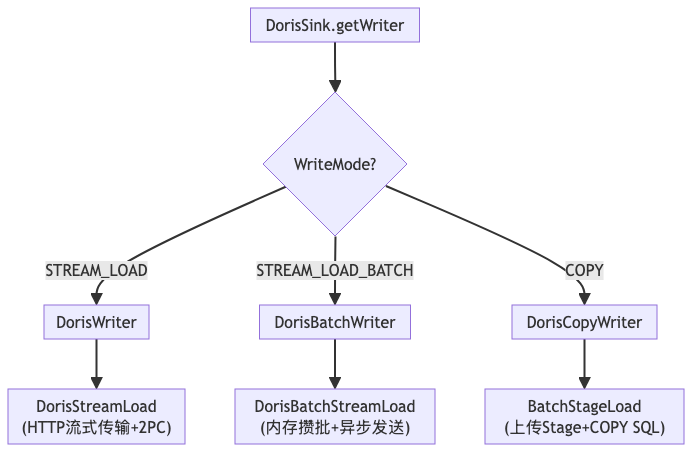
DorisSink 根据配置参数选择对应的 Writer 实现:
// DorisSink.java
public DorisAbstractWriter getDorisAbstractWriter(InitContext initContext,
                                                   DorisWriterState state) {
    if (WriteMode.STREAM_LOAD.equals(executionOptions.getWriteMode())) {
        // 默认模式:流式写入 + 2PC
        return new DorisWriter<>(initContext, state, serializer, ...);
    } else if (WriteMode.STREAM_LOAD_BATCH.equals(executionOptions.getWriteMode())) {
        // 攒批模式:内存攒批 + 异步发送
        return new DorisBatchWriter<>(initContext, state, serializer, ...);
    } else if (WriteMode.COPY.equals(executionOptions.getWriteMode())) {
        // COPY模式:Stage导入
        return new DorisCopyWriter(initContext, state, labelGenerator, ...);
    }
    throw new IllegalArgumentException("Unsupported write mode");
}
三、STREAM_LOAD 模式详解(默认模式)
STREAM_LOAD 是 Flink Doris Connector 的默认写入模式,也是唯一支持 Exactly-Once 语义的模式。其核心通过 Doris 的两阶段提交(2PC)机制与 Flink Checkpoint 协同,保证数据不丢不重。
3.1 DorisWriter:写入器核心逻辑
DorisWriter 负责管理数据写入的生命周期,包括 StreamLoad 的初始化、数据写入、预提交等。
// DorisWriter.java 核心结构
public class DorisWriter<IN>
        implements DorisAbstractWriter<IN, DorisWriterState, DorisCommittable> {

    private DorisStreamLoad dorisStreamLoad;
    private final DorisWriteMetrics dorisWriteMetrics;
    private volatile boolean loading = false;
    private long lastCheckpointId;

    // 初始化 StreamLoad
    public void initializeLoad() throws IOException {
        this.dorisStreamLoad = new DorisStreamLoad(...);
        // 处理残留事务(故障恢复)
        if (executionOptions.enabled2PC()) {
            dorisStreamLoad.abortLingeringTransactions(
                labelGenerator.getLabelPrefix(), ...);
        }
    }

    // 写入单条记录
    @Override
    public void write(IN in, Context context) throws IOException, InterruptedException {
        checkLoadException();
        // 序列化
        DorisRecord record = serializer.serialize(in);
        if (record == null || record.getRow() == null) {
            return;
        }
        // 首次写入时启动 HTTP 连接
        if (!loading) {
            dorisStreamLoad.startLoad(
                labelGenerator.generateTableLabel(...), ...);
            loading = true;
        }
        // 写入数据
        dorisStreamLoad.writeRecord(record.getRow());
    }

    // Checkpoint 时预提交
    @Override
    public Collection<DorisCommittable> prepareCommit()
            throws IOException, InterruptedException {
        if (!loading) {
            return Collections.emptyList();
        }
        // 结束当前 StreamLoad,获取事务ID
        RespContent response = dorisStreamLoad.stopLoad();
        loading = false;

        if (!executionOptions.enabled2PC()) {
            return Collections.emptyList();
        }
        // 返回待提交的事务信息
        return Collections.singletonList(
            new DorisCommittable(dorisStreamLoad.getHostPort(),
                                 dorisStreamLoad.getDb(),
                                 response.getTxnId()));
    }
}
3.2 DorisStreamLoad:HTTP 流式传输执行器
DorisStreamLoad 是实际执行 HTTP Stream Load 的核心类,通过持续的 HTTP 连接流式传输数据到 Doris BE。
// DorisStreamLoad.java 核心结构
public class DorisStreamLoad implements Serializable {

    private static final String STREAM_LOAD_URL =
        "http://%s/api/%s/%s/_stream_load";
    private RecordBuffer recordBuffer;
    private Future<CloseableHttpResponse> pendingLoadFuture;
    private final ExecutorService loadExecutorService;

    // 启动 StreamLoad
    public void startLoad(String label, boolean isResume) throws IOException {
        loadBatchFirstRecord = true;
        // 生成 HTTP 请求
        HttpPutBuilder putBuilder = new HttpPutBuilder();
        String url = String.format(STREAM_LOAD_URL, currentHost, db, table);
        putBuilder.setUrl(url)
                  .baseAuth(username, password)
                  .addCommonHeader()
                  .addLabel(label)
                  .setEntity(recordBuffer);  // RecordBuffer 作为 HTTP Entity

        // 2PC 模式下启用两阶段提交
        if (enable2PC) {
            putBuilder.enable2PC();  // Header: two_phase_commit=true
        }

        // 异步发送 HTTP 请求(请求会一直保持,直到 stopLoad)
        this.pendingLoadFuture = loadExecutorService.submit(() -> {
            return httpClient.execute(putBuilder.build());
        });
    }

    // 写入记录到缓冲区
    public void writeRecord(byte[] record) throws InterruptedException {
        recordBuffer.write(record);
    }

    // 停止 StreamLoad,获取响应
    public RespContent stopLoad() throws IOException {
        recordBuffer.stopBufferData();  // 标记数据结束
        CloseableHttpResponse response = pendingLoadFuture.get();
        return handleResponse(response);
    }
}
3.3 RecordBuffer:生产者-消费者缓冲区
RecordBuffer 是连接数据写入和 HTTP 传输的核心组件,采用生产者-消费者模式解耦数据写入与网络传输。
3.3.1 核心数据结构
// RecordBuffer.java 核心结构
public class RecordBuffer extends InputStream {

    // 1. 空闲缓冲区队列(存放多个 ByteBuffer)
    private final BlockingQueue<ByteBuffer> writeQueue;

    // 2. 待发送缓冲区队列(存放多个 ByteBuffer)
    private final BlockingDeque<ByteBuffer> readQueue;

    // 3. 当前正在写入的缓冲区(单个 ByteBuffer)
    private ByteBuffer currentWriteBuffer;

    // 4. 当前正在读取的缓冲区(单个 ByteBuffer)
    private ByteBuffer currentReadBuffer;

    public RecordBuffer(int bufferSize, int queueSize) {
        this.writeQueue = new ArrayBlockingQueue<>(queueSize);
        this.readQueue = new LinkedBlockingDeque<>();
        // 预分配缓冲区(这就是"多个缓冲区"的含义)
        for (int i = 0; i < queueSize; i++) {
            writeQueue.add(ByteBuffer.allocate(bufferSize));
        }
    }
}配置参数说明:
sink.buffer-size:单个 ByteBuffer 的大小(默认 1MB)sink.buffer-count:队列中 ByteBuffer 的数量(默认 3)
所以"3个缓冲区"指的是:队列中有 3 个 ByteBuffer 对象在循环复用。
3.3.2 缓冲区循环复用机制
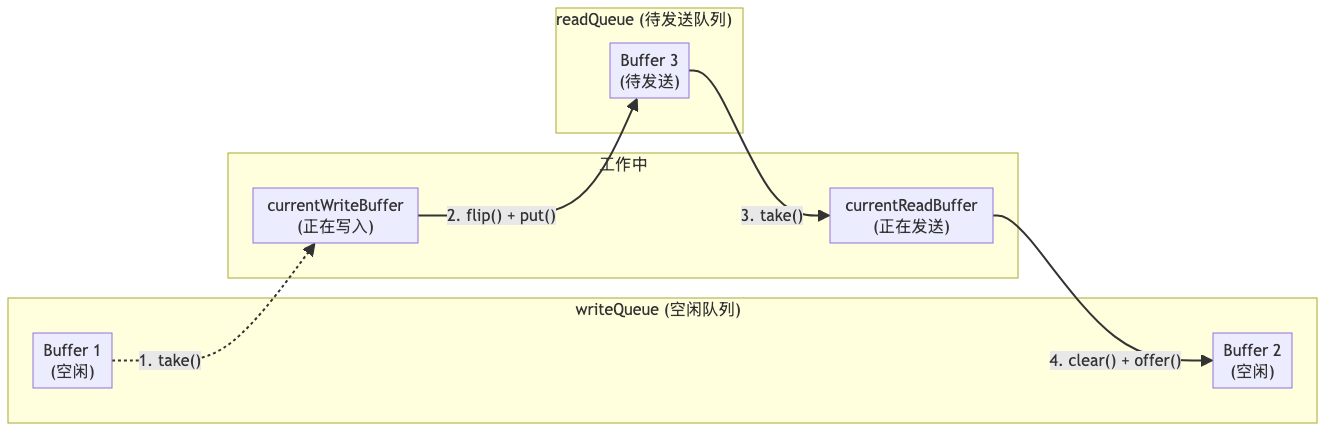
数据流转过程:
- 写入线程从
writeQueue取出空闲 Buffer - 写满后
flip()放入readQueue - HTTP 发送线程从
readQueue取出待发送 Buffer - 发送完成后
clear()归还到writeQueue
3.3.3 写入方法实现
// 写入数据(生产者调用)
public void write(byte[] record) throws InterruptedException {
    if (currentWriteBuffer == null ||
        currentWriteBuffer.remaining() < record.length + lineDelimiter.length) {
        // 将当前缓冲区放入待发送队列
        if (currentWriteBuffer != null) {
            currentWriteBuffer.flip();  // 切换为读模式
            readQueue.put(currentWriteBuffer);
        }
        // 从空闲队列获取新缓冲区(可能阻塞)
        currentWriteBuffer = writeQueue.take();
        currentWriteBuffer.clear();
    }
    // 写入数据
    currentWriteBuffer.put(record);
    currentWriteBuffer.put(lineDelimiter);
}
3.3.4 读取方法实现(关键!)
// 读取数据(HTTP线程通过InputStream接口调用)
@Override
public int read(byte[] buf, int off, int len) throws IOException {
    if (currentReadBuffer == null || !currentReadBuffer.hasRemaining()) {
        // 回收已读完的缓冲区
        if (currentReadBuffer != null) {
            currentReadBuffer.clear();
            writeQueue.offer(currentReadBuffer);  // 归还到空闲队列
        }
        // 从待发送队列获取新缓冲区(带超时)
        currentReadBuffer = readQueue.poll(timeout, TimeUnit.MILLISECONDS);
        if (currentReadBuffer == null) {
            // 队列空了,但数据还没结束
            return endOfStream ? -1 : 0;  // 返回 0,HTTP 线程继续等待
        }
    }
    // 有数据就立即返回(不等 Buffer 满)
    int readLen = Math.min(len, currentReadBuffer.remaining());
    currentReadBuffer.get(buf, off, readLen);
    return readLen;
}关键点:HTTP 线程只要有数据就立即读取并发送,不会等待 Buffer 填满。这就是"边写边传"的实现原理。
3.4 STREAM_LOAD 的"边写边传"特性
3.4.1 为什么调大 Buffer 参数效果有限?
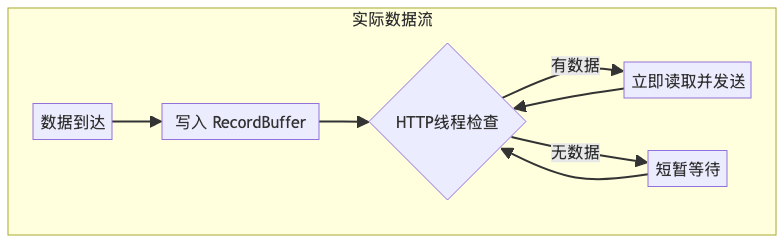
核心原因:RecordBuffer 实现了 InputStream 接口,HTTP 线程通过 read() 方法读取数据。只要有数据可读,就会立即返回并发送,而不是等 Buffer 填满。
调大参数的实际效果:
| 参数 | 调大后的效果 | 对吞吐量的影响 |
|
| 单个 ByteBuffer 更大 | ❌ 几乎无影响,因为不等填满就发 |
|
| 队列中 Buffer 更多 | ⚠️ 略有帮助,减少写入阻塞 |
| Checkpoint 间隔 | 单次 Stream Load 时间更长 | ✅ 减少 2PC 提交开销 |
真正影响 STREAM_LOAD 吞吐的因素:
实际吞吐 ≈ min(数据产生速率, 网络带宽, BE处理能力)Buffer 参数主要是解耦生产和消费,防止相互阻塞,而不是用来"攒批提高效率"。
3.4.2 为什么要设计成"边写边传"?
原因一:支持 2PC 的需要
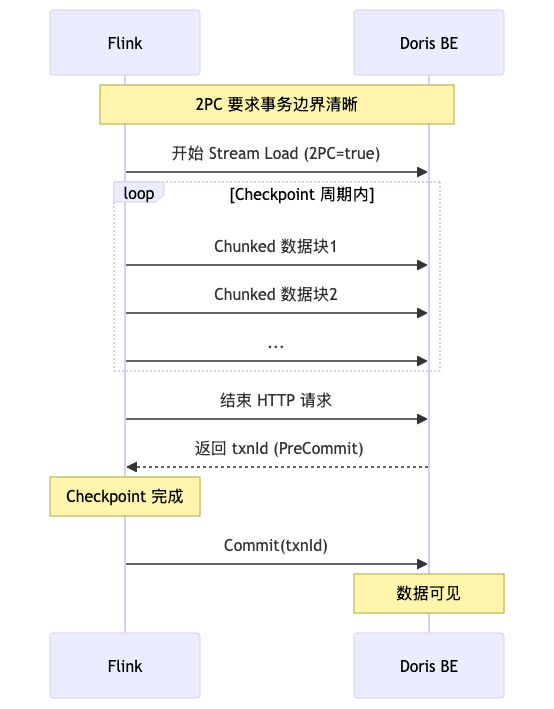
如果像 BATCH 一样攒批,一个 Checkpoint 周期内可能触发多次 Stream Load,每次都是独立事务,无法实现整个 Checkpoint 周期的原子性。
原因二:内存可控
STREAM_LOAD 内存占用 = buffer-size × buffer-count
                    = 1MB × 3 = 3MB (固定)

BATCH 内存占用 = 实际数据量 (动态增长,可能很大)
STREAM_LOAD 通过流式传输,数据不在 Flink 端堆积。
原因三:延迟更低
数据到达后立即发送,不等待攒批,端到端延迟更低。
3.5 DorisCommitter:两阶段提交执行器
DorisCommitter 负责在 Flink Checkpoint 完成后,向 Doris 发送事务提交请求。
// DorisCommitter.java 核心结构
public class DorisCommitter implements Committer<DorisCommittable>, Closeable {

    private static final String COMMIT_URL = "http://%s/api/%s/_stream_load_2pc";

    @Override
    public void commit(Collection<CommitRequest<DorisCommittable>> committables)
            throws IOException, InterruptedException {
        for (CommitRequest<DorisCommittable> request : committables) {
            commitTransaction(request.getCommittable());
        }
    }

    private void commitTransaction(DorisCommittable committable)
            throws IOException, InterruptedException {
        // PUT /api/{db}/_stream_load_2pc?txn_operation=commit&txn_id={txnId}
        HttpPutBuilder builder = new HttpPutBuilder()
                .setUrl(String.format(COMMIT_URL,
                    committable.getHostPort(), committable.getDb()))
                .baseAuth(username, password)
                .addTxnId(committable.getTxnId())
                .setEmptyEntity()
                .addCommonHeader()
                .commit();  // txn_operation=commit

        int retry = 0;
        while (retry++ < maxRetries) {
            try (CloseableHttpResponse response =
                    httpClient.execute(builder.build())) {
                if (handleCommitResponse(response)) {
                    return;  // 提交成功
                }
            } catch (Exception e) {
                LOG.warn("Commit failed, retry {}/{}", retry, maxRetries, e);
            }
            Thread.sleep(1000 * retry);  // 退避重试
        }
        throw new DorisException("Commit failed after " + maxRetries + " retries");
    }
}
3.6 两阶段提交完整时序图
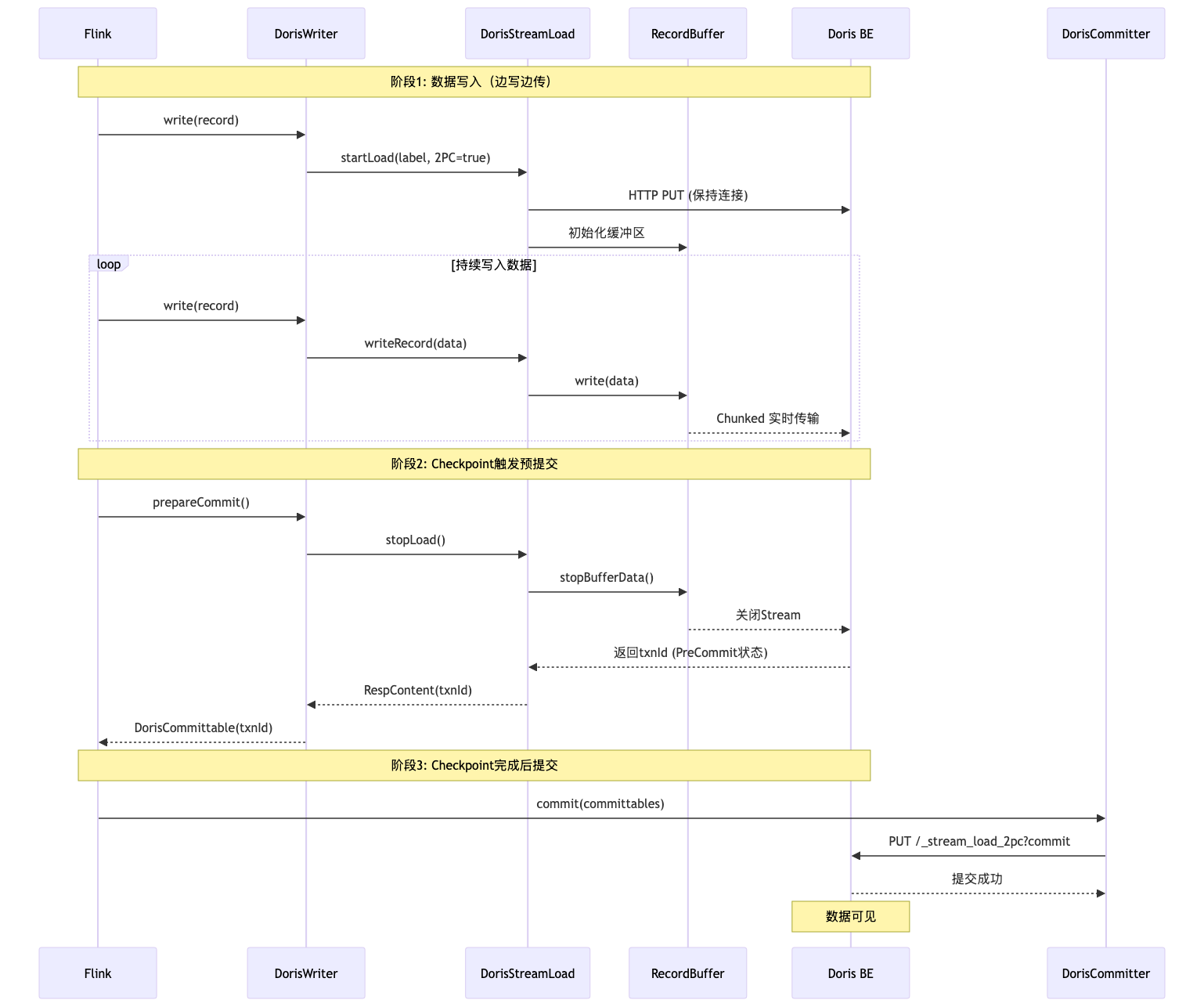
四、STREAM_LOAD_BATCH 模式详解(攒批模式)
STREAM_LOAD_BATCH 模式通过内存攒批减少 HTTP 请求次数,提升写入吞吐量,但不支持 2PC,只能保证 At-Least-Once 语义。
4.1 核心设计差异
| 对比项 | STREAM_LOAD | STREAM_LOAD_BATCH |
| 数据传输 | 边写边传(Chunked 实时流式) | 攒够再发(内存攒批后批量发送) |
| HTTP 连接 | 持续保持直到 Checkpoint | 按需建立,发送完即关闭 |
| 缓冲区 | RecordBuffer(固定大小循环复用) | BatchRecordBuffer(动态扩展) |
| 发送时机 | 有数据就发 | 达到阈值才发 |
| 2PC 支持 | ✅ 支持 | ❌ 不支持 |
| Buffer 调大效果 | ❌ 效果有限 | ✅ 显著提升吞吐 |
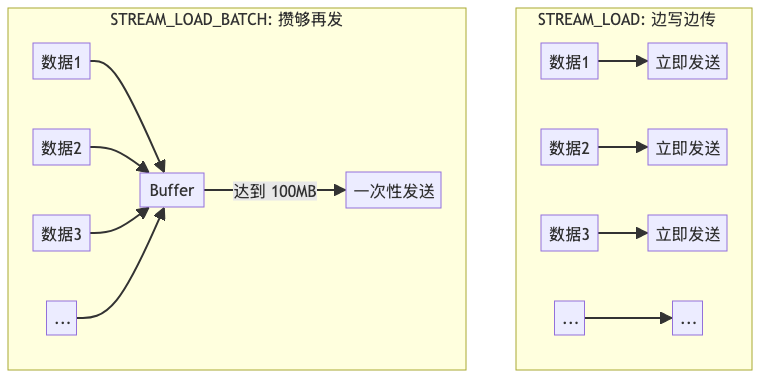
4.2 At-Least-Once 语义详解
BATCH 模式可以做到不丢数据,但做不到不重复数据。
4.2.1 不丢数据的保证
sequenceDiagram
    participant Flink
    participant DorisBatchWriter
    participant Doris

    Note over Flink,Doris: 正常流程
    Flink->>DorisBatchWriter: write(data)
    DorisBatchWriter->>DorisBatchWriter: 攒批到 Buffer
    Flink->>DorisBatchWriter: prepareCommit (Checkpoint触发)
    DorisBatchWriter->>DorisBatchWriter: flush(waitUtilDone=true)
    DorisBatchWriter->>Doris: Stream Load (无2PC)
    Doris-->>DorisBatchWriter: 成功
    Note over Doris: 数据已持久化
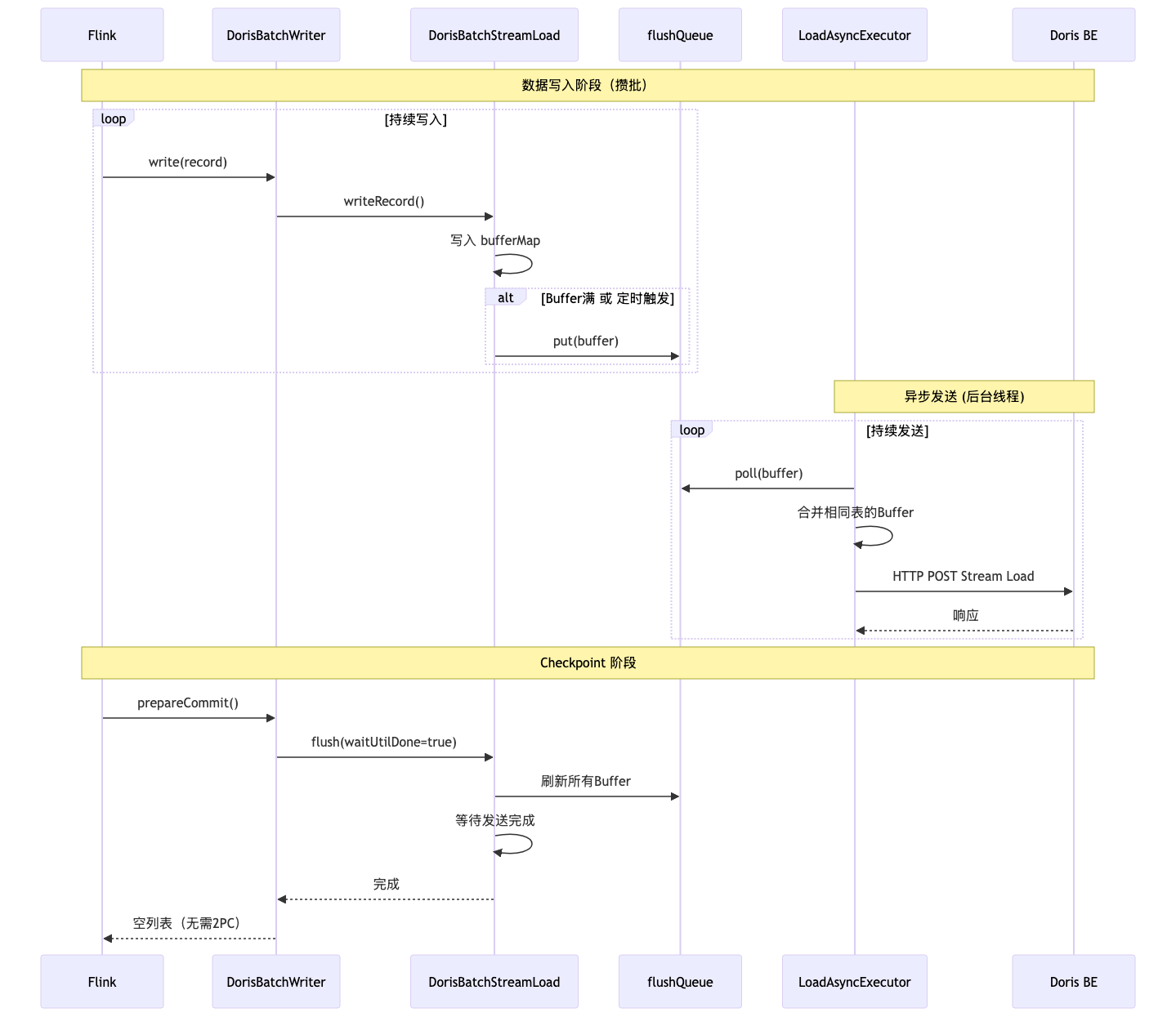
Flink->>Flink: Checkpoint 完成关键点:Checkpoint 时会 flush(waitUtilDone=true),等待所有数据都发送成功才完成 Checkpoint。所以 Checkpoint 成功 = 数据一定已经写入 Doris。
4.2.2 为什么会重复?
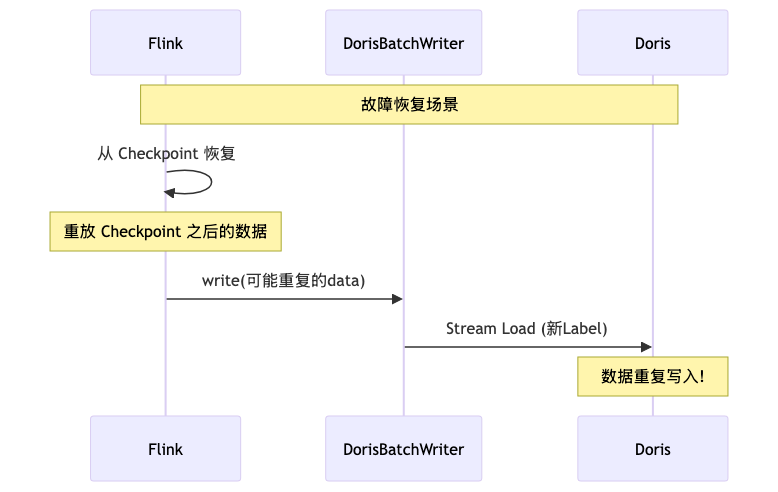
原因:Label 机制无法去重
BATCH 模式的 Label 格式:
// DorisBatchStreamLoad.java
public String generateBatchLabel(String table) {
    // 每次都是新的 UUID,无法利用 Label 去重!
    return String.format("%s_%s_%s", labelPrefix, table, UUID.randomUUID());
}
而 STREAM_LOAD 模式的 Label 格式:
// LabelGenerator.java
public String generateTableLabel(String table, long checkpointId) {
    // 相同 checkpointId 生成相同 Label,Doris 会拒绝重复 Label
    return String.format("%s_%s_%d_%d", labelPrefix, table, subtaskId, checkpointId);
}结论:BATCH 模式每次 flush 都是新 Label,故障恢复时 Doris 无法识别重复数据。
4.3 BATCH 模式架构图
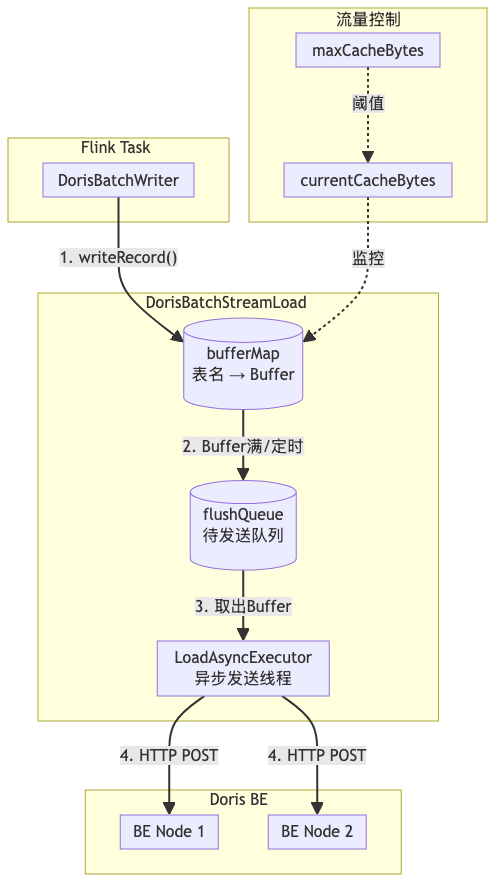
4.4 DorisBatchStreamLoad:攒批执行器
// DorisBatchStreamLoad.java 核心结构
public class DorisBatchStreamLoad implements Serializable {

    // 每个表一个缓冲区
    private final Map<String, BatchRecordBuffer> bufferMap =
        new ConcurrentHashMap<>();
    // 待发送队列
    private final BlockingQueue<BatchRecordBuffer> flushQueue;
    // 异步发送线程
    private LoadAsyncExecutor loadAsyncExecutor;
    // 当前缓存数据量(流量控制)
    private volatile long currentCacheBytes = 0L;
    private final long maxCacheBytes;

    // 写入记录
    public synchronized void writeRecord(String database, String table,
            byte[] record) throws InterruptedException {
        checkFlushException();
        String bufferKey = getTableIdentifier(database, table);

        // 获取或创建该表的缓冲区
        BatchRecordBuffer buffer = bufferMap.computeIfAbsent(bufferKey,
                k -> new BatchRecordBuffer(database, table, lineDelimiter,
                        executionOptions.getBufferFlushMaxBytes()));

        // 流量控制:如果缓存超限,等待发送完成
        while (currentCacheBytes > maxCacheBytes) {
            LOG.info("Cache full, waiting...");
            Thread.sleep(1000);
            checkFlushException();
        }

        int recordSize = record.length + lineDelimiter.length;
        buffer.insert(record);
        currentCacheBytes += recordSize;

        // 判断是否需要触发 Flush
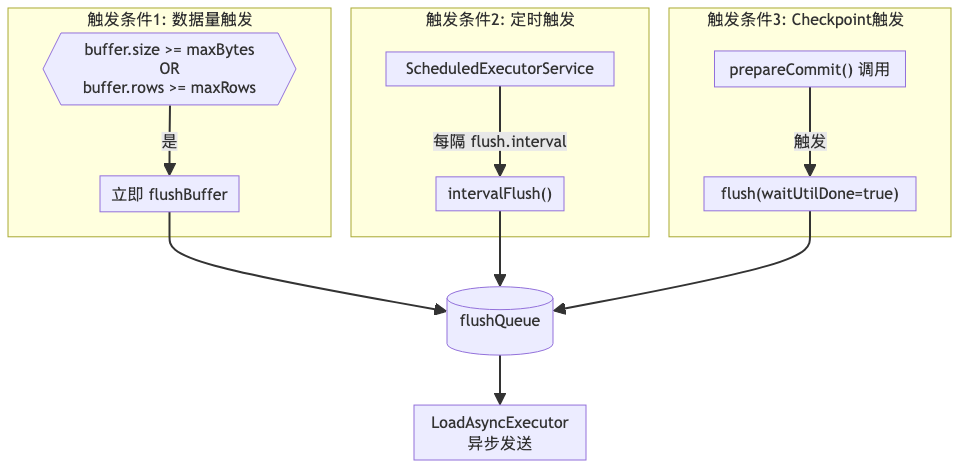
        if (buffer.getBufferSizeBytes() >= executionOptions.getBufferFlushMaxBytes()
                || buffer.getNumOfRecords() >= executionOptions.getBufferFlushMaxRows()) {
            flushBuffer(bufferKey, false);
        }
    }

    // Checkpoint 时强制刷新所有缓冲区
    public synchronized void flush(boolean waitUtilDone) throws InterruptedException {
        for (String bufferKey : new ArrayList<>(bufferMap.keySet())) {
            flushBuffer(bufferKey, false);
        }
        if (waitUtilDone) {
            waitAsyncLoadFinish();  // 等待所有发送完成
        }
    }
}
4.5 三种 Flush 触发条件
4.6 STREAM_LOAD_BATCH 时序图
五、COPY 模式详解(Stage 导入模式)
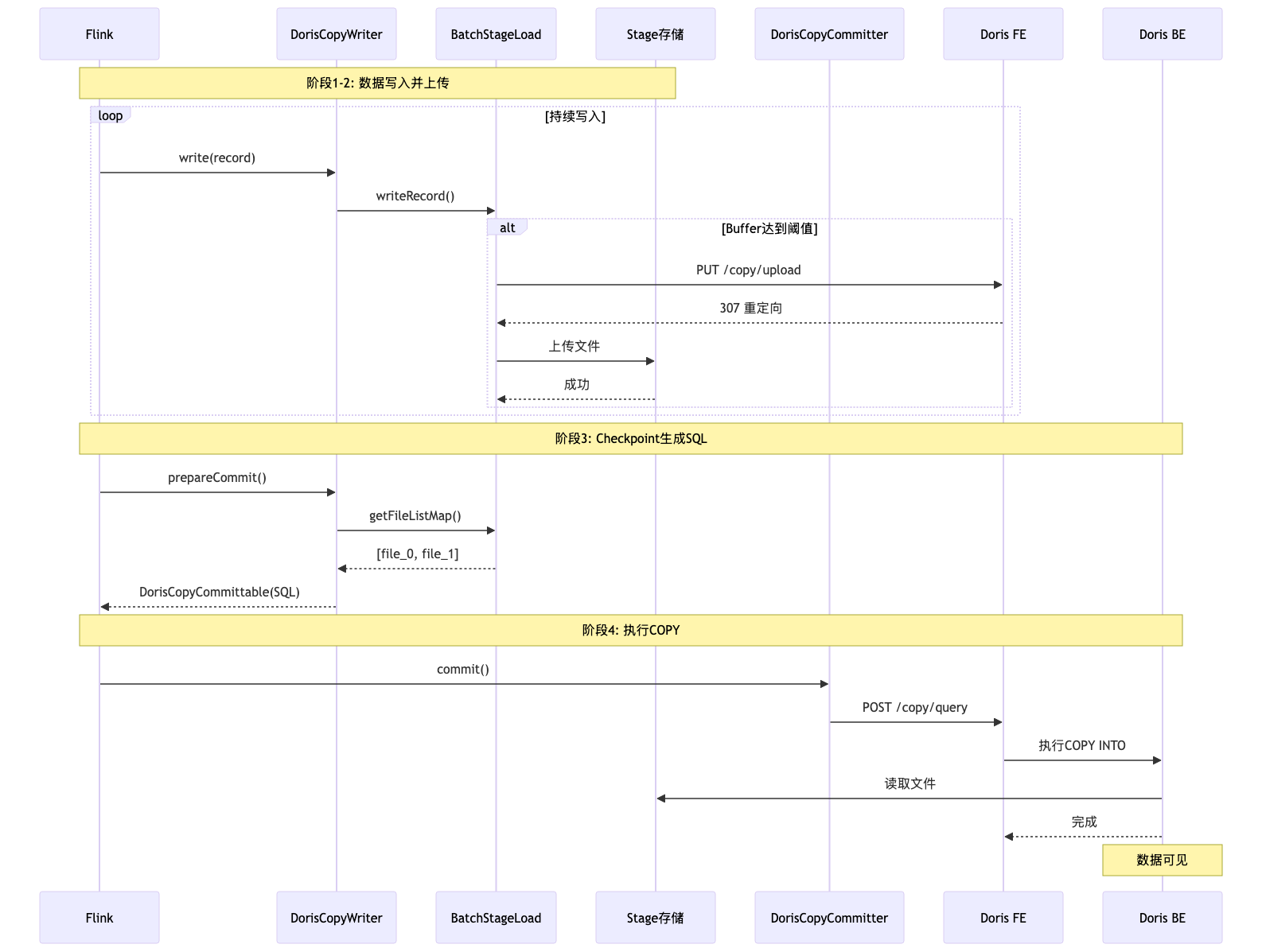
COPY 模式是一种批量导入方式,数据先上传到 Doris 的 Internal Stage(对象存储),然后通过 COPY INTO SQL 批量导入到表中。
5.1 COPY 模式工作原理
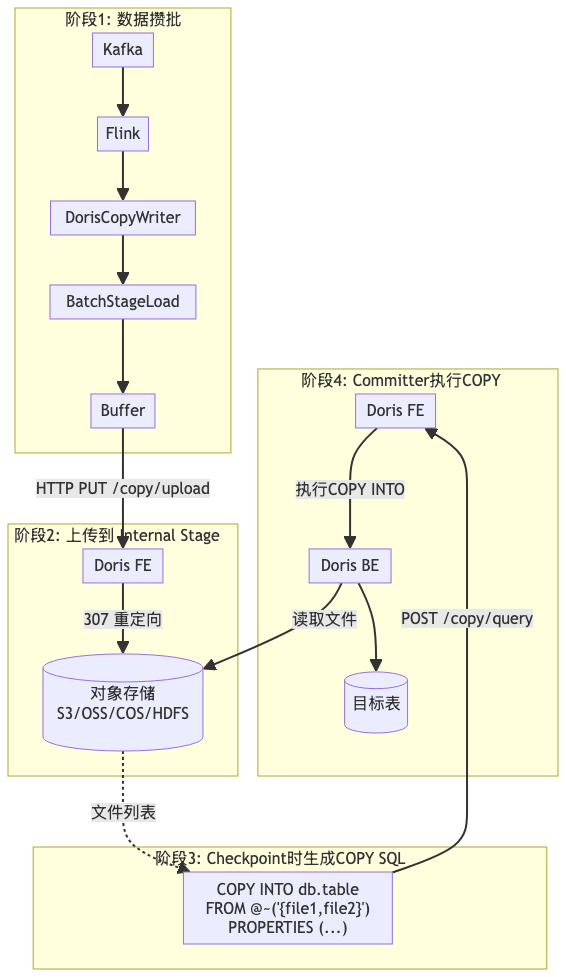
5.2 BatchStageLoad:Stage 上传执行器
// BatchStageLoad.java 核心结构
public class BatchStageLoad implements Serializable {

    private static final String UPLOAD_URL_PATTERN = "http://%s/copy/upload";

    // 每个表一个 Buffer
    private Map<String, BatchRecordBuffer> bufferMap = new ConcurrentHashMap<>();
    // 已上传的文件列表
    private Map<String, List<String>> fileListMap = new ConcurrentHashMap<>();
    // 当前 Checkpoint ID
    private long currentCheckpointID;
    // 文件计数器
    private AtomicInteger fileNum;

    // 写入记录
    public synchronized void writeRecord(String database, String table,
            byte[] record) throws InterruptedException {
        String bufferKey = getTableIdentifier(database, table);
        BatchRecordBuffer buffer = bufferMap.computeIfAbsent(bufferKey,
                k -> new BatchRecordBuffer(database, table, lineDelimiter,
                        executionOptions.getBufferFlushMaxBytes()));

        buffer.insert(record);

        // Buffer 达到 80% 容量时触发上传
        if (buffer.getBufferSizeBytes() >=
                executionOptions.getBufferFlushMaxBytes() * 0.8) {
            flush(bufferKey, false);
        }
    }

    // 上传到 Internal Stage
    public void uploadToStorage(String fileName, BatchRecordBuffer buffer)
            throws IOException {
        // 1. 获取上传地址(FE 返回 307 重定向到对象存储)
        String address = getUploadAddress(fileName);

        // 2. 上传文件到对象存储
        HttpPutBuilder putBuilder = new HttpPutBuilder()
                .setUrl(address)
                .addCommonHeader()
                .setEntity(new ByteArrayEntity(
                        buffer.getData().array(), 0, buffer.getData().limit()));

        try (CloseableHttpResponse response =
                httpClient.execute(putBuilder.build())) {
            // 处理响应
        }
    }

    // 获取已上传的文件列表
    public Map<String, List<String>> getFileListMap() {
        return fileListMap;
    }
}
5.3 CopySQLBuilder:COPY SQL 构建器
// CopySQLBuilder.java
public class CopySQLBuilder {

    public String buildCopySQL() {
        StringBuilder sb = new StringBuilder();

        // COPY INTO db.table FROM @~('{file1,file2,file3}')
        sb.append("COPY INTO ")
                .append(tableIdentifier)
                .append(" FROM @~('{")
                .append(String.join(",", fileList))
                .append("}') ")
                .append("PROPERTIES (");

        // 必须同步执行
        properties.put("copy.async", "false");

        // 拼接属性
        StringJoiner props = new StringJoiner(",");
        for (Map.Entry<Object, Object> entry : properties.entrySet()) {
            props.add(String.format("'%s'='%s'",
                entry.getKey(), entry.getValue()));
        }
        sb.append(props).append(")");

        return sb.toString();
    }
}

// 生成的 SQL 示例:
// COPY INTO `db`.`table` FROM @~('{prefix_tbl_1_0,prefix_tbl_1_1}')
// PROPERTIES ('copy.async'='false', 'file.type'='json')
5.4 COPY 模式时序图
5.5 COPY 模式适用场景分析
COPY 模式的性能优势体现在超大批量离线导入场景:
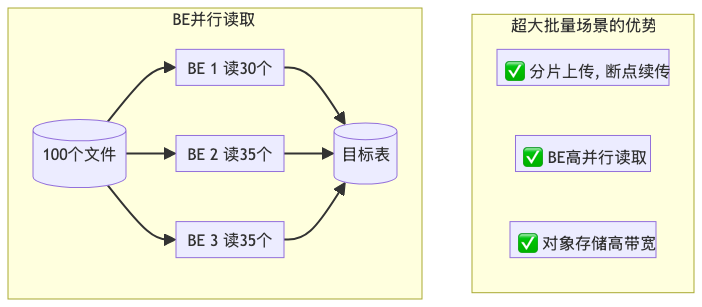
| 场景 | 是否推荐 | 原因 |
| 实时日志写入 | ❌ | 两次 IO 增加延迟 |
| 每日数仓同步(50亿条) | ✅ | 分片并行,容错好 |
| 历史数据迁移(TB级) | ✅ | 充分利用并行度 |
| 订单实时入库 | ❌ | 不支持 2PC |
六、故障恢复机制
6.1 Label 幂等性原理
Doris 的 Stream Load 使用 Label 机制保证幂等性。同一个 Label 只能成功导入一次,重复提交会返回 LABEL_ALREADY_EXIST。
Label 格式对比:
| 模式 | Label 格式 | 示例 | 能否去重 |
| STREAM_LOAD |
|
| ✅ 相同 checkpointId 生成相同 Label |
| STREAM_LOAD_BATCH |
|
| ❌ 每次 UUID 不同 |
6.2 故障恢复流程
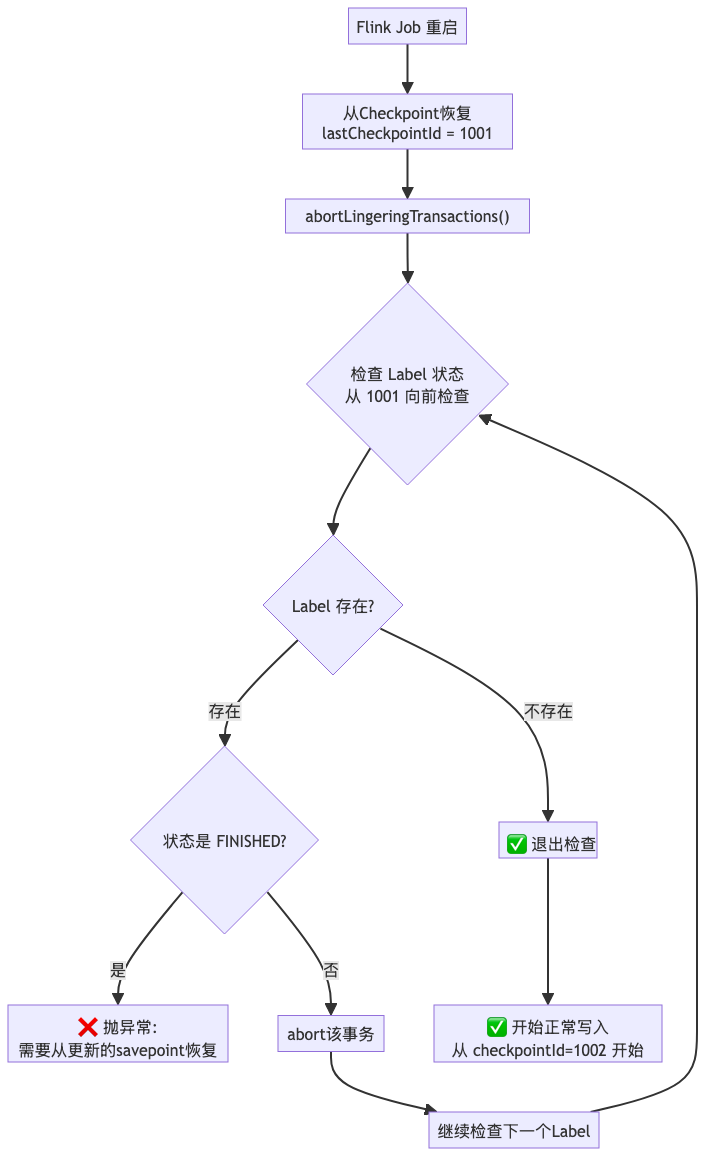
// DorisStreamLoad.java
public void abortLingeringTransactions(String labelPrefix, long checkpointId) {
    // 从当前 checkpointId 向前检查,最多检查 5 个
    for (long i = checkpointId; i >= Math.max(0, checkpointId - 5); i--) {
        String label = labelGenerator.generateTableLabel(table, i);

        // 发送空请求检查 Label 状态
        RespContent response = checkLabelState(label);

        if ("LABEL_ALREADY_EXIST".equals(response.getStatus())) {
            // Label 已存在
            if ("FINISHED".equals(response.getExistingJobStatus())) {
                // 数据已提交成功,说明恢复点不对
                throw new DorisException(
                    "Label " + label + " already committed, " +
                    "please restore from a newer savepoint");
            } else {
                // 数据未提交,abort 该事务
                abortTransaction(response.getTxnId());
            }
        } else {
            // Label 不存在,abort 返回的 txnId(如果有)
            if (response.getTxnId() > 0) {
                abortTransaction(response.getTxnId());
            }
            break;  // 退出检查
        }
    }
}
6.3 Writer State 设计
DorisWriterState 保存了恢复所需的最小信息:
public class DorisWriterState implements Serializable {
    private String labelPrefix;  // Label 前缀
    private String database;     // 数据库名
    private String table;        // 表名
    private int subtaskId;       // 子任务 ID
}
七、监控指标
7.1 DorisWriteMetrics 指标定义
Flink Doris Connector 通过 DorisWriteMetrics 类提供丰富的监控指标:
| 指标类型 | 指标名称 | 说明 |
| Counter | totalFlushLoadBytes | 已发送字节数 |
| Counter | totalFlushLoadedRows | 已发送行数 |
| Counter | totalFlushSucceededTimes | 发送成功次数 |
| Counter | totalFlushFailedTimes | 发送失败次数 |
| Histogram | beginTxnTimeHistogramMs | 开启事务耗时分布 |
| Histogram | commitAndPublishTimeHistogramMs | 提交事务耗时分布 |
| Histogram | streamLoadPutTimeHistogramMs | Stream Load 耗时分布 |
7.2 DorisWriteMetrics 源码解析
// DorisWriteMetrics.java
public class DorisWriteMetrics implements Serializable {

    private static final String DORIS_METRICS_GROUP = "doris";

    // Counter 计数器
    private transient Counter totalFlushLoadBytes;
    private transient Counter totalFlushLoadedRows;
    private transient Counter totalFlushSucceededTimes;
    private transient Counter totalFlushFailedTimes;

    // Histogram 直方图(耗时分布)
    private transient Histogram beginTxnTimeHistogramMs;
    private transient Histogram commitAndPublishTimeHistogramMs;
    private transient Histogram streamLoadPutTimeHistogramMs;

    public DorisWriteMetrics(MetricGroup metricGroup) {
        registerMetrics(metricGroup);
    }

    private void registerMetrics(MetricGroup metricGroup) {
        MetricGroup dorisGroup = metricGroup.addGroup(DORIS_METRICS_GROUP);

        // 注册 Counter
        this.totalFlushLoadBytes = dorisGroup.counter("totalFlushLoadBytes");
        this.totalFlushLoadedRows = dorisGroup.counter("totalFlushLoadedRows");
        this.totalFlushSucceededTimes = dorisGroup.counter("totalFlushSucceededTimes");
        this.totalFlushFailedTimes = dorisGroup.counter("totalFlushFailedTimes");

        // 注册 Histogram(使用 DescriptiveStatisticsHistogram 实现)
        this.beginTxnTimeHistogramMs = dorisGroup.histogram(
            "beginTxnTimeHistogramMs",
            new DescriptiveStatisticsHistogram(1000));  // 保留最近 1000 个样本
        this.commitAndPublishTimeHistogramMs = dorisGroup.histogram(
            "commitAndPublishTimeHistogramMs",
            new DescriptiveStatisticsHistogram(1000));
        this.streamLoadPutTimeHistogramMs = dorisGroup.histogram(
            "streamLoadPutTimeHistogramMs",
            new DescriptiveStatisticsHistogram(1000));
    }

    // ============ 更新指标的方法 ============

    /** 更新发送成功指标 */
    public void updateFlushSucceeded(long bytes, long rows) {
        if (totalFlushLoadBytes != null) {
            totalFlushLoadBytes.inc(bytes);
        }
        if (totalFlushLoadedRows != null) {
            totalFlushLoadedRows.inc(rows);
        }
        if (totalFlushSucceededTimes != null) {
            totalFlushSucceededTimes.inc();  // 成功次数 +1
        }
    }

    /** 更新发送失败指标 */
    public void updateFlushFailed() {
        if (totalFlushFailedTimes != null) {
            totalFlushFailedTimes.inc();  // 失败次数 +1
        }
    }

    /** 更新 Stream Load 耗时 */
    public void updateStreamLoadPutTime(long timeMs) {
        if (streamLoadPutTimeHistogramMs != null) {
            streamLoadPutTimeHistogramMs.update(timeMs);
        }
    }

    /** 更新事务开启耗时 */
    public void updateBeginTxnTime(long timeMs) {
        if (beginTxnTimeHistogramMs != null) {
            beginTxnTimeHistogramMs.update(timeMs);
        }
    }

    /** 更新事务提交耗时 */
    public void updateCommitAndPublishTime(long timeMs) {
        if (commitAndPublishTimeHistogramMs != null) {
            commitAndPublishTimeHistogramMs.update(timeMs);
        }
    }

    // ============ Getter 方法(用于测试或外部访问) ============

    public Counter getTotalFlushSucceededTimes() {
        return totalFlushSucceededTimes;
    }

    public Counter getTotalFlushFailedTimes() {
        return totalFlushFailedTimes;
    }

    public Counter getTotalFlushLoadBytes() {
        return totalFlushLoadBytes;
    }

    public Counter getTotalFlushLoadedRows() {
        return totalFlushLoadedRows;
    }
}
7.3 指标更新调用链
指标在 Stream Load 响应处理时更新,以下是调用链:
sequenceDiagram
    participant Writer as DorisWriter/DorisBatchWriter
    participant StreamLoad as DorisStreamLoad
    participant Metrics as DorisWriteMetrics

    Writer->>StreamLoad: stopLoad() / flush()
    StreamLoad->>StreamLoad: HTTP 请求完成
    StreamLoad->>StreamLoad: 解析 RespContent

    alt 发送成功
        StreamLoad->>Metrics: updateFlushSucceeded(bytes, rows)
        Note over Metrics: totalFlushLoadBytes += bytes<br/>totalFlushLoadedRows += rows<br/>totalFlushSucceededTimes++
    else 发送失败
        StreamLoad->>Metrics: updateFlushFailed()
        Note over Metrics: totalFlushFailedTimes++
    end

    StreamLoad->>Metrics: updateStreamLoadPutTime(耗时)
    Note over Metrics: 记录到直方图
DorisBatchStreamLoad 中的指标更新示例:
// DorisBatchStreamLoad.java - LoadAsyncExecutor 内部类
private class LoadAsyncExecutor implements Runnable {
    @Override
    public void run() {
        while (!loadThreadStop) {
            try {
                BatchRecordBuffer buffer = flushQueue.poll(2, TimeUnit.SECONDS);
                if (buffer == null) continue;

                long startTime = System.currentTimeMillis();

                // 执行 Stream Load
                RespContent response = load(buffer.getDatabase(),
                                           buffer.getTable(),
                                           buffer.getLabelName(),
                                           buffer);

                long loadTimeMs = System.currentTimeMillis() - startTime;

                // 根据响应更新指标
                if (response != null && response.isSuccess()) {
                    // 发送成功:更新字节数、行数、成功次数
                    dorisWriteMetrics.updateFlushSucceeded(
                        response.getLoadBytes(),    // 已发送字节数
                        response.getLoadedRows()    // 已发送行数
                    );
                    LOG.info("Stream Load success, label={}, rows={}, bytes={}, cost={}ms",
                        buffer.getLabelName(),
                        response.getLoadedRows(),
                        response.getLoadBytes(),
                        loadTimeMs);
                } else {
                    // 发送失败:更新失败次数
                    dorisWriteMetrics.updateFlushFailed();
                    LOG.error("Stream Load failed, label={}, msg={}",
                        buffer.getLabelName(),
                        response != null ? response.getMessage() : "null response");
                }

                // 更新 Stream Load 耗时直方图
                dorisWriteMetrics.updateStreamLoadPutTime(loadTimeMs);

            } catch (Exception e) {
                dorisWriteMetrics.updateFlushFailed();
                LOG.error("LoadAsyncExecutor error", e);
            }
        }
    }
}
7.4 如何获取监控指标值
方式一:通过 Flink REST API 获取
# 获取 Job 的所有指标
curl http://flink-jobmanager:8081/jobs/<job-id>/vertices/<vertex-id>/subtasks/metrics

# 获取特定指标(发送成功次数)
curl "http://flink-jobmanager:8081/jobs/<job-id>/vertices/<vertex-id>/subtasks/metrics?get=doris.totalFlushSucceededTimes"

# 响应示例
[
  {
    "id": "doris.totalFlushSucceededTimes",
    "value": "12345"
  }
]
方式二:通过 Prometheus + Grafana
flink-conf.yaml 配置:
# 启用 Prometheus Reporter
metrics.reporter.prom.factory.class: org.apache.flink.metrics.prometheus.PrometheusReporterFactory
metrics.reporter.prom.port: 9249

# 或使用 PushGateway
metrics.reporter.promgateway.factory.class: org.apache.flink.metrics.prometheus.PrometheusPushGatewayReporterFactory
metrics.reporter.promgateway.host: prometheus-pushgateway
metrics.reporter.promgateway.port: 9091
metrics.reporter.promgateway.jobName: flink-doris-job
metrics.reporter.promgateway.randomJobNameSuffix: true
metrics.reporter.promgateway.deleteOnShutdown: false
Prometheus 抓取配置:
# prometheus.yml
scrape_configs:
  - job_name: 'flink'
    static_configs:
      - targets: ['flink-taskmanager-1:9249', 'flink-taskmanager-2:9249']
    metrics_path: /
Grafana 面板 PromQL 示例:
# 发送成功次数(每秒增量)
rate(flink_taskmanager_job_task_operator_doris_totalFlushSucceededTimes[1m])

# 发送失败次数
flink_taskmanager_job_task_operator_doris_totalFlushFailedTimes

# 写入吞吐量(字节/秒)
rate(flink_taskmanager_job_task_operator_doris_totalFlushLoadBytes[1m])

# 写入行数速率(行/秒)
rate(flink_taskmanager_job_task_operator_doris_totalFlushLoadedRows[1m])

# Stream Load P99 延迟
histogram_quantile(0.99,
  rate(flink_taskmanager_job_task_operator_doris_streamLoadPutTimeHistogramMs_bucket[5m]))
方式三:在代码中直接访问(用于自定义告警)
// 自定义 ProcessFunction 中获取 Doris Sink 指标
public class DorisMetricsAlertFunction extends ProcessFunction<String, String> {

    private transient Counter flushSucceededCounter;
    private transient Counter flushFailedCounter;

    @Override
    public void open(Configuration parameters) {
        // 获取 Doris 指标组
        MetricGroup dorisGroup = getRuntimeContext()
            .getMetricGroup()
            .addGroup("doris");

        // 获取已注册的 Counter(如果 Sink 和此 Function 在同一个 Task 中)
        // 注意:通常需要通过 REST API 或 Reporter 获取其他算子的指标
        this.flushSucceededCounter = dorisGroup.counter("totalFlushSucceededTimes");
        this.flushFailedCounter = dorisGroup.counter("totalFlushFailedTimes");
    }

    @Override
    public void processElement(String value, Context ctx, Collector<String> out) {
        // 业务逻辑...

        // 获取当前计数值(Counter 本身只能 inc,获取值需要其他方式)
        // 实际生产中建议通过 Prometheus/REST API 获取
    }
}
7.5 告警配置示例
Prometheus AlertManager 规则:
# alert_rules.yml
groups:
  - name: flink-doris-alerts
    rules:
      # 发送失败告警
      - alert: DorisFlushFailed
        expr: increase(flink_taskmanager_job_task_operator_doris_totalFlushFailedTimes[5m]) > 0
        for: 1m
        labels:
          severity: critical
        annotations:
          summary: "Doris Sink 发送失败"
          description: "Job {{ $labels.job_name }} 在过去 5 分钟内有 {{ $value }} 次发送失败"

      # 写入吞吐量下降告警
      - alert: DorisThroughputDrop
        expr: rate(flink_taskmanager_job_task_operator_doris_totalFlushLoadBytes[5m]) < 1000000
        for: 5m
        labels:
          severity: warning
        annotations:
          summary: "Doris 写入吞吐量下降"
          description: "当前吞吐量 {{ $value | humanize }}B/s,低于 1MB/s"

      # Stream Load 延迟过高告警
      - alert: DorisStreamLoadSlow
        expr: histogram_quantile(0.99, rate(flink_taskmanager_job_task_operator_doris_streamLoadPutTimeHistogramMs_bucket[5m])) > 30000
        for: 5m
        labels:
          severity: warning
        annotations:
          summary: "Doris Stream Load P99 延迟过高"
          description: "P99 延迟 {{ $value | humanize }}ms,超过 30 秒"
八、性能测试数据
8.1 官方整库同步测试(Flink Doris Connector 1.4.0)
数据来源:Apache Doris 官方博客
测试环境:
- 1000 张 MySQL 表
- 单表 100 字段
- 均为活跃表(持续写入,每张表单次写入上百条)
- Checkpoint 间隔:10 秒
测试结果:
| 指标 | 数值 |
| 同步表数量 | 1000 张 |
| 数据延迟 | 秒级 |
| 系统稳定性 | 稳定 |
此外,部分社区用户在生产环境中已实现万表级别的整库同步,查询性能和系统稳定性表现出色。
8.2 高并发写入测试(Doris 1.1 版本)
数据来源:SelectDB 官方博客
测试场景:通用 Flink 高并发场景
- 上游 Kafka 数据:每秒 10 万条
- 要求数据 5 秒内完成同步
- Flink 并发度:20
- Checkpoint 间隔:5 秒
测试结果:
| 指标 | 优化后表现 |
| Compaction 合并效率 | 提升 10+ 倍 |
| CPU 资源消耗 | 下降 25% |
| Tablet 版本数 | 稳定在 50 以下 |
| 数据可见延迟 | < 5 秒 |
极限压测场景:
- 单 BE 单 Tablet
- 客户端 30 并发极限 Stream Load
- 数据实时性 < 1 秒
8.3 性能测试建议
由于官方未发布三种模式的横向对比 Benchmark,建议根据实际业务场景进行测试:
测试框架参考:
| 测试项 | 测试方法 |
| 吞吐量 | Flink Datagen 模拟数据,统计 totalFlushLoadBytes/s |
| 延迟 | 对比 Kafka 消息时间戳与 Doris 写入时间 |
| CPU/内存 | 监控 Flink TaskManager 和 Doris BE 资源占用 |
| 稳定性 | 长时间运行,观察 Compaction Score 和版本数 |
十、总结
10.1 三种模式完整对比
| 对比维度 | STREAM_LOAD | STREAM_LOAD_BATCH | COPY |
| 配置方式 | 默认 |
|
|
| Writer 类 | DorisWriter | DorisBatchWriter | DorisCopyWriter |
| 语义保证 | Exactly-Once | At-Least-Once | At-Least-Once |
| 数据传输 | 边写边传 (Chunked) | 攒够再发 (内存攒批) | Stage + COPY SQL |
| 去重机制 | Label 幂等 + 2PC | ❌ 无 | ❌ 无 |
| Buffer 作用 | 解耦生产消费 | 攒批提高吞吐 | 攒批后上传 |
| 调大 Buffer 效果 | ❌ 效果有限 | ✅ 显著提升 | ✅ 有效 |
| 吞吐量 | 中等 | 高 | 最高(大批量) |
| 延迟 | 低 | 中等 | 高 |
| 内存占用 | 小(固定) | 大(动态) | 中等 |
| 适用场景 | 金融、订单 | 日志、埋点 | 数仓同步 |
| 依赖 | 无 | 无 | 对象存储 |
10.2 核心设计思想
mindmap
  root((Flink Doris<br/>Connector))
    灵活的写入模式
      STREAM_LOAD: 2PC精确一次
      BATCH: 攒批高吞吐
      COPY: Stage超大批量
    可靠的事务保证
      Doris 2PC
      Flink Checkpoint
      Label幂等性
    高效的数据传输
      边写边传 vs 攒够再发
      RecordBuffer双队列
      异步发送+流量控制
    完善的故障恢复
      Writer State
      残留事务处理
      断点续传
    丰富的监控指标
      Counter计数
      Histogram分布
      Prometheus集成
10.3 选型建议速查表
| 你的需求 | 推荐模式 | 关键配置 |
| 数据绝对不能重复 | STREAM_LOAD |
|
| 追求最高吞吐 | STREAM_LOAD_BATCH |
|
| TB 级数据迁移 | COPY |
|
| 秒级数据可见 | STREAM_LOAD |
|
| 分钟级延迟可接受 | STREAM_LOAD_BATCH |
|
10.4 参考资料
- Apache Doris 官方文档 - Flink Doris Connector
- GitHub - apache/doris-flink-connector
- Doris Stream Load 文档
- SelectDB 博客 - Flink 实时写入优化
- 一键实现万表 MySQL 整库同步至 Apache Doris
作者说明:本文基于 Flink Doris Connector 源码分析编写,如有错误欢迎指正。
版权声明:本文为原创内容,转载请注明出处。

汇聚全球AI编程工具,助力开发者即刻编程。
更多推荐

 22
22 0
0- 0


 已为社区贡献1条内容

所有评论(0)