
Linux systemd 与 systemctl 命令
·
参考资料
一. systemd
1.1 简介
⏹systemd是现代Linux的系统与服务管理框架(init system),CentOS从7开始,Ubuntu从15.04开始使用systemd。systemd取代了传统的 init 系统和 service 命令。核心职责是:
- 🚀 系统启动(
PID 1→ 第一个启动的进程) - 🔧 服务管理
- 📜 日志管理(journald)
- ⏱ 定时任务(timer)
- 🔌 设备、会话、网络管理
⏹systemd的架构

⏹简化版的 systemd 启动顺序
内核
 ↓
systemd (PID 1)
 ↓
target(multi-user.target / graphical.target)
 ↓
service / socket / timer ...
1.2 Unit
⏹systemd管理的最小单位叫Unit,systemd通过一系列的 Unit来控制系统和服务的启动。Unit又分为不同的种类:
| Unit 类型 | 文件后缀 | 作用 |
|---|---|---|
| 服务 | .service |
后台程序(例如:ssh, nginx) |
| 定时器 | .timer |
cron 的替代(例如:logrotate.timer) |
| 套接字 | .socket |
按需启动服务 |
| 设备 | .device |
硬件 |
| 挂载点 | .mount |
文件系统 |
| 目标 | .target |
运行级别 |
⏹unit 文件位置
/usr/lib/systemd/system/- 支持
systemd的软件,安装的时候会自动在此目录下添加一个配置文件 - 尽量不要修改该目录下的位置
- 支持
/etc/systemd/system/- 管理员自定义的
unit放在此位置
- 管理员自定义的
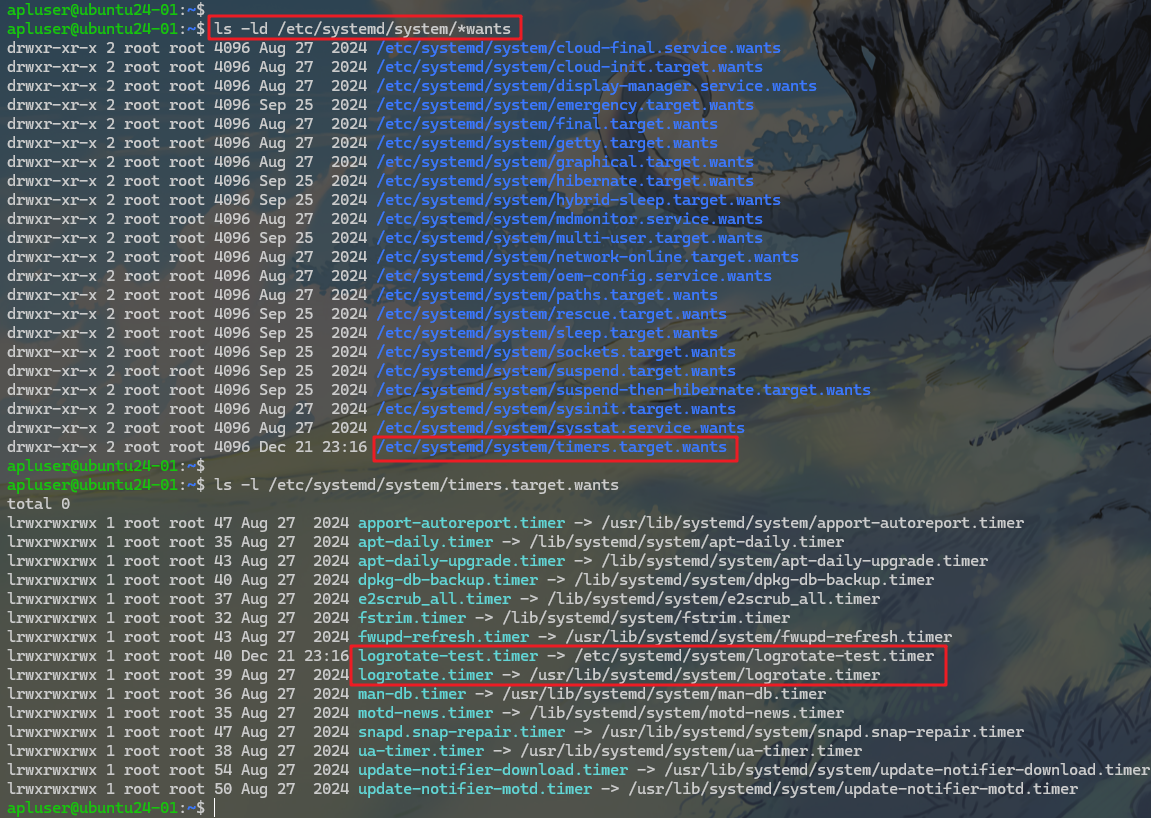
⏹当执行 systemctl enable <unit> 时,systemd 会在 /etc/systemd/system/<target>.wants/ 目录下创建一个符号链接,指向该 unit 文件(通常位于 /usr/lib/systemd/system/ 或 /lib/systemd/system/)。
这个链接用于在 target 激活时自动启动该 unit。
- 这篇文章进行过实战演示 → Linux logrotate 与 systemctl 命令
1.3 WSL中的systemd
⏹WSL(Windows Subsystem for Linux)早期 不支持 systemd,这导致:
systemctl不可用ssh/cron/logrotate/docker等服务无法正常以systemd方式运行journald不存在或不可用- 如果linux系统支持
systemd的话,systemd会第一个启动,因此是1号线程
# 不支持 systemd 的wsl
apluser@FengYeHong-HP:~$ ps -p 1 -o pid,comm
  PID COMMAND
    1 init(Ubuntu_22.
apluser@FengYeHong-HP:~$

# 支持 systemd 的ubuntu虚拟机
apluser@ubuntu24-01:~$ ps -p 1 -o pid,comm
    PID COMMAND
      1 systemd
apluser@ubuntu24-01:~$
⏹自 WSL 0.67+ 起,官方支持 systemd,不过需要手动配置一下。
- 下面的文件若不存在的话,手动创建
- 将
systemd=false改为true
apluser@FengYeHong-HP:~$ cat /etc/wsl.conf
[user]
default=apluser
[boot]
systemd=false
apluser@FengYeHong-HP:~$
- 在windows的命令行窗口执行下面的命令,关闭wsl
wsl --shutdown
- 重新进入wsl后,查看
systemctl状态,若不报错,则说明systemd正常工作。
systemctl status
二. systemctl
2.1 简介
⏹systemctl 是操作 systemd 的命令行工具,就好比 systemd 是汽车的引擎,而 systemctl 是方向盘。用于:
- 管理服务(
启动/停止/重启) - 控制开机启动
- 切换系统运行模式(
target) - 查看系统与服务状态
- 查看 systemd 管理的日志
- 执行系统级电源操作
┌───────────────────────────────┐
│           systemctl           │
│      (systemd 的遥控器)        │
└───────────────┬───────────────┘
                │
┌───────────────┼────────────────┬────────────────┐
│               │                │                │
│   服务管理     │   系统运行模式  │   系统控制     │
│  (Service)    │   (Target)     │   (Power)      │
│               │                │                │
│  start        │  isolate       │  reboot        │
│  stop         │   multi-user   │  poweroff      │
│  restart      │  isolate       │  suspend       │
│  reload       │   graphical    │  hibernate     │
│  status       │  set-default   │                │
│  list-units   │  get-default   │                │
└───────────────┼────────────────┴────────────────┘
                │
┌───────────────┼────────────────┬──────────────────────────┐
│               │                │                          │
│ 开机启动管理   │ 日志与状态查看  │      其他 Unit 管理       │
│ (Enable)      │ (Status/Log)   │                          │
│               │                │                          │
│ enable        │ status <unit>  │ .socket   (套接字)       │
│ disable       │ journalctl -u  │ .mount    (挂载点)       │
│ is-enabled    │ list-units     │ .timer    (定时任务)     │
│ mask          │ list-unit-     │ .path     (路径监控)     │
│ unmask        │  files         │ .target   (运行模式)     │
└───────────────┴────────────────┴──────────────────────────┘
- 命令格式
systemctl 子命令 [Unit名] [配置项]
2.2 服务(Service)管理
2.2.1 启停与重载
restart:完整重启try-restart:启动中的Unit停止后,再启动reload:重新加载配置(不重启进程,需服务支持)
systemctl start <service>
systemctl stop <service>
systemctl restart <service>
systemctl try-restart <service>
systemctl reload <service>
2.2.2 状态查看
- active (running)
- inactive (dead)
- failed
systemctl status <service>
Loaded: loaded (/usr/lib/systemd/system/ssh.service; disabled; preset: enabled)loaded:unit 文件已加载ssh.service:服务定义文件disabled:没有 enable(未设为开机自启)preset: enabled:发行版建议是enable,支持建议值。

2.2.3 👍批量查看
- 查看所有的
Service服务
apluser@ubuntu24-01:~$ systemctl list-units --type=service | head
  UNIT                                                                                      LOAD   ACTIVE SUB     DESCRIPTION
  apparmor.service                                                                          loaded active exited  Load AppArmor profiles
  apport.service                                                                            loaded active exited  automatic crash report generation
  blk-availability.service                                                                  loaded active exited  Availability of block devices
  console-setup.service                                                                     loaded active exited  Set console font and keymap
  cron.service                                                                              loaded active running Regular background program processing daemon
  dbus.service                                                                              loaded active running D-Bus System Message Bus
  finalrd.service                                                                           loaded active exited  Create final runtime dir for shutdown pivot root
  fsidd.service                                                                             loaded active running NFS FSID Daemon
  fwupd.service                                                                             loaded active running Firmware update daemon
apluser@ubuntu24-01:~$
# 查看ssh服务
apluser@ubuntu24-01:~$ systemctl list-units --type=service | grep ssh
  ssh.service                                                                               loaded active running OpenBSD Secure Shell server
apluser@ubuntu24-01:~$
- 查看启动失败的
Service服务
apluser@ubuntu24-01:~$ systemctl --failed
  UNIT              LOAD   ACTIVE SUB    DESCRIPTION
● motd-news.service loaded failed failed Message of the Day

Legend: LOAD   → Reflects whether the unit definition was properly loaded.
        ACTIVE → The high-level unit activation state, i.e. generalization of SUB.
        SUB    → The low-level unit activation state, values depend on unit type.

1 loaded units listed.
apluser@ubuntu24-01:~$
2.2.4 配置文件查看
systemctl cat 服务名称.service

2.3 开机启动管理(Enable / Disable)
2.3.1 启用 / 禁用
⏹本质就是在 target 的 wants/ 目录中创建 / 删除符号链接
systemctl enable <service>
systemctl disable <service>
2.3.2 状态查询
⏹返回值
- enabled
- disabled
- masked
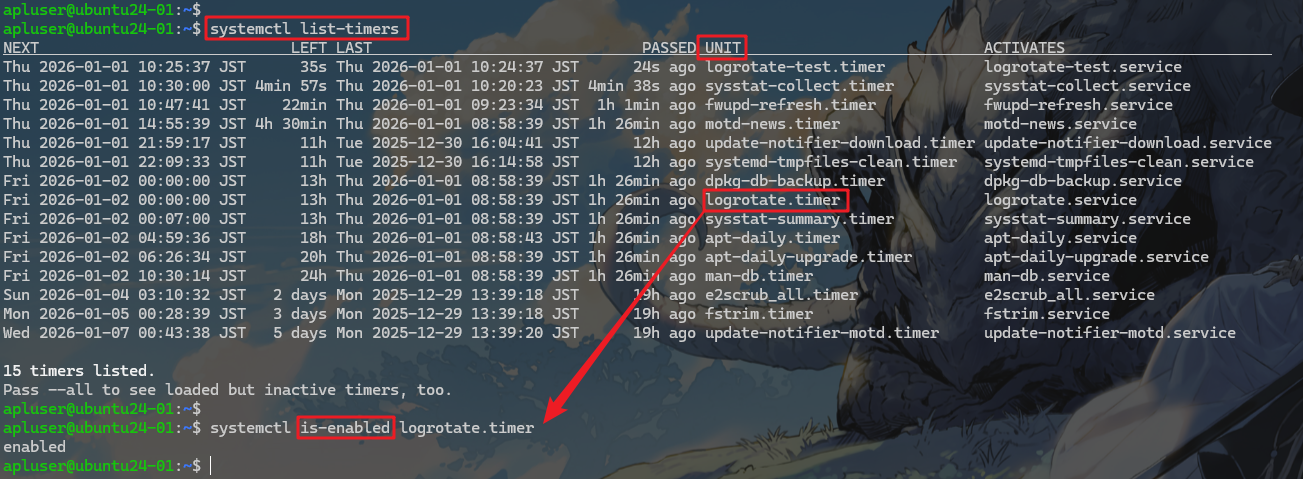
systemctl is-enabled <service>
⏹可以看到我们的logrotate.timer是开机启动的
2.3.3 mask / unmask(强制禁止)
- 禁止任何方式启动(含依赖)
- 事故止血、临时封禁
systemctl mask <service>
systemctl unmask <service>
2.4 Unit 文件管理
2.4.1 文件位置
/usr/lib/systemd/system/:软件包提供/etc/systemd/system/:运维自定义
⏹推荐的编辑方式
systemctl edit <unit>

↓↓↓

# 会生成如下所示的配置文件
/etc/systemd/system/<unit>.d/override.conf
2.4.2 重载配置
daemon-reload:重载 unit 文件daemon-reexec:重启 systemd 本身(不中断服务)
systemctl daemon-reload
systemctl daemon-reexec
2.5 Timer / Socket / 其他 Unit
⏹定时任务
systemctl list-timers
systemctl status logrotate.timer
⏹Socket
systemctl list-units --type=socket
⏹mount 和 path
systemctl list-units --type=mount
systemctl list-units --type=path
2.6 系统运行模式(Target)
| Target | 说明 |
|---|---|
| multi-user.target | 多用户命令行 |
| graphical.target | 图形界面 |
| rescue.target | 单用户 |
| emergency.target | 最小救援 |
# 查看系统默认的运行模式
systemctl get-default
# 切换默认的运行模式
systemctl set-default multi-user.target
# isolate 会立即停止无关服务
systemctl isolate graphical.target
2.7 排障速查清单
# 服务是否存在
systemctl list-unit-files | grep <name>

# 服务是否失败
systemctl --failed

# 查看失败原因
systemctl status <unit>

# 查看详细日志
journalctl -xeu <unit>

汇聚全球AI编程工具,助力开发者即刻编程。
更多推荐



 29
29 0
0- 0


 已为社区贡献7条内容

所有评论(0)