
ruoyi-vue全局请求参数解密返回参数加密
·
指定路径的请求参数解密返回参数加密
背景:该项目中小程序的所有请求都需要对请求参数和返回参数加密解密
项目框架:ruoyi-vue (该项目只针对于ruoyi-vue框架更改)但是其他项目大体思路是一样的
使用加密插件:crypto-js
1、前端修改
1、前端项目中下载插件
npm install crypto-js
或者是
yarn add crypto-js
2、前端代码加密解密工具类
import CryptoJS from 'crypto-js'
//字符串长度为16
var key = CryptoJS.enc.Utf8.parse("1231231231231212");
var iv = CryptoJS.enc.Utf8.parse('qertyuiopasdfghj');

//解密方法
export function decrypt(word) {
  var encryptedHexStr = CryptoJS.enc.Hex.parse(word);
  var srcs = CryptoJS.enc.Base64.stringify(encryptedHexStr);
  var decrypt = CryptoJS.AES.decrypt(srcs, key, {
    iv: iv,
    mode: CryptoJS.mode.CBC,
    padding: CryptoJS.pad.Pkcs7
  });
  var decryptedStr = decrypt.toString(CryptoJS.enc.Utf8);
  return decryptedStr.toString();
}

//加密方法
export function encrypt(word) {
  var srcs = CryptoJS.enc.Utf8.parse(word);
  var encrypted = CryptoJS.AES.encrypt(srcs, key, {
    iv: iv,
    mode: CryptoJS.mode.CBC,
    padding: CryptoJS.pad.Pkcs7
  });
  return encrypted.ciphertext.toString().toUpperCase();
}
3、前端全局加密解密的东西不是我写的大家自行去修改我只讲我做的或者直接调用该方法即可
 var data = {
      username: "admin",
      password: "ccaa"
    }

    console.log(encrypt(JSON.stringify(data)))
    console.log(decrypt("CDB423D195388208AB57833087666A6AE6A63007FC6EAC1D4D03DFC782982A50E10F08568CAB28C5CADB1A1B6F1CF3FB"))
4、前端加密解密结果
| 浏览器打印 |
|---|
 |
2、后端修改
1、添加依赖
<dependency>
      <groupId>org.bouncycastle</groupId>
      <artifactId>bcprov-jdk15on</artifactId>
      <version>1.70</version>
</dependency>
2、java加密解密工具类
package com.search.common.utils.sign;

import org.bouncycastle.jce.provider.BouncyCastleProvider;
import org.bouncycastle.util.encoders.Hex;

import javax.crypto.Cipher;
import javax.crypto.spec.IvParameterSpec;
import javax.crypto.spec.SecretKeySpec;
import java.nio.charset.StandardCharsets;
import java.security.Key;
import java.security.Security;

public class CryptoUtils {
	//必须和前端保持一致性
    // 16字节密钥(128位)示例:"0123456789abcdef"
    private static final String SESSION_KEY = "1231231231231212";

    // 16字节初始化向量(必须16字节)
    private static final String IV = "qertyuiopasdfghj";

    // 算法参数
    private static final String KEY_ALGORITHM = "AES";
    private static final String ALGORITHM = "AES/CBC/PKCS7Padding";

    private Key key;
    private Cipher cipher;
    private IvParameterSpec ivParameterSpec;

    public CryptoUtils() {
        initialize();
    }

    private void initialize() {
        try {
            // 添加BouncyCastle安全提供者
            Security.addProvider(new BouncyCastleProvider());

            // 转换密钥和IV字节
            byte[] keyBytes = SESSION_KEY.getBytes(StandardCharsets.UTF_8);
            byte[] ivBytes = IV.getBytes(StandardCharsets.UTF_8);

            // 验证密钥和IV长度
            if (keyBytes.length != 16) {
                throw new IllegalArgumentException("Invalid key length. Must be 16 bytes");
            }
            if (ivBytes.length != 16) {
                throw new IllegalArgumentException("Invalid IV length. Must be 16 bytes");
            }

            // 创建密钥和IV规范
            this.key = new SecretKeySpec(keyBytes, KEY_ALGORITHM);
            this.ivParameterSpec = new IvParameterSpec(ivBytes);

            // 初始化Cipher实例
            this.cipher = Cipher.getInstance(ALGORITHM, "BC");
        } catch (Exception e) {
            throw new RuntimeException("Crypto initialization failed", e);
        }
    }

    /**
     * AES加密
     * @param plaintext 明文
     * @return 16进制格式的密文
     */
    public String encrypt(String plaintext) {
        try {
            cipher.init(Cipher.ENCRYPT_MODE, key, ivParameterSpec);
            byte[] cipherText = cipher.doFinal(plaintext.getBytes(StandardCharsets.UTF_8));
            return Hex.toHexString(cipherText);
        } catch (Exception e) {
            throw new RuntimeException("Encryption failed", e);
        }
    }

    /**
     * AES解密
     * @param ciphertext 16进制格式的密文
     * @return 明文
     */
    public String decrypt(String ciphertext) {
        try {
            cipher.init(Cipher.DECRYPT_MODE, key, ivParameterSpec);
            byte[] plainText = cipher.doFinal(Hex.decode(ciphertext));
            return new String(plainText, StandardCharsets.UTF_8);
        } catch (Exception e) {
            throw new RuntimeException("Decryption failed", e);
        }
    }

    public static void main(String[] args) {
        CryptoUtils crypto = new CryptoUtils();

        // 测试加密
        String originalText = "我是测试";
        System.out.println("原始文本: " + originalText);
        String encrypted = crypto.encrypt(originalText);
        System.out.println("加密结果: " + encrypted);
        System.out.println("解密结果: " + decrypted);
        // 验证一致性
        System.out.println("解密验证: " + originalText.equals(decrypted));
    }
}
3、编写java前置过滤器
前置过滤器:该项目对小程序的api进行拦截,所以对特定的路径
/reletive拦截,说明:我们现在拦截的全是post请求的方法。GET请求将问号后的参数全部加密拼接
package com.search.framework.interceptor;

import com.alibaba.fastjson2.JSON;
import com.alibaba.fastjson2.JSONObject;
import com.search.common.core.domain.AjaxResult;
import com.search.common.filter.RepeatedlyRequestWrapper;
import com.search.common.filter.XssHttpServletRequestWrapper;
import com.search.common.utils.ServletUtils;
import com.search.common.utils.StringUtils;
import com.search.common.utils.http.HttpHelper;
import com.search.common.utils.sign.CryptoUtils;
import com.search.common.utils.sign.RsaUtils;
import org.springframework.stereotype.Component;
import org.springframework.web.servlet.HandlerInterceptor;
import org.springframework.web.servlet.ModelAndView;

import javax.servlet.http.HttpServletRequest;
import javax.servlet.http.HttpServletResponse;
import java.util.Map;

//过滤小程序接口加密数据
@Component
public class MiniURLInterceptor implements HandlerInterceptor {

    //拦截指定URL
    @Override
    public boolean preHandle(HttpServletRequest request, HttpServletResponse response, Object handler) throws Exception {
        CryptoUtils cryptoUtils = new CryptoUtils();
        // 包装请求以缓存请求体
        String nowParams = "";
        //可重复读取Request
        RepeatedlyRequestWrapper wrapper = new RepeatedlyRequestWrapper(request, response);

        //拿到URL
        String requestURI = request.getRequestURI();
        //小程序请会携带relative
        if (requestURI.contains("relative")) {
            String method = request.getMethod();
            System.out.println("method = " + method);
            //判断请求方式
            //post请求
            if (method.equals("POST")) {
                //获取加密参数
                nowParams = HttpHelper.getBodyString(wrapper);
                try {
                    //解密
                    String jsonBody = cryptoUtils.decrypt(nowParams);
                    wrapper.setAttribute("json", jsonBody);
                    return true;
                } catch (Exception e) {
                    AjaxResult ajaxResult = AjaxResult.error("POST参数解密失败");
                    e.printStackTrace();
                    ServletUtils.renderString(response, cryptoUtils.encrypt(JSON.toJSONString(ajaxResult)));
                    return false;
                }
            }
            //get请求方式
            if (method.equals("GET")) {
                // body参数为空,获取Parameter的数据
                if (StringUtils.isEmpty(nowParams)) {
                    nowParams = JSON.toJSONString(request.getParameterMap());

                    try {
                        if ("{}".equals(nowParams)) {
                            return true;
                        }
                        String jsonBody = cryptoUtils.decrypt(nowParams);
                        wrapper.setAttribute("params", jsonBody);
                        return true;
                    } catch (Exception e) {
                        AjaxResult ajaxResult = AjaxResult.error("GET参数解密失败");
                        e.printStackTrace();
                        ServletUtils.renderString(response, cryptoUtils.encrypt(JSON.toJSONString(ajaxResult)));
                        return false;
                    }
                }
            }
        }
        return false;
    }

    @Override
    public void postHandle(HttpServletRequest request, HttpServletResponse response, Object handler, ModelAndView modelAndView) throws Exception {
        HandlerInterceptor.super.postHandle(request, response, handler, modelAndView);
    }

    @Override
    public void afterCompletion(HttpServletRequest request, HttpServletResponse response, Object handler, Exception ex) throws Exception {
        HandlerInterceptor.super.afterCompletion(request, response, handler, ex);
    }
}
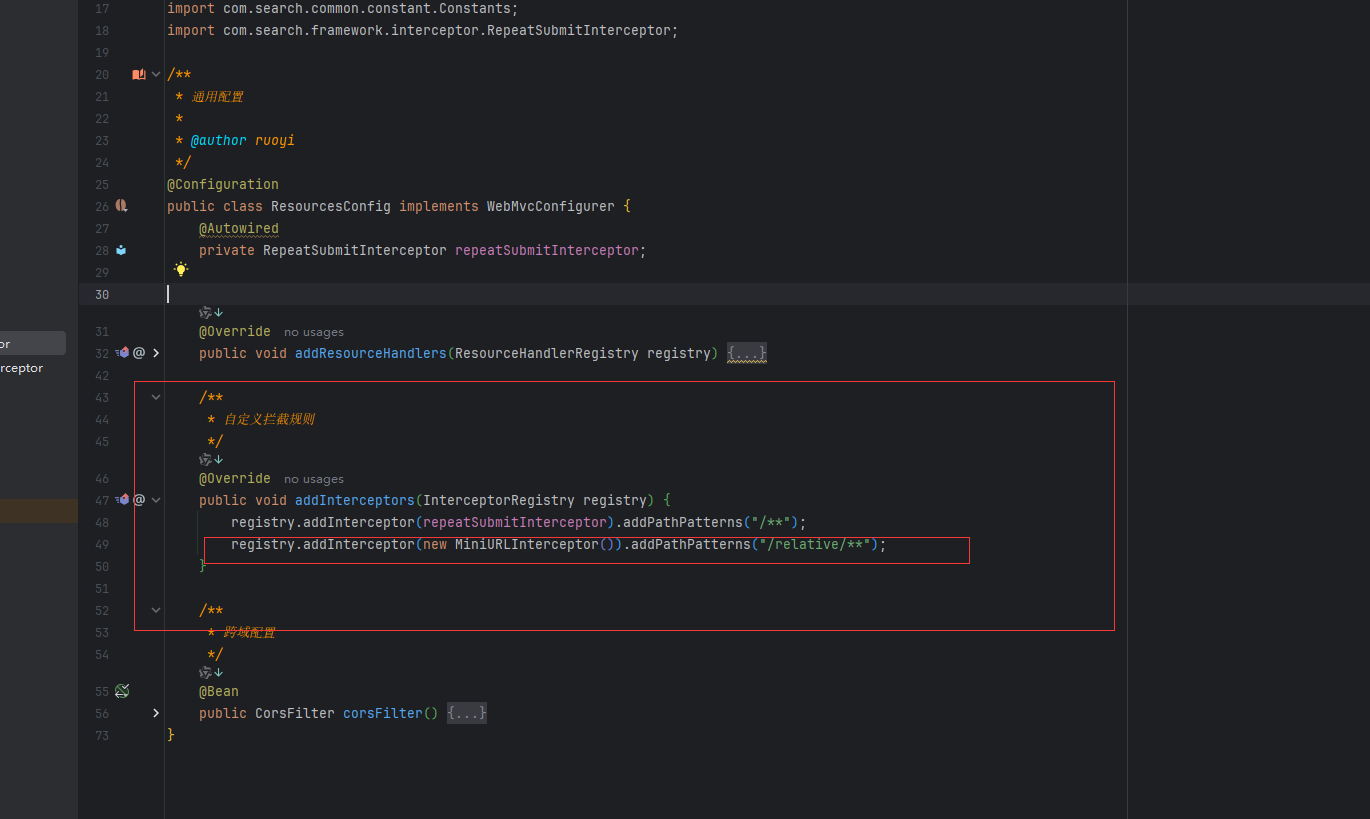
4、注册前置拦截器
| 前置拦截器注册 |
|---|
 |
5、拦截后如何在使用解密后的参数
拿到HttpServletRequest和HttpServletResponse
    @PostMapping("/login")
    public AjaxResult login(HttpServletRequest request, HttpServletResponse response) throws Exception {
        String json = (String) request.getAttribute("json");
        LoginBody loginBody = JSON.parseObject(json, LoginBody.class);
    		.............
        return AjaxResult.success("登录成功", dataMap);
    }
6、后置过滤器,拦截路径进行加密
1、定义自定义注解
package com.search.common.annotation;

import java.lang.annotation.ElementType;
import java.lang.annotation.Retention;
import java.lang.annotation.RetentionPolicy;
import java.lang.annotation.Target;

//作用与方法上
@Retention(RetentionPolicy.RUNTIME)
@Target(ElementType.METHOD)
public @interface ApiEncrypt {
    //默认添加该注解为加密
    boolean value() default true;
}
7、自定义响应处理
package com.search.common.advice;

import com.alibaba.fastjson.serializer.SerializerFeature;
import com.alibaba.fastjson.JSON;
import com.search.common.annotation.ApiEncrypt;
import com.search.common.core.domain.AjaxResult;
import com.search.common.utils.ServletUtils;
import com.search.common.utils.sign.CryptoUtils;
import com.search.common.utils.sign.RsaUtils;
import org.springframework.core.MethodParameter;
import org.springframework.http.MediaType;
import org.springframework.http.server.ServerHttpRequest;
import org.springframework.http.server.ServerHttpResponse;
import org.springframework.web.bind.annotation.ControllerAdvice;
import org.springframework.web.servlet.mvc.method.annotation.ResponseBodyAdvice;


import java.lang.reflect.Method;
import java.util.Objects;


//只作用于小程序接口 你的包对应那个包下的控制器或者是api
@ControllerAdvice(basePackages = "com.xxxx.xxx.api")

public class EncryptAdvice implements ResponseBodyAdvice<Object> {

    @Override
    public boolean supports(MethodParameter returnType, Class converterType) {
        return true;
    }

    //原来Controller需要返回的参数
    @Override
    public Object beforeBodyWrite(Object body, MethodParameter methodParameter, MediaType mediaType, Class aClass, ServerHttpRequest request, ServerHttpResponse response) {
        //拿到注解名称
        Method method = methodParameter.getMethod();
        //获取注解字段
        assert method != null;
        if (method.isAnnotationPresent(ApiEncrypt.class)) {
            ApiEncrypt methodAnnotation = methodParameter.getMethodAnnotation(ApiEncrypt.class);
            if (Objects.nonNull(methodAnnotation) && !methodAnnotation.value()) {
                return body;
            }
        }
        //不加密
        String jsonString = JSON.toJSONString(body, SerializerFeature.DisableCircularReferenceDetect);
        try {
            CryptoUtils cryptoUtils = new CryptoUtils();
            return cryptoUtils.encrypt(jsonString);
        } catch (Exception e) {
            e.printStackTrace();
            return AjaxResult.error("参数加密失败");
        }
    }
}
8、使用 在需要加密的接口上加上@ApiEncrpt注解
但是我的这个注解好像有点问题,com.xxxx.xxx.api加不加注解都被加密了
//小程序账号登录
@ApiEncrypt
@PostMapping("/login")
public AjaxResult login(HttpServletRequest request, HttpServletResponse response) throws Exception {
    String json = (String) request.getAttribute("json");
    LoginBody loginBody = JSON.parseObject(json, LoginBody.class);
	.......
    return AjaxResult.success("登录成功", dataMap);

}
9、如果要对部分异常也进行加密处理进行数据格式上的统一是一样的思路
创建自定义异常处理
@Data
public class ValidationException extends RuntimeException {

    private final String message;

    public ValidationException( String message) {
        super(message);
        this.message = message;
    }
}
10、捕获自定义处理
@Order(Ordered.HIGHEST_PRECEDENCE) //将加密提高至最高级别
@ControllerAdvice
public class ValidationExceptionHandler {

    /**
     * 捕获 ValidationException 并返回加密响应
     */
    @ExceptionHandler(ValidationException.class)
    public void handleValidationException(ValidationException ex, HttpServletResponse response) {
        // 构造加密响应
        AjaxResult result = AjaxResult.error(500, ex.getMessage());
        CryptoUtils cryptoUtils=new CryptoUtils();
        String encryptedData = cryptoUtils.encrypt(JSON.toJSONString(result));
        // 写入响应
        ServletUtils.renderString(response, encryptedData);
    }

}
11、在需要加密异常抛出的地方将异常替换为自定义的即可并且
if (StringUtils.isEmpty(username) || StringUtils.isEmpty(password)) {
    AsyncManager.me().execute(AsyncFactory.recordLogininfor(username, Constants.LOGIN_FAIL, MessageUtils.message("not.null")));
    throw new ValidationException(MessageUtils.message("not.null"));
}
12:到此ruoyi-vue的代码就改造完成了,ruoyi自带的rsa对太长的加密使用不了

汇聚全球AI编程工具,助力开发者即刻编程。
更多推荐

 3
3 0
0- 0


 已为社区贡献1条内容

所有评论(0)