
Networking Essentials 网络基础知识
目录
Task1Introduction 引言
文字版
Have you ever wondered how your computer can dynamically configure its network settings when you turn it on or connect it to a new network? Have you ever wanted to know how many devices and countries your packets passed through before reaching their destination? Are you curious how all your home devices can access the Internet even though your ISP gives you a single IP address?
你是否曾经想过,当你打开计算机或将其连接到新网络时,它是如何动态配置其网络设置的?你是否曾经想知道你的数据包在到达目的地之前经过了多少设备和国家?你是否好奇,即使你的 ISP 只给了你一个 IP 地址,你的所有家用设备是如何访问互联网的?
If you want to know the answers to these questions, among others, then this room is for you.
如果你想知道这些问题的答案,那么这个房间就是为你准备的。
This room is the second room in a series of four rooms about computer networking:
这个房间是一系列关于计算机网络的四个房间中的第二个:
- Networking Concepts网络概念
- Networking Essentials (this room)网络基础知识 (这个房间)
- Networking Core Protocols核心协议网络化
- Networking Secure Protocols网络安全协议
Learning Prerequisites学习前提条件
To benefit from this room, we recommend that you know the following:
为了从这个房间中受益,我们建议您了解以下内容:
- ISO OSI model and layersISO OSI 模型和层
- TCP/IP model and layersTCP/IP 模型和层
- Ethernet, IP, and TCP protocols以太网、IP 和 TCP 协议
In other words, starting this room after Networking Concepts is the recommended approach.
换句话说,在学习了网络概念之后开始这个房间是推荐的方法。
Learning Objectives学习目标
The objective of this room is to teach you about various standard protocols and technologies that glue things together:
这个房间的目的是教你各种标准协议和技术,这些协议和技术将事物紧密地结合在一起:
- Dynamic Host Configuration Protocol (DHCP)动态主机配置协议 (DHCP)
- Address Resolution Protocol (ARP)地址解析协议 (ARP)
- Network Address Translation (NAT)网络地址转换 (NAT)
- Internet Control Message Protocol (ICMP) 互联网控制消息协议 (ICMP)
-
- Ping
- Traceroute

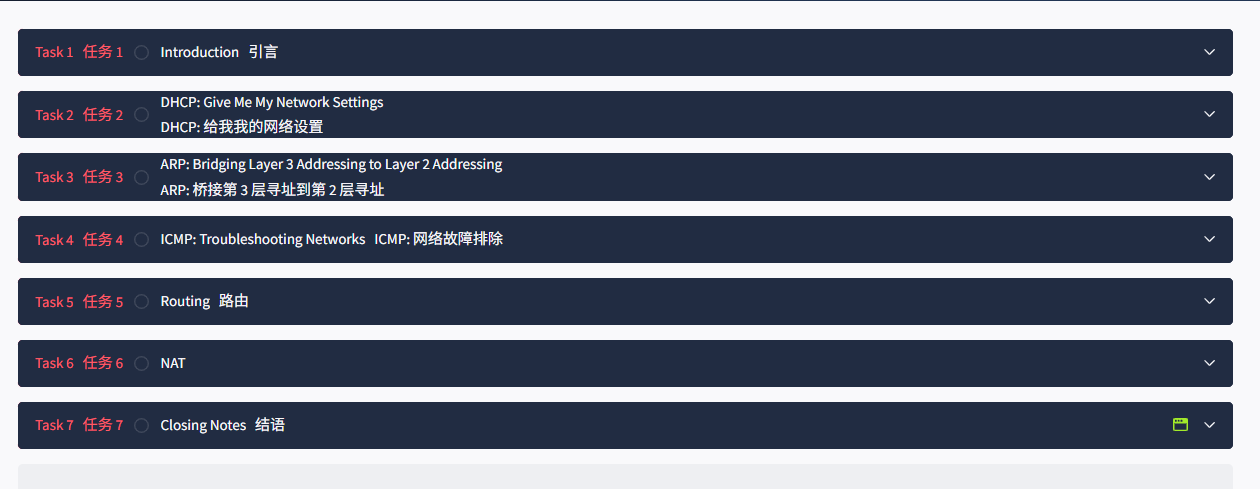
Task2 DHCP: Give Me My Network Settings DHCP: 给我 我的 网络设置
图片版
文字版
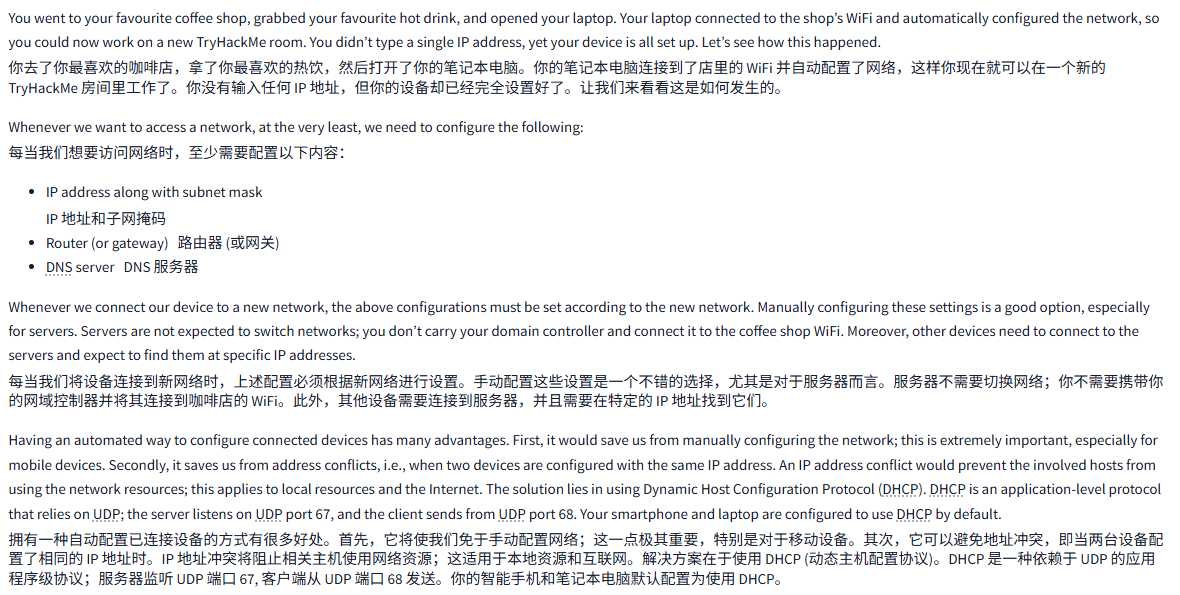
You went to your favourite coffee shop, grabbed your favourite hot drink, and opened your laptop. Your laptop connected to the shop’s WiFi and automatically configured the network, so you could now work on a new TryHackMe room. You didn’t type a single IP address, yet your device is all set up. Let’s see how this happened.
你去了你最喜欢的咖啡店,拿了你最喜欢的热饮,然后打开了你的笔记本电脑。你的笔记本电脑连接到了店里的 WiFi 并自动配置了网络,这样你现在就可以在一个新的 TryHackMe 房间里工作了。你没有输入任何 IP 地址,但你的设备却已经完全设置好了。让我们来看看这是如何发生的。
Whenever we want to access a network, at the very least, we need to configure the following:
每当我们想要访问网络时,至少需要配置以下内容:
- IP address along with subnet mask
IP 地址和子网掩码 - Router (or gateway)路由器 (或网关)
- DNS serverDNS 服务器
Whenever we connect our device to a new network, the above configurations must be set according to the new network. Manually configuring these settings is a good option, especially for servers. Servers are not expected to switch networks; you don’t carry your domain controller and connect it to the coffee shop WiFi. Moreover, other devices need to connect to the servers and expect to find them at specific IP addresses.
每当我们将设备连接到新网络时,上述配置必须根据新网络进行设置。手动配置这些设置是一个不错的选择,尤其是对于服务器而言。服务器不需要切换网络;你不需要携带你的网域控制器并将其连接到咖啡店的 WiFi。此外,其他设备需要连接到服务器,并且需要在特定的 IP 地址找到它们。
Having an automated way to configure connected devices has many advantages. First, it would save us from manually configuring the network; this is extremely important, especially for mobile devices. Secondly, it saves us from address conflicts, i.e., when two devices are configured with the same IP address. An IP address conflict would prevent the involved hosts from using the network resources; this applies to local resources and the Internet. The solution lies in using Dynamic Host Configuration Protocol (DHCP). DHCP is an application-level protocol that relies on UDP; the server listens on UDP port 67, and the client sends from UDP port 68. Your smartphone and laptop are configured to use DHCP by default.
拥有一种自动配置已连接设备的方式有很多好处。首先,它将使我们免于手动配置网络;这一点极其重要,特别是对于移动设备。其次,它可以避免地址冲突,即当两台设备配置了相同的 IP 地址时。IP 地址冲突将阻止相关主机使用网络资源;这适用于本地资源和互联网。解决方案在于使用 DHCP (动态主机配置协议)。DHCP 是一种依赖于 UDP 的应用程序级协议;服务器监听 UDP 端口 67, 客户端从 UDP 端口 68 发送。你的智能手机和笔记本电脑默认配置为使用 DHCP。
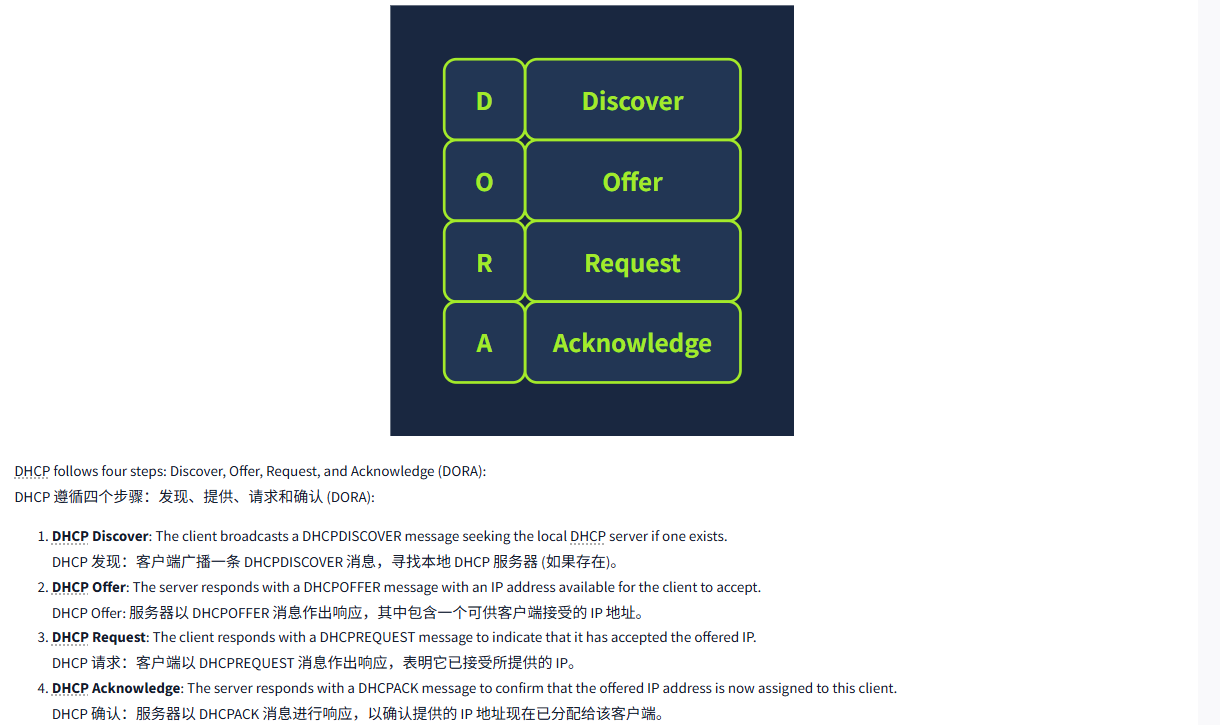
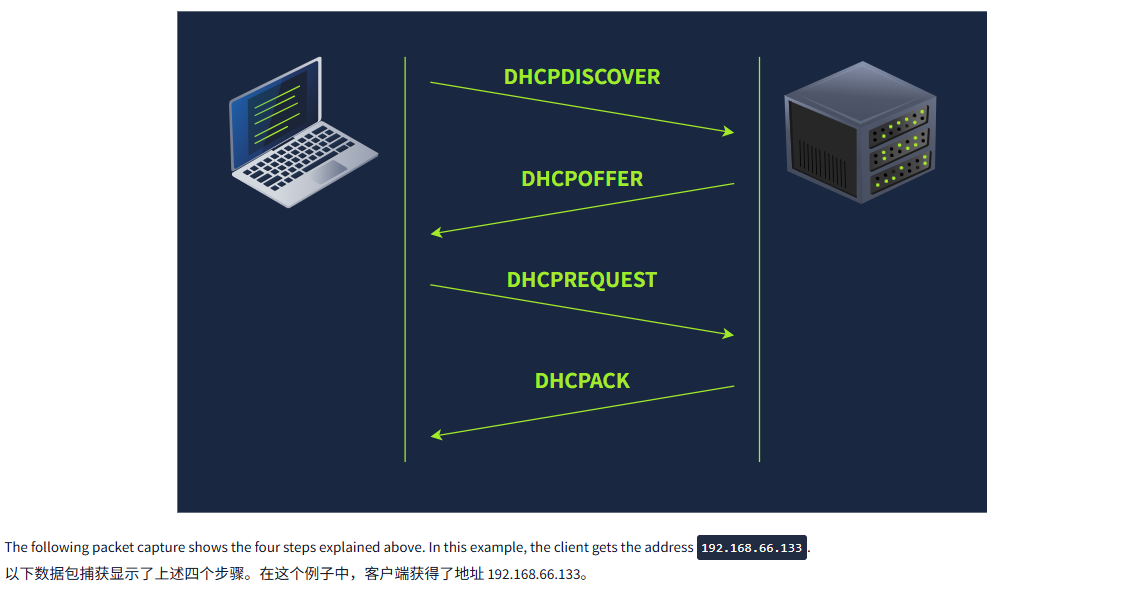
DHCP follows four steps: Discover, Offer, Request, and Acknowledge (DORA):
DHCP 遵循四个步骤:发现、提供、请求和确认 (DORA):
- DHCP Discover: The client broadcasts a DHCPDISCOVER message seeking the local DHCP server if one exists.
DHCP 发现:客户端广播一条 DHCPDISCOVER 消息,寻找本地 DHCP 服务器 (如果存在)。 - DHCP Offer: The server responds with a DHCPOFFER message with an IP address available for the client to accept.
DHCP Offer: 服务器以 DHCPOFFER 消息作出响应,其中包含一个可供客户端接受的 IP 地址。 - DHCP Request: The client responds with a DHCPREQUEST message to indicate that it has accepted the offered IP.
DHCP 请求:客户端以 DHCPREQUEST 消息作出响应,表明它已接受所提供的 IP。 - DHCP Acknowledge: The server responds with a DHCPACK message to confirm that the offered IP address is now assigned to this client.
DHCP 确认:服务器以 DHCPACK 消息进行响应,以确认提供的 IP 地址现在已分配给该客户端。
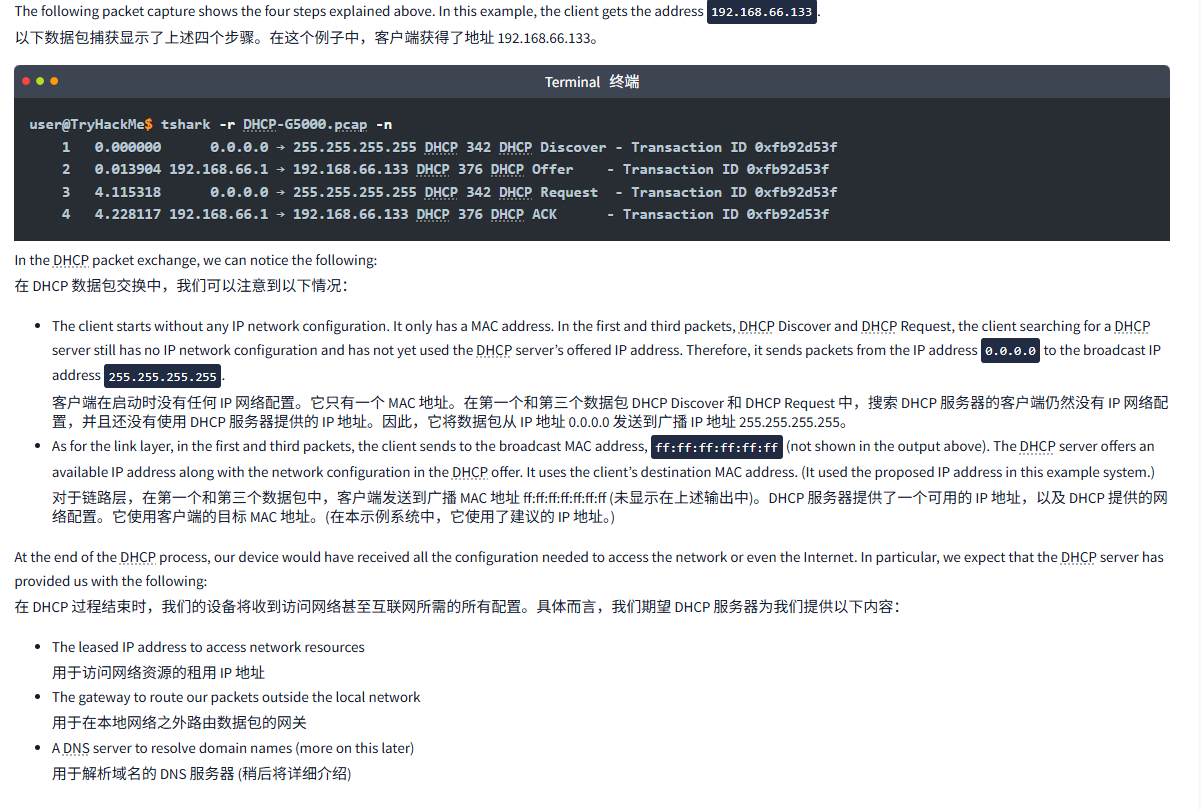
The following packet capture shows the four steps explained above. In this example, the client gets the address 192.168.66.133.
以下数据包捕获显示了上述四个步骤。在这个例子中,客户端获得了地址 192.168.66.133。
Terminal终端
user@TryHackMe$ tshark -r DHCP-G5000.pcap -n
    1   0.000000      0.0.0.0 → 255.255.255.255 DHCP 342 DHCP Discover - Transaction ID 0xfb92d53f
    2   0.013904 192.168.66.1 → 192.168.66.133 DHCP 376 DHCP Offer    - Transaction ID 0xfb92d53f
    3   4.115318      0.0.0.0 → 255.255.255.255 DHCP 342 DHCP Request  - Transaction ID 0xfb92d53f
    4   4.228117 192.168.66.1 → 192.168.66.133 DHCP 376 DHCP ACK      - Transaction ID 0xfb92d53f
In the DHCP packet exchange, we can notice the following:
在 DHCP 数据包交换中,我们可以注意到以下情况:
- The client starts without any IP network configuration. It only has a MAC address. In the first and third packets, DHCP Discover and DHCP Request, the client searching for a DHCP server still has no IP network configuration and has not yet used the DHCP server’s offered IP address. Therefore, it sends packets from the IP address
0.0.0.0to the broadcast IP address255.255.255.255.
客户端在启动时没有任何 IP 网络配置。它只有一个 MAC 地址。在第一个和第三个数据包 DHCP Discover 和 DHCP Request 中,搜索 DHCP 服务器的客户端仍然没有 IP 网络配置,并且还没有使用 DHCP 服务器提供的 IP 地址。因此,它将数据包从 IP 地址 0.0.0.0 发送到广播 IP 地址 255.255.255.255。 - As for the link layer, in the first and third packets, the client sends to the broadcast MAC address,
ff:ff:ff:ff:ff:ff(not shown in the output above). The DHCP server offers an available IP address along with the network configuration in the DHCP offer. It uses the client’s destination MAC address. (It used the proposed IP address in this example system.)
对于链路层,在第一个和第三个数据包中,客户端发送到广播 MAC 地址 ff:ff:ff:ff:ff:ff:ff (未显示在上述输出中)。DHCP 服务器提供了一个可用的 IP 地址,以及 DHCP 提供的网络配置。它使用客户端的目标 MAC 地址。(在本示例系统中,它使用了建议的 IP 地址。)
At the end of the DHCP process, our device would have received all the configuration needed to access the network or even the Internet. In particular, we expect that the DHCP server has provided us with the following:
在 DHCP 过程结束时,我们的设备将收到访问网络甚至互联网所需的所有配置。具体而言,我们期望 DHCP 服务器为我们提供以下内容:
- The leased IP address to access network resources
用于访问网络资源的租用 IP 地址 - The gateway to route our packets outside the local network
用于在本地网络之外路由数据包的网关 - A DNS server to resolve domain names (more on this later)
用于解析域名的 DNS 服务器 (稍后将详细介绍)
问题
答案
Task3 ARP: Bridging Layer 3 Addressing to Layer 2 Addressing ARP: 桥接第 3 层寻址到第 2 层寻址
图片版
文字版
We have stated in the Networking Concepts room that as two hosts communicate over a network, an IP packet is encapsulated within a data link frame as it travels over layer 2. Remember that the two common data link layers we use are Ethernet (IEEE 802.3) and WiFi (IEEE 802.11). Whenever one host needs to communicate with another host on the same Ethernet or WiFi, it must send the IP packet within a data link layer frame. Although it knows the IP address of the target host, it needs to look up the target’s MAC address so the proper data link header can be created.
我们在网络概念室中提到,当两台主机通过网络进行通信时,IP 数据包在通过第 2 层时会被封装在数据链路帧中。请记住,我们使用的两个常见数据链路层是以太网 (IEEE 802.3) 和 WiFi (IEEE 802.11)。每当一台主机需要与同一以太网或 WiFi 上的另一台主机通信时,它必须在数据链路层帧中发送 IP 数据包。尽管它知道目标主机的 IP 地址,但它需要查找目标的 MAC 地址,以便创建适当的数据链路报头。
As you would remember, a MAC address is a 48-bit number typically represented in hexadecimal notation; for example, 7C:DF:A1:D3:8C:5C and 44:DF:65:D8:FE:6C are two MAC addresses on my network.
你可能还记得,MAC 地址是一个 48 位数,通常用十六进制表示。例如,7C:DF:A1:D3:8C:5C 和 44:DF:65:D8:FE:6C 是我网络中的两个 MAC 地址。
However, the devices on the same Ethernet network do not need to know each other’s MAC addresses all the time; they only need to know each other’s MAC addresses while communicating. Everything revolves around IP addresses. Consider this scenario: You connect your device to a network, and if the network has a DHCP server, your device is automatically configured to use a specific gateway (router) and DNS server. Consequently, your device knows the IP address of the DNS server to resolve any domain name; moreover, it knows the IP address of the router when it needs to send packets over the Internet. In all this scenario, no MAC addresses are revealed. However, two devices on the same Ethernet cannot communicate without knowing each other’s MAC addresses.
然而,同一以太网络上的设备并不需要始终知道彼此的 MAC 地址;它们只需要在通信时知道彼此的 MAC 地址。一切都围绕着 IP 地址展开。考虑这样一个场景:你将设备连接到一个网络,如果该网络有 DHCP 服务器,你的设备会自动配置为使用特定的网关 (路由器) 和 DNS 服务器。因此,你的设备知道 DNS 服务器的 IP 地址来解析任何域名;此外,当它需要通过互联网发送数据包时,它还知道路由器的 IP 地址。在所有这些场景中,不会暴露任何 MAC 地址。然而,如果不知道彼此的 MAC 地址,同一以太网络上的两台设备就无法进行通信。
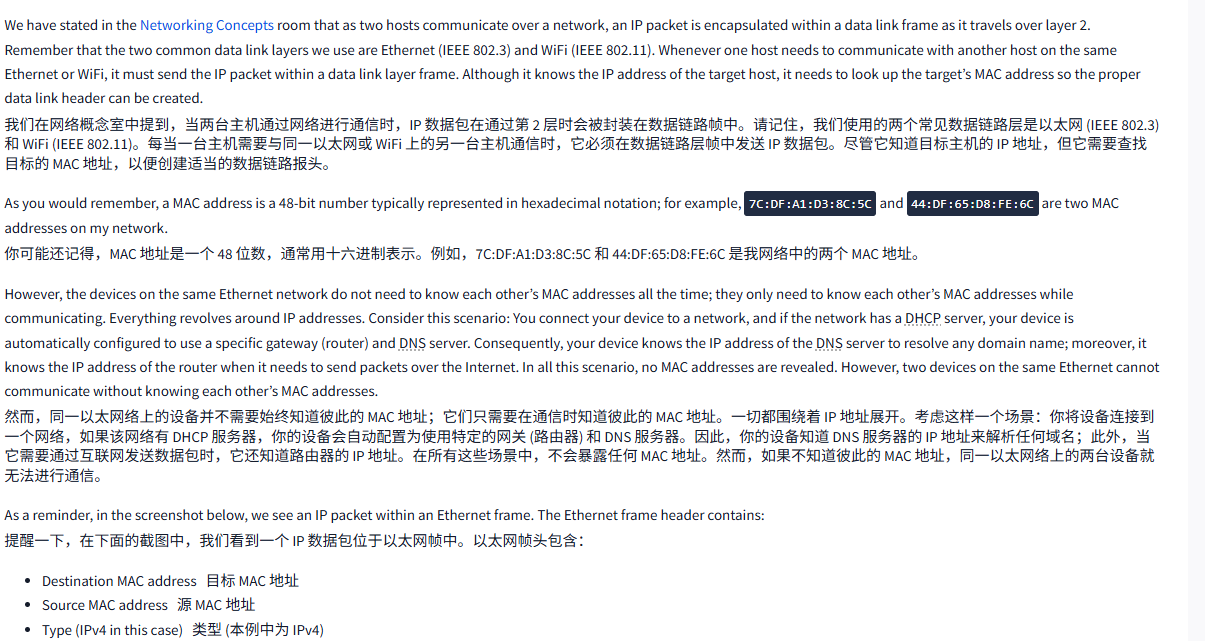
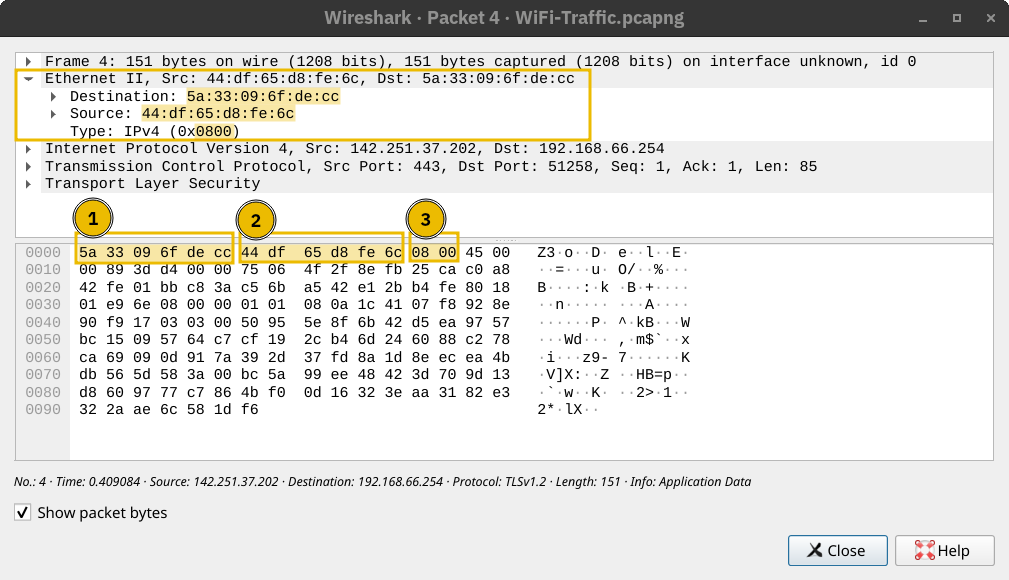
As a reminder, in the screenshot below, we see an IP packet within an Ethernet frame. The Ethernet frame header contains:
提醒一下,在下面的截图中,我们看到一个 IP 数据包位于以太网帧中。以太网帧头包含:
- Destination MAC address目标 MAC 地址
- Source MAC address源 MAC 地址
- Type (IPv4 in this case)类型 (本例中为 IPv4)
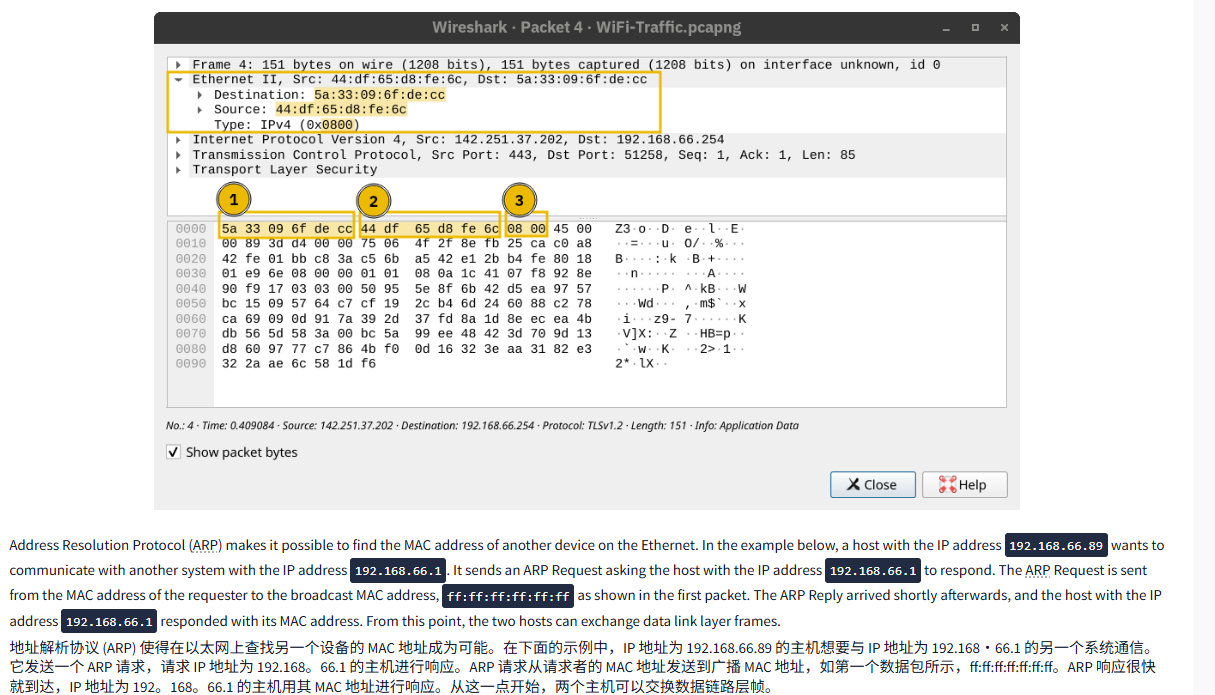
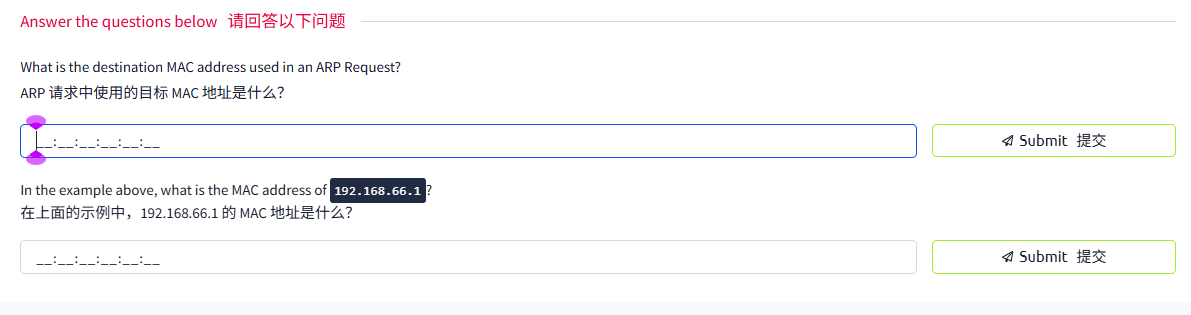
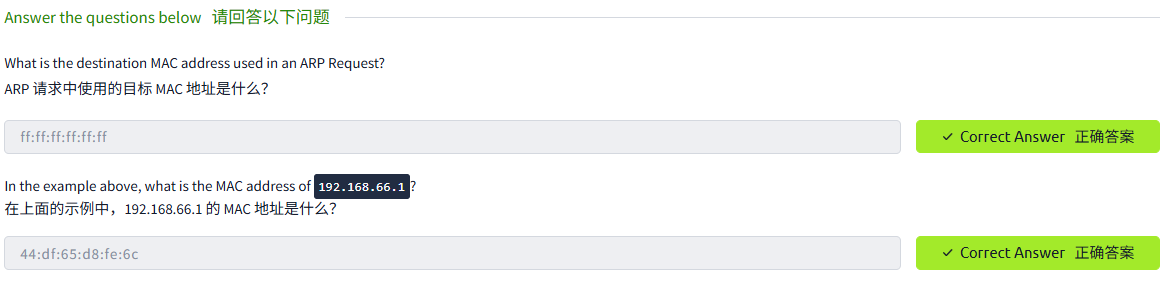
Address Resolution Protocol (ARP) makes it possible to find the MAC address of another device on the Ethernet. In the example below, a host with the IP address 192.168.66.89 wants to communicate with another system with the IP address 192.168.66.1. It sends an ARP Request asking the host with the IP address 192.168.66.1 to respond. The ARP Request is sent from the MAC address of the requester to the broadcast MAC address, ff:ff:ff:ff:ff:ff as shown in the first packet. The ARP Reply arrived shortly afterwards, and the host with the IP address 192.168.66.1 responded with its MAC address. From this point, the two hosts can exchange data link layer frames.
地址解析协议 (ARP) 使得在以太网上查找另一个设备的 MAC 地址成为可能。在下面的示例中,IP 地址为 192.168.66.89 的主机想要与 IP 地址为 192.168・66.1 的另一个系统通信。它发送一个 ARP 请求,请求 IP 地址为 192.168。66.1 的主机进行响应。ARP 请求从请求者的 MAC 地址发送到广播 MAC 地址,如第一个数据包所示,ff:ff:ff:ff:ff:ff:ff。ARP 响应很快就到达,IP 地址为 192。168。66.1 的主机用其 MAC 地址进行响应。从这一点开始,两个主机可以交换数据链路层帧。
Terminal终端
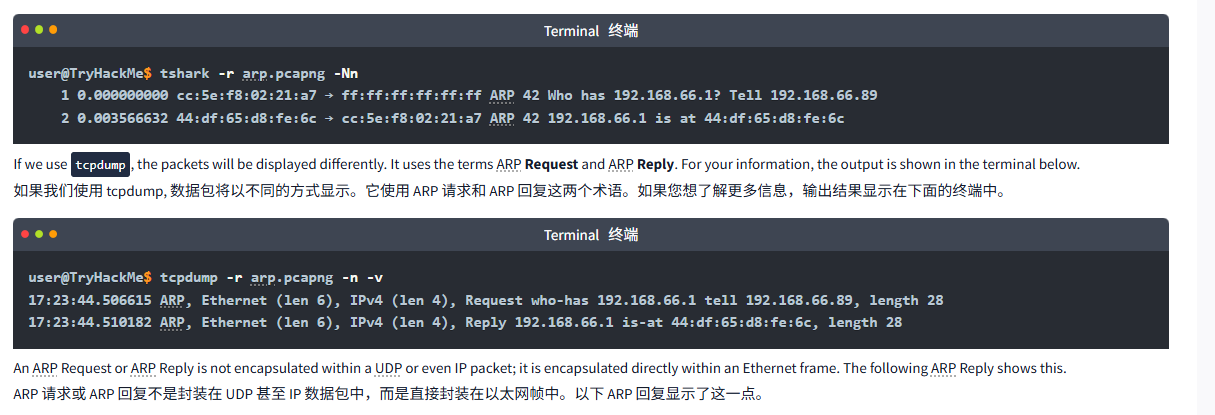
user@TryHackMe$ tshark -r arp.pcapng -Nn
    1 0.000000000 cc:5e:f8:02:21:a7 → ff:ff:ff:ff:ff:ff ARP 42 Who has 192.168.66.1? Tell 192.168.66.89
    2 0.003566632 44:df:65:d8:fe:6c → cc:5e:f8:02:21:a7 ARP 42 192.168.66.1 is at 44:df:65:d8:fe:6c
If we use tcpdump, the packets will be displayed differently. It uses the terms ARP Request and ARP Reply. For your information, the output is shown in the terminal below.
如果我们使用 tcpdump, 数据包将以不同的方式显示。它使用 ARP 请求和 ARP 回复这两个术语。如果您想了解更多信息,输出结果显示在下面的终端中。
Terminal终端
user@TryHackMe$ tcpdump -r arp.pcapng -n -v
17:23:44.506615 ARP, Ethernet (len 6), IPv4 (len 4), Request who-has 192.168.66.1 tell 192.168.66.89, length 28
17:23:44.510182 ARP, Ethernet (len 6), IPv4 (len 4), Reply 192.168.66.1 is-at 44:df:65:d8:fe:6c, length 28
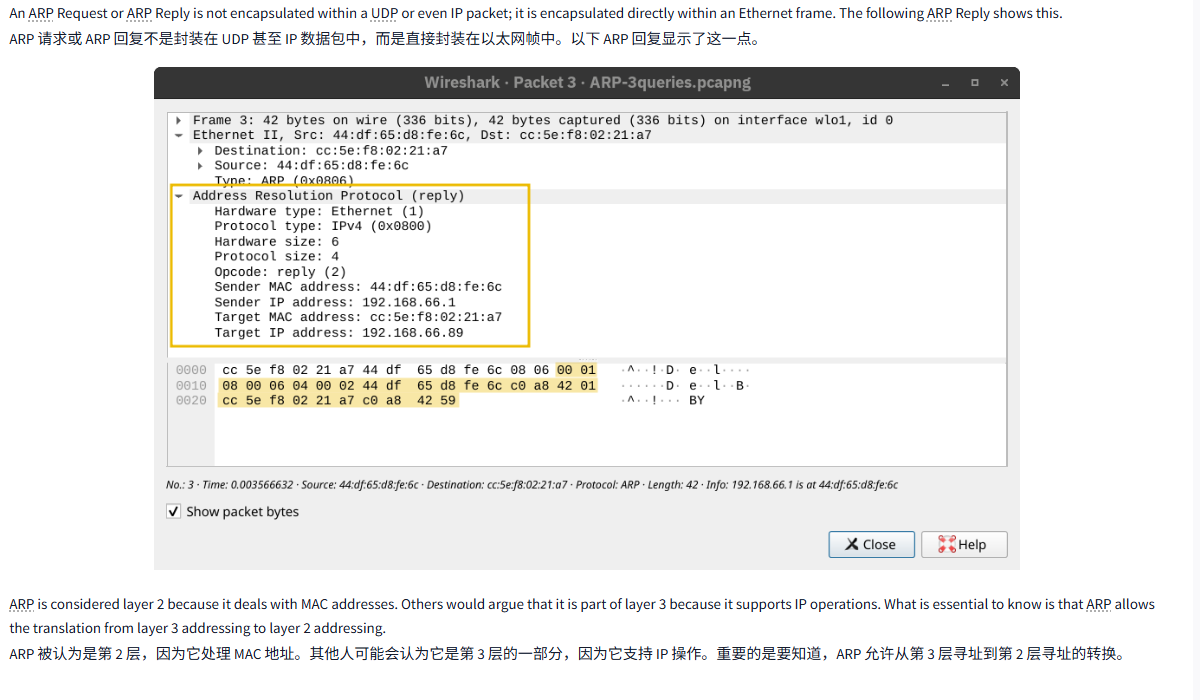
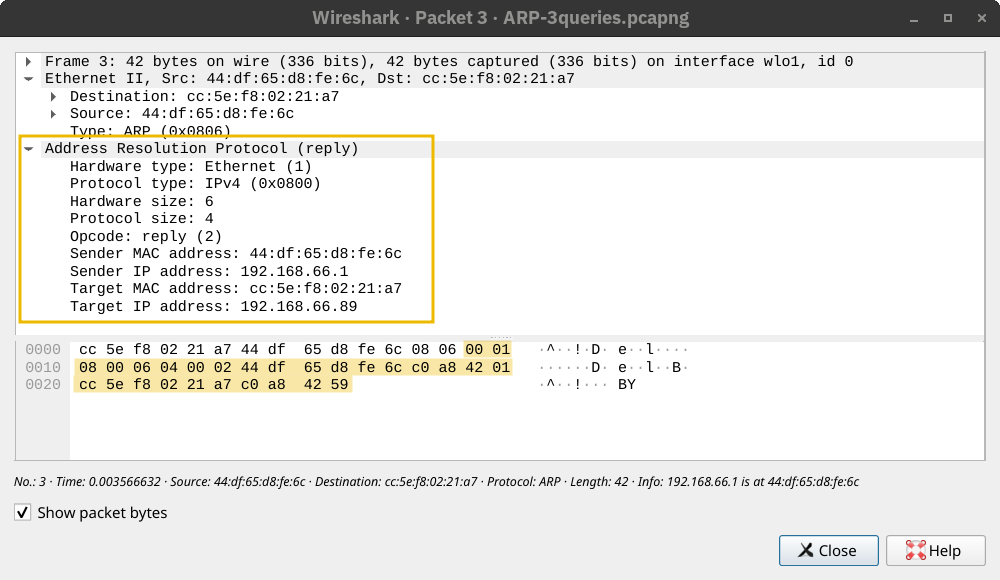
An ARP Request or ARP Reply is not encapsulated within a UDP or even IP packet; it is encapsulated directly within an Ethernet frame. The following ARP Reply shows this.
ARP 请求或 ARP 回复不是封装在 UDP 甚至 IP 数据包中,而是直接封装在以太网帧中。以下 ARP 回复显示了这一点。
ARP is considered layer 2 because it deals with MAC addresses. Others would argue that it is part of layer 3 because it supports IP operations. What is essential to know is that ARP allows the translation from layer 3 addressing to layer 2 addressing.
ARP 被认为是第 2 层,因为它处理 MAC 地址。其他人可能会认为它是第 3 层的一部分,因为它支持 IP 操作。重要的是要知道,ARP 允许从第 3 层寻址到第 2 层寻址的转换。
问题
答案
Task4 ICMP: Troubleshooting Networks ICMP: 网络故障排除
图片版
文字版
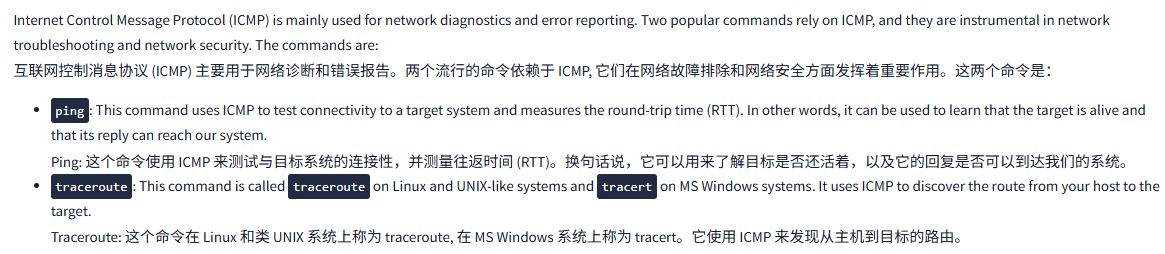
Internet Control Message Protocol (ICMP) is mainly used for network diagnostics and error reporting. Two popular commands rely on ICMP, and they are instrumental in network troubleshooting and network security. The commands are:
互联网控制消息协议 (ICMP) 主要用于网络诊断和错误报告。两个流行的命令依赖于 ICMP, 它们在网络故障排除和网络安全方面发挥着重要作用。这两个命令是:
ping: This command uses ICMP to test connectivity to a target system and measures the round-trip time (RTT). In other words, it can be used to learn that the target is alive and that its reply can reach our system.
Ping: 这个命令使用 ICMP 来测试与目标系统的连接性,并测量往返时间 (RTT)。换句话说,它可以用来了解目标是否还活着,以及它的回复是否可以到达我们的系统。traceroute: This command is calledtracerouteon Linux and UNIX-like systems andtracerton MS Windows systems. It uses ICMP to discover the route from your host to the target.
Traceroute: 这个命令在 Linux 和类 UNIX 系统上称为 traceroute, 在 MS Windows 系统上称为 tracert。它使用 ICMP 来发现从主机到目标的路由。
Ping
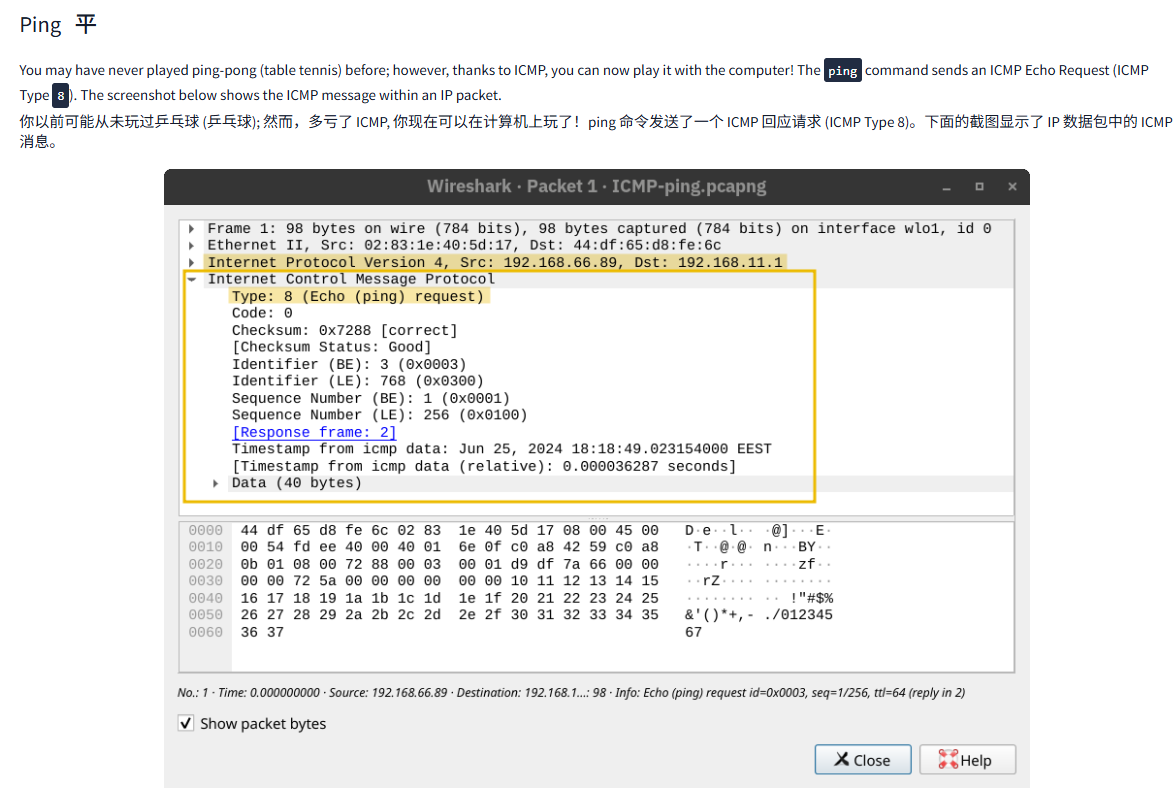
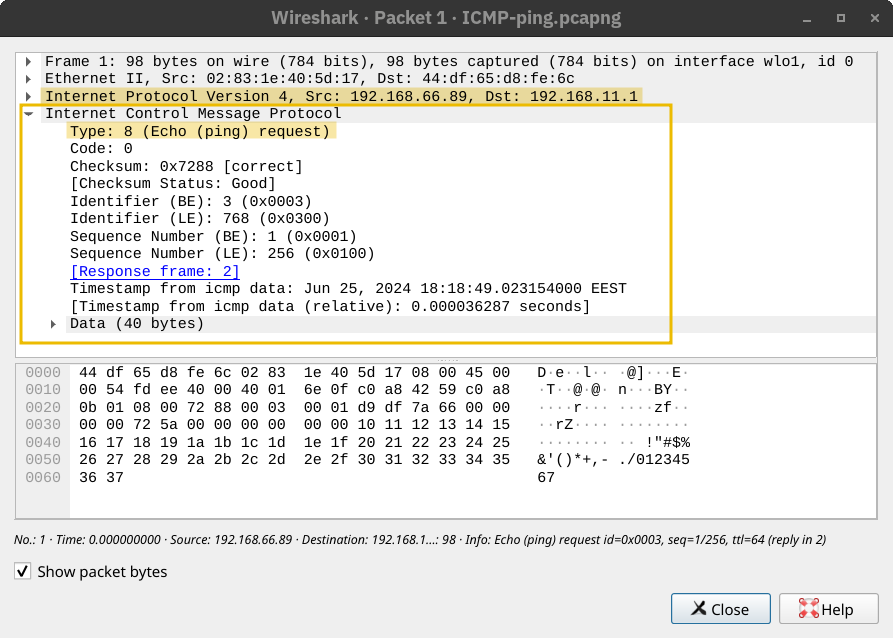
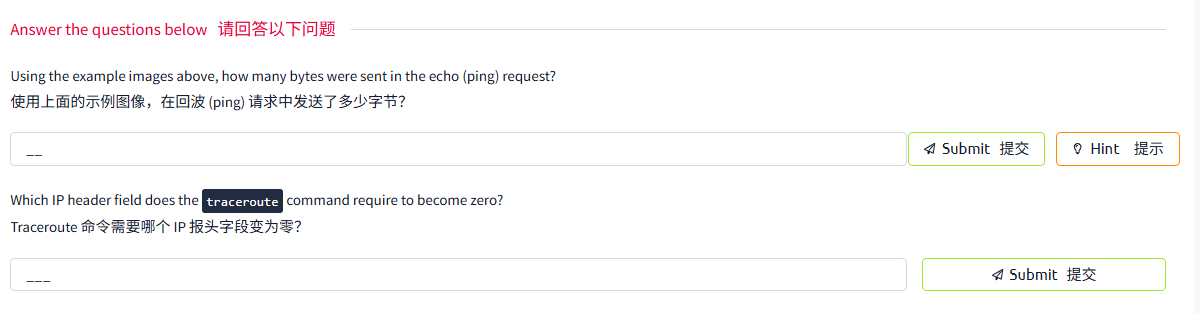
You may have never played ping-pong (table tennis) before; however, thanks to ICMP, you can now play it with the computer! The ping command sends an ICMP Echo Request (ICMP Type 8). The screenshot below shows the ICMP message within an IP packet.
你以前可能从未玩过乒乓球 (乒乓球); 然而,多亏了 ICMP, 你现在可以在计算机上玩了!ping 命令发送了一个 ICMP 回应请求 (ICMP Type 8)。下面的截图显示了 IP 数据包中的 ICMP 消息。
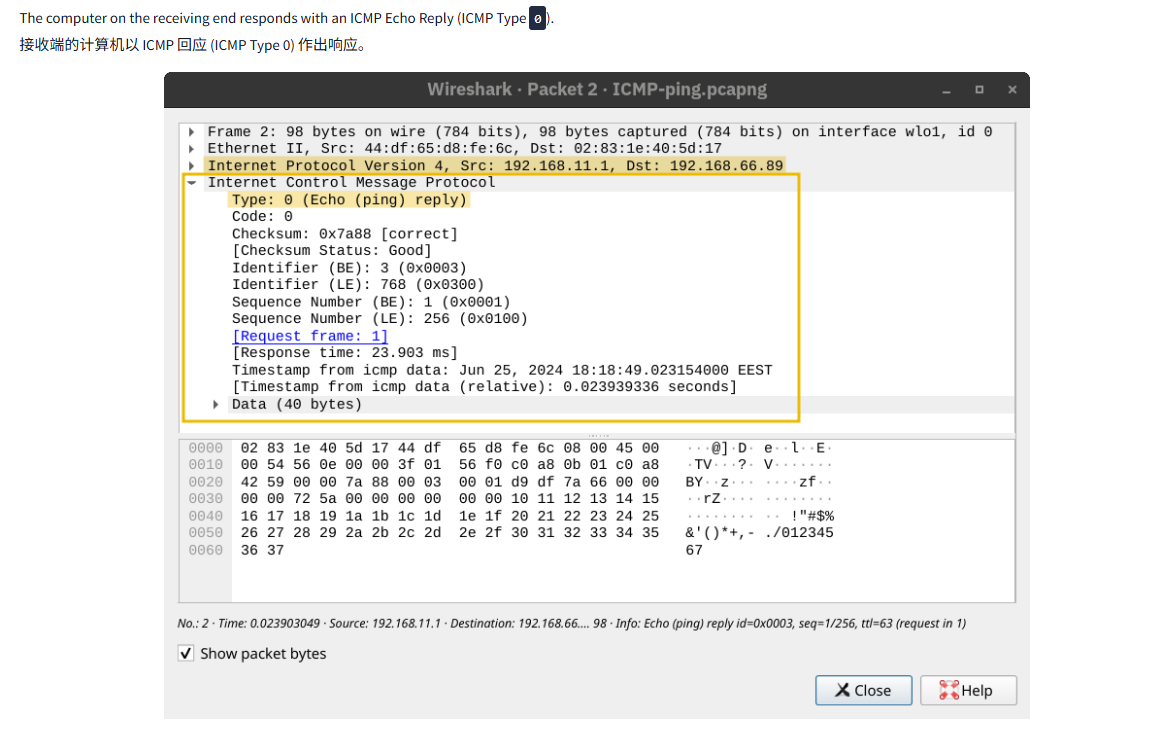
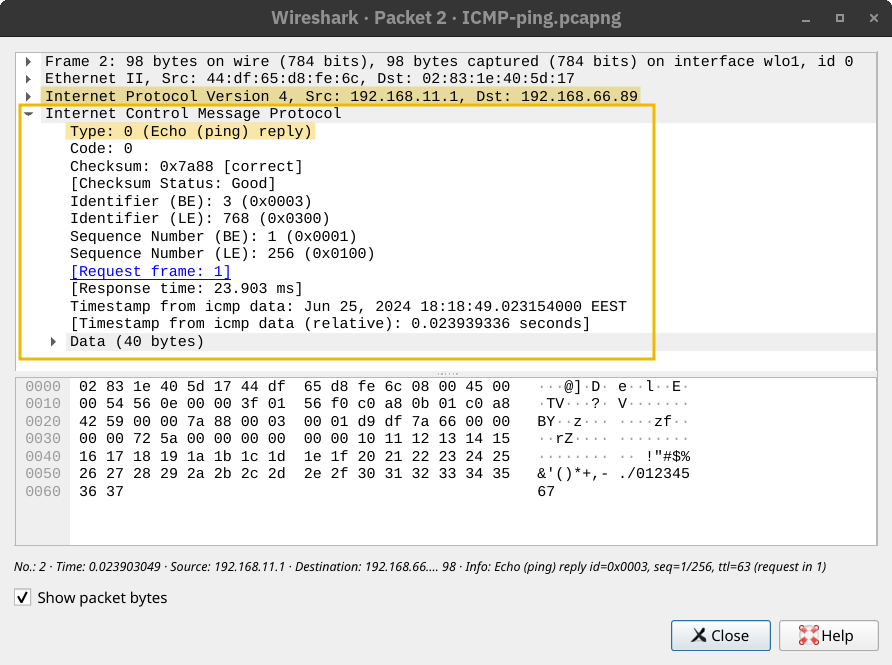
The computer on the receiving end responds with an ICMP Echo Reply (ICMP Type 0).
接收端的计算机以 ICMP 回应 (ICMP Type 0) 作出响应。
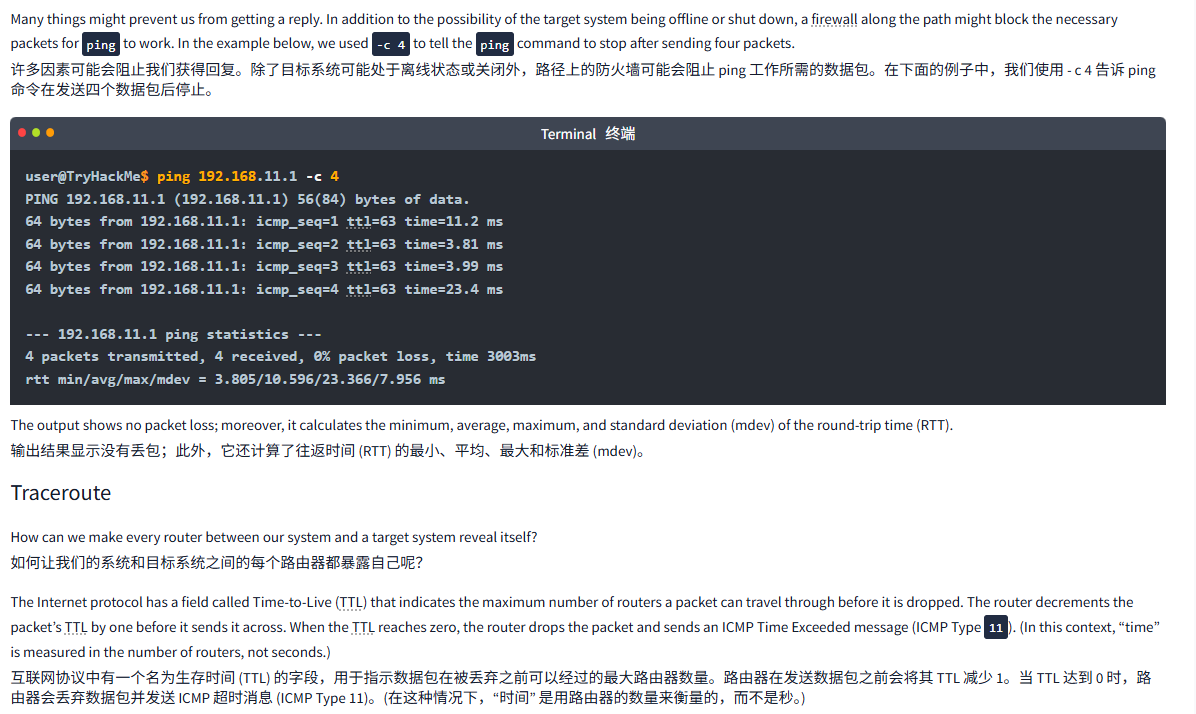
Many things might prevent us from getting a reply. In addition to the possibility of the target system being offline or shut down, a firewall along the path might block the necessary packets for ping to work. In the example below, we used -c 4 to tell the ping command to stop after sending four packets.
许多因素可能会阻止我们获得回复。除了目标系统可能处于离线状态或关闭外,路径上的防火墙可能会阻止 ping 工作所需的数据包。在下面的例子中,我们使用 - c 4 告诉 ping 命令在发送四个数据包后停止。
Terminal终端
user@TryHackMe$ ping 192.168.11.1 -c 4
PING 192.168.11.1 (192.168.11.1) 56(84) bytes of data.
64 bytes from 192.168.11.1: icmp_seq=1 ttl=63 time=11.2 ms
64 bytes from 192.168.11.1: icmp_seq=2 ttl=63 time=3.81 ms
64 bytes from 192.168.11.1: icmp_seq=3 ttl=63 time=3.99 ms
64 bytes from 192.168.11.1: icmp_seq=4 ttl=63 time=23.4 ms

--- 192.168.11.1 ping statistics ---
4 packets transmitted, 4 received, 0% packet loss, time 3003ms
rtt min/avg/max/mdev = 3.805/10.596/23.366/7.956 ms
The output shows no packet loss; moreover, it calculates the minimum, average, maximum, and standard deviation (mdev) of the round-trip time (RTT).
输出结果显示没有丢包;此外,它还计算了往返时间 (RTT) 的最小、平均、最大和标准差 (mdev)。
Traceroute
How can we make every router between our system and a target system reveal itself?
如何让我们的系统和目标系统之间的每个路由器都暴露自己呢?
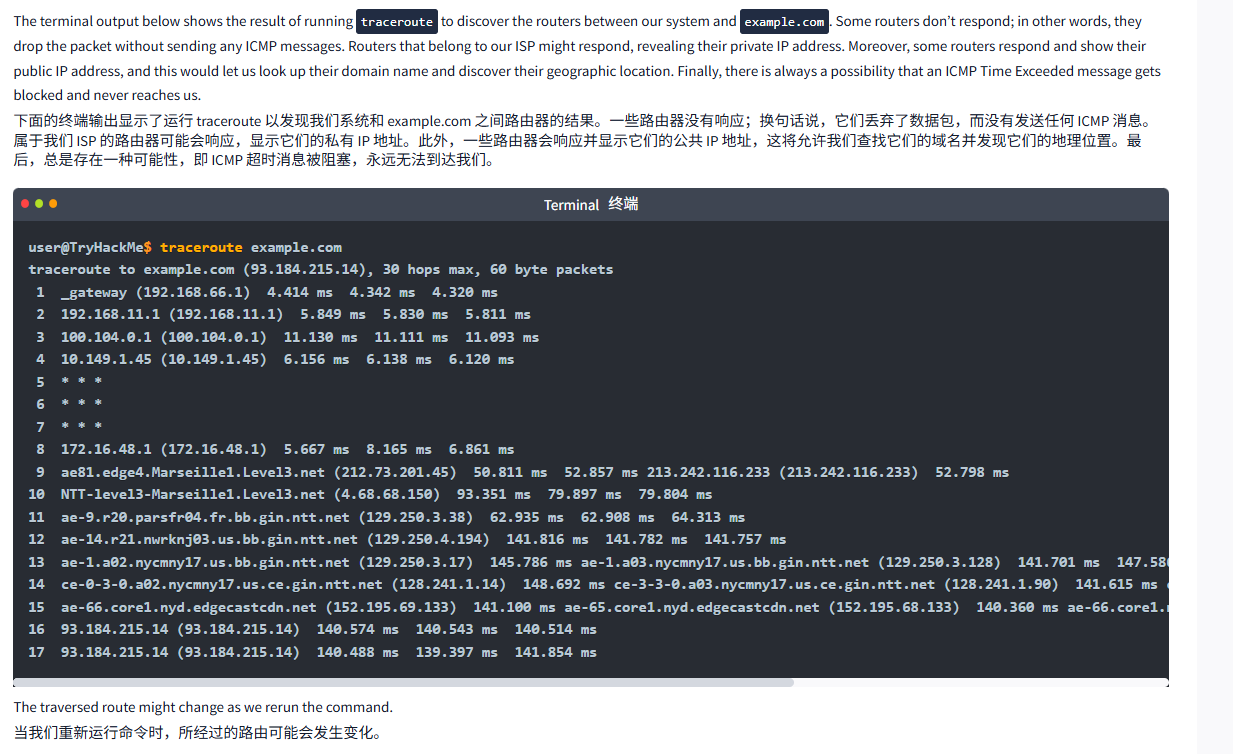
The Internet protocol has a field called Time-to-Live (TTL) that indicates the maximum number of routers a packet can travel through before it is dropped. The router decrements the packet’s TTL by one before it sends it across. When the TTL reaches zero, the router drops the packet and sends an ICMP Time Exceeded message (ICMP Type 11). (In this context, “time” is measured in the number of routers, not seconds.)
互联网协议中有一个名为生存时间 (TTL) 的字段,用于指示数据包在被丢弃之前可以经过的最大路由器数量。路由器在发送数据包之前会将其 TTL 减少 1。当 TTL 达到 0 时,路由器会丢弃数据包并发送 ICMP 超时消息 (ICMP Type 11)。(在这种情况下,“时间” 是用路由器的数量来衡量的,而不是秒。)
The terminal output below shows the result of running traceroute to discover the routers between our system and example.com. Some routers don’t respond; in other words, they drop the packet without sending any ICMP messages. Routers that belong to our ISP might respond, revealing their private IP address. Moreover, some routers respond and show their public IP address, and this would let us look up their domain name and discover their geographic location. Finally, there is always a possibility that an ICMP Time Exceeded message gets blocked and never reaches us.
下面的终端输出显示了运行 traceroute 以发现我们系统和 example.com 之间路由器的结果。一些路由器没有响应;换句话说,它们丢弃了数据包,而没有发送任何 ICMP 消息。属于我们 ISP 的路由器可能会响应,显示它们的私有 IP 地址。此外,一些路由器会响应并显示它们的公共 IP 地址,这将允许我们查找它们的域名并发现它们的地理位置。最后,总是存在一种可能性,即 ICMP 超时消息被阻塞,永远无法到达我们。
Terminal终端
user@TryHackMe$ traceroute example.com
traceroute to example.com (93.184.215.14), 30 hops max, 60 byte packets
 1  _gateway (192.168.66.1)  4.414 ms  4.342 ms  4.320 ms
 2  192.168.11.1 (192.168.11.1)  5.849 ms  5.830 ms  5.811 ms
 3  100.104.0.1 (100.104.0.1)  11.130 ms  11.111 ms  11.093 ms
 4  10.149.1.45 (10.149.1.45)  6.156 ms  6.138 ms  6.120 ms
 5  * * *
 6  * * *
 7  * * *
 8  172.16.48.1 (172.16.48.1)  5.667 ms  8.165 ms  6.861 ms
 9  ae81.edge4.Marseille1.Level3.net (212.73.201.45)  50.811 ms  52.857 ms 213.242.116.233 (213.242.116.233)  52.798 ms
10  NTT-level3-Marseille1.Level3.net (4.68.68.150)  93.351 ms  79.897 ms  79.804 ms
11  ae-9.r20.parsfr04.fr.bb.gin.ntt.net (129.250.3.38)  62.935 ms  62.908 ms  64.313 ms
12  ae-14.r21.nwrknj03.us.bb.gin.ntt.net (129.250.4.194)  141.816 ms  141.782 ms  141.757 ms
13  ae-1.a02.nycmny17.us.bb.gin.ntt.net (129.250.3.17)  145.786 ms ae-1.a03.nycmny17.us.bb.gin.ntt.net (129.250.3.128)  141.701 ms  147.586 ms
14  ce-0-3-0.a02.nycmny17.us.ce.gin.ntt.net (128.241.1.14)  148.692 ms ce-3-3-0.a03.nycmny17.us.ce.gin.ntt.net (128.241.1.90)  141.615 ms ce-0-3-0.a02.nycmny17.us.ce.gin.ntt.net (128.241.1.14)  148.168 ms
15  ae-66.core1.nyd.edgecastcdn.net (152.195.69.133)  141.100 ms ae-65.core1.nyd.edgecastcdn.net (152.195.68.133)  140.360 ms ae-66.core1.nyd.edgecastcdn.net (152.195.69.133)  140.638 ms
16  93.184.215.14 (93.184.215.14)  140.574 ms  140.543 ms  140.514 ms
17  93.184.215.14 (93.184.215.14)  140.488 ms  139.397 ms  141.854 ms
The traversed route might change as we rerun the command.
当我们重新运行命令时,所经过的路由可能会发生变化。
问题
答案
Task5 Routing 路由
图片版

文字版
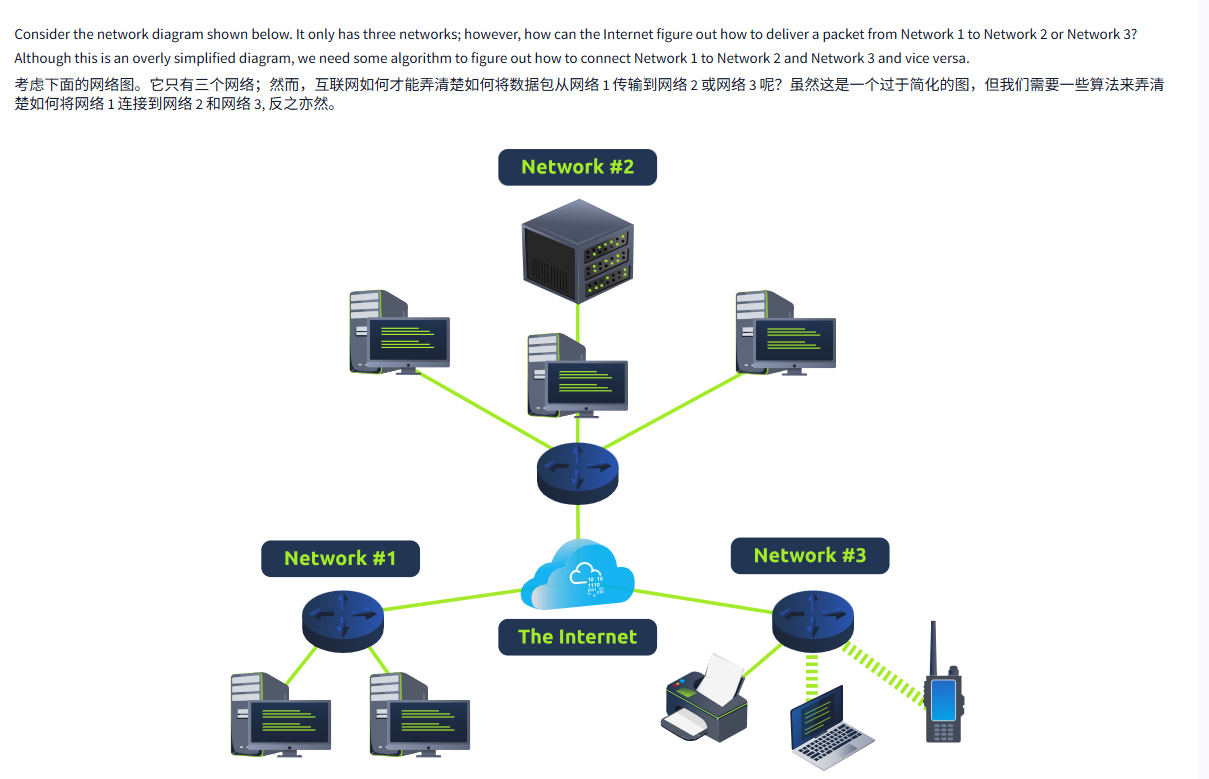
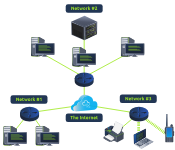
Consider the network diagram shown below. It only has three networks; however, how can the Internet figure out how to deliver a packet from Network 1 to Network 2 or Network 3? Although this is an overly simplified diagram, we need some algorithm to figure out how to connect Network 1 to Network 2 and Network 3 and vice versa.
考虑下面的网络图。它只有三个网络;然而,互联网如何才能弄清楚如何将数据包从网络 1 传输到网络 2 或网络 3 呢?虽然这是一个过于简化的图,但我们需要一些算法来弄清楚如何将网络 1 连接到网络 2 和网络 3, 反之亦然。
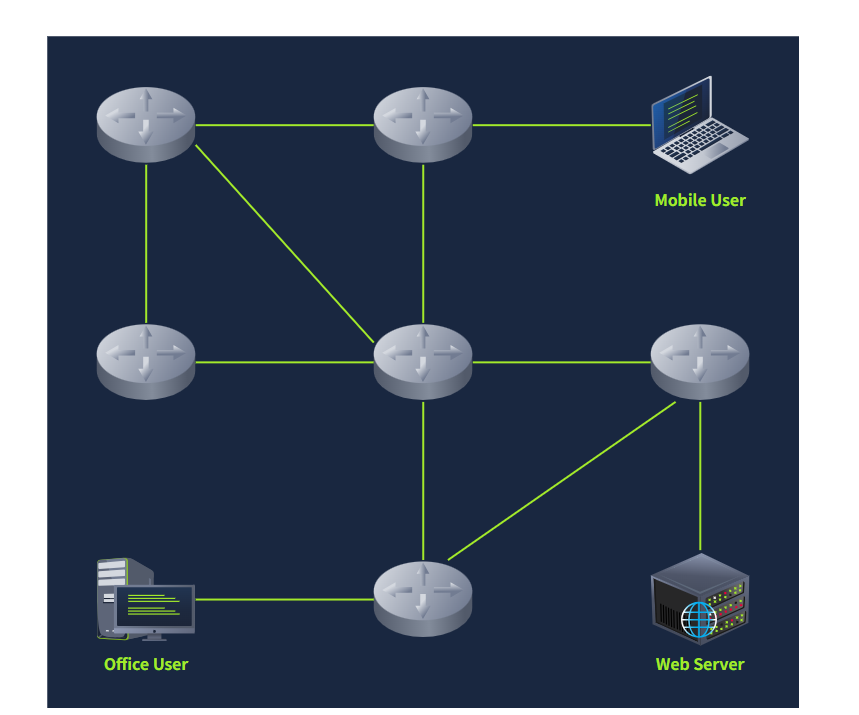
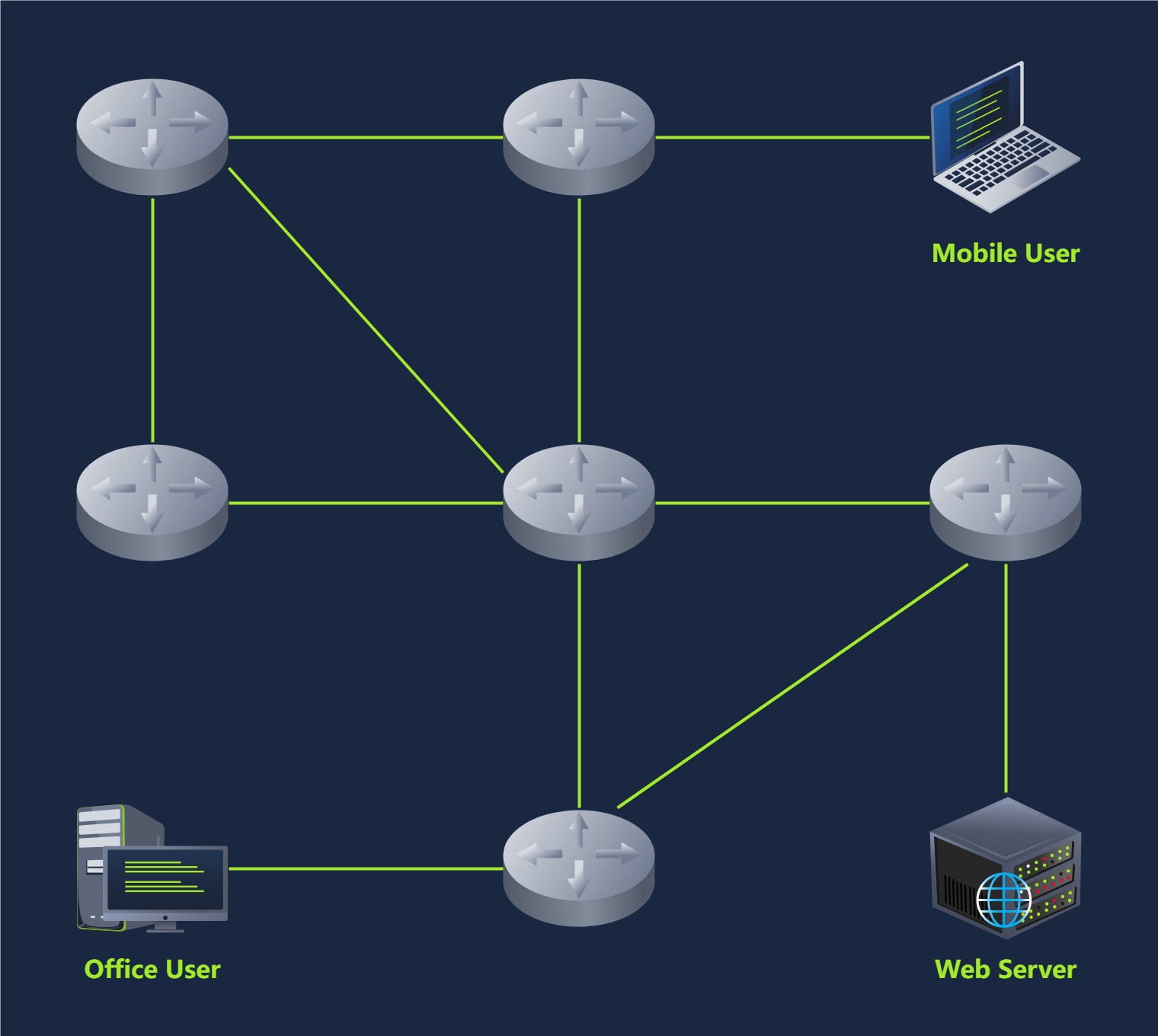
Let’s consider a more detailed diagram. The Internet would be millions of routers and billions of devices. The network below is a tiny subset of the Internet. The mobile user can reach the web server; however, for this to happen, each router across the path needs to send the packets via the appropriate link. Obviously, there is more than one path, i.e., route, connecting the mobile user and the web server. We need a routing algorithm for the router to figure out which link to use.
让我们考虑一个更详细的图表。互联网将由数百万个路由器和数十亿台设备组成。下面的网络只是互联网的一个微小子集。移动用户可以到达 Web 服务器;然而,为了实现这一点,路径上的每个路由器都需要通过适当的链路发送数据包。显然,有不止一条路径,即连接移动用户和 Web 服务器的路由。我们需要一个路由算法来让路由器决定使用哪个链路。
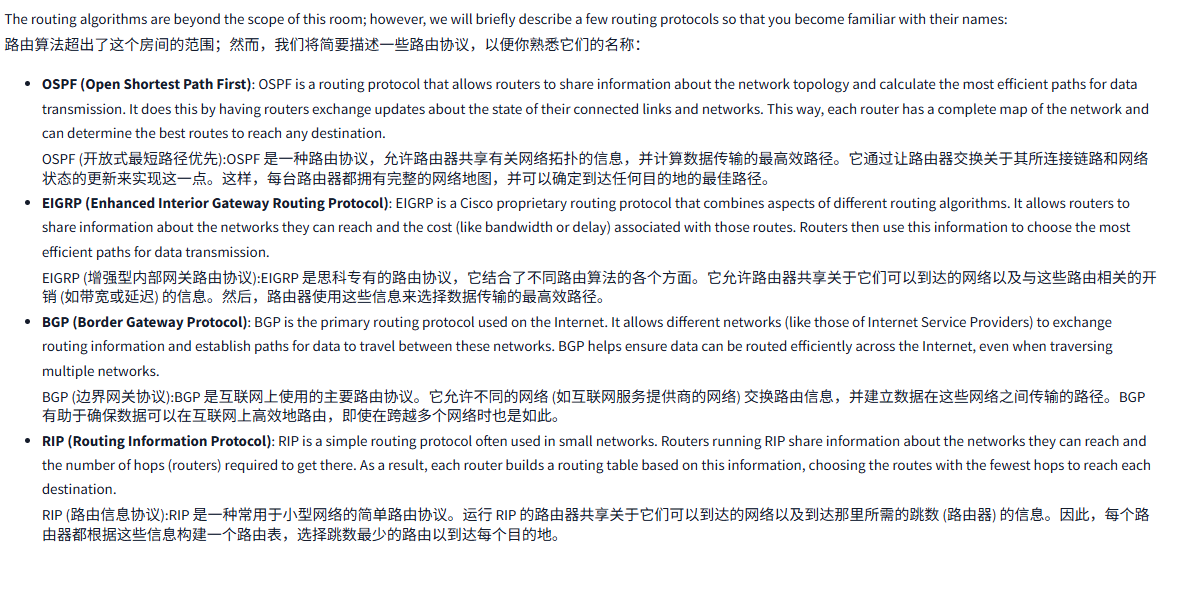
The routing algorithms are beyond the scope of this room; however, we will briefly describe a few routing protocols so that you become familiar with their names:
路由算法超出了这个房间的范围;然而,我们将简要描述一些路由协议,以便你熟悉它们的名称:
- OSPF (Open Shortest Path First): OSPF is a routing protocol that allows routers to share information about the network topology and calculate the most efficient paths for data transmission. It does this by having routers exchange updates about the state of their connected links and networks. This way, each router has a complete map of the network and can determine the best routes to reach any destination.
OSPF (开放式最短路径优先):OSPF 是一种路由协议,允许路由器共享有关网络拓扑的信息,并计算数据传输的最高效路径。它通过让路由器交换关于其所连接链路和网络状态的更新来实现这一点。这样,每台路由器都拥有完整的网络地图,并可以确定到达任何目的地的最佳路径。 - EIGRP (Enhanced Interior Gateway Routing Protocol): EIGRP is a Cisco proprietary routing protocol that combines aspects of different routing algorithms. It allows routers to share information about the networks they can reach and the cost (like bandwidth or delay) associated with those routes. Routers then use this information to choose the most efficient paths for data transmission.
EIGRP (增强型内部网关路由协议):EIGRP 是思科专有的路由协议,它结合了不同路由算法的各个方面。它允许路由器共享关于它们可以到达的网络以及与这些路由相关的开销 (如带宽或延迟) 的信息。然后,路由器使用这些信息来选择数据传输的最高效路径。 - BGP (Border Gateway Protocol): BGP is the primary routing protocol used on the Internet. It allows different networks (like those of Internet Service Providers) to exchange routing information and establish paths for data to travel between these networks. BGP helps ensure data can be routed efficiently across the Internet, even when traversing multiple networks.
BGP (边界网关协议):BGP 是互联网上使用的主要路由协议。它允许不同的网络 (如互联网服务提供商的网络) 交换路由信息,并建立数据在这些网络之间传输的路径。BGP 有助于确保数据可以在互联网上高效地路由,即使在跨越多个网络时也是如此。 - RIP (Routing Information Protocol): RIP is a simple routing protocol often used in small networks. Routers running RIP share information about the networks they can reach and the number of hops (routers) required to get there. As a result, each router builds a routing table based on this information, choosing the routes with the fewest hops to reach each destination.
RIP (路由信息协议):RIP 是一种常用于小型网络的简单路由协议。运行 RIP 的路由器共享关于它们可以到达的网络以及到达那里所需的跳数 (路由器) 的信息。因此,每个路由器都根据这些信息构建一个路由表,选择跳数最少的路由以到达每个目的地。
问题

答案

Task6 NAT 地址转换
图片版
文字版
As discussed in the Networking Concepts room, we calculated that IPv4 can support a maximum of four billion devices. With the increase in the number of devices connected to the Internet, from computers and smartphones to security cameras and washing machines, it was clear that the IPv4 address space would be depleted quickly. One solution to address depletion is Network Address Translation (NAT).
正如在网络概念室讨论的那样,我们计算出 IPv4 最多可以支持 40 亿台设备。随着连接互联网的设备数量的增加,从计算机和智能手机到安全摄像头和洗衣机,很明显 IPv4 地址空间将迅速耗尽。一种解决地址耗尽的方案是网络地址转换 (NAT)。
The idea behind NAT lies in using one public IP address to provide Internet access to many private IP addresses. In other words, if you are connecting a company with twenty computers, you can provide Internet access to all twenty computers by using a single public IP address instead of twenty public IP addresses. (Note: Technically speaking, the number of IP addresses is always expressed as a power of two. To be technically accurate, with NAT, you reserve two public IP addresses instead of thirty-two. Consequently, you would have saved thirty public IP addresses.)
NAT 背后的思想是使用一个公共 IP 地址为多个私有 IP 地址提供互联网访问。换句话说,如果你正在连接一家拥有 20 台计算机的公司,你可以通过使用一个公共 IP 地址而不是 20 个公共 IP 地址为所有 20 台计算机提供互联网访问。(注意:从技术角度来说,IP 地址的数量总是表示为 2 的幂。为了技术上的准确性,使用 NAT 时,你预留了两个公共 IP 地址,而不是 32 个。因此,你将节省 30 个公共 IP 地址。)
Unlike routing, which is the natural way to route packets to the destination host, routers that support NAT must find a way to track ongoing connections. Consequently, NAT-supporting routers maintain a table translating network addresses between internal and external networks. Generally, the internal network would use a private IP address range, while the external network would use a public IP address.
与路由不同,路由是将数据包路由到目标主机的自然方式,而支持 NAT 的路由器必须找到一种方法来跟踪正在进行的连接。因此,支持 NAT 的路由器维护一个表,用于在内部网络和外部网络之间转换网络地址。通常,内部网络使用私有 IP 地址范围,而外部网络则使用公共 IP 地址。
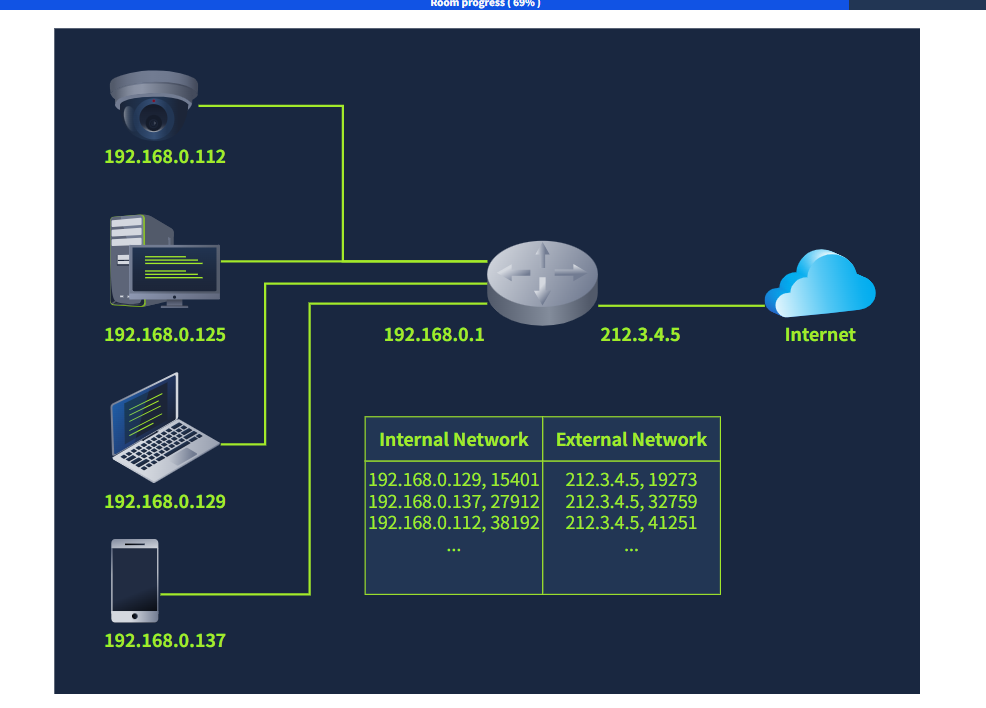
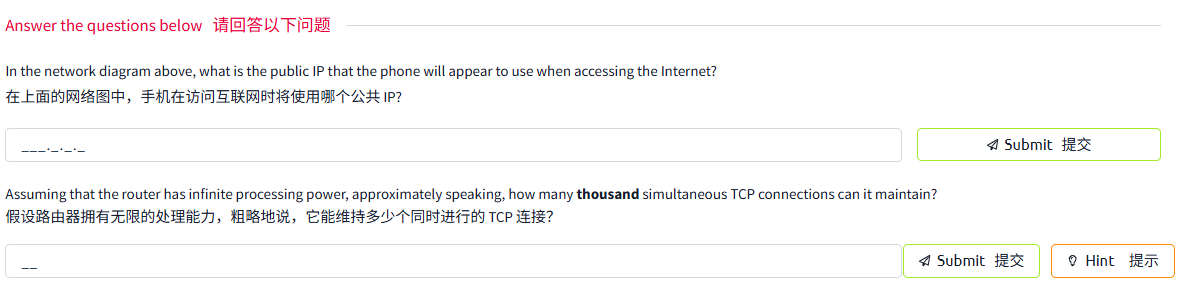
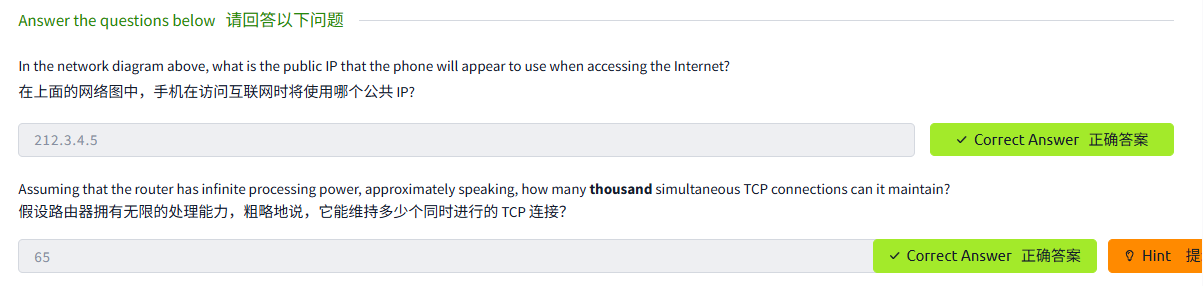
In the diagram below, multiple devices access the Internet via a router that supports NAT. The router maintains a table that maps the internal IP address and port number with its external IP address and port number. For instance, the laptop might establish a connection with some web server. From the laptop perspective, the connection is initiated from its IP address 192.168.0.129 from TCP source port number 15401; however, the web server will see this same connection as being established from 212.3.4.5 and TCP port number 19273, as shown in the translation table. The router does this address translation seamlessly.
在下图中,多台设备通过支持 NAT 的路由器访问互联网。路由器维护一个表,将内部 IP 地址和端口号映射到外部 IP 地址和端口号。例如,笔记本电脑可能会与某个 Web 服务器建立连接。从笔记本电脑的角度来看,该连接是从其 IP 地址 192.168.0.129 和 TCP 源端口号 15401 发起的;然而,Web 服务器将看到这个连接是从 212.3.4.5 和 TCP 端口号 19273 建立的,如翻译表所示。路由器可以无缝地翻译这个地址。
问题
答案
Task7 Closing Notes 结语
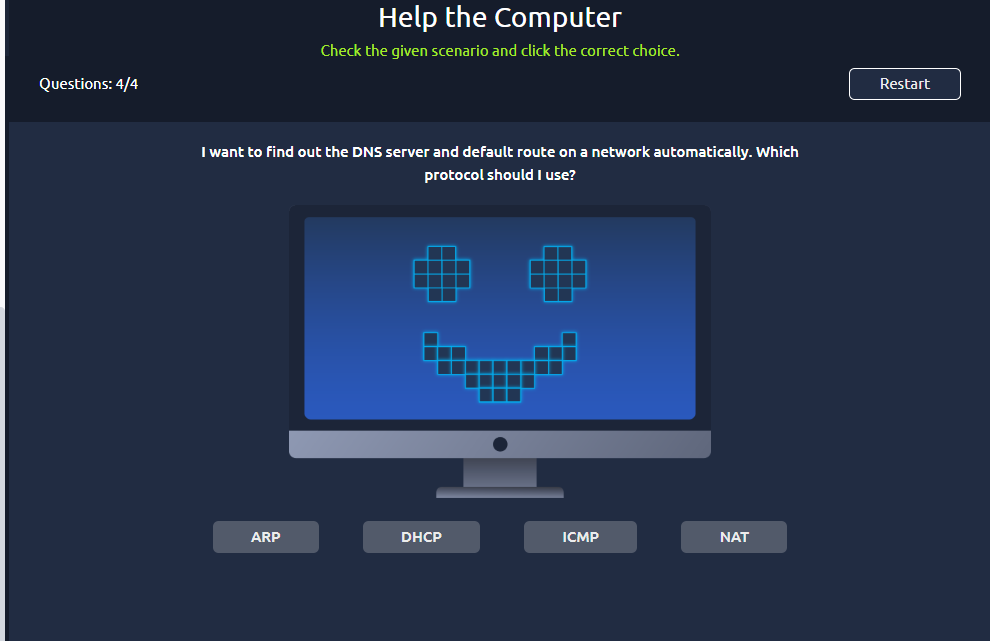
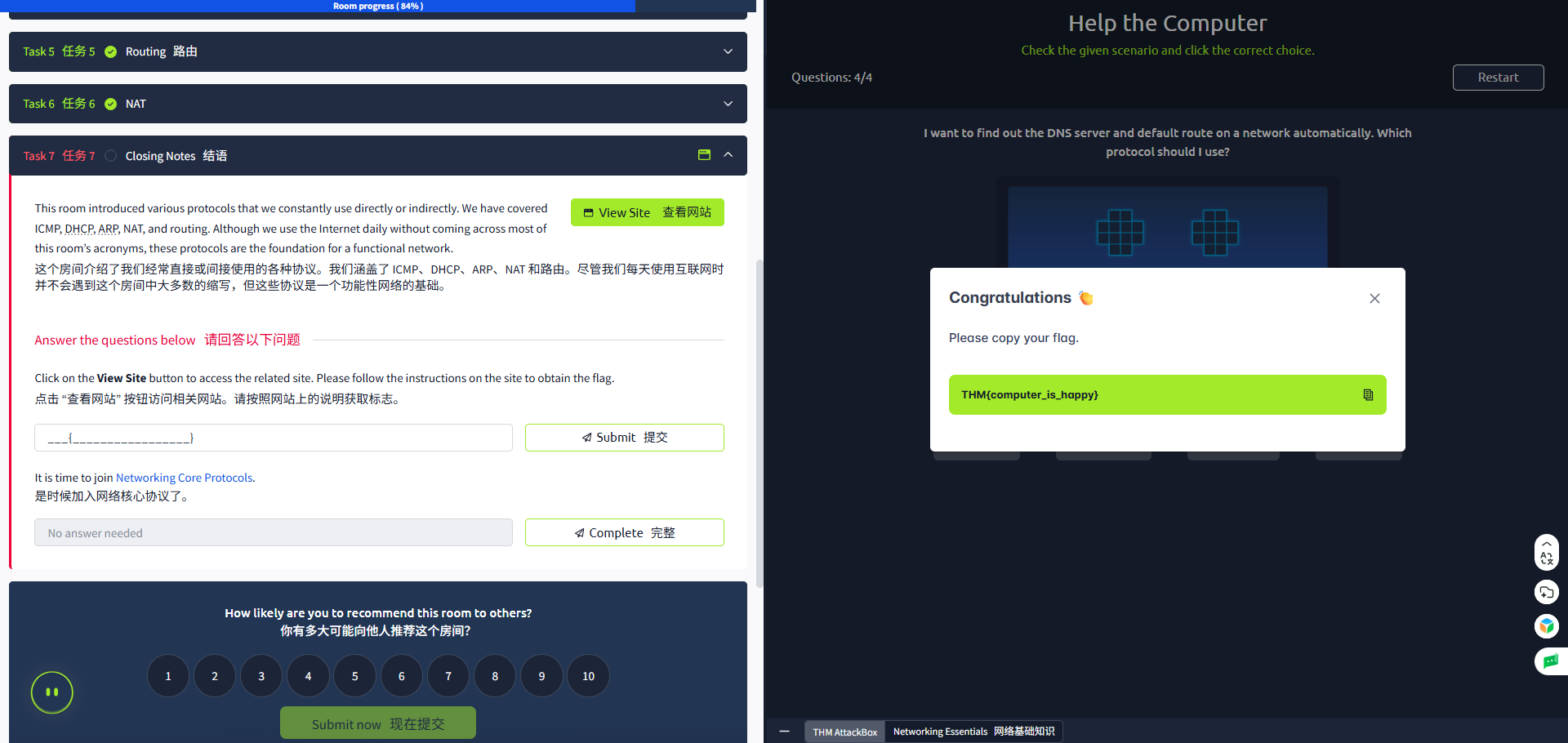
arp
nat
icmp
dhcp

汇聚全球AI编程工具,助力开发者即刻编程。
更多推荐

 22
22 0
0- 0


 已为社区贡献1条内容

所有评论(0)