
[性能优化] C# Formatted String 特性
·
更好的阅读体验,可查看 C# Formatted String 特性
FormattableString 是 C# 6.0 中引入的新类型之一,可以避免在非必要情况下执行了格式化字符串带来的性能开销。
使用如下示例如下,可以看出 FormattableString 将需要格式化的字符串创建和真正的格式化操作进行了拆分:
string name = "张三";
int age = 30;
decimal weight = 60.5m;

// 创建一个 FormattableString
FormattableString message = $"{name} 年龄 {age},体重 {weight} 公斤。";

// 将 FormattableString 转换为 string 类型
string formattedMessage = message.ToString();

// 输出结果
Console.WriteLine(formattedMessage);
Performance
对于一些函数,需要在运行时判断是否需要输出 string,可以使用 FormattableString 保证格式化仅在真正需要使用 string 时才执行。这可以带来性能提升。
如下性能测试函数:
[Test, Performance, Category("String")]
public void String_NotReallyOutput()
{
    var unit = SampleUnit.Microsecond;

    var outputStr = new MeasurementSettings(10, 10, 100, "Output using string", unit);
    var outputFormattedStr = new MeasurementSettings(10, 10, 100, "Output using formatted string", unit);

    void FakeOutput(string str) { if (false) Debug.Log(str); }
    void FormattedFakeOutput(FormattableString fStr) { if (false) Debug.Log(fStr.ToString()); }

    int age = 23, times = 25;
    Measure.Method(() =>
    {
        FakeOutput($"Hello World with age {age} with times {times} ");
    }, outputStr).Run();

    Measure.Method(() =>
    {
        FormattedFakeOutput($"Hello World with age {age} with times {times} ");
    }, outputFormattedStr).Run();
}
使用 FormattableString 的版本因为避免了格式化操作的进行,带来了约 5 倍的收益: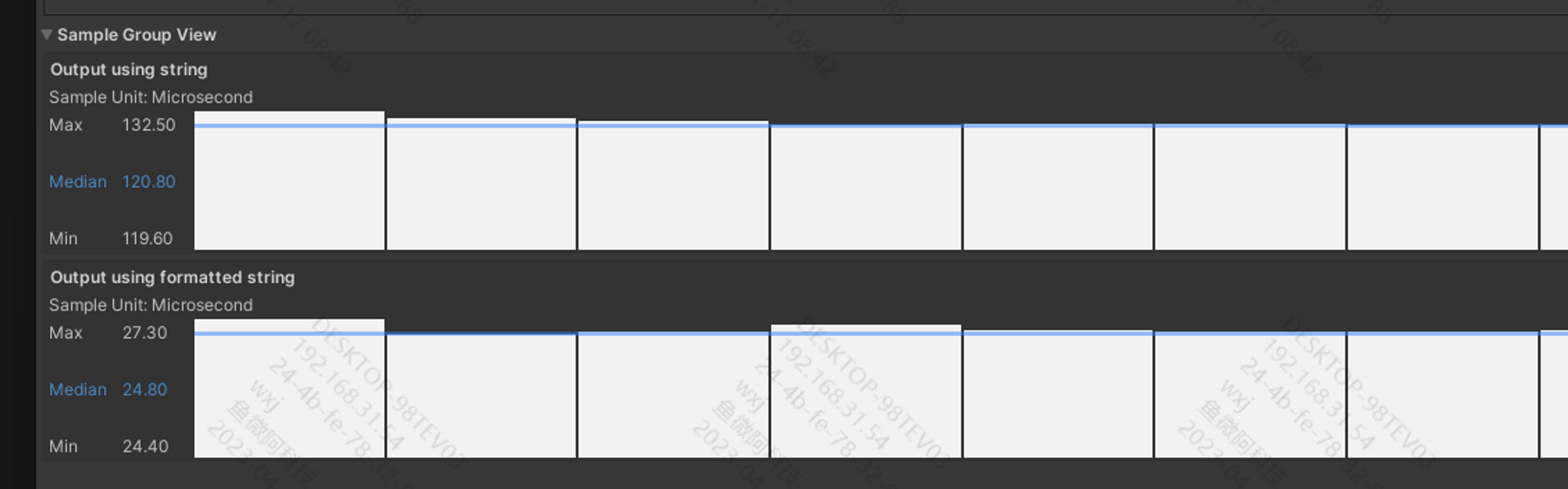
即使真正需要执行 String 格式化时,使用 FormattableString 也不会带来性能劣化,如下性能测试代码:
[Test, Performance, Category("String")]
public void String_ReallyOutput()
{
    var unit = SampleUnit.Microsecond;

    var outputStr = new MeasurementSettings(10, 10, 100, "Output using string", unit);
    var outputFormattedStr = new MeasurementSettings(10, 10, 100, "Output using formatted string", unit);

    void FakeOutput(string str)
    {
        if (true) Debug.Log(str);
    }

    void FormattedFakeOutput(FormattableString fStr)
    {
        if (true) Debug.Log(fStr.ToString());
    }

    int age = 23, times = 25;

    Measure.Method(() =>
    {
        FakeOutput($"Hello World with age {age} with times {times} ");
    }, outputStr).Run();

    Measure.Method(() =>
    {
        FormattedFakeOutput($"Hello World with age {age} with times {times} ");
    }, outputFormattedStr).Run();
}
性能测试结果为: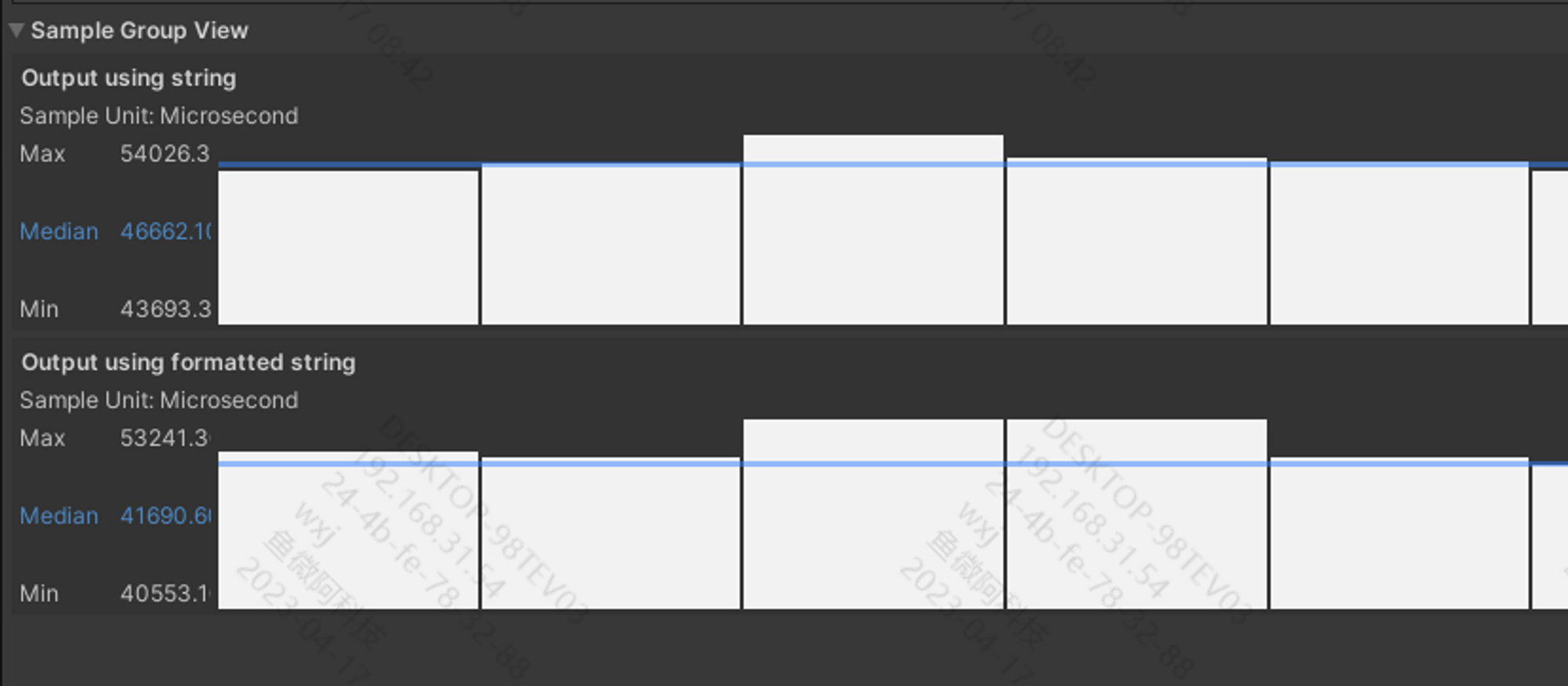
但是如果在不需要进行格式化时,强制使用 FormattableString 则会带来性能劣化。
如下代码,可以看到针对字符串实际上并没有需要拼接的数据,但对于 Formattted 版本的函数,为了保证形参为 FormattableString 仍然加上了 $ 符:
[Test, Performance, Category("String"), TestCase(true), TestCase(false)]
public void String_UseZeroArgument(bool reallyOutput)
{
    MeasurementSettings outputStr = new(10, 10, 100, "Output using string", s_Unit);
    MeasurementSettings outputFormattedStr = new(10, 10, 100, "Output using formatted string", s_Unit);

    Measure.Method(() =>
    {
        if (reallyOutput)
            ReallyOutput("Hello World");
        else
            FakeOutput("Hello World");
    }, outputStr).Run();

    Measure.Method(() =>
    {
        if (reallyOutput)
            ReallyFormattedOutput($"Hello World");
        else
            FakeFormattedOutput($"Hello World");
    }, outputFormattedStr).Run();
}
此时,FormattableString 版本的函数在实际不需要输出时带来了约 10 倍的性能恶化: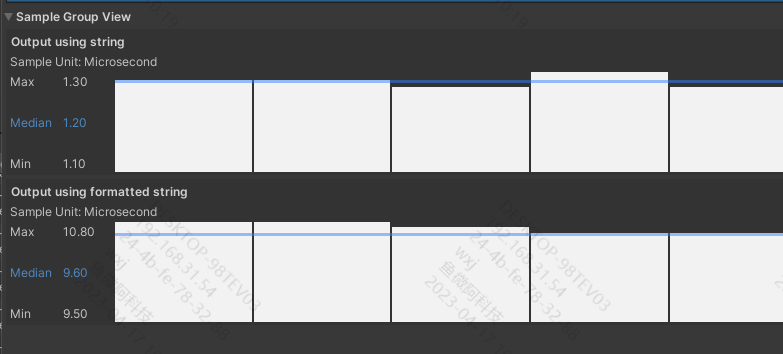
Override
尽可能的避免 string 和 FormattableString 的函数重载,因为编译器会优先选择 string 形参的版本,且在一些操作时可能会隐式的将 FormattableString 转换为 string,进而导致与预期违背的行为产生。
如下示例代码:
// DO NOT
void Sample(string value) => throw null;
void Sample(FormattableString value) => throw null;

Sample($"Hello {name}");
// ⚠ Call Sample(string)

Sample((FormattableString)$"Hello {name}");
// Call Sample(FormattableString) because of the explicit cast

Sample((FormattableString)$"Hello {name}" + "!");
// Call Sample(string) because the operator FormattableString + string returns a string
Reference

汇聚全球AI编程工具,助力开发者即刻编程。
更多推荐

 8
8 0
0- 0


 已为社区贡献1条内容

所有评论(0)