
【热点文章-实时计算】kafkaStream
·
实时计算与定时计算
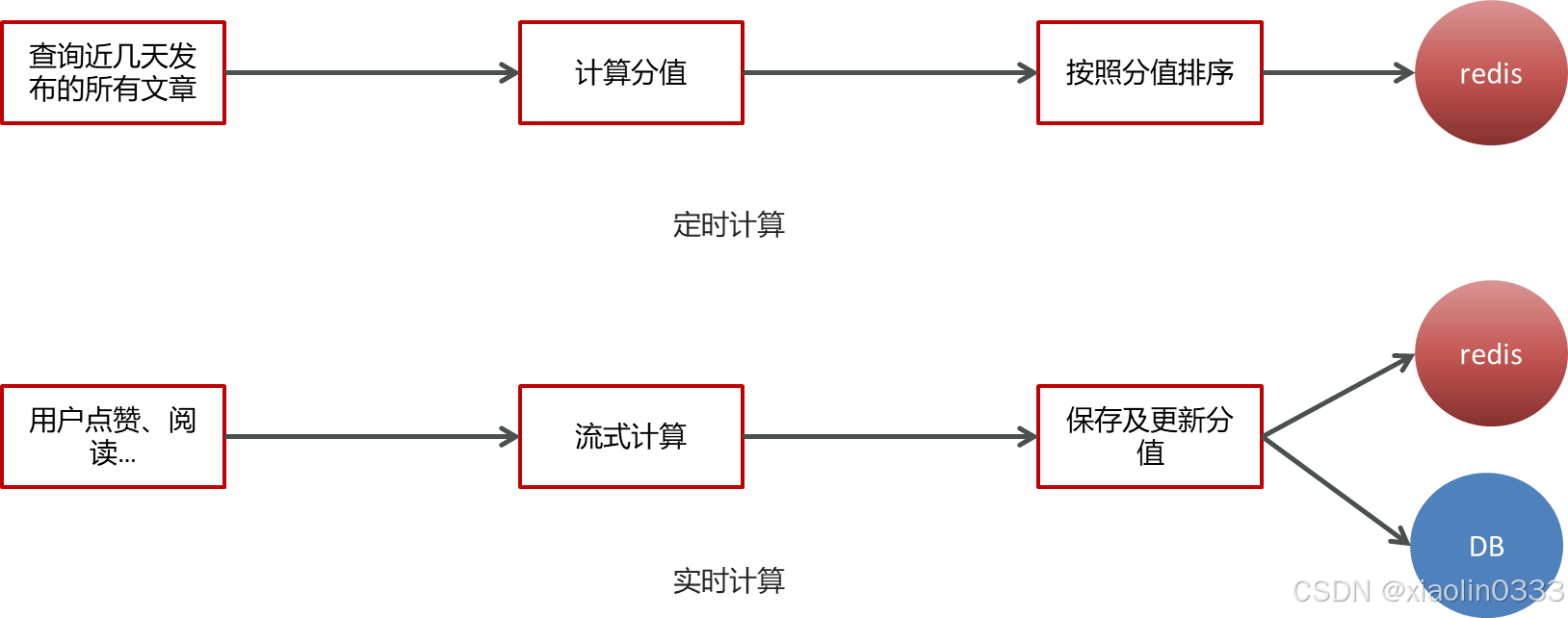
定时计算是争对首页推荐文章更新
实时计算是争对点赞、收藏数的
流式计算应用场景
- 日志分析:网站的用户访问日志进行实时的分析,计算访问量、用户画像、留存率等。实时的进行数据分析。
- 大屏看板统计:实时的查看网站注册数量,订单数量,购买数量,金额等。
- 公交的实时数据:可以随时更新公交车方位,计算多久到达站牌。
- 实时文章热度计算:头条类文章的分值计算,通过用户的行为实时更新文章的分值,分值越高的就越被推荐。
Kafka Stream
提供了对存储于Kafka内的数据进行流式处理和分析的功能。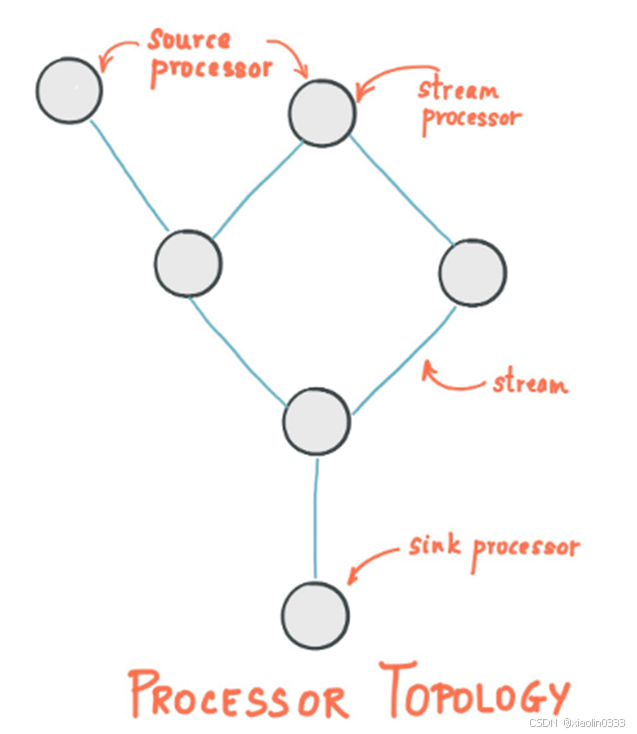
源处理器(Source Processor):消息的生产者(可以有多个),发送消息给Stream流式处理,Stream汇总数据后往下游发送给当前某个topic。
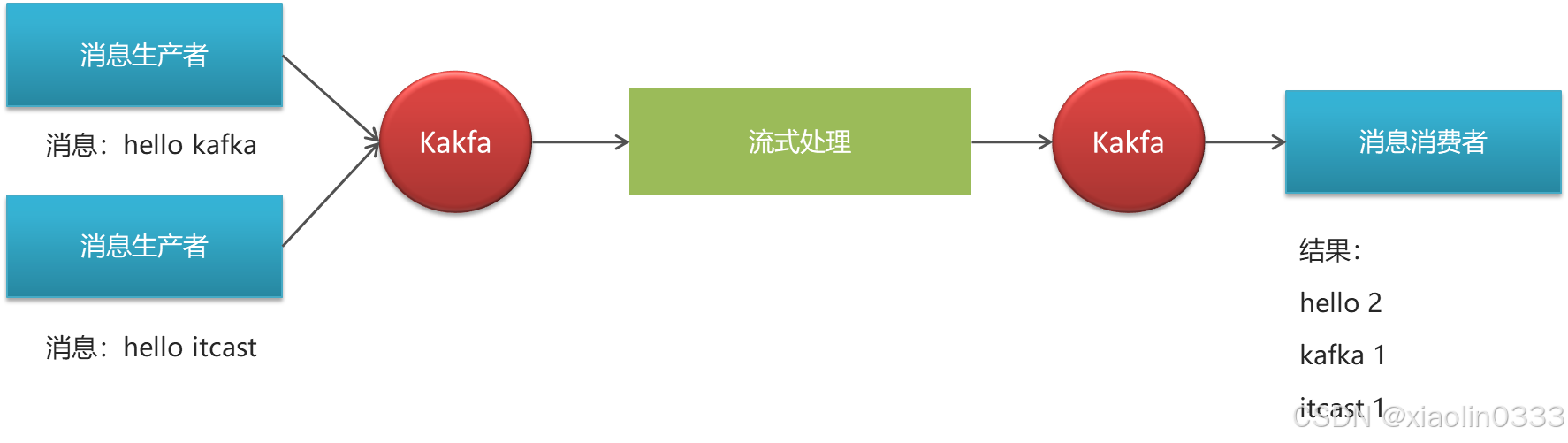
案例. 统计单词个数
- 引入依赖
<dependency>
   <groupId>org.apache.kafka</groupId>
   <artifactId>kafka-streams</artifactId>
</dependency>
- 编写流式处理代码
/**
 * 流式处理
 */
public class KafkaStreamQuickStart {
    public static void main(String[] args) {
        // 0. kafka的配置信息
        Properties prop = new Properties();
        prop.put(StreamsConfig.BOOTSTRAP_SERVERS_CONFIG, "192.168.140.102:9092"); // 连接地址
        prop.put(StreamsConfig.DEFAULT_KEY_SERDE_CLASS_CONFIG, Serdes.String().getClass()); // key的序列化器
        prop.put(StreamsConfig.DEFAULT_VALUE_SERDE_CLASS_CONFIG, Serdes.String().getClass()); // value的序列化器
        prop.put(StreamsConfig.APPLICATION_ID_CONFIG, "streams-quickstart"); // 应用名称
        // 0. stream构建器
        StreamsBuilder streamsBuilder = new StreamsBuilder();

        // 流式计算
        streamProcessor(streamsBuilder);

        // 1. 创建KafkaStream对象
        KafkaStreams streams = new KafkaStreams(streamsBuilder.build(), prop);
        // 2. 开启流失计算
        streams.start();
    }

    /**
     * 流式计算
     * 消息的内容:hello kafka
     * @param streamsBuilder
     */
    private static void streamProcessor(StreamsBuilder streamsBuilder) {
        // 创建Kstream对象,同时指定从哪个topic中接收消息
        KStream<String, String> stream = streamsBuilder.stream("xiaolin0333-topic-input");
        /**
         * 处理消息的value
         */
        stream.flatMapValues(value -> Arrays.asList(value.split(" ")))
                .groupBy((key, value) -> value) // 按照value分组聚合处理
                .windowedBy(TimeWindows.of(Duration.ofSeconds(10))) // 时间窗口设置(每10s聚合一次)
                .count() // 聚合计算:统计单词的个数
                .toStream() // 转化为KStream对象
                .map((key, value) -> new KeyValue<>(key.key().toString(), value.toString())) // 处理后结果key和value转化为字符串
                .to("xiaolin0333-topic-out"); // 发送消息

    }
}
- 测试
- 生产者在topic为xiaolin0333-topic-input中发送多条消息
- 消费者接收topic为xiaolin0333-topic-out
通过流式计算,把生产者的多条消息汇总成一条发送到消费者中输出
springboot集成kafkaStream
- 添加配置
@Data
@Configuration
@EnableKafkaStreams // 开启KafkaStream
@ConfigurationProperties(prefix="kafka")
public class KafkaStreamConfig {
    private static final int MAX_MESSAGE_SIZE = 16* 1024 * 1024;
    private String hosts;
    private String group;
    @Bean(name = KafkaStreamsDefaultConfiguration.DEFAULT_STREAMS_CONFIG_BEAN_NAME)
    public KafkaStreamsConfiguration defaultKafkaStreamsConfig() {
        Map<String, Object> props = new HashMap<>();
        props.put(StreamsConfig.BOOTSTRAP_SERVERS_CONFIG, hosts);
        props.put(StreamsConfig.APPLICATION_ID_CONFIG, this.getGroup()+"_stream_aid");
        props.put(StreamsConfig.CLIENT_ID_CONFIG, this.getGroup()+"_stream_cid");
        props.put(StreamsConfig.RETRIES_CONFIG, 10);
        props.put(StreamsConfig.DEFAULT_KEY_SERDE_CLASS_CONFIG, Serdes.String().getClass());
        props.put(StreamsConfig.DEFAULT_VALUE_SERDE_CLASS_CONFIG, Serdes.String().getClass());
        return new KafkaStreamsConfiguration(props);
    }
}
kafka:
  hosts: 192.168.140.102:9092
  group: ${spring.application.name}
- 在配置类中定义方法:
@Configuration
@Slf4j
public class KafkaStreamHelloListener {
    @Bean
    public KStream<String, String> kStream(StreamsBuilder streamsBuilder) {
        // 创建Kstream对象,同时指定从哪个topic中接收消息
        KStream<String, String> stream = streamsBuilder.stream("xiaolin0333-topic-input");
        /**
         * 处理消息的value
         */
        stream.flatMapValues(value -> Arrays.asList(value.split(" ")))
                .groupBy((key, value) -> value) // 按照value分组聚合处理
                .windowedBy(TimeWindows.of(Duration.ofSeconds(10))) // 时间窗口设置(每10s聚合一次)
                .count() // 聚合计算:统计单词的个数
                .toStream() // 转化为KStream对象
                .map((key, value) -> new KeyValue<>(key.key().toString(), value.toString())) // 处理后结果key和value转化为字符串
                .to("xiaolin0333-topic-out"); // 发送消息
        return stream;
    }
}
应用:热点文章实时计算
用户点赞、阅读、评论、收藏后,发送消息给kafkastream,更新数据库的数量,重新计算文章分值,更新对应频道的缓存数据以及推荐对应的热点数据。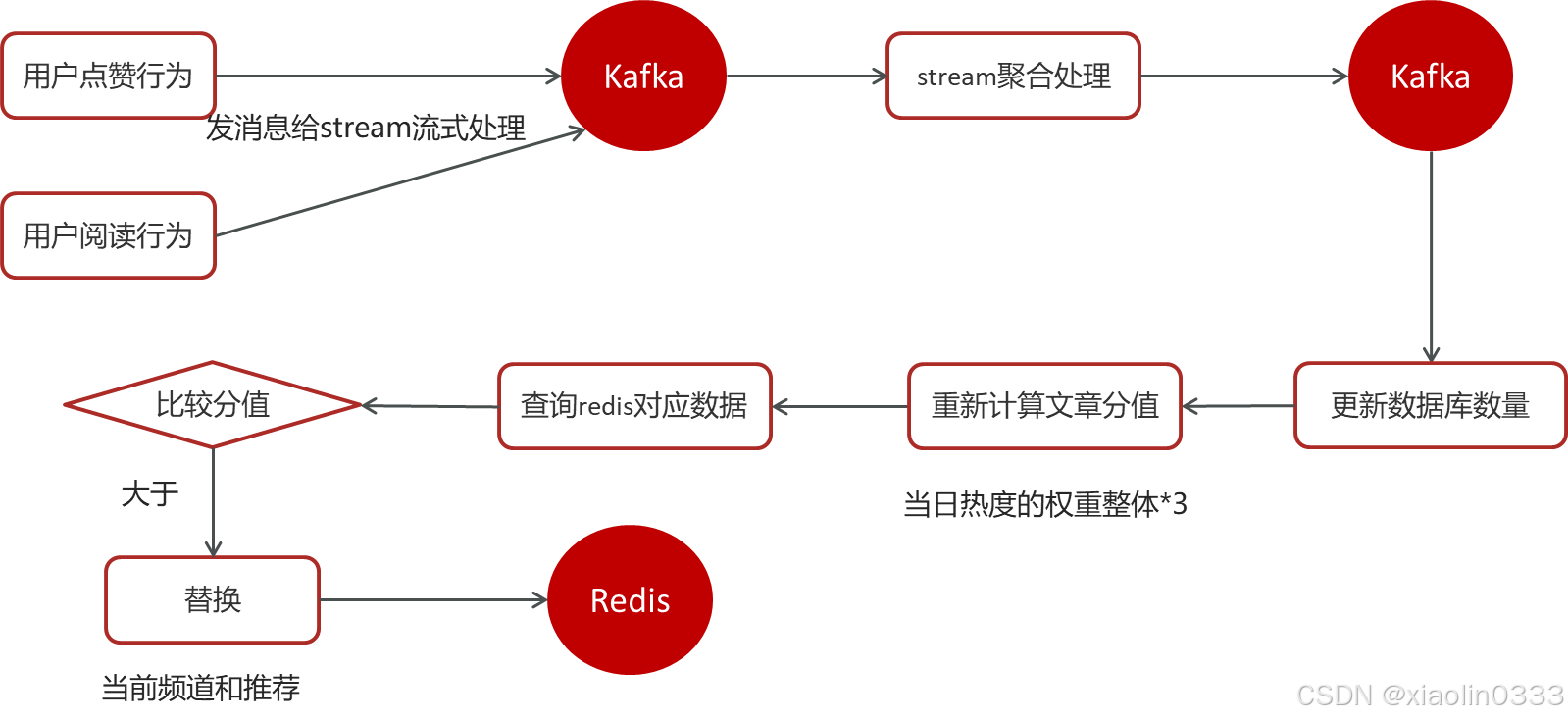
- 在点赞、阅读、收藏、评论的业务代码下发送消息
// 发送消息
UpdateArticleMess mess = new UpdateArticleMess();
mess.setArticleId(dto.getArticleId());
mess.setType(UpdateArticleMess.UpdateArticleType.VIEWS);
mess.setAdd(1);
kafkaTemplate.send(HotArticleConstants.HOT_ARTICLE_SCORE_TOPIC, JSON.toJSONString(mess));
- 使用kafkaStream实时接收消息
@Configuration
@Slf4j
public class HotArticleStreamHandler {
    @Bean
    public KStream<String, String> kStream(StreamsBuilder builder) {
        // 1. 接收消息
        KStream<String, String> stream = builder.stream(HotArticleConstants.HOT_ARTICLE_SCORE_TOPIC);
        // 2. 聚合流式处理
        stream.map((key, value) -> {
            UpdateArticleMess mess = JSON.parseObject(value, UpdateArticleMess.class);
            // 重置消息的key - 文章id、value - likes:1
            return new KeyValue<>(mess.getArticleId().toString(), mess.getType().name() + ":" + mess.getAdd());
        }).groupBy((key, value) -> key)
                .windowedBy(TimeWindows.of(Duration.ofSeconds(10)))  // 时间窗口,按照文章id聚合
                .aggregate(new Initializer<String>() {
                    /**
                     * 初始方法,返回值是消息的value
                     * @return
                     */
                    @Override
                    public String apply() {
                        return "COLLECTION:0,COMMENT:0,LIKES:0,VIEWS:0";
                    }
                }, new Aggregator<String, String, String>() {
                    /**
                     * 真正的聚合操作,返回值是消息的value
                     * @param key
                     * @param value
                     * @param aggValue
                     * @return
                     */
                    @Override
                    public String apply(String key, String value, String aggValue) {
                        if(StringUtils.isBlank(value)) {
                            return aggValue;
                        }
                        String[] aggAry = aggValue.split(",");
                        int col = 0, com = 0, like = 0, views = 0;
                        /**
                         * 获得初始值,也是时间窗口内计算之后的值
                         */
                        for (String agg : aggAry) {
                            String[] split = agg.split(":");
                            switch(UpdateArticleMess.UpdateArticleType.valueOf(split[0])){
                                case COLLECTION:
                                    col = Integer.parseInt(split[1]);
                                    break;
                                case COMMENT:
                                    com = Integer.parseInt(split[1]);
                                    break;
                                case LIKES:
                                    like = Integer.parseInt(split[1]);
                                    break;
                                case VIEWS:
                                    views = Integer.parseInt(split[1]);
                                    break;
                            }
                        }
                        /**
                         * 累加操作
                         */
                        String[] valAry = value.split(":");
                        switch(UpdateArticleMess.UpdateArticleType.valueOf(valAry[0])){
                            case COLLECTION:
                                col += Integer.parseInt(valAry[1]);
                                break;
                            case COMMENT:
                                com += Integer.parseInt(valAry[1]);
                                break;
                            case LIKES:
                                like += Integer.parseInt(valAry[1]);
                                break;
                            case VIEWS:
                                views += Integer.parseInt(valAry[1]);
                                break;
                        }
                        String format = String.format("COLLECTION:%d,COMMENT:%d,LIKES:%d,VIEWS:%d", col, com, like, views);
                        System.out.println("文章id" + key);
                        System.out.println("当前时间窗口内消息的处理结果" + format);
                        return format;
                    }
                }, Materialized.as("hot-article-stream-count-001"))
                .toStream()
                .map((key, value)-> {
                    return new KeyValue<>(key.key().toString(), formatObj(key.key().toString(), value));
                })
                .to(HotArticleConstants.HOT_ARTICLE_INCR_HANDLE_TOPIC);
        // 3. 发送消息
        return stream;
    }

    /**
     * 格式化消息的value数据
     * @param articleId
     * @param value
     * @return
     */
    public String formatObj(String articleId, String value) {
        ArticleVisitStreamMess mess = new ArticleVisitStreamMess();
        mess.setArticleId(Long.valueOf(articleId));
        String[] valueArr = value.split(","); //  "COLLECTION:0,COMMENT:0,LIKES:0,VIEWS:0"
        for (String val : valueArr) {
            String[] valAry = val.split(":");
            switch(UpdateArticleMess.UpdateArticleType.valueOf(valAry[0])){
                case COLLECTION:
                    mess.setCollect(Integer.parseInt(valAry[1]));
                    break;
                case COMMENT:
                    mess.setComment(Integer.parseInt(valAry[1]));
                    break;
                case LIKES:
                    mess.setLike(Integer.parseInt(valAry[1]));
                    break;
                case VIEWS:
                    mess.setView(Integer.parseInt(valAry[1]));
                    break;
            }
        }
        log.info("聚合消息处理之后的结果:{}", JSON.toJSONString(mess)) ;
        return JSON.toJSONString(mess);
    }
}
- 添加listener监听器,重新计算文章的分值,并更新到数据库和缓存中
监听器代码:
@Component
public class ArticleIncrHandleListener {
    @Autowired
    private ApArticleService apArticleService;
    @KafkaListener(topics = HotArticleConstants.HOT_ARTICLE_INCR_HANDLE_TOPIC)
    public void onMessage(String message) {
        if(StringUtils.isNotBlank(message)){
            ArticleVisitStreamMess articleVisitStreamMess = JSON.parseObject(message, ArticleVisitStreamMess.class);
            apArticleService.updateScore(articleVisitStreamMess);
        }
    }
}
业务代码:
/**
 * 更新文章分值,同时更新缓存中热点文章数据
 * @param mess
 */
@Override
public void updateScore(ArticleVisitStreamMess mess) {
    // 1. 更新文章的阅读、点赞、收藏、评论的数量
    ApArticle apArticle = updateArticle(mess);
    // 2. 计算文章的分值
    int score = computeScore(apArticle);
    score *= 3;
    // 3. 替换当前文章对应频道的热点数据
    replaceDataToRedis(ArticleConstants.HOT_ARTICLE_FIRST_PAGE + apArticle.getChannelId(), apArticle, score);
    // 4. 替换推荐对应的热点数据
    replaceDataToRedis(ArticleConstants.HOT_ARTICLE_FIRST_PAGE + ArticleConstants.DEFAULT_TAG, apArticle, score);
}

/**
 * 更新文章行为数量
 * @param mess
 */
private ApArticle updateArticle(ArticleVisitStreamMess mess) {
    ApArticle article = getById(mess.getArticleId());
    article.setCollection((article.getCollection() == null ? 0 : article.getCollection()) + mess.getCollect());
    article.setComment((article.getComment() == null ? 0 : article.getComment()) + mess.getComment());
    article.setLikes((article.getLikes() == null ? 0 : article.getLikes()) + mess.getLike());
    article.setViews((article.getViews() == null ? 0 : article.getViews()) + mess.getView());
    updateById(article);
    return article;
}

/**
 * 计算文章的具体分值
 * @param apArticle
 * @return
 */
private int computeScore(ApArticle apArticle) {
    Integer scere = 0;
    if(apArticle.getLikes() != null){
        scere += apArticle.getLikes() * ArticleConstants.HOT_ARTICLE_LIKE_WEIGHT;
    }
    if(apArticle.getViews() != null){
        scere += apArticle.getViews();
    }
    if(apArticle.getComment() != null){
        scere += apArticle.getComment() * ArticleConstants.HOT_ARTICLE_COMMENT_WEIGHT;
    }
    if(apArticle.getCollection() != null){
        scere += apArticle.getCollection() * ArticleConstants.HOT_ARTICLE_COLLECTION_WEIGHT;
    }
    return scere;
}

/**
 * 替换数据并存入redis中
 * @param key
 * @param apArticle
 * @param score
 */
private void replaceDataToRedis(String key, ApArticle apArticle, int score) {
    String articleListStr = cacheService.get(key);
    if (StringUtils.isNotBlank(articleListStr)) {
        List<HotArticleVo> hotArticleVoList = JSON.parseArray(articleListStr, HotArticleVo.class);
        // 如果缓存中存在该文章,只要更新分值
        Boolean flag = true;
        for (HotArticleVo hotArticleVo : hotArticleVoList) {
            if (hotArticleVo.getId().equals(apArticle.getId())) {
                hotArticleVo.setScore(score); // 更新分值
                flag = false;
                break;
            }
        }
        if (flag && hotArticleVoList.size() >= 30) {// 如果缓存中不存在该文章
            // 查询缓存中分值最小的一条数据
            hotArticleVoList = hotArticleVoList.stream().sorted(Comparator.comparing(HotArticleVo::getScore).reversed())
                    .collect(Collectors.toList());
            HotArticleVo lastHot = hotArticleVoList.get(hotArticleVoList.size() - 1);
            // 如果该文章分值 > 缓存中数据 - 替换
            if (lastHot.getScore() < score) {
                hotArticleVoList.remove(hotArticleVoList.size() - 1); // 删除分值最小的数据
                HotArticleVo hot = new HotArticleVo();
                BeanUtils.copyProperties(apArticle, hot);
                hot.setScore(score);
                hotArticleVoList.add(hot);
            }
        } else {
            // 新增
            HotArticleVo hot = new HotArticleVo();
            BeanUtils.copyProperties(apArticle, hot);
            hot.setScore(score);
            hotArticleVoList.add(hot);
        }
        // 缓存到redis
        hotArticleVoList = hotArticleVoList.stream().sorted(Comparator.comparing(HotArticleVo::getScore).reversed())
                .collect(Collectors.toList());
        cacheService.set(key, JSON.toJSONString(hotArticleVoList));
    }
}

汇聚全球AI编程工具,助力开发者即刻编程。
更多推荐
 17
17 0
0- 0


 已为社区贡献1条内容

所有评论(0)