
若依框架 WxJava微改动 适配 微信 发起商家转账 2025.03.07最新更新
·
现在的步骤
1 发起商家转账 2025.03.07
2 小程序调起确认转账API 2025.03.07
3 回调处理2025.03.07
1 common-core集成 WxJava
① maven依赖
 <!--     微信相关 小程序   -->
        <dependency>
            <groupId>com.github.binarywang</groupId>
            <artifactId>weixin-java-miniapp</artifactId>
            <version>4.7.0</version>
        </dependency>
        <!--     微信相关 支付   -->
        <dependency>
            <groupId>com.github.binarywang</groupId>
            <artifactId>weixin-java-pay</artifactId>
            <version>4.7.0</version>
        </dependency>
        <!--     微信相关 公众号   -->
        <dependency>
            <groupId>com.github.binarywang</groupId>
            <artifactId>weixin-java-mp</artifactId>
            <version>4.7.0</version>
        </dependency>
②代码
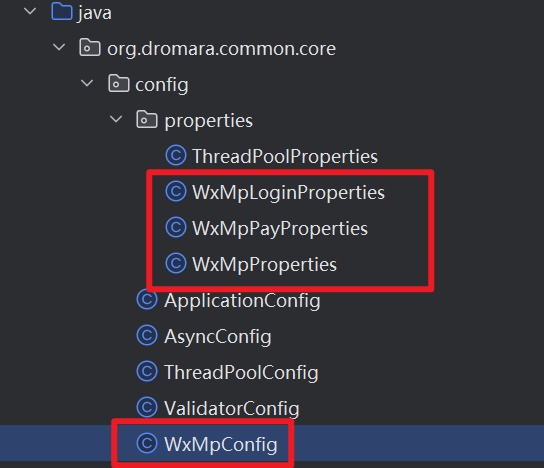
- WxMpLoginProperties
package org.dromara.common.core.config.properties;

import lombok.Data;
import org.springframework.boot.context.properties.ConfigurationProperties;

import java.util.List;

@Data
@ConfigurationProperties(prefix = "wx.mini.login")
public class WxMpLoginProperties {
    private List<Config> configs;
    @Data
    public static class Config {
        /**
         * 设置微信小程序的appid
         */
        private String appid;

        /**
         * 设置微信小程序的Secret
         */
        private String secret;

        /**
         * 设置微信小程序消息服务器配置的token
         */
        private String token;

        /**
         * 设置微信小程序消息服务器配置的EncodingAESKey
         */
        private String aesKey;

        /**
         * 消息格式,XML或者JSON
         */
        private String msgDataFormat;
    }
}
- WxMpPayProperties
package org.dromara.common.core.config.properties;

import lombok.Data;
import org.springframework.boot.context.properties.ConfigurationProperties;

import java.util.List;

@Data
@ConfigurationProperties(prefix = "wx.mini.pay")
public class WxMpPayProperties {
private List<Config> configs;
@Data
public static class Config {
    private String mchId;
    private String appid;
    private String wxApiV3Key;
    private String notify_url;
    /**
     * 证书-序列号
     * 1D685BC1A16B008C7714E3A255C9408607D1738C
     */
    private String mchSerialNo;
    /**
     * https://api.mch.weixin.qq.com/v3/certificates
     */
    private String v3CertUrl;
    /**
     * 证书所在服务器位置 如 /payment/yfyxs/apiclient_key.pem
     */
    private String keyPath;
    /**
     * apiclient_key.pem证书文件的内容
     */
    private String apiClientKey;
    /**
     * apiclient_cert.pem证书文件的内容
     */
    private String apiClientCert;
    /**
     * 商户签名使用 商户私钥 ,证书序列号包含在请求HTTP头部的  Authorization的serial_no
     * 微信支付签名使用微信支付平台私钥,证书序列号包含在应答HTTP头部的Wechatpay-Serial
     * 商户上送敏感信息时使用微信支付平台公钥加密,证书序列号包含在请求HTTP头部的 Wechatpay-Serial
     */
}
}
- WxMpProperties
package org.dromara.common.core.config.properties;

import com.google.gson.Gson;
import com.google.gson.GsonBuilder;
import lombok.Data;
import org.springframework.boot.context.properties.ConfigurationProperties;

import java.util.List;

@Data
@ConfigurationProperties(prefix = "wx.mini.mp")
public class WxMpProperties {
    /**
     * 是否使用redis存储access token
     */
    private boolean useRedis;

    /**
     * redis 配置
     */
    private RedisConfig redisConfig;

    @Data
    public static class RedisConfig {
        /**
         * redis服务器 主机地址
         */
        private String host;

        /**
         * redis服务器 端口号
         */
        private Integer port;

        /**
         * redis服务器 密码
         */
        private String password;

        /**
         * redis 服务连接超时时间
         */
        private Integer timeout;
    }

    /**
     * 多个公众号配置信息
     */
    private List<MpConfig> configs;

    @Data
    public static class MpConfig {
        /**
         * 设置微信公众号的appid
         */
        private String appId;

        /**
         * 设置微信公众号的app secret
         */
        private String secret;

        /**
         * 设置微信公众号的token
         */
        private String token;

        /**
         * 设置微信公众号的EncodingAESKey
         */
        private String aesKey;
    }

    @Override
    public String toString() {
        Gson gson = new GsonBuilder()
            .setPrettyPrinting()
            .disableHtmlEscaping()
            .create();
        return gson.toJson(this);
    }
}
- config 文件
package org.dromara.common.core.config;

import cn.binarywang.wx.miniapp.api.WxMaService;
import cn.binarywang.wx.miniapp.api.impl.WxMaServiceImpl;
import cn.binarywang.wx.miniapp.config.impl.WxMaDefaultConfigImpl;
import com.github.binarywang.wxpay.config.WxPayConfig;
import com.github.binarywang.wxpay.service.WxPayService;
import com.github.binarywang.wxpay.service.impl.WxPayServiceImpl;

import lombok.extern.slf4j.Slf4j;
import me.chanjar.weixin.common.error.WxRuntimeException;
import me.chanjar.weixin.common.redis.JedisWxRedisOps;
import me.chanjar.weixin.mp.api.WxMpService;
import me.chanjar.weixin.mp.api.impl.WxMpServiceImpl;
import me.chanjar.weixin.mp.config.impl.WxMpDefaultConfigImpl;
import me.chanjar.weixin.mp.config.impl.WxMpRedisConfigImpl;
import org.dromara.common.core.config.properties.WxMpLoginProperties;
import org.dromara.common.core.config.properties.WxMpPayProperties;
import org.dromara.common.core.config.properties.WxMpProperties;
import org.springframework.boot.context.properties.EnableConfigurationProperties;
import org.springframework.context.annotation.Bean;
import org.springframework.context.annotation.Configuration;
import redis.clients.jedis.JedisPool;
import redis.clients.jedis.JedisPoolConfig;

import java.util.List;
import java.util.Map;
import java.util.function.Function;
import java.util.stream.Collectors;

@Slf4j
@Configuration
@EnableConfigurationProperties({WxMpLoginProperties.class, WxMpPayProperties.class, WxMpProperties.class})
public class WxMpConfig {

    private final WxMpLoginProperties loginProperties;
    private final WxMpPayProperties payProperties;
    private final WxMpProperties mpProperties;
    public WxMpConfig(WxMpLoginProperties loginProperties, WxMpPayProperties payProperties,WxMpProperties mpProperties) {
        this.loginProperties = loginProperties;
        this.payProperties = payProperties;
        this.mpProperties = mpProperties;
    }

    /**
     * 与微信小程序有关的总service
     * @return WxMaService
     */
    @Bean
    public WxMaService wxMaService() {
        List<WxMpLoginProperties.Config> configs = this.loginProperties.getConfigs();
        if (configs == null) {
            throw new WxRuntimeException("没有微信小程序配置啊");
        }
        WxMaServiceImpl maService = new WxMaServiceImpl();
        Map<String, WxMaDefaultConfigImpl> multiConfigs = configs.stream()
                .map(cof -> {
                    WxMaDefaultConfigImpl config = new WxMaDefaultConfigImpl();
                    config.setAppid(cof.getAppid());
                    config.setSecret(cof.getSecret());
                    config.setToken(cof.getToken());
                    config.setAesKey(cof.getAesKey());
                    config.setMsgDataFormat(cof.getMsgDataFormat());
                    return config;
                })
                .collect(Collectors.toMap(WxMaDefaultConfigImpl::getAppid, Function.identity(), (o, n) -> o));
        maService.setMultiConfigs(multiConfigs);
        return maService;
    }

  @Bean
    public WxPayService wxPayService() {
        List<WxMpPayProperties.Config> configs = this.payProperties.getConfigs();
        if (configs == null) {
            throw new WxRuntimeException("没有微信小程序配置啊");
        }
      	WxPayService wxPayService = new WxPayServiceImpl();
        this.payProperties.getConfigs().stream().forEach(merchant -> {
      		WxPayConfig payConfig = new WxPayConfig();
      		payConfig.setMchId(merchant.getMchId());
      		payConfig.setAppId(merchant.getAppid());
      		payConfig.setCertSerialNo(merchant.getMchSerialNo());
     	 	payConfig.setApiV3Key(merchant.getWxApiV3Key());
      		payConfig.setPrivateKeyPath(merchant.getApiClientKey());
      		payConfig.setPrivateCertPath(merchant.getApiClientCert());
      		wxPayService.addConfig(merchant.getMchId(), payConfig);
      		// 可以指定是否使用沙箱环境
      		payConfig.setUseSandboxEnv(false);
    });
    return wxPayService;
    }

    @Bean
    public WxMpService wxMpService() {
        // 代码里 getConfigs()处报错的同学,请注意仔细阅读项目说明,你的IDE需要引入lombok插件!!!!
        final List<WxMpProperties.MpConfig> configs = this.mpProperties.getConfigs();
        if (configs == null) {
            throw new RuntimeException("大哥,拜托先看下项目首页的说明(readme文件),添加下相关配置,注意别配错了!");
        }

        WxMpService service = new WxMpServiceImpl();
        service.setMultiConfigStorages(configs
            .stream().map(a -> {
                WxMpDefaultConfigImpl configStorage;
                if (this.mpProperties.isUseRedis()) {
                    final WxMpProperties.RedisConfig redisConfig = this.mpProperties.getRedisConfig();
                    JedisPoolConfig poolConfig = new JedisPoolConfig();
                    JedisPool jedisPool = new JedisPool(poolConfig, redisConfig.getHost(), redisConfig.getPort(),
                        redisConfig.getTimeout(), redisConfig.getPassword());
                    configStorage = new WxMpRedisConfigImpl(new JedisWxRedisOps(jedisPool), a.getAppId());
                } else {
                    configStorage = new WxMpDefaultConfigImpl();
                }

                configStorage.setAppId(a.getAppId());
                configStorage.setSecret(a.getSecret());
                configStorage.setToken(a.getToken());
                configStorage.setAesKey(a.getAesKey());
                return configStorage;
            }).collect(Collectors.toMap(WxMpDefaultConfigImpl::getAppId, a -> a, (o, n) -> o)));
        System.out.println("O(∩_∩)O wxMpService 初始化成功 ");
        return service;
    }

}
- 配置文件
wx:
  #正式版为 "release",体验版为 "trial",开发版为 "develop"
  env: develop
  baseUrl: https://looyong.cn:2053
  orderNotifyV3Url: ${wx.baseUrl}/prod-api
  mini:
    login:
      configs:
        - appid: wx0fxxxxxea6c707
          secret: 247246a7XXxxxxxxxxxxxxx7c6c19
          aesKey: xxx
    pay:
      configs:
      	  # 商户号
        - mchId: 17xxxx27863
          appid: wx0fbxxxxxxx6c707
          # 证书-序列号
          mchSerialNo: 7724C0F4532xxxxxxxxxxxx158DA73F00F0BEED0
          # apiV3密钥
          wxApiV3Key: fasrgsgxxxxxxxxxxxxx22522
          #apiclient_key.pem证书文件的内容
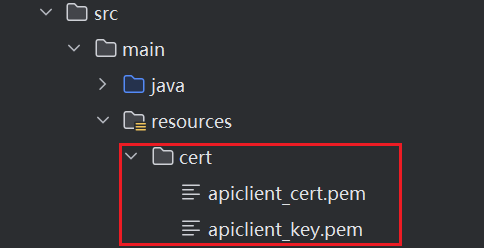
          apiClientKey: classpath:cert/apiclient_key.pem
          apiClientCert: classpath:cert/apiclient_cert.pem
    #公众号配置
    mp:
      useRedis: false
      redisConfig:
        host: ${spring.data.redis.host}
        port: ${spring.data.redis.port}
        timeout: 2000
        password: ${spring.data.redis.password}
      configs:
        - appId: wx102xxxxx80dff # 第一个公众号的appid
          secret: c64xxxxxxx9768c2f9fe0aa289bdf2 # 公众号的appsecret
          token: qhjxxxxxxQKjniof1t0p1jOt # 接口配置里的Token值
          aesKey: 9nPjIiMoxxxxxxiof1t0p1jOtHHW3b14Nc   # 接口配置里的EncodingAESKey值
  #      - appId: 2222 # 第二个公众号的appid,以下同上
  #        secret: 1111
  #        token: 111
  #        aesKey: 111
2 发起转账
- 由于WxJava 4.7.0已经不支持最新版本的微信转账api了 api已从历史的 /v3/transfer/batches 更新到/v3/fund-app/mch-transfer/transfer-bills 🤢🤢,无奈只能新写一个
util WxPayUtils
package org.dromara.system.util;

import cn.hutool.json.JSONArray;
import cn.hutool.json.JSONUtil;
import com.alibaba.fastjson.JSONObject;
import com.wechat.pay.java.core.RSAAutoCertificateConfig;
import com.wechat.pay.java.core.exception.ServiceException;
import com.wechat.pay.java.core.http.*;
import lombok.extern.slf4j.Slf4j;
import okhttp3.OkHttpClient;
import org.apache.commons.lang3.StringUtils;
import org.dromara.common.core.config.properties.WxMpPayProperties;
import org.springframework.beans.factory.annotation.Autowired;
import org.springframework.stereotype.Component;

import javax.crypto.Cipher;
import java.io.ByteArrayInputStream;
import java.io.IOException;
import java.io.InputStream;
import java.nio.charset.StandardCharsets;
import java.security.cert.CertificateFactory;
import java.security.cert.X509Certificate;
import java.util.Base64;
import java.util.HashMap;

/**
 * 微信支付工具类 - 使用微信原生API V3
 * 实现商家转账功能
 */
@Slf4j
@Component
public class WxPayUtils {

    @Autowired
    private WxMpPayProperties wxMpPayProperties;

    /**
     * 发起商家转账 - 使用微信原生API V3
     * API地址: /v3/fund-app/mch-transfer/transfer-bills
     *
     * @param outBillNo 商户单号
     * @param openId    收款用户OpenID
     * @param userName  收款用户姓名(可选,需要加密)
     * @param amount    转账金额(单位:分)
     * @param notifyUrl 回调通知地址
     * @return 转账结果
     */
    public JSONObject createTransferBills(String outBillNo, String openId, Long amount, String notifyUrl) {
        try {
            // 获取配置信息
            WxMpPayProperties.Config payConfig = getPayConfig();

            // 构建HTTP客户端
            OkHttpClient okHttpClient = new OkHttpClient();
            HttpClient httpClient = new DefaultHttpClientBuilder()
                    .config(buildRSAConfig(payConfig))
                    .okHttpClient(okHttpClient)
                    .build();

            // 构建请求头
            HttpHeaders headers = new HttpHeaders();
            headers.addHeader("Accept", MediaType.APPLICATION_JSON.getValue());
            headers.addHeader("Content-Type", MediaType.APPLICATION_JSON.getValue());

//            // 如果有证书序列号,添加到请求头(可选)
//            if (StringUtils.isNotBlank(payConfig.getMchSerialNo())) {
//                headers.addHeader("Wechatpay-Serial", payConfig.getMchSerialNo());
//            }

            // 构建请求参数
            HashMap<Object, Object> map = new HashMap<>();
            // 商户AppID
            map.put("appid", payConfig.getAppid());
            // 商户单号
            map.put("out_bill_no", outBillNo);
            // 转账场景ID (1001=商家活动)
            map.put("transfer_scene_id", "1005");
            // 收款用户OpenID
            map.put("openid", openId);

//            // 收款用户姓名(如果提供,需要加密传入)
//            if (StringUtils.isNotBlank(userName)) {
//                try {
//                    String encryptedName = rsaEncryptOAEP(userName, payConfig);
//                    map.put("user_name", encryptedName);
//                } catch (Exception e) {
//                    log.warn("用户姓名加密失败,将不传递姓名字段", e);
//                }
//            }

            // 转账金额(单位:分)
            map.put("transfer_amount", amount);
            // 转账备注
            map.put("transfer_remark", "红包抽奖");
            // 回调通知地址
            map.put("notify_url", notifyUrl);
            // 用户收款感知
            map.put("user_recv_perception", "企业补贴");

            // 转账场景报备信息
            JSONArray jsonArray = new JSONArray();
            jsonArray.add(new JSONObject().fluentPut("info_type", "岗位类型").fluentPut("info_content", "消费者"));
            jsonArray.add(new JSONObject().fluentPut("info_type", "报酬说明").fluentPut("info_content", "抽奖发放"));
            map.put("transfer_scene_report_infos", jsonArray);

            log.info("发起商家转账请求,商户单号:{},金额:{}分,OpenID:{}", outBillNo, amount, openId);

            // 构建请求体
            JsonRequestBody requestBody = new JsonRequestBody.Builder()
                    .body(JSONUtil.toJsonStr(map))
                    .build();

            // 构建HTTP请求
            HttpRequest httpRequest = new HttpRequest.Builder()
                    .httpMethod(HttpMethod.POST)
                    .url("https://api.mch.weixin.qq.com/v3/fund-app/mch-transfer/transfer-bills")
                    .headers(headers)
                    .body(requestBody)
                    .build();

            // 发送请求
            HttpResponse<JSONObject> response = httpClient.execute(httpRequest, JSONObject.class);
            JSONObject responseBody = response.getServiceResponse();

            log.info("商家转账返回成功,商户单号:{},响应:{}", outBillNo, responseBody.toJSONString());
            return responseBody;

        } catch (ServiceException e) {
            log.error("商家转账失败,商户单号:{},错误码:{},错误信息:{}",
                    outBillNo, e.getErrorCode(), e.getErrorMessage(), e);
            throw new RuntimeException("商家转账失败:" + e.getErrorMessage(), e);
        } catch (Exception e) {
            log.error("商家转账异常,商户单号:{}", outBillNo, e);
            throw new RuntimeException("商家转账异常:" + e.getMessage(), e);
        }
    }

    /**
     * 获取微信支付配置(默认取第一个配置)
     */
    private WxMpPayProperties.Config getPayConfig() {
        if (wxMpPayProperties == null || wxMpPayProperties.getConfigs() == null
                || wxMpPayProperties.getConfigs().isEmpty()) {
            throw new RuntimeException("微信支付配置未找到,请检查配置文件");
        }
        return wxMpPayProperties.getConfigs().get(0);
    }

    /**
     * 构建RSA自动证书配置
     *
     * @param config 支付配置
     * @return RSA配置对象
     */
    private RSAAutoCertificateConfig buildRSAConfig(WxMpPayProperties.Config config) {
        try {
            // 读取私钥内容
            String privateKey = readCertificateContent(config.getApiClientKey());

            return new RSAAutoCertificateConfig.Builder()
                    // 商户号
                    .merchantId(config.getMchId())
                    // 商户API证书私钥内容
                    .privateKey(privateKey)
                    // 商户API证书序列号
                    .merchantSerialNumber(config.getMchSerialNo())
                    // APIv3密钥
                    .apiV3Key(config.getWxApiV3Key())
                    .build();
        } catch (Exception e) {
            log.error("构建RSA配置失败", e);
            throw new RuntimeException("构建RSA配置失败:" + e.getMessage(), e);
        }
    }

    /**
     * 读取证书内容
     *
     * @param certPath 证书路径 (支持 classpath:xxx 格式)
     * @return 证书内容
     */
    private String readCertificateContent(String certPath) throws IOException {
        if (StringUtils.isBlank(certPath)) {
            throw new IllegalArgumentException("证书路径不能为空");
        }

        InputStream inputStream = null;
        try {
            if (certPath.startsWith("classpath:")) {
                // 从classpath加载
                String path = certPath.substring("classpath:".length());
                ClassLoader classLoader = this.getClass().getClassLoader();
                inputStream = classLoader.getResourceAsStream(path);
                if (inputStream == null) {
                    throw new IOException("证书文件未找到: " + certPath);
                }
            } else {
                // 直接使用证书内容(如果配置的就是证书内容字符串)
                if (certPath.contains("BEGIN")) {
                    return certPath;
                }
                throw new IOException("不支持的证书路径格式: " + certPath);
            }

            // 读取证书内容
            byte[] certBytes = inputStream.readAllBytes();
            return new String(certBytes, StandardCharsets.UTF_8);

        } finally {
            if (inputStream != null) {
                try {
                    inputStream.close();
                } catch (IOException e) {
                    log.warn("关闭证书流失败", e);
                }
            }
        }
    }

    /**
     * 敏感信息加密 - 使用RSA-OAEP算法
     *
     * @param message 需要加密的消息
     * @param config  支付配置
     * @return 加密后的Base64字符串
     */
    private String rsaEncryptOAEP(String message, WxMpPayProperties.Config config) {
        X509Certificate cert = getX509Certificate(config);
        try {
            Cipher cipher = Cipher.getInstance("RSA/ECB/OAEPWithSHA-1AndMGF1Padding");
            cipher.init(Cipher.ENCRYPT_MODE, cert.getPublicKey());
            byte[] data = message.getBytes(StandardCharsets.UTF_8);
            byte[] cipherdata = cipher.doFinal(data);
            return Base64.getEncoder().encodeToString(cipherdata);
        } catch (Exception e) {
            log.error("RSA加密失败", e);
            throw new RuntimeException("RSA加密失败:" + e.getMessage(), e);
        }
    }

    /**
     * 获取 X509Certificate 证书
     *
     * @param config 支付配置
     * @return X509证书对象
     */
    private X509Certificate getX509Certificate(WxMpPayProperties.Config config) {
        InputStream inputStream = null;
        try {
            String certPath = config.getApiClientCert();
            if (StringUtils.isBlank(certPath)) {
                throw new IllegalArgumentException("证书路径不能为空");
            }

            if (certPath.startsWith("classpath:")) {
                // 从classpath加载
                String path = certPath.substring("classpath:".length());
                ClassLoader classLoader = this.getClass().getClassLoader();
                inputStream = classLoader.getResourceAsStream(path);
                if (inputStream == null) {
                    throw new IOException("证书文件未找到: " + certPath);
                }
            } else if (certPath.contains("BEGIN CERTIFICATE")) {
                // 直接使用证书内容
                byte[] certBytes = certPath.getBytes(StandardCharsets.UTF_8);
                inputStream = new ByteArrayInputStream(certBytes);
            } else {
                throw new IOException("不支持的证书路径格式: " + certPath);
            }

            CertificateFactory cf = CertificateFactory.getInstance("X.509");
            return (X509Certificate) cf.generateCertificate(inputStream);

        } catch (Exception e) {
            log.error("获取X509证书失败", e);
            throw new RuntimeException("获取X509证书失败:" + e.getMessage(), e);
        } finally {
            if (inputStream != null) {
                try {
                    inputStream.close();
                } catch (IOException e) {
                    log.warn("关闭证书流失败", e);
                }
            }
        }
    }
}
实际转账代码
         // 构建回调通知地址
            String notifyUrl = orderNotifyV3Url + "/looyong/redPacketQrcode/notify/draw";

            // 计算转账金额(转换为分)
            Long transferAmount = Long.valueOf(BaseWxPayRequest.yuan2Fen(qrcodeVo.getRedPacketAmount()));

            // 使用微信原生API V3发起商家转账
            log.info("【红包码】开始发起商家转账,ID:{},金额:{}元({}分),OpenID:{}",
                    id, qrcodeVo.getRedPacketAmount(), transferAmount, openid);

            JSONObject result = wxPayUtils.createTransferBills(
                    "RP" + id,  // 红包码商户单号,添加前缀区分
                    openid,
                    transferAmount,
                    notifyUrl
            );
result中有前端调起API必要的参数 请将result返回给前端并且存到数据库中前端调起文档
3. 回调处理
- 由于最新的回调参数 WxJava以前的对象也不支持(有字段差距),但是接收参数和解密方法还是可以用的。
package org.dromara.looyong.controller;

import com.alibaba.fastjson.JSONObject;
import com.github.binarywang.wxpay.bean.notify.OriginNotifyResponse;
import com.github.binarywang.wxpay.bean.notify.SignatureHeader;
import com.github.binarywang.wxpay.bean.notify.WxPayNotifyV3Response;
import com.github.binarywang.wxpay.bean.notify.WxPayTransferBatchesNotifyV3Result;
import com.github.binarywang.wxpay.service.WxPayService;
import com.github.binarywang.wxpay.v3.util.AesUtils;
import jakarta.servlet.http.HttpServletRequest;
import jakarta.servlet.http.HttpServletResponse;
import lombok.RequiredArgsConstructor;
import lombok.extern.slf4j.Slf4j;
import org.dromara.common.core.utils.ServletUtils;
import org.springframework.validation.annotation.Validated;
import org.springframework.web.bind.annotation.PostMapping;
import org.springframework.web.bind.annotation.RequestMapping;
import org.springframework.web.bind.annotation.RestController;

import java.util.Optional;

/**
 * @author LiuDQ
 * @date 2023/10/20
 */
@Validated
@RequiredArgsConstructor
@RestController
@Slf4j
@RequestMapping("/notify")
public class TsetC {

    private final WxPayService payService;

    @PostMapping("/notify/draw")
    public String notify(HttpServletRequest request , HttpServletResponse response) throws Exception {
        String timestamp = request.getHeader("Wechatpay-Timestamp");
        Optional.ofNullable(timestamp).orElseThrow(() -> new RuntimeException("时间戳不能为空"));

        String nonce = request.getHeader("Wechatpay-Nonce");
        Optional.ofNullable(nonce).orElseThrow(() -> new RuntimeException("nonce不能为空"));

        String serialNo = request.getHeader("Wechatpay-Serial");
        Optional.ofNullable(serialNo).orElseThrow(() -> new RuntimeException("serialNo不能为空"));

        String signature = request.getHeader("Wechatpay-Signature");
        Optional.ofNullable(signature).orElseThrow(() -> new RuntimeException("signature不能为空"));

        log.info("是商家转账回调:请求头参数为:timestamp:{} nonce:{} serialNo:{} signature:{}", timestamp, nonce, serialNo, signature);

        WxPayTransferBatchesNotifyV3Result batchesNotifyV3Result = this.payService.parseTransferBatchesNotifyV3Result(ServletUtils.readData(request),
            new SignatureHeader(timestamp, nonce, signature, serialNo));

        OriginNotifyResponse rawData = batchesNotifyV3Result.getRawData();
        log.info("是商家转账回调信息解析rawData:{}", JSONObject.toJSONString(rawData));
        String eventType = rawData.getEventType();
        //不是商家转账  完成事件
        if (!"MCHTRANSFER.BILL.FINISHED".equals(eventType)) {
            return WxPayNotifyV3Response.success("成功");
        }
        if (!"encrypt-resource".equals(rawData.getResourceType())) {
            return WxPayNotifyV3Response.success("成功");
        }
        OriginNotifyResponse.Resource resource = rawData.getResource();
        String cipherText = resource.getCiphertext();
        String associatedData = resource.getAssociatedData();
        String nonce1 = resource.getNonce();
        String apiV3Key = this.payService.getConfig().getApiV3Key();

        String result1 = AesUtils.decryptToString(associatedData, nonce1, cipherText, apiV3Key);

        log.info("是商家转账回调信息解析result1:{}", result1);

        JSONObject jsonObject = JSONObject.parseObject(result1);


        String outBatchNo = jsonObject.getString("out_bill_no");
        String batchStatus = jsonObject.getString("state");
        log.info("收到商家转账完成通知,商户批次单号:{},批次状态:{}", outBatchNo, batchStatus);

        // 处理回调 - 更新提现状态为已入账
        try {
            Boolean handleResult = yourSerVice.handleDrawNotify(outBatchNo);
            if (handleResult) {
                log.info("回调处理成功,商户批次单号:{}", outBatchNo);
            } else {
                log.warn("回调处理失败,商户批次单号:{}", outBatchNo);
            }
        } catch (Exception e) {
            log.error("回调处理异常,商户批次单号:{},错误信息:{}", outBatchNo, e.getMessage(), e);
            // 即使处理失败,也返回成功,避免微信重复通知
        }

        return WxPayNotifyV3Response.success("成功");
    }
}

汇聚全球AI编程工具,助力开发者即刻编程。
更多推荐


 6
6 0
0- 0


 已为社区贡献1条内容

所有评论(0)