
将redis加入系统中对验证码进行存储
·
在 pom.xml 中添加 Redis 依赖:
            <!-- Redis -->
            <dependency>
                <groupId>org.springframework.boot</groupId>
                <artifactId>spring-boot-starter-data-redis</artifactId>
                <version>${spring-boot.version}</version>
            </dependency>
修改 CaptchaUtils 类:
package com.med.utils;

import java.util.HashMap;
import java.util.Map;
import java.util.UUID;
import java.util.concurrent.TimeUnit;
import cn.hutool.captcha.CaptchaUtil;
import cn.hutool.captcha.LineCaptcha;
import org.springframework.beans.factory.annotation.Autowired;
import org.springframework.data.redis.core.StringRedisTemplate;
import org.springframework.stereotype.Component;
import lombok.extern.slf4j.Slf4j;

@Slf4j
@Component
public class CaptchaUtils {
    private static final int CODE_LENGTH = 6;
    private static final long EXPIRE_MINUTES = 5;

    @Autowired
    private StringRedisTemplate redisTemplate;

    // Redis key 前缀
    private static final String CAPTCHA_KEY_PREFIX = "captcha:";

    public Map<String, Object> createCaptcha() {
        try {
            log.info("开始生成验证码");

            LineCaptcha lineCaptcha = CaptchaUtil.createLineCaptcha(100, 30, CODE_LENGTH, 20);
            String code = lineCaptcha.getCode();
            String uuid = UUID.randomUUID().toString();

            // 将验证码存储到 Redis,设置过期时间
            String redisKey = CAPTCHA_KEY_PREFIX + uuid;
            redisTemplate.opsForValue().set(redisKey, code, EXPIRE_MINUTES, TimeUnit.MINUTES);

            log.info("验证码生成成功, uuid: {}, code: {}", uuid, code);

            Map<String, Object> map = new HashMap<>();
            map.put("uuid", uuid);
            map.put("image", lineCaptcha.getImageBase64Data());

            return map;
        } catch (Exception e) {
            log.error("生成验证码失败", e);
            throw new RuntimeException("生成验证码失败: " + e.getMessage(), e);
        }
    }

    public boolean validateCaptcha(String code, String uuid) {
        if (code == null || uuid == null) {
            log.warn("验证码或uuid为空");
            return false;
        }

        String redisKey = CAPTCHA_KEY_PREFIX + uuid;
        String storedCode = redisTemplate.opsForValue().get(redisKey);

        if (storedCode == null) {
            log.warn("验证码不存在或已过期, uuid: {}", uuid);
            return false;
        }

        log.info("验证码校验 - 输入:{},存储:{}", code, storedCode);

        boolean isValid = storedCode.equalsIgnoreCase(code);
        if (isValid) {
            // 验证成功后删除验证码
            redisTemplate.delete(redisKey);
            log.info("验证码验证成功");
        } else {
            log.warn("验证码不匹配");
        }

        return isValid;
    }
}
添加 Redis 配置类:
package com.med.rag.config;

import org.springframework.context.annotation.Bean;
import org.springframework.context.annotation.Configuration;
import org.springframework.data.redis.connection.RedisConnectionFactory;
import org.springframework.data.redis.core.StringRedisTemplate;

@Configuration
public class RedisConfig {

    @Bean
    public StringRedisTemplate stringRedisTemplate(RedisConnectionFactory connectionFactory) {
        return new StringRedisTemplate(connectionFactory);
    }
}
在 application.yml 中添加 Redis 配置:一般均为默认即可,有无密码可以自行判断
  redis:
    host: localhost  # Redis服务器地址
    port: 6379      # Redis服务器端口
    password:xxxxxx       # Redis服务器密码(如果有的话)
    database: 0     # 使用的数据库索引
    timeout: 5000   # 连接超时时间
启动redis存储,打开redis-cli在输入MONITOR来进行监听获取的验证码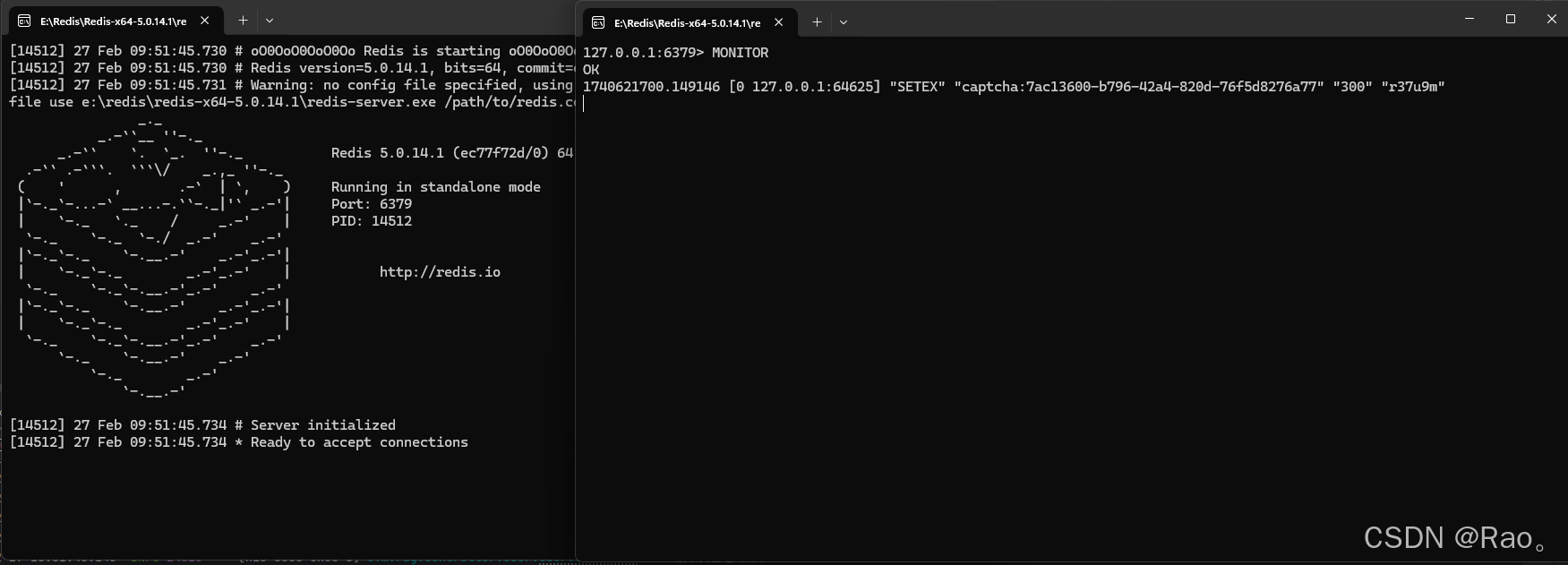
若在没有打开redis的情况,启动了项目获取验证码的时候,在验证码接口会报错,通常情况的报错是:
org.springframework.data.redis.connection.PoolException: Could not get a resource from the pool或者
org.springframework.data.redis.RedisConnectionFailureException: Unable to connect to Redis当然,为了避免这种情况发生我们忽略了redis未启动的问题,可以添加错误处理,如下:
@Slf4j
@Component
public class CaptchaUtils {

    @Autowired
    private StringRedisTemplate redisTemplate;

    public Map<String, Object> createCaptcha() {
        try {
            // 测试 Redis 连接
            try {
                redisTemplate.getConnectionFactory().getConnection().ping();
            } catch (Exception e) {
                log.error("Redis 连接失败", e);
                throw new RuntimeException("验证码服务暂时不可用,请稍后重试");
            }

            // 原有的验证码生成逻辑
            LineCaptcha lineCaptcha = CaptchaUtil.createLineCaptcha(100, 30, CODE_LENGTH, 20);
            String code = lineCaptcha.getCode();
            String uuid = UUID.randomUUID().toString();

            // 存储验证码到Redis
            String key = CAPTCHA_PREFIX + uuid;
            redisTemplate.opsForValue().set(key, code, EXPIRE_MINUTES, TimeUnit.MINUTES);

            Map<String, Object> map = new HashMap<>();
            map.put("uuid", uuid);
            map.put("image", lineCaptcha.getImageBase64Data());

            return map;
        } catch (Exception e) {
            log.error("生成验证码失败", e);
            throw new RuntimeException("生成验证码失败: " + e.getMessage());
        }
    }
}
在控制器中添加全局异常处理:
@RestControllerAdvice
@Slf4j
public class GlobalExceptionHandler {

    @ExceptionHandler(RedisConnectionFailureException.class)
    public Result<?> handleRedisConnectionFailure(RedisConnectionFailureException e) {
        log.error("Redis 连接失败", e);
        return Result.error("验证码服务暂时不可用,请确保 Redis 服务已启动");
    }

    @ExceptionHandler(Exception.class)
    public Result<?> handleException(Exception e) {
        log.error("系统异常", e);
        return Result.error("系统异常:" + e.getMessage());
    }
}
在启动项目时检查 Redis 连接:
@SpringBootApplication
public class MedApplication implements CommandLineRunner {

    @Autowired
    private StringRedisTemplate redisTemplate;

    private static final Logger log = LoggerFactory.getLogger(MedApplication.class);

    public static void main(String[] args) {
        SpringApplication.run(MedApplication.class, args);
    }

    @Override
    public void run(String... args) {
        try {
            redisTemplate.getConnectionFactory().getConnection().ping();
            log.info("Redis 连接成功");
        } catch (Exception e) {
            log.error("Redis 连接失败,请确保 Redis 服务已启动", e);
        }
    }
}
添加redis健康:
<dependency>
    <groupId>org.springframework.boot</groupId>
    <artifactId>spring-boot-starter-actuator</artifactId>
</dependency>
management:
endpoints:
web:
exposure:
include: health
health:
redis:
enabled: true这些措施可以:
1.及时发现redis连接问题
2.提供非常友好的错误提示
3.方便很快的定位问题的地方
4.提升我们解决问题的速度
所以当我们在启动项目前,请确保:redis服务启动,redis的配置正确

汇聚全球AI编程工具,助力开发者即刻编程。
更多推荐



 8
8 0
0- 0


 已为社区贡献1条内容

所有评论(0)