
使用postgres安装timescaledb及pgvector插件
因为最近在做一个数据库的项目,需要用到这些插件,然后由于服务器有点任性,所以经常需要重新部署postgres,重新下插件(已经有三四次了o(╥﹏╥)o)。然后由于博主对于服务器linux系统还是太菜了,所以在这方面花了挺多时间,也碰到了比较多的问题吧,最后还是找到了比较清晰的思路和方法。
当然博主已经部署好了,懒的再新开个虚拟机演示了,就用一些和gpt交流的截图已经其他的图片代替一下哈~
那么首先你得需要下载好postgres,然后我用的是centos系统。你可以用一下命令看一下有没有下好postgres:
which psql之前感觉好像也出现了一些问题,但是已经记不清了....不管了,之后就需要安装一些依赖项
sudo yum install -y epel-release
sudo yum install -y gcc gcc-c++ make cmake git readline-devel zlib-devel curl-devel openssl-devel llvm clang
然后这时候主播的问题就来了!!!出现了:
Error downloading packages:
  libcurl-devel-7.29.0-59.el7_9.2.x86_64: [Errno 256] No more mirrors to try.
  clang-3.4.2-9.el7.x86_64: [Errno 256] No more mirrors to try.
  llvm-3.4.2-9.el7.x86_64: [Errno 256] No more mirrors to try.
  llvm-libs-3.4.2-9.el7.x86_64: [Errno 256] No more mirrors to try.
  readline-devel-6.2-11.el7.x86_64: [Errno 256] No more mirrors to try.

[root@hadoop94 ~]#
报错是因为 CentOS 系统镜像源不可用或者失效了,导致 yum 找不到对应的软件包下载地址。所以需要换镜像,换成阿里云的。但是首先做这些事需要确保你可以ping通外网!!
然后如果你能够ping通外网之后,你就可以换镜像源了,那么更换镜像源的原因是能够下载依赖项。
sudo mv /etc/yum.repos.d/CentOS-Base.repo /etc/yum.repos.d/CentOS-Base.repo.backup
sudo curl -o /etc/yum.repos.d/CentOS-Base.repo http://mirrors.aliyun.com/repo/Centos-7.repo
sudo yum clean all
sudo yum makecache
那么接下来就是重点,如何获取插件,安装插件?
访问这个网站:
https://download.postgresql.org/pub/repos/yum/
这里面是yum仓库,里面包含了postgres大量的插件,有不同版本的,不同操作系统的,自己去看看。选择自己需要的
主播选的是timescaledb_15-2.15.3-1PGDG.rhel7.x86_64.rpm
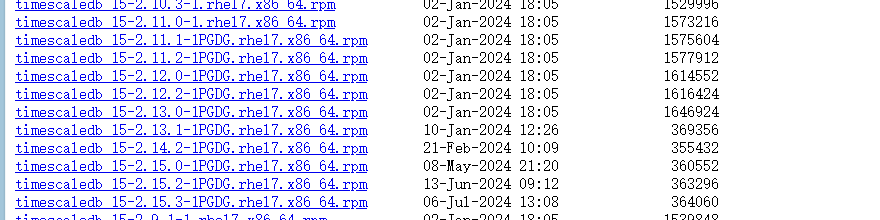
下载到本地后通过finalshell上传(感觉比较方便,当然也可以直接cmd用scp命令),上传到相应目录下:

上传完之后运行:
sudo yum localinstall /mnt/software/timescaledb_15-2.15.3-1PGDG.rhel7.x86_64.rpm
显示如下页面就表示ok了:
Installed size: 13 M
Is this ok [y/d/N]: y
Downloading packages:
Running transaction check
Running transaction test
Transaction test succeeded
Running transaction
  Installing : timescaledb_15-2.15.3-1PGDG.rhel7.x86_64                                                             1/1
  Verifying  : timescaledb_15-2.15.3-1PGDG.rhel7.x86_64                                                             1/1

Installed:
  timescaledb_15.x86_64 0:2.15.3-1PGDG.rhel7

Complete!
[root@hadoop94 ~]#
然后就是一些基本的插件的配置,找到你要的数据库conf文件的地址:
vi /mnt/software/postgresql15/15/datafile/postgresql.conf
如果你不知道可以find一下,或者直接问一下ai也行他会告诉你的
find /mnt/software/pgsql-15 -name postgresql.conf然后找到并编辑:
shared_preload_libraries = 'timescaledb'
重启数据库:里面可能会说你权限不足,你可以用su命令
# 切换到 postgres 用户(假设你的数据库运行用户是 postgres)
su - postgres

# 然后重启数据库
/mnt/software/pgsql-15/bin/pg_ctl -D /mnt/software/postgresql15/15/datafile restart

# 或者先停止再启动
/mnt/software/pgsql-15/bin/pg_ctl -D /mnt/software/postgresql15/15/datafile stop
/mnt/software/pgsql-15/bin/pg_ctl -D /mnt/software/postgresql15/15/datafile start
然后登录数据库并创建扩展:
/mnt/software/pgsql-15/bin/psql -U postgres
CREATE EXTENSION IF NOT EXISTS timescaledb;
你可以用\dx确认一下有没有成功扩展哈~

pgvector主播用的是pgvector_15-0.7.2-1PGDG.rhel7.x86_64.rpm,步骤一样的,好像更简单,pgvector不需要在conf文件里面设置,直接install后就进入到数据库后安装扩展就行了。
CREATE EXTENSION vector;
最终结果:
postgres=# \dx
                                               List of installed extensions
    Name     | Version |   Schema   |                                     Description

-------------+---------+------------+-----------------------------------------------------------------------------------
---
 plpgsql     | 1.0     | pg_catalog | PL/pgSQL procedural language
 timescaledb | 2.15.3  | public     | Enables scalable inserts and complex queries for time-series data (Apache 2 Editio
n)
 vector      | 0.7.2   | public     | vector data type and ivfflat and hnsw access methods
(3 rows)

postgres=#
那就没什么问题了。嘻嘻~

汇聚全球AI编程工具,助力开发者即刻编程。
更多推荐
 11
11 0
0- 0


 已为社区贡献1条内容

所有评论(0)