
通过SSH实现远程备份Mysql数据库(使用ssh+mysqldump工具实现)
由于工作需求,要使用
C#后台备份Mysql数据库。而应用服务器上没有安装Mysql数据库,不能直接调用Mysql安装路径下mysqldump.exe工具来备份数据库,因此想到可以使用SSH命令,实现在数据库服务器上远程备份Mysql数据库。 由于花费了较多时间研究,因此记录一下,以备后用。
Tips:本案例中应用/数据库服务器均为Windows系统
第一步,检查OPENSSH是否安装
以管理员身份打开
PowerShell,通过脚本检查SSH是否安装
# 检查SSH版本,V大写
ssh -V
# 输出版本号 OpenSSH_for_Windows_9.5p1, LibreSSL 3.8.2
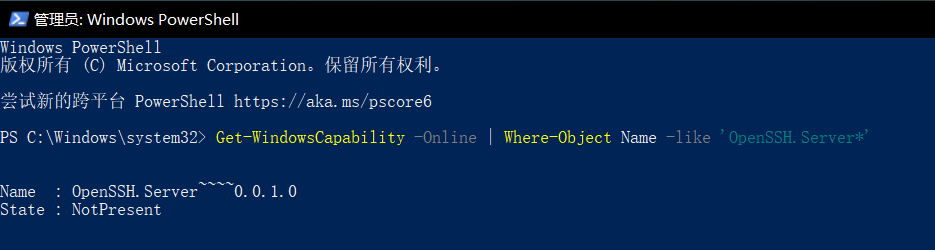
Get-WindowsCapability -Online | Where-Object Name -like 'OpenSSH.Server*'

# 若输出如下,则说明没有安装OPENSSH
# Name  : OpenSSH.Server~~~~0.0.1.0
# State : NotPresent

# 若输出如下,则说明已安装
# Name  : OpenSSH.Server~~~~0.0.1.0
# State : Installed
若服务器未安装
OPENSSH,使用如下脚本进行安装
# 1. 安装 OpenSSH 服务器
Add-WindowsCapability -Online -Name OpenSSH.Server~~~~0.0.1.0

# 2. 安装完成后启动服务
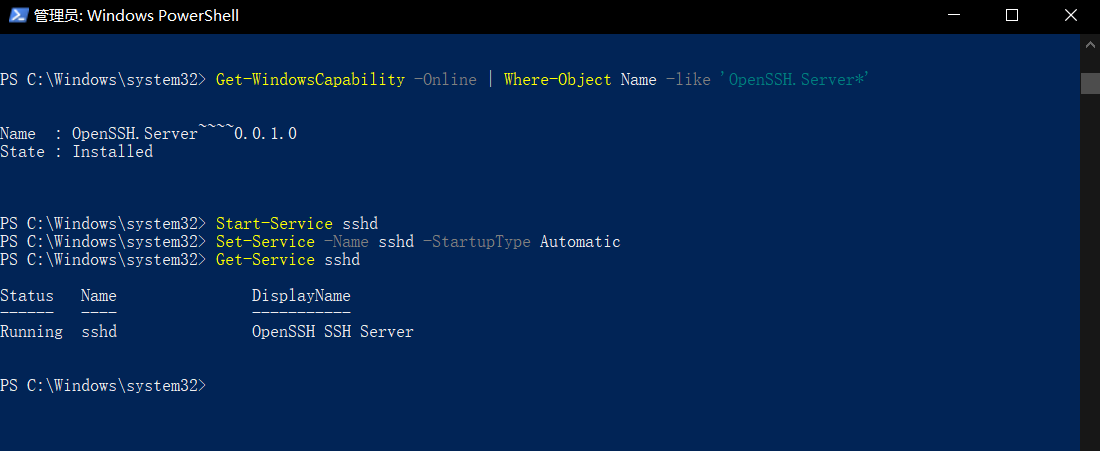
Start-Service sshd

# 3. 设置开机自启动
Set-Service -Name sshd -StartupType Automatic

# 4. 检查安装状态(应该显示 State : Installed)
Get-WindowsCapability -Online | Where-Object Name -like 'OpenSSH.Server*'

# 5. 检查服务状态(应该显示 Running)
Get-Service sshd

# Status   Name               DisplayName
# ------   ----               -----------
# Running  sshd               OpenSSH SSH Server
Tips: 由于需要使用SSH实现应用服务器向数据库服务器传输并运行备份命令,需要数据库服务器也安装OPENSSH,安装方式同上
首次连接设置
使用命令
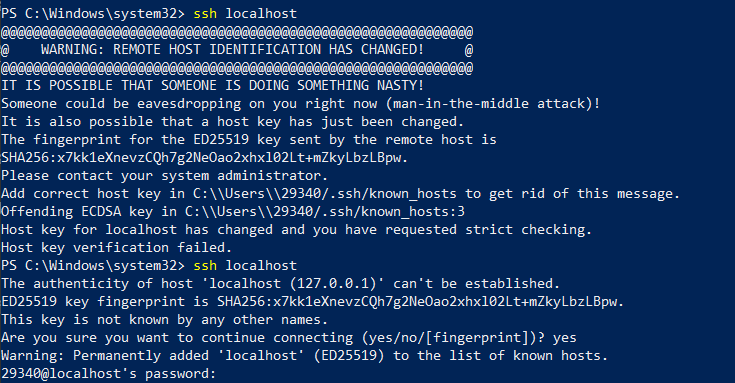
ssh localhost时会提示如下:

输入
yes,再输入当前计算机登陆账号密码即可登录,输入什么密码
运行成功后显示如下,如果成功了,则直接跳至第二步即可
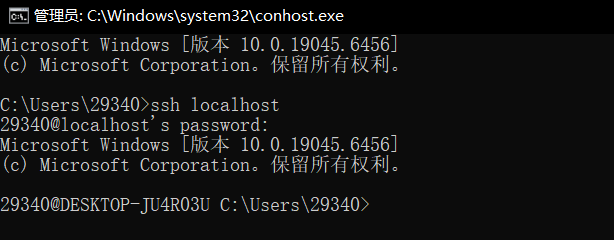
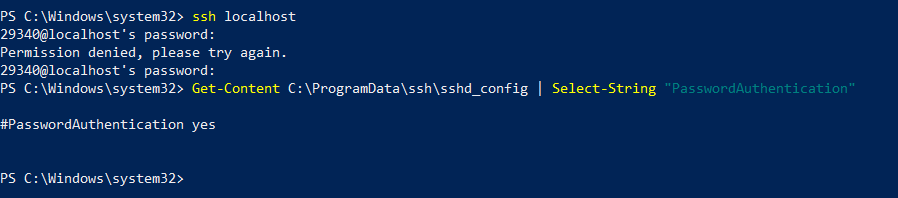
如果输入正确的密码之后,无法登陆,出现如下内容
Permission denied, please try again.
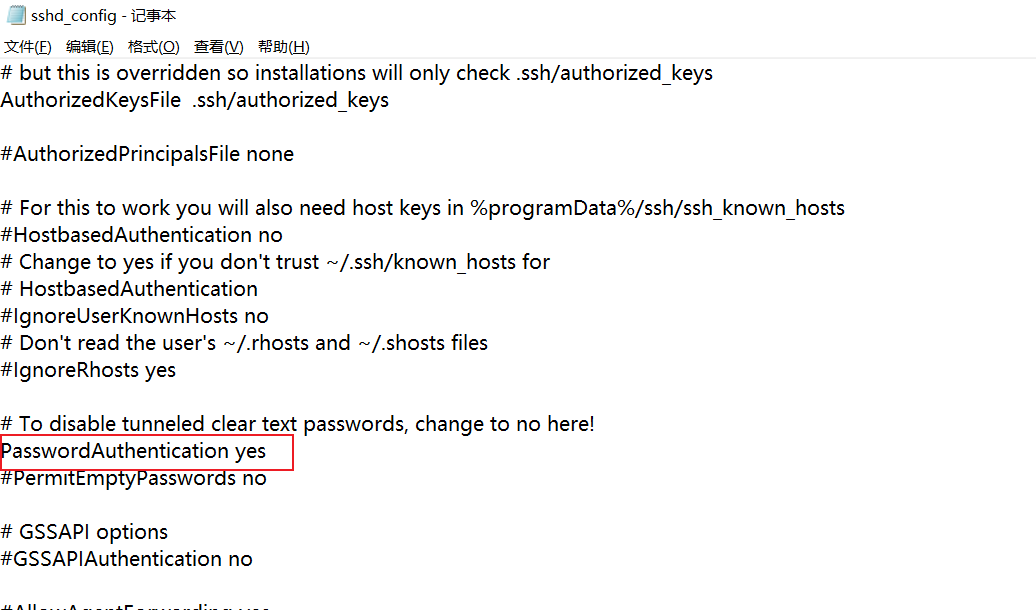
则输入命令Get-Content C:\ProgramData\ssh\sshd_config | Select-String "PasswordAuthentication"查看ssh配置文件中是否允许密码认证,我这里显示#PasswordAuthentication yes,说明该配置没有生效,被注释了。
同样通过管理员powershell,运行如下命令,打开配置文件,如果手工打开该路径,需要再资源管理器中,将
查看-隐藏的文件勾选上,该目录是隐藏的。找到对应行将前面的#去除后,保存,并重启服务。
# 打开配置文件
notepad C:\ProgramData\ssh\sshd_config

# 配置如下信息
PasswordAuthentication yes
UseDefaultAuthentication yes # 如果上面这个配置了还不行,就再添加这一条,文件末尾添加

#重启SSH服务
Restart-Service sshd
这里发现sshd服务停止了,且无法启动,晕,折腾一段时间,遂卸载重装,脚本如下
# 停止服务
Stop-Service sshd -Force

# 通过可选功能卸载
Get-WindowsCapability -Online | Where-Object {$_.Name -like '*OpenSSH.Server*'} | Remove-WindowsCapability -Online

# 删除配置目录(备份重要文件)
Remove-Item -Recurse -Force "C:\ProgramData\ssh" -ErrorAction SilentlyContinue

# 删除系统文件(如果有残留)
Remove-Item -Recurse -Force "C:\Windows\System32\OpenSSH" -ErrorAction SilentlyContinue

# 方法A:通过可选功能安装
Add-WindowsCapability -Online -Name OpenSSH.Server~~~~0.0.1.0

# 安装后执行初始配置
Start-Service sshd
Set-Service -Name sshd -StartupType 'Automatic'

# 确认防火墙规则
Get-NetFirewallRule -Name *ssh*
重装后发现,运行
ssh localhost,报错如下,原因是之前配置sshd_config文件之后,连接成功了一次,在文件C:\Users\29340\.ssh下生成了known_hosts文件,将其清除即可重新连接成功
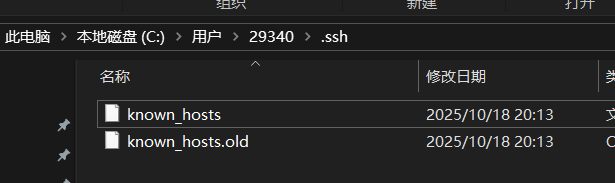
重新安装OPENSSH并删除known_hosts文件之后,发现又可以直接运行
ssh localhost了,搞不懂什么毛病>_<
第二步,配置SSH密钥
私钥保留到应用服务器,公钥复制到数据库服务器
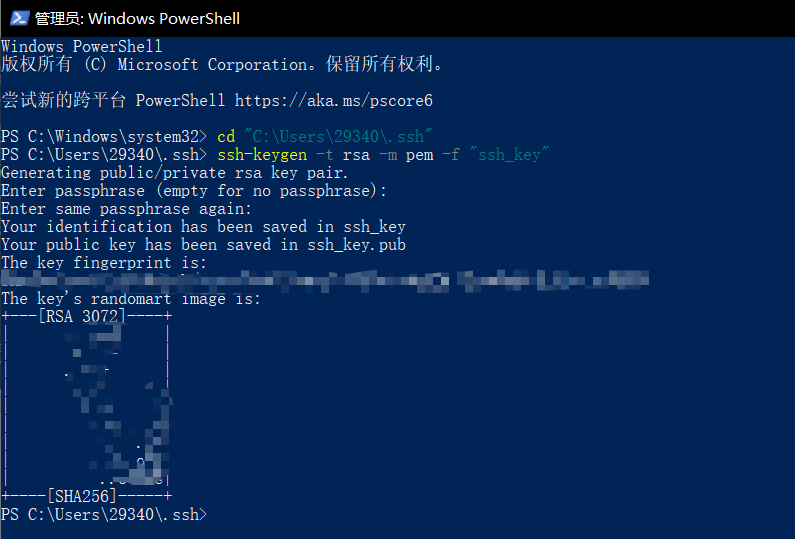
先在C:\Users\29340\.ssh下创建密钥
# 若目录不存在,先创建
New-Item -Path "C:\Users\29340\.ssh" -ItemType Directory -Force
cd "C:\Users\29340\.ssh"

# 生成密钥
ssh-keygen -t rsa -m pem -f "ssh_key"
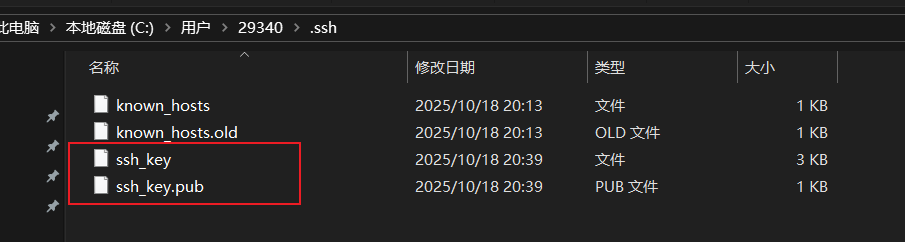
由于需要使用代码调用密钥,而SSH不允许私钥的权限过于宽松,为了能够让IIS应用池可以调用私钥文件,需要将密钥放到
C:\Windows\ServiceProfiles\ApplicationPoolIdentity\.ssh文件夹中,若没有,请自行创建。
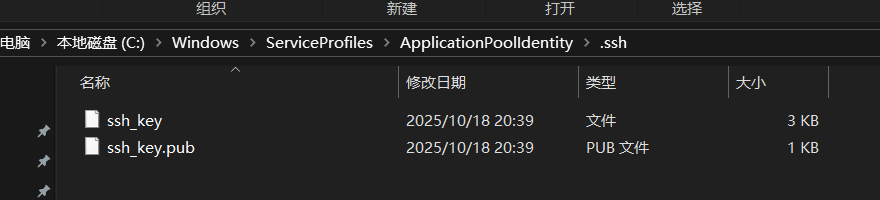
设置文件及文件夹权限(非常重要)
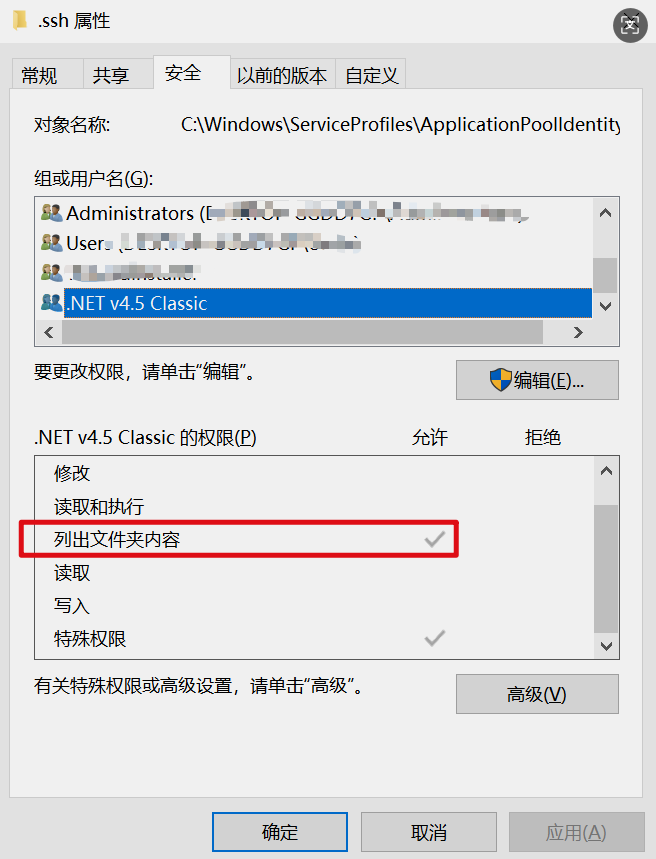
① .ssh文件夹的权限,需要又
IIS APPPOOL的权限
点击高级,添加C#程序所在的IIS程序池用户权限
更改权限-添加-选择主体
如果你的电脑在域网络中,请切换查找未位置为整个计算机否则可能查找不到IIS程序池对象
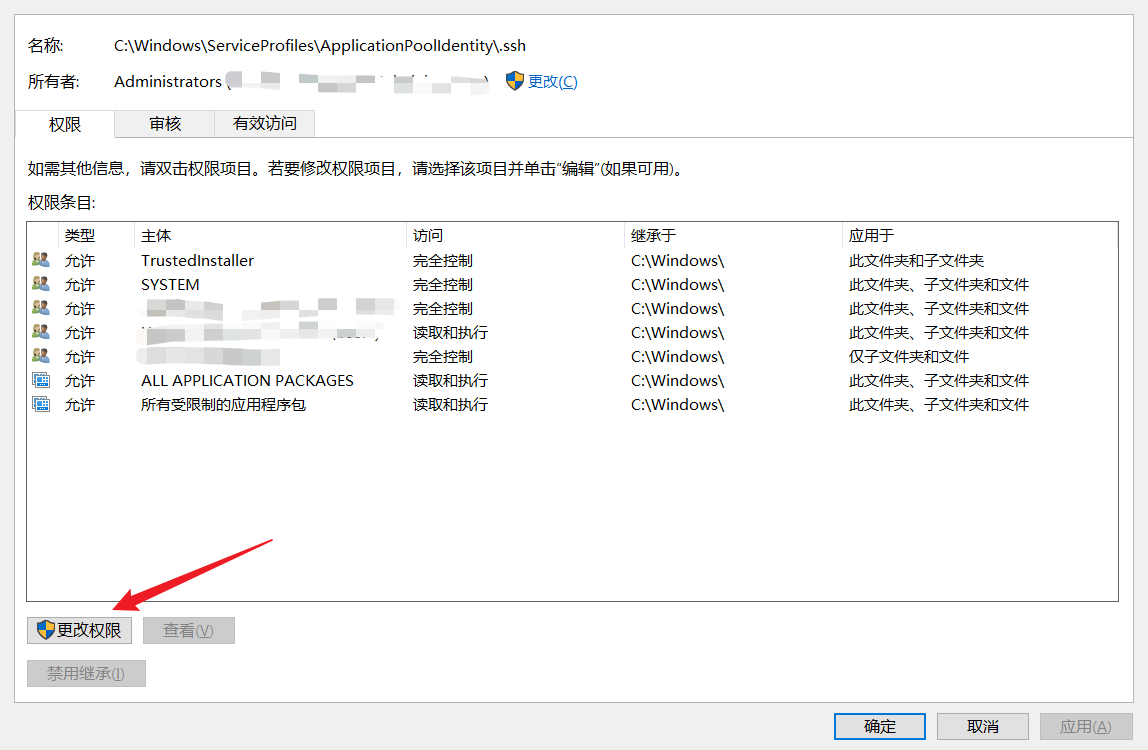
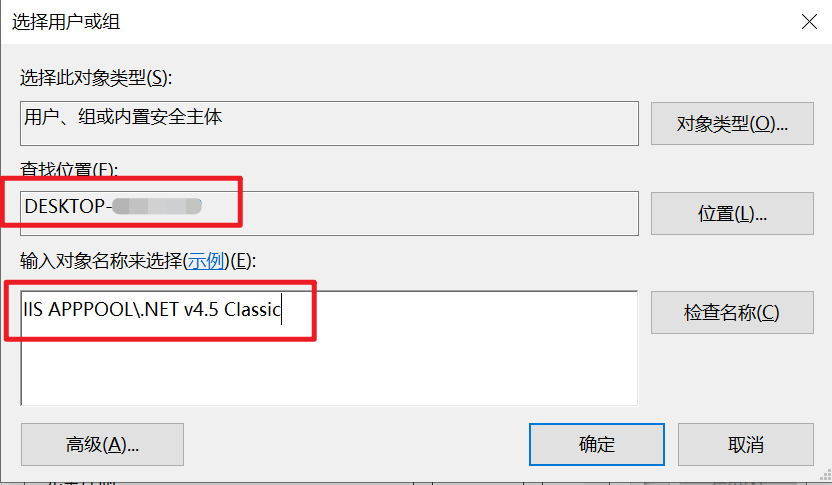
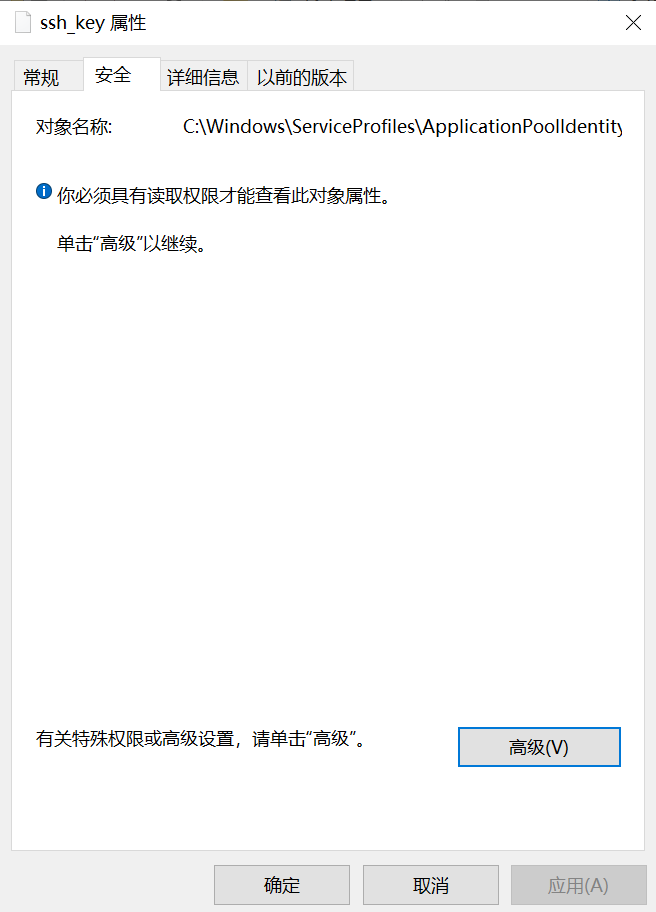
② 设置私钥文件的权限,这个很重要,设置不对,直接连接报错!
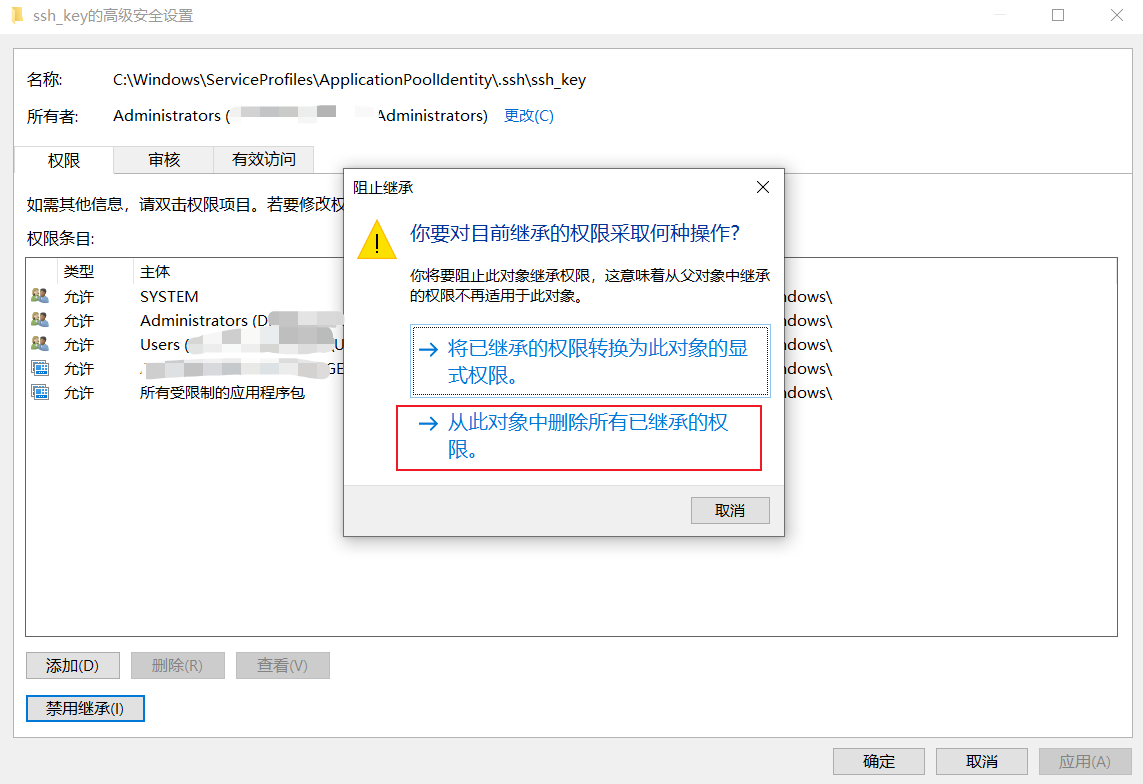
点“安全”-“高级”-“禁用继承”-“从此对象中删除所有已继承的权限”-重新添加一个IIS程序池,添加方法同上
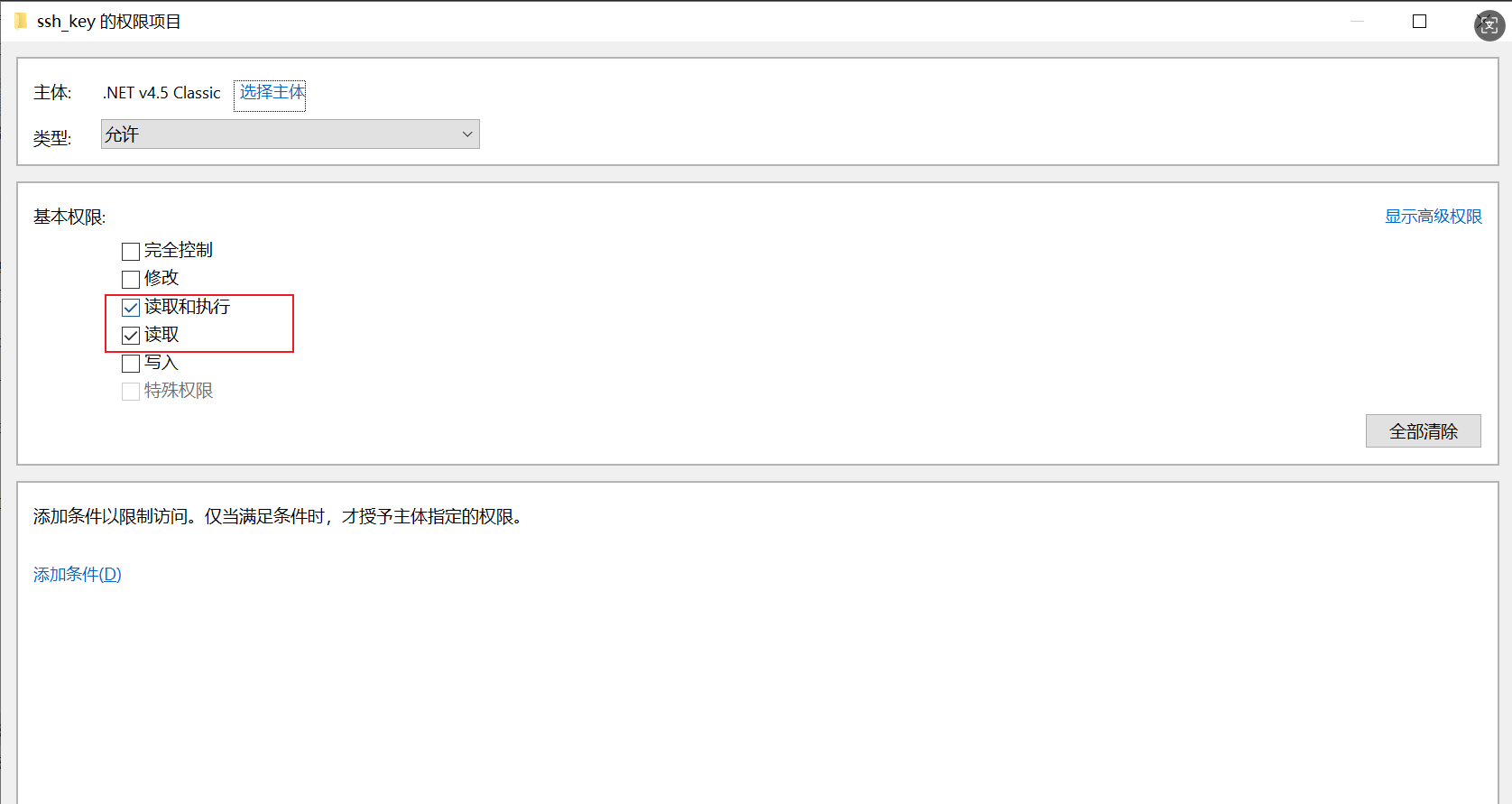
IIS程序池对象,只需要给读取和执行&读取的权限即可
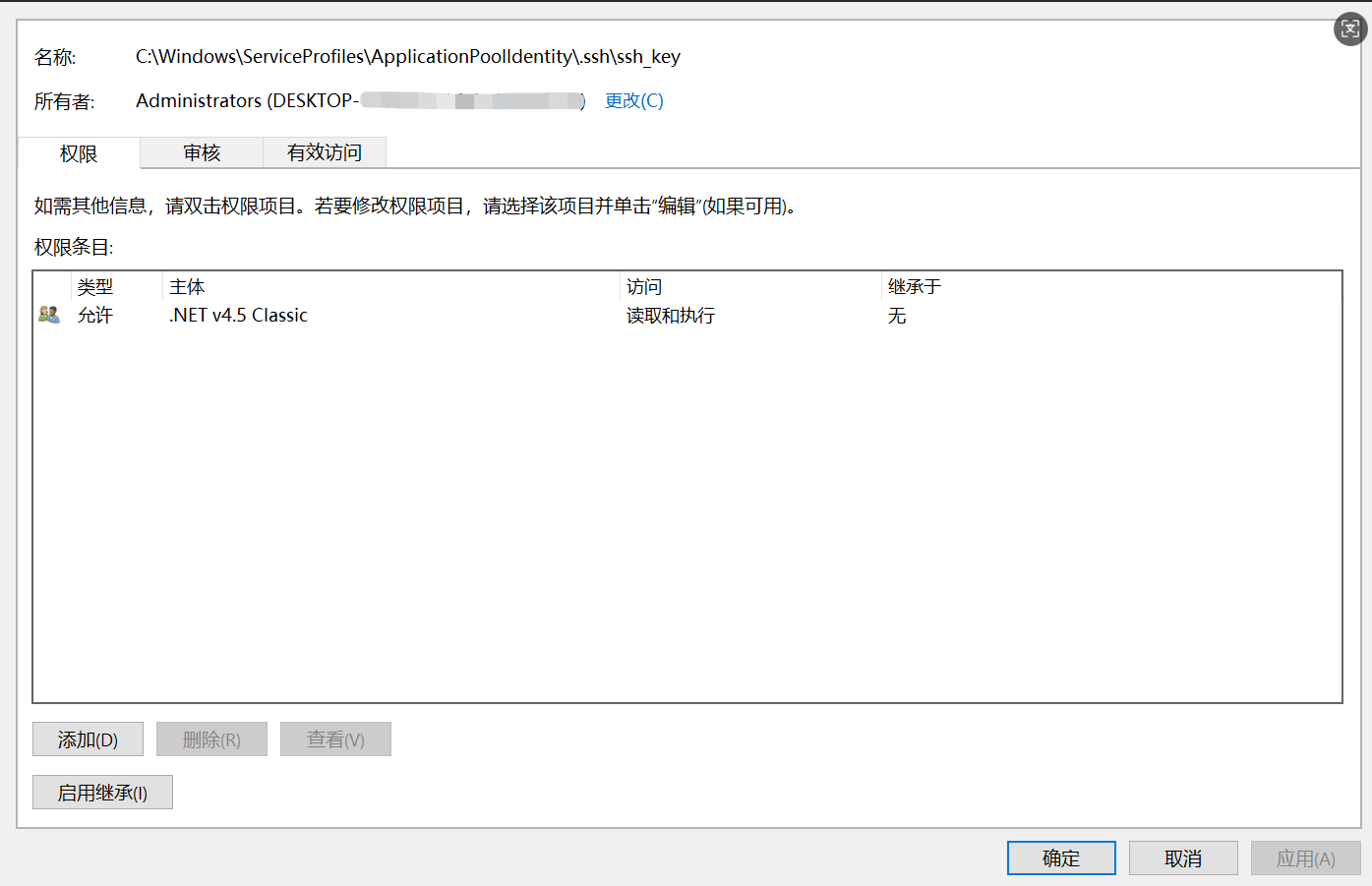
私钥只能有一个用户可以读取,即IIS程序池,设置好的文件权限如下所示
③ 将公钥
ssh_key.pub复制到数据库服务器(前提,数据库服务器已经安装好了OPENSSH,方法同应用服务器)
公钥内容直接使用记事本打开并复制
在数据库服务器中打开管理员powershell,运行以下脚本,将example_db替换成正确的数据库服务器用户名

# 将公钥内容添加到 authorized_keys 文件,在数据库服务器中操作
$publicKey = "ssh-rsa AAAAB3NzaC1yc2EAAAADAQABAAABAQC...你的公钥内容"
Add-Content -Path C:\Users\example_db\.ssh\authorized_keys -Value $publicKey

# 设置 .ssh 目录权限
icacls C:\Users\example_db\.ssh /inheritance:r
icacls C:\Users\example_db\.ssh /grant:r "example_db:F" /grant:r "SYSTEM:F"

# 设置 authorized_keys 文件权限
icacls C:\Users\example_db\.ssh\authorized_keys /inheritance:r
icacls C:\Users\example_db\.ssh\authorized_keys /grant:r "example_db:F" /grant:r "SYSTEM:F"
④ 编辑(数据库服务器)SSH服务器配置
管理员PowerShell运行以下脚本
notepad C:\ProgramData\ssh\sshd_config #该文件是隐藏文件

#更改以下配置
PubkeyAuthentication yes #只要把前面的井号拿掉就可以
AuthorizedKeysFile .ssh/authorized_keys
PubkeyAcceptedAlgorithms +ssh-rsa
LogLevel VERBOSE #可选

#这两行要注释掉
#Match Group administrators
#       AuthorizedKeysFile __PROGRAMDATA__/ssh/administrators_authorized_keys

#保存后,重启SSH服务
Restart-Service sshd
⑤ 验证连接
在应用服务器中使用C:\Users\29340\.ssh中的私钥测试连接,不要用IIS APPPOOL权限的那个,测不了,因为那个只能程序调用
运行ssh -i C:\Users\29340\.ssh\ssh_key example_db@数据库服务器IP
若没有提示输入密码,则说明SSH密钥配置成功了
第三步,编写程序实现功能
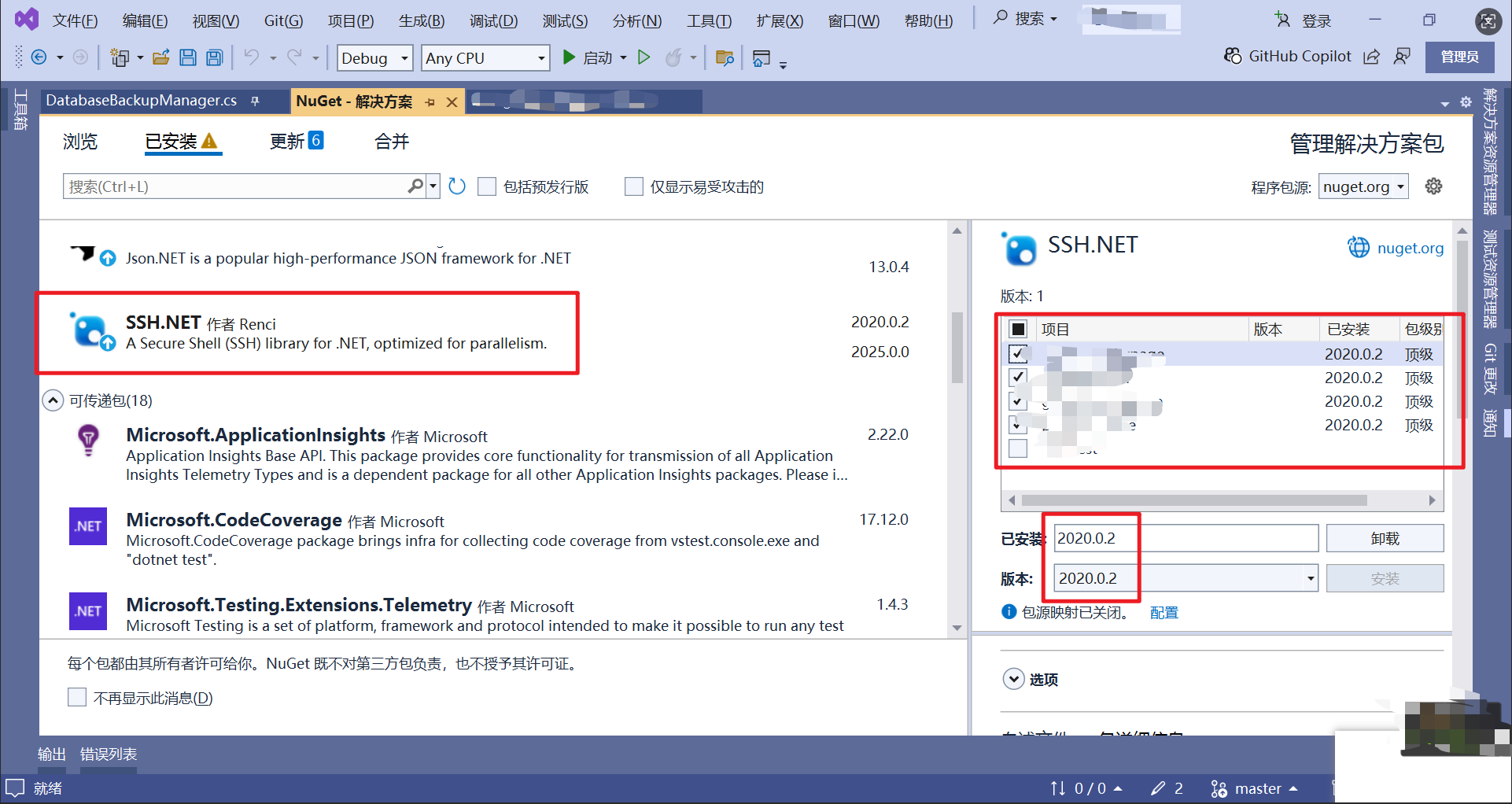
注意使用NuGet管理器安装依赖包时,选择合适的版本,太高了可能项目会不兼容
具体实现代码如下
using Renci.SshNet;
using System;
using System.Data.Common;
using System.IO;

public class DatabaseBackupManager
{
    private string _connectionString;
    private string _remoteBackupDirectory;
    private string _databaseName;
    private string _sshHost;
    private int _sshPort = 22;
    private string _sshUsername;
    private string _privateKeyPath;

    public DatabaseBackupManager(string connectionString, string backupDirectory,
                                string sshUsername = "example_db",
                                string privateKeyPath = @"C:\Windows\ServiceProfiles\ApplicationPoolIdentity\.ssh\ssh_key")
    {
        _connectionString = connectionString;
        _remoteBackupDirectory = backupDirectory;
        _sshUsername = sshUsername;
        _privateKeyPath = privateKeyPath;

        DbConnectionStringBuilder builder = new DbConnectionStringBuilder();
        builder.ConnectionString = connectionString;
        _databaseName = builder.ContainsKey("database") ? builder["database"].ToString() : "";
        _sshHost = builder.ContainsKey("data source") ? builder["data source"].ToString() : "";

        // 确保远程备份目录存在
        EnsureRemoteDirectoryExists();
    }

    #region -- SSH辅助方法
    private SshClient GetSshClient()
    {
        var privateKeyFile = new PrivateKeyFile(_privateKeyPath);
        var keyFiles = new[] { privateKeyFile };
        return new SshClient(_sshHost, _sshPort, _sshUsername, keyFiles);
    }

    private void EnsureRemoteDirectoryExists()
    {
        try
        {
            using (var sshClient = GetSshClient())
            {
                sshClient.Connect();
                sshClient.RunCommand($"if not exist \"{_remoteBackupDirectory}\" mkdir \"{_remoteBackupDirectory}\"");
                sshClient.Disconnect();
            }
        }
        catch (Exception ex)
        {
            Console.WriteLine($"[ERROR] 创建远程目录失败: {ex.Message}");
            throw;
        }
    }

    private string ExecuteRemoteCommand(SshClient sshClient, string command)
    {
        var result = sshClient.RunCommand(command);

        if (result.ExitStatus != 0)
        {
            throw new Exception($"远程命令执行失败: {command}\n错误: {result.Error}");
        }

        return result.Result;
    }
    #endregion

    #region -- Backup() 远程备份数据库
    public bool Backup()
    {
        string timestamp = DateTime.Now.ToString("yyyyMMdd_HHmmss");
        string backupFileName = $"{_databaseName}_backup_{timestamp}.sql";
        string remoteBackupPath = $@"{_remoteBackupDirectory}\{backupFileName}";

        try
        {
            DbConnectionStringBuilder builder = new DbConnectionStringBuilder();
            builder.ConnectionString = _connectionString;

            string strUserId = builder.ContainsKey("user id") ? builder["user id"].ToString() : "";
            string strPassword = builder.ContainsKey("password") ? builder["password"].ToString() : "";
            string strCharset = builder.ContainsKey("charset") ? builder["charset"].ToString() : "utf8";

            // 构建mysqldump命令
            string mysqlDumpCommand = $"mysqldump.exe --user={strUserId} --password={strPassword} " +
                                    $"--databases {_databaseName} --result-file=\"{remoteBackupPath}\" " +
                                    "--skip-lock-tables --single-transaction --routines --events --triggers " +
                                    $"--default-character-set={strCharset}";

            using (var sshClient = GetSshClient())
            {
                sshClient.Connect();
                ExecuteRemoteCommand(sshClient, mysqlDumpCommand);

                // 检查备份文件是否存在
                string checkFileCommand = $"if exist \"{remoteBackupPath}\" (echo exists) else (echo not exists)";
                string checkResult = ExecuteRemoteCommand(sshClient, checkFileCommand);

                sshClient.Disconnect();

                bool backupSuccess = checkResult.Trim().Equals("exists", StringComparison.OrdinalIgnoreCase);

                if (backupSuccess)
                {
                    Console.WriteLine($"[INFO] 数据库备份成功: {remoteBackupPath}");
                }
                else
                {
                    Console.WriteLine($"[ERROR] 数据库备份失败,文件不存在: {remoteBackupPath}");
                }

                return backupSuccess;
            }
        }
        catch (Exception ex)
        {
            Console.WriteLine($"[ERROR] 备份过程中发生异常: {ex.Message}");
            throw;
        }
    }
    #endregion

    #region -- CompressBackup() 压缩远程备份文件
    public string CompressBackup(string remoteSqlFilePath)
    {
        try
        {
            if (string.IsNullOrEmpty(remoteSqlFilePath))
                return null;

            string remoteZipFilePath = Path.ChangeExtension(remoteSqlFilePath, ".zip");

            using (var sshClient = GetSshClient())
            {
                sshClient.Connect();

                // 检查SQL文件是否存在
                string checkFileCommand = $"if exist \"{remoteSqlFilePath}\" (echo exists) else (echo not exists)";
                string checkResult = ExecuteRemoteCommand(sshClient, checkFileCommand);

                if (!checkResult.Trim().Equals("exists", StringComparison.OrdinalIgnoreCase))
                {
                    Console.WriteLine($"[ERROR] 压缩失败,文件不存在: {remoteSqlFilePath}");
                    return null;
                }

                // 使用PowerShell命令压缩文件
                string compressCommand = $@"powershell -Command ""Compress-Archive -Path '{remoteSqlFilePath}' -DestinationPath '{remoteZipFilePath}' -Force""";
                ExecuteRemoteCommand(sshClient, compressCommand);

                // 检查压缩文件是否存在
                string checkZipCommand = $"if exist \"{remoteZipFilePath}\" (echo exists) else (echo not exists)";
                string checkZipResult = ExecuteRemoteCommand(sshClient, checkZipCommand);

                if (checkZipResult.Trim().Equals("exists", StringComparison.OrdinalIgnoreCase))
                {
                    // 删除原SQL文件
                    string deleteCommand = $"del /f /q \"{remoteSqlFilePath}\"";
                    ExecuteRemoteCommand(sshClient, deleteCommand);

                    Console.WriteLine($"[INFO] 压缩成功: {remoteZipFilePath}");
                }
                else
                {
                    Console.WriteLine($"[ERROR] 压缩失败,ZIP文件未创建: {remoteZipFilePath}");
                    return null;
                }

                sshClient.Disconnect();
            }

            return remoteZipFilePath;
        }
        catch (Exception ex)
        {
            Console.WriteLine($"[ERROR] 压缩过程中发生异常: {ex.Message}");
            throw;
        }
    }
    #endregion

    #region -- CompressLatestBackup() 压缩最新的远程备份文件
    public string CompressLatestBackup()
    {
        try
        {
            string latestBackup = null;

            using (var sshClient = GetSshClient())
            {
                sshClient.Connect();

                string getLatestFileCommand = $@"powershell -Command ""Get-ChildItem -Path '{_remoteBackupDirectory}' -Filter *.sql | Sort-Object CreationTime -Descending | Select-Object -First 1 -ExpandProperty FullName""";
                string result = ExecuteRemoteCommand(sshClient, getLatestFileCommand);

                sshClient.Disconnect();

                latestBackup = result.Trim();
            }

            if (!string.IsNullOrEmpty(latestBackup) && latestBackup != " ")
            {
                return CompressBackup(latestBackup);
            }
            else
            {
                throw new Exception("未找到备份文件!");
            }
        }
        catch (Exception ex)
        {
            Console.WriteLine($"[ERROR] 压缩最新备份时发生异常: {ex.Message}");
            throw;
        }
    }
    #endregion

    #region -- BackupAndCompress() 备份并自动压缩
    public string BackupAndCompress()
    {
        try
        {
            if (Backup())
            {
                Console.WriteLine("[INFO] 备份完成,开始压缩...");
                return CompressLatestBackup();
            }

            return null;
        }
        catch (Exception ex)
        {
            Console.WriteLine($"[ERROR] 备份并压缩过程中发生异常: {ex.Message}");
            throw;
        }
    }
    #endregion

    #region -- CleanOldBackups() 自动清理远程旧备份文件
    public void CleanOldBackups(int keepDays = 30)
    {
        try
        {
            string cutoffDate = DateTime.Now.AddDays(-keepDays).ToString("yyyy-MM-dd");

            using (var sshClient = GetSshClient())
            {
                sshClient.Connect();

                string cleanCommand = $@"powershell -Command ""Get-ChildItem -Path '{_remoteBackupDirectory}' -Include *.sql,*.zip | Where-Object {{ $_.CreationTime -lt '{cutoffDate}' }} | Remove-Item -Force""";
                ExecuteRemoteCommand(sshClient, cleanCommand);

                string countCommand = $@"powershell -Command ""(Get-ChildItem -Path '{_remoteBackupDirectory}' -Include *.sql,*.zip | Where-Object {{ $_.CreationTime -lt '{cutoffDate}' }}).Count""";
                string countResult = ExecuteRemoteCommand(sshClient, countCommand);

                if (int.TryParse(countResult.Trim(), out int deletedCount) && deletedCount > 0)
                {
                    Console.WriteLine($"[INFO] 已清理 {deletedCount} 个过期备份文件");
                }
                else
                {
                    Console.WriteLine("[INFO] 没有需要清理的过期备份文件");
                }

                sshClient.Disconnect();
            }
        }
        catch (Exception ex)
        {
            Console.WriteLine($"[ERROR] 清理旧备份时出错: {ex.Message}");
            throw;
        }
    }
    #endregion
}
调用代码示例如下
// 创建备份管理器
var backupManager = new DatabaseBackupManager(
    connectionString: "Server=mysql-server;Database=mydb;Uid=user;Pwd=password;",
    backupDirectory: @"D:\Backups"
);

// 执行备份和压缩
try
{
    string zipFilePath = backupManager.BackupAndCompress();
    Console.WriteLine($"备份完成: {zipFilePath}");

    // 清理旧备份
    backupManager.CleanOldBackups(30);
}
catch (Exception ex)
{
    Console.WriteLine($"备份失败: {ex.Message}");
}
运行过程中可能会报错
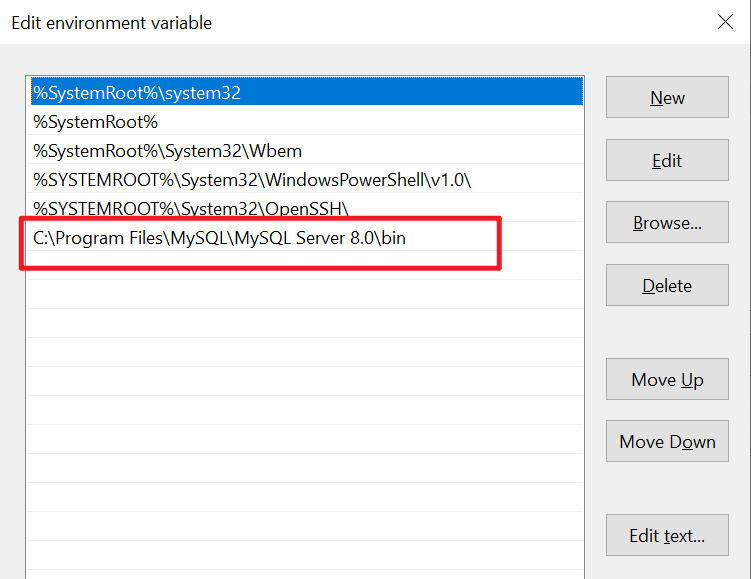
'mysqldump.exe' is not recognized as an internal or external command, operable program or batch file.
这是因为数据库服务器没有把mysql安装路径添加到环境变量中,添加到Path变量上即可
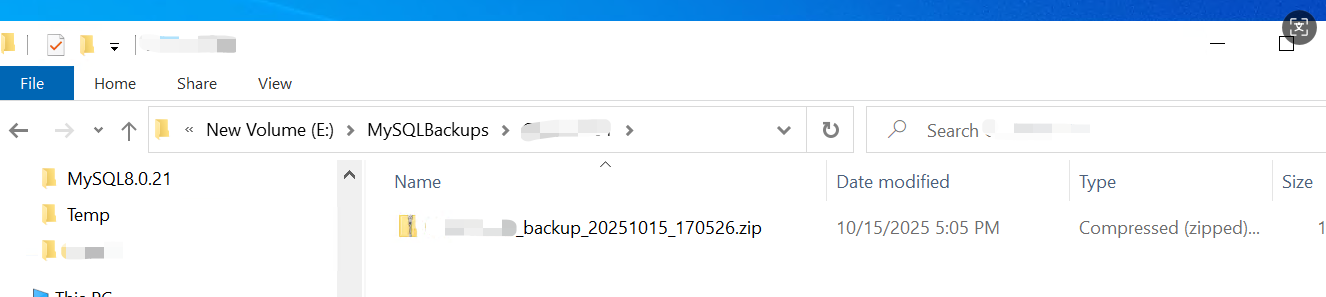
运行完成后,数据库服务器指定备份文件夹下会有数据库备份压缩文件,如图所示:
文章到此结束,如有帮助,请多点赞
^(●ˇ∀ˇ●)^
如有疑问,欢迎留言交流,谢谢!

汇聚全球AI编程工具,助力开发者即刻编程。
更多推荐

 21
21 0
0- 0


 已为社区贡献1条内容

所有评论(0)