
presto自定义函数
第一种:SQL方式
presto在0.251版本加入了使用SQL语句来自定义函数的能力,到了0.272版本有了一定的可用性,如果你在用的版本比我用的0.272高,最好是仔细看一下官方文档,因为0.272的文档中提到目前这个能力不完善,未来的配置和使用方式可能会发生改变
相关资料:
自定义函数catalog配置文档:https://prestodb.io/docs/0.272/admin/function-namespace-managers.html
自定义函数使用语法:https://prestodb.io/docs/0.272/sql/create-function.html
需要明确的是,0.272版本的SQL方式创建函数,虽然面向于用户侧,但它只能实现某个字段一行代码范围内的处理逻辑,不支持多行,可见功能尚不完善,还无法支持spark和hive那样面向用户的三大自定义函数
在使用时,有别于presto的内建函数,存储在presto.default这个默认的存储空间中,比如当你调用最大值时,全链路为presto.default.max(),日常使用的是简写max(),presto执行时自动补全存储空间,而其他的用户自定义函数需要自己准备存储空间也就是一个单独的catalog,和其他大多数配置一样,目前只支持mysql
因此,使用前需要做一个单独的配置,在presto的部署路径下新增etc/function-namespace/example.properties文件,并写入如下内容,指向准备好的mysql,etc/function-namespace/这里路径不要变,example.properties和hive那些一样,文件名称会识别成后期使用调用的catalog
function-namespace-manager.name=mysql
database-url=jdbc:mysql://example.net:3306/database?user=root&password=password
function-namespaces-table-name=example_function_namespaces
functions-table-name=example_sql_functions
最后两个参数是两个数据表,如果不存在会自动创建,名称可以自己改
function-namespaces-table-name:这个表用来存储自定义函数的命名空间列表,也就是那些存储函数的库
functions-table-name:用来存储自定义函数的功能消息
重启Presto,随后在mysql中用如下语句,向数据表新增一个函数库,catalog要和上面配置文件对应的catalog名字一样,后面那个schema_name,就可以按需要自定义了,不需要为它在新建一个mysql,这里只是一个调用的链路名称
INSERT INTO example_function_namespaces (catalog_name, schema_name) VALUES('example', 'test');
如果你需要,你可以在etc/function-namespace文件夹下创建多个存储自定义函数用的catalog,它们可以指向同一个mysql数据库,presto会自己按照example_function_namespaces中的记录处理对应的关系,保障每个catalog只会绑定自己的函数,要这样做的话,新的catalog和schema_name,在mysql里面手动新增记录即可。但是一般不会这样做,都是完全隔离的,尤其是多租户的场景下,多数是用户自备mysql
随后你就可以在presto中使用下面的语法创建自定义函数
CREATE [ OR REPLACE ] [TEMPORARY] FUNCTION
qualified_function_name (
  parameter_name parameter_type
  [, ...]
)
RETURNS return_type
[ COMMENT function_description ]
[ LANGUAGE [ SQL | identifier] ]
[ DETERMINISTIC | NOT DETERMINISTIC ]
[ RETURNS NULL ON NULL INPUT | CALLED ON NULL INPUT ]
[ RETURN expression | EXTERNAL [ NAME identifier ] ]
REPLACE:如果函数存在,则替换为当前设置的最新状态TEMPORARY:和hive语法一样是否临时函数qualified_function_name:函数名。如果建立的是一个永久函数,函数名称就必须写成catalog.schema_name.函数名的格式,永久函数通过函数名称和参数类型列表进行唯一标识。临时函数都由函数名称唯一标识,不可与已有的函数名重复RETURNS :这个函数的返回值类型COMMENT:函数说明LANGUAGE:这个函数执行体类型,默认是SQL,其他可选的有Java等可被识别的标识符,可以看官网,非SQL时需要另行指定 RETURN 为 EXTERNAL 并制定对应代码类的全限定名称,一般不使用非SQL之外的,因为设计到的代码开发有其他相关的操作,成本较大,而且需要引擎运维侧来操作DETERMINISTIC | NOT DETERMINISTIC :指这个函数在运行计划和结果是否是可观测的,如果是可观测的,presto会自动加入一些优化,但可能会导致影响函数的结果,比如击中缓冲等。如果不是意味着每次运行都视为一个从无到有的计算体,运行的资源消耗presto只会在具体调度时根据已有的集群配置做优化,一般使用默认的不可观测RETURNS NULL ON NULL INPUT | CALLED ON NULL INPUT :这两个是指函数传入参数有Null时的处理行为,默认的CALLED ON NULL INPUT是指只要有Null,这个函数会直接返回Null,不会发生实际的计算。反之RETURNS NULL ON NULL INPUT会直接计算函数体,一般RETURNS NULL ON NULL INPUT用的多一些,当然这意味着通常会在函数中处理Null值入参RETURN:函数的执行体,SQL时写执行的sql表达式,执行体类型非SQL时需要写为EXTERNAL NAME 'com.example.security.CryptoUtils.encrypt'这个格式
案例sql:
CREATE FUNCTION example.default.tan(x double)
RETURNS double
DETERMINISTIC
RETURNS NULL ON NULL INPUT
RETURN sin(x) / cos(x)

CREATE OR REPLACE FUNCTION example.default.tan(x double)
RETURNS double
COMMENT 'tangent trigonometric function'
LANGUAGE SQL
DETERMINISTIC
RETURNS NULL ON NULL INPUT
RETURN sin(x) / cos(x)

CREATE TEMPORARY FUNCTION square(x int)
RETURNS int
RETURN x * x
第二种:插件注册方式
SQL类型的函数执行体,就和最开头说的那样,它能够完成的能力是相当有限的,现在的版本只支持一行内的返回体,无法写多行,这就导致他没有办法处理相当复杂的逻辑,只能用在一个很复杂的SQL字段逻辑封装中,如果你有多行需求就需要写代码解决了,但是需要交给服务侧去解决,并且presto的自定义二次封装函数开发成本很高,相比之下hive或者spark的性价比较高,所以除非你只有presto不然尽量不要轻易决定去开发presto的函数
插件注册,允许开发者使用三种函数类型,下面是官网原文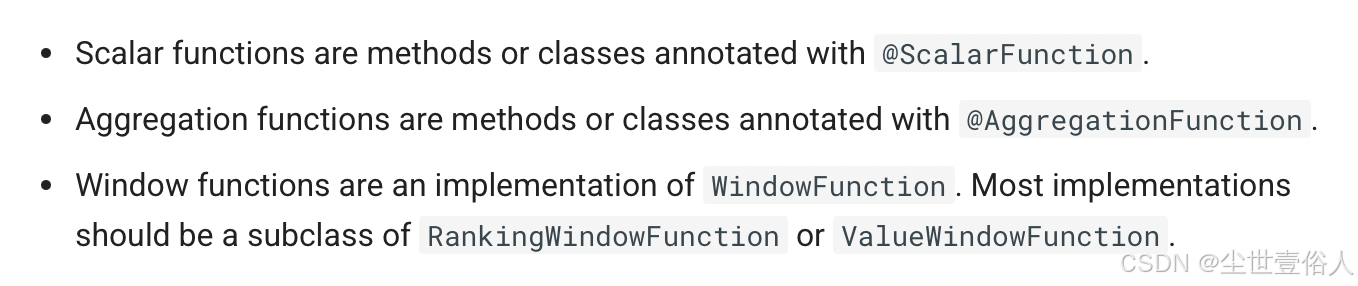
在介绍代码之前,先说一下编写代码的项目结构,由于后期使用需要,最省事的莫过于项目结构最后能打包成一个归档文件,如果不会的可以看我发过的打包插件使用博客。当然如果你嫌麻烦,用一个单体项目并打包成一个jar也行,但是后面使用时需要的第三方jar很容易出现加载不到的问题,需要你手动放在函数目录下
而且pom中的三方依赖版本需要和github上的prestoDB源码项目保持一致,比如我本地环境是0.272就需要如下pom
    <dependencies>
        <dependency>
            <groupId>com.facebook.presto</groupId>
            <artifactId>presto-spi</artifactId>
            <version>0.272</version> <!-- PrestoDB版本号 -->
            <scope>provided</scope>
        </dependency>

        <dependency>
            <groupId>com.google.guava</groupId>
            <artifactId>guava</artifactId>
            <version>26.0-jre</version> <!-- 与源码保持一致 -->
        </dependency>

        <dependency>
            <groupId>io.airlift</groupId>
            <artifactId>slice</artifactId>
            <version>0.38</version> <!-- 与源码保持一致 -->
        </dependency>

    </dependencies>
Scalar functions
这类函数叫做标量函数,对标hive的udf一进一出,在presto中有两种写法,这里只介绍第一种常规写法,至于第二种写法是让函数在字节码中生成,但是这种写法的开发成本是最高的那一撮了,即使它有更高的执行效率
package com.wangyang.prestoDN.scalar;

import com.facebook.presto.common.type.StandardTypes;
import com.facebook.presto.spi.function.Description;
import com.facebook.presto.spi.function.ScalarFunction;
import com.facebook.presto.spi.function.SqlNullable;
import com.facebook.presto.spi.function.SqlType;
import io.airlift.slice.Slice;

/**
 * Scalar Function,即标量函数。将传递给它的一个或者多个参数值,进行计算后,返回一个确定类型的标量值
 *
 * 开发自定义函数的时候要注意,presto的数据类型本身有很多,因此对于写函数来讲,数据类型分为两种
 * 原生容器类型和sql类型,presto会根据函数中的注解内容自动识别,并在sql执行时解析为需要的sql类型
 *
 * 原生容器类型(在代码中直接操作的类型):boolean、long、double、Slice和Block
 *
 * Slice的本质是对byte[]进行了封装,为的是更加高效、自由地对内存进行操作
 * Block对应 SQL 中的数组类型
 *
 * SQL类型可以通过StandardTypes调用 它是一个 final 类
 * 可以通过它调用需要的类型表达 com.facebook.presto.common.type 包下有对应类型的实现presto会自己调用
 */
public class ExampleIsNullFunction {

    /**
     * ScalarFunction:用于声明标量函数的名称(value)和别名(alias)
     *                 calledOnNullInput = true 意味着当前方法允许传入Null,有null需要时必须携带
     * Description:函数说明
     * SqlType:两个作用,放在方法上用于声明函数的返回类型,放在入参数上表示参数类型
     * SqlNullable:用于表示函数的那个参数或返回结果可能为NULL。
     *             这一点就和直接执行create function语法的空处理是一样的作用
     *             如果方法的参数不使用此注解,当函数参数包含NULL时,则该函数不会被调用,框架自动返回结果NULL。
     *             当 Java 代码中用于实现函数的方法,它的返回值为包装类型时,必须要在实现方法上加上该注解,且该注解无法用于 Java 基础类型
     *
     * @param string
     * @return
     */
    @ScalarFunction(value = "is_null1", alias = "isnull1" , calledOnNullInput = true)
    @Description("判断是否为空")
    @SqlType(StandardTypes.BOOLEAN)
    public static boolean isNull(@SqlNullable @SqlType(StandardTypes.VARCHAR) Slice string)
    {
        return (string == null);
    }

}
除了上面一个一个的写具体方法之外,presto针对同一个方法,不同的入参类型支持多态的自动识别
package com.wangyang.prestoDN.scalar;

import com.facebook.presto.common.block.Block;
import com.facebook.presto.common.type.StandardTypes;
import com.facebook.presto.spi.function.*;
import io.airlift.slice.Slice;

/**
 * 自定义函数的进阶用法,可以将整个类视为函数体,内部写成范型的逻辑,节省了后续函数注册的开发成本
 *
 */
@ScalarFunction(value = "is_null2", alias = "isnull2",calledOnNullInput = true)
@Description("是否为空")
public final class ExampleIsNullFunctionPro {

    public ExampleIsNullFunctionPro() {
    }

    /**
     * TypeParameter:TypeParameter的使用有点类似 Java 中泛型的用法,
     *               类型变量T在声明完之后就可以在@SqlType注解中使用。
     *               在实际的调用过程中,框架会将T与实际 SQL 类型进行绑定
     *               然后再去调用以对应的原生容器类型为参数的实际方法。
     *
     *               它缺失可以被使用在方法返回类型的SqlType注解里面,但是一般不这样使用
     *               通常情况下函数需要一个明确的返回值类型
     *
     * @param value
     * @return
     */
    @TypeParameter("T")
    @SqlType(StandardTypes.BOOLEAN)
    public static boolean isNullSlice(@SqlNullable @SqlType("T") Slice value)
    {
        //String s = value.toStringUtf8();//转换成Java类操作,当然还有直接操作 字节数组的方法,但是不常用
        // return Slices.utf8Slice(s); 当返回类型是字符串的使用通常使用Slices手动转换一下Java的String
        return (value == null);
    }

    @TypeParameter("T")
    @SqlType(StandardTypes.BOOLEAN)
    public static boolean isNullLong(@SqlNullable @SqlType("T") Long value)
    {
        return (value == null);
    }

    @TypeParameter("T")
    @SqlType(StandardTypes.BOOLEAN)
    public static boolean isNullDouble(@SqlNullable @SqlType("T") Double value)
    {
        return (value == null);
    }

    @TypeParameter("T")
    @SqlType(StandardTypes.BOOLEAN)
    public static boolean isNullBoolean(@SqlNullable @SqlType("T") Boolean value)
    {
        return (value == null);
    }

    @TypeParameter("T")
    @SqlType(StandardTypes.BOOLEAN)
    public static boolean isNullBlock(@SqlNullable @SqlType("T") Block value)
    {
        return (value == null);
    }

}
第一种写法,在presto中有一个辅助功能是传入一个规范的执行类,用来代替了关键参数校验等流程,但是一般很少用,有兴趣可以看官方文档:@OperatorDependency部分
Aggregation Function
这类函数叫聚合函数,对标hive的udaf多进一出,但是通常用的不多,因为presto自带了一个reduce函数,可以实现多数聚合需求
它的使用需要一个状态接口,并装备好所需类型的get、set方法,下面是一个平均值的例子
package com.wangyang.prestoDN.aggregation;

import com.facebook.presto.spi.function.AccumulatorState;

/**
 * 对于presto基于原生数据类型的聚合函数来讲
 * 需要一个继承 AccumulatorState 父状态接口的自定义接口
 * 并定义需要的以中间类型为参数或返回值的get、set
 */
public interface LongAndDoubleState extends AccumulatorState {
    long getLong();

    void setLong(long value);

    double getDouble();

    void setDouble(double value);
}
package com.wangyang.prestoDN.aggregation;

import com.facebook.presto.common.block.BlockBuilder;
import com.facebook.presto.common.type.DoubleType;
import com.facebook.presto.common.type.StandardTypes;
import com.facebook.presto.spi.function.*;

/**
 * Aggregation Function,即聚合函数。计算从列中取得的值,返回一个单一的值。
 *
 * 使用一个 LongAndDoubleState 自定义接口来记录状态数据
 *
 */
@AggregationFunction(value = "avg_double_pro",alias = "avgdoublepro" )
public class AverageAggregation {

    /**
     * InputFunction 注解 input 阶段,分别在不同的 worker 中进行,将行值进行累积计算到state中
     * @param state
     * @param value
     */
    @InputFunction
    public static void input(LongAndDoubleState state, @SqlType(StandardTypes.DOUBLE) double value)
    {
        state.setLong(state.getLong() + 1);
        state.setDouble(state.getDouble() + value);
    }

    /**
     * combine阶段将上一步得到的state进行两两结合
     */
    @CombineFunction
    public static void combine(LongAndDoubleState state, LongAndDoubleState otherState)
    {
        state.setLong(state.getLong() + otherState.getLong());
        state.setDouble(state.getDouble() + otherState.getDouble());
    }


    /**
     * 最终会得到一个state,在output阶段对最终的state进行处理输出
     */
    @OutputFunction(StandardTypes.DOUBLE)
    public static void output(LongAndDoubleState state, BlockBuilder out)
    {
        long count = state.getLong();
        if (count == 0) {
            out.appendNull();
        }
        else {
            double value = state.getDouble();
            DoubleType.DOUBLE.writeDouble(out, value / count);
        }
    }

}
注意在后期使用时,聚合函数不能使用范型写法,只能是有多个需求写多个实现
Window functions
这类函数叫做窗口函数,在使用时需要和over子句配合,社区版的presto,也就是PrestoDB,在0.251加入了自定义函数的二次开发接口,但是市场上一来是生态习惯,二来是没有强需求支持,所以找遍网上的资料都没有找到靠谱的窗口函数开发流程,能找到的最多是在另外两种函数上有效,在窗口函数上流程走不通。所以我按照上面官方原文的说明中查看了相关源码,多次尝试之下,我有些怀疑截止到我本地用的0.272在窗口函数的二次开发和注册上prestoDB本身就有bug,当然这只是我的怀疑,因为本身窗口函数在我的工作经验中也没见有那个服务商落地过,标量函数我见的很多,聚合函数只有少数reduce函数和自带的函数无法解决时偶尔开发几个。所以我在这里分享一下我在源码中得到了什么,如果大家在往后的版本能跑同开窗函数的二次开发或者有其他思路欢迎私聊我。如果你没有这方面的兴趣可以跳过Window functions 这部分内容,去看函数注册,另外两种函数的开发和使用没有问题
按照官网的原文来看,prestodb它提供了一个顶级接口WindowFunction,两个实现该接口的抽象类RankingWindowFunction、ValueWindowFunction,并说明了大部分情况下自定义开窗函数应该是这两个抽象类的子类,由于官网也说了这适用于大部分情况,因此抱着先跑通这一条线的想法,去查看了源码。
WindowFunction顶级父接口,提供了两个方法,reset用来在开窗函数被调用时做初始化,只会被调用一次。processRow是用来处理开窗函数所处理的每一行数据,在调用函数时每一行递归一次
package com.facebook.presto.spi.function;

import com.facebook.presto.common.block.BlockBuilder;

public interface WindowFunction {
    void reset(WindowIndex windowIndex);

    void processRow(BlockBuilder output, int peerGroupStart, int peerGroupEnd, int frameStart, int frameEnd);
}
RankingWindowFunction抽象类,实现了这个顶级父接口,并做出了如下的流程封装
/*
 * Licensed under the Apache License, Version 2.0 (the "License");
 * you may not use this file except in compliance with the License.
 * You may obtain a copy of the License at
 *
 *     http://www.apache.org/licenses/LICENSE-2.0
 *
 * Unless required by applicable law or agreed to in writing, software
 * distributed under the License is distributed on an "AS IS" BASIS,
 * WITHOUT WARRANTIES OR CONDITIONS OF ANY KIND, either express or implied.
 * See the License for the specific language governing permissions and
 * limitations under the License.
 */
package com.facebook.presto.spi.function;

import com.facebook.presto.common.block.BlockBuilder;

public abstract class RankingWindowFunction
        implements WindowFunction
{
    /**
     * WindowIndex 受保护变量,子类可访问,用来读取开窗函数处理的行数据
     * currentPeerGroupStart 和 currentPosition 用来暂存当前窗口数据边界中的起始边界和当前行位置
     */
    protected WindowIndex windowIndex;

    private int currentPeerGroupStart;
    private int currentPosition;

    /**
     * 重写了父接口的初始化方法,并存储行数据指针
     * 两个边界相关的默认值中 currentPeerGroupStart 是-1 ,currentPosition指向当前行,所以默认是数据指针下标从0开始
     *
     * 并在其中,另外给了一个reset方法,会在末尾调用,这是因为对于二次开发的人来讲,RankingWindowFunction中重写父接口的reset方法被final标记,以及无法被子类重写了
     * 所以另给了一个reset方法,需要重写一些逻辑时,子类实现,这里被调用
     *
     * @param windowIndex the window index which contains sorted values for the partition
     */
    @Override
    public final void reset(WindowIndex windowIndex)
    {
        this.windowIndex = windowIndex;
        this.currentPeerGroupStart = -1;
        this.currentPosition = 0;

        reset();
    }

    /**
     * 和reset方法一样不允许被子类重写,但是提供了可扩展的processRow方法
     *
     * @param output 最终用来输出结果的对象
     * @param peerGroupStart 当前窗口下数据所在组的起始边界
     * @param peerGroupEnd 当前窗口下数据所在组的结束边界
     *
     *        peerGroupStart和peerGroupEnd通俗的将就是开窗函数 partition by 关键字的结果组,每一组的边界
     *
     * @param frameStart the position of the first row in the window frame
     * @param frameEnd the position of the last row in the window frame
     */
    @Override
    public final void processRow(BlockBuilder output, int peerGroupStart, int peerGroupEnd, int frameStart, int frameEnd)
    {
        /**
         * 这个if的作用是使用初始化时生成的边界起始变量来判断运行时
         * 是否和入参中的当前窗口起始值一样
         * 如果一样意味着窗口没有更改,否则意味着处理到了下一个窗口
         * 下一个窗口时,更新newPeerGroup为true 以及新窗口的起始值
         */
        boolean newPeerGroup = false;
        if (peerGroupStart != currentPeerGroupStart) {
            currentPeerGroupStart = peerGroupStart;
            newPeerGroup = true;
        }

        //边界下标相减 + 1 得到当前窗口有多少个数据
        int peerGroupCount = (peerGroupEnd - peerGroupStart) + 1;

        //调用子类的行处理方法,传入参数从左到右为:输出数据用的类、是否新窗口、当前窗口有多少行,当前行的下标
        processRow(output, newPeerGroup, peerGroupCount, currentPosition);

        //最后当前行下标自增 1
        currentPosition++;
    }

    /**
     * Reset state for a new partition (including the first one).
     */
    public void reset()
    {
        // subclasses can override
    }

    /**
     * Process a row by outputting the result of the window function.
     * <p/>
     * This method provides information about the ordering peer group. A peer group is all
     * of the rows that are peers within the specified ordering. Rows are peers if they
     * compare equal to each other using the specified ordering expression. The ordering
     * of rows within a peer group is undefined (otherwise they would not be peers).
     *
     * @param output the {@link BlockBuilder} to use for writing the output row
     * @param newPeerGroup if this row starts a new peer group
     * @param peerGroupCount the total number of rows in this peer group
     * @param currentPosition the current position for this row
     */
    public abstract void processRow(BlockBuilder output, boolean newPeerGroup, int peerGroupCount, int currentPosition);
}
ValueWindowFunction抽象类,实现了这个顶级父接口,并做出了如下的流程封装。并且综合来看这个抽象类,它的能力更健壮,抛开无法使用这一点,在源码中将子类的方法改成接受所有参数就能满足绝大部分需求
/*
 * Licensed under the Apache License, Version 2.0 (the "License");
 * you may not use this file except in compliance with the License.
 * You may obtain a copy of the License at
 *
 *     http://www.apache.org/licenses/LICENSE-2.0
 *
 * Unless required by applicable law or agreed to in writing, software
 * distributed under the License is distributed on an "AS IS" BASIS,
 * WITHOUT WARRANTIES OR CONDITIONS OF ANY KIND, either express or implied.
 * See the License for the specific language governing permissions and
 * limitations under the License.
 */
package com.facebook.presto.spi.function;

import com.facebook.presto.common.block.BlockBuilder;

public abstract class ValueWindowFunction
        implements WindowFunction
{
    /**
     * 同 RankingWindowFunction 一样的窗口数据指针变量
     *
     * 不同的是 ignoreNulls 变量提供了presto自动为你过滤空值的能力
     * 一般保险起见在子类的初始化方法中 调用setIgnoreNulls 指定一下 ture为忽略空值,反之不忽略
     */
    protected WindowIndex windowIndex;

    protected boolean ignoreNulls;

    private int currentPosition;

    /**
     * 同RankingWindowFunction
     * @param windowIndex the window index which contains sorted values for the partition
     */
    @Override
    public final void reset(WindowIndex windowIndex)
    {
        this.windowIndex = windowIndex;
        this.currentPosition = 0;

        reset();
    }

    @Override
    public final void processRow(BlockBuilder output, int peerGroupStart, int peerGroupEnd, int frameStart, int frameEnd)
    {
        processRow(output, frameStart, frameEnd, currentPosition);

        currentPosition++;
    }

    /**
     * Reset state for a new partition (including the first one).
     */
    public void reset()
    {
        // subclasses can override
    }

    /**
     * Process a row by outputting the result of the window function.
     *
     * @param output the {@link BlockBuilder} to use for writing the output row
     * @param frameStart 当前窗口实际起始边界
     * @param frameEnd 当前窗口实际结束边界
     *
     *                frameStart 和  frameEnd 在默认情况下和另外两个 Group 边界值是一样的
     *                 区别在于如果你操作了range或者ROWS后实际计算窗口的起始指针
     *                 windowFunction(arg1,....argn) OVER([PARTITION BY<...>] [ORDER BY<...>] [RANGE|ROWS BETWEEN AND])
     *
     * @param currentPosition the current position for this row
     */
    public abstract void processRow(BlockBuilder output, int frameStart, int frameEnd, int currentPosition);

    /**
     * Set ignore nulls indicator.
     *
     * @param ignoreNulls true if nulls should be ignored
     */
    public void setIgnoreNulls(boolean ignoreNulls)
    {
        this.ignoreNulls = ignoreNulls;
    }
}
下面是一个按照当前从源码中获取到的信息,二次开发的,输出当前窗口边界以及当前行值的例子
package com.wangyang.prestoDN.window;

import com.facebook.presto.common.block.BlockBuilder;
import com.facebook.presto.common.block.BlockBuilderStatus;
import com.facebook.presto.common.type.BooleanType;
import com.facebook.presto.common.type.StandardTypes;
import com.facebook.presto.common.type.VarcharType;
import com.facebook.presto.spi.function.ValueWindowFunction;
import com.facebook.presto.spi.function.WindowFunctionSignature;
import io.airlift.units.DataSize;

//@WindowFunctionSignature(name = "out_range", typeVariable = "T", returnType = "T", argumentTypes = "T")
@WindowFunctionSignature(name = "out_range", typeVariable = "T", returnType = StandardTypes.VARCHAR, argumentTypes = "T")
public class WindowValue extends ValueWindowFunction {

    @Override
    public void reset() {
        //忽略空值
        setIgnoreNulls(true);
    }

    public void processRow(BlockBuilder output, int frameStart, int frameEnd, int currentPosition) {
        //createBlockBuilder 方法接受两个参数
        // blockBuilderStatus :是一个状态监控对象,目的是限制BlockBuilder所含数据的太大,导致资源问题,但是一般不监控
        // expectedEntries: 是预期写入多少个数据,对于appendTo方法来将只需要一个就行
        BlockBuilder blockBuilder = BooleanType.BOOLEAN.createBlockBuilder(null, 1);
        windowIndex.appendTo(0,currentPosition,blockBuilder);
        //取出来
        boolean value = BooleanType.BOOLEAN.getBoolean(blockBuilder.build(), 0);

        VarcharType.VARCHAR.writeString(output,"当前窗口边界为:"+frameStart+"--"+frameEnd+"  当前值为:"+value);
    }

}
至于获取行数据的对象,它的源码如下
/*
 * Licensed under the Apache License, Version 2.0 (the "License");
 * you may not use this file except in compliance with the License.
 * You may obtain a copy of the License at
 *
 *     http://www.apache.org/licenses/LICENSE-2.0
 *
 * Unless required by applicable law or agreed to in writing, software
 * distributed under the License is distributed on an "AS IS" BASIS,
 * WITHOUT WARRANTIES OR CONDITIONS OF ANY KIND, either express or implied.
 * See the License for the specific language governing permissions and
 * limitations under the License.
 */
package com.facebook.presto.spi.function;

import com.facebook.presto.common.block.Block;
import com.facebook.presto.common.block.BlockBuilder;
import io.airlift.slice.Slice;

/**
 * A window index contains the sorted values for a window partition.
 * Each window function argument is available as a separate channel.
 */
public interface WindowIndex
{
    /**
     * 获取行数,一般不用这个方法,而是调用ValueWindowFunction中的窗口入参
     */
    int size();

    /**
     * 判断一个行数据是否为空
     *
     * @param channel 入参计算的字段下标,从0开始
     * @param position 行下标
     * @return if the value is null
     */
    boolean isNull(int channel, int position);

    /**
     * 获得一个boolean类型值
     *
     * @param channel argument number
     * @param position row within the partition, starting at zero
     * @return value at the specified channel and position
     */
    boolean getBoolean(int channel, int position);

    /**
     * Gets a value as a {@code long}.
     *
     * @param channel argument number
     * @param position row within the partition, starting at zero
     * @return value at the specified channel and position
     */
    long getLong(int channel, int position);

    /**
     * Gets a value as a {@code double}.
     *
     * @param channel argument number
     * @param position row within the partition, starting at zero
     * @return value at the specified channel and position
     */
    double getDouble(int channel, int position);

    /**
     * Gets a value as a {@link Slice}.
     *
     * @param channel argument number
     * @param position row within the partition, starting at zero
     */
    Slice getSlice(int channel, int position);

    /**
     * Gets a value stored as a {@link Block}.
     *
     * @param channel argument number
     * @param position row within the partition, starting at zero
     */
    Block getSingleValueBlock(int channel, int position);

    /**
     * Gets an object value.
     *
     * @param channel argument number
     * @param position row within the partition, starting at zero
     */
    Object getObject(int channel, int position);

    /**
     * 按照官方的说法,这个方法相当重要,直接调用了上面的get*方法是直接读取一整行然后再筛选你要的字段数据,但考虑到按需读取数据,应该调用appendTo方法
     * 通俗的来讲就是spark的dateset和dateframe的差别
     *
     * @param channel argument number
     * @param position row within the partition, starting at zero
     * @param output the {@link BlockBuilder} to output to
     */
    void appendTo(int channel, int position, BlockBuilder output);
}
按照插件注册的流程走完之后,0.272版本下在启服务阶段会报如下错误,看情况应该是presto在组成窗口函数时,通过class反射方法时的流程和它官网中说的不一样
ava.lang.NoSuchMethodException: com.wangyang.prestoDN.window.WindowValue.<init>(java.util.List)
java.lang.RuntimeException: java.lang.NoSuchMethodException: com.wangyang.prestoDN.window.WindowValue.<init>(java.util.List)
        at com.facebook.presto.operator.window.ReflectionWindowFunctionSupplier.<init>(ReflectionWindowFunctionSupplier.java:54)
        at com.facebook.presto.operator.window.WindowAnnotationsParser.parse(WindowAnnotationsParser.java:69)
        at com.facebook.presto.operator.window.WindowAnnotationsParser.lambda$parseFunctionDefinition$0(WindowAnnotationsParser.java:43)
        at java.util.stream.ReferencePipeline$3$1.accept(ReferencePipeline.java:193)
        at java.util.Spliterators$ArraySpliterator.forEachRemaining(Spliterators.java:948)
        at java.util.stream.AbstractPipeline.copyInto(AbstractPipeline.java:482)
        at java.util.stream.AbstractPipeline.wrapAndCopyInto(AbstractPipeline.java:472)
        at java.util.stream.ReduceOps$ReduceOp.evaluateSequential(ReduceOps.java:708)
        at java.util.stream.AbstractPipeline.evaluate(AbstractPipeline.java:234)
        at java.util.stream.ReferencePipeline.collect(ReferencePipeline.java:499)
        at com.facebook.presto.operator.window.WindowAnnotationsParser.parseFunctionDefinition(WindowAnnotationsParser.java:44)
        at com.facebook.presto.metadata.FunctionExtractor.extractFunctions(FunctionExtractor.java:51)
        at com.facebook.presto.server.PluginManager.installPlugin(PluginManager.java:238)
        at com.facebook.presto.server.PluginManager.loadPlugin(PluginManager.java:206)
        at com.facebook.presto.server.PluginManager.loadPlugin(PluginManager.java:190)
        at com.facebook.presto.server.PluginManager.loadPlugins(PluginManager.java:171)
        at com.facebook.presto.server.PrestoServer.run(PrestoServer.java:145)
        at com.facebook.presto.server.PrestoServer.main(PrestoServer.java:85)
Caused by: java.lang.NoSuchMethodException: com.wangyang.prestoDN.window.WindowValue.<init>(java.util.List)
        at java.lang.Class.getConstructor0(Class.java:3082)
        at java.lang.Class.getConstructor(Class.java:1825)
        at com.facebook.presto.operator.window.ReflectionWindowFunctionSupplier.<init>(ReflectionWindowFunctionSupplier.java:50)
        ... 17 more
函数注册
上面的函数类需要一个单独的插件类来提交class对象,如下
package com.wangyang.prestoDN.plugin;

import com.facebook.presto.spi.Plugin;
import com.google.common.collect.ImmutableSet;
import com.wangyang.prestoDN.aggregation.AverageAggregation;
import com.wangyang.prestoDN.scalar.ExampleIsNullFunction;
import com.wangyang.prestoDN.scalar.ExampleIsNullFunctionPro;

import java.util.Set;

public class MDAFunctionPlugin implements Plugin {
    @Override
    public Set<Class<?>> getFunctions() {
        return ImmutableSet.<Class<?>>builder()
                .add(ExampleIsNullFunction.class)
                .add(ExampleIsNullFunctionPro.class)
                .add(AverageAggregation.class)
                .build()
                ;
    }
}
随后在代码项目的resource目录下创建META-INF/services目录,并创建com.facebook.presto.spi.Plugin文本文件,目录和文本文件名称不能变,文件中写入插件类的全限定名称
com.wangyang.prestoDN.plugin.MDAFunctionPlugin
随后打包代码,上面说了,最好是打包成一个归档包,比如zip、tar这种,方便后期使用,比如我打完的结果物如下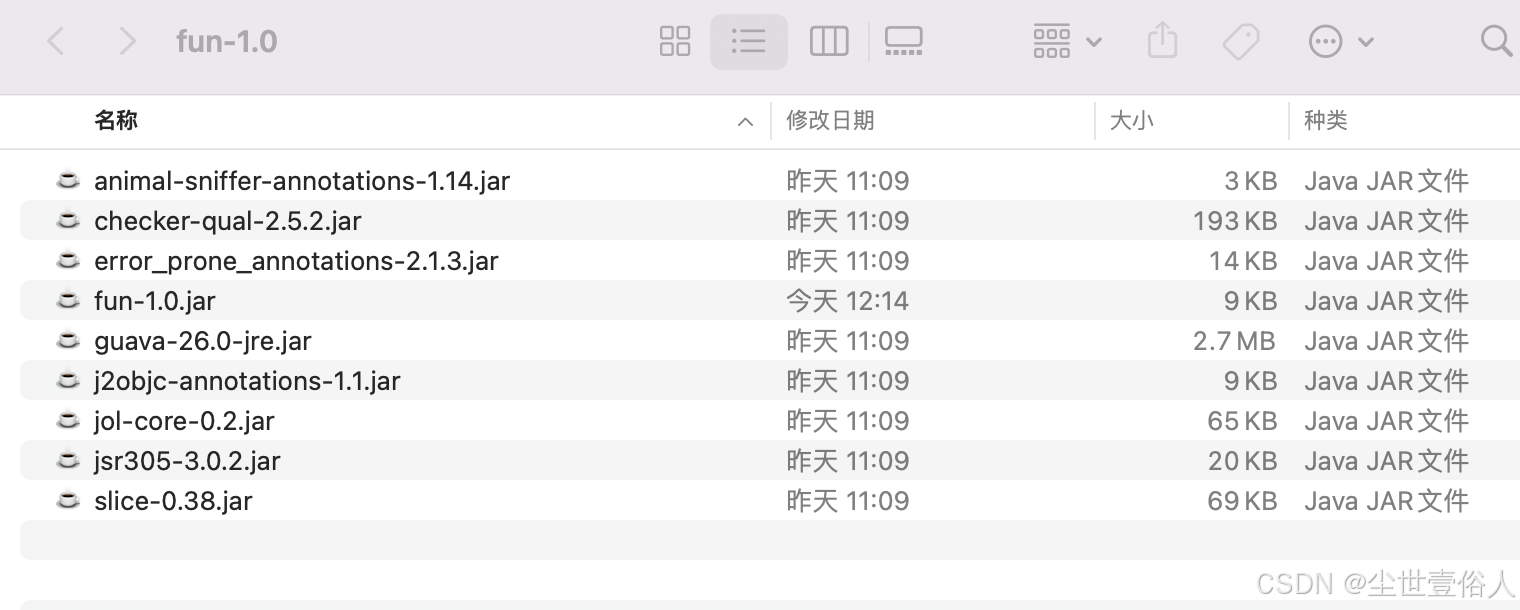
随后在presto安装目录下的plugin中,创建一个和你存放函数代码jar同名的路径,比如我上面的代码存放jar是fun-1.0.jar,则为建的目录就是fun,随后将结果物品中的jar包放在建立的目录下,重启presto服务,使用在presto中运行show functions就可以在顺序的函数列表中看到你的函数了
上面的代码案例,可以直接在我的git上拉在本地看-》https://github.com/wangyang159/prestoDB.git

汇聚全球AI编程工具,助力开发者即刻编程。
更多推荐



 6
6 0
0- 0


 已为社区贡献4条内容

所有评论(0)