
试用copilot过程中问题解决
目录
1.提示Please upgrade your Copilot extension to continue using this service
2. 提示: Failed to install Visual Studio Code update
0.copilot申请试用
1.提示Please upgrade your Copilot extension to continue using this service
解决:
This can be resolved by upgrading VSCode itself: Help → Check for Updates / Install Available Updates.
You may or may not need to re-install the extension and re-authenticate with git.
参考:github - Please upgrade your Copilot extension to continue using this service - Stack Overflow
2. 提示: Failed to install Visual Studio Code update
解决:
将VS Code 安装目录下的 Code.exe 文件 复制到
C:\Users\用户名\AppData\Local\Programs\Microsoft VS Code文件夹下
参考: VS Code 报错: Failed to install Visual Studio Code update_z向前的博客-CSDN博客
3.加载 Web 视图时出错: Error: Could not register service workers: InvalidStateError: Failed to register a ServiceWorker: The document is in an invalid state..
In Windows, you can simply fix this error by clearing the cache for VSCode. Please follow the steps below:
-
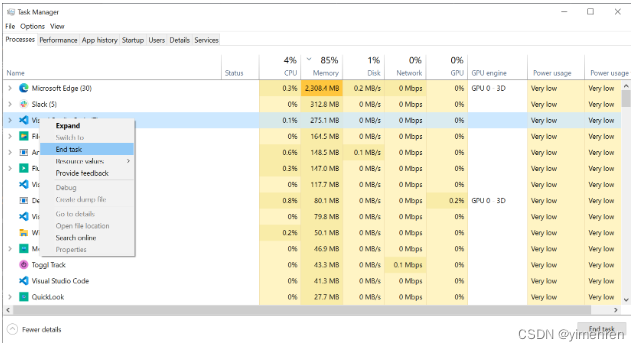
Close VSCode and also kill any background processes running in the task manager.
-
-
Go to the file explorer and to the path
C:\Users\<user_name>\AppData\Roaming\Codeand clear the contents of the foldersCache, CachedData, CachedExtensions, CachedExtensionVSIXs (if this folder exists) and Code Cache. -
Open VSCode and you are good to go.

汇聚全球AI编程工具,助力开发者即刻编程。
更多推荐



 0
0 0
0- 0


 已为社区贡献1条内容

所有评论(0)