
羽毛球剪辑算法集锦
目录
TrackNet-V3-based-Badminton 改进版
2. BST (Badminton Stroke-type Transformer) 击球识别模型
3. YOLOv8/YOLOv11-Pose + ByteTrack 球员追踪
二、完整端到端开源项目(自带回合识别 + 自动剪辑,直接跑)
1. BadmintonAI(最强完整工程,推荐专业分析 / 剪辑)
技术栈:Python/PyTorch/OpenCV/FFmpeg/Next.js 前端
2. Badminton-Highlight-Extraction(轻量化高光提取)
3. badminton-pipeline-repro(可复现通用分析流水线)
4. FooHou111/ShuttlecockHittingEventDetection(击球事件专用)
5. badminton_video_edit_analyze(带 GUI 手动 + 自动剪辑混合工具)
Badminton-Highlight-Extraction
误判和解决方法:
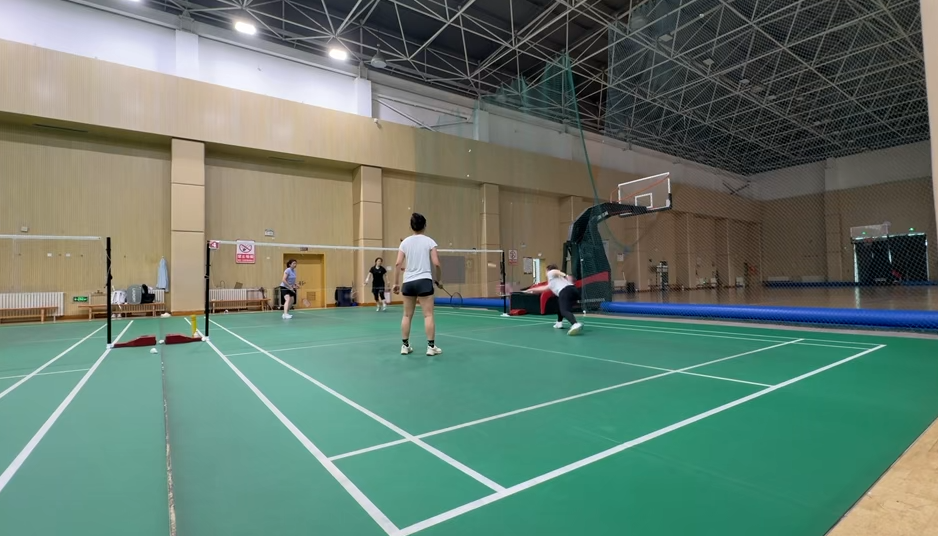
分段4秒推理一次,没有识别为捡球了。
4. SwingNet(击球事件辅助模型)
Github:https://github.com/TW-yuhsi/A-New-Perspective-for-Shuttlecock-Hitting-Event-Detection 作用:在追踪到羽球轨迹后,识别击球时刻、击球人,用来切分回合。
5. 完整端到端开源工程(直接落地参考)
- BadmintonChallenge(IJCAI CoachAI 竞赛方案) https://github.com/jean50621/BadmintonChallenge 集成:TrackNet + 球员检测 + 击球识别、回合统计
- BadmintonAI(全栈羽毛球视频分析) 整合 TrackNetV3、球场检测、球员追踪、自动高光剪辑
数据集:
https://finebadminton.github.io/FineBadminton/ 多层标注:羽球轨迹、击球类型、战术标签;适合高阶回合识别 缺点:体积巨大,下载较慢
开源羽毛球回合识别 + 自动剪辑算法 / 项目全梳理
羽毛球自动剪辑核心逻辑:羽球追踪(TrackNet 系列)→ 击球事件检测 → 回合起止判定(发球 / 落地)
一、底层核心基础算法(所有剪辑系统必备)
TrackNet-V3-based-Badminton 改进版
https://github.com/ZSHYC/TrackNet-V3-based-Badminton
1. TrackNetV3(行业标准羽球追踪,必用)
- 定位:专门检测高速、极小羽毛球的深度学习模型,是羽毛球视觉任务基石,所有开源项目几乎都集成它
原 TrackNetV3 主要解决“每一帧羽毛球在哪里”的问题,本项目进一步面向“比赛片段中关键事件在哪里发生”:
- 开源地址:集成在 BadmintonAI、badminton-pipeline-repro 等仓库,原版论文配套开源代码
- 核心能力:
- 识别画面中像素仅 2~5 像素的羽毛球,解决杀球高速模糊丢失问题
- 输出每一帧羽毛球坐标,用于轨迹分析、落地检测、回合分割
- 搭配卡尔曼滤波插值补全遮挡 / 模糊丢失的球轨迹,大幅提升回合识别准确率
- 回合判定原理:
- 回合开始:球从地面向上起飞(发球轨迹突变)
- 回合结束:球垂直贴近场地平面、速度骤降(落地出界 / 得分)
- 过滤短于 30 帧无效拉扯片段,输出每回合
[start_frame, end_frame]时间戳,直接喂给 FFmpeg 剪辑
2. BST (Badminton Stroke-type Transformer) 击球识别模型
- 开源:https://github.com/Va6lue/BST-Badminton-Stroke-type-Transformer
- 作用:基于人体骨骼 + 羽球轨迹识别击球动作(吊球、杀球、高远、放网),给回合打分筛选精彩片段(自动保留多拍拉锯、重杀回合)
- 搭配 YOLO-Pose 提取球员骨架,和 TrackNet 轨迹融合,区分有效击球与假动作
3. YOLOv8/YOLOv11-Pose + ByteTrack 球员追踪
通用开源检测框架,无专属羽毛球模型时用:
- 检测两名球员、球场标线,区分左右半场球员
- 解决球员遮挡、换人跟踪 ID 跳变问题
- 开源:Ultralytics YOLO 官方开源,开箱即用
二、完整端到端开源项目(自带回合识别 + 自动剪辑,直接跑)
1. BadmintonAI(最强完整工程,推荐专业分析 / 剪辑)
仓库:https://github.com/jayclim/BadmintonAIGitHub
核心优势
- 全链路闭环:TrackNetV3 羽球追踪 + YOLO11-Pose 球员识别 + BST 击球分类 + 回合自动分割 + FFmpeg 批量剪辑导出回合视频
- 自带可视化面板:每个回合时间戳、拍数、击球类型、球员跑动数据
- 支持 BWF 官方赛事录像、业余实拍视频,自动校正球场透视
- 跨平台:Windows/Linux/Mac(M 芯片 MPS 加速)
剪辑功能
- 自动切出每一个得分回合,单独保存片段
- 按回合拍数筛选长多拍精彩集锦,自动拼接高光视频
- 可导出带 AI 标注(球轨迹、球员骨骼)的分析视频
技术栈:Python/PyTorch/OpenCV/FFmpeg/Next.js 前端
2. Badminton-Highlight-Extraction(轻量化高光提取)
仓库:https://github.com/Manoj-A-Anandan/Badminton-Highlight-ExtractionGitHub
- 定位:轻量纯后端,只做自动高光剪辑,无复杂数据分析面板
- 算法:YOLOv8 检测球员 + LSTM 时序模型识别杀球 / 长回合,置信度阈值自动触发片段截取
- 内置插值算法补全羽毛球丢失帧,离线处理本地 MP4,输出拼接好的集锦视频
- 适合快速批量剪比赛,上手简单,依赖少
3. badminton-pipeline-repro(可复现通用分析流水线)
仓库:https://github.com/ychenfen/badminton-pipeline-reproGitHub
- 完整可复现链路:TrackNet + YOLOv8-Pose + 球场透视矫正 + 回合检测器 + 视频剪辑
- 自带封装好的
RallyDetector回合分割类,可单独抽出来集成到自己剪辑脚本 - 适配业余手机拍摄斜视角视频(绝大多数开源项目只适配俯视转播镜头,这个兼容性更强)
- 支持输出每回合起止帧,调用 FFmpeg 批量裁剪
4. FooHou111/ShuttlecockHittingEventDetection(击球事件专用)
仓库:https://github.com/FooHou111/ShuttlecockHittingEventDetectionGitHub
- 专注击球帧检测,精准标记每一次击球时间点,结合落地事件分割回合
- 自带轨迹可视化代码,可自定义剪辑前后缓冲帧数(比如回合前多留 1 秒发球画面)
- 适合二次开发,抽取算法嵌入自有剪辑工具
5. badminton_video_edit_analyze(带 GUI 手动 + 自动剪辑混合工具)
仓库:https://github.com/CptJack333/badminton_video_edit_analyze
- 特色:自动识别回合 + FFplay 可视化播放器,支持人工修正 AI 识别错误的回合边界
- 内置剪辑快捷键、比分标记,适合教练复盘剪辑,兼顾自动 + 手动微调
三、移动端开源方案(手机实时剪辑)
弧迹 Huji(Android 开源 APP)
仓库:https://github.com/hhoao/hujiGitHub
- 本地端侧 AI,无需 GPU 服务器,手机实时检测羽毛球回合
- 功能:自动剔除捡球、擦地、休息冗余片段,一键导出所有回合集锦
- 速度优化:16 分钟比赛 PC 端 1 分钟完成剪辑,手机可边录制边实时分段
- 适合业余玩家、训练视频快速剪辑,不用电脑
四、自研简易回合剪辑完整算法流程(自己搭最小系统)
如果你不想用完整项目,可基于 TrackNet 自建轻量化剪辑管道,核心 4 步算法:
- 羽球轨迹提取:TrackNetV3 逐帧推理,输出
(帧号,x,y)坐标序列 - 轨迹平滑:滑动窗口卡尔曼滤波消除检测噪声
- RallyDetector 回合边界判定
python
运行
# 核心判定逻辑 回合开始:羽毛球从场地低位持续向上运动(发球启动) 回合结束:羽毛球贴近场地平面 + 垂直速度骤降(落地) 过滤规则:持续帧数小于30帧判定为无效拉扯,丢弃 - FFmpeg 批量剪辑:根据识别出的
(start_sec, end_sec)时间戳批量裁剪、拼接集锦
bash
# FFmpeg单回合裁剪示例
ffmpeg -ss 00:01:20 -to 00:01:35 -i input.mp4 -c copy rally_01.mp4
五、选型建议
- 专业赛事 / 教练复盘,需要数据分析 + 剪辑 → BadmintonAI(功能最全)
- 只需要快速批量剪出高光集锦 → Badminton-Highlight-Extraction
- 业余手机实拍视频,兼容性优先 → badminton-pipeline-repro
- 手机本地实时剪辑 → 弧迹 Huji 效果一般
羽球时刻,复杂场景效果一般,单纯场景,效果好一点
https://shouyou.3dmgame.com/android/544019.html- 二次开发、自定义剪辑逻辑 → FooHou111 击球检测 + 自研 RallyDetector
- 纯移动端离线使用:弧迹 Huji
六、现存开源算法局限性
- 逆光、场馆灯光过暗、观众遮挡时,羽毛球追踪准确率下降,需增加图像增强预处理;
- 近距离网前小球速度慢,容易误判回合结束,可调整落地判定阈值;
- 无 GPU 设备时,TrackNet 推理速度较慢,移动端需要模型量化加速。
good-badminton 推荐,看起来还行
https://github.com/qwpyyx/Good-Badminton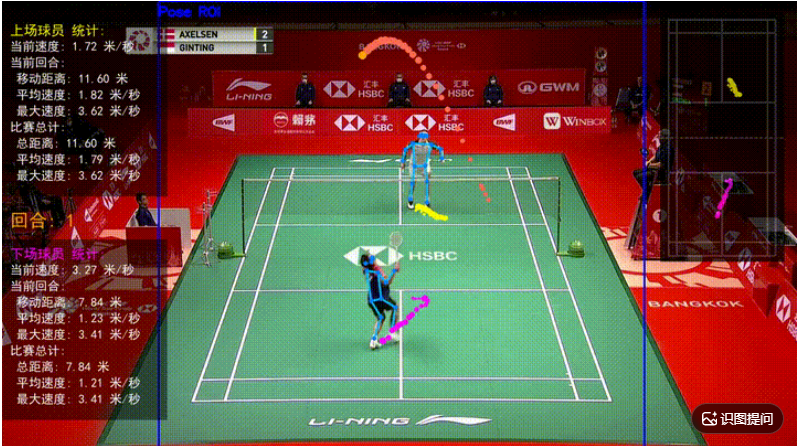
racquet-sports-analyzer
Bot-Derpy/racquet-sports-analyzer
huji
https://github.com/hhoao/huji

https://github.com/hhoao/huji-algorithm
conda create -p E:\soft\envs\py312 python=3.12 -y
conda activate E:\soft\envs\py312
pip install -r requirements.txt推理脚本:
python main.py --video-path "C:\Users\ChanJing-01\Videos\yumao\yumao.mp4" --sport badmintonimport argparse
import importlib.util
import json
import os
import sys
from pathlib import Path
from typing import Any
import os
import re
import sys
import shutil
from datetime import datetime
# 修复 auto_clipper 的排序问题
def patch_auto_clipper():
try:
from src.main.core import auto_clipper
# 保存原始方法
original_handle_video = auto_clipper.AutoClipper.handle_video
def patched_handle_video(self, *args, **kwargs):
result = original_handle_video(self, *args, **kwargs)
# 修复 all_ball_video_list 排序
if hasattr(self, 'all_ball_video_list'):
def extract_number(filepath):
filename = os.path.basename(filepath)
name_without_ext = os.path.splitext(filename)[0]
numbers = re.findall(r'\d+', name_without_ext)
return int(numbers[0]) if numbers else 0
self.all_ball_video_list.sort(key=extract_number)
return result
# 替换方法
auto_clipper.AutoClipper.handle_video = patched_handle_video
print("✅ AutoClipper 排序修复已应用")
except Exception as e:
print(f"⚠️ 无法应用修复: {e}")
def _venv_python() -> str | None:
venv_dir = Path(__file__).resolve().parent / ".venv"
if sys.platform == "win32":
candidate = venv_dir / "Scripts" / "python.exe"
else:
candidate = venv_dir / "bin" / "python"
return str(candidate) if candidate.is_file() else None
def _check_runtime_deps() -> None:
if importlib.util.find_spec("ruamel.yaml") is None:
print("未找到 Python 依赖,请先安装并激活虚拟环境:", file=sys.stderr)
if sys.platform == "win32":
print(" .\\setup.ps1", file=sys.stderr)
print(" .venv\\Scripts\\activate", file=sys.stderr)
else:
print(" ./setup.sh", file=sys.stderr)
print(" source .venv/bin/activate", file=sys.stderr)
venv_python = _venv_python()
if venv_python:
print(f" 或直接: {venv_python} main.py ...", file=sys.stderr)
sys.exit(1)
_check_runtime_deps()
from src import CONFIG_PATH
from src.main.config.config import Config, load_config
from src.main.constant.autoclip_constant import BadmintonAutoClipConfig, MatchType
from src.main.constant.common_constant import JobType
from src.main.core.badminton_auto_clipper import BadmintonAutoClipper
from src.main.core.pingpong_auto_clipper import PingPongAutoClipper
from src.main.logger import LOG
from src.main.service.large_model_service import LargeModelService
from src.main.utils import path_utils
def _build_parser() -> argparse.ArgumentParser:
parser = argparse.ArgumentParser(description="乒乓球、羽毛球比赛视频自动剪辑", formatter_class=argparse.RawDescriptionHelpFormatter, epilog="""
示例:
python main.py --video-path videos/demo.mp4 --sport ping_pong
python main.py --video-path videos/demo.mp4 --sport badminton --match-type doubles
python main.py --video-path videos/demo.mp4 --sport badminton --export-rounds
python main.py --serve
python main.py --train
python main.py
""", )
parser.add_argument("--config", default=CONFIG_PATH, help=f"配置目录(含 application.yml),默认 {CONFIG_PATH}", )
parser.add_argument("--video-path", "-v", metavar="PATH", default=r"C:\Users\ChanJing-01\Videos\yumao\yumao1.mp4", help="本地视频文件路径")
parser.add_argument("--sport", default="badminton", choices=["ping_pong", "badminton"], help="运动类型(clip 模式必填)", )
parser.add_argument("--match-type", choices=["singles", "doubles"], default="singles", help="羽毛球比赛类型,默认 singles", )
parser.add_argument("--output-dir", "-o", metavar="DIR", help="剪辑输出目录")
parser.add_argument("--serve", action="store_true", help="启动 Kafka + HTTP 服务")
parser.add_argument("--train", action="store_true", help="训练模型")
# 新增回合导出相关参数
parser.add_argument("--export-rounds", action="store_true", default=True, help="将每个回合单独导出为独立视频文件")
parser.add_argument("--rounds-dir", metavar="DIR", help="回合视频导出目录(默认在输出目录下创建 rounds_时间戳 子目录)")
parser.add_argument("--export-format", choices=["mp4", "avi", "mov"], default="mp4", help="导出视频格式,默认 mp4")
# 新增低回合阈值参数
parser.add_argument("--low-rounds-threshold", type=int, default=5, help="低回合阈值,默认5个回合(少于该值将被分类到低回合文件夹)")
# 新增视频优化参数
parser.add_argument("--optimize-video", action="store_true", default=True, help="优化导出视频,确保播放流畅(默认开启)")
parser.add_argument("--target-fps", type=float, default=None, help="目标帧率(不指定则保持原始帧率)")
parser.add_argument("--video-quality", choices=["low", "medium", "high"], default="high", help="视频质量,默认 high")
return parser
def _resolve_mode(args: argparse.Namespace) -> str:
modes = [bool(args.video_path), args.serve, args.train]
if sum(modes) > 1:
LOG.error("不能同时指定 --video-path、--serve、--train")
sys.exit(1)
if args.video_path:
return "clip"
if args.serve:
return "serve"
if args.train:
return "train"
return "config"
def _build_auto_clip_config(args: argparse.Namespace) -> dict[str, Any] | None:
if args.sport != "badminton":
return None
match_type = (MatchType.DOUBLES_MATCH if args.match_type == "doubles" else MatchType.SINGLES_MATCH)
return json.loads(BadmintonAutoClipConfig(match_type=match_type).model_dump_json())
def optimize_video_export(input_path: str, output_path: str, target_fps: float = None, quality: str = "high") -> bool:
try:
import cv2
cap = cv2.VideoCapture(input_path)
if not cap.isOpened():
LOG.error(f"无法打开视频: {input_path}")
return False
# 获取原始参数
original_fps = cap.get(cv2.CAP_PROP_FPS)
width = int(cap.get(cv2.CAP_PROP_FRAME_WIDTH))
height = int(cap.get(cv2.CAP_PROP_FRAME_HEIGHT))
total_frames = int(cap.get(cv2.CAP_PROP_FRAME_COUNT))
# 验证参数
if width <= 0 or height <= 0:
LOG.error(f"无效的视频尺寸: {width}x{height}")
cap.release()
return False
# 确定最终帧率
fps = target_fps if target_fps and target_fps > 0 else original_fps
if fps <= 0 or fps > 120:
fps = 30 # 默认30fps
# 根据质量设置编码参数
quality_settings = {"low": {"fourcc": cv2.VideoWriter_fourcc(*'mp4v'), "fps": min(fps, 25), "scale": 0.5 # 缩放比例
}, "medium": {"fourcc": cv2.VideoWriter_fourcc(*'mp4v'), "fps": fps, "scale": 0.75}, "high": {"fourcc": cv2.VideoWriter_fourcc(*'mp4v'), "fps": fps, "scale": 1.0}}
settings = quality_settings.get(quality, quality_settings["high"])
# 应用缩放
if settings["scale"] != 1.0:
width = int(width * settings["scale"])
height = int(height * settings["scale"])
# 确保宽高为偶数(编码要求)
width = width if width % 2 == 0 else width + 1
height = height if height % 2 == 0 else height + 1
LOG.info(f"导出参数: {width}x{height}, {settings['fps']:.2f}fps, {total_frames}帧, 质量:{quality}")
# 创建写入器
out = cv2.VideoWriter(str(output_path), settings["fourcc"], settings["fps"], (width, height))
if not out.isOpened():
LOG.error("无法创建视频写入器")
cap.release()
return False
# 逐帧处理
frame_count = 0
success_count = 0
while True:
ret, frame = cap.read()
if not ret:
break
# 如果需要缩放
if settings["scale"] != 1.0:
frame = cv2.resize(frame, (width, height), interpolation=cv2.INTER_LINEAR)
# 写入帧
out.write(frame)
frame_count += 1
success_count += 1
# 每100帧显示进度
if frame_count % 100 == 0:
LOG.debug(f"处理进度: {frame_count}/{total_frames}")
cap.release()
out.release()
# 验证输出
if success_count == 0:
LOG.error("没有帧被写入")
return False
# 验证输出文件是否存在且有效
if os.path.exists(output_path) and os.path.getsize(output_path) > 0:
LOG.info(f"✅ 成功导出 {success_count} 帧到: {output_path}")
return True
else:
LOG.error(f"输出文件无效: {output_path}")
return False
except ImportError:
LOG.warning("OpenCV未安装,请运行: pip install opencv-python")
# 回退到简单复制
try:
shutil.copy2(input_path, output_path)
LOG.info(f"使用简单复制: {output_path}")
return True
except Exception as e:
LOG.error(f"简单复制失败: {e}")
return False
except Exception as e:
LOG.error(f"视频优化失败: {e}")
# 尝试简单复制作为备选
try:
shutil.copy2(input_path, output_path)
LOG.info(f"优化失败,使用简单复制: {output_path}")
return True
except:
return False
def _export_metadata(export_dir: Path, video_path: str, exported_files: list, result, export_format: str, low_rounds: bool = False, total_rounds: int = 0, optimize_info: dict = None) -> Path | None:
metadata_file = export_dir / "rounds_metadata.json"
try:
metadata = {"source_video": video_path, "export_time": datetime.now().isoformat(), "total_rounds": len(exported_files), "format": export_format, "rounds": []}
# 如果是低回合视频,添加标记
if low_rounds:
metadata["is_low_rounds"] = True
metadata["low_rounds_threshold"] = 5
metadata["actual_rounds"] = total_rounds
metadata["reason"] = f"少于5个回合(实际{total_rounds}个)"
# 添加优化信息
if optimize_info:
metadata["optimization"] = optimize_info
# 尝试获取每个回合的时间信息
for i, file_path in enumerate(exported_files, 1):
round_info = {"round_number": i, "file_name": Path(file_path).name, "file_path": file_path}
# 如果有时间信息,可以添加
if hasattr(result, 'round_timestamps') and result.round_timestamps:
if i <= len(result.round_timestamps):
round_info["timestamp"] = result.round_timestamps[i - 1]
metadata["rounds"].append(round_info)
with open(metadata_file, 'w', encoding='utf-8') as f:
json.dump(metadata, f, ensure_ascii=False, indent=2)
LOG.info(f"📋 元数据已导出: {metadata_file}")
return metadata_file
except Exception as e:
LOG.warning(f"导出元数据失败: {e}")
return None
def export_rounds_videos(result, video_path: str, output_dir: str, export_format: str = "mp4", low_rounds_threshold: int = 5, optimize_video: bool = True, target_fps: float = None,
video_quality: str = "high") -> dict:
exported_info = {"total_rounds": 0, "exported_files": [], "export_dir": output_dir, "success": False, "low_rounds_dir": None, "low_rounds_files": [], "low_rounds_count": 0, "is_low_rounds": False,
"metadata_file": None, "low_metadata_file": None, "optimization_info": {"optimized": optimize_video, "target_fps": target_fps, "quality": video_quality}}
# 尝试获取回合视频列表 - 检查多个可能的属性名
round_videos = []
possible_attrs = ['ball_video_list', 'round_video_list', 'all_ball_video_list', 'segment_video_list']
for attr in possible_attrs:
if hasattr(result, attr):
video_list = getattr(result, attr)
if video_list and isinstance(video_list, list):
round_videos = video_list
LOG.info(f"找到回合视频列表: {attr}, 共 {len(round_videos)} 个")
break
if not round_videos:
LOG.warning("未找到回合视频列表,请检查剪辑结果对象")
# 尝试从 result 的 dict 中获取
if hasattr(result, '__dict__'):
for key, value in result.__dict__.items():
if isinstance(value, list) and value and any(str(v).endswith(('.mp4', '.avi', '.mov')) for v in value):
round_videos = value
LOG.info(f"从 {key} 找到回合视频列表")
break
if not round_videos:
LOG.error("无法找到回合视频,请确保剪辑过程生成了独立的回合视频文件")
return exported_info
# 创建导出目录
export_dir = Path(output_dir)
export_dir.mkdir(parents=True, exist_ok=True)
# 创建回合子目录
base_name = Path(video_path).stem
timestamp = datetime.now().strftime("%Y%m%d_%H%M%S")
# 先统计总回合数
total_rounds = len(round_videos)
LOG.info(f"检测到总回合数: {total_rounds}")
# 判断是否少于阈值
is_low_rounds = total_rounds < low_rounds_threshold
if is_low_rounds:
LOG.warning(f"⚠️ 视频只有 {total_rounds} 个回合(少于{low_rounds_threshold}个),将导出到低回合文件夹")
rounds_subdir = export_dir / f"{base_name}_low_rounds_{timestamp}"
else:
LOG.info(f"✅ 视频有 {total_rounds} 个回合(正常)")
rounds_subdir = export_dir / f"{base_name}_rounds_{timestamp}"
rounds_subdir.mkdir(parents=True, exist_ok=True)
# 导出每个回合
exported_files = []
export_stats = {"total_frames": 0, "total_size": 0, "avg_fps": 0}
for i, round_video_path in enumerate(round_videos, 1):
if not os.path.exists(round_video_path):
LOG.warning(f"回合 {i} 视频文件不存在: {round_video_path}")
continue
# 构建目标文件名
round_filename = f"round_{i:03d}.{export_format}"
dest_path = rounds_subdir / round_filename
try:
success = False
# 如果启用优化,使用优化导出
if optimize_video:
LOG.info(f"🔄 优化导出回合 {i}...")
success = optimize_video_export(input_path=round_video_path, output_path=str(dest_path), target_fps=target_fps, quality=video_quality)
# 如果优化失败或未启用,使用简单复制
if not success:
LOG.info(f"📋 使用简单复制回合 {i}")
shutil.copy2(round_video_path, dest_path)
success = True
if success:
exported_files.append(str(dest_path))
# 统计信息
file_size = os.path.getsize(dest_path)
export_stats["total_size"] += file_size
LOG.info(f"✅ 回合 {i} 导出成功: {dest_path} ({file_size / 1024 / 1024:.2f}MB)")
else:
LOG.error(f"❌ 回合 {i} 导出失败")
except Exception as e:
LOG.error(f"❌ 回合 {i} 导出异常: {e}")
# 最后尝试直接复制
try:
shutil.copy2(round_video_path, dest_path)
exported_files.append(str(dest_path))
LOG.warning(f"⚠️ 回合 {i} 使用应急复制")
except Exception as e2:
LOG.error(f"❌ 回合 {i} 所有导出方式都失败: {e2}")
# 更新统计信息
export_stats["exported_count"] = len(exported_files)
if exported_files:
export_stats["avg_size"] = export_stats["total_size"] / len(exported_files)
# 导出元数据
metadata_file = _export_metadata(export_dir=rounds_subdir, video_path=video_path, exported_files=exported_files, result=result, export_format=export_format, low_rounds=is_low_rounds,
total_rounds=total_rounds, optimize_info=exported_info["optimization_info"] if optimize_video else None)
# 更新返回信息
exported_info.update({"total_rounds": total_rounds, "exported_files": exported_files, "export_dir": str(rounds_subdir), "metadata_file": str(metadata_file) if metadata_file else None,
"success": len(exported_files) > 0, "is_low_rounds": is_low_rounds, "low_rounds_count": len(exported_files) if is_low_rounds else 0,
"low_rounds_dir": str(rounds_subdir) if is_low_rounds else None, "export_stats": export_stats})
# 打印总结信息
print("\n" + "=" * 60)
print("📊 导出完成统计")
print("=" * 60)
if is_low_rounds:
print(f"⚠️ 低回合视频")
print(f" 总回合数: {total_rounds} (少于{low_rounds_threshold}个)")
else:
print(f"✅ 正常视频")
print(f" 总回合数: {total_rounds}")
print(f" 成功导出: {len(exported_files)} 个")
print(f" 导出目录: {rounds_subdir}")
if optimize_video:
print(f" 视频优化: 已启用")
if target_fps:
print(f" 目标帧率: {target_fps} fps")
print(f" 视频质量: {video_quality}")
else:
print(f" 视频优化: 未启用")
if metadata_file:
print(f" 元数据: {metadata_file}")
print("=" * 60 + "\n")
return exported_info
def run_clip(args: argparse.Namespace, config: Config) -> None:
video_path = os.path.abspath(args.video_path)
if not os.path.isfile(video_path):
LOG.error(f"视频文件不存在: {video_path}")
sys.exit(1)
if not args.sport:
LOG.error("clip 模式需要指定 --sport(ping_pong 或 badminton)")
sys.exit(1)
auto_clip_config = config.auto_clip_config
common_options = auto_clip_config.common_options
if args.output_dir:
common_options.output_dir = path_utils.get_project_path(args.output_dir)
large_model_service = LargeModelService(config.large_model_service_config)
if args.sport == "ping_pong":
clipper = PingPongAutoClipper(auto_clip_config.ping_pong, common_options, large_model_service)
else:
clipper = BadmintonAutoClipper(auto_clip_config.badminton, common_options, large_model_service)
LOG.info(f"开始剪辑: {video_path}")
result = clipper.autoclip_video(video_path, auto_clip_config=_build_auto_clip_config(args))
# 导出合并视频
merged_video_path = result.all_match_merged_video_path
LOG.info(f"✅ 合并视频完成: {merged_video_path}")
print(f"\n合并视频: {merged_video_path}")
# 如果启用了回合导出
if args.export_rounds:
LOG.info("🔄 开始导出回合分段视频...")
# 确定输出目录
if args.rounds_dir:
output_dir = os.path.abspath(args.rounds_dir)
else:
output_dir = args.output_dir or str(common_options.output_dir)
# 导出回合视频
exported_info = export_rounds_videos(result=result, video_path=video_path, output_dir=output_dir, export_format=args.export_format, low_rounds_threshold=args.low_rounds_threshold,
optimize_video=args.optimize_video, target_fps=args.target_fps, video_quality=args.video_quality)
if exported_info["success"]:
LOG.info(f"✅ 所有回合导出完成!共 {exported_info['total_rounds']} 个回合")
# 显示详细信息
print(f"\n📊 最终结果:")
print(f" 视频文件: {Path(video_path).name}")
print(f" 总回合数: {exported_info['total_rounds']}")
print(f" 成功导出: {len(exported_info['exported_files'])} 个")
if exported_info["is_low_rounds"]:
print(f" 状态: ⚠️ 低回合视频 (< {args.low_rounds_threshold} 个)")
else:
print(f" 状态: ✅ 正常视频")
print(f" 导出目录: {exported_info['export_dir']}")
if exported_info.get("metadata_file"):
print(f" 元数据: {exported_info['metadata_file']}")
# 显示优化信息
if args.optimize_video:
print(f" 优化: ✅ 已启用 (质量: {args.video_quality})")
else:
print(f" 优化: ❌ 未启用")
else:
LOG.warning("⚠️ 没有回合视频被导出,请检查剪辑结果")
print(f"\n✅ 处理完成: {merged_video_path}")
def run_serve(config: Config) -> None:
from src.main.http.internal_http import InternalHttp
from src.main.service.video_edit_service import VideoEditService
auto_clip_config = config.auto_clip_config
common_options = auto_clip_config.common_options
large_model_service = LargeModelService(config.large_model_service_config)
http_client = InternalHttp(config.internal.http).client
pingpong_auto_clipper = PingPongAutoClipper(auto_clip_config.ping_pong, common_options, large_model_service)
badminton_auto_clipper = BadmintonAutoClipper(auto_clip_config.badminton, common_options, large_model_service)
video_edit_service = VideoEditService(service_config=config.service_config, mysql_config=config.datasource_config.mysql, pingpong_auto_clipper=pingpong_auto_clipper,
badminton_auto_clipper=badminton_auto_clipper, kafka_config=config.kafka_config, http_client=http_client, )
try:
video_edit_service.start()
except Exception as e:
video_edit_service.stop()
LOG.error(f"启动服务失败: {e}")
def run_from_config(config: Config) -> None:
if config.job_type == JobType.SERVICE:
run_serve(config)
else:
LOG.error(f"未知的 job_type: {config.job_type}")
sys.exit(1)
def main() -> None:
parser = _build_parser()
args = parser.parse_args()
config = load_config(args.config)
mode = _resolve_mode(args)
if mode == "clip":
run_clip(args, config)
elif mode == "serve":
run_serve(config)
else:
run_from_config(config)
if __name__ == "__main__":
# patch_auto_clipper()
main()羽球时刻 推荐:
yuqiushike.com
Badminton-Highlight-Extraction
https://github.com/Manoj-A-Anandan/Badminton-Highlight-ExtractionYoloe 检测
jianqiu_client.py
# client_example.py
import os

import cv2
import requests
import json

import time
import threading

class TimeStr:
    def __init__(self):
        self.last_time = ''
        self.counter = 0
        self.lock = threading.Lock()

    def get_time(self, fmt="%m%d_%H%M_%S", base_fmt="%m%d_%H%M"):
        now_time = time.strftime(fmt)
        base_time = time.strftime(base_fmt)

        with self.lock:
            if base_time != self.last_time:
                self.last_time = base_time
                self.counter = 0
            else:
                self.counter += 1

            counter = self.counter

        return f"{now_time}_{counter}"

    def get_time_sec(self):
        return self.get_time("%m%d_%H%M_%S")

    def get_time_mm(self):
        return self.get_time("%m%d_%H%M")

    def get_time_hh(self):
        return self.get_time("%m%d_%H")

name_get = TimeStr()
def detect_image(img, classes: list, conf: float = 0.25, iou: float = 0.45, return_image: bool = False, server_url: str = "http://localhost:8000"):

    url = f"{server_url}/detect"

    _, img_encoded = cv2.imencode('.jpg', img)
    img_bytes = img_encoded.tobytes()

    # 准备文件
    files = {'file': ('image.jpg', img_bytes, 'image/jpeg')}
    data = {'classes': ','.join(classes), 'conf': conf, 'iou': iou, 'return_image': str(return_image).lower(), 'model_path': 'yoloe-11m-seg.pt'}

    # 发送请求
    response = requests.post(url, files=files, data=data)

    if response.status_code == 200:
        result = response.json()
        return result
    else:
        print(f"错误: {response.status_code}")
        return None

if __name__ == "__main__":

    server_url="http://192.168.8.231:8000"
    # 定义类别
    classes = [# 基础姿态 (4个)
        "squatting person",  # 蹲着的人
        "bending person",  # 弯腰的人
        "stooping person",  # 俯身的人
        "person bending down",  # 向下弯腰的人

        # 捡球相关动作 (4个)
        "person picking up ball",  # 捡球的人
        "person touching ground",  # 触碰地面的人
        "deep squat",  # 深蹲
        "half squat",  # 半蹲

        # 弯腰程度 (3个)
        "deep bend",  # 深度弯腰
        "slight bend",  # 轻微弯腰
        "horizontal back",  # 背部水平

        # 手部动作 (2个)
        "hand reaching ground",  # 手触地面
        "arm extended down",  # 手臂向下伸展

        # with扩展 (2个)
        "person squatting with ball",  # 蹲着拿球的人
        "person bending with ball"  # 弯腰拿球的人
    ]
    video_path = r"C:\Users\ChanJing-01\Videos\yumao\yumao.mp4"

    cap = cv2.VideoCapture(video_path)

    # 获取帧率和分辨率
    fps = cap.get(cv2.CAP_PROP_FPS)
    width = int(cap.get(cv2.CAP_PROP_FRAME_WIDTH))
    height = int(cap.get(cv2.CAP_PROP_FRAME_HEIGHT))

    out_dir="det_out"
    os.makedirs(out_dir, exist_ok=True)
    debug = False
    frame_id = 0
    while True:
        ret, frame = cap.read()
        if not ret:
            break
        frame_id += 1
        if frame_id %2==0:
            continue

        start=time.time()
        img=frame
        result = detect_image(img=img, classes=classes, conf=0.2, iou=0.35, return_image=False, server_url=server_url)
        img_height, img_width, _ = img.shape
        max_box = None
        max_area = 0
        save_path = None
        if result and result['success']:
            print(f"{frame_id} 检测到 {result['num_detections']} 个目标")
            for det in result['detections']:

                confidence = det.get('confidence', 0)
                class_name = det.get('class_name', 'unknown')

                x1, y1, x2, y2 = [int(v) for v in det['bbox']]

                cv2.rectangle(img, (x1, y1), (x2, y2), (0, 0, 255), 1)
                label = f"{class_name}: {confidence:.2f}"
                # 获取文字大小
                (text_width, text_height), baseline = cv2.getTextSize(label, cv2.FONT_HERSHEY_SIMPLEX, 0.5, 1)

                # 绘制文字背景(可选,让文字更清晰)
                cv2.rectangle(img, (x1, y1 - text_height - 10), (x1 + text_width, y1), (0, 0, 255), -1)

                # 绘制文字
                cv2.putText(img, label, (x1, y1 - 5), cv2.FONT_HERSHEY_SIMPLEX, 0.5, (255, 255, 255), 1)

            save_path = f"{out_dir}/{frame_id}_jianqiu.jpg"
            cv2.imwrite(save_path, img)

    cap.release()

    cv2.destroyAllWindows()

汇聚全球AI编程工具,助力开发者即刻编程。
更多推荐



 0
0 0
0- 0


 已为社区贡献13条内容

所有评论(0)