
【Kimi】蓝耘元生代 | 大模型落地实践:Kimi K2.6接入与代码实测

【作者主页】Francek Chen
【专栏介绍】 ⌈ ⌈ ⌈人工智能与大模型应用 ⌋ ⌋ ⌋ 人工智能(AI)通过算法模拟人类智能,利用机器学习、深度学习等技术驱动医疗、金融等领域的智能化。大模型是千亿参数的深度神经网络(如ChatGPT),经海量数据训练后能完成文本生成、图像创作等复杂任务,显著提升效率,但面临算力消耗、数据偏见等挑战。当前正加速与教育、科研融合,未来需平衡技术创新与伦理风险,推动可持续发展。
文章目录
前言
当今数字化时代,大模型作为 AI 领域重大突破,迅速改变社会图景,凭借多种特性成为 AI 技术发展里程碑,推动经济、社会、科技发展,引领人类迈向智能化新纪元,为各领域可持续发展注入动力。近期,我体验了蓝耘元生代 MaaS 平台与 Kimi 合作的产品,接下来,我将在本文分享使用该平台的体验与测评,为大家的选择提供参考。
一、Kimi K2.6 模型介绍
Kimi K2.6 是 Kimi 的通用模型,Kimi K2.6 的通用 Agent、代码、视觉理解等综合能力得到全面提升,其中在博士级难度的完整版人类最后的考试(Humanity’s Last Exam)、在考察模型真实软件工程能力的 SWE-Bench Pro、评估 Agent 深度检索能力的 DeepSearchQA 等基准测试中均取得行业领先的成绩,同时支持文本、图片与视频输入,思考与非思考模式,对话与 Agent 任务。
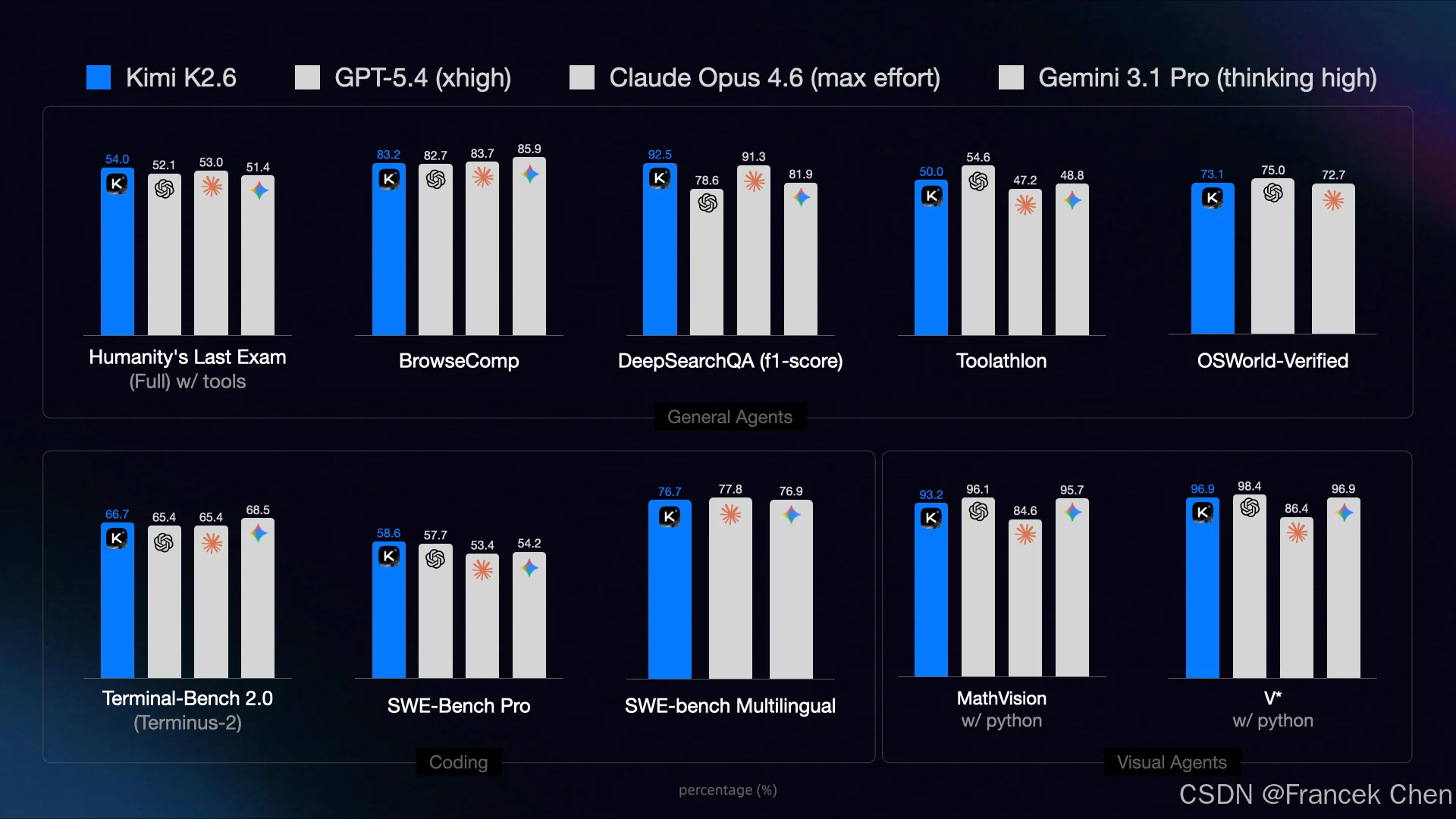
Kimi K2.6 作为国内领先的 Coding 模型,在长程代码任务中的表现取得了突破,面对不同编程语言(如 Rust、Go、Python)和任务场景(如前端、运维、性能优化)均具备更可靠的泛化能力。
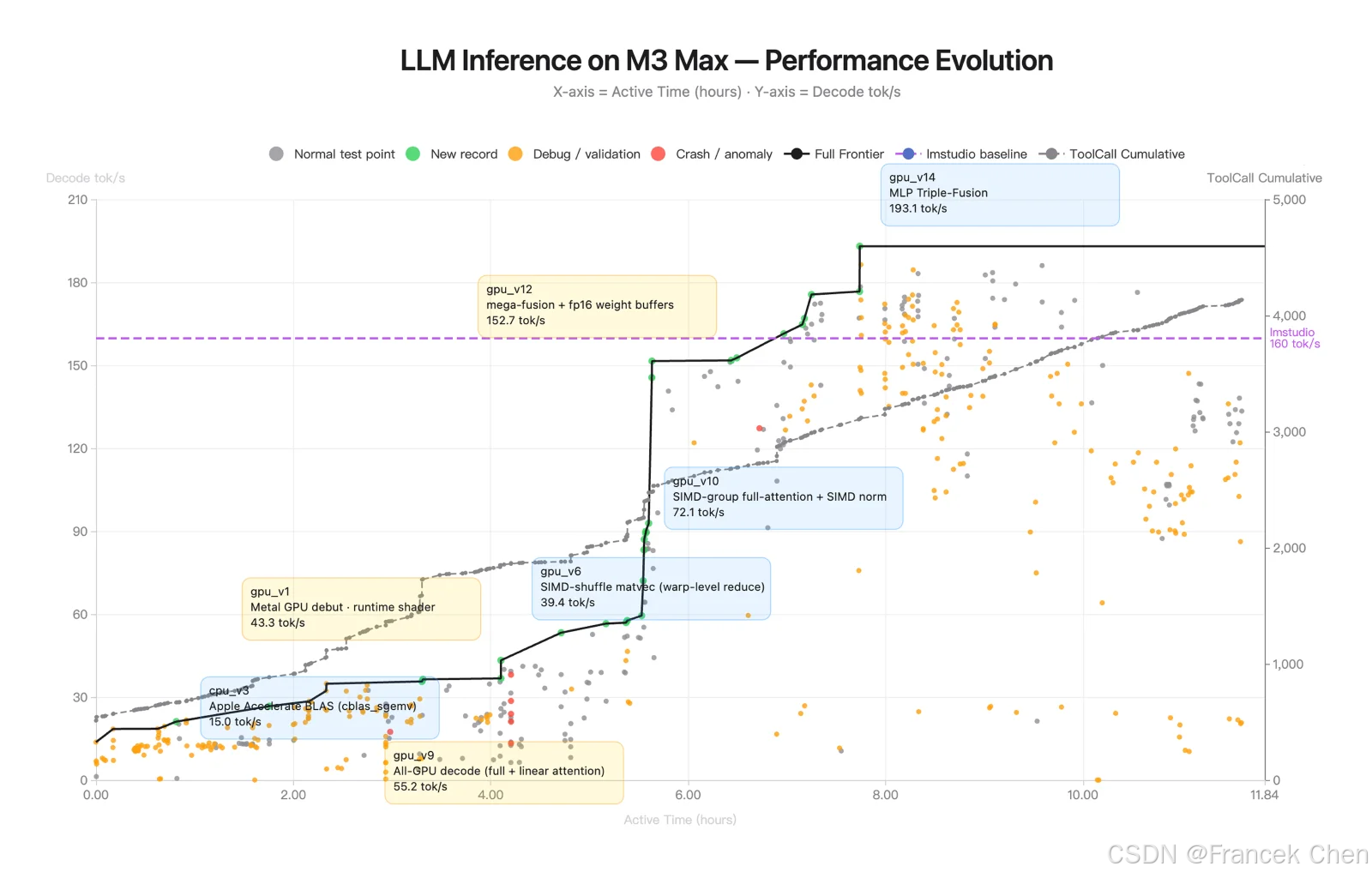
Kimi K2.6 在复杂的工程任务中展示了强大的长视距编码。Kimi K2.6 成功下载并部署了 Qwen3.5-0.8B 在 Mac 上本地建模。通过在中实施和优化模型推理齐格-一种高度利基的编程语言-它展示了出色的非分布泛化 4000 多个工具调用,超过 12 小时的连续执行和 14 次迭代,Kimi K2.6 将吞吐量从 15 显著提高到约 193 个令牌/秒,最终实现的速度比 LM Studio 快约 20%。
二、蓝耘 MaaS 平台的 kimi-k2.6 模型
(一)注册蓝耘智算平台账号
点击注册链接:https://console.lanyun.net/#/register?promoterCode=1d442a7adf
输入手机号获取验证码,设置密码,点击注册。如图3所示。

若已经注册过帐号,点击下方“已有账号,立即登录”即可。
(二)进入蓝耘 MaaS 模型广场
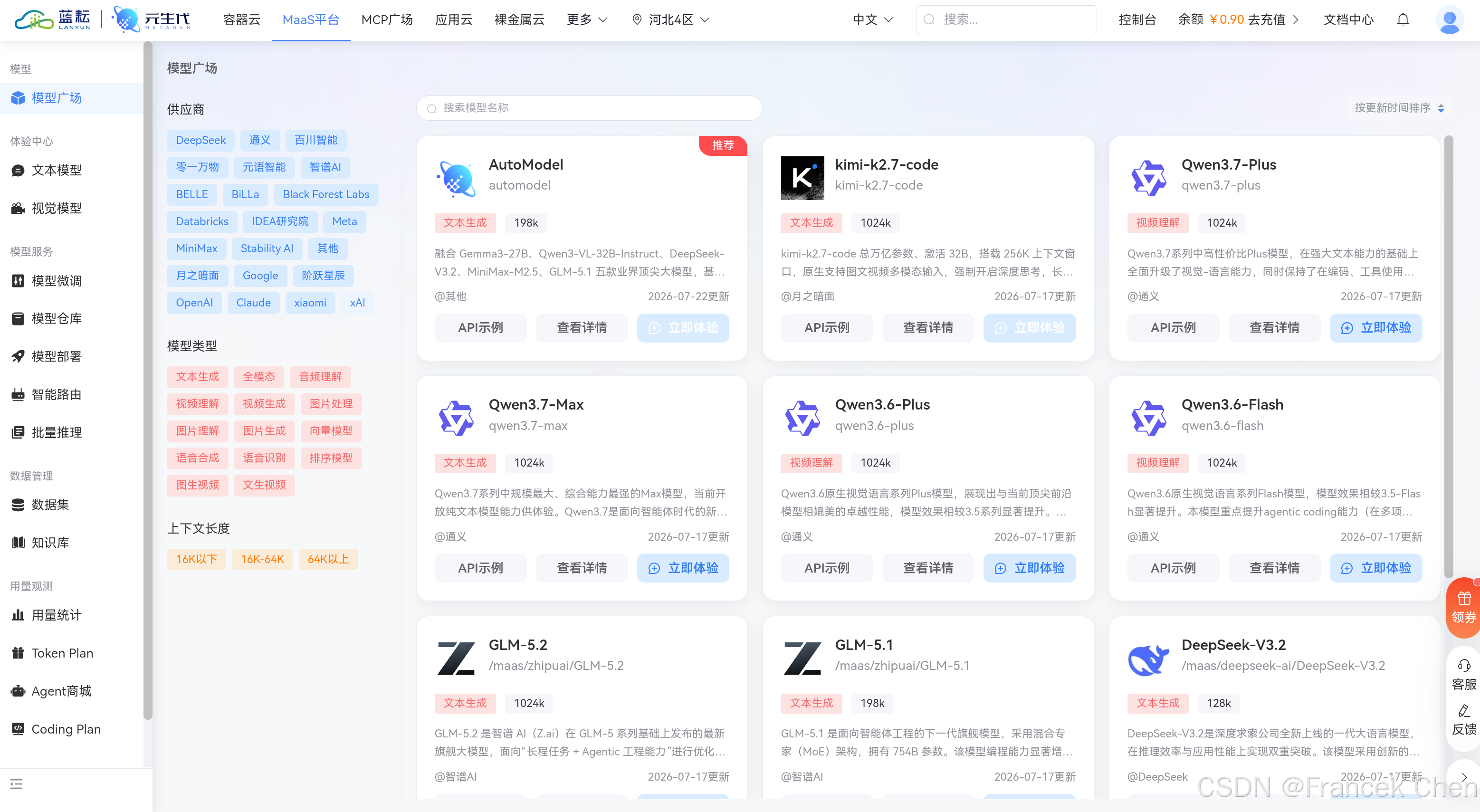
登录后进入首页,点击“MaaS平台”。接着进入 MaaS 平台的模型广场。在这里,用户可以看到多种来自不同供应商的模型,如 DeepSeek、通义等。页面详细列出了模型名称、类型(如文本生成)、上下文长度等信息,还提供了 API 示例、查看详情和立即体验等操作选项。图4中展示的是蓝耘元生代 MaaS 平台的模型广场页面。
然后,找到 kimi-k2.6 大模型。如图5所示。
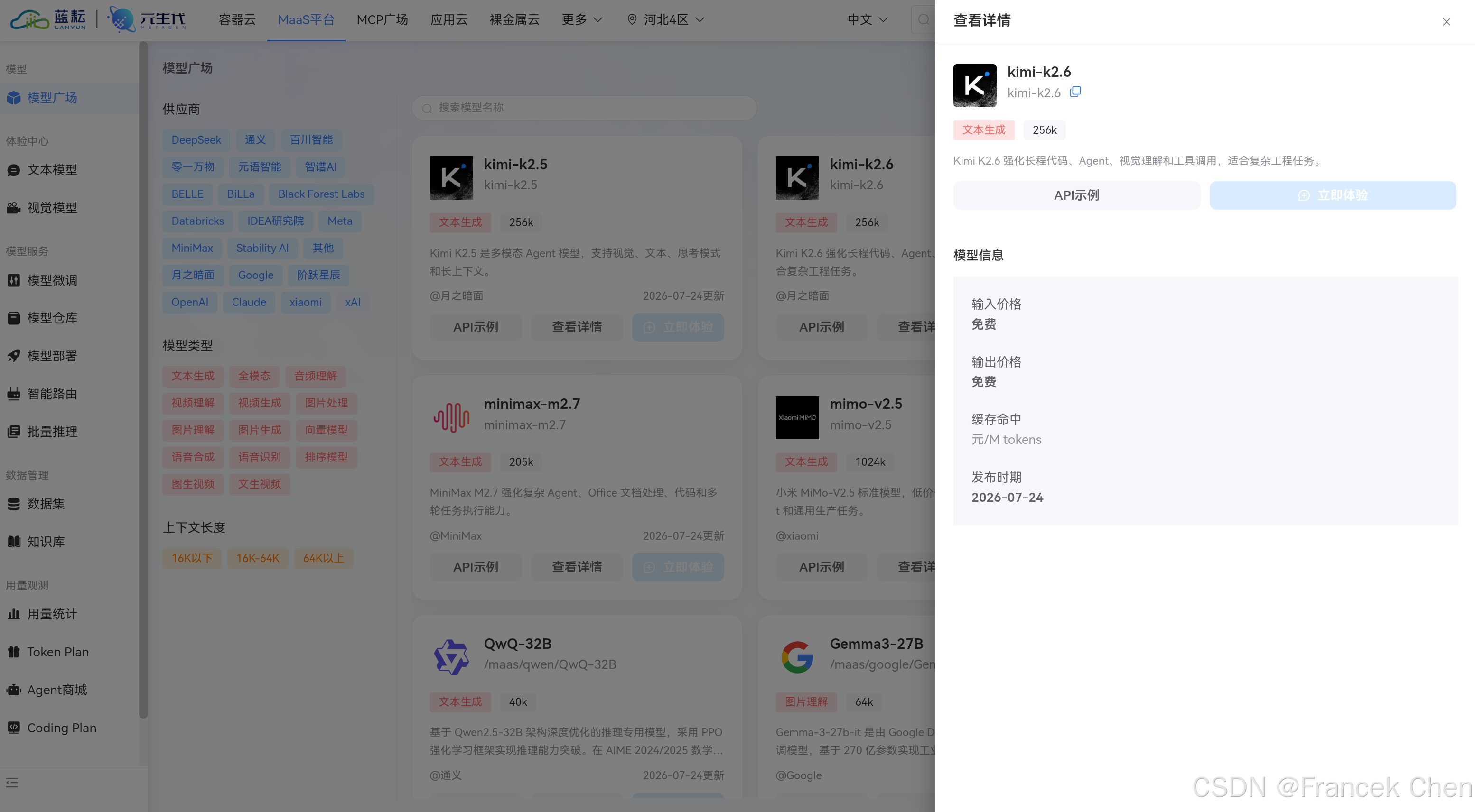
Kimi K2.6 擅长强化长程代码、Agent、视觉理解和工具调用,适合复杂工程任务。
三、使用 Cherry Studio 接入蓝耘 kimi-k2.6 API
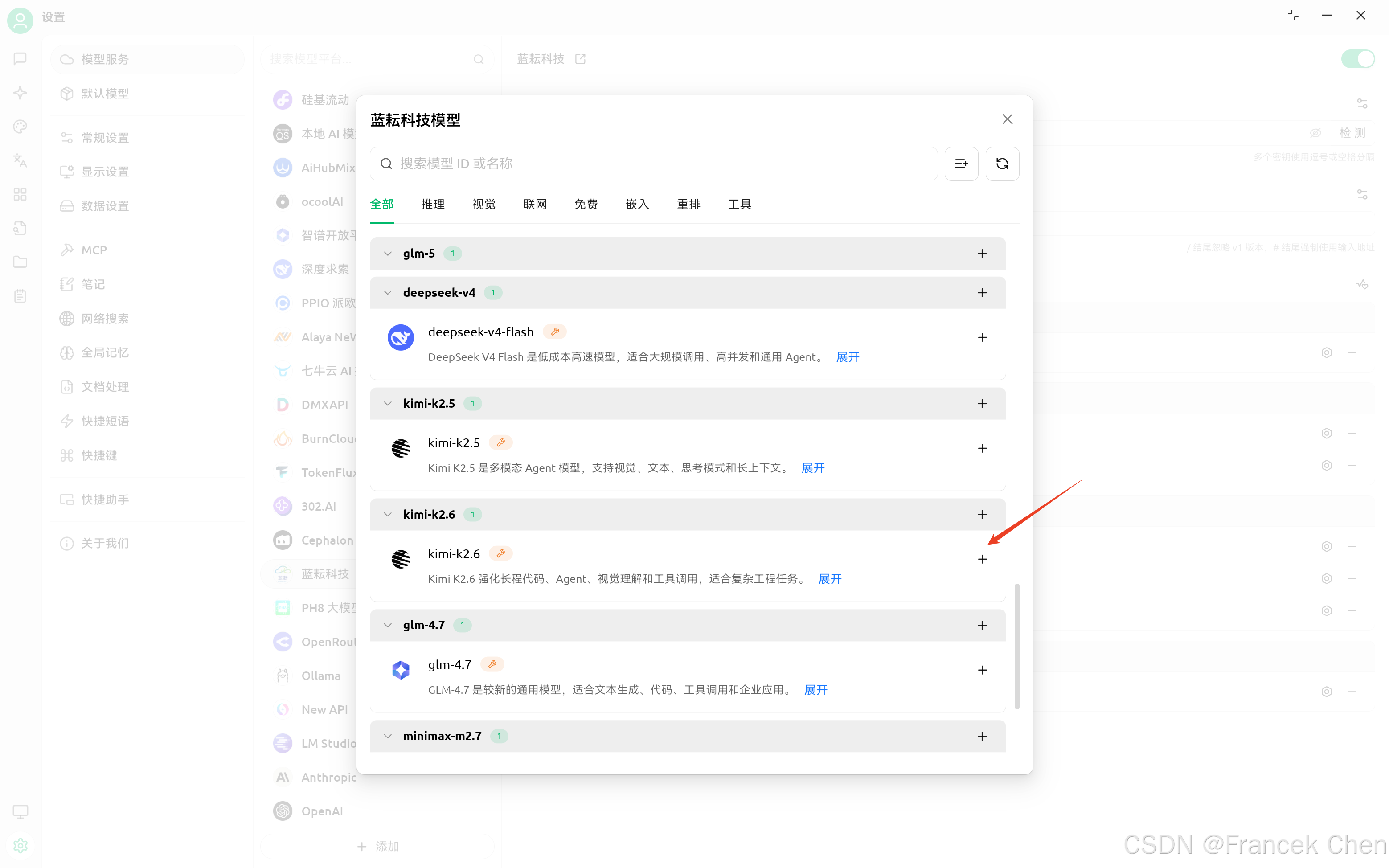
(一)添加 kimi-k2.6 模型
首先,在模型管理界面中,找到 kimi-k2.6 模型,并点击“+”号进行添加。
(二)蓝耘平台获取 API 密钥
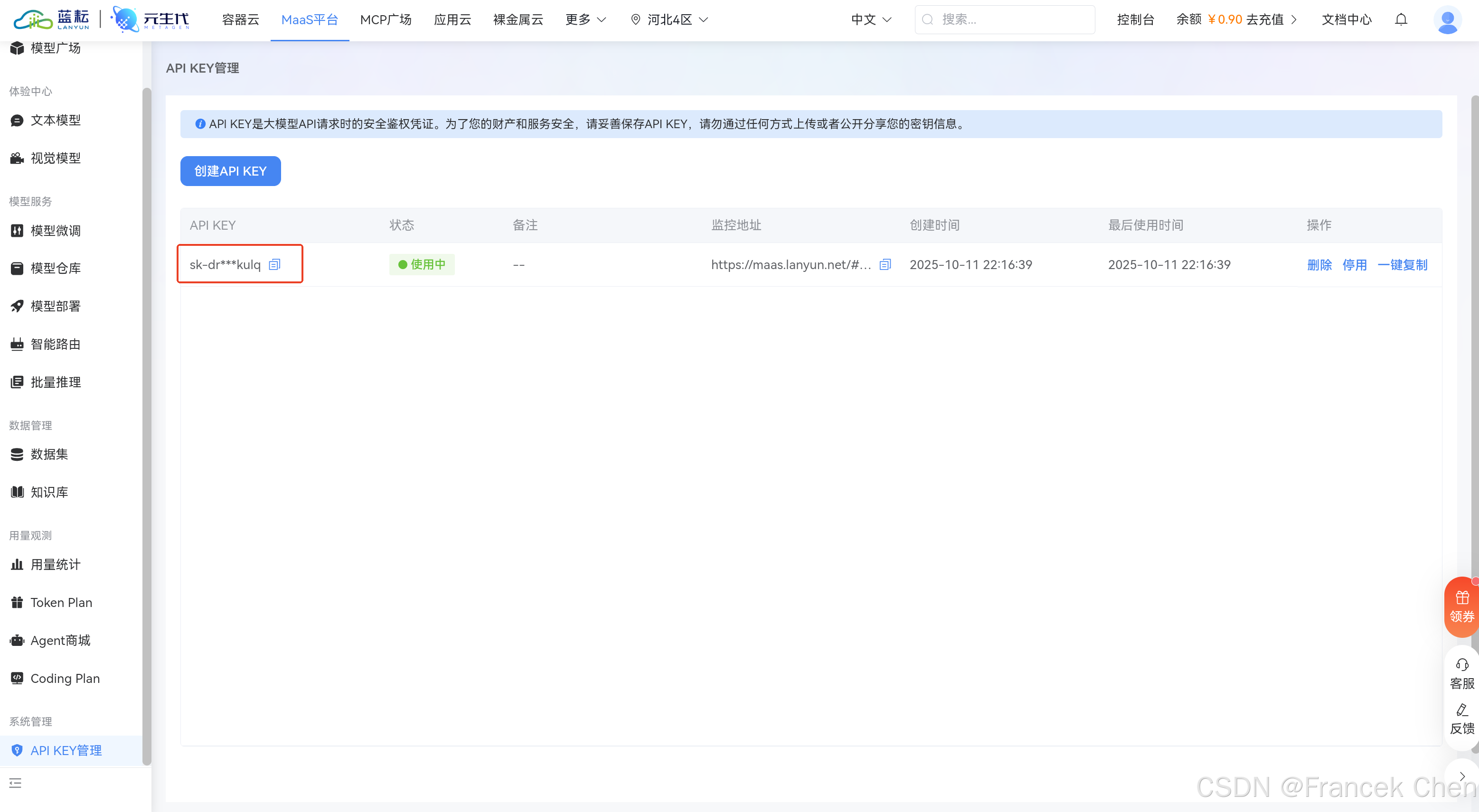
然后,再回到蓝耘 MaaS 平台获取专属 API KEY。
(三)检测 Cherry Studio 连接 API
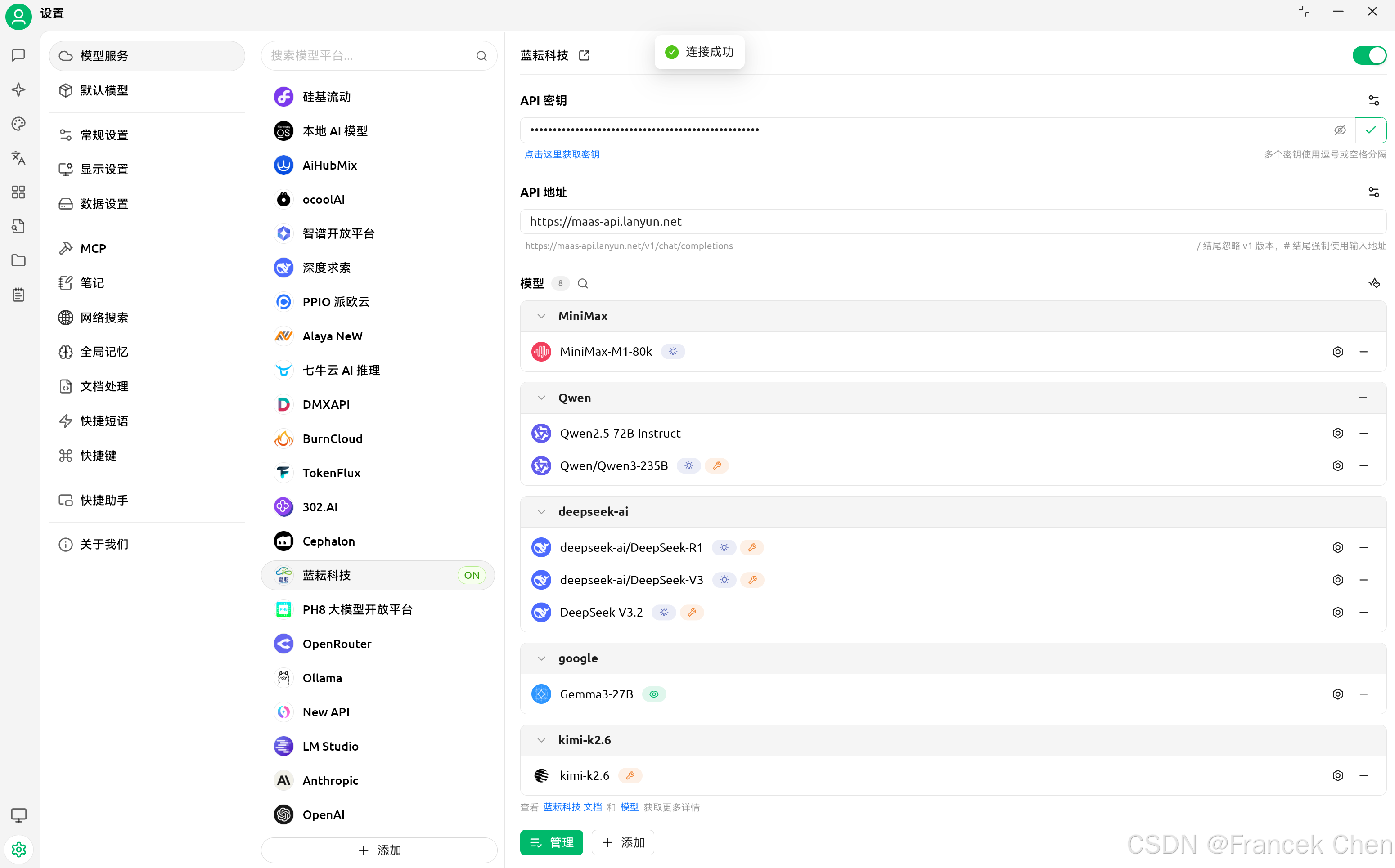
最后,再次回到 Cherry Studio 验证 API 和模型名称是否正确。
四、测试代码验证模型
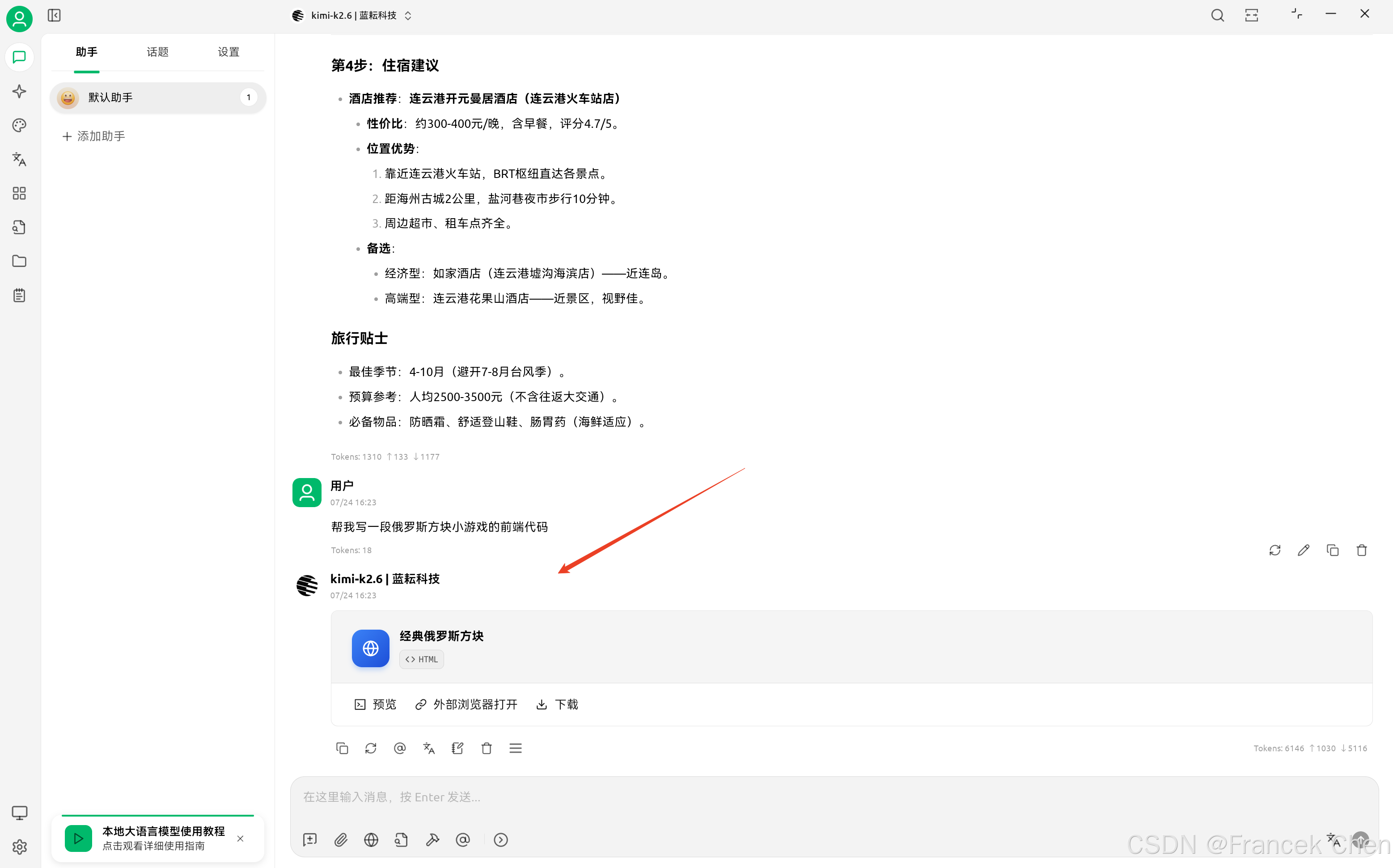
输入提示词:
帮我写一段俄罗斯方块小游戏的前端代码
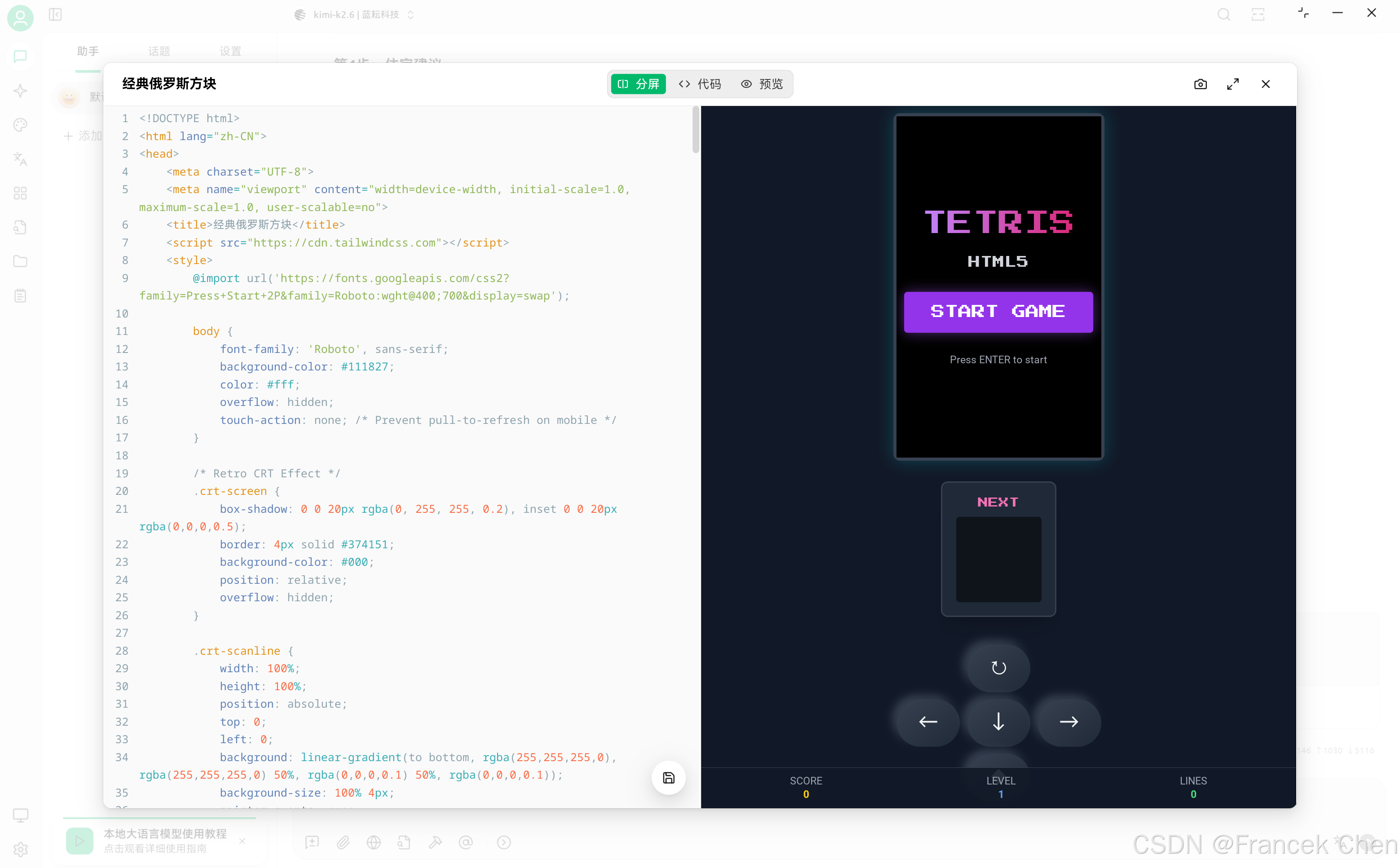
<!DOCTYPE html>
<html lang="zh-CN">
<head>
<meta charset="UTF-8">
<meta name="viewport" content="width=device-width, initial-scale=1.0, maximum-scale=1.0, user-scalable=no">
<title>经典俄罗斯方块</title>
<script src="https://cdn.tailwindcss.com"></script>
<style>
@import url('https://fonts.googleapis.com/css2?family=Press+Start+2P&family=Roboto:wght@400;700&display=swap');
body {
font-family: 'Roboto', sans-serif;
background-color: #111827;
color: #fff;
overflow: hidden;
touch-action: none; /* Prevent pull-to-refresh on mobile */
}
/* Retro CRT Effect */
.crt-screen {
box-shadow: 0 0 20px rgba(0, 255, 255, 0.2), inset 0 0 20px rgba(0,0,0,0.5);
border: 4px solid #374151;
background-color: #000;
position: relative;
overflow: hidden;
}
.crt-scanline {
width: 100%;
height: 100%;
position: absolute;
top: 0;
left: 0;
background: linear-gradient(to bottom, rgba(255,255,255,0), rgba(255,255,255,0) 50%, rgba(0,0,0,0.1) 50%, rgba(0,0,0,0.1));
background-size: 100% 4px;
pointer-events: none;
z-index: 10;
}
.retro-font {
font-family: 'Press Start 2P', cursive;
}
/* Custom Scrollbar for any overflow */
::-webkit-scrollbar {
width: 8px;
}
::-webkit-scrollbar-track {
background: #1f2937;
}
::-webkit-scrollbar-thumb {
background: #4b5563;
}
.game-btn {
background: linear-gradient(145deg, #374151, #1f2937);
box-shadow: 5px 5px 10px #111827, -5px -5px 10px #374151;
transition: all 0.1s ease;
}
.game-btn:active {
box-shadow: inset 5px 5px 10px #111827, inset -5px -5px 10px #374151;
transform: scale(0.95);
}
.glow-text {
text-shadow: 0 0 10px rgba(255, 255, 255, 0.7);
}
</style>
</head>
<body class="h-screen w-screen flex flex-col items-center justify-center bg-gray-900 text-gray-100">
<!-- Main Game Container -->
<div class="relative w-full max-w-4xl h-full flex flex-col md:flex-row items-center justify-center gap-6 p-4">
<!-- Left Panel: Stats -->
<div class="hidden md:flex flex-col gap-4 w-64">
<div class="bg-gray-800 p-4 rounded-lg border-2 border-gray-700 shadow-xl">
<h2 class="retro-font text-yellow-400 text-sm mb-2">分数 SCORE</h2>
<div id="score" class="text-3xl font-bold text-right text-white glow-text">0</div>
</div>
<div class="bg-gray-800 p-4 rounded-lg border-2 border-gray-700 shadow-xl">
<h2 class="retro-font text-blue-400 text-sm mb-2">等级 LEVEL</h2>
<div id="level" class="text-3xl font-bold text-right text-white glow-text">1</div>
</div>
<div class="bg-gray-800 p-4 rounded-lg border-2 border-gray-700 shadow-xl">
<h2 class="retro-font text-green-400 text-sm mb-2">行数 LINES</h2>
<div id="lines" class="text-3xl font-bold text-right text-white glow-text">0</div>
</div>
<div class="mt-auto text-xs text-gray-500 text-center">
<p>Controls:</p>
<p>⬅️ ➡️ Move</p>
<p>⬆️ Rotate</p>
<p>⬇️ Soft Drop</p>
<p>Space Hard Drop</p>
</div>
</div>
<!-- Center: Game Screen -->
<div class="relative group">
<div class="crt-screen rounded-lg">
<div class="crt-scanline"></div>
<canvas id="tetris" width="240" height="400" class="block bg-black"></canvas>
<!-- Start/Pause Overlay -->
<div id="overlay" class="absolute inset-0 flex flex-col items-center justify-center bg-black/80 z-20 backdrop-blur-sm">
<h1 class="retro-font text-3xl md:text-4xl text-transparent bg-clip-text bg-gradient-to-r from-purple-400 to-pink-600 mb-6 text-center leading-tight">
TETRIS<br><span class="text-sm text-gray-300">HTML5</span>
</h1>
<button id="startBtn" class="retro-font bg-purple-600 hover:bg-purple-500 text-white py-3 px-8 rounded shadow-[0_0_15px_rgba(168,85,247,0.5)] transition-all transform hover:scale-105 mb-4">
START GAME
</button>
<p class="text-gray-400 text-xs mt-2">Press ENTER to start</p>
</div>
<!-- Game Over Screen (Hidden by default) -->
<div id="gameOver" class="hidden absolute inset-0 flex flex-col items-center justify-center bg-red-900/90 z-30">
<h2 class="retro-font text-3xl text-white mb-4 glow-text">GAME OVER</h2>
<div class="text-xl mb-6">Score: <span id="finalScore">0</span></div>
<button id="restartBtn" class="retro-font bg-white text-red-900 py-2 px-6 rounded hover:bg-gray-200">
TRY AGAIN
</button>
</div>
</div>
</div>
<!-- Right Panel: Mobile Controls & Next Piece -->
<div class="flex flex-col gap-4 items-center w-full md:w-auto">
<!-- Next Piece Preview (Always Visible) -->
<div class="bg-gray-800 p-4 rounded-lg border-2 border-gray-700 shadow-xl mb-4 md:mb-0">
<h2 class="retro-font text-pink-400 text-xs mb-2 text-center">NEXT</h2>
<canvas id="nextPiece" width="100" height="100" class="bg-black/50 rounded"></canvas>
</div>
<!-- Mobile Controls -->
<div class="grid grid-cols-3 gap-2 md:hidden w-full max-w-[240px]">
<div></div>
<button id="btnRotate" class="game-btn h-14 rounded-full flex items-center justify-center text-2xl">↻</button>
<div></div>
<button id="btnLeft" class="game-btn h-14 rounded-full flex items-center justify-center text-2xl">←</button>
<button id="btnDown" class="game-btn h-14 rounded-full flex items-center justify-center text-2xl">↓</button>
<button id="btnRight" class="game-btn h-14 rounded-full flex items-center justify-center text-2xl">→</button>
<div></div>
<button id="btnDrop" class="game-btn h-14 rounded-full flex items-center justify-center text-2xl bg-red-900/50">⬥</button>
<div></div>
</div>
</div>
</div>
<!-- Mobile Stats (Bottom) -->
<div class="md:hidden fixed bottom-0 left-0 w-full bg-gray-900/90 p-2 flex justify-around items-center border-t border-gray-700 z-40 text-xs">
<div class="text-center">
<div class="text-gray-400">SCORE</div>
<div id="mobileScore" class="font-bold text-yellow-400">0</div>
</div>
<div class="text-center">
<div class="text-gray-400">LEVEL</div>
<div id="mobileLevel" class="font-bold text-blue-400">1</div>
</div>
<div class="text-center">
<div class="text-gray-400">LINES</div>
<div id="mobileLines" class="font-bold text-green-400">0</div>
</div>
</div>
<script>
// --- Constants & Config ---
const COLS = 10;
const ROWS = 20;
const BLOCK_SIZE = 24; // Base size for calculation, canvas scales via CSS
const COLORS = [
null,
'#00f0f0', // I - Cyan
'#0000f0', // J - Blue
'#f0a000', // L - Orange
'#f0f000', // O - Yellow
'#00f000', // S - Green
'#a000f0', // T - Purple
'#f00000' // Z - Red
];
// --- Game State ---
const canvas = document.getElementById('tetris');
const ctx = canvas.getContext('2d');
const nextCanvas = document.getElementById('nextPiece');
const nextCtx = nextCanvas.getContext('2d');
let board = [];
let score = 0;
let lines = 0;
let level = 1;
let gameOver = false;
let isPaused = true;
let dropCounter = 0;
let dropInterval = 1000;
let lastTime = 0;
let animationId;
// --- Piece Definitions ---
const SHAPES = [
[], // Empty
[[0,0,0,0],[1,1,1,1],[0,0,0,0],[0,0,0,0]], // I
[[2,0,0],[2,2,2],[0,0,0]], // J
[[0,0,3],[3,3,3],[0,0,0]], // L
[[4,4],[4,4]], // O
[[0,5,5],[5,5,0],[0,0,0]], // S
[[0,6,0],[6,6,6],[0,0,0]], // T
[[7,7,0],[0,7,7],[0,0,0]] // Z
];
// --- Player Object ---
const player = {
pos: {x: 0, y: 0},
matrix: null,
score: 0
};
let nextPieceMatrix = null;
// --- Core Logic ---
function createPiece(type) {
// Maps 0-6 to 1-7 in SHAPES
return SHAPES[type + 1];
}
function drawMatrix(matrix, offset, context = ctx) {
matrix.forEach((row, y) => {
row.forEach((value, x) => {
if (value !== 0) {
// Block body
context.fillStyle = COLORS[value];
context.fillRect((offset.x + x) * BLOCK_SIZE, (offset.y + y) * BLOCK_SIZE, BLOCK_SIZE, BLOCK_SIZE);
// Inner bevel effect
context.lineWidth = 2;
context.strokeStyle = 'rgba(0,0,0,0.2)';
context.strokeRect((offset.x + x) * BLOCK_SIZE, (offset.y + y) * BLOCK_SIZE, BLOCK_SIZE, BLOCK_SIZE);
// Highlight
context.fillStyle = 'rgba(255,255,255,0.3)';
context.fillRect((offset.x + x) * BLOCK_SIZE, (offset.y + y) * BLOCK_SIZE, BLOCK_SIZE, 4);
}
});
});
}
function draw() {
// Clear Board
ctx.fillStyle = '#000';
ctx.fillRect(0, 0, canvas.width, canvas.height);
// Draw Grid (Subtle)
ctx.strokeStyle = '#111';
ctx.lineWidth = 1;
for(let i=0; i<=COLS; i++) {
ctx.beginPath(); ctx.moveTo(i*BLOCK_SIZE, 0); ctx.lineTo(i*BLOCK_SIZE, canvas.height); ctx.stroke();
}
for(let i=0; i<=ROWS; i++) {
ctx.beginPath(); ctx.moveTo(0, i*BLOCK_SIZE); ctx.lineTo(canvas.width, i*BLOCK_SIZE); ctx.stroke();
}
// Draw Ghost Piece (Landing prediction)
if (player.matrix) {
drawGhost();
}
// Draw Board
drawMatrix(board, {x: 0, y: 0});
// Draw Current Piece
if (player.matrix) {
drawMatrix(player.matrix, player.pos);
}
}
function drawGhost() {
const ghostPos = { ...player.pos };
while (!collide(board, { pos: ghostPos, matrix: player.matrix })) {
ghostPos.y++;
}
ghostPos.y--; // Move back to valid position
ctx.globalAlpha = 0.2;
ctx.fillStyle = '#fff';
player.matrix.forEach((row, y) => {
row.forEach((value, x) => {
if (value !== 0) {
// Draw outline or faint block
ctx.strokeStyle = 'white';
ctx.lineWidth = 1;
ctx.strokeRect((ghostPos.x + x) * BLOCK_SIZE, (ghostPos.y + y) * BLOCK_SIZE, BLOCK_SIZE, BLOCK_SIZE);
}
});
});
ctx.globalAlpha = 1.0;
}
function drawNextPiece() {
nextCtx.fillStyle = '#000';
nextCtx.fillRect(0, 0, nextCanvas.width, nextCanvas.height);
if (!nextPieceMatrix) return;
// Center the piece in the preview canvas
// Calculate bounding box of the piece
const cols = nextPieceMatrix[0].length;
const rows = nextPieceMatrix.length;
const offsetX = Math.floor((nextCanvas.width / BLOCK_SIZE - cols) / 2);
const offsetY = Math.floor((nextCanvas.height / BLOCK_SIZE - rows) / 2);
drawMatrix(nextPieceMatrix, {x: offsetX, y: offsetY}, nextCtx);
}
function merge(arena, player) {
player.matrix.forEach((row, y) => {
row.forEach((value, x) => {
if (value !== 0) {
arena[y + player.pos.y][x + player.pos.x] = value;
}
});
});
}
function rotate(matrix, dir) {
for (let y = 0; y < matrix.length; ++y) {
for (let x = 0; x < y; ++x) {
[
matrix[x][y],
matrix[y][x],
] = [
matrix[y][x],
matrix[x][y],
];
}
}
if (dir > 0) {
matrix.forEach(row => row.reverse());
} else {
matrix.reverse();
}
}
function playerRotate(dir) {
const pos = player.pos.x;
let offset = 1;
rotate(player.matrix, dir);
while (collide(board, player)) {
player.pos.x += offset;
offset = -(offset + (offset > 0 ? 1 : -1));
if (offset > player.matrix[0].length) {
rotate(player.matrix, -dir);
player.pos.x = pos;
return;
}
}
}
function collide(arena, player) {
const [m, o] = [player.matrix, player.pos];
for (let y = 0; y < m.length; ++y) {
for (let x = 0; x < m[y].length; ++x) {
if (m[y][x] !== 0 &&
(arena[y + o.y] && arena[y + o.y][x + o.x]) !== 0) {
return true;
}
}
}
return false;
}
function playerReset() {
if (nextPieceMatrix === null) {
nextPieceMatrix = createPiece(Math.floor(Math.random() * 7));
}
player.matrix = nextPieceMatrix;
nextPieceMatrix = createPiece(Math.floor(Math.random() * 7));
drawNextPiece();
player.pos.y = 0;
player.pos.x = (board[0].length / 2 | 0) - (player.matrix[0].length / 2 | 0);
if (collide(board, player)) {
endGame();
}
}
function playerDrop() {
player.pos.y++;
if (collide(board, player)) {
player.pos.y--;
merge(board, player);
arenaSweep();
playerReset();
}
dropCounter = 0;
}
function playerMove(dir) {
player.pos.x += dir;
if (collide(board, player)) {
player.pos.x -= dir;
}
}
function playerHardDrop() {
while (!collide(board, player)) {
player.pos.y++;
}
player.pos.y--;
merge(board, player);
arenaSweep();
playerReset();
dropCounter = 0;
}
function arenaSweep() {
let rowCount = 0;
outer: for (let y = board.length - 1; y > 0; --y) {
for (let x = 0; x < board[y].length; ++x) {
if (board[y][x] === 0) {
continue outer;
}
}
const row = board.splice(y, 1)[0];
row.fill(0);
board.unshift(row);
++y;
rowCount++;
}
if (rowCount > 0) {
// Scoring: Classic Nintendo scoring system
// 1=40, 2=100, 3=300, 4=1200 * (level + 1)
const lineScores = [0, 40, 100, 300, 1200];
score += lineScores[rowCount] * level;
lines += rowCount;
level = Math.floor(lines / 10) + 1;
dropInterval = Math.max(100, 1000 - (level - 1) * 100); // Speed up
updateScore();
}
}
function updateScore() {
document.getElementById('score').innerText = score;
document.getElementById('level').innerText = level;
document.getElementById('lines').innerText = lines;
// Mobile updates
document.getElementById('mobileScore').innerText = score;
document.getElementById('mobileLevel').innerText = level;
document.getElementById('mobileLines').innerText = lines;
}
function resetGame() {
board = Array.from({ length: ROWS }, () => Array(COLS).fill(0));
score = 0;
lines = 0;
level = 1;
dropInterval = 1000;
updateScore();
gameOver = false;
nextPieceMatrix = null;
playerReset();
}
function endGame() {
gameOver = true;
isPaused = true;
document.getElementById('gameOver').classList.remove('hidden');
document.getElementById('finalScore').innerText = score;
document.getElementById('overlay').classList.add('hidden'); // Hide start overlay
}
function update(time = 0) {
if (isPaused) return;
const deltaTime = time - lastTime;
lastTime = time;
dropCounter += deltaTime;
if (dropCounter > dropInterval) {
playerDrop();
}
draw();
animationId = requestAnimationFrame(update);
}
// --- Controls ---
document.addEventListener('keydown', event => {
if (gameOver) return;
// Start game with Enter if paused
if (isPaused && event.keyCode === 13) {
startGame();
return;
}
if (isPaused) return;
switch(event.keyCode) {
case 37: // Left
playerMove(-1);
break;
case 39: // Right
playerMove(1);
break;
case 40: // Down
playerDrop();
break;
case 38: // Up
playerRotate(1);
break;
case 32: // Space
playerHardDrop();
break;
case 80: // P for Pause
// Optional pause logic
break;
}
});
// Mobile Button Listeners
const btnLeft = document.getElementById('btnLeft');
const btnRight = document.getElementById('btnRight');
const btnDown = document.getElementById('btnDown');
const btnRotate = document.getElementById('btnRotate');
const btnDrop = document.getElementById('btnDrop');
// Helper for touch devices to prevent zoom/scroll and trigger immediately
function addTouchListener(element, action) {
element.addEventListener('touchstart', (e) => {
e.preventDefault();
if(!isPaused && !gameOver) action();
});
element.addEventListener('mousedown', (e) => {
e.preventDefault();
if(!isPaused && !gameOver) action();
});
}
addTouchListener(btnLeft, () => playerMove(-1));
addTouchListener(btnRight, () => playerMove(1));
addTouchListener(btnDown, () => playerDrop());
addTouchListener(btnRotate, () => playerRotate(1));
addTouchListener(btnDrop, () => playerHardDrop());
// --- Game Flow ---
function startGame() {
document.getElementById('overlay').classList.add('hidden');
document.getElementById('gameOver').classList.add('hidden');
resetGame();
isPaused = false;
lastTime = performance.now();
update();
}
document.getElementById('startBtn').addEventListener('click', startGame);
document.getElementById('restartBtn').addEventListener('click', startGame);
// Initial Draw
ctx.fillStyle = '#000';
ctx.fillRect(0, 0, canvas.width, canvas.height);
// Draw initial empty board
// board = Array.from({ length: ROWS }, () => Array(COLS).fill(0));
// draw();
</script>
</body>
</html>
小结
本次测评围绕蓝耘元生代 MaaS 平台搭载的 Kimi K2.6 大模型展开,完整梳理了模型性能优势、平台接入流程与实际落地效果。Kimi K2.6 综合能力全面升级,在多项权威基准测试中表现优异,尤其擅长长程代码编写、Agent 智能任务、视觉理解与工具调用,适配各类复杂工程场景,推理性能大幅优化,相较传统工具速度提升显著。测评详细演示了蓝耘平台账号注册、模型查找、API 密钥获取及 Cherry Studio 接入的完整流程,操作简洁、适配性强,普通用户可快速完成部署。同时通过前端俄罗斯方块小游戏代码编写实测,验证了该模型的代码生成精准度、完整性与实用性,能够高效产出可直接运行的优质代码。整体而言,Kimi K2.6 依托蓝耘 MaaS 平台,兼具高性能、易部署、强实用的优势,在工程开发、智能任务处理等场景具备极高的使用价值。
欢迎 点赞👍 | 收藏⭐ | 评论✍ | 关注🤗


汇聚全球AI编程工具,助力开发者即刻编程。
更多推荐
 27
27 0
0- 0


 已为社区贡献2条内容

所有评论(0)