
【大模型项目实战】ruoyi框架中接入大模型,完成数据清洗
前言
目前有一个传统的信息录入系统,新增业务数据存在两大痛点:一是录入模式单一,只能逐字段手动填写,效率低下;二是存量原始数据格式杂乱无章,即便支持批量粘贴至输入框,业务人员仍需耗费大量时间人工规整格式、逐条匹配对应录入项,人力成本高且易出现录入差错。
为解决上述录入难题,引入大模型能力优化全流程:直接上传杂乱原始数据交由大模型统一清洗、规整,再通过预设标准化模板输出结构化规范数据,最终自动入库存储,摆脱人工整理数据的重复工作。
本文将基于若依(RuoYi)框架接入大模型的实操方案,落地自动化智能数据录入需求。
正文
源码分享
我用夸克网盘给你分享了「ruoyi-zxks」,点击链接或复制整段内容,打开「夸克APP」即可获取。
链接:https://pan.quark.cn/s/1ae7a971ba21
gitee地址:https://gitee.com/hongwu-mayin/ruoyi-zxks
在application.yml中配置
# 项目相关配置
ruoyi:
  # 名称
  name: RuoYi
  # 版本
  version: 3.9.0
  # 版权年份
  copyrightYear: 2025
  # 文件路径 示例( Windows配置D:/ruoyi/uploadPath,Linux配置 /home/ruoyi/uploadPath)
  profile: D:/ruoyi/uploadPath
  # 获取ip地址开关
  addressEnabled: false
  # 验证码类型 math 数字计算 char 字符验证
  captchaType: math
  # AI 配置(DeepSeek 等 OpenAI 兼容接口)
  ai:
    # 是否启用 AI 功能
    enabled: true
    # DeepSeek 官方接口地址
    base-url: https://api.deepseek.com
    # API Key(请替换为你的 DeepSeek API Key,建议通过环境变量/配置中心注入,勿提交到代码库)
    api-key: sk8888888
    # 模型名称(默认 deepseek-v4-flash / deepseek-v4-pro)
    model: deepseek-v4-flash
    # 请求超时(毫秒)
    timeout: 120000
Aiconfig
这段代码定义了一个名为 AiConfig 的 Java 配置类,它的主要作用是集中管理 AI 服务(本文是 DeepSeek)的相关配置参数。
简单来说,它就像一个“中转站”,把写在配置文件里的信息读取出来,让程序的其他部分能够方便地使用。
- 读取配置 它会自动读取项目配置文件(如
application.yml)中所有以ruoyi.ai开头的设置。例如,当你在配置文件里设置了 API 密钥,这个类就会把它“拿”过来。 - 封装参数 它将读取到的零散配置项(如网址、密钥、模型名等)封装成一个完整的 Java 对象。这样,其他代码需要调用 AI 服务时,直接注入这个
AiConfig对象就能获取所有必要信息,而不用自己去解析配置文件。 - 提供默认值 代码中为每个配置项都设置了默认值。这意味着即使你没有在配置文件中做任何设置,程序也能使用这些默认值(如默认的 DeepSeek API 地址和模型)正常运行,避免了因缺少配置而报错。
这个类主要管理以下几个核心参数:
| 字段名 | 作用说明 | 默认值 |
|---|---|---|
enabled |
一个开关,用于快速启用或禁用整个 AI 功能。 | false |
baseUrl |
AI 服务的接口地址。这里默认指向 DeepSeek 的 API。 | https://api.deepseek.com |
apiKey |
访问 AI 服务所需的身份验证密钥。 | (空字符串) |
model |
指定要使用的 AI 模型名称。 | deepseek-v4-flash |
timeout |
网络请求的超时时间,单位是毫秒。 | 120000 (即120秒) |
package com.ruoyi.zxks.ai.config;

import org.springframework.boot.context.properties.ConfigurationProperties;
import org.springframework.stereotype.Component;

/**
 * AI 配置(DeepSeek 等 OpenAI 兼容接口)
 *
 * 配置示例(application.yml -> ruoyi.ai):
 *   ruoyi:
 *     ai:
 *       enabled: true
 *       base-url: https://api.deepseek.com
 *       api-key: sk-xxxx
 *       model: deepseek-chat
 *       timeout: 120000
 */
@Component
@ConfigurationProperties(prefix = "ruoyi.ai")
public class AiConfig
{
    /** 是否启用 AI 功能 */
    private boolean enabled = false;

    /** OpenAI 兼容接口地址(DeepSeek 为 https://api.deepseek.com) */
    private String baseUrl = "https://api.deepseek.com";

    /** API Key */
    private String apiKey = "";

    /** 模型名称(deepseek-v4-pro / deepseek-v4-flash) */
    private String model = "deepseek-v4-flash";

    /** 请求超时时间(毫秒) */
    private int timeout = 120000;

    public boolean isEnabled()
    {
        return enabled;
    }

    public void setEnabled(boolean enabled)
    {
        this.enabled = enabled;
    }

    public String getBaseUrl()
    {
        return baseUrl;
    }

    public void setBaseUrl(String baseUrl)
    {
        this.baseUrl = baseUrl;
    }

    public String getApiKey()
    {
        return apiKey;
    }

    public void setApiKey(String apiKey)
    {
        this.apiKey = apiKey;
    }

    public String getModel()
    {
        return model;
    }

    public void setModel(String model)
    {
        this.model = model;
    }

    public int getTimeout()
    {
        return timeout;
    }

    public void setTimeout(int timeout)
    {
        this.timeout = timeout;
    }
}
AiClient
这段代码定义了一个名为 AiClient 的 Java 类,它的核心作用是作为一个与 AI 模型(如 DeepSeek)进行交互的底层客户端工具。它负责封装网络请求、发送对话指令,并解析 AI 返回的复杂数据。
具体来说,它的作用可以分为以下四个方面:
- 初始化网络请求工具
在类初始化时(@PostConstruct 方法中),它根据你在配置类(AiConfig)中设置的超时时间,配置并创建了一个 RestTemplate 对象。同时,它还强制指定了 UTF-8 编码,以确保在处理包含中文等字符的 AI 对话时不会出现乱码。
- 发起 AI 对话请求 (
chat方法)
这是该类的核心功能。它模拟了标准的 OpenAI 兼容接口调用流程:
- 安全检查:首先检查 AI 功能是否开启以及 API Key 是否配置,防止无效调用。
- 构建请求:自动拼接 API 地址(
/chat/completions),设置请求头(包含鉴权信息和 JSON 格式声明)。 - 组装消息体:将“系统提示词(System Prompt)”和“用户提示词(User Prompt)”组装成标准的对话消息格式,并指定了使用的模型。它还强制要求 AI 以 JSON 格式输出(
response_format: json_object)。 - 发送请求:通过
RestTemplate向 AI 服务器发送 HTTP POST 请求。
- 解析 AI 的响应结果
AI 返回的数据通常是一个复杂的 JSON 结构。这个类会自动提取出我们真正需要的内容:
- 它会从返回的 JSON 树中定位到
choices数组。 - 提取出第一个选项(
choices[0])中message的content内容,也就是 AI 实际回复的文本。 - 如果请求失败或返回格式不对,它会抛出明确的异常提示。
- 提供实用的 JSON 处理工具
由于 AI 模型有时可能会“不听话”,即使你要求它输出 JSON,它也可能在前后加上多余的废话或 Markdown 代码块标记(如 ````json`)。为此,该类提供了两个静态工具方法:
extractJson:一个“清洗”工具。它能智能地从 AI 的回复文本中剥离掉多余的文字和代码块标记,精准提取出纯粹的 JSON 字符串。parseJson:一个“转换”工具。它能将提取出来的 JSON 字符串直接转换成 Java 对象(POJO),方便你的业务代码直接使用。
package com.ruoyi.zxks.ai.client;

import java.util.ArrayList;
import java.util.Arrays;
import java.util.HashMap;
import java.util.LinkedHashMap;
import java.util.List;
import java.util.Map;
import javax.annotation.PostConstruct;
import com.fasterxml.jackson.databind.JsonNode;
import com.fasterxml.jackson.databind.ObjectMapper;
import org.springframework.beans.factory.annotation.Autowired;
import org.springframework.http.HttpEntity;
import org.springframework.http.HttpHeaders;
import org.springframework.http.MediaType;
import org.springframework.http.ResponseEntity;
import org.springframework.http.converter.StringHttpMessageConverter;
import org.springframework.stereotype.Component;
import org.springframework.web.client.RestTemplate;
import org.springframework.http.client.SimpleClientHttpRequestFactory;
import com.ruoyi.common.utils.StringUtils;
import com.ruoyi.zxks.ai.config.AiConfig;

/**
 * OpenAI 兼容的 AI 调用客户端(适配 DeepSeek)
 */
@Component
public class AiClient
{
    @Autowired
    private AiConfig aiConfig;

    private RestTemplate restTemplate;

    private static final ObjectMapper OBJECT_MAPPER = new ObjectMapper();

    @PostConstruct
    public void init()
    {
        SimpleClientHttpRequestFactory factory = new SimpleClientHttpRequestFactory();
        factory.setConnectTimeout(aiConfig.getTimeout());
        factory.setReadTimeout(aiConfig.getTimeout());
        restTemplate = new RestTemplate(factory);
        // 确保 UTF-8 编码
        restTemplate.getMessageConverters().stream()
                .filter(c -> c instanceof StringHttpMessageConverter)
                .forEach(c -> ((StringHttpMessageConverter) c).setDefaultCharset(java.nio.charset.StandardCharsets.UTF_8));
    }

    /**
     * 发起一次对话请求,返回模型回复文本
     *
     * @param systemPrompt 系统提示词
     * @param userPrompt   用户提示词
     * @return 模型回复内容
     */
    public String chat(String systemPrompt, String userPrompt)
    {
        if (!aiConfig.isEnabled() || StringUtils.isEmpty(aiConfig.getApiKey()))
        {
            throw new RuntimeException("AI 功能未启用或未配置 API Key,请在 application.yml 的 ruoyi.ai 中配置");
        }

        String url = aiConfig.getBaseUrl().replaceAll("/+$", "") + "/chat/completions";

        HttpHeaders headers = new HttpHeaders();
        headers.setContentType(MediaType.APPLICATION_JSON);
        headers.set("Authorization", "Bearer " + aiConfig.getApiKey());

        Map<String, Object> systemMsg = new LinkedHashMap<>();
        systemMsg.put("role", "system");
        systemMsg.put("content", systemPrompt);

        Map<String, Object> userMsg = new LinkedHashMap<>();
        userMsg.put("role", "user");
        userMsg.put("content", userPrompt);

        Map<String, Object> body = new LinkedHashMap<>();
        body.put("model", aiConfig.getModel());
        body.put("messages", Arrays.asList(systemMsg, userMsg));
        body.put("temperature", 0.3);
        Map<String, String> responseFormat = new HashMap<>();
        responseFormat.put("type", "json_object");
        body.put("response_format", responseFormat);

        HttpEntity<Map<String, Object>> entity = new HttpEntity<>(body, headers);

        ResponseEntity<String> response = restTemplate.postForEntity(url, entity, String.class);
        if (!response.getStatusCode().is2xxSuccessful() || StringUtils.isEmpty(response.getBody()))
        {
            throw new RuntimeException("AI 接口调用失败,HTTP 状态:" + response.getStatusCode());
        }

        try
        {
            JsonNode root = OBJECT_MAPPER.readTree(response.getBody());
            JsonNode choices = root.path("choices");
            if (choices.isMissingNode() || !choices.isArray() || choices.size() == 0)
            {
                throw new RuntimeException("AI 接口返回格式异常:" + response.getBody());
            }
            return choices.get(0).path("message").path("content").asText();
        }
        catch (Exception e)
        {
            throw new RuntimeException("AI 接口返回解析失败:" + e.getMessage());
        }
    }

    /**
     * 从模型回复中提取 JSON 文本(兼容 ```json 代码块包裹的情况)
     */
    public static String extractJson(String text)
    {
        if (text == null)
        {
            return null;
        }
        text = text.trim();
        if (text.startsWith("```"))
        {
            int firstNewline = text.indexOf('\n');
            int last = text.lastIndexOf("```");
            if (firstNewline != -1 && last > firstNewline)
            {
                text = text.substring(firstNewline + 1, last).trim();
            }
        }
        int start = text.indexOf('{');
        int end = text.lastIndexOf('}');
        if (start != -1 && end != -1 && end > start)
        {
            text = text.substring(start, end + 1);
        }
        return text;
    }

    /**
     * 将 JSON 解析为指定类型
     */
    public static <T> T parseJson(String json, Class<T> clazz)
    {
        try
        {
            return OBJECT_MAPPER.readValue(json, clazz);
        }
        catch (Exception e)
        {
            throw new RuntimeException("AI 返回内容解析失败:" + e.getMessage());
        }
    }
}
controller
package com.ruoyi.zxks.ai.controller;

import java.util.List;
import java.util.Map;
import org.springframework.security.access.prepost.PreAuthorize;
import org.springframework.beans.factory.annotation.Autowired;
import org.springframework.web.bind.annotation.PostMapping;
import org.springframework.web.bind.annotation.RequestBody;
import org.springframework.web.bind.annotation.RequestMapping;
import org.springframework.web.bind.annotation.RestController;
import com.ruoyi.common.core.controller.BaseController;
import com.ruoyi.common.core.domain.AjaxResult;
import com.ruoyi.zxks.ai.domain.AiCleanImportParam;
import com.ruoyi.zxks.ai.service.IQuestionAiService;
import com.ruoyi.zxks.question.domain.ExamQuestion;

/**
 * AI 题目Controller
 */
@RestController
@RequestMapping("/question/ai")
public class QuestionAiController extends BaseController
{
    @Autowired
    private IQuestionAiService questionAiService;

    /**
     * AI 解析原始文本为题目(仅预览,不入库)
     */
    @PreAuthorize("@ss.hasPermi('question:question:add')")
    @PostMapping("/parse")
    public AjaxResult parse(@RequestBody AiCleanImportParam param)
    {
        List<ExamQuestion> list = questionAiService.parseText(param);
        return AjaxResult.success("解析完成,共 " + list.size() + " 题", list);
    }

    /**
     * 确认导入 AI 解析出的题目
     */
    @PreAuthorize("@ss.hasPermi('question:question:add')")
    @PostMapping("/import")
    public AjaxResult importQuestions(@RequestBody List<ExamQuestion> questionList)
    {
        Map<String, Object> result = questionAiService.importQuestions(questionList);
        int successCount = (int) result.get("successCount");
        int failCount = (int) result.get("failCount");
        String errorMsg = (String) result.get("errorMsg");

        String msg = "导入成功 " + successCount + " 条";
        if (failCount > 0)
        {
            msg += ",失败 " + failCount + " 条,错误信息:" + errorMsg;
            return AjaxResult.warn(msg);
        }
        return AjaxResult.success(msg);
    }
}
service
这段代码定义了 QuestionAiServiceImpl 类,它是整个 AI 功能的核心业务层。如果说前面的 AiClient 是负责“打电话”的底层通信工具,那么这个类就是负责“编写剧本、导演排练并处理最终结果”的业务导演。
它的核心作用是:利用 AI 将非结构化的原始文本(如复制粘贴的文档、网页内容)智能解析为结构化的考试题目,并将其安全地导入到数据库中。
具体来说,它实现了以下三大核心功能:
- 智能解析文本为题目 (
parseText方法)
这是该类的“大脑”部分,负责与 AI 进行深度交互:
- 构建提示词(Prompt Engineering):
buildSystemPrompt():定义了 AI 的角色(考试题库助手),并给出了极其严格的规则(如题型编码、选项格式、JSON 输出要求等),确保 AI 返回的数据格式是程序能直接处理的。buildUserPrompt():将用户输入的原始文本与系统设置的默认值(如默认分类、默认难度、默认分值)结合,生成最终的提问。
- 调用 AI 并清洗数据:调用
AiClient.chat()获取 AI 回复,然后利用之前提到的extractJson和parseJson工具,将 AI 返回的文本精准提取并转换为 Java 对象AiParseResult。 - 数据转换与兜底:遍历解析出的题目列表,通过
convert方法将 AI 返回的 DTO 对象转换为数据库实体ExamQuestion。在这里它还做了很多“兜底”处理,比如 AI 没识别出题型就用默认题型,AI 没识别出分值就默认给 1 分等。
- 批量导入题目入库 (
importQuestions方法)
这是该类的“执行”部分,负责将解析好的题目安全地存入数据库:
- 逐条校验与入库:遍历题目列表,检查题目内容和分类是否为空。如果有效,则调用现有的
examQuestionService.insertExamQuestion(q)进行入库。 - 容错处理:它没有采用“要么全成功,要么全失败”的批量插入,而是采用单条插入。这意味着如果第 5 题插入失败,不会影响前 4 题和第 6 题的成功入库。
- 结果统计:最后返回一个包含成功数量、失败数量和详细错误信息的 Map,方便前端给用户展示导入结果报告。
- 精细化的数据转换逻辑 (
convert及辅助方法)
为了保证 AI 返回的数据能够完美适配现有的数据库表结构,它做了大量适配工作:
- 选项处理 (
pickOption):兼容 AI 可能返回的大写A或小写a,并去除多余空格。 - 类型转换 (
toBigDecimal):将 AI 返回的分值安全地转换为数据库需要的BigDecimal类型,防止格式错误导致崩溃。
package com.ruoyi.zxks.ai.service.impl;

import java.math.BigDecimal;
import java.util.ArrayList;
import java.util.Arrays;
import java.util.HashMap;
import java.util.List;
import java.util.Map;
import org.springframework.beans.factory.annotation.Autowired;
import org.springframework.stereotype.Service;
import com.ruoyi.common.utils.StringUtils;
import com.ruoyi.zxks.ai.client.AiClient;
import com.ruoyi.zxks.ai.domain.AiCleanImportParam;
import com.ruoyi.zxks.ai.domain.AiParseResult;
import com.ruoyi.zxks.ai.domain.AiQuestionDTO;
import com.ruoyi.zxks.ai.service.IQuestionAiService;
import com.ruoyi.zxks.question.domain.ExamQuestion;
import com.ruoyi.zxks.question.service.IExamQuestionService;

/**
 * AI 题目服务实现
 */
@Service
public class QuestionAiServiceImpl implements IQuestionAiService
{
    @Autowired
    private AiClient aiClient;

    @Autowired
    private IExamQuestionService examQuestionService;

    /** 题型白名单 */
    private static final List<String> VALID_TYPES = Arrays.asList("1", "2", "3", "4");

    @Override
    public List<ExamQuestion> parseText(AiCleanImportParam param)
    {
        if (param == null || StringUtils.isEmpty(param.getRawText()))
        {
            throw new RuntimeException("原始题目文本不能为空");
        }
        if (param.getRawText().length() > 5000)
        {
            throw new RuntimeException("原始题目文本不能超过 5000 个字符");
        }
        if (StringUtils.isEmpty(param.getCategoryId()))
        {
            throw new RuntimeException("请先选择目标分类");
        }

        String content = aiClient.chat(buildSystemPrompt(), buildUserPrompt(param));
        String json = AiClient.extractJson(content);
        AiParseResult result = AiClient.parseJson(json, AiParseResult.class);

        List<ExamQuestion> questions = new ArrayList<>();
        if (result != null && result.getQuestions() != null)
        {
            for (AiQuestionDTO dto : result.getQuestions())
            {
                ExamQuestion q = convert(dto, param);
                if (q != null)
                {
                    questions.add(q);
                }
            }
        }
        return questions;
    }

    @Override
    public Map<String, Object> importQuestions(List<ExamQuestion> questionList)
    {
        Map<String, Object> result = new HashMap<>();
        int successCount = 0;
        int failCount = 0;
        StringBuilder errorMsg = new StringBuilder();

        if (questionList == null || questionList.isEmpty())
        {
            result.put("successCount", 0);
            result.put("failCount", 0);
            result.put("errorMsg", "没有可导入的题目");
            return result;
        }

        for (int i = 0; i < questionList.size(); i++)
        {
            ExamQuestion q = questionList.get(i);
            if (q == null || StringUtils.isEmpty(q.getQuestionContent()))
            {
                failCount++;
                errorMsg.append("第").append(i + 1).append("题:题目内容为空;");
                continue;
            }
            if (StringUtils.isEmpty(q.getCategoryId()))
            {
                failCount++;
                errorMsg.append("第").append(i + 1).append("题:分类为空;");
                continue;
            }
            try
            {
                // 复用现有新增逻辑:自动生成ID、创建人信息、去除选项前缀
                examQuestionService.insertExamQuestion(q);
                successCount++;
            }
            catch (Exception e)
            {
                failCount++;
                errorMsg.append("第").append(i + 1).append("题:插入失败(").append(e.getMessage()).append(");");
            }
        }

        result.put("successCount", successCount);
        result.put("failCount", failCount);
        result.put("errorMsg", errorMsg.toString());
        return result;
    }

    /**
     * 将 AI 单题 DTO 转换为 ExamQuestion
     */
    private ExamQuestion convert(AiQuestionDTO dto, AiCleanImportParam param)
    {
        if (dto == null || StringUtils.isEmpty(dto.getQuestionContent()))
        {
            return null;
        }
        ExamQuestion q = new ExamQuestion();
        q.setCategoryId(param.getCategoryId());
        q.setQuestionContent(dto.getQuestionContent().trim());
        q.setDelFlag("0");

        // 题型:优先使用 AI 识别,其次使用传入默认值,最后兜底单选
        String type = dto.getQuestionType();
        if (!VALID_TYPES.contains(type))
        {
            type = param.getQuestionType();
        }
        if (!VALID_TYPES.contains(type))
        {
            type = "1";
        }
        q.setQuestionType(type);

        // 选项
        if (dto.getOptions() != null)
        {
            q.setOptionA(pickOption(dto.getOptions(), "A"));
            q.setOptionB(pickOption(dto.getOptions(), "B"));
            q.setOptionC(pickOption(dto.getOptions(), "C"));
            q.setOptionD(pickOption(dto.getOptions(), "D"));
        }

        q.setCorrectAnswer(StringUtils.isEmpty(dto.getCorrectAnswer()) ? null : dto.getCorrectAnswer().trim());
        q.setAnalysis(StringUtils.isEmpty(dto.getAnalysis()) ? null : dto.getAnalysis().trim());

        // 难度
        String difficulty = dto.getDifficulty();
        if (StringUtils.isEmpty(difficulty) || (!"1".equals(difficulty) && !"2".equals(difficulty) && !"3".equals(difficulty)))
        {
            difficulty = param.getDifficulty();
        }
        if (StringUtils.isEmpty(difficulty))
        {
            difficulty = "2";
        }
        q.setDifficulty(difficulty);

        // 分值:用户设置的默认分值优先(覆盖 AI 识别值),未设置时才回退到 AI 识别值,最后兜底 1 分
        BigDecimal score = param.getScore();
        if (score == null)
        {
            score = toBigDecimal(dto.getScore());
        }
        if (score == null)
        {
            score = BigDecimal.ONE;
        }
        q.setScore(score);

        return q;
    }

    private String pickOption(Map<String, String> options, String key)
    {
        String val = options.get(key);
        if (StringUtils.isEmpty(val))
        {
            val = options.get(key.toLowerCase());
        }
        return StringUtils.isEmpty(val) ? null : val.trim();
    }

    private BigDecimal toBigDecimal(Object obj)
    {
        if (obj == null)
        {
            return null;
        }
        try
        {
            return new BigDecimal(obj.toString());
        }
        catch (Exception e)
        {
            return null;
        }
    }

    private String buildSystemPrompt()
    {
        return "你是一个考试题库助手。用户会提供一段包含若干题目的原始文本(可能来自教材、文档或网页)。"
                + "请从中提取出每一道题目,并转换为结构化 JSON。\n"
                + "题型编码:1=单选,2=多选,3=判断,4=简答。\n"
                + "规则:\n"
                + "1. 单选题 correctAnswer 为单个选项字母(如 \"A\");多选题 correctAnswer 为逗号分隔的字母(如 \"A,B\");"
                + "判断题 correctAnswer 为 \"正确\" 或 \"错误\",且 options 为空对象;简答题 correctAnswer 为答案要点文本,options 为空对象。\n"
                + "2. 选项统一使用键 A/B/C/D,去掉选项前的 \"A.\" \"B、\" 等前缀,只保留内容本身。\n"
                + "3. 若题目没有明显解析,analysis 填空字符串。\n"
                + "4. 只输出 JSON,不要包含任何解释性文字或 markdown 代码块标记。\n"
                + "输出格式示例:\n"
                + "{\"questions\":[{\"questionContent\":\"...\",\"questionType\":\"1\","
                + "\"options\":{\"A\":\"...\",\"B\":\"...\",\"C\":\"...\",\"D\":\"...\"},"
                + "\"correctAnswer\":\"A\",\"analysis\":\"...\",\"difficulty\":\"2\",\"score\":5}]}";
    }

    private String buildUserPrompt(AiCleanImportParam param)
    {
        StringBuilder sb = new StringBuilder();
        sb.append("请将以下文本解析为题目:\n\n").append(param.getRawText()).append("\n\n");
        sb.append("补充说明:\n");
        sb.append("- 所有题目归入已指定的分类,无需输出分类字段。\n");
        if (StringUtils.isNotEmpty(param.getQuestionType()))
        {
            sb.append("- 若题目本身未明确题型,默认题型为 ").append(param.getQuestionType()).append("。\n");
        }
        if (StringUtils.isNotEmpty(param.getDifficulty()))
        {
            sb.append("- 若题目未标注难度,默认难度为 ").append(param.getDifficulty()).append("。\n");
        }
        if (param.getScore() != null)
        {
            sb.append("- 若题目未标注分值,默认分值为 ").append(param.getScore()).append("。\n");
        }
        sb.append("请尽量依据题目内容判断题型,仅在无法判断时使用上述默认值。");
        return sb.toString();
    }
}
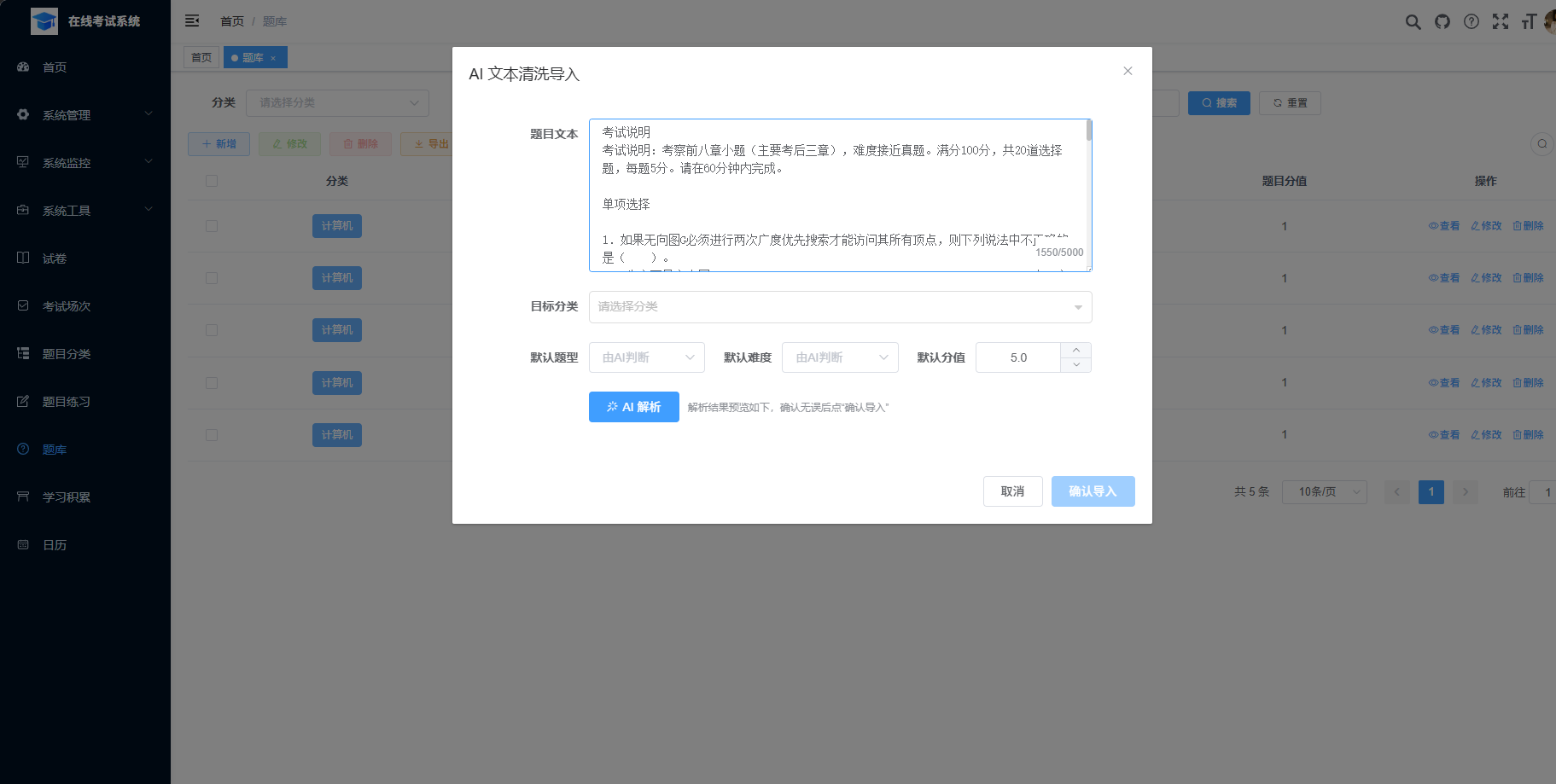
效果图
输入:
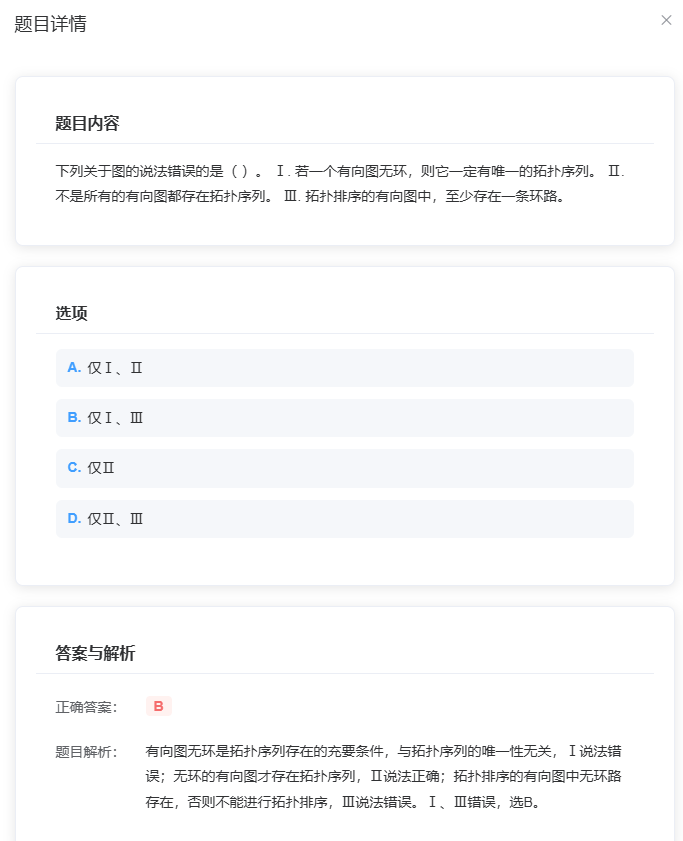
查看清洗出的题目效果:

汇聚全球AI编程工具,助力开发者即刻编程。
更多推荐
 5
5 0
0- 0


 已为社区贡献7条内容

所有评论(0)