
FreeLLMAPI 大模型 API Key 导出指南
·
前置条件
- 已部署 FreeLLMAPI 服务(WSL / Linux / Windows)
- 服务正在运行,且数据库中已添加过 API Key
- Node.js >= 20.18.0
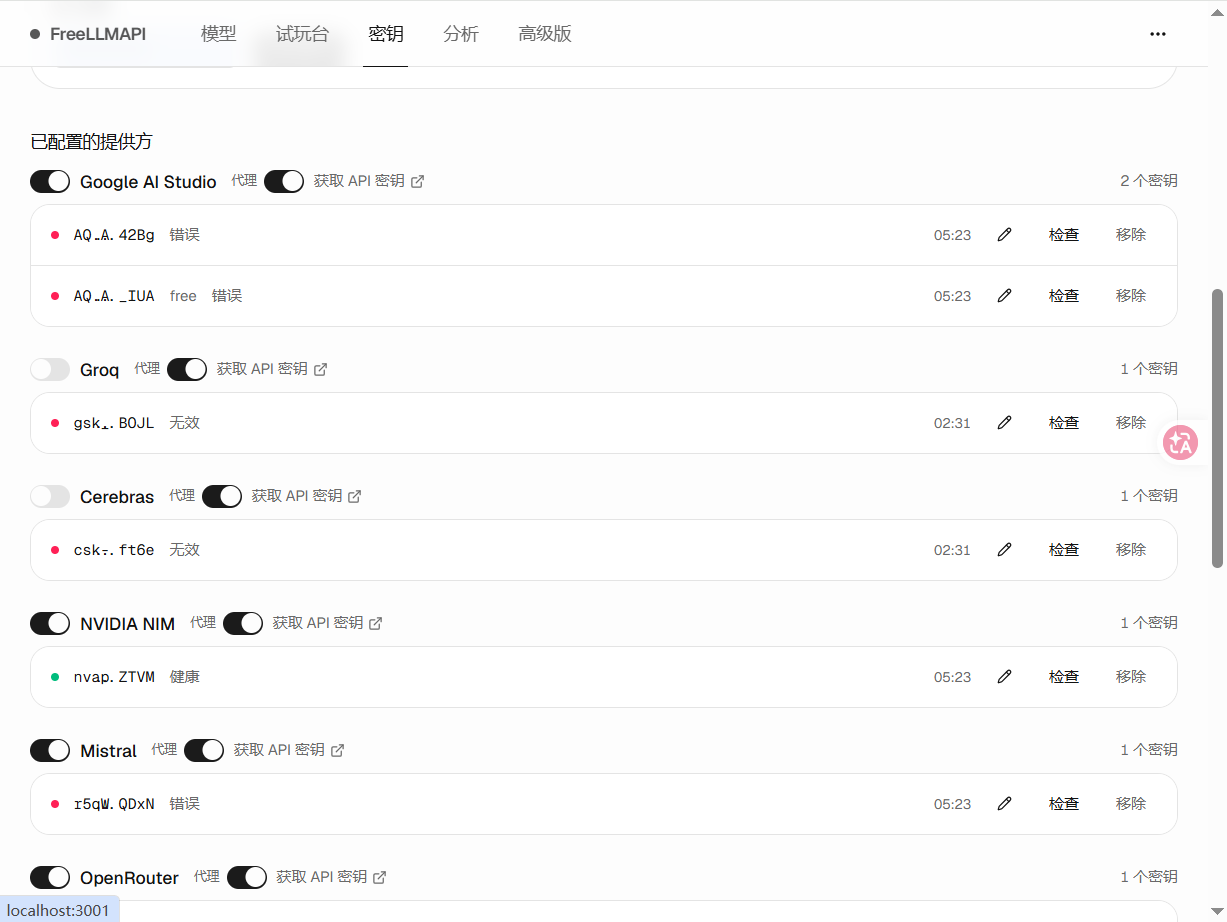
方式一:通过 Web 界面导出(如果没有导出按钮,推荐方式三)
操作步骤
- 打开浏览器访问
http://localhost:3000 - 登录后进入 密钥 页面
- 点击页面右上角的 导出 按钮(需已添加至少一个密钥才会显示)
- 选择导出格式(JSON / .env / CSV)
- 可选勾选 仅导出健康密钥
- 点击 导出下载 按钮
方式二:通过 API 导出
1. 登录获取 Session Token
curl -s -X POST http://localhost:3000/api/auth/login \
  -H "Content-Type: application/json" \
  -d '{"password": "<your-password>"}'
从返回结果中复制 token 字段的值。
PS: 或者直接中浏览器中获取也行
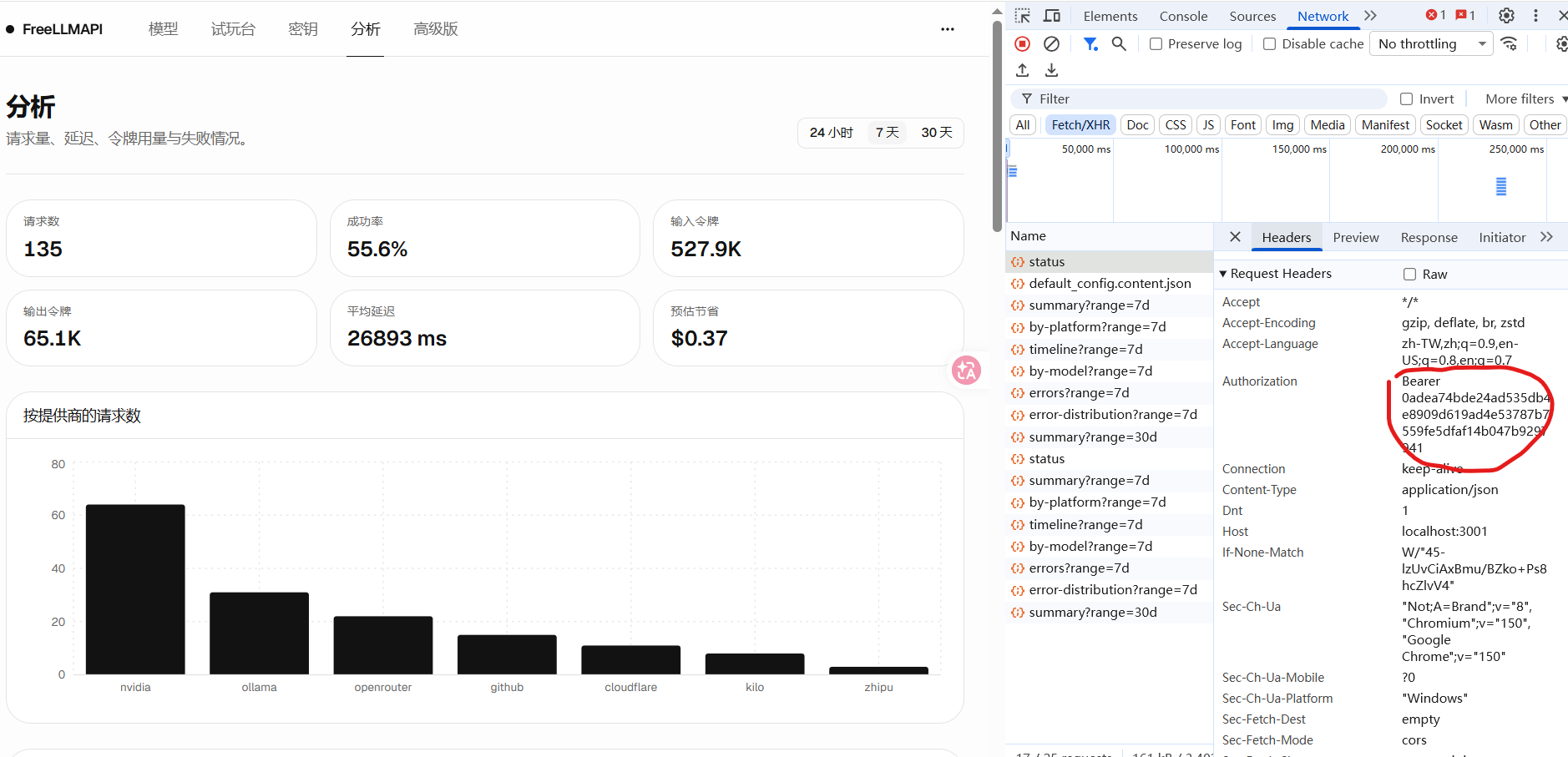
2. 导出密钥
# JSON 格式
curl -H "Authorization: Bearer <TOKEN>" \
  "http://localhost:3000/api/keys/export?format=json" \
  -o freellmapi-keys.json

# .env 格式
curl -H "Authorization: Bearer <TOKEN>" \
  "http://localhost:3000/api/keys/export?format=env" \
  -o freellmapi-keys.env

# CSV 格式
curl -H "Authorization: Bearer <TOKEN>" \
  "http://localhost:3000/api/keys/export?format=csv" \
  -o freellmapi-keys.csv

# 仅导出状态为 healthy 的密钥
curl -H "Authorization: Bearer <TOKEN>" \
  "http://localhost:3000/api/keys/export?format=json&healthy=true" \
  -o freellmapi-keys.json
方式三:通过 Node.js 脚本从数据库直接导出
适用于 API 接口不可用、Web 界面异常等场景。
步骤 1:找到数据库文件
# 搜索项目目录下的 .db 文件
find <your-project-path> -name "*.db" -type f 2>/dev/null
常见路径:
<your-project-path>/server/data/freeapi.db
步骤 2:确认数据库中包含 api_keys 表
node -e "
  import('better-sqlite3').then(m => {
    const db = new m.default('<your-project-path>/server/data/freeapi.db');
    const tables = db.prepare(\"SELECT name FROM sqlite_master WHERE type='table'\").all();
    console.log(tables.map(t => t.name).join(', '));
  });
"
确认输出中包含 api_keys。

步骤 3:获取加密密钥
从 .env 文件中获取 ENCRYPTION_KEY:
grep ENCRYPTION_KEY <your-project-path>/.env
示例输出:
ENCRYPTION_KEY=<your-encryption-key>
步骤 4:创建导出脚本
cat > <your-project-path>/export-keys.mjs << 'SCRIPT'
import Database from 'better-sqlite3';
import { createDecipheriv } from 'crypto';

const dbPath = process.argv[2];
const ENCRYPTION_KEY = process.env.ENCRYPTION_KEY || '<your-encryption-key>';

if (!dbPath) {
  console.error('Usage: node export-keys.mjs <database-path>');
  process.exit(1);
}

const db = new Database(dbPath);

function decrypt(encrypted, iv, authTag) {
  const decipher = createDecipheriv('aes-256-gcm',
    Buffer.from(ENCRYPTION_KEY, 'hex').slice(0, 32),
    Buffer.from(iv, 'hex')
  );
  decipher.setAuthTag(Buffer.from(authTag, 'hex'));
  return decipher.update(Buffer.from(encrypted, 'hex')) + decipher.final('utf8');
}

const rows = db.prepare('SELECT * FROM api_keys ORDER BY platform, created_at ASC').all();
console.log('Found', rows.length, 'key records');

const keys = rows.map(row => {
  try {
    const key = decrypt(row.encrypted_key, row.iv, row.auth_tag);
    if (key && key !== 'no-key') {
      return { platform: row.platform, key, label: row.label || '' };
    }
  } catch (e) {
    console.error('Decrypt failed for', row.platform, ':', e.message);
  }
  return null;
}).filter(Boolean);

const output = {
  version: 1,
  exportedAt: new Date().toISOString(),
  source: 'freellmapi',
  keys
};

console.log(JSON.stringify(output, null, 2));
SCRIPT
步骤 5:运行导出脚本
cd <your-project-path>
node export-keys.mjs <your-project-path>/server/data/freellmapi.db > freellmapi-keys.json
步骤 6:验证导出结果
cat freellmapi-keys.json
输出示例:
{
  "version": 1,
  "exportedAt": "2026-07-18T12:00:00.000Z",
  "source": "freellmapi",
  "keys": [
    {
      "platform": "google",
      "key": "AIzaSy...",
      "label": "Google AI Studio"
    },
    {
      "platform": "groq",
      "key": "gsk_...",
      "label": "Groq"
    }
  ]
}
常见问题
Q: API 返回 Cannot GET /api/keys/export
原因:运行的服务代码版本不包含 export 路由。
解决:重新构建并重启服务:
cd <your-project-path>
npm run build
npm run start
Q: API 返回 No keys to export
原因:数据库中没有密钥,或所有密钥状态为 keyless,还有可能 是库名错误。
解决:先通过 Web 界面或 API 添加密钥后再导出。确认数据库名称是freellmapi.db还是freeapi.db
Q: 数据库文件中找不到 api_keys 表
原因:指向了错误的数据库文件。
解决:用 find 命令查找所有 .db 文件,逐个检查哪个包含 api_keys 表。
find <your-project-path>-name "*.db" -type f 2>/dev/null

Q: 解密失败
原因:ENCRYPTION_KEY 不正确。
解决:确认 .env 文件中的 ENCRYPTION_KEY 值,并通过 export ENCRYPTION_KEY=xxx 设置环境变量后重新运行脚本。
导出格式说明
| 格式 | 文件扩展名 | 适用场景 |
|---|---|---|
| JSON | .json | 备份、导入到其他 FreeLLMAPI 实例 |
| .env | .env | 配置环境变量,如 GOOGLE_KEY=xxx |
| CSV | .csv | 电子表格查看、审计 |
安全提示
- 导出的密钥文件包含明文 API Key,请妥善保管
- 不要将导出的文件上传到公开仓库
- 导出完成后建议删除临时脚本文件
- 定期更换 API Key 并重新导出备份

汇聚全球AI编程工具,助力开发者即刻编程。
更多推荐

 6
6 0
0- 0


 已为社区贡献2条内容

所有评论(0)