
Hermes Agent Linux 部署实战:从零开始搭建自进化 AI 助手
本文详细记录在 Linux 服务器上部署 Hermes Agent 的完整过程,包括安装、配置模型连接、工具集启用及常见问题解决。Hermes Agent 是由 Nous Research 开源的自进化 AI Agent 框架,具有学习能力,可根据使用习惯自动总结成 Skill。
一、Hermes Agent 是什么?
Hermes Agent 是由 Nous Research 开源的自进化 AI Agent 框架,其特点包括:
- 自学习能力:能够根据使用习惯和过往经历自动总结成 Skill,也就是说它具备持续学习能力。
- 多平台集成:可方便集成到飞书、微信等国内外平台。
- 丰富的工具集:自带 Web Search、浏览器自动化、文件操作、代码执行等大量工具,可供 AI 调用。
我部署该项目的主要目的,正是为了学习和借鉴它的工具集获取与配置方式。
📎 项目地址:NousResearch/hermes-agent
📖 项目有中文版说明文档,可直接查看。
二、环境准备
| 项目 | 说明 |
|---|---|
| 操作系统 | Ubuntu(Linux 服务器) |
| 用户权限 | 非 root 用户(避免影响其他用户) |
| 模型服务 | 采用 Ollama 本地部署(参考Linux 非 Root 权限下部署 Ollama 完整指南) |
三、安装 Hermes Agent
3.1 设置镜像源加速
安装过程会下载大量依赖,建议先设置国内镜像源:
export UV_INDEX_URL=https://mirrors.aliyun.com/pypi/simple/
3.2 执行安装脚本
Hermes Agent 支持用户级安装(Per-user),安装位置在 /home/YourUserName/.hermes/,不会影响其他用户。
官方一键安装指令:
curl -fsSL https://hermes-agent.nousresearch.com/install.sh | bash
如果官方源下载慢,可使用 GitHub 代理加速:
curl -fsSL https://ghproxy.net/https://raw.githubusercontent.com/NousResearch/hermes-agent/main/scripts/install.sh | bash
3.3 安装过程中的选择
可选包安装
安装过程中会弹出提示,询问是否安装 ripgrep(用于更快的文件搜索)和 ffmpeg(用于语音转文字)。若选择安装,会提示需要 sudo 管理员权限。
提示:如果不想用 sudo,可以选择
n跳过,不影响核心功能。
配置模式选择
首先弹出了提示是否需要安装ripgrep(用于更快的文件搜索)和ffmpeg用于语音转文字,若需要安装的话会提示要sudo管理员权限需要登录一下。此处我先选了y发现要管理员权限就ctrl+c取消了。
这两个模块不影响主要功能,无伤大雅。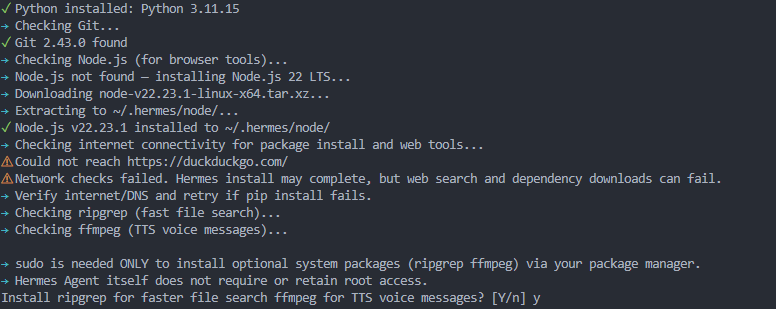
安装完成后首次启动会进入配置向导,有三个模式可选:
| 选项 | 说明 |
|---|---|
| Quick Setup (Nous Portal) | 使用 Hermes 订阅来调用工具,免费 OAuth 登录,无需自己配置 API Key |
| Full setup | 手动配置每个提供商、工具和选项(自己获取 API) |
| Blank Slate | 空白模式,默认关闭核心功能,后续手动开启和配置 |
我选择了 Full setup,因为计划使用本地部署的模型。
四、配置模型提供商
4.1 选择自定义端点
由于我打算通过 Ollama 本地部署模型(或通过 LLaMA-Factory + HuggingFace 启动模型),因此需要在提供商列表中选择 Custom endpoint (enter URL manually)。
(●) Nous Portal (Everything your agent needs, 300+ models with bundled tool use)
(○) OpenRouter (Pay-per-use API aggregator)
(○) Mixture of Agents (named presets; aggregator acts after reference models)
(○) NovitaAI (Cloud: Model API, Agent Sandbox, GPU Cloud)
(○) LM Studio (Local desktop app with built-in model server)
(○) Anthropic (Claude models via API key or Claude Code)
(○) OpenAI ▸ (Codex CLI or direct OpenAI API)
(○) Qwen Cloud / DashScope (Qwen + multi-provider)
(○) xAI Grok ▸ (Direct API or SuperGrok / Premium+ OAuth)
(○) Xiaomi MiMo (MiMo-V2.5 and V2 models: pro, omni, flash)
(○) Tencent TokenHub (Hy3 Preview via tokenhub.tencentmaas.com)
(○) NVIDIA NIM (Nemotron models via build.nvidia.com or local NIM)
(○) GitHub Copilot ▸ (GitHub token API or copilot --acp process)
(○) Hugging Face Inference Providers
(○) Google AI Studio (Native Gemini API)
(○) Google Vertex AI (Gemini via GCP; OAuth2 service account or ADC, GCP billing/quotas)
(○) DeepSeek (V3, R1, coder, direct API)
(○) Z.AI / GLM (Zhipu direct API)
(○) Kimi / Moonshot ▸ (Coding Plan, Moonshot global & China endpoints)
(○) StepFun Step Plan (Agent / coding models via Step Plan API)
(○) MiniMax ▸ (Global, OAuth Coding Plan & China endpoints)
(○) Ollama Cloud (Cloud-hosted open models, ollama.com)
(○) Arcee AI (Trinity models, direct API)
(○) GMI Cloud (Multi-model direct API)
(○) Fireworks AI (OpenAI-compatible direct model API)
(○) Kilo Code (Kilo Gateway API)
(○) OpenCode ▸ (Zen pay-as-you-go or Go subscription)
(○) AWS Bedrock (Claude, Nova, Llama, DeepSeek; IAM or API key)
(○) Azure Foundry (OpenAI-style or Anthropic-style endpoint, your Azure AI deployment)
(○) Qwen OAuth (Reuses local Qwen CLI login)
(○) Alibaba Cloud Coding Plan (Dedicated coding tier)
(○) custom (direct API)
(○) DeepInfra — 100+ open models, pay-per-use
(○) Upstage (Solar API)
(○) Custom endpoint (enter URL manually)
(○) Configure auxiliary models... →
(○) Leave unchanged
4.2 配置 API 地址
根据你的模型服务地址填写:
| 场景 | API Base URL |
|---|---|
| Ollama 默认端口 | http://127.0.0.1:11434/v1 |
| LLaMA-Factory 自定义端口 | http://localhost:8821/v1 |
API Key 留空(本地服务不校验)。
4.3 选择 API 兼容模式
LLaMA-Factory 和 Ollama 都提供 OpenAI 兼容 API,因此选择2号Chat Completions:
Select API compatibility mode:
  1. Auto-detect [current]
     Use Hermes URL heuristics; best for standard OpenAI-compatible endpoints.
  2. Chat Completions
     Use /chat/completions for standard OpenAI-compatible servers.
  3. Responses / Codex
     Use /responses for Codex-compatible tool-calling backends.
  4. Anthropic Messages
     Use /v1/messages for Anthropic-compatible endpoints.
Choice [1-4, Enter to keep current/detected]:
4.4 后续配置
- Model name:填写你部署的模型名称(如
deepseek-r1或qwen) - Context length:留空自动检测
- Display name:使用默认即可
- 运行模式:选择
Local - run directly on this machine
运行模式可选项目参考如下:
 (○) Local - run directly on this machine (default)
 (○) Docker - isolated container with configurable resources
 (○) Modal - serverless cloud sandbox
 (○) SSH - run on a remote machine
 (○) Daytona - persistent cloud development environment
 (○) Singularity/Apptainer - HPC-friendly container
 (●) Keep current (local)
后续的消息网关(如 Telegram、微信、飞书等)可以先按 Ctrl+C 跳过,后续需要时再配置。
 [ ] 💬 Mattermost  (not configured)
  [ ] 📡 Signal  (not configured)
  [ ] 💬 Weixin / WeChat  (not configured)
  [ ] 💬 BlueBubbles (iMessage)  (not configured)
  [ ] 🐧 QQ Bot  (not configured)
  [ ] 💎 Yuanbao  (not configured)
  [ ] 🐳 DingTalk  (not configured)
  [ ] 🎮 Discord  (not configured)
  [ ] 📧 Email  (not configured)
  [ ] 🪽 Feishu / Lark  (not configured)
  [ ] 💬 Google Chat  (not configured)
  [ ] 🏠 Home Assistant  (not configured)
  [ ] 💬 IRC  (not configured)
  [ ] 💚 LINE  (not configured)
  [ ] 🔐 Matrix  (not configured)
  [ ] 🔔 ntfy  (not configured)
  [ ] 📱 iMessage via Photon  (not configured)
  [ ] 🔔 Raft  (not configured)
  [ ] 🔒 SimpleX Chat  (not configured)
  [ ] 💼 Slack  (not configured)
  [ ] 📱 SMS (Twilio)  (not configured)
  [ ] 💼 Microsoft Teams  (not configured)
  [ ] ✈️ Telegram  (not configured)
  [ ] 💼 WeCom (Enterprise WeChat)  (not configured)
4.5 选择工具集
配置过程中会弹出目前的工具集状态:
Tools for 🖥️  CLI
  ↑↓ navigate  SPACE toggle  ENTER confirm  ESC cancel

   [✓] 🔍 Web Search & Scraping  (web_search, web_extract)
   [✓] 🌐 Browser Automation  (navigate, click, type, scroll)
   [✓] 💻 Terminal & Processes  (terminal, process)
 → [✓] 📁 File Operations  (read, write, patch, search)
   [✓] ⚡ Code Execution  (execute_code)
   [✓] 👁️  Vision / Image Analysis  (vision_analyze)
   [ ] 🎬 Video Analysis  (video_analyze (requires video-capable model))
   [✓] 🎨 Image Generation  (image_generate)
   [ ] 🎬 Video Generation  (video_generate (text/image/reference))
   [ ] 🐦 X (Twitter) Search  (x_search (requires xAI OAuth or XAI_API_KEY))
   [✓] 🔊 Text-to-Speech  (text_to_speech)
   [✓] 📚 Skills  (list, view, manage)
   [✓] 📋 Task Planning  (todo)
   [✓] 💾 Memory  (persistent memory across sessions)
   [ ] 🧩 Context Engine  (runtime tools from the active context engine)
   [✓] 🔎 Session Search  (search past conversations)
   [✓] ❓ Clarifying Questions  (clarify)
   [✓] 👥 Task Delegation  (delegate_task)
   [✓] ⏰ Cron Jobs  (create/list/update/pause/resume/run, with optional attached skills)
   [ ] 🏠 Home Assistant  (smart home device control)  [no API key]
   [ ] 🎵 Spotify  (playback, search, playlists, library)
   [ ] 🤖 Yuanbao  (group info, member queries, DM)
   [✓] 🖱️  Computer Use (macOS/Windows/Linux)  (background desktop control via cua-driver)
4.6 搜索提供商选择
搜索提供商建议先选择 Skip,后续再配置 Brave Search 免费版或其他服务。
Select Search Provider: ↑↓ navigate ENTER/SPACE select ESC cancel →
(●) Nous Subscription [subscription] — Managed Firecrawl billed to your subscription ★ via Nous Portal (login on select)
(○) Firecrawl Self-Hosted [free · self-hosted] — Run your own Firecrawl instance (Docker)
(○) Brave Search (Free) [free] — Free-tier API key — 2k queries/mo, search only.
(○) DuckDuckGo (ddgs) [free · no key · search only] — Search via the ddgs Python package — no API key (pair with any extra
(○) Exa [paid] — Semantic + neural web search with content extraction.
(○) Firecrawl [paid · optional gateway] — Full search + extract; supports direct API and Nous tool-gateway routing.
(○) Parallel [paid] — Objective-tuned search + parallel page extraction.
(○) SearXNG [free · self-hosted] — Free, privacy-respecting metasearch. Point SEARXNG_URL at your instance.
(○) Tavily [paid] — Search + extract in one provider.
(○) xAI Web Search (Grok) [paid] — Agentic web search via Grok's web_search tool — uses xAI Grok OAuth or XAI_API_KEY.
(○) Skip — keep defaults / configure later
五、验证安装
安装完成后,执行以下命令使环境变量生效:
source ~/.bashrc
验证安装是否成功:
hermes version
参考输出:
Hermes Agent v0.18.2 (2026.7.7.2) · upstream 569b912d
Install directory: /home/yourname/.hermes/hermes-agent
Install method: git
Python: 3.11.15
Up to date
六、连接本地模型服务
6.1 问题回溯
最初尝试使用 LLaMA-Factory + HuggingFace 引擎启动模型供给 Hermes 使用,但遇到大量报错。初步判断原因是 HuggingFace 启动的模型不支持在流式处理的同时带 tools 参数,导致冲突。
因此,后续改为使用 Ollama 启动模型供给 Hermes 调用(Ollama 部署方法参考Linux 非 Root 权限下部署 Ollama 完整指南)。
6.2 启动 Ollama 服务
ollama serve
6.3 配置 Hermes 连接 Ollama
在另一个终端中运行:
hermes model
选择 Custom endpoint (enter URL manually),配置如下:
| 配置项 | 填写内容 |
|---|---|
| API base URL | http://127.0.0.1:11434/v1(Ollama 默认端口) |
| API key | 留空 |
| API mode | 2. Chat Completions |
其余选项直接回车使用默认值,Hermes 会自动检测到 Ollama 上的模型。
6.4 关闭思考模式
对话测试时发现当前模型(Qwen)不支持思考模式(thinking),导致报错。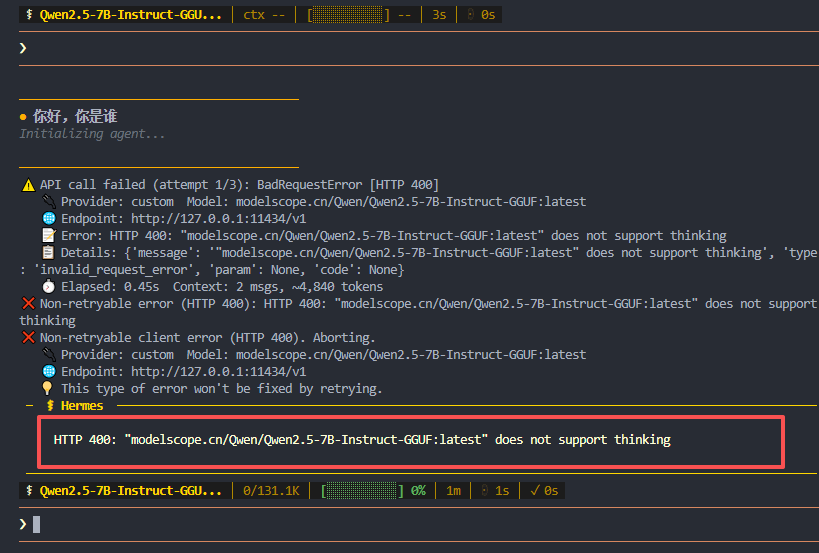
解决方法是在 chat 界面输入:
/reasoning none
之后即可正常对话。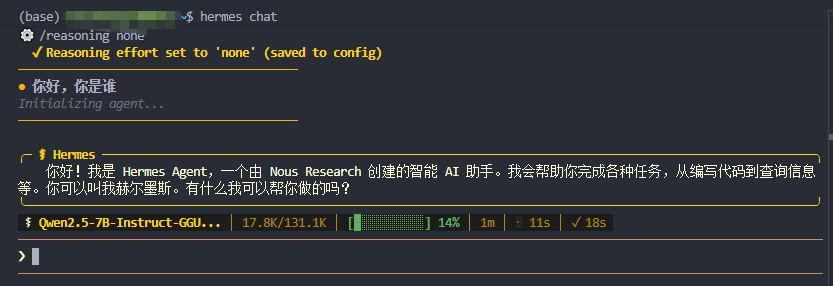
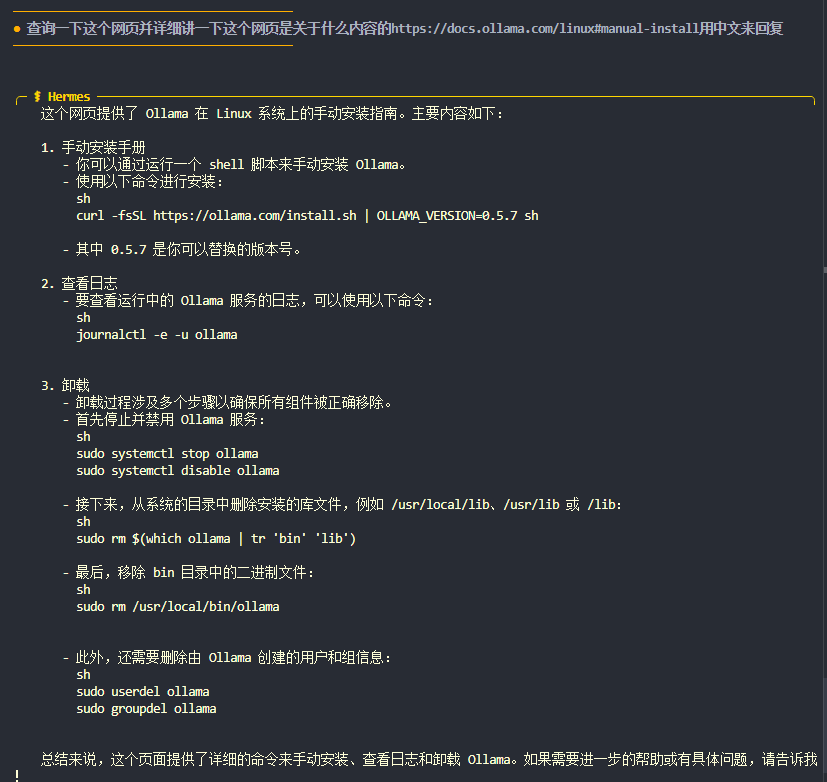
七、功能测试:Web Search + 网页分析
提问:
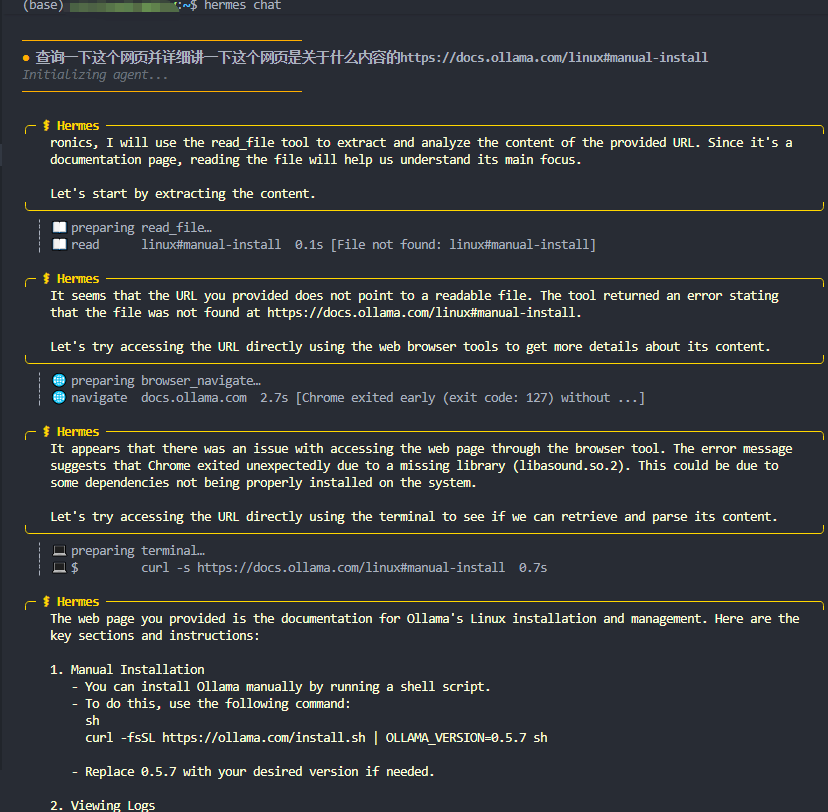
分析总结一下这个网站是关于什么内容的 https://docs.ollama.com/linux#manual-install
执行过程:
- Hermes 尝试使用 Chrome 浏览器访问网页,但因缺失系统库
libasound.so.2导致失败 - Hermes 自动降级,改用 Terminal +
curl访问网页并获取内容 - 成功提取信息并进行总结
这说明 Hermes 具备自动降级能力——当一个工具失败时,会尝试其他方式完成任务。
八、遇到的常见问题及解决
| 问题 | 原因 | 解决方案 |
|---|---|---|
| 安装下载慢 | 海外源 | 设置 UV_INDEX_URL 为阿里云镜像,或使用 ghproxy 代理 |
浏览器工具报错 libasound.so.2 |
系统缺少音频库 | sudo apt install libasound2 |
| 模型报错 “does not support thinking” | 模型不支持思考模式 | chat 中输入 /reasoning none |
| 流式 + tools 冲突 | HuggingFace 后端限制 | 改用 Ollama 作为模型服务 |
九、总结
Hermes Agent 的部署流程整体清晰,用户级安装不影响其他用户,适合多人共用服务器。其核心优势在于:
- 模块化工具集:可按需启用/禁用
- 自学习能力:自动总结 Skill
- 多平台集成:支持飞书、微信等
- 自动降级容错:工具失败时自动切换方式
后续可以继续探索:
- 配置 Brave Search 免费 API 实现真正联网搜索
- 集成到飞书/微信实现日常自动化任务
- 学习并拆解 Hermes 的工具集,移植到自己的 LangChain 项目中
📎 相关文章:

汇聚全球AI编程工具,助力开发者即刻编程。
更多推荐
 5
5 0
0- 0


 已为社区贡献4条内容

所有评论(0)