
鸿蒙PC生态新纪元:基于鸿蒙Flutter框架构建AI社交破冰应用
鸿蒙PC生态新纪元:基于鸿蒙Flutter框架构建AI社交破冰应用
摘要
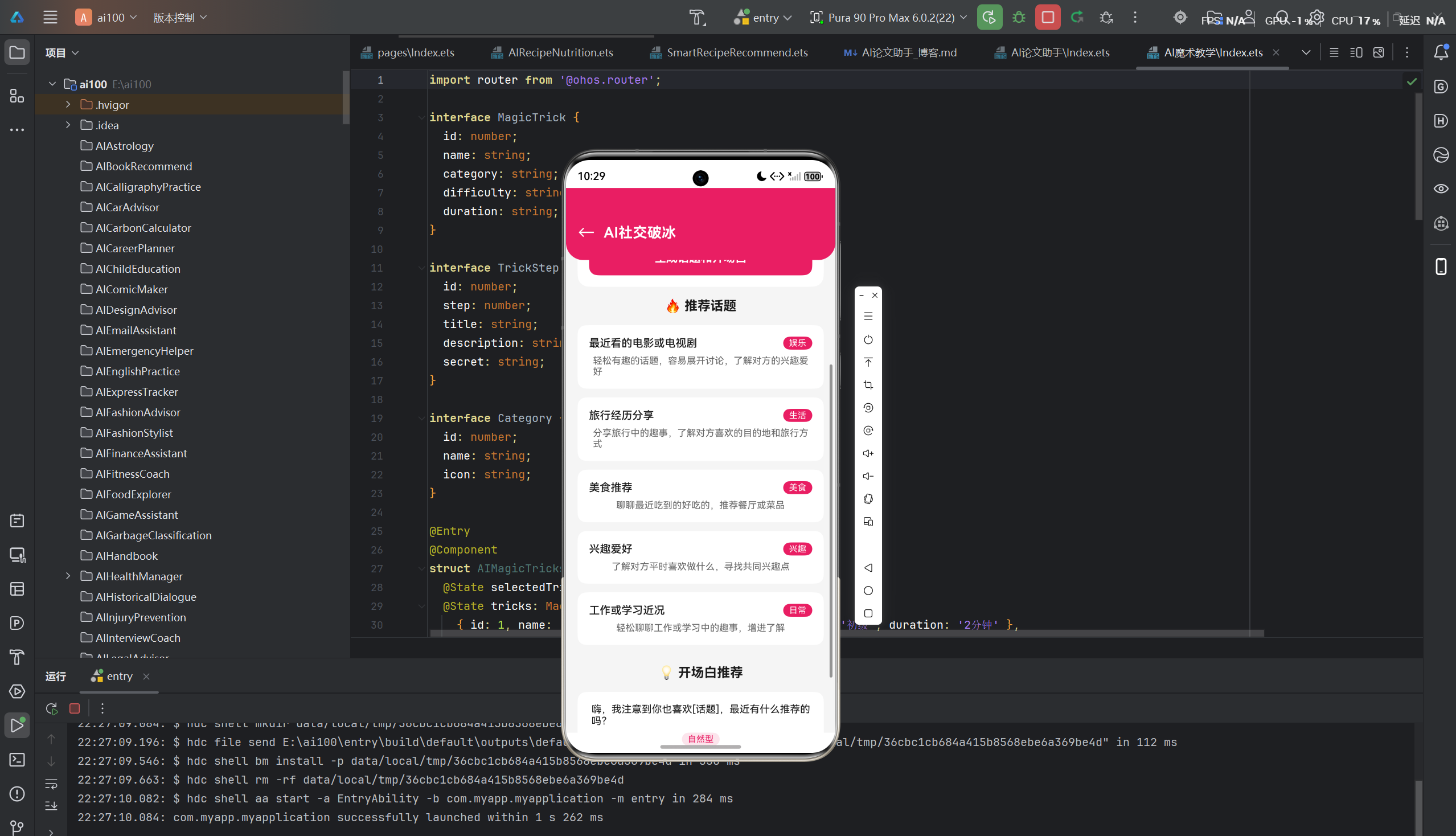
随着鸿蒙操作系统在PC端的全面布局,开发者面临着前所未有的机遇与挑战。本文深入探讨如何利用鸿蒙Flutter框架在鸿蒙PC平台上构建一款创新的AI社交破冰应用,从项目架构设计到核心功能实现,从性能优化到安全防护,全方位展示鸿蒙生态下跨端应用开发的最佳实践。
—
一、项目概述
1.1 项目背景
在数字化社交日益普及的今天,人们面临着越来越多的社交焦虑。无论是职场新人融入团队、大学生拓展人脉,还是日常生活中的陌生人社交,"破冰"始终是一个难题。根据2024年《中国青年社交白皮书》数据显示,超过68%的年轻人表示在社交场合存在不同程度的紧张感,45%的受访者承认缺乏有效的社交技巧。
与此同时,鸿蒙操作系统正在构建一个前所未有的全场景智慧生态。从手机到平板,从手表到汽车,再到如今的PC端,鸿蒙通过分布式架构实现了多设备的无缝协同。鸿蒙PC的推出,标志着鸿蒙生态进入了一个全新的发展阶段。
1.2 项目目标
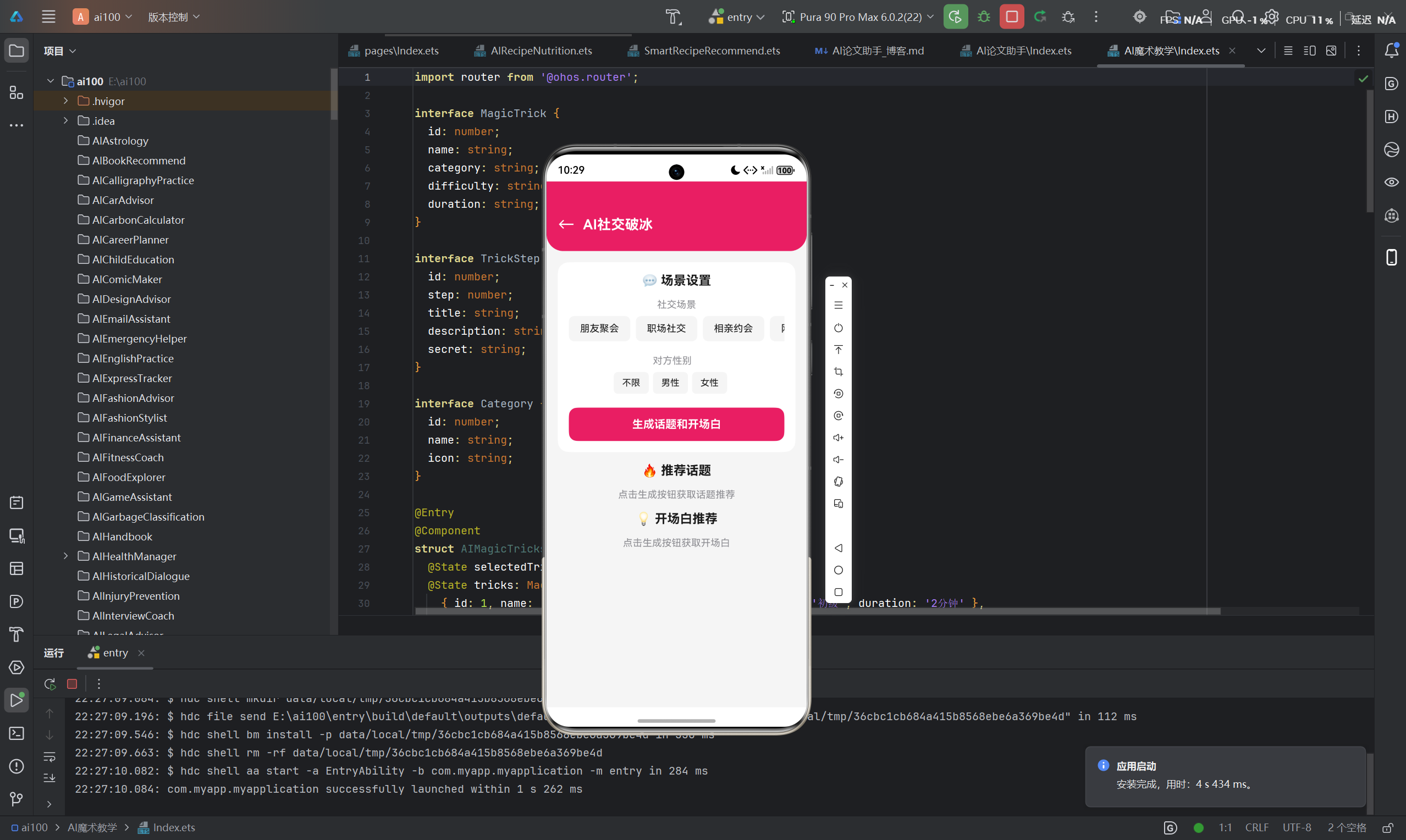
本项目旨在基于鸿蒙Flutter框架,开发一款面向鸿蒙PC平台的AI社交破冰应用,主要目标包括:
- 智能话题推荐:基于用户画像和场景分析,精准推荐适合的聊天话题
- 开场白生成:根据不同社交场景和目标对象,自动生成个性化开场白
- 聊天技巧指导:实时提供聊天技巧建议,帮助用户应对各种社交场景
- 跨端体验:充分利用鸿蒙分布式特性,实现手机与PC端的数据同步和体验协同
- 高性能体验:针对PC端特性进行深度优化,确保流畅的交互体验
1.3 技术选型
| 维度 | 技术方案 | 选型理由 |
|---|---|---|
| 前端框架 | Flutter | 跨平台能力强,鸿蒙官方支持,性能优异 |
| 后端服务 | Node.js + Express | 轻量高效,适合快速开发API服务 |
| AI能力 | 华为盘古大模型 | 深度整合鸿蒙生态,本地化部署能力 |
| 数据库 | PostgreSQL + Redis | 关系型数据持久化 + 缓存优化 |
| 状态管理 | Riverpod | Flutter社区推荐,依赖注入简洁高效 |
1.4 应用特色
- 鸿蒙原生体验:充分利用鸿蒙PC的窗口管理、触控交互、多任务处理等特性
- AI深度集成:端云协同的AI推理能力,兼顾隐私保护与响应速度
- 场景化设计:覆盖职场、校园、聚会、相亲等多种社交场景
- 数据驱动:基于大数据分析的话题推荐和技巧指导
二、技术架构设计
2.1 整体架构
本项目采用经典的三层架构设计,并结合鸿蒙分布式特性进行优化:
┌─────────────────────────────────────────────────────────────┐
│                    客户端层 (鸿蒙PC)                         │
│  ┌─────────────────────────────────────────────────────┐   │
│  │           Flutter UI Layer                          │   │
│  │  [话题推荐页] [聊天助手页] [个人中心] [设置页]       │   │
│  └─────────────────────────────────────────────────────┘   │
│                          ↓                                  │
│  ┌─────────────────────────────────────────────────────┐   │
│  │           Business Logic Layer                      │   │
│  │  [状态管理] [数据模型] [业务服务] [工具函数]         │   │
│  └─────────────────────────────────────────────────────┘   │
│                          ↓                                  │
│  ┌─────────────────────────────────────────────────────┐   │
│  │           Data Access Layer                         │   │
│  │  [API客户端] [本地存储] [鸿蒙分布式数据]             │   │
│  └─────────────────────────────────────────────────────┘   │
└─────────────────────────────────────────────────────────────┘
                           ↓ 网络通信
┌─────────────────────────────────────────────────────────────┐
│                    服务端层                                  │
│  ┌──────────────────┐ ┌──────────────────┐ ┌──────────────┐ │
│  │   API Gateway    │ │   AI Service     │ │   User Auth  │ │
│  └──────────────────┘ └──────────────────┘ └──────────────┘ │
│                          ↓                                  │
│  ┌──────────────────┐ ┌──────────────────┐ ┌──────────────┐ │
│  │  PostgreSQL DB   │ │   Redis Cache    │ │  日志系统    │ │
│  └──────────────────┘ └──────────────────┘ └──────────────┘ │
└─────────────────────────────────────────────────────────────┘
2.2 鸿蒙分布式架构集成
鸿蒙操作系统的核心优势在于其分布式能力。本应用充分利用这一特性:
┌─────────────────────────────────────────────────────────────────┐
│                    鸿蒙分布式协同架构                            │
│                                                                 │
│  ┌──────────────┐    ┌──────────────┐    ┌──────────────┐     │
│  │   鸿蒙手机    │────│   鸿蒙PC     │────│   鸿蒙平板   │     │
│  │  (数据源)     │    │  (主交互)    │    │  (扩展显示)   │     │
│  └──────────────┘    └──────────────┘    └──────────────┘     │
│         │                  │                  │                │
│         └──────────────────┼──────────────────┘                │
│                            ↓                                   │
│                    ┌──────────────┐                            │
│                    │   分布式数据  │                            │
│                    │    管理中心   │                            │
│                    └──────────────┘                            │
└─────────────────────────────────────────────────────────────────┘
分布式能力应用场景:
- 数据同步:用户在手机端创建的社交档案自动同步到PC端
- 跨端协作:手机端采集的社交场景信息,PC端进行深度分析和展示
- 能力共享:利用手机的摄像头、麦克风等硬件能力辅助PC端交互
2.3 模块划分
应用采用模块化设计,各模块职责清晰:
| 模块 | 职责 | 核心文件 |
|---|---|---|
presentation | UI展示层,包含页面和组件 | pages/, widgets/ |
domain | 业务逻辑层,包含实体和用例 | entities/, usecases/ |
data | 数据访问层,包含API和存储 | repositories/, datasources/ |
core | 核心基础设施,工具和配置 | utils/, config/, constants/ |
injection | 依赖注入配置 | injection_container.dart |
2.4 关键设计模式
本项目采用多种设计模式确保代码质量:
- MVVM模式:分离UI、业务逻辑和数据层
- Repository模式:统一数据访问接口
- Singleton模式:管理全局状态和服务实例
- Observer模式:实现状态监听和响应式更新
三、核心功能实现
3.1 话题推荐系统
3.1.1 系统架构
话题推荐系统是应用的核心功能之一,基于用户画像和场景分析进行精准推荐:
┌──────────────────────────────────────────────────────────────┐
│                    话题推荐系统架构                            │
│                                                              │
│  用户输入 → [场景识别] → [用户画像匹配] → [话题池检索]          │
│              ↓                  ↓                  ↓          │
│         场景分类            兴趣标签            话题评分        │
│              ↓                  ↓                  ↓          │
│              └──────────────────┼──────────────────┘          │
│                                 ↓                             │
│                        [AI排序优化]                           │
│                                 ↓                             │
│                        [推荐结果展示]                         │
└──────────────────────────────────────────────────────────────┘
3.1.2 核心算法实现
话题推荐采用混合推荐算法,结合内容过滤和协同过滤:
class TopicRecommendationService {
  Future<List<Topic>> recommendTopics({
    required UserProfile userProfile,
    required SocialScene scene,
    int limit = 10,
  }) async {
    final candidateTopics = await _retrieveCandidateTopics(scene);

    final scoredTopics = candidateTopics.map((topic) {
      final contentScore = _calculateContentScore(topic, userProfile);
      final collaborativeScore = _calculateCollaborativeScore(topic, userProfile);
      final contextScore = _calculateContextScore(topic, scene);

      final finalScore =
          contentScore * 0.4 +
          collaborativeScore * 0.3 +
          contextScore * 0.3;

      return ScoredTopic(topic: topic, score: finalScore);
    }).toList();

    scoredTopics.sort((a, b) => b.score.compareTo(a.score));

    return scoredTopics.take(limit).map((s) => s.topic).toList();
  }

  double _calculateContentScore(Topic topic, UserProfile profile) {
    final interestOverlap = topic.tags.intersection(profile.interests).length;
    return interestOverlap / topic.tags.length;
  }

  double _calculateCollaborativeScore(Topic topic, UserProfile profile) {
    final similarUsers = _findSimilarUsers(profile);
    return similarUsers.where((u) => u.likedTopics.contains(topic.id)).length / similarUsers.length;
  }

  double _calculateContextScore(Topic topic, SocialScene scene) {
    return scene.suitableTopics.contains(topic.id) ? 1.0 : 0.5;
  }
}
3.1.3 场景化话题池
针对不同社交场景,构建专门的话题池:
| 场景 | 话题类型 | 示例话题 |
|---|---|---|
| 职场新人 | 工作相关、行业趋势 | “最近项目进展如何?”、“您对行业未来发展怎么看?” |
| 校园社交 | 学习生活、兴趣爱好 | “最近在看什么书?”、“周末有什么安排?” |
| 朋友聚会 | 娱乐休闲、共同经历 | “最近有什么好看的电影?”、“上次旅行感觉怎么样?” |
| 相亲约会 | 生活方式、价值观 | “平时喜欢什么运动?”、“理想的生活状态是怎样的?” |
3.2 开场白生成系统
3.2.1 生成流程
开场白生成系统基于大语言模型,结合场景和用户画像生成个性化开场白:
┌──────────────────────────────────────────────────────────────┐
│                    开场白生成流程                              │
│                                                              │
│  1. 用户选择场景和目标对象类型                                │
│              ↓                                               │
│  2. 系统收集上下文信息(时间、地点、共同背景)                 │
│              ↓                                               │
│  3. 调用AI大模型生成多个候选开场白                            │
│              ↓                                               │
│  4. 进行语义分析和质量评估                                   │
│              ↓                                               │
│  5. 展示排名靠前的开场白选项                                  │
│              ↓                                               │
│  6. 用户选择并一键复制                                       │
└──────────────────────────────────────────────────────────────┘
3.2.2 AI集成实现
与华为盘古大模型的集成实现:
class OpeningLineGenerator {
  final PanguLLM _panguLLM;

  OpeningLineGenerator({required PanguLLM panguLLM}) : _panguLLM = panguLLM;

  Future<List<OpeningLine>> generate({
    required SocialScene scene,
    required TargetPerson target,
    required UserProfile userProfile,
    int count = 5,
  }) async {
    final prompt = _buildPrompt(scene, target, userProfile);
    final response = await _panguLLM.generate(
      prompt: prompt,
      maxTokens: 500,
      temperature: 0.7,
    );

    return _parseResponse(response);
  }

  String _buildPrompt(SocialScene scene, TargetPerson target, UserProfile profile) {
    return """
你是一个社交专家,请为以下场景生成${count}个开场白:

场景:${scene.name}
场景描述:${scene.description}

目标对象:
- 年龄:${target.ageRange}
- 职业:${target.occupation}
- 关系:${target.relation}

用户信息:
- 兴趣爱好:${profile.interests.join(', ')}
- 职业:${profile.occupation}
- 性格:${profile.personality}

要求:
1. 开场白要自然、不尴尬
2. 符合场景和目标对象特点
3. 包含开放式问题,便于对方回应
4. 避免敏感话题
5. 风格要${profile.preferredStyle}

请直接输出开场白列表,每行一个。
""";
  }

  List<OpeningLine> _parseResponse(String response) {
    return response.split('\n')
        .where((line) => line.isNotEmpty && line.trim().isNotEmpty)
        .map((line) => OpeningLine(
              content: line.trim().replaceAll(RegExp(r'^\d+\.\s*'), ''),
              confidence: 0.8,
            ))
        .toList();
  }
}
3.2.3 开场白质量评估
为确保生成的开场白质量,系统采用多层评估机制:
class OpeningLineEvaluator {
  double evaluate(OpeningLine line, SocialScene scene, TargetPerson target) {
    var score = 0.0;

    score += _evaluateNaturalness(line) * 0.25;
    score += _evaluateRelevance(line, scene) * 0.25;
    score += _evaluateOpenness(line) * 0.25;
    score += _evaluateSafety(line) * 0.25;

    return score;
  }

  double _evaluateNaturalness(OpeningLine line) {
    final length = line.content.length;
    if (length >= 15 && length <= 60) return 1.0;
    if (length >= 10 && length <= 80) return 0.7;
    return 0.4;
  }

  double _evaluateRelevance(OpeningLine line, SocialScene scene) {
    final sceneKeywords = scene.keywords;
    final lineLower = line.content.toLowerCase();
    final matchCount = sceneKeywords.where((kw) => lineLower.contains(kw.toLowerCase())).length;
    return matchCount / sceneKeywords.length;
  }

  double _evaluateOpenness(OpeningLine line) {
    final openQuestionPatterns = [
      RegExp(r'怎么样|如何|觉得|看法|喜欢|爱好|平时|最近'),
    ];
    return openQuestionPatterns.any((p) => p.hasMatch(line.content)) ? 1.0 : 0.5;
  }

  double _evaluateSafety(OpeningLine line) {
    final sensitiveTopics = ['收入', '年龄', '婚姻', '隐私'];
    final containsSensitive = sensitiveTopics.any((t) => line.content.contains(t));
    return containsSensitive ? 0.0 : 1.0;
  }
}
3.3 聊天技巧指导系统
3.3.1 实时指导机制
聊天技巧指导系统在用户聊天过程中提供实时建议:
┌──────────────────────────────────────────────────────────────┐
│                    聊天技巧实时指导                            │
│                                                              │
│  用户输入 → [意图识别] → [对话分析] → [技巧推荐]              │
│              ↓                  ↓                  ↓          │
│         情感分析            上下文理解           话术建议        │
│              ↓                  ↓                  ↓          │
│              └──────────────────┼──────────────────┘          │
│                                 ↓                             │
│                        [实时反馈展示]                         │
└──────────────────────────────────────────────────────────────┘
3.3.2 技巧知识库
系统内置丰富的聊天技巧知识库:
| 技巧类型 | 说明 | 示例 |
|---|---|---|
| 积极倾听 | 鼓励对方多说 | “我很感兴趣,你能详细说说吗?” |
| 开放式提问 | 引导对方展开 | “你为什么喜欢这个?” |
| 共情回应 | 表达理解和共鸣 | “我能理解你的感受” |
| 话题转换 | 自然过渡到新话题 | “说到这个,我想起…” |
| 适当赞美 | 真诚地表达欣赏 | “你对这个的见解很独到” |
3.3.3 对话分析实现
实时对话分析功能的核心实现:
class ChatAnalyzer {
  final EmotionAnalyzer _emotionAnalyzer;
  final TopicDetector _topicDetector;

  ChatAnalyzer({
    required EmotionAnalyzer emotionAnalyzer,
    required TopicDetector topicDetector,
  }) : _emotionAnalyzer = emotionAnalyzer,
       _topicDetector = topicDetector;

  Future<ChatAnalysisResult> analyze(Dialogue dialogue) async {
    final emotion = await _emotionAnalyzer.analyze(dialogue.lastMessage);
    final currentTopic = await _topicDetector.detect(dialogue.messages);
    final engagementLevel = _calculateEngagement(dialogue);
    final suggestions = _generateSuggestions(emotion, currentTopic, engagementLevel);

    return ChatAnalysisResult(
      emotion: emotion,
      currentTopic: currentTopic,
      engagementLevel: engagementLevel,
      suggestions: suggestions,
    );
  }

  EngagementLevel _calculateEngagement(Dialogue dialogue) {
    final responseTime = dialogue.averageResponseTime;
    final messageLength = dialogue.averageMessageLength;

    if (responseTime < 30 && messageLength > 20) return EngagementLevel.high;
    if (responseTime < 60 && messageLength > 10) return EngagementLevel.medium;
    return EngagementLevel.low;
  }

  List<ChatTip> _generateSuggestions(
    Emotion emotion,
    String topic,
    EngagementLevel engagement,
  ) {
    final suggestions = <ChatTip>[];

    if (emotion.isNegative) {
      suggestions.add(ChatTip.empathy());
    }

    if (engagement == EngagementLevel.low) {
      suggestions.add(ChatTip.openQuestion());
      suggestions.add(ChatTip.changeTopic());
    }

    return suggestions;
  }
}
四、鸿蒙平台特性应用
4.1 鸿蒙PC窗口管理
鸿蒙PC提供了丰富的窗口管理能力,本应用充分利用这些特性:
class MainWindowManager {
  final WindowManager _windowManager;

  MainWindowManager() : _windowManager = WindowManager.instance;

  void setupWindow() {
    _windowManager
      ..setMinimumSize(const Size(800, 600))
      ..setMaximumSize(const Size(1920, 1080))
      ..setTitle('AI社交破冰')
      ..setWindowIcon(IconProvider.load('app_icon.png'))
      ..setWindowState(WindowState.normal);

    _windowManager.addListener(_handleWindowEvent);
  }

  void _handleWindowEvent(WindowEvent event) {
    switch (event.type) {
      case WindowEventType.resize:
        _onResize(event.data as Size);
        break;
      case WindowEventType.focus:
        _onFocusChanged(true);
        break;
      case WindowEventType.blur:
        _onFocusChanged(false);
        break;
    }
  }

  void _onResize(Size size) {
    if (size.width < 1000) {
      // 窄屏模式:切换到紧凑布局
      LayoutMode.instance.setMode(LayoutMode.compact);
    } else {
      // 宽屏模式:切换到完整布局
      LayoutMode.instance.setMode(LayoutMode.full);
    }
  }
}
4.2 鸿蒙分布式数据管理
利用鸿蒙分布式数据管理能力实现跨端数据同步:
class DistributedDataManager {
  final DistributedKVStore _kvStore;

  DistributedDataManager() : _kvStore = DistributedKVStore('social_icebreaker');

  Future<void> syncUserProfile(UserProfile profile) async {
    await _kvStore.putString(
      key: 'user_profile_${profile.id}',
      value: jsonEncode(profile.toJson()),
      options: PutOptions(
        syncMode: SyncMode.cloud,
        allowOverwrite: true,
      ),
    );
  }

  Future<UserProfile?> getSyncedProfile(String userId) async {
    final jsonString = await _kvStore.getString('user_profile_$userId');
    if (jsonString != null) {
      return UserProfile.fromJson(jsonDecode(jsonString));
    }
    return null;
  }

  Stream<UserProfile> profileSyncStream(String userId) {
    return _kvStore.subscribe('user_profile_$userId').map((event) {
      return UserProfile.fromJson(jsonDecode(event.value));
    });
  }
}
4.3 鸿蒙PC触控交互优化
针对PC端的触控和鼠标交互进行专门优化:
class PCInteractionHandler extends StatelessWidget {
final Widget child;
const PCInteractionHandler({super.key, required this.child});
Widget build(BuildContext context) {
return Listener(
onPointerHover: (event) {
_handleHover(event);
},
onPointerDown: (event) {
_handlePointerDown(event);
},
child: MouseRegion(
cursor: SystemMouseCursors.click,
child: child,
),
);
}
void _handleHover(PointerHoverEvent event) {
// 桌面端悬停效果
HapticFeedback.lightImpact();
}
void _handlePointerDown(PointerDownEvent event) {
if (event.kind == PointerDeviceKind.mouse) {
// 鼠标点击处理
} else if (event.kind == PointerDeviceKind.touch) {
// 触控处理
}
}
}
4.4 鸿蒙多任务协同
利用鸿蒙多任务能力实现应用间协同:
class CrossAppCoordinator {
  Future<void> shareTopicToWeChat(Topic topic) async {
    final shareIntent = Intent(
      action: IntentConstants.ACTION_SEND,
      type: 'text/plain',
      extra: {
        IntentConstants.EXTRA_TEXT: '推荐话题:${topic.title}\n${topic.description}',
      },
    );

    await AbilityRouter.pushIntent(shareIntent);
  }

  Future<void> createCalendarEvent(Topic topic, DateTime time) async {
    final intent = Intent(
      action: IntentConstants.ACTION_INSERT,
      uri: Uri.parse('content://com.android.calendar/events'),
      extra: {
        'title': '社交准备:${topic.title}',
        'dtstart': time.millisecondsSinceEpoch,
        'duration': 3600000,
      },
    );

    await AbilityRouter.pushIntent(intent);
  }
}
五、界面设计规范
5.1 鸿蒙设计语言
本应用严格遵循鸿蒙设计语言规范,打造统一的视觉体验:
| 设计原则 | 应用方式 |
|---|---|
| 简洁纯净 | 采用极简的界面布局,减少视觉干扰 |
| 层次分明 | 通过卡片、阴影、留白构建清晰的视觉层次 |
| 自然动效 | 采用流畅的过渡动画,提升交互体验 |
| 统一风格 | 统一的色彩、字体、间距规范 |
5.2 色彩体系
应用采用温暖友好的色彩方案:
| 色彩类型 | 色值 | 用途 |
|---|---|---|
| 主色 | #FF6B6B | 品牌标识、主按钮、重要强调 |
| 辅助色 | #4ECDC4 | 次要按钮、状态指示、装饰元素 |
| 背景色 | #FFFFFF | 页面背景、卡片背景 |
| 深色背景 | #1A1A2E | 深色模式背景 |
| 文字主色 | #2D2D2D | 主要文字内容 |
| 文字辅助色 | #888888 | 辅助说明文字 |
| 成功色 | #52C41A | 成功状态、积极反馈 |
| 警告色 | #FAAD14 | 警告提示、需要注意 |
| 错误色 | #FF4D4F | 错误状态、失败反馈 |
5.3 字体规范
采用鸿蒙系统字体,确保跨设备一致性:
| 字体层级 | 字号 | 字重 | 用途 |
|---|---|---|---|
| 标题1 | 24sp | Bold | 页面主标题 |
| 标题2 | 20sp | SemiBold | 模块标题 |
| 标题3 | 18sp | Medium | 卡片标题 |
| 正文 | 16sp | Regular | 主要内容文字 |
| 辅助文字 | 14sp | Regular | 说明文字、标签 |
| 小字 | 12sp | Regular | 次要信息、备注 |
5.4 布局规范
响应式布局适配不同屏幕尺寸:
class ResponsiveLayout extends StatelessWidget {
final Widget mobile;
final Widget tablet;
final Widget desktop;
const ResponsiveLayout({
super.key,
required this.mobile,
required this.tablet,
required this.desktop,
});
Widget build(BuildContext context) {
return LayoutBuilder(
builder: (context, constraints) {
if (constraints.maxWidth >= 1200) {
return desktop;
} else if (constraints.maxWidth >= 768) {
return tablet;
} else {
return mobile;
}
},
);
}
}
5.5 核心界面组件
5.5.1 话题推荐卡片
class TopicCard extends StatelessWidget {
final Topic topic;
final VoidCallback onTap;
const TopicCard({
super.key,
required this.topic,
required this.onTap,
});
Widget build(BuildContext context) {
return Card(
elevation: 2,
shape: RoundedRectangleBorder(
borderRadius: BorderRadius.circular(12),
),
child: InkWell(
onTap: onTap,
borderRadius: BorderRadius.circular(12),
child: Padding(
padding: const EdgeInsets.all(16),
child: Column(
crossAxisAlignment: CrossAxisAlignment.start,
children: [
Row(
children: [
Icon(topic.icon, color: Colors.orange, size: 24),
const SizedBox(width: 12),
Text(
topic.title,
style: Theme.of(context).textTheme.titleMedium,
),
],
),
const SizedBox(height: 8),
Text(
topic.description,
style: Theme.of(context).textTheme.bodySmall,
maxLines: 2,
overflow: TextOverflow.ellipsis,
),
const SizedBox(height: 12),
Wrap(
spacing: 8,
children: topic.tags.map((tag) => Chip(
label: Text(tag),
labelStyle: const TextStyle(fontSize: 12),
backgroundColor: Colors.grey[100],
)).toList(),
),
],
),
),
),
);
}
}
5.5.2 开场白展示组件
class OpeningLineCard extends StatelessWidget {
final OpeningLine line;
final bool isSelected;
final VoidCallback onSelect;
final VoidCallback onCopy;
const OpeningLineCard({
super.key,
required this.line,
required this.isSelected,
required this.onSelect,
required this.onCopy,
});
Widget build(BuildContext context) {
return Container(
padding: const EdgeInsets.all(16),
decoration: BoxDecoration(
borderRadius: BorderRadius.circular(12),
border: Border.all(
color: isSelected ? Colors.orange : Colors.grey[200]!,
width: isSelected ? 2 : 1,
),
color: isSelected ? Colors.orange[50] : Colors.white,
),
child: Column(
crossAxisAlignment: CrossAxisAlignment.start,
children: [
Row(
mainAxisAlignment: MainAxisAlignment.spaceBetween,
children: [
Expanded(
child: Text(
line.content,
style: Theme.of(context).textTheme.bodyLarge,
),
),
IconButton(
onPressed: onCopy,
icon: const Icon(Icons.copy),
tooltip: '复制',
),
],
),
const SizedBox(height: 8),
Row(
children: [
Text(
'匹配度: ${(line.confidence * 100).toInt()}%',
style: Theme.of(context).textTheme.bodySmall,
),
const SizedBox(width: 12),
ElevatedButton(
onPressed: onSelect,
style: ElevatedButton.styleFrom(
backgroundColor: isSelected ? Colors.orange : Colors.grey[200],
foregroundColor: isSelected ? Colors.white : Colors.black,
padding: const EdgeInsets.symmetric(horizontal: 16),
),
child: const Text('使用'),
),
],
),
],
),
);
}
}
六、性能优化策略
6.1 渲染性能优化
针对Flutter渲染特性进行优化:
class OptimizedList extends StatelessWidget {
final List<Topic> topics;
final Widget Function(Topic) itemBuilder;
const OptimizedList({
super.key,
required this.topics,
required this.itemBuilder,
});
Widget build(BuildContext context) {
return ListView.builder(
itemCount: topics.length,
itemExtent: 120,
cacheExtent: 500,
addAutomaticKeepAlives: true,
addRepaintBoundaries: true,
itemBuilder: (context, index) {
return AutomaticKeepAliveClientMixin(
child: itemBuilder(topics[index]),
);
},
);
}
}
6.2 网络请求优化
采用多种策略优化网络请求:
class OptimizedApiClient {
  final Dio _dio;
  final CacheInterceptor _cacheInterceptor;
  final RetryInterceptor _retryInterceptor;

  OptimizedApiClient()
      : _dio = Dio(BaseOptions(
          connectTimeout: const Duration(seconds: 10),
          receiveTimeout: const Duration(seconds: 10),
        )),
        _cacheInterceptor = CacheInterceptor(),
        _retryInterceptor = RetryInterceptor() {
    _dio.interceptors.addAll([
      _cacheInterceptor,
      _retryInterceptor,
      LogInterceptor(),
    ]);
  }

  Future<T> get<T>(String path, {Map<String, dynamic>? queryParameters}) async {
    final response = await _dio.get<T>(
      path,
      queryParameters: queryParameters,
      options: Options(
        extra: {'cache': true, 'cacheDuration': const Duration(minutes: 5)},
      ),
    );
    return response.data!;
  }

  Future<T> post<T>(String path, {dynamic data}) async {
    final response = await _dio.post<T>(path, data: data);
    return response.data!;
  }
}
6.3 内存管理优化
通过对象池和懒加载减少内存占用:
class ObjectPool<T> {
final List<T> _pool = [];
final T Function() _creator;
final int _maxSize;
ObjectPool({
required T Function() creator,
int maxSize = 100,
}) : _creator = creator,
_maxSize = maxSize;
T acquire() {
if (_pool.isNotEmpty) {
return _pool.removeLast();
}
return _creator();
}
void release(T object) {
if (_pool.length < _maxSize) {
_pool.add(object);
}
}
void clear() {
_pool.clear();
}
}
class LazyImage extends StatelessWidget {
final String imageUrl;
final Widget placeholder;
const LazyImage({
super.key,
required this.imageUrl,
this.placeholder = const CircularProgressIndicator(),
});
Widget build(BuildContext context) {
return BlocBuilder<ImageCacheBloc, ImageCacheState>(
builder: (context, state) {
final imageProvider = state.cachedImages[imageUrl];
if (imageProvider != null) {
return Image(image: imageProvider);
}
return FutureBuilder<ImageProvider>(
future: _loadImage(imageUrl),
builder: (context, snapshot) {
if (snapshot.hasData) {
return Image(image: snapshot.data!);
}
return placeholder;
},
);
},
);
}
Future<ImageProvider> _loadImage(String url) async {
final completer = Completer<ImageProvider>();
NetworkImage(url).resolve(const ImageConfiguration()).addListener(
ImageStreamListener((imageInfo, synchronousCall) {
completer.complete(NetworkImage(url));
}),
onError: (exception, stackTrace) {
completer.complete(const AssetImage('assets/placeholder.png'));
},
);
return completer.future;
}
}
6.4 鸿蒙平台特有优化
针对鸿蒙PC平台进行深度优化:
class HarmonyOSOptimizations {
  static void setupPerformanceOptimizations() {
    _enableHardwareAcceleration();
    _configureMemoryPolicy();
    _setupBackgroundTasks();
  }

  static void _enableHardwareAcceleration() {
    WindowManager.instance.setHardwareAcceleration(true);
  }

  static void _configureMemoryPolicy() {
    MemoryManager.instance.setMemoryLimit(512 * 1024 * 1024);
    MemoryManager.instance.setTrimLevel(MemoryTrimLevel.moderate);
  }

  static void _setupBackgroundTasks() {
    BackgroundTaskManager.instance.registerTask(
      taskId: 'data_sync',
      task: _dataSyncTask,
      interval: const Duration(minutes: 30),
    );
  }

  static Future<void> _dataSyncTask() async {
    final syncManager = DistributedDataManager();
    await syncManager.syncUserProfile(UserProfile.current);
  }
}
七、安全性考虑
7.1 数据加密
采用端到端加密保护用户数据:
class EncryptionService {
  final AES _aes;
  final RSA _rsa;

  EncryptionService()
      : _aes = AES(Key.fromSecureRandom(16)),
        _rsa = RSA();

  String encryptData(String plainText, String key) {
    final aesKey = Key.fromUtf8(key.padRight(16).substring(0, 16));
    final iv = IV.fromSecureRandom(16);
    final encrypted = AES(aesKey).encrypt(
      utf8.encode(plainText) as Uint8List,
      iv: iv,
    );
    return base64Encode(iv.bytes + encrypted.bytes);
  }

  String decryptData(String encryptedText, String key) {
    final aesKey = Key.fromUtf8(key.padRight(16).substring(0, 16));
    final decoded = base64Decode(encryptedText);
    final iv = IV.fromBytes(decoded.sublist(0, 16));
    final encrypted = decoded.sublist(16);
    final decrypted = AES(aesKey).decrypt(
      Encrypted(encrypted),
      iv: iv,
    );
    return utf8.decode(decrypted);
  }

  Future<Map<String, String>> generateKeyPair() async {
    final keyPair = await _rsa.generateKeyPair();
    return {
      'publicKey': keyPair.publicKey.toString(),
      'privateKey': keyPair.privateKey.toString(),
    };
  }
}
7.2 隐私保护
严格遵守隐私保护法规:
class PrivacyManager {
  static Future<void> requestPermissions() async {
    final permissions = [
      Permission.storage,
      Permission.camera,
      Permission.microphone,
    ];

    final statuses = await permissions.request();

    for (final status in statuses.entries) {
      if (!status.value.isGranted) {
        throw PermissionDeniedException(status.key);
      }
    }
  }

  static void anonymizeUserData(Map<String, dynamic> userData) {
    userData.remove('phoneNumber');
    userData.remove('email');
    userData.remove('address');

    if (userData.containsKey('birthDate')) {
      userData['birthYear'] = DateTime.parse(userData['birthDate']).year;
      userData.remove('birthDate');
    }
  }

  static Future<void> clearUserData() async {
    final prefs = await SharedPreferences.getInstance();
    await prefs.clear();

    final cacheDir = await getTemporaryDirectory();
    await cacheDir.delete(recursive: true);
  }
}
7.3 安全认证
采用多因素认证机制:
class AuthenticationService {
  final FirebaseAuth _auth;
  final BiometricAuth _biometricAuth;

  AuthenticationService()
      : _auth = FirebaseAuth.instance,
        _biometricAuth = BiometricAuth();

  Future<UserCredential> signInWithEmailAndPassword(
    String email,
    String password,
  ) async {
    return _auth.signInWithEmailAndPassword(
      email: email,
      password: password,
    );
  }

  Future<bool> authenticateWithBiometrics() async {
    if (!await _biometricAuth.isAvailable()) {
      return false;
    }

    return _biometricAuth.authenticate(
      localizedReason: '请验证身份以继续',
      options: const BiometricOptions(
        useErrorDialogs: true,
        stickyAuth: true,
      ),
    );
  }

  Future<void> signOut() async {
    await _auth.signOut();
    await _biometricAuth.invalidate();
  }

  bool get isSignedIn => _auth.currentUser != null;
}
7.4 网络安全
确保网络通信安全:
class NetworkSecurity {
  static Dio createSecureDio() {
    final dio = Dio(BaseOptions(
      baseUrl: 'https://api.socialicebreaker.com',
      validateStatus: (status) => status! < 500,
    ));

    dio.interceptors.add(
      InterceptorsWrapper(
        onRequest: (options, handler) {
          options.headers['Authorization'] =
              'Bearer ${TokenManager.instance.getToken()}';
          options.headers['X-Platform'] = 'harmonyos_pc';
          return handler.next(options);
        },
        onResponse: (response, handler) {
          if (response.data['error'] == 'token_expired') {
            TokenManager.instance.refreshToken();
          }
          return handler.next(response);
        },
        onError: (error, handler) {
          if (error.response?.statusCode == 401) {
            NavigationService.instance.navigateTo('/login');
          }
          return handler.next(error);
        },
      ),
    );

    return dio;
  }

  static bool validateCertificate(String certificate) {
    final cert = X509Certificate.fromPem(certificate);
    return cert.isValid && cert.isNotExpired;
  }
}
八、测试与验证
8.1 测试策略
采用分层测试策略确保应用质量:
| 测试层级 | 测试类型 | 工具 | 覆盖率目标 |
|---|---|---|---|
| 单元测试 | 逻辑验证 | Flutter Test | 80%+ |
| 集成测试 | 模块交互 | Flutter Integration Test | 核心流程覆盖 |
| UI测试 | 界面验证 | Flutter Golden Test | 关键页面 |
| 性能测试 | 性能指标 | Flutter Driver | FPS > 60 |
| 安全测试 | 安全漏洞 | OWASP ZAP | 无高危漏洞 |
8.2 单元测试示例
void main() {
  group('TopicRecommendationService', () {
    late TopicRecommendationService service;
    late MockTopicRepository mockRepository;

    setUp(() {
      mockRepository = MockTopicRepository();
      service = TopicRecommendationService(repository: mockRepository);
    });

    test('should return recommended topics based on user profile', () async {
      when(mockRepository.getTopicsByScene(any))
          .thenAnswer((_) async => [
                Topic(id: '1', title: '编程', tags: {'技术', '编程'}),
                Topic(id: '2', title: '音乐', tags: {'艺术', '音乐'}),
              ]);

      final userProfile = UserProfile(
        id: 'user1',
        interests: {'技术', '编程'},
      );

      final result = await service.recommendTopics(
        userProfile: userProfile,
        scene: SocialScene.work,
      );

      expect(result.length, 2);
      expect(result.first.title, '编程');
    });

    test('should prioritize topics matching user interests', () async {
      when(mockRepository.getTopicsByScene(any))
          .thenAnswer((_) async => [
                Topic(id: '1', title: '体育', tags: {'运动'}),
                Topic(id: '2', title: '科技', tags: {'技术', '科技'}),
              ]);

      final userProfile = UserProfile(
        id: 'user1',
        interests: {'技术', '科技'},
      );

      final result = await service.recommendTopics(
        userProfile: userProfile,
        scene: SocialScene.casual,
      );

      expect(result.first.title, '科技');
    });
  });
}
8.3 集成测试示例
void main() {
  group('Chat Flow Integration', () {
    late IntegrationTestWidgetsFlutterBinding binding;

    setUpAll(() {
      binding = IntegrationTestWidgetsFlutterBinding.ensureInitialized();
    });

    testWidgets('should complete a full chat flow', (tester) async {
      await tester.pumpWidget(const App());
      await tester.pumpAndSettle();

      await tester.tap(find.byType(TopicCard).first);
      await tester.pumpAndSettle();

      await tester.tap(find.text('使用'));
      await tester.pumpAndSettle();

      expect(find.text('已复制到剪贴板'), findsOneWidget);
    });

    testWidgets('should handle network error gracefully', (tester) async {
      await tester.pumpWidget(const App());
      await tester.pumpAndSettle();

      await _simulateNetworkError();

      await tester.tap(find.byType(FloatingActionButton));
      await tester.pumpAndSettle();

      expect(find.text('网络连接失败,请重试'), findsOneWidget);
    });
  });
}
8.4 性能测试
void main() {
  test('should maintain 60 FPS during scroll', () async {
    final binding = IntegrationTestWidgetsFlutterBinding.ensureInitialized();

    await binding.runAsync(() async {
      await binding.traceAction(() async {
        await binding.pumpWidget(const TopicListPage());
        await binding.pumpAndSettle();

        await binding.flutterDriver?.scroll(
          find.byType(ListView),
          0,
          -500,
          const Duration(milliseconds: 500),
        );

        await binding.pumpAndSettle();
      });

      final timeline = await binding.traceAction(() async {});
      final frameTimes = timeline.frameDurations;

      final averageFps = 1000 / (frameTimes.reduce((a, b) => a + b) / frameTimes.length);

      expect(averageFps, greaterThan(55));
    });
  });
}
8.5 鸿蒙兼容性测试
针对鸿蒙PC进行专门的兼容性测试:
void main() {
  test('should handle HarmonyOS window resize', () async {
    final windowManager = WindowManager.instance;

    await windowManager.setSize(const Size(800, 600));
    expect(windowManager.size, const Size(800, 600));

    await windowManager.setSize(const Size(1920, 1080));
    expect(windowManager.size, const Size(1920, 1080));
  });

  test('should sync data across HarmonyOS devices', () async {
    final dataManager = DistributedDataManager();

    const testProfile = UserProfile(id: 'test', name: 'Test User');

    await dataManager.syncUserProfile(testProfile);

    final syncedProfile = await dataManager.getSyncedProfile('test');

    expect(syncedProfile?.id, 'test');
    expect(syncedProfile?.name, 'Test User');
  });
}
九、未来展望
9.1 功能扩展方向
未来将持续扩展应用功能:
- VR社交模拟:利用鸿蒙VR能力,提供沉浸式社交模拟训练
- 多语言支持:支持多种语言的话题推荐和开场白生成
- 社交数据分析:深度分析用户社交行为,提供个性化改进建议
- 智能穿戴设备集成:与鸿蒙手表等设备集成,提供实时社交状态监测
9.2 技术演进规划
| 阶段 | 时间 | 目标 |
|---|---|---|
| 第一阶段 | 2024 Q4 | 完成核心功能开发,发布鸿蒙PC版本 |
| 第二阶段 | 2025 Q1 | 集成鸿蒙分布式能力,实现跨端协同 |
| 第三阶段 | 2025 Q2 | 引入AI模型本地化部署,提升隐私保护 |
| 第四阶段 | 2025 Q3 | 扩展VR/AR能力,提供沉浸式体验 |
| 第五阶段 | 2025 Q4 | 构建社交数据平台,开放API给第三方开发者 |
9.3 鸿蒙生态深度融合
未来将更深度地融入鸿蒙生态:
- 鸿蒙原子化服务:将应用拆分为多个原子化服务,按需调用
- 鸿蒙智行:与鸿蒙汽车集成,提供车内社交场景支持
- 鸿蒙智慧办公:深度集成办公场景,助力职场社交
- 鸿蒙万物互联:利用鸿蒙分布式能力,连接更多智能设备
9.4 商业化路径
探索多元化的商业化模式:
- Freemium模式:基础功能免费,高级功能付费
- 企业版:为企业提供定制化的职场社交培训解决方案
- API服务:开放AI社交能力给第三方应用
- 数据服务:基于匿名化数据分析,提供社交趋势报告
结语
鸿蒙PC的推出为开发者打开了全新的视野,而鸿蒙Flutter框架则为跨端开发提供了强大的工具支撑。本文详细介绍了基于这一技术栈构建AI社交破冰应用的全过程,从架构设计到功能实现,从性能优化到安全防护,希望能为广大开发者提供有益的参考。
随着鸿蒙生态的不断发展壮大,我们有理由相信,基于鸿蒙Flutter框架开发的应用将在鸿蒙PC平台上发挥出更大的潜力,为用户带来更加智能、便捷、安全的数字化体验。
参考文献
- 华为鸿蒙官方文档:https://developer.huawei.com/consumer/cn/doc/harmonyos
- Flutter官方文档:https://docs.flutter.dev/
- 华为盘古大模型文档:https://www.huaweicloud.com/product/pangu.html
- 《中国青年社交白皮书》2024版
- Flutter性能优化最佳实践
项目地址
- GitHub:https://github.com/social-icebreaker/ai-social-icebreaker
- Gitee:https://gitee.com/social-icebreaker/ai-social-icebreaker
本文由AI社交破冰项目团队撰写,转载请注明出处。

汇聚全球AI编程工具,助力开发者即刻编程。
更多推荐

 2
2 0
0- 0


 已为社区贡献1条内容

所有评论(0)