
MCP协议如何让AI Agent实现跨工具全链路协作
MCP是Anthropic 2024年11月开源的协议标准,解决AI Agent跨工具协作的碎片化问题。底层用JSON-RPC 2.0,采用Host-Client-Server三层架构。Cursor、Claude Code、Codex CLI已原生支持,社区Server超5000个。核心提供Tools、Resources、Prompts、Sampling四类能力,让Agent动态发现和调用外部工具,不需要硬编码API端点。
AI Agent要完成复杂任务,往往需要调用多个外部工具:读文件、查数据库、跑测试、部署代码。在MCP出现之前,每个AI编程工具是信息孤岛,Cursor不认识Claude Code写了什么,不同工具之间无法传递上下文。MCP协议就是给这些工具一个共同语言,让它们能互相传递上下文、调用彼此的工具。
MCP协议解决什么实际问题
MCP解决的核心痛点是m个模型乘n个工具需要m×n次定制开发的碎片化问题。引入MCP后只需m+n次实现即可全互联。一个典型场景:产品经理用Vibe Coding工具画出原型,开发者在Cursor里实现,测试在Claude Code里跑。以前这三步需要手动传递上下文,MCP让它们自动衔接。产品经理画的原型里的组件定义,直接变成开发者Cursor里的代码骨架,测试结果自动回传。
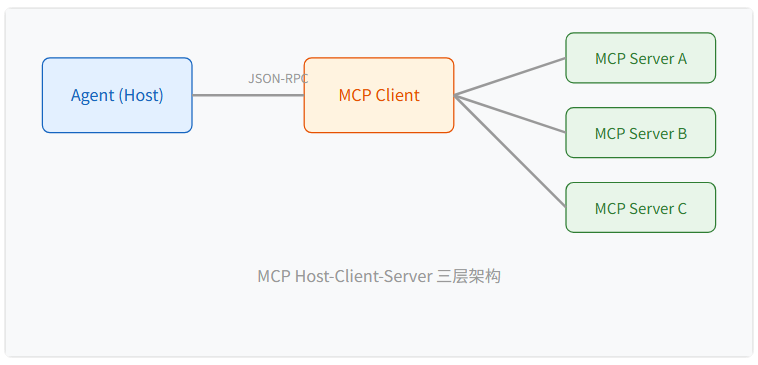
从架构上看,MCP采用Host-Client-Server三层模型。Host是运行Agent的应用(比如Cursor),Client是Host内部负责MCP通信的模块,Server是暴露工具和数据的外部进程。Host可以同时连接多个Server,Agent通过Client动态发现各Server提供的能力列表,按需调用。这种设计让Agent的工具有了可插拔的扩展性。
MCP的核心能力有哪些
MCP Server通过JSON-RPC 2.0协议暴露四类核心原语供Agent调用:
- Tools:让Agent调用外部工具,比如运行测试、部署代码、查询数据库。Agent发起tools/call请求,Server执行操作并返回结果。
- Resources:让Agent读取外部数据,比如文件系统内容、API响应、数据库记录。Agent通过resources/read按URI读取。
- Prompts:预定义的提示模板,比如代码审查模板、测试生成模板。Agent通过prompts/get获取标准化提示,确保输出一致性。
- Sampling:让Server反向请求Agent生成内容,用于动态提示补全等场景。
| 能力类型 | 说明 | 示例 |
|---|---|---|
| Tools | 让Agent调用外部工具 | 运行测试、部署、查询数据库 |
| Resources | 让Agent读取外部数据 | 文件系统、API响应、数据库 |
| Prompts | 预定义的提示模板 | 代码审查模板、测试生成模板 |
| Sampling | 让Server请求Agent生成内容 | 动态提示补全 |
怎么在项目中接入MCP
接入MCP的核心步骤是:选择或编写MCP Server暴露你的工具能力,在Agent客户端配置Server连接,然后通过标准接口调用Tools和Resources。下面是一个完整的stdio客户端实现,展示Agent如何通过JSON-RPC 2.0与MCP Server通信。
Python客户端实现
import asyncio
import json
from typing import Any, Dict, List, Optional

class MCPStdioClient:
    """MCP stdio 客户端
    通过子进程启动 MCP Server,使用 JSON-RPC 2.0 over stdio 通信。
    支持 tool(工具调用)和 resource(资源读取)两类能力。
    """

    def __init__(self, command: List[str]):
        self.command = command
        self.process: Optional[asyncio.subprocess.Process] = None
        self.request_id = 0

    async def connect(self) -> Dict[str, Any]:
        """启动 MCP Server 子进程,发送 initialize 握手"""
        self.process = await asyncio.create_subprocess_exec(
            *self.command,
            stdin=asyncio.subprocess.PIPE,
            stdout=asyncio.subprocess.PIPE,
            stderr=asyncio.subprocess.PIPE,
        )
        return await self._request("initialize", {
            "protocolVersion": "2024-11-05",
            "capabilities": {},
            "clientInfo": {"name": "my-agent", "version": "1.0.0"},
        })

    async def list_tools(self) -> List[Dict[str, Any]]:
        """列出 Server 暴露的工具列表"""
        result = await self._request("tools/list", {})
        return result.get("result", {}).get("tools", [])

    async def call_tool(self, name: str, arguments: Dict[str, Any]) -> Any:
        """调用指定工具"""
        return await self._request("tools/call", {
            "name": name,
            "arguments": arguments,
        })

    async def read_resource(self, uri: str) -> Any:
        """读取指定资源(文件、数据库等)"""
        return await self._request("resources/read", {"uri": uri})

    async def _request(self, method: str, params: Dict[str, Any]) -> Any:
        """发送 JSON-RPC 2.0 请求,逐行读取响应"""
        self.request_id += 1
        payload = json.dumps({
            "jsonrpc": "2.0",
            "id": self.request_id,
            "method": method,
            "params": params,
        })
        self.process.stdin.write((payload + "\n").encode())
        await self.process.stdin.drain()
        line = await asyncio.wait_for(
            self.process.stdout.readline(), timeout=15.0
        )
        return json.loads(line)

    async def close(self):
        """终止子进程"""
        if self.process:
            self.process.terminate()
            await self.process.wait()

async def main():
    """连接 filesystem MCP Server,演示工具发现与调用"""
    client = MCPStdioClient([
        "npx", "-y",
        "@modelcontextprotocol/server-filesystem", "/tmp",
    ])
    try:
        # 1. 握手
        init = await client.connect()
        print(f"已连接: {init.get('result', {}).get('serverInfo', {})}")

        # 2. 发现工具
        tools = await client.list_tools()
        print(f"发现 {len(tools)} 个工具")
        for t in tools[:5]:
            print(f"  - {t.get('name')}: {t.get('description', '')[:40]}")

        # 3. 读取资源
        result = await client.read_resource("file:///tmp")
        print(f"资源读取: {json.dumps(result, ensure_ascii=False)[:120]}")
    finally:
        await client.close()

if __name__ == "__main__":
    asyncio.run(main())
Cursor配置示例
在实际项目中,配置MCP Server不需要写代码。在Cursor的配置文件.cursor/mcp.json中声明要连接的Server即可:
{
  "mcpServers": {
    "claude-code": {
      "command": "claude",
      "args": ["--mcp-server"],
      "env": {
        "ANTHROPIC_API_KEY": "${ANTHROPIC_API_KEY}"
      }
    },
    "filesystem": {
      "command": "npx",
      "args": ["-y", "@modelcontextprotocol/server-filesystem", "/workspace"]
    },
    "postgres": {
      "command": "npx",
      "args": ["-y", "@modelcontextprotocol/server-postgres", "postgresql://localhost/mydb"]
    }
  }
}
配置完成后,Agent在启动时会自动连接所有声明的MCP Server,动态发现它们提供的工具和资源,不需要在代码中硬编码API端点。
哪些工具已经支持MCP
截至2026年初,Cursor、Claude Code、Codex CLI已原生支持MCP,社区Server数量超过5000个,覆盖文件系统、数据库、Git、Kubernetes等常见场景。Windsurf和Copilot官方尚未宣布支持,生态还在快速扩展。MCP已成为智能体生态里事实上的标准协议。
对于想在终端环境实践MCP工作流的开发者,SophCode CLI既可以作为MCP Client调用外部Server,也可以作为Server暴露本地能力给其他Agent。内置8款模型自由切换,代码不出本地,文件读写有沙箱限制,命令执行逐条确认。在sophnet.com/sophcode-cli可以了解详情。
MCP协议的意义在于把AI Agent从单工具孤岛推向多工具协作。理解MCP的设计思路,有助于在选型和搭建Agent工作流时做出更好的决策。从m×n到m+n的简化,不只是工程效率提升,更是Agent生态从碎片化走向标准化的关键一步。

汇聚全球AI编程工具,助力开发者即刻编程。
更多推荐



 6
6 0
0- 0


 已为社区贡献6条内容

所有评论(0)