
java 多页签_实现多页签切换效果
实现多页签切换效果* {margin: 0; padding: 0;}#tab li {float: left;list-style: none;width: 72px;height: 40px;line-height: 40px;cursor: pointer;text-align: center;color: #fff;font-weight: bold;}#container {positi
* {margin: 0; padding: 0;}
#tab li {float: left;list-style: none;width: 72px;height: 40px;line-height: 40px;cursor: pointer;text-align: center;color: #fff;font-weight: bold;}
#container {position: relative;}
#content1, #content2, #content3,#content4,#content5 {width: 300px;height: 100px;padding: 30px;position: absolute;top: 40px;left: 0;}
#tab1, #content1 {background-color: #ffcc00;}
#tab2, #content2 {background-color: #ff00cc;}
#tab3, #content3 {background-color: #90EE90;}
#tab4, #content4 {background-color: #FFC0CB;}
#tab5, #content5 {background-color: #FF5500;}
.foreground {z-index: 1;}
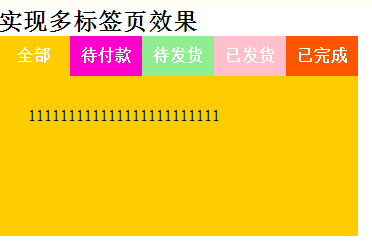
实现多标签页效果
- 全部
- 待付款
- 待发货
- 已发货
- 已完成
111111111111111111111111
222222222222222222222222222
3333333333333333333333333
444444444444444444444444
555555555555555555555555
// 1. 为li元素绑定click事件
$("#tab>li").click(function(){
$("#content"+$(this).val()).attr("style","z-index: 1;").siblings("div").removeAttr("style");
});

汇聚全球AI编程工具,助力开发者即刻编程。
更多推荐

 0
0 0
0- 0


 已为社区贡献1条内容

所有评论(0)