
【AI】生成前端SVG动画 (Gemini-3-pro-preview)
·
这里展示的gif,原版很流畅, 试过KIMI2.5和GLM5有点不太理想,双子星勉强可以,有兴趣小伙伴试试3.1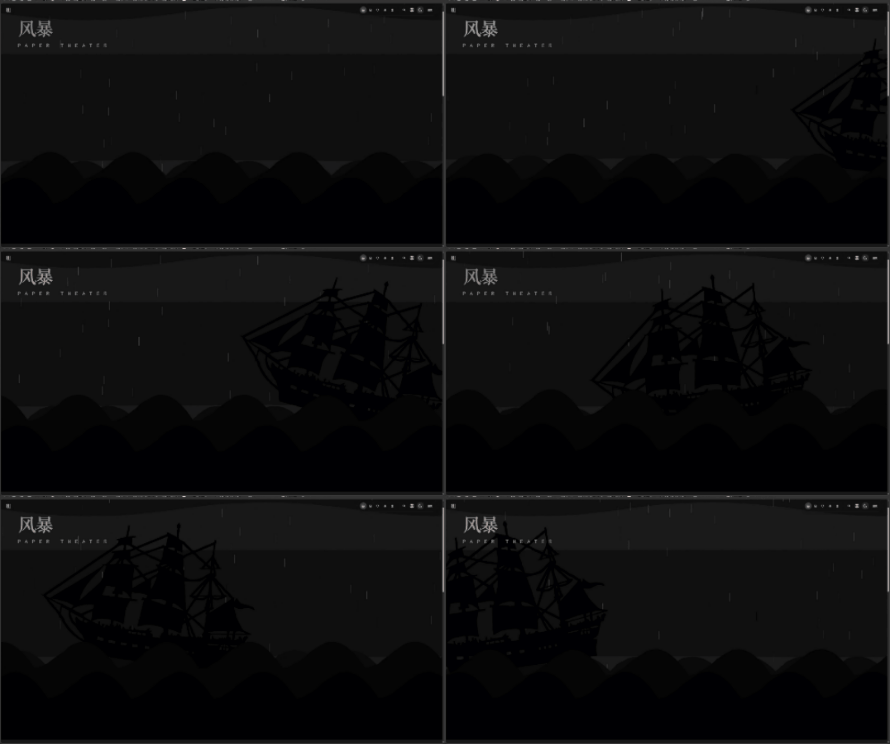
提示词:
设计纸戏剧SVG动画,剪影风,小船乘风破浪,背景电闪雷鸣,前景海浪翻涌
小船样式:带有一些细节(如船帆、桅杆)的纸艺风格小船,海绵没过船底,看不到船底,但是能清晰看到船顶,
质感滤镜:配上滤镜,模拟黑白版画那种粗糙的颗粒感。
闪电效果:频繁闪烁的闪电,偶尔几次大闪电,大的闪电屏幕会整个抖动,同时整个屏幕都亮,模拟闪电劈在海面上的效果
动态光影:闪电不仅仅是画出来的,它充当了一个“光源”,闪电亮起时,背景乌云会瞬间变亮,模拟真实的雷暴氛围
海浪层次:前景大浪、中景波浪、远景涟漪,速度不同,配合小船的起伏,营造强烈的立体空间感。
循环动画:循环海报,做网页背景或动态海报。几秒后船从右侧驶入左侧 -> 遭遇巨浪 -> 闪电随机劈下 -> 冲出浪花,场面非常激烈。
部分调节:
小船需要从网上下载svg,小船放大,应该在底部海面下,海浪重新设计,前景大浪、中景波浪、远景涟漪,速度不同,配合小船的起伏,营造强烈的立体空间感。前景大浪左右波动,非常剧烈,中景则速度没那么快,依次往后递减递减
具体代码
import { useEffect, useState, useMemo } from 'react'
import { motion, AnimatePresence, useAnimation } from 'framer-motion'
import { cn } from '@/utils'

// 粗糙颗粒感滤镜 SVG
const TextureFilters = () => (
  <svg className="hidden">
    <defs>
      {/* 纸张纹理滤镜 */}
      <filter id="paper-texture">
        <feTurbulence type="fractalNoise" baseFrequency="0.8" numOctaves="4" stitchTiles="stitch" />
        <feColorMatrix type="saturate" values="0" />
        <feComponentTransfer>
          <feFuncA type="linear" slope="0.4" />
        </feComponentTransfer>
        <feBlend mode="multiply" in="SourceGraphic" />
      </filter>

      {/* 边缘粗糙滤镜 - 模拟剪纸边缘 */}
      <filter id="rough-edges">
        <feTurbulence type="fractalNoise" baseFrequency="0.05" numOctaves="2" result="noise" />
        <feDisplacementMap in="SourceGraphic" in2="noise" scale="3" />
      </filter>
    </defs>
  </svg>
)

// 闪电组件
const Lightning = ({ isBig }: { isBig: boolean }) => {
  // 生成随机闪电路径
  const points = useMemo(() => {
    let path = "M 50 0 "
    let x = 50
    let y = 0
    while (y < 100) {
      y += Math.random() * 10 + 5
      x += (Math.random() - 0.5) * 20
      path += `L ${x} ${y} `
    }
    return path
  }, [])

  return (
    <motion.svg
      viewBox="0 0 100 100"
      preserveAspectRatio="none"
      className={cn(
        "absolute top-0 left-1/2 w-full h-full -translate-x-1/2 pointer-events-none z-10",
        isBig ? "opacity-100 drop-shadow-[0_0_15px_rgba(255,255,255,0.8)]" : "opacity-70"
      )}
      initial={{ opacity: 0, pathLength: 0 }}
      animate={{ opacity: [0, 1, 0], pathLength: 1 }}
      transition={{ duration: 0.2 }}
    >
      <path d={points} stroke="white" strokeWidth={isBig ? 1.5 : 0.5} fill="none" filter="url(#rough-edges)" />
    </motion.svg>
  )
}

// 雨滴组件
const Rain = () => {
  // 生成随机雨滴
  const raindrops = useMemo(() => {
    return Array.from({ length: 100 }).map((_, i) => ({
      id: i,
      left: `${Math.random() * 100}%`,
      top: `${Math.random() * -100}%`,
      delay: Math.random() * 2,
      duration: 0.5 + Math.random() * 0.5
    }))
  }, [])

  return (
    <div className="absolute inset-0 pointer-events-none z-20 overflow-hidden">
      {raindrops.map((drop) => (
        <motion.div
          key={drop.id}
          className="absolute w-[2px] h-[40px] bg-white/30"
          style={{
            left: drop.left,
            top: drop.top,
            transform: 'rotate(15deg)' // 雨滴倾斜
          }}
          animate={{
            y: ["0vh", "120vh"],
            opacity: [0, 0.8, 0]
          }}
          transition={{
            duration: drop.duration,
            repeat: Infinity,
            delay: drop.delay,
            ease: "linear"
          }}
        />
      ))}
    </div>
  )
}

// 波浪组件
const WaveLayer = ({
  delay,
  duration,
  yOffset,
  color,
  zIndex,
  amplitude = 20,
  direction = 1,
  type = 'normal'
}: {
  delay: number
  duration: number
  yOffset: string
  color: string
  zIndex: number
  amplitude?: number
  direction?: number
  type?: 'ripple' | 'normal' | 'violent'
}) => {

  // 锯齿状/倒钩状波浪路径
  const paths = {
    // 涟漪:平缓的起伏
    ripple: "M0,60 C300,70 600,50 900,60 C1050,65 1200,55 1200,60 L1200,500 L0,500 Z",
    // 普通波浪:尖锐的锯齿
    normal: (() => {
      let d = "M0,100 ";
      for(let i=0; i<12; i++) {
        d += `Q ${i*100+50} 0 ${i*100+100} 100 `;
      }
      d += "L 1200 500 L 0 500 Z";
      return d;
    })(),
    // 剧烈巨浪:更夸张的倒钩,参考图片中的尖浪
    violent: (() => {
      let d = "M0,150 ";
      for(let i=0; i<8; i++) {
        // 模仿图片中的尖刺:左侧平缓,右侧陡峭
        d += `C ${i*150+50} 150, ${i*150+80} 0, ${i*150+150} 150 `;
      }
      d += "L 1200 800 L 0 800 Z"; // 加深底部闭合区域以防露底
      return d;
    })()
  }

  const path = paths[type]

  return (
    <motion.div
      className={`absolute left-[-25%] right-[-25%] bottom-0 ${color}`}
      style={{
        bottom: yOffset,
        zIndex,
        height: type === 'violent' ? '80vh' : (type === 'normal' ? '60vh' : '50vh')
      }}
      animate={{
        x: direction > 0
          ? ["-10%", "0%", "-10%"]
          : ["0%", "-10%", "0%"],
        y: [0, -amplitude, 0],
      }}
      transition={{
        duration: duration,
        repeat: Infinity,
        ease: "easeInOut",
        delay: delay
      }}
    >
      <svg className="w-full h-full" preserveAspectRatio="none" viewBox="0 0 1200 500">
        <path
          d={path}
          fill="currentColor"
          filter="url(#rough-edges)"
        />
      </svg>
    </motion.div>
  )
}

// 小船组件
const Boat = () => {
  const controls = useAnimation()

  // 随机不规则摆动逻辑
  useEffect(() => {
    let isMounted = true

    const randomAnimate = async () => {
      while (isMounted) {
        await controls.start({
          y: Math.random() * 120 - 40,
          rotate: Math.random() * 40 - 20,
          scale: 0.95 + Math.random() * 0.1,
          transition: {
            duration: 0.8 + Math.random() * 1.5,
            ease: "easeInOut"
          }
        })
      }
    }

    randomAnimate()
    return () => { isMounted = false }
  }, [controls])

  return (
    <motion.div
      className="absolute z-30 w-[1000px] h-[600px]"
      style={{ bottom: '35%' }}
      initial={{ x: "110vw", y: 0, rotate: 0 }}
      animate={{
        x: ["110vw", "-120vw"],
      }}
      transition={{
        duration: 40,
        repeat: Infinity,
        ease: "linear",
      }}
    >
      <motion.div
        className="w-full h-full relative"
        animate={controls}
      >
        <img
          src="/test/海盗船.svg"
          alt="Pirate Ship"
          className="w-full h-full object-contain drop-shadow-2xl invert"
          style={{
            filter: 'url(#rough-edges) brightness(0)',
            transform: 'scaleX(-1)'
          }}
        />
      </motion.div>
    </motion.div>
  )
}

export default function HomeBanner() {
  const [lightningState, setLightningState] = useState<'none' | 'normal' | 'big'>('none')

  // 闪电控制逻辑
  useEffect(() => {
    const loop = () => {
      const isBig = Math.random() > 0.7
      setLightningState(isBig ? 'big' : 'normal')

      setTimeout(() => {
        setLightningState('none')
      }, isBig ? 200 : 100)

      const nextDelay = Math.random() * 3000 + 500
      setTimeout(loop, nextDelay)
    }

    const timer = setTimeout(loop, 2000)
    return () => clearTimeout(timer)
  }, [])

  return (
    <div className={cn(
      "relative w-full h-screen overflow-hidden transition-colors duration-75 z-0",
      lightningState === 'big' ? "bg-[#cfcfcf]" : (lightningState === 'normal' ? "bg-[#2a2a2a]" : "bg-[#0f0f0f]"),
      lightningState === 'big' && "animate-shake"
    )}>
      <TextureFilters />

      <div className="absolute inset-0 z-40 pointer-events-none opacity-40 mix-blend-overlay"
           style={{ filter: 'url(#paper-texture)' }} />

      <div className="absolute top-20 left-20 z-40 mix-blend-difference text-[#e0e0e0] pointer-events-none">
        <motion.h1
          className="text-8xl font-black tracking-tighter"
          animate={{ opacity: [0.6, 0.8, 0.6] }}
          transition={{ duration: 3, repeat: Infinity }}
          style={{ fontFamily: 'serif' }}
        >
          风暴
        </motion.h1>
        <p className="text-2xl mt-4 tracking-[1em] uppercase opacity-70">Paper Theater</p>
      </div>

      <Rain />

      <AnimatePresence>
        {lightningState !== 'none' && (
          <Lightning isBig={lightningState === 'big'} />
        )}
      </AnimatePresence>

      <div className="absolute top-0 w-full h-64 opacity-30 z-0">
        <svg viewBox="0 0 1000 200" className="w-full h-full" preserveAspectRatio="none">
           <path d="M0,50 Q200,100 400,50 T800,50 T1200,50 V200 H0 Z" fill="#333" filter="url(#rough-edges)" />
        </svg>
      </div>

      <WaveLayer
        type="ripple"
        delay={0}
        duration={20}
        yOffset="-10%"
        color="text-[#1a1a1a]"
        zIndex={10}
        amplitude={15}
        direction={1}
      />

      <WaveLayer
        type="normal"
        delay={2}
        duration={10}
        yOffset="-20%"
        color="text-[#0a0a0a]"
        zIndex={20}
        amplitude={30}
        direction={-1}
      />

      <Boat />

      <WaveLayer
        type="violent"
        delay={1}
        duration={5}
        yOffset="-30%"
        color="text-[#050505]"
        zIndex={40}
        amplitude={60}
        direction={1}
      />

      <WaveLayer
        type="violent"
        delay={2}
        duration={4}
        yOffset="-40%"
        color="text-[#000]"
        zIndex={45}
        amplitude={80}
        direction={-1}
      />

      <style>{`
        @keyframes shake {
          0% { transform: translate(0, 0) rotate(0deg); }
          25% { transform: translate(-5px, 5px) rotate(-1deg); }
          50% { transform: translate(5px, -5px) rotate(1deg); }
          75% { transform: translate(-5px, -5px) rotate(-1deg); }
          100% { transform: translate(0, 0) rotate(0deg); }
        }
        .animate-shake {
          animation: shake 0.2s cubic-bezier(.36,.07,.19,.97) both;
        }
      `}</style>
    </div>
  )
}
工具类
/**
 * 类名合并工具
 * 基于 clsx 和 tailwind-merge
 */
import { clsx, type ClassValue } from 'clsx'
import { twMerge } from 'tailwind-merge'

/**
 * 合并 Tailwind CSS 类名
 * @param inputs - 类名列表
 * @returns 合并后的类名字符串
 */
export function cn(...inputs: ClassValue[]): string {
  return twMerge(clsx(inputs))
}

汇聚全球AI编程工具,助力开发者即刻编程。
更多推荐


 2
2 0
0- 0


 已为社区贡献1条内容

所有评论(0)