
微软Autogen框架加载本地llama2
1、实践流程
(1)使用Fastchat框架搭建运行ChatGLM模型openai兼容API
(2)测试AutoGen加载ChatGLM2
2、部署FastChat
2.1、创建虚拟环境
# Python version >= 3.8, < 3.12
conda create -n fastchat python=3.10 -y
conda activate fastchat
2.2、下载FastChat
git clone https://github.com/lm-sys/FastChat.git
2.3、依赖框架安装
pip3 install torch==2.0.0+cu117 torchvision==0.15.1+cu117 torchaudio==2.0.1 --index-url https://download.pytorch.org/whl/cu117
pip3 install cpm_kernels -i https://pypi.mirrors.ustc.edu.cn/simple --trusted-host=pypi.mirrors.ustc.edu.cn
pip3 install --upgrade pip -i https://pypi.mirrors.ustc.edu.cn/simple --trusted-host=pypi.mirrors.ustc.edu.cn
cd FastChat & pip3 install -e ".[model_worker,webui]" -i https://pypi.mirrors.ustc.edu.cn/simple --trusted-host=pypi.mirrors.ustc.edu.cn #这行根据自己的设置,或者用别的
2.4、加载模型
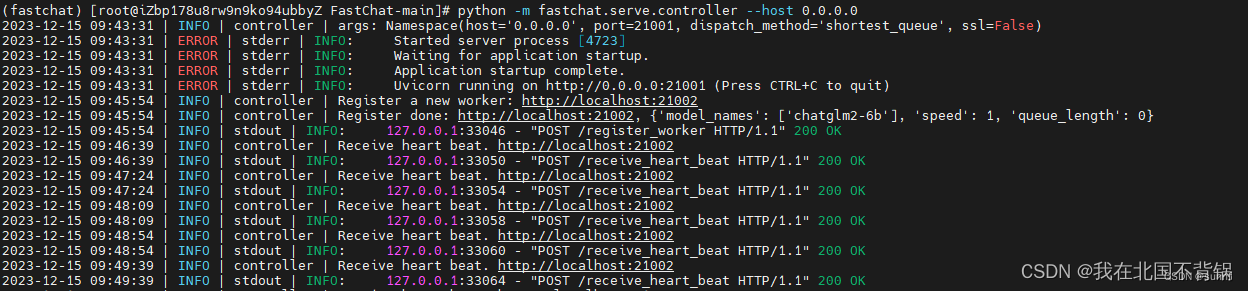
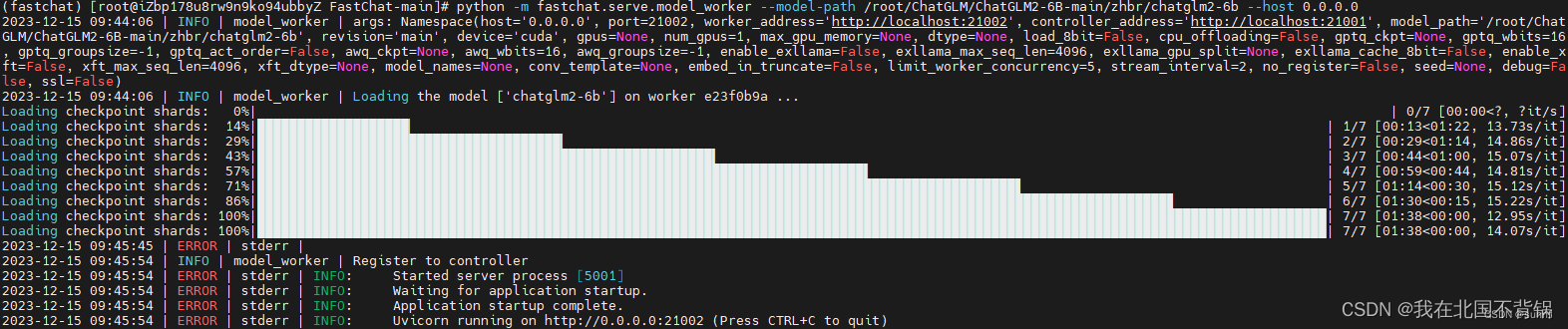
需要分别启动控制器、模型执行器和API服务。
# controller
cd FastChat
conda activate fastchat
python -m fastchat.serve.controller --host 0.0.0.0
————————————————
# model_worker
cd FastChat
conda activate fastchat
python -m fastchat.serve.model_worker --model-path ./Llama2-chat-Chinese-50W --host 0.0.0.0
上面的Llama2-chat-Chinese-50W 自己的目录,可以用绝对目录
# api_server
cd FastChat
conda activate fastchat
python -m fastchat.serve.openai_api_server --host 0.0.0.0 --port 8001
3、Autogen测试
安装Autogen框架:
pip install pyautogen
编写如下代码:
from autogen import oai
from autogen import AssistantAgent, UserProxyAgent, config_list_from_json
def TestAutoGen():
config_list = [
{
"model": "Llama2-chat-Chinese-50W",
"base_url": "http://127.0.0.1:8001/v1",
#"api_type": "open_ai",#该行要注释掉,不然报错
"api_key": "NULL"
}
]
assistant = AssistantAgent("assistant", llm_config={
"config_list": config_list})
user_proxy = UserProxyAgent(
"user_proxy", code_execution_config={"work_dir": "coding"})
user_proxy.initiate_chat(
assistant, message="用react.js写一个用户登录程序")
if __name__ == '__main__':
TestAutoGen()
上面的是参照下面的
原文链接:https://blog.csdn.net/weixin_44455388/article/details/135001302
模型下载:https://huggingface.co/RicardoLee/
这个可以直接下载。有好几个模型可以下载。

汇聚全球AI编程工具,助力开发者即刻编程。
更多推荐
 17
17 0
0- 0


 已为社区贡献1条内容

所有评论(0)