
LangGraph核心组件-人机交互
·
人机交互介绍
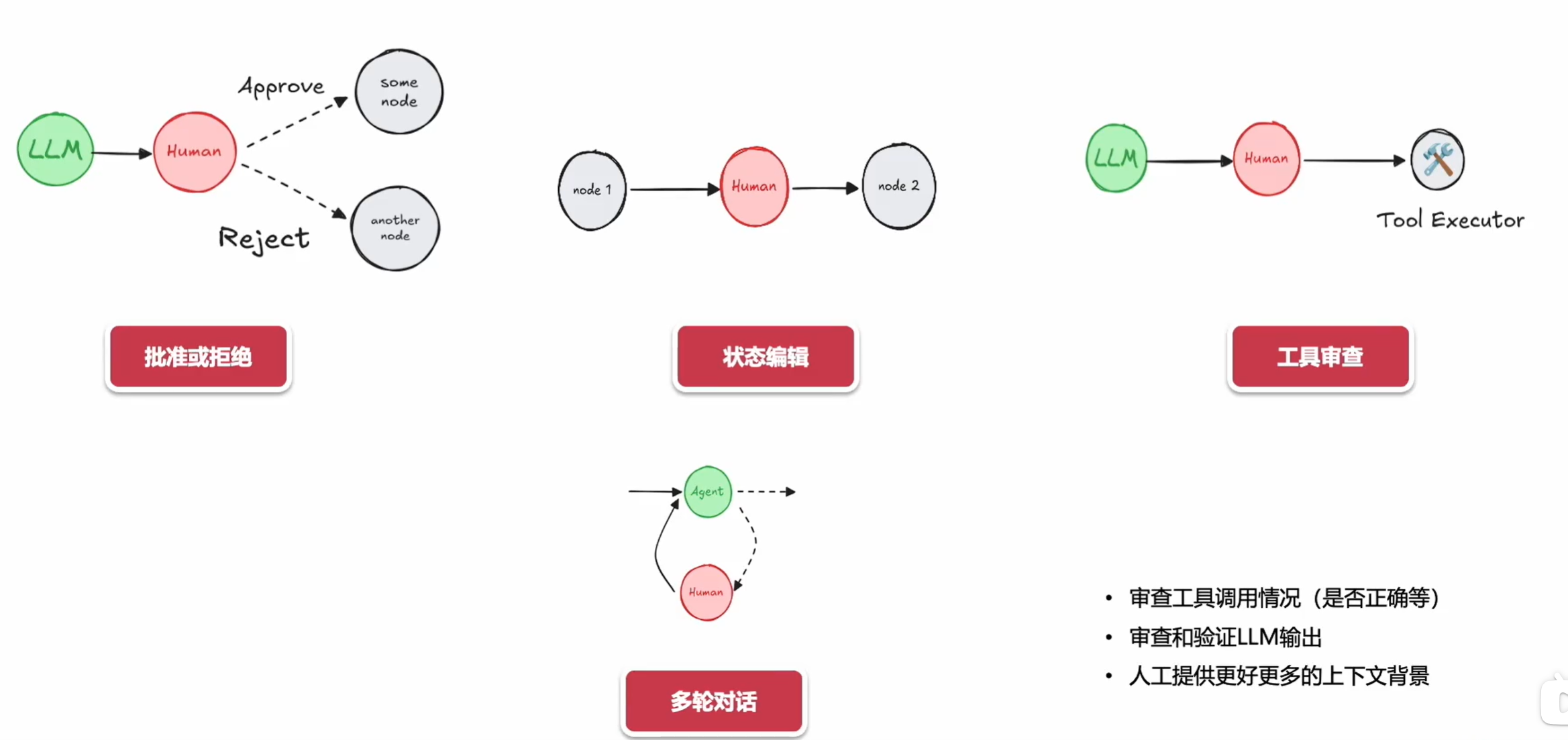
在LangGraph框架中,人机交互作为核心组件,主要通过以下机制实现动态协作:
交互流程设计
-
中断触发机制
系统在以下场景自动暂停流程并请求人工介入:- 关键决策节点(例如置信度低于阈值 )
- 异常状态检测(如循环次数超过 max)
- 预设的人工审核点
-
多模态输入接口
支持人类通过:
# 伪代码示例
def human_feedback_handler():
    input_modes = ["文本", "语音", "标注工具"]
    return integrate_multimodal(input_modes)
状态管理
采用双向状态同步机制:
典型应用场景
| 场景类型 | 人类介入方式 | 系统响应 |
|---|---|---|
| 内容审核 | 修正标注 | 重新训练局部模型 |
| 知识补充 | 注入新数据 | 更新知识图谱 $ G=(V,E) $ |
| 流程控制 | 调整权重参数 | 动态优化路径规划 |
基本运用
典型应用场景
-
任务型对话系统
例如订票、客服咨询,通过 langgraph 逐步引导用户提供必要信息(如时间、地点),并实时验证完整性。 -
多分支决策交互
在游戏叙事、教育问答等场景中,根据用户选择进入不同剧情分支或知识点讲解路径。 -
混合主动对话
系统可在用户未提问时主动推送信息(如促销提醒),再通过图中预设的“中断恢复节点”回到主流程。
与传统方法的对比
| 方法 | 灵活性 | 可维护性 | 复杂度管理 |
|---|---|---|---|
| 硬编码规则 | 低 | 差 | 困难 |
| 纯机器学习模型 | 高 | 中等 | 依赖数据 |
| langgraph | 中高 | 优秀 | 可视化 |
核心价值
- 可视化开发:图结构直观展示对话脉络,降低设计门槛。
- 模块化复用:通用节点(如身份验证)可跨项目复用。
- 可控性与扩展性:新增分支仅需扩展子图,无需重构整体逻辑。
等待用户数据(代码示例)
from pydantic import BaseModel
from langgraph.graph import StateGraph ,START,END
from langgraph.types import  Command,interrupt
from langgraph.checkpoint.memory import  MemorySaver
from IPython.display import Image,display

class State(BaseModel):
  input:str
  user_feedback:str=""

def step_1 (state:State):
    print("---step 1---")
    pass
def human_feedback(state:State):
    print("---human_feedBack---")
    feedback=interrupt("please provide feedback")
    return {"user_feedback":feedback}
def step_3 (state:State):
    print("---step 3---")
    pass

builder=StateGraph(State)
builder.add_node(step_1)
builder.add_node(step_3)
builder.add_node("human_feedback",human_feedback)

builder.add_edge(START,"step_1")
builder.add_edge("step_1","human_feedback")
builder.add_edge("human_feedback","step_3")
builder.add_edge("step_3",END)

memory=MemorySaver()

graph=builder.compile(checkpointer= memory)
# display(Image(graph.get_graph().draw_mermaid_png()))
init_input=State(input="你好")
config={"configurable":{"thread_id":"1"}}
for e in graph.stream(init_input,config,stream_mode="updates"):
    print(e)
    print("\n")
示例输出:
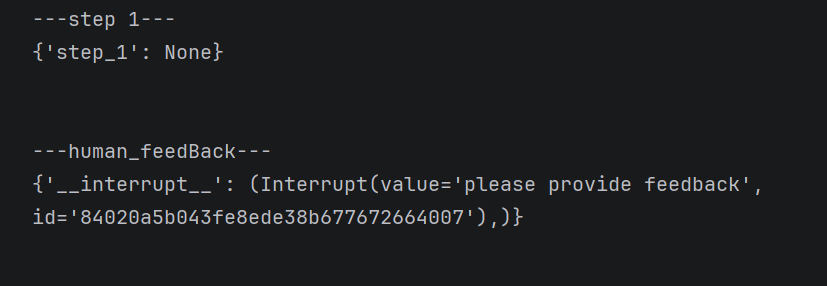
"""添加人类组件: command 来让其继续执行"""
for event in graph.stream(
    Command(resume="go to step_3"),
    config,
    stream_mode="updates",
):
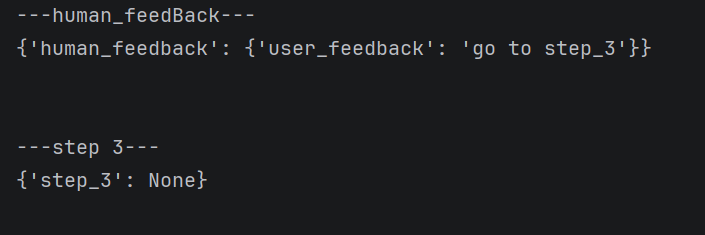
    print(event)
    print("\n")
示例输出:
在智能体中引入人工介入(代码示例)
from langchain_core.messages import HumanMessage
from langgraph.graph import MessagesState, START
from langgraph.types import  Command,interrupt

# 设置工具
# 我们将有一个真实工具 - 搜索工具
# 我们还将有一个"假"工具 - "ask_human"(询问人类)工具
# 这里我们定义任何实际工具
from langchain_core.tools import tool
from langgraph.prebuilt import ToolNode

@tool
def search(query: str):
    """调用此函数来浏览网络。"""
    # 这只是实际实现的占位符
    # 不要让大语言模型知道这一点哦 😉
    return f"我查询了:{query}。结果:北京天气晴朗,温度25度。"

tools = [search]
tool_node = ToolNode(tools)

# 设置模型
from langchain_deepseek import ChatDeepSeek
import os

model = ChatDeepSeek(
    model="deepseek-chat",
    api_key=os.environ.get("DEEPSEEK_API_KEY"),
    base_url="https://api.deepseek.com",
    temperature=0.8
)
from pydantic import BaseModel

# 我们将"绑定"所有工具到模型
# 我们有上面的实际工具,但我们还需要一个模拟工具来询问人类
# 由于`bind_tools`接受工具但也接受工具定义,
# 我们可以为`ask_human`定义一个工具定义
class AskHuman(BaseModel):
    """向人类提问"""

    question: str

model = model.bind_tools(tools + [AskHuman])

# 定义节点和条件边

# 定义确定是否继续的函数
def should_continue(state):
    messages = state["messages"]
    last_message = messages[-1]
    # 如果没有函数调用,则结束
    if not last_message.tool_calls:
        return END
    # 如果工具调用是询问人类,我们返回该节点
    # 你也可以在这里添加逻辑,让某些系统知道有需要人类输入的内容
    elif last_message.tool_calls[0]["name"] == "AskHuman":
        return "ask_human"
    # 否则如果有函数调用,我们继续
    else:
        return "action"

# 定义调用模型的函数
def call_model(state):
    messages = state["messages"]
    system_prompt = """你是一个智能助手。当需要获取用户的位置信息时,必须使用 AskHuman 工具来询问用户。
不要直接用自然语言询问,而要调用 AskHuman 工具。"""
    # 在消息列表开头添加系统提示
    enhanced_messages = [{"role": "system", "content": system_prompt}] + messages
    response = model.invoke(enhanced_messages)
    # 我们返回一个列表,因为这将被添加到现有列表中
    return {"messages": [response]}
# 我们定义一个假节点来询问人类
def ask_human(state):
    tool_call_id = state["messages"][-1].tool_calls[0]["id"]
    ask = AskHuman.model_validate(state["messages"][-1].tool_calls[0]["args"])
    location = interrupt(ask.question)
    from langchain_core.messages import ToolMessage
    tool_message = ToolMessage(content=location, tool_call_id=tool_call_id)
    return {"messages": [tool_message]}

# 构建图

from langgraph.graph import END, StateGraph

# 定义一个新图
workflow = StateGraph(MessagesState)
workflow.add_node("agent",call_model)
workflow.add_node("action",tool_node)
workflow.add_node("ask_human",ask_human)
workflow.add_edge(START, "agent")
workflow.add_conditional_edges("agent", should_continue,["action", "ask_human", END])
workflow.add_edge("action", "agent")
workflow.add_edge("ask_human", "agent")

from langgraph.checkpoint.memory import MemorySaver
memory = MemorySaver()
graph = workflow.compile(checkpointer=memory)
# display(Image(graph.get_graph().draw_mermaid_png()))

# 1. 首次执行 - 会中断在 ask_human 节点
config = {"configurable": {"thread_id": "2"}}
for event in graph.stream(
    MessagesState(messages=[HumanMessage(content="询问用户他们在哪里,然后再去查询那里的天气?")]),
    config,
    stream_mode="values",
):
    event["messages"][-1].pretty_print()

# 2. 恢复执行 - 提供用户反馈
for event in graph.stream(
    Command(resume="北京"),  # 用户提供的答案
    config,
    stream_mode="values",
):
    event["messages"][-1].pretty_print()
审查编写(代码示例)
"""审查编写"""
from langchain_deepseek import ChatDeepSeek
from typing import Literal
from langgraph.types import Command, interrupt
from langgraph.graph import END
from dotenv import load_dotenv
from langgraph.graph import MessagesState,StateGraph,START,END
from langgraph.checkpoint.memory import MemorySaver
import os
from langchain_core.tools import tool
from IPython.display import Image,display

load_dotenv()
model = ChatDeepSeek(
    model="deepseek-chat",
    api_key=os.environ.get("DEEPSEEK_API_KEY"),
    base_url="https://api.deepseek.com",
    temperature=0.8
)
class State(MessagesState):
    input: str  # <- 这里导致了报错

def call_llm(state):
    model_with_tools = model.bind_tools([weather_search])
    response = model_with_tools.invoke(state["messages"])
    return {"messages": [response]}


#定义天气查询函数
@tool(description="用于查询天气的函数。")
def weather_search(city: str) -> str:
    return f"{city} 的天气晴朗,温度25度。"

# 1. 定义路由函数:判断是否需要人工审核
def route_after_llm(state) -> Literal[END, "human_review_node"]:
    """
    如果最后一条消息包含工具调用,则路由到人工审核节点;
    否则结束流程。
    """
    if len(state["messages"][-1].tool_calls) == 0:
        return END
    else:
        return "human_review_node"

# 2. 定义人工审核节点
def human_review_node(state) -> Command[Literal["call_llm", "run_tool"]]:
    last_message = state["messages"][-1]
    # 获取最新的工具调用请求
    tool_call = last_message.tool_calls[-1]

    # 这是我们将通过 Command(resume=<human_review>) 提供的值
    # 流程会在这里暂停,直到人类输入反馈
    human_review = interrupt({
        "question": "这是正确的吗?",
        # 显示工具调用以供审核
        "tool_call": tool_call,
    })

    review_action = human_review["action"]
    review_data = human_review.get("data")

    # 分支 1: 如果批准,直接调用工具
    if review_action == "continue":
        return Command(goto="run_tool")

    # 分支 2: 更新 AI 消息中的参数并调用工具
    elif review_action == "update":
        updated_message = {
            "role": "ai",
            "content": last_message.content,
            "tool_calls": [
                {
                    "id": tool_call["id"],
                    "name": tool_call["name"],
                    # 这是人类提供的更新后的参数
                    "args": review_data,
                }
            ],
            # 这很重要 - 这需要与你替换的消息 ID 相同!
            # 否则,它将显示为一个单独的消息(追加而不是覆盖)
            "id": last_message.id,
        }
        # 使用 update 参数覆盖旧消息,并跳转到 run_tool
        return Command(goto="run_tool", update={"messages": [updated_message]})

    # 分支 3: 向 LLM 提供反馈(不执行工具,而是让 LLM 重新思考)
    elif review_action == "feedback":
        # 注意:我们将反馈消息添加为 ToolMessage
        # 以保持消息历史中的正确顺序
        # (带有工具调用的 AI 消息需要后跟工具调用消息)
        tool_message = {
            "role": "tool",
            # 这是我们的自然语言反馈
            "content": review_data,
            "name": tool_call["name"],
            "tool_call_id": tool_call["id"],
        }
        # 跳转回 call_llm,让模型看到反馈后重新生成
        return Command(goto="call_llm", update={"messages": [tool_message]})

# 3. 定义实际执行工具的节点
def run_tool(state):
    new_messages = []
    # 假设 weather_search 是已定义的工具函数
    tools = {"weather_search": weather_search}

    tool_calls = state["messages"][-1].tool_calls
    for tool_call in tool_calls:
        tool = tools[tool_call["name"]]
        # 执行工具
        result = tool.invoke(tool_call["args"])

        new_messages.append({
            "role": "tool",
            "name": tool_call["name"],
            "content": result,
            "tool_call_id": tool_call["id"],
        })
    return {"messages": new_messages}
# 1. 初始化状态图构建器
# 假设 State 已经在前面定义好(例如继承自 MessagesState)
builder = StateGraph(State)

# 2. 添加节点
builder.add_node(call_llm)           # LLM 调用节点
builder.add_node(run_tool)           # 工具执行节点
builder.add_node(human_review_node)  # 人工审核节点

# 3. 定义边(流程控制)
# 入口:从 START 开始,首先调用 LLM
builder.add_edge(START, "call_llm")

# 条件路由:在 LLM 调用后,根据是否有工具调用以及是否需要人工介入来决定去向
# route_after_llm 函数会返回 "run_tool", "human_review_node" 或 END
builder.add_conditional_edges("call_llm", route_after_llm)

# 闭环:工具执行完成后,回到 LLM 节点,让模型根据工具返回的结果生成最终回复
builder.add_edge("run_tool", "call_llm")

# 4. 设置持久化(必须步骤)
# 要实现 interrupt 中断和 Command 恢复功能,必须配置 checkpointer
memory = MemorySaver()

# 5. 编译图
graph = builder.compile(checkpointer=memory)

# 6. 可视化查看
# display(Image(graph.get_graph().draw_mermaid_png()))
from langchain_core.messages import HumanMessage
#不涉及 工具调用
config = {"configurable": {"thread_id": "test_1"}}
initial_input = {"messages": [HumanMessage(content="你好")]}

# 使用 stream 观察每一步的输出
for event in graph.stream(initial_input, config):
    print(event)
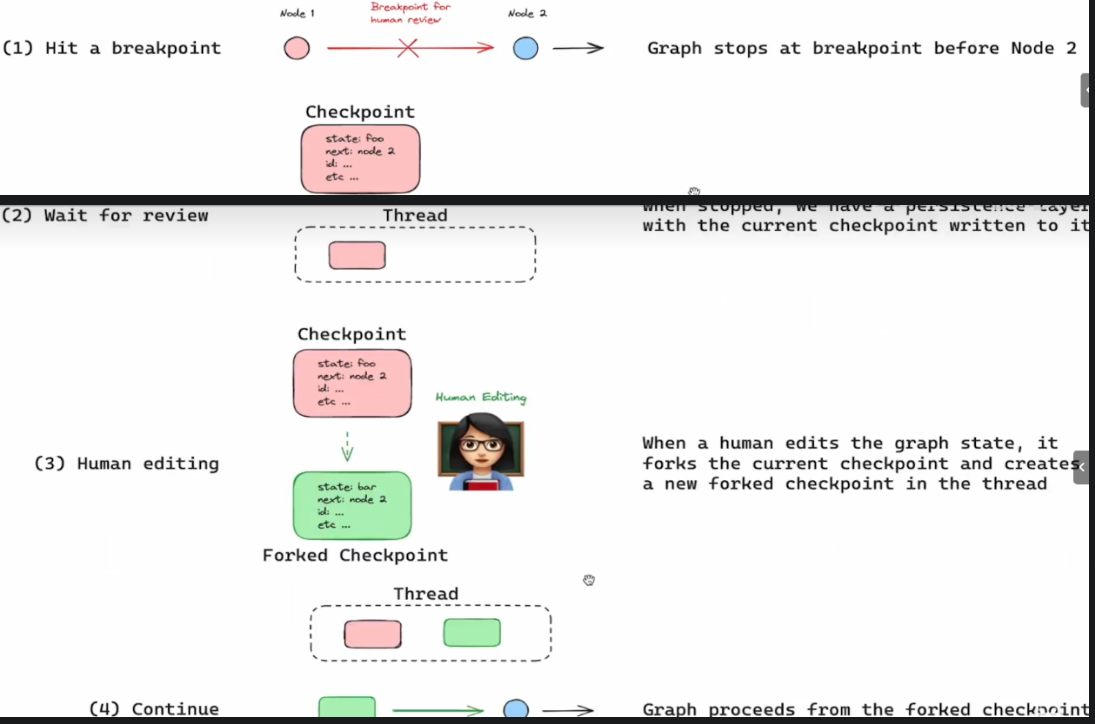
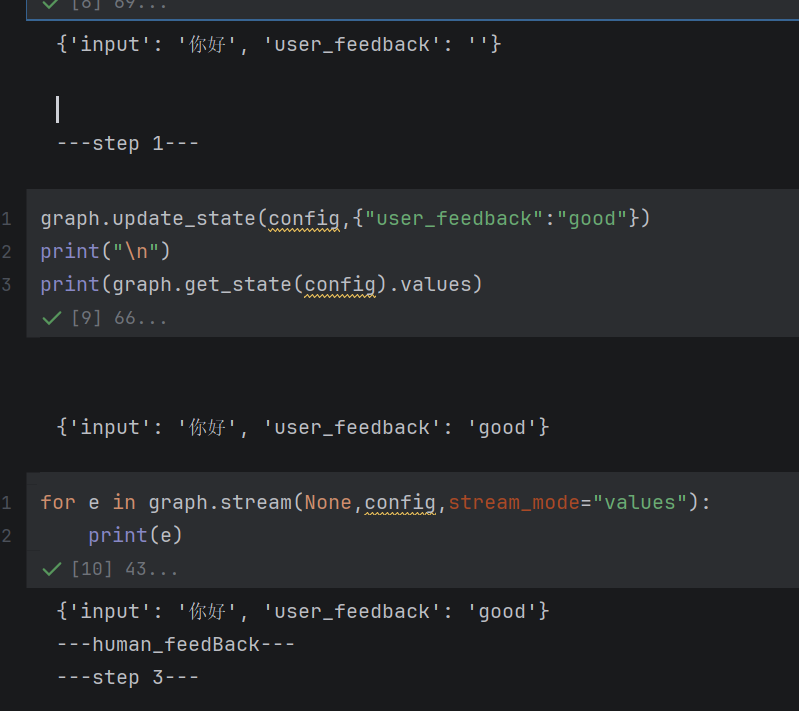
人机交互-对图状态进行编辑
from pydantic import BaseModel
from langgraph.graph import StateGraph ,START,END
from langgraph.types import  Command,interrupt
from langgraph.checkpoint.memory import  MemorySaver
from IPython.display import Image,display

class State(BaseModel):
  input:str
  user_feedback:str=""

def step_1 (state:State):
    print("---step 1---")
    pass
def human_feedback(state:State):
    print("---human_feedBack---")
def step_3 (state:State):
    print("---step 3---")
    pass

builder=StateGraph(State)
builder.add_node(step_1)
builder.add_node(step_3)
builder.add_node("human_feedback",human_feedback)

builder.add_edge(START,"step_1")
builder.add_edge("step_1","human_feedback")
builder.add_edge("human_feedback","step_3")
builder.add_edge("step_3",END)

memory=MemorySaver()

graph=builder.compile(checkpointer= memory,interrupt_before=["human_feedback"])
# display(Image(graph.get_graph().draw_mermaid_png()))
init_input=State(input="你好")
config={"configurable":{"thread_id":"1"}}
for e in graph.stream(init_input,config, stream_mode="values"):
    print(e)
    print("\n")

汇聚全球AI编程工具,助力开发者即刻编程。
更多推荐
 8
8 0
0- 0


 已为社区贡献3条内容

所有评论(0)