
MySQL 函数大全:从入门到面试通关
📖 文章目录:快速导航到各章节
| 章节 | 内容 |
|---|---|
| 📅 1. 日期函数 | 获取日期时间、加减操作、日期差、实战案例 |
| 🔤 2. 字符串函数 | 字符集、拼接、长度、替换、截取、大小写 |
| ➗ 3. 数学函数 | 绝对值、取整、随机数、进制转换 |
| 🛠️ 4. 其它函数 | 用户信息、加密、空值处理 |
| 🎯 5. 实战 OJ | 统计逗号出现次数 |
| 📚 6. 小总结 | 函数分类总结表 |
| ❓ 7. 经典面试题 | 5道高频面试题及解答 |
📅 1. 日期函数
日期和时间函数是 MySQL 中非常常用的工具,主要用于处理日期和时间类型的数据。
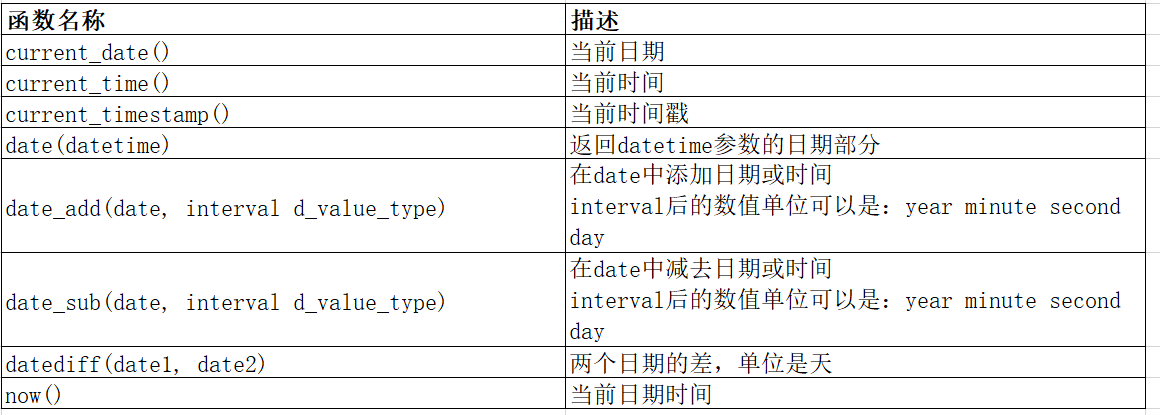
🎯 1.1 获取当前日期和时间
-- 获取当前日期(年月日)
select current_date();
    +----------------+
    | current_date() |
    +----------------+
    | 2017-11-19     |
    +----------------+

-- 获取当前时间(时分秒)
select current_time();
    +----------------+
    | current_time() |
    +----------------+
    | 13:51:21       |
    +----------------+

-- 获取当前时间戳(年月日 时分秒)
select current_timestamp();
    +---------------------+
    | current_timestamp() |
    +---------------------+
    | 2017-11-19 13:51:48 |
    +---------------------+
💡 小贴士:
current_date()返回日期部分,current_time()返回时间部分,current_timestamp()返回完整的日期和时间。
➕ 1.2 日期加减操作
-- 在日期的基础上加天数
select date_add('2017-10-28', interval 10 day);
    +-----------------------------------------+
    | date_add('2017-10-28', interval 10 day) |
    +-----------------------------------------+
    | 2017-11-07                              |
    +-----------------------------------------+

-- 在日期的基础上减天数
select date_sub('2017-10-1', interval 2 day);
    +---------------------------------------+
    | date_sub('2017-10-1', interval 2 day) |
    +---------------------------------------+
    | 2017-09-29                            |
    +---------------------------------------+
📏 1.3 计算日期差
-- 计算两个日期之间相差多少天
select datediff('2017-10-10', '2016-9-1');
    +------------------------------------+
    | datediff('2017-10-10', '2016-9-1') |
    +------------------------------------+
    |                                404 |
    +------------------------------------+
⚠️ 注意:
datediff()是时间1 - 时间2,返回的是相差的天数。
📝 1.4 实战案例
案例1:记录生日
-- 创建一张表,记录生日
create table tmp(
  id int primary key auto_increment,
  birthday date
);

-- 添加当前日期
insert into tmp(birthday) values(current_date());

mysql> select * from tmp;
+----+------------+
| id | birthday   |
+----+------------+
|  1 | 2017-11-19 |
+----+------------+
案例2:留言表
-- 创建一个留言表
mysql> create table msg (
      id int primary key auto_increment,
      content varchar(30) not null,
      sendtime datetime
      );

-- 插入数据
mysql> insert into msg(content,sendtime) values('hello1', now());
mysql> insert into msg(content,sendtime) values('hello2', now());

mysql> select * from msg;
+----+---------+---------------------+
| id | content | sendtime            |
+----+---------+---------------------+
|  1 | hello1  | 2017-11-19 14:12:20 |
|  2 | hello2  | 2017-11-19 14:13:21 |
+----+---------+---------------------+

-- 显示所有留言信息,发布日期只显示日期,不用显示时间
select content, date(sendtime) from msg;

-- 请查询在2分钟内发布的帖子
select * from msg where date_add(sendtime, interval 2 minute) > now();
理解:
------------------------------|-----------|-------------|------------------
		                    初始时间      now()       初始时间+2min
🤔 理解:
date_add(sendtime, interval 2 minute) > now()表示:如果sendtime加上2分钟后的时间大于当前时间,说明该帖子是在2分钟内发布的。
🔤 2. 字符串函数
字符串函数用于对字符串类型的数据进行处理和转换。
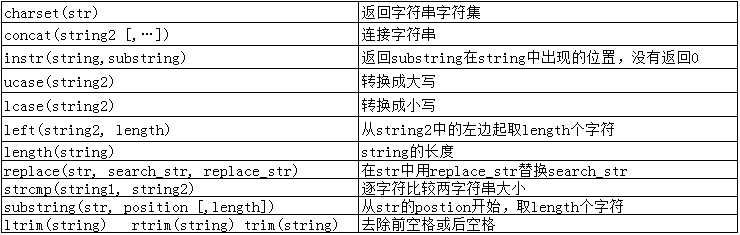
🔍 2.1 获取字符集
-- 获取 emp 表的 ename 列的字符集
select charset(ename) from EMP;
🔗 2.2 字符串拼接
-- 要求显示 exam_result 表中的信息,显示格式:"XXX的语文是 XXX分,数学 XXX分,英语 XXX分"
select concat(name, '的语文是', chinese, '分,数学是', math, '分') as '分数' from student;
📏 2.3 获取字符串长度
-- 求学生表中学生姓名占用的字节数
select length(name), name from student;
💡 理解:
length函数返回字符串长度,以字节为单位。如果是多字节字符则计算多个字节数;如果是单字节字符则算作一个字节。比如:字母、数字算作一个字节,中文表示多个字节数(与字符集编码有关)。在
utf8中,汉字占3个字节,普通数字和字母占一个字节,如'abc123你好'--> 12字节。
🔄 2.4 字符串替换
-- 将 EMP 表中所有名字中有 S 的替换成 '上海'
select replace(ename, 'S', '上海'), ename from EMP;
✂️ 2.5 字符串截取
-- 截取 EMP 表中 ename 字段的第二个到第三个字符
select substring(ename, 2, 2), ename from EMP;
substring(str, pos, len):从pos位置开始,截取len个字符。
🔡 2.6 大小写转换
-- 以首字母小写的方式显示所有员工的姓名
select concat(lcase(substring(ename, 1, 1)), substring(ename, 2)) from EMP;
思路:先用
substring取出第一个字符并转为小写,再拼接上从第二个字符开始的剩余部分。
➗ 3. 数学函数
数学函数用于执行各种数学运算。
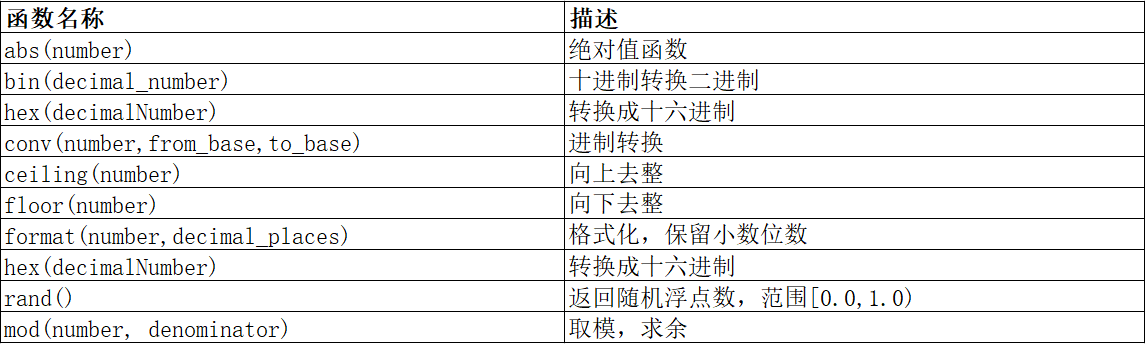
📊 3.1 常用数学函数
-- 绝对值
select abs(-100.2);

-- 向上取整
select ceiling(23.04);

-- 向下取整
select floor(23.7);

-- 保留2位小数位数(小数四舍五入)
select format(12.3456, 2);

-- 产生随机数
select rand();
🔢 3.2 进制转换
-- conv(num, from_base, to_base) 把一个数字从 from_base 进制转换成 to_base 进制
-- 把10进制的10转化为2进制
select conv(10, 10, 2);
🎲 3.3 随机数应用
-- 产生1-100之间的随机数
select rand() * 100;

-- 取整方式:
-- 1. 向0取整:3.1 --> 3,-3.1 --> -3
-- 2. 向上取整:4.1 --> 5,-4.1 --> -4
-- 3. 向下取整:4.1 --> 4,-4.1 --> -5
-- 4. 四舍五入

-- 设置固定小数位数
select format(3.1415926, 2);  --> 3.14

-- 产生1-100之间的随机整数
select format(rand() * 100, 0);
🛠️ 4. 其它函数
👤 4.1 用户与数据库信息
-- 查询当前用户
select user();

-- 显示当前正在使用的数据库
select database();
🔐 4.2 加密函数
-- 对一个字符串进行 md5 摘要,摘要后得到一个32位字符串
select md5('admin');
    +----------------------------------+
    | md5('admin')                     |
    +----------------------------------+
    | 21232f297a57a5a743894a0e4a801fc3 |
    +----------------------------------+

-- MySQL 数据库使用该函数对用户加密
select password('root');
    +-------------------------------------------+
    | password('root')                          |
    +-------------------------------------------+
    | *81F5E21E35407D884A6CD4A731AEBFB6AF209E1B |
    +-------------------------------------------+
🔒 安全提示:在实际开发中,密码通常使用
md5()进行摘要存储,而不是明文存储。
❓ 4.3 空值处理
-- 如果 val1 为 null,返回 val2,否则返回 val1 的值
select ifnull('abc', '123');
    +----------------------+
    | ifnull('abc', '123') |
    +----------------------+
    | abc                  |
    +----------------------+
    1 row in set (0.01 sec)

select ifnull(null, '123');
    +---------------------+
    | ifnull(null, '123') |
    +---------------------+
    | 123                 |
    +---------------------+
    1 row in set (0.00 sec)
💡 应用场景:
ifnull常用于数据清洗,当某个字段可能为NULL时,可以设置一个默认值。
🎯 5. 实战 OJ
📝 题目:统计字符串中逗号出现的次数
牛客题目:查找字符串 '10,A,B' 中逗号 ',' 出现的次数 cnt
select length('10,A,B') - length(replace('10,A,B', ',', '')) as comma_count;
🤔 解题思路:
length('10,A,B'):计算原字符串的总长度replace('10,A,B', ',', ''):将逗号替换为空字符串length(replace(...)):计算去掉逗号后的字符串长度- 两者相减,得到的就是逗号出现的次数
📚 6. 小总结
MySQL 函数主要分为四大类:
| 函数类别 | 核心函数 | 应用场景 |
|---|---|---|
| 📅 日期函数 | current_date()、date_add()、datediff() | 时间记录、统计、过期判断 |
| 🔤 字符串函数 | concat()、substring()、replace() | 数据格式化、清洗、拼接 |
| ➗ 数学函数 | abs()、ceiling()、floor()、rand() | 数值计算、随机数生成 |
| 🛠️ 其它函数 | md5()、ifnull()、user() | 加密、空值处理、系统信息 |
🎯 面试重点:日期函数中的
datediff和date_add、字符串函数中的concat和substring、数学函数中的rand和format是面试中的高频考点。
❓ 7. 经典面试题
面试题1:如何统计一个字符串中某个字符出现的次数?
解答:使用 length() 和 replace() 函数组合。
-- 统计字符串 'hello world' 中字母 'l' 出现的次数
select length('hello world') - length(replace('hello world', 'l', '')) as count;
面试题2:如何查询最近7天内发布的数据?
解答:使用 date_add() 或 datediff() 函数。
-- 方法1:使用 date_add
select * from orders where date_add(order_date, interval 7 day) > now();

-- 方法2:使用 datediff
select * from orders where datediff(now(), order_date) <= 7;
面试题3:ifnull() 和 coalesce() 有什么区别?
解答:
ifnull(val1, val2):如果val1为NULL,返回val2,否则返回val1。只能处理两个参数。coalesce(val1, val2, val3, ...):返回参数列表中第一个非NULL的值。可以处理多个参数。
-- ifnull 示例
select ifnull(null, '默认值');  --> 默认值

-- coalesce 示例
select coalesce(null, null, '第三个值', '第四个值');  --> 第三个值
面试题4:如何生成一个随机密码或验证码?
解答:结合 rand()、floor() 和字符串函数。
-- 生成一个6位数字验证码
select floor(rand() * 900000 + 100000) as captcha;

-- 生成一个8位随机字符串(包含数字和字母)
select concat(
    substring('ABCDEFGHIJKLMNOPQRSTUVWXYZ0123456789', floor(rand() * 36) + 1, 1),
    substring('ABCDEFGHIJKLMNOPQRSTUVWXYZ0123456789', floor(rand() * 36) + 1, 1),
    substring('ABCDEFGHIJKLMNOPQRSTUVWXYZ0123456789', floor(rand() * 36) + 1, 1),
    substring('ABCDEFGHIJKLMNOPQRSTUVWXYZ0123456789', floor(rand() * 36) + 1, 1),
    substring('ABCDEFGHIJKLMNOPQRSTUVWXYZ0123456789', floor(rand() * 36) + 1, 1),
    substring('ABCDEFGHIJKLMNOPQRSTUVWXYZ0123456789', floor(rand() * 36) + 1, 1),
    substring('ABCDEFGHIJKLMNOPQRSTUVWXYZ0123456789', floor(rand() * 36) + 1, 1),
    substring('ABCDEFGHIJKLMNOPQRSTUVWXYZ0123456789', floor(rand() * 36) + 1, 1)
) as random_password;
面试题5:如何对密码进行安全存储?
解答:不要明文存储密码,应该使用哈希函数进行加密。
-- 注册时存储密码的哈希值
insert into users(username, password_hash) values('admin', md5('123456'));

-- 登录时验证密码
select * from users where username = 'admin' and password_hash = md5('123456');
⚠️ 注意:在实际生产环境中,建议使用更安全的
SHA2()或bcrypt算法,并且要加盐(salt)处理。
🚀 最后的话:MySQL 函数是面试中的基础但重要的知识点,掌握好这些函数不仅能帮你提高通过面试的概率,更能让你在实际开发中事半功倍。建议多动手练习,把每个函数都敲一遍,理解其原理和用法。

汇聚全球AI编程工具,助力开发者即刻编程。
更多推荐

 7
7 0
0- 0


 已为社区贡献8条内容

所有评论(0)