
实验4 Java Swing图形用户界面
·
一、实验目的:
学习掌握事件处理
二、实验环境:
IntelliJ IDEA
三、实验内容:
实验1
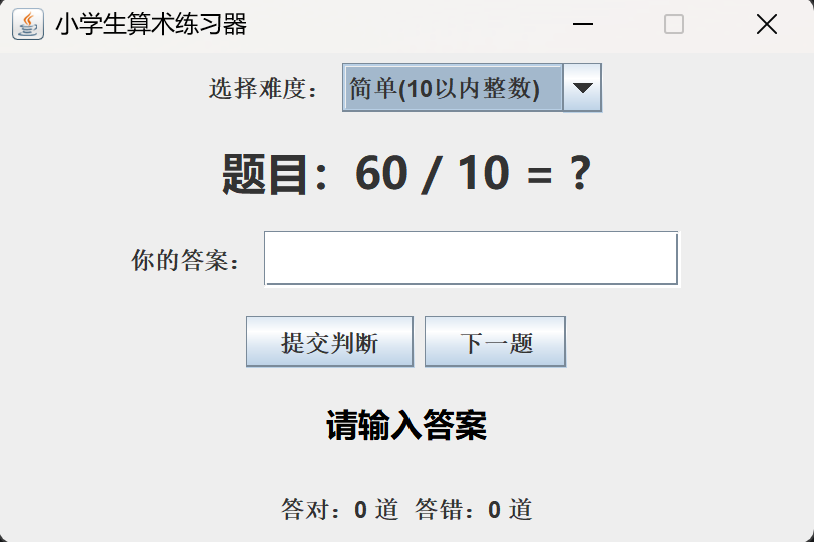
按以下需求(可扩充),设计并完成一个能运行的且界面美观的小软件。提交可运行软件,程序主要针对小学生的算术计算。
- 可以自定义计算的难度(此项可根据功能进行扩展)
- 随机获取不一样的题目,能通过按键触发确定填写输入的答案是否正确。
- 计算满足+ - * /(可扩展)
- 操作数可以是整数、小数、分数等等(可扩展)
import javax.swing.*;
import java.awt.*;
import java.awt.event.ActionEvent;
import java.awt.event.ActionListener;
import java.util.Random;

/**
 * 小学生算术练习系统 Swing实现
 */
public class ArithmeticGame extends JFrame {
    // 界面组件
    private JLabel lblQuestion;     // 题目显示
    private JTextField txtAnswer;   // 答案输入框
    private JLabel lblTip;          // 对错提示
    private JLabel lblCount;        // 统计对错
    private JComboBox<String> cbLevel; // 难度选择
    private JButton btnSubmit, btnNext;

    // 运算数据
    private Random random = new Random();
    private int num1, num2;
    private String op;
    private double rightAnswer;
    private int correct = 0;    // 答对总数
    private int wrong = 0;      // 答错总数

    public ArithmeticGame() {
        // 窗口基础设置
        setTitle("小学生算术练习器");
        setSize(420, 280);
        setDefaultCloseOperation(JFrame.EXIT_ON_CLOSE);
        setLocationRelativeTo(null); // 窗口居中
        setLayout(new GridLayout(6, 1, 8, 8));
        setResizable(false);

        // 1. 难度选择行
        JPanel panelLevel = new JPanel();
        panelLevel.add(new JLabel("选择难度:"));
        String[] levels = {"简单(10以内整数)", "中等(100以内整数)", "困难(含小数四则)"};
        cbLevel = new JComboBox<>(levels);
        panelLevel.add(cbLevel);
        add(panelLevel);

        // 2. 题目展示
        lblQuestion = new JLabel("题目:", SwingConstants.CENTER);
        lblQuestion.setFont(new Font("微软雅黑", Font.BOLD, 22));
        add(lblQuestion);

        // 3. 答案输入框
        JPanel panelInput = new JPanel();
        panelInput.add(new JLabel("你的答案:"));
        txtAnswer = new JTextField(12);
        txtAnswer.setFont(new Font("微软雅黑", Font.PLAIN, 18));
        panelInput.add(txtAnswer);
        add(panelInput);

        // 4. 按钮区域
        JPanel panelBtn = new JPanel();
        btnSubmit = new JButton("提交判断");
        btnNext = new JButton("下一题");
        panelBtn.add(btnSubmit);
        panelBtn.add(btnNext);
        add(panelBtn);

        // 5. 对错提示
        lblTip = new JLabel("请输入答案", SwingConstants.CENTER);
        lblTip.setFont(new Font("微软雅黑", Font.BOLD, 16));
        add(lblTip);

        // 6. 统计信息
        lblCount = new JLabel("答对:0 道  答错:0 道", SwingConstants.CENTER);
        add(lblCount);

        // 初始化第一题
        createQuestion();

        // 绑定按钮事件
        btnSubmit.addActionListener(new SubmitListener());
        btnNext.addActionListener(e -> createQuestion());
    }

    // 根据难度生成随机题目
    private void createQuestion() {
        String level = (String) cbLevel.getSelectedItem();
        String[] ops = {"+", "-", "*", "/"};
        op = ops[random.nextInt(4)];

        if (level.contains("简单")) {
            num1 = random.nextInt(10) + 1;
            num2 = random.nextInt(10) + 1;
        } else if (level.contains("中等")) {
            num1 = random.nextInt(100) + 1;
            num2 = random.nextInt(100) + 1;
        } else {
            // 困难:小数
            num1 = random.nextInt(50) + 1;
            num2 = random.nextInt(20) + 1;
        }

        // 计算标准答案,除法保证整除
        switch (op) {
            case "+":
                rightAnswer = num1 + num2;
                break;
            case "-":
                rightAnswer = num1 - num2;
                break;
            case "*":
                rightAnswer = num1 * num2;
                break;
            case "/":
                // 除法避免小数,重新生成能整除的数字
                num1 = num2 * (random.nextInt(10) + 1);
                rightAnswer = num1 / num2;
                break;
        }
        lblQuestion.setText("题目:" + num1 + " " + op + " " + num2 + " = ?");
        txtAnswer.setText("");
        lblTip.setText("请输入答案");
        lblTip.setForeground(Color.BLACK);
    }

    // 提交按钮事件监听内部类
    class SubmitListener implements ActionListener {
        @Override
        public void actionPerformed(ActionEvent e) {
            String inputStr = txtAnswer.getText().trim();
            if (inputStr.isEmpty()) {
                lblTip.setText("请输入答案!");
                lblTip.setForeground(Color.ORANGE);
                return;
            }

            double userInput;
            try {
                userInput = Double.parseDouble(inputStr);
            } catch (NumberFormatException ex) {
                lblTip.setText("输入数字格式错误!");
                lblTip.setForeground(Color.RED);
                return;
            }

            // 判断答案是否正确,误差0.01兼容小数
            if (Math.abs(userInput - rightAnswer) < 0.01) {
                lblTip.setText("回答正确!太棒啦");
                lblTip.setForeground(new Color(0, 150, 0));
                correct++;
            } else {
                lblTip.setText("回答错误,正确答案:" + rightAnswer);
                lblTip.setForeground(Color.RED);
                wrong++;
            }
            // 更新统计
            lblCount.setText("答对:" + correct + " 道  答错:" + wrong + " 道");
        }
    }

    public static void main(String[] args) {
        // Swing程序建议在UI线程启动
        SwingUtilities.invokeLater(() -> {
            new ArithmeticGame().setVisible(true);
        });
    }
}
实验2(选做,可AI)
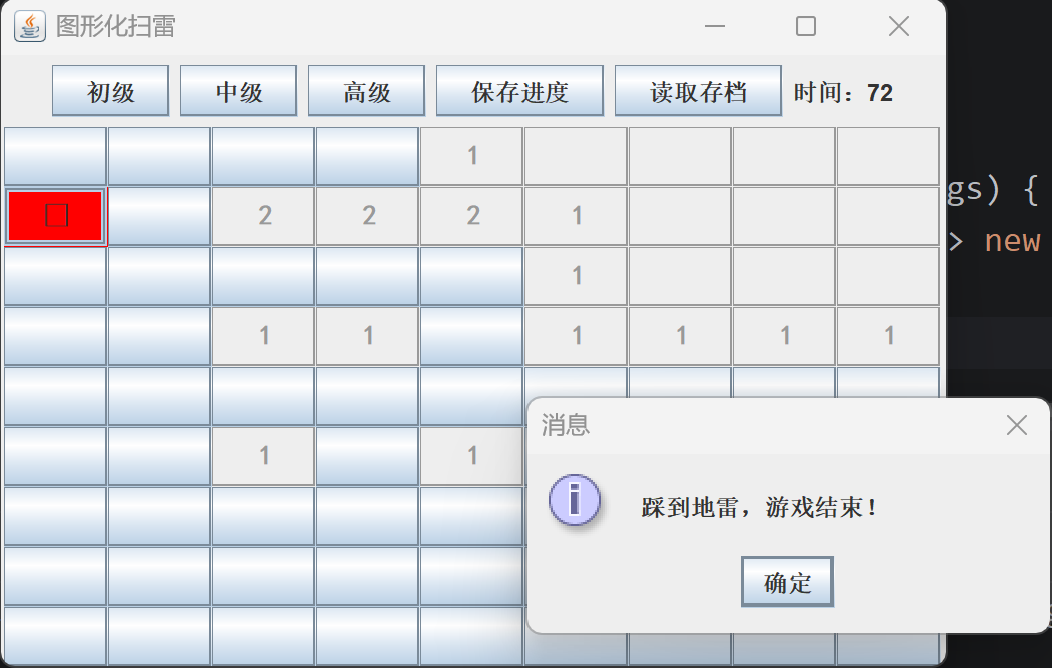
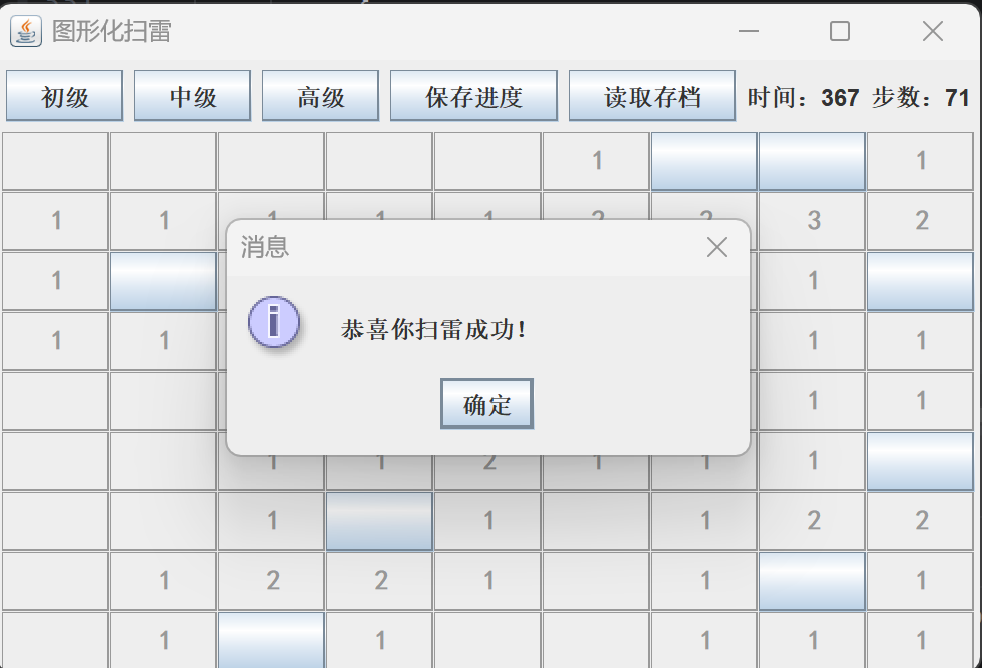
(扫雷、射击。。。)游戏
- 良好的界面实现
- 可调节难度
- 计时与计步功能
- 保存/读取游戏进度
- 。。。。可扩展
import javax.swing.*;
import java.awt.*;
import java.awt.event.MouseAdapter;
import java.awt.event.MouseEvent;
import java.io.*;

public class MineSweeperGUI extends JFrame {
    // 难度参数
    private static final int EASY_ROW = 9, EASY_COL = 9, EASY_MINE = 10;
    private static final int MID_ROW = 16, MID_COL = 16, MID_MINE = 40;
    private static final int HARD_ROW = 16, HARD_COL = 30, HARD_MINE = 99;

    private int rowCnt, colCnt, mineTotal;
    private boolean[][] mineMap;
    private int[][] numMap;
    private boolean[][] openMap;
    private boolean[][] flagMap;

    private JButton[][] cellBtns;
    private JLabel lblTime, lblStep;
    private Timer timer;
    private long startTime;
    private int step;
    private boolean gameOver;

    // 顶部控制面板
    private JPanel topPanel;
    // 游戏棋盘面板
    private JPanel gamePanel;

    public MineSweeperGUI() {
        setTitle("图形化扫雷");
        setDefaultCloseOperation(EXIT_ON_CLOSE);
        setLayout(new BorderLayout());

        // 顶部按钮栏
        topPanel = new JPanel();
        JButton btnEasy = new JButton("初级");
        JButton btnMid = new JButton("中级");
        JButton btnHard = new JButton("高级");
        JButton btnSave = new JButton("保存进度");
        JButton btnLoad = new JButton("读取存档");
        lblTime = new JLabel("时间:0");
        lblStep = new JLabel("步数:0");

        topPanel.add(btnEasy);
        topPanel.add(btnMid);
        topPanel.add(btnHard);
        topPanel.add(btnSave);
        topPanel.add(btnLoad);
        topPanel.add(lblTime);
        topPanel.add(lblStep);
        add(topPanel, BorderLayout.NORTH);

        // 难度切换事件
        btnEasy.addActionListener(e -> initGame(EASY_ROW, EASY_COL, EASY_MINE));
        btnMid.addActionListener(e -> initGame(MID_ROW, MID_COL, MID_MINE));
        btnHard.addActionListener(e -> initGame(HARD_ROW, HARD_COL, HARD_MINE));
        btnSave.addActionListener(e -> saveData());
        btnLoad.addActionListener(e -> loadData());

        // 计时器,每秒刷新时间
        timer = new Timer(1000, e -> {
            long sec = (System.currentTimeMillis() - startTime) / 1000;
            lblTime.setText("时间:" + sec);
        });

        // 默认开局初级
        initGame(EASY_ROW, EASY_COL, EASY_MINE);
        setLocationRelativeTo(null);
    }

    // 初始化游戏地图
    private void initGame(int r, int c, int m) {
        if (timer != null) timer.stop();
        rowCnt = r;
        colCnt = c;
        mineTotal = m;
        step = 0;
        gameOver = false;

        mineMap = new boolean[rowCnt][colCnt];
        numMap = new int[rowCnt][colCnt];
        openMap = new boolean[rowCnt][colCnt];
        flagMap = new boolean[rowCnt][colCnt];

        // 清空棋盘面板
        if (gamePanel != null) remove(gamePanel);
        gamePanel = new JPanel(new GridLayout(rowCnt, colCnt));
        cellBtns = new JButton[rowCnt][colCnt];

        // 生成格子按钮
        for (int i = 0; i < rowCnt; i++) {
            for (int j = 0; j < colCnt; j++) {
                JButton btn = new JButton();
                btn.setPreferredSize(new Dimension(30, 30));
                btn.setFont(new Font("黑体", Font.BOLD, 14));
                // 鼠标监听:左键点开,右键插旗
                btn.addMouseListener(new CellMouseListener(i, j));
                cellBtns[i][j] = btn;
                gamePanel.add(btn);
            }
        }
        add(gamePanel, BorderLayout.CENTER);
        pack();

        createMine();
        calcSurroundMine();

        // 启动计时
        startTime = System.currentTimeMillis();
        timer.start();
        lblTime.setText("时间:0");
        lblStep.setText("步数:0");
    }

    // 随机生成地雷
    private void createMine() {
        int count = 0;
        while (count < mineTotal) {
            int x = (int) (Math.random() * rowCnt);
            int y = (int) (Math.random() * colCnt);
            if (!mineMap[x][y]) {
                mineMap[x][y] = true;
                count++;
            }
        }
    }

    // 计算每个格子周围地雷数量
    private void calcSurroundMine() {
        for (int i = 0; i < rowCnt; i++) {
            for (int j = 0; j < colCnt; j++) {
                if (mineMap[i][j]) continue;
                int cnt = 0;
                for (int dx = -1; dx <= 1; dx++) {
                    for (int dy = -1; dy <= 1; dy++) {
                        int nx = i + dx;
                        int ny = j + dy;
                        if (nx >= 0 && nx < rowCnt && ny >= 0 && ny < colCnt) {
                            if (mineMap[nx][ny]) cnt++;
                        }
                    }
                }
                numMap[i][j] = cnt;
            }
        }
    }

    // 鼠标监听:左键翻开,右键插旗
    class CellMouseListener extends MouseAdapter {
        int x, y;
        public CellMouseListener(int x, int y) {
            this.x = x;
            this.y = y;
        }
        @Override
        public void mousePressed(MouseEvent e) {
            if (gameOver) return;
            if (SwingUtilities.isLeftMouseButton(e)) {
                openCell(x, y);
            } else if (SwingUtilities.isRightMouseButton(e)) {
                setFlag(x, y);
            }
        }
    }

    // 翻开格子
    private void openCell(int x, int y) {
        if (x < 0 || x >= rowCnt || y < 0 || y >= colCnt) return;
        if (openMap[x][y] || flagMap[x][y]) return;

        openMap[x][y] = true;
        step++;
        lblStep.setText("步数:" + step);
        JButton btn = cellBtns[x][y];

        // 踩雷,游戏失败
        if (mineMap[x][y]) {
            gameOver = true;
            timer.stop();
            btn.setText("💣");
            btn.setBackground(Color.RED);
            JOptionPane.showMessageDialog(this, "踩到地雷,游戏结束!");
            showAllMine();
            return;
        }

        // 显示数字
        int num = numMap[x][y];
        btn.setEnabled(false);
        if (num > 0) {
            btn.setText(num + "");
        } else {
            // 空白格递归展开四周
            for (int dx = -1; dx <= 1; dx++) {
                for (int dy = -1; dy <= 1; dy++) {
                    openCell(x + dx, y + dy);
                }
            }
        }
        checkWin();
    }

    // 右键插旗/取消
    private void setFlag(int x, int y) {
        if (openMap[x][y] || gameOver) return;
        flagMap[x][y] = !flagMap[x][y];
        cellBtns[x][y].setText(flagMap[x][y] ? "🚩" : "");
    }

    // 游戏失败展示全部地雷
    private void showAllMine() {
        for (int i = 0; i < rowCnt; i++) {
            for (int j = 0; j < colCnt; j++) {
                if (mineMap[i][j]) {
                    cellBtns[i][j].setText("💣");
                }
            }
        }
    }

    // 判断胜利:所有无雷格子全部打开
    private void checkWin() {
        int safeTotal = rowCnt * colCnt - mineTotal;
        int openSafe = 0;
        for (int i = 0; i < rowCnt; i++) {
            for (int j = 0; j < colCnt; j++) {
                if (!mineMap[i][j] && openMap[i][j]) openSafe++;
            }
        }
        if (openSafe == safeTotal) {
            gameOver = true;
            timer.stop();
            JOptionPane.showMessageDialog(this, "恭喜你扫雷成功!");
        }
    }

    // 保存游戏进度到 sweep.txt
    private void saveData() {
        try (BufferedWriter bw = new BufferedWriter(new FileWriter("sweep.txt"))) {
            bw.write(rowCnt + " " + colCnt + " " + mineTotal + "\n");
            bw.write(step + " " + (System.currentTimeMillis() - startTime) + "\n");
            // 地雷
            for (int i = 0; i < rowCnt; i++) {
                for (int j = 0; j < colCnt; j++) bw.write(mineMap[i][j] ? "1" : "0");
                bw.newLine();
            }
            // 翻开
            for (int i = 0; i < rowCnt; i++) {
                for (int j = 0; j < colCnt; j++) bw.write(openMap[i][j] ? "1" : "0");
                bw.newLine();
            }
            // 旗帜
            for (int i = 0; i < rowCnt; i++) {
                for (int j = 0; j < colCnt; j++) bw.write(flagMap[i][j] ? "1" : "0");
                bw.newLine();
            }
            JOptionPane.showMessageDialog(this, "存档成功!");
        } catch (IOException e) {
            JOptionPane.showMessageDialog(this, "存档失败");
        }
    }

    // 读取存档
    private void loadData() {
        File file = new File("sweep.txt");
        if (!file.exists()) {
            JOptionPane.showMessageDialog(this, "无存档文件");
            return;
        }
        try (BufferedReader br = new BufferedReader(new FileReader(file))) {
            String[] size = br.readLine().split(" ");
            int r = Integer.parseInt(size[0]);
            int c = Integer.parseInt(size[1]);
            int m = Integer.parseInt(size[2]);

            String[] st = br.readLine().split(" ");
            int saveStep = Integer.parseInt(st[0]);
            long saveTime = Long.parseLong(st[1]);

            // 重建地图
            initGame(r, c, m);
            step = saveStep;
            lblStep.setText("步数:" + step);
            startTime = System.currentTimeMillis() - saveTime;

            // 读取地雷
            for (int i = 0; i < r; i++) {
                String line = br.readLine();
                for (int j = 0; j < c; j++) mineMap[i][j] = line.charAt(j) == '1';
            }
            // 读取翻开
            for (int i = 0; i < r; i++) {
                String line = br.readLine();
                for (int j = 0; j < c; j++) openMap[i][j] = line.charAt(j) == '1';
            }
            // 读取旗帜
            for (int i = 0; i < r; i++) {
                String line = br.readLine();
                for (int j = 0; j < c; j++) flagMap[i][j] = line.charAt(j) == '1';
            }
            calcSurroundMine();
            refreshUI();
            checkWin();
            JOptionPane.showMessageDialog(this, "读取存档完成");
        } catch (Exception e) {
            JOptionPane.showMessageDialog(this, "读取存档失败");
        }
    }

    // 根据数据刷新界面按钮状态
    private void refreshUI() {
        for (int i = 0; i < rowCnt; i++) {
            for (int j = 0; j < colCnt; j++) {
                JButton btn = cellBtns[i][j];
                btn.setText("");
                btn.setEnabled(true);
                if (flagMap[i][j]) {
                    btn.setText("🚩");
                }
                if (openMap[i][j]) {
                    btn.setEnabled(false);
                    if (mineMap[i][j]) {
                        btn.setText("💣");
                    } else if (numMap[i][j] > 0) {
                        btn.setText(numMap[i][j] + "");
                    }
                }
            }
        }
    }

    public static void main(String[] args) {
        SwingUtilities.invokeLater(() -> new MineSweeperGUI().setVisible(true));
    }
}
四、心得体会:
本次 Swing 实验完成算术练习器与图形扫雷,让我熟练掌握 GUI 组件和事件监听。通过鼠标、按钮事件处理,理解了事件源与监听器的工作原理。同时运用二维数组、文件 IO、递归实现扫雷存档与自动开格,锻炼了逻辑思维。编程中多次遇到界面刷新、存档读取 bug,调试过程提升了排错能力,也体会到模块化编写代码的重要性。

汇聚全球AI编程工具,助力开发者即刻编程。
更多推荐



 7
7 0
0- 0


 已为社区贡献2条内容

所有评论(0)