
ProtoBuf 完整学习笔记(C++ 版)
R YF

如何实现
JSON
XML
Protobuf
什么是protbuf
将结构化数据进行序列化的一种方式
特点:
一、初识 ProtoBuf
1.1 序列化与反序列化
• 序列化:将内存中的对象转换为字节序列(二进制),以便存储或网络传输。
• 反序列化:从字节序列恢复为内存对象。
• 何时需要:存储数据(保存到文件或数据库)/ 网络传输(如 socket 编程)。
• 常见方案:XML、JSON、ProtoBuf。
1.2 ProtoBuf 是什么
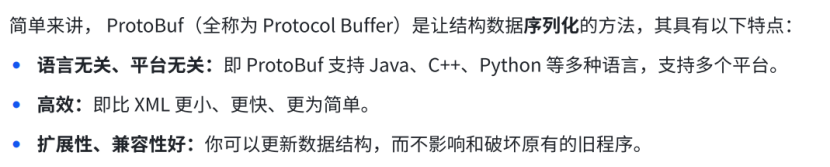
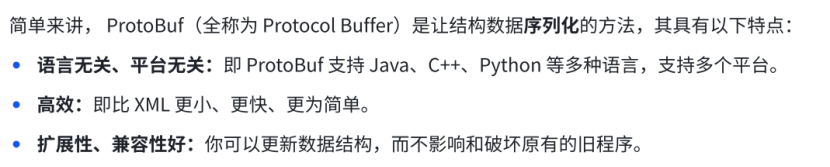
全称 Protocol Buffers,Google 开发的语言无关、平台无关、可扩展的序列化机制。
核心特点:
• 更小:二进制格式,体积远小于 XML/JSON。
• 更快:编解码性能极高。
• 更简单:通过定义 .proto 文件自动生成代码,无需手写解析器。
• 扩展性好:可更新数据结构而不破坏旧程序。
1.3 使用流程
• ① 编写 .proto 文件,定义消息结构(message)。
• ② 用 protoc 编译器生成目标语言代码(如 C++ 的 .h 和 .cc)。
• ③ 在项目中包含生成的头文件,使用生成的类进行序列化/反序列化。
二、安装 ProtoBuf
Linux (apt):sudo apt install protobuf-compiler
macOS (Homebrew):brew install protobuf
Windows (winget):winget install protobuf
源码编译:从 GitHub releases 下载,使用 CMake 编译安装(获取最新版)
验证安装:
protoc --version
三、快速上手:通讯录 1.0
目标:定义联系人(姓名、年龄),进行序列化/反序列化并打印。
3.1 创建 contacts.proto
syntax = "proto3"; // 指定 proto3 语法
package contacts; // 命名空间
message PeopleInfo {
string name = 1; // 姓名
int32 age = 2; // 年龄
}
• 字段规则:字段类型 字段名 = 字段编号;
• 编号:一旦使用不可更改,用于二进制编码。
标量类型与 C++ 对应(部分):
|
proto 类型 |
C++ 类型 |
说明 |
|
double |
double |
|
|
float |
float |
|
|
int32 |
int32_t |
变长编码,负数建议用 sint32 |
|
int64 |
int64_t |
同上 |
|
uint32 |
uint32_t |
|
|
sint32 |
int32_t |
有符号,负数编码高效 |
|
fixed32 |
uint32_t |
定长4字节 |
|
string |
string |
UTF-8 |
|
bool |
bool |
3.2 编译生成代码
protoc --cpp_out=./ contacts.proto
生成 contacts.pb.h 和 contacts.pb.cc。生成的 C++ 类提供:
• getter/setter:name()、set_name()、age()、set_age()
• clear_ 方法重置字段
• 序列化:SerializeToString(string* output) const
• 反序列化:ParseFromString(const string& data)
• 其他:SerializeToArray / ParseFromArray / 流版本等
3.3 编写测试程序 main.cc
#include <iostream>
#include "contacts.pb.h"
int main() {
// 序列化
contacts::PeopleInfo people;
people.set_name("张三");
people.set_age(20);
std::string people_str;
people.SerializeToString(&people_str);
std::cout << "序列化后二进制长度:" << people_str.size() << std::endl;
// 反序列化
contacts::PeopleInfo new_people;
if (new_people.ParseFromString(people_str)) {
std::cout << "姓名:" << new_people.name() << std::endl;
std::cout << "年龄:" << new_people.age() << std::endl;
}
return 0;
}
编译命令:
g++ main.cc contacts.pb.cc -o TestProtoBuf -std=c++11 -lprotobuf
⚠️ 必须链接 -lprotobuf 并启用 C++11。
四、proto3 语法详解
4.1 字段规则
• singular:默认,出现 0 或 1 次。
• repeated:可重复任意次(数组),顺序保留。
message PeopleInfo {
string name = 1;
int32 age = 2;
repeated string phone_numbers = 3; // 多个号码
}
4.2 消息类型定义与使用
可在一个 .proto 中定义多个 message,支持嵌套,也可导入其他 .proto 文件。
嵌套示例:
message PeopleInfo {
string name = 1;
int32 age = 2;
message Phone {
string number = 1;
}
repeated Phone phone = 3;
}
跨文件导入(phone.proto + contacts.proto):
// phone.proto
syntax = "proto3";
package phone;
message Phone {
string number = 1;
}
// contacts.proto
syntax = "proto3";
import "phone.proto";
message PeopleInfo {
repeated phone.Phone phone = 3;
}
4.3 通讯录 2.0:写入与读取文件
定义通讯录(包含多个联系人):
message Contacts {
repeated PeopleInfo contacts = 1;
}
写入 write.cc(核心代码):
#include <fstream>
#include "contacts.pb.h"
Contacts contacts;
fstream input("contacts.bin", ios::in | ios::binary);
if (input) {
contacts.ParseFromStream(&input);
input.close();
}
PeopleInfo* p = contacts.add_contacts();
p->set_name("李四");
p->set_age(25);
fstream output("contacts.bin", ios::out | ios::trunc | ios::binary);
contacts.SerializeToStream(&output);
output.close();
读取 read.cc:
Contacts contacts;
fstream input("contacts.bin", ios::in | ios::binary);
if (contacts.ParseFromStream(&input)) {
for (int i = 0; i < contacts.contacts_size(); ++i) {
const PeopleInfo& p = contacts.contacts(i);
cout << "姓名:" << p.name() << ", 年龄:" << p.age() << endl;
}
}
可用 hexdump -C contacts.bin 查看二进制内容。
4.4 枚举类型(enum)
• 第一个枚举常量必须为 0(默认值)。
• 可在 message 内或外定义。
• 同级枚举常量名不可重复,不同级或不同 package 可重复。
message PeopleInfo {
message Phone {
string number = 1;
enum PhoneType {
MP = 0; // 移动电话
TEL = 1; // 固定电话
}
PhoneType type = 2;
}
repeated Phone phone = 3;
}
C++ 使用:
phone->set_type(PeopleInfo_Phone_PhoneType::MP);
// 获取枚举名称
cout << PeopleInfo_Phone_PhoneType_Name(phone->type());
4.5 Any 类型(泛型)
可存储任意 message 类型,需导入 google/protobuf/any.proto。
import "google/protobuf/any.proto";
message Address {
string home_address = 1;
string unit_address = 2;
}
message PeopleInfo {
google.protobuf.Any data = 4; // 存放任意类型
}
C++ 打包与解包:
Address address;
address.set_home_address("陕西省西安市");
address.set_unit_address("陕西省西安市");
google::protobuf::Any* any = people.mutable_data();
any->PackFrom(address); // 打包
// 反序列化时解包
if (people.has_data() && people.data().Is<Address>()) {
Address addr;
people.data().UnpackTo(&addr);
}
4.6 oneof 类型(多选一)
多个字段共享内存,同时最多一个被设置,节省内存并明确互斥。
message PeopleInfo {
oneof other_contact {
string qq = 5;
string weixin = 6;
}
}
C++ 使用:
people.set_qq("123456"); // 设置 qq
people.set_weixin("wx_abc"); // 自动清除 qq,只保留 weixin
switch (people.other_contact_case()) {
case PeopleInfo::kQq: cout << people.qq(); break;
case PeopleInfo::kWeixin: cout << people.weixin(); break;
case PeopleInfo::OTHER_CONTACT_NOT_SET: break;
}
4.7 map 类型
定义:map<key_type, value_type> map_field = N;
注意:key 不能是 float/bytes,value 任意;不可用 repeated 修饰。
message PeopleInfo {
map<string, string> remark = 7;
}
C++ 操作:
auto* remark_map = people.mutable_remark();
(*remark_map)["日程"] = "10月1出去玩";
remark_map->insert({"key", "value"});
// 遍历
for (auto& p : people.remark()) {
cout << p.first << ": " << p.second << endl;
}
4.8 默认值
|
类型 |
默认值 |
|
string |
空串 |
|
bytes |
空 |
|
bool |
false |
|
数值类型 |
0 |
|
枚举 |
第一个枚举值(必须为 0) |
|
消息字段 |
未设置,C++ 用 has_ 方法检查 |
|
repeated |
空列表 |
4.9 更新消息与兼容性
更新规则:
• ❌ 禁止修改已有字段编号。
• 删除字段应使用 reserved 保留编号或名称,防止未来误用。
• int32/uint32/int64/uint64/bool 之间可互转(注意截断)。
• sint32/sint64 互兼容,但与其它整数不兼容。
• string/bytes 在合法 UTF-8 下兼容。
• enum 与 int32 等兼容(值不匹配会截断)。
保留字段示例:
message PeopleInfo {
reserved 2; // 保留编号 2
reserved "old_field"; // 保留字段名
string name = 1;
int32 birthday = 4; // 新字段使用新编号
}
未知字段(proto3.5+:新字段被旧代码保留)打印示例:
#include <google/protobuf/unknown_field_set.h>
using google::protobuf::UnknownFieldSet;
const UnknownFieldSet& unknown =
contacts.GetReflection()->GetUnknownFields(contacts);
for (int i = 0; i < unknown.field_count(); ++i) {
const auto& field = unknown.field(i);
cout << "未知字段编号:" << field.number()
<< ",类型:" << field.type()
<< ",值:" << field.varint() << endl;
}
向前兼容:老代码能解析新数据(新字段成为未知字段)。
向后兼容:新代码能解析老数据(缺失字段填默认值)。
4.10 选项(option)
影响编译器的处理方式。常用选项:
optimize_for(文件选项):
• SPEED(默认):高效代码,体积大。
• CODE_SIZE:代码少,依赖反射,运行慢。
• LITE_RUNTIME:轻量,仅序列化,适合移动端。
option optimize_for = LITE_RUNTIME;
allow_alias(枚举选项):允许枚举常量有相同数值(别名)。
enum PhoneType {
option allow_alias = true;
MP = 0;
TEL = 1;
LANDLINE = 1; // 别名
}
五、网络版通讯录 4.0(实战)
5.1 架构与接口
使用 cpp-httplib 搭建 HTTP 服务(仅需包含 httplib.h)。
客户端与服务端通过 Protobuf 序列化请求/响应(Content-Type: application/protobuf)。
接口定义:
|
HTTP 方法 |
路径 |
请求消息 |
响应消息 |
|
POST |
/contacts/add |
AddContactRequest |
AddContactResponse |
|
POST |
/contacts/del |
DelContactRequest |
DelContactResponse |
|
GET |
/contacts/find-all |
(无) |
FindAllContactsResponse |
|
POST |
/contacts/find-one |
FindOneContactRequest |
FindOneContactResponse |
5.2 请求/响应消息定义(部分)
// add_contact_request.proto
syntax = "proto3";
package add_contact_req;
message AddContactRequest {
string name = 1;
int32 age = 2;
message Phone {
string number = 1;
enum PhoneType { MP=0; TEL=1; }
PhoneType type = 2;
}
repeated Phone phone = 3;
map<string, string> remark = 4;
}
// base_response.proto
syntax = "proto3";
package base_response;
message BaseResponse {
bool success = 1;
string error_desc = 2;
}
// add_contact_response.proto
syntax = "proto3";
package add_contact_resp;
import "base_response.proto";
message AddContactResponse {
base_response.BaseResponse base_resp = 1;
string uid = 2;
}
5.3 客户端实现要点
• 使用 httplib::Client 发送请求。
• 序列化 request 为 string 作为 body。
• 接收响应后反序列化,检查 base_resp.success() 判断业务结果。
示例:新增联系人:
void ContactsServer::addContact() {
httplib::Client cli("127.0.0.1", 8123);
add_contact_req::AddContactRequest req;
req.set_name("王五");
req.set_age(30);
std::string req_str;
req.SerializeToString(&req_str);
auto res = cli.Post("/contacts/add", req_str, "application/protobuf");
if (res && res->status == 200) {
add_contact_resp::AddContactResponse resp;
resp.ParseFromString(res->body);
if (resp.base_resp().success()) {
cout << "添加成功,UID: " << resp.uid() << endl;
} else {
cout << "添加失败: " << resp.base_resp().error_desc() << endl;
}
}
}
5.4 服务端实现要点
• 使用 httplib::Server 注册路由处理函数。
• 在 lambda 中解析 request body,调用业务逻辑,序列化 response 返回。
• 存储使用本地文件,维护 contacts::Contacts 消息。
• 生成唯一 UID 用工具函数(如 Utils::generate_hex)。
核心服务逻辑(新增联系人):
srv.Post("/contacts/add", [&](const Request& req, Response& res) {
add_contact_req::AddContactRequest request;
if (!request.ParseFromString(req.body)) {
// 返回错误
return;
}
add_contact_resp::AddContactResponse response;
contactsServer.add(request, &response);
std::string resp_str;
response.SerializeToString(&resp_str);
res.set_content(resp_str, "application/protobuf");
res.status = 200;
});
ContactsServer::add 内部步骤:
• ① 读取现有通讯录文件(若不存在则新建)。
• ② 将请求数据转换为 contacts::PeopleInfo,分配 UID。
• ③ 写入 map(uid -> PeopleInfo),再序列化回文件。
• ④ 填充 response 的 uid 和 success。
5.5 异常处理
统一捕获异常,构造 BaseResponse 设置 success=false 和错误描述。
HTTP 状态码可返回 500 或 200,但业务成功标志由 success 字段决定。
六、性能对比(PB vs JSON)
6.1 测试数据
使用相同结构数据(含嵌套、repeated、map、Any),对比 PB 和 JSON 的序列化/反序列化性能。
6.2 测试结果
|
次数 |
PB序列化(ms) |
PB反序列化(ms) |
JSON序列化(ms) |
JSON反序列化(ms) |
PB大小(B) |
JSON大小(B) |
|
100 |
0.342 |
0.435 |
1.306 |
0.926 |
278 |
567 |
|
1,000 |
3.59 |
5.069 |
11.582 |
9.289 |
278 |
567 |
|
10,000 |
34.386 |
45.96 |
115.76 |
91.046 |
278 |
567 |
|
100,000 |
349.937 |
428.366 |
1150.54 |
904.58 |
278 |
567 |
6.3 结论
• 编解码速度:PB 比 JSON 快 2~4 倍。
• 内存/传输占用:PB 约为 JSON 的 1/2。
• 可读性:JSON 文本可读,PB 二进制不可读(需解析)。
• 适用场景:PB 适合高性能、低带宽的内部服务;JSON 适合 Web 前端、配置文件等。
附录:ProtoBuf 三大真实使用场景
ProtoBuf 最核心的用处一句话:让两台不同机器、不同语言写的程序,能高效、安全地对话和存盘。
场景一:微服务之间的网络通信
情景:C++ 高性能推荐算法服务,需把用户信息推送给 Java 用户中心服务。
痛点:C++ 结构体 Java 不认;JSON 解析慢、流量大。
定义契约 user.proto:
syntax = "proto3";
package user;
message UserInfo {
int64 user_id = 1;
string name = 2;
int32 age = 3;
repeated string tags = 4; // 如 ["VIP", "学生"]
}
C++ 发送端:
#include "user.pb.h"
#include <iostream>
#include <string>
void SendDataOverTcp(const std::string& binary_data);
int main() {
user::UserInfo user;
user.set_user_id(10086);
user.set_name("张三");
user.set_age(25);
user.add_tags("VIP");
user.add_tags("学生");
std::string binary_buffer;
if (!user.SerializeToString(&binary_buffer)) {
std::cerr << "序列化失败!" << std::endl;
return -1;
}
std::cout << "数据大小: " << binary_buffer.size() << " 字节" << std::endl;
SendDataOverTcp(binary_buffer); // 发送二进制
return 0;
}
Java 接收端(伪代码):
// Java 端用同一个 .proto 生成 UserInfo 类
UserInfo user = UserInfo.parseFrom(binary_buffer_received);
System.out.println("用户名: " + user.getName()); // 张三
System.out.println("年龄: " + user.getAge()); // 25
场景二:游戏存档 / 大数据落地存储
情景:网游玩家背包 100 件装备实时存盘。
痛点:fwrite 写内存结构体版本升级后旧存档废;JSON 存读盘慢导致卡顿。
#include "player.pb.h"
#include <fstream>
#include <iostream>
// 存档
void SaveGame(const player::Player& player_data) {
std::string binary_data;
player_data.SerializeToString(&binary_data);
std::ofstream file("savegame.dat", std::ios::out | std::ios::binary);
if (file.is_open()) {
file.write(binary_data.c_str(), binary_data.size());
file.close();
std::cout << "存档大小:" << binary_data.size() << " 字节" << std::endl;
}
}
// 读档
player::Player LoadGame() {
player::Player player_data;
std::ifstream file("savegame.dat", std::ios::in | std::ios::binary);
if (file.is_open()) {
std::string binary_data(
(std::istreambuf_iterator<char>(file)),
std::istreambuf_iterator<char>());
if (player_data.ParseFromString(binary_data)) {
std::cout << "玩家:" << player_data.name() << std::endl;
}
}
return player_data;
}
场景三:版本升级零崩溃(向前兼容)
情景:线上 App 新增 email 字段,老版本客户端无需强制更新。
新版服务端 proto:
message UserInfo {
int64 user_id = 1;
string name = 2;
string email = 3; // 新加字段!
}
老客户端 C++ 代码(没有 email 字段)解析时:
UserInfo user;
if (user.ParseFromString(binary_from_server)) {
// 不会崩溃!
std::cout << "ID: " << user.user_id() << std::endl; // 正常
std::cout << "Name: " << user.name() << std::endl; // 正常
// email 字段被忽略,完美运行
}
这就是 ProtoBuf 的向前兼容:线上千万台老设备无需升级,照样正常接收新数据。
七、总结
|
特性 |
XML |
JSON |
ProtoBuf |
|
格式 |
文本 |
文本 |
二进制 |
|
可读性 |
好 |
好 |
差(需解析) |
|
数据大小 |
大(冗余标签) |
中等 |
小(无冗余) |
|
编解码速度 |
慢 |
中 |
快(2~4倍) |
|
适用场景 |
文档、配置 |
Web、配置 |
高性能 RPC、存储 |
|
跨语言 |
支持 |
支持 |
支持(需生成代码) |
ProtoBuf 核心优势:效率优先,适合对性能敏感的系统。
学习要点
• ① 掌握 .proto 语法(message、enum、repeated、map、oneof、Any)。
• ② 熟练使用 protoc 生成代码。
• ③ 理解序列化/反序列化 API(SerializeToString、ParseFromString 等)。
• ④ 注意兼容性规则(reserved、未知字段)。
• ⑤ 结合网络库(如 httplib)实现 RPC 通信。
实践建议
在实际项目中,建议使用 CMake 管理 protobuf 依赖,并考虑结合 gRPC 框架实现更完善的 RPC 服务。ProtoBuf 就是跨国快递界的压缩打包标准:把对象打成极致压缩的二进制包裹,对面无论用什么语言都能毫秒级无损还原,且新旧版本可以无缝对接。

汇聚全球AI编程工具,助力开发者即刻编程。
更多推荐



 4
4 0
0- 0


 已为社区贡献1条内容

所有评论(0)