
Hadoop HDFS操作与Java交互实战
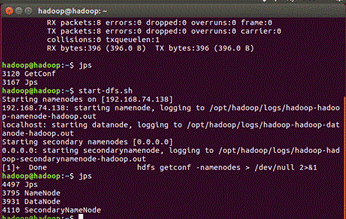
一、启动Hadoop
hadoop@hadoop:~$ start-dfs.sh
hadoop@hadoop:~$ jps
二、查看HadoopShell命令
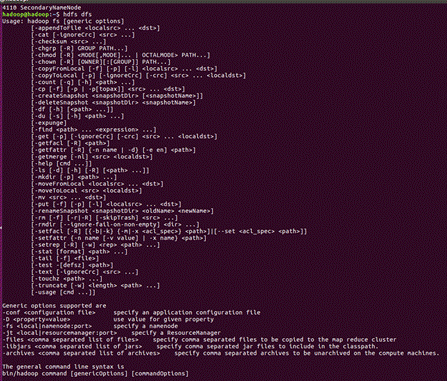
hadoop@hadoop:~$ hdfs dfs
三、⽬录操作
# 创建 hadoop ⽤⼾⽬录,并使⽤
hadoop@hadoop:~$ hdfs dfs -mkdir -p /user/hadoop
hadoop@hadoop:~$ hdfs dfs -rmdir /user/test

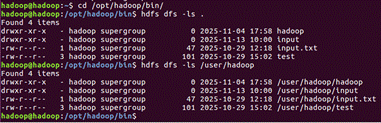
hadoop@hadoop:~$ cd /opt/hadoop/bin/
hadoop@hadoop:/opt/hadoop/bin$ hdfs dfs -ls .
hadoop@hadoop:/opt/hadoop/bin$ hdfs dfs -ls /user/hadoop
在当前⽤⼾⽬录下再创建新的⽬录:
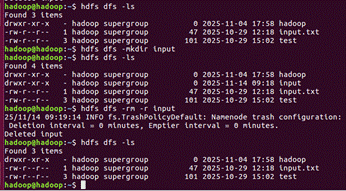
hadoop@hadoop:~$ hdfs dfs -mkdir input
删除⽬录的操作:
hadoop@hadoop:~$ hdfs dfs -rm -r input
四、⽂件操作
# ⾸先创建⼀个本地的⽂本⽂件 :
hadoop@hadoop:~$ vim input.txt
hadoop@hadoop:~$ cat input.txt
# ⽂件创建完成后,上传到 HDFS 中 :
hadoop@hadoop:~$ hdfs dfs -put /home/hadoop/input.txt /user/hadoop
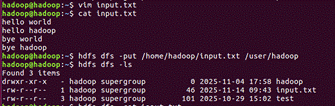
还可以直接查看HDFS中的⽂件的内容:
hadoop@hadoop:~$ hdfs dfs -cat input.txt
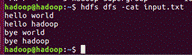
将HDFS中的⽂件下载到本地来:
hadoop@hadoop:~$ hdfs dfs -get input.txt ~/Downloads/

HDFS中的⽂件的拷⻉:
hadoop@hadoop:~$ hdfs dfs -cp input.txt /
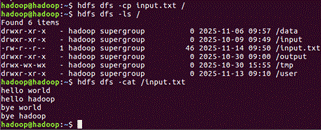
删除HDFS根⽬录下的myLocalFile.txt⽂件:
hadoop@hadoop:~$ hdfs dfs -rm -r /input.txt
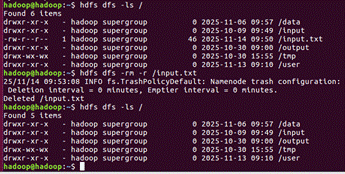
五、Java编程实现与HDFS的交互
- 首先创建Java工程,然后建立文件夹lib导入项目将会用到的jar包:hadoop/share/hadoop/common⽬录下的hadoop-common-2.7.3.jar和hadoop-nfs-2.7.3.jar,hadoop/share/hadoop/common/lib⽬录下的所有jar包,hadoop/share/hadoop/hdfs⽬录下的hadoop-hdfs-2.7.3.jar和hadoop-hdfs-nfs-2.7.3.jar,hadoop/share/hadoop/hdfs/lib⽬录下的所有jar包
- 编写HDFS交互程序:在项⽬的src⽬录下右键点击弹出菜单中选择New-->Class,进⾏类的创建;在Name输⼊框中输⼊类的名称(HDFSFileIFExist),然后点击Finish完成。
- 编写核⼼程序内容
import org.apache.hadoop.conf.Configuration; import org.apache.hadoop.fs.FSDataOutputStream; import org.apache.hadoop.fs.FileSystem; import org.apache.hadoop.fs.Path; public class HdfsWrite { public static void main(String[] args) { System.setProperty("HADOOP_USER_NAME", "hadoop"); FSDataOutputStream os = null; try { Configuration conf = new Configuration(); conf.set("fs.defaultFS", "hdfs://192.168.74.138:9000"); conf.set("fs.hdfs.impl", "org.apache.hadoop.hdfs.DistributedFileSystem"); FileSystem fs = FileSystem.get(conf); System.out.println(fs); String[] contents = new String[] { "两人对酌山花开,\n", "一杯一杯复一杯,\n", "我醉欲眠卿且去,\n", "明朝有意包琴来。\n", "\n", }; String filename = "test"; Path file = new Path(filename); if(fs.exists(file)) { System.out.println(filename+",已经存在。"); os = fs.append(file); }else { os = fs.create(file); System.out.println("新建文件:"+filename); } for (String line:contents) { os.write(line.getBytes("Utf-8")); os.flush(); } os.close(); fs.close(); }catch(Exception e) { e.printStackTrace(); } } } - Eclipse的Java程序运行结果:

- 虚拟机运行结果:
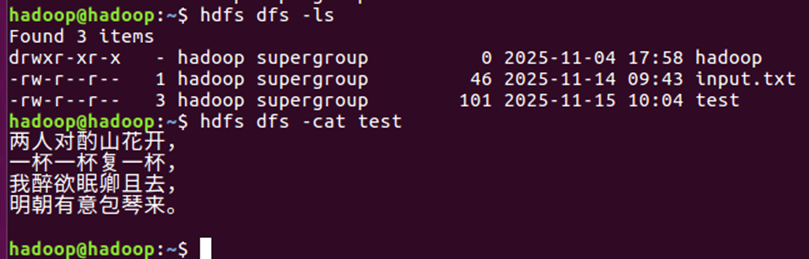
如果在Eclipse中运行出现Connectionrefused异常时,这个原因有可能是以下的⼏种情况: 在代码中的配置信息没有指定正确的hdfs的IP地址 如果宿主机可以ping通虚拟机,则需要检查hadoop的core-site.xml的配置信息
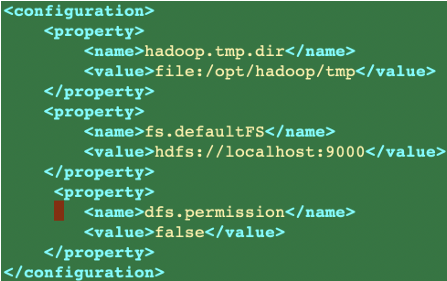
在上图中可以看到hadoop中的配置信息fs.defaultFS的访问地址是localhost,所以宿主机(外部的应 ⽤不能够访问到该hdfs服务),需要修改为具体的IP地址。 修改后的信息为:
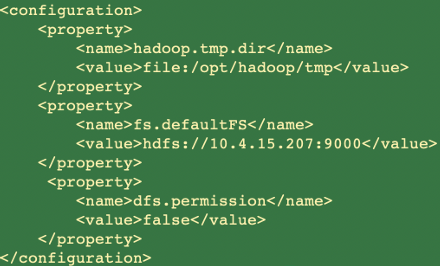
(注:上面是参考老师教的内容)

汇聚全球AI编程工具,助力开发者即刻编程。
更多推荐

 10
10 0
0- 0


 已为社区贡献1条内容

所有评论(0)