
● Java IO
● Java IO
Java IO 流的四大顶级抽象父类 → 所有 IO 流都是它们的子类,这 4 个类是「根」
1:字节输入流:InputStream
2:字节输出流:OutputStream
3:字符输入流:Reader
4:字符输出流:Writer
InputStream/OutputStream/Reader/Writer → 都是抽象父类,是 IO 流的「设计图纸」,不能直接 new 对象使用,只定义了【读 / 写】的统一规则,所有子类都继承它们、实现具体功能;
子类:
InputStream:
- FileInputStream [字节输入流]
- BufferedInputStream[字节输入缓冲流]
- ObjectInputStream[对象字节输入流]
- ByteArrayInputStream[内存字节输入流]
OutputStream:
- FileOutputStream [文件字节输出流]
- BufferedOutputStream [字节缓冲输出流]
- ByteArrayOutputStream [内存字节输出流]
- ObjectOutputStream [对象输出流]
Reader:
- FileReader [文件字符输入流]
- BufferedReader [字符缓冲输入流]
- InputStreamReader [字符转换输入流]
Writer:
- FileWriter [文件字符输出流]
- BufferedWriter [字符缓冲输出流]
- OutputStreamWriter [字符转换输出流]
○ File类
java.io.File不是IO流;它是「文件 / 文件夹的路径工具类」,专门操作文件 / 文件夹本身(比如创建文件、判断是否存在、删除文件夹),不负责读写文件内容,但所有操作文件的 IO 流,都必须依赖 File 类指定「要操作的文件路径」。
判断类(最常用)
file.exists() → 判断文件 / 文件夹是否存在
file.isFile() → 判断当前路径是不是【文件】(不是文件夹)
file.isDirectory() → 判断当前路径是不是【文件夹】
创建 / 删除类
file.createNewFile() → 创建【空文件】,文件夹不存在会报错
file.mkdir() → 创建【单级文件夹】(比如 D:/test)
file.mkdirs() → 创建【多级文件夹】(比如 D:/test/a/b/c,推荐用这个)
file.delete() → 删除【文件】或【空文件夹】
获取信息类
file.getAbsolutePath() → 获取文件「绝对路径」(比如 D:/test.txt)
file.getName() → 获取文件名(比如 test.txt)
file.length() → 获取文件大小(单位:字节)
file.listFiles() → 获取当前文件夹下的子文件及文件夹
○ 类加载器
它是什么
Java 类加载器(java.lang.ClassLoader)是 JVM 的核心子系统,本质是一个 Java 类,核心使命是:负责将 .class 字节码文件加载到 JVM 内存中,并生成对应的 java.lang.Class 对象,同时提供一系列读取项目资源的 API。
一句话总结:
Java 程序能运行、项目里的资源能读取,全靠类加载器,它是连接「字节码文件 / 项目资源」和「JVM 运行时」的桥梁。
核心加载规则
✅ 按需加载、懒加载:JVM 不会一次性加载所有类,而是程序运行到用到某个类时,才会触发类加载器加载,比如你调用new User(),才会加载User.class,极大节省内存;
✅ 加载一次,永久缓存:同一个类加载器,对同一个全类名(如com.test.User)的类,只会加载一次,加载后会缓存到 JVM 中,后续再使用直接从缓存取,不会重复加载;
✅ 双亲委派机制:Java 类加载器的核心安全机制,子类加载器加载类时,会先委托父类加载器加载,父类加载不到才会自己加载,目的是保证核心类(如java.lang.String)不会被篡改,保证程序安全。
△ 双亲委派机制
Java 内置的「三大类加载器」+ 严格的父子层级关系
Java 给我们提供了 3 个核心的内置类加载器,它们不是平级的,而是存在 「自上而下的严格父子继承关系」,双亲委派的全部逻辑都基于这个层级执行,这是最核心的前提!
【顶层】启动类加载器 (Bootstrap ClassLoader)
        ↓ 父类
    扩展类加载器 (Extension ClassLoader)
        ↓ 父类
【底层】应用程序类加载器 (Application ClassLoader)
各加载器的核心职责:
启动类加载器(Bootstrap):
C++ 编写,JVM 原生组件,负责加载 JDK 核心类库(JAVA_HOME/jre/lib 下的 jar 包,如 rt.jar),比如java.lang.String、java.lang.Object、java.util.ArrayList这些所有 Java 程序的基础核心类,都由它加载。Java 代码中获取该类加载器会返回 null。
扩展类加载器(Extension):
Java 编写,负责加载 JDK 扩展类库(JAVA_HOME/jre/lib/ext 下的 jar 包),是对核心类库的补充,父加载器是启动类加载器。
应用程序类加载器(App):
Java 编写,开发中我们接触到的所有类加载器都是它!负责加载:我们自己写的业务类、Maven 引入的第三方依赖(JUnit、Spring、Mybatis)、src/main/resources下的所有资源文件。父加载器是扩展类加载器。
什么是「双亲」?
很多人会误解「双亲」是「父母两个加载器」,这是错误的!
双亲委派中的「双亲」 = parent 父加载器,本质是「单亲委派」,指的是:每一个类加载器都有且仅有一个父加载器,子类加载器在干活前,一定会先找自己的父加载器帮忙。
假设你在自己的项目中,写了一个类:
package java.lang; // 和核心类的包名+类名完全一致
public class String {
    // 写一段恶意代码
    public String() {
        System.out.println("我是恶意的String类,我被加载了!");
    }
}
你觉得这个类会被加载吗?答案是:永远不会!
执行流程:
当你尝试使用这个类时,App 加载器收到请求,委派给扩展加载器,再委派给启动加载器;
启动加载器在rt.jar中已经找到了 JDK 原生的java.lang.String类,并完成加载,直接返回该类的 Class 对象;
整个流程结束,你的自定义java.lang.String类永远不会被加载,你的恶意代码永远不会执行!
安全结论:
双亲委派机制通过「顶层加载核心类」的规则,彻底杜绝了开发者自定义、篡改 Java 核心类的可能性,核心类的加载权完全由 JVM 掌控,任何人都无法替换,这是 Java 最坚固的安全防线!
△ 类加载器使用
使用类加载器获取maven项目resource下的路径
Maven 的标准资源目录是:项目根目录/src/main/resources
✅ 核心特性:
该目录下的所有文件 / 文件夹,Maven 编译、打包时会自动复制到项目的 classpath 根目录(编译后路径是 target/classes/)
不管是 IDE 中运行项目,还是打包成 jar/war 运行,resources 下的资源最终都是classpath 内的资源,这是读取该目录的核心依据
获取classpath(target/classes)路径:
Maven 打包后,src/main/resources 下的所有内容,都会被放到项目的 classpath 根目录(target/classes/)
Java 中读取 classpath 内的资源,标准做法是通过 ClassLoader 类加载器 获取资源路径,而非直接 new File ()
ClassLoader 的 getResource() 方法,会从 classpath 根目录开始查找资源,返回资源的 URL 路径,完美匹配 Maven 的资源目录规则
普通方法:
URL resource = this.getClass().getClassLoader().getResource("");

静态方法:
URL resource = 类名.class.getClassLoader().getResource("");

打印出来的是target/classes/
如果是target/classes/com/XXX
则需要在getResource("../../")即可
○ 字节输入输出流
[万能流但效率慢 按字节(8bit)传输 推荐二进制文件]
流的操作必须处理IOException:所有 IO 流的创建和读写方法都会抛出此异常,必须用try-catch捕获,或用throws声明。
文件路径的写法:
绝对路径:D:/test.txt(Windows)、/home/test.txt(Linux),注意用/而非\(\是转义字符)。
相对路径:test.txt(项目根目录)、src/main/resources/test.txt(资源目录)。
△ FileInputStream
(字节输入流:读文件)
核心作用
从硬盘文件中读取字节数据到内存。
| new FileInputStream(String path) | new FileInputStream(File file) |
|---|---|
| 通过文件路径创建流,文件不存在则抛FileNotFoundException | 通过File对象创建流,推荐(可先判断文件是否存在) |
int read()	读取 1 个字节,返回字节的 ASCII 值,读完返回-1
int read(byte[] buffer)	读取字节到缓冲区,返回实际读取的字节数,读完返回-1
void close()	关闭流,释放资源(try-with-resources 自动调用)
public void test() {
        //创建File读取文件
        URL resource = TestServiceImpl.class.getClassLoader().getResource("");
        File file = new File(resource.getFile(), "test.txt");

        if (file.exists()) {

            //try-with-resources 自动关闭资源 自动调用fis.close()
            try (FileInputStream fis = new FileInputStream(file)) {

                byte[] bytes = new byte[1024]; // 缓冲区:一次读1024字节(1KB),越大效率越高

                int read = 0; // 记录实际读取的字节数

                while ((read = fis.read(bytes)) != -1) {
                    // 4. 转换为字符串输出(注意:字节流读中文可能乱码,文本文件推荐用字符流)
                    System.out.print(new String(bytes, 0, read));
                }

            } catch (IOException e) {
                System.out.println(e.getMessage());
            }

        }
    }
△ FileOutputStream
(字节输出流:写文件)
核心作用
将内存中的字节数据写入硬盘文件。
| new FileOutputStream(String path) | new FileOutputStream(String path, boolean append) | new FileOutputStream(File file, boolean append) |
|---|---|---|
| 覆盖写入:文件不存在则创建,存在则清空原有内容 | 追加写入:append=true时,在文件末尾追加内容,不覆盖 | 通过File对象创建,推荐 |
void write(int b)	写入 1 个字节
void write(byte[] buffer)	写入整个字节数组
void write(byte[] buffer, int off, int len)	写入字节数组的一部分(off:起始索引,len:写入长度)
void flush()	刷新缓冲区(字节流可省略,缓冲流必须调用)
public void fileOutputStreamTest() {
        if (resource == null) return;
        File file = new File(resource.getFile(), "test.txt");
        if (file.exists()) {
            //创建追加文本的输出流
            try (FileOutputStream fos = new FileOutputStream(file, true)) {
                //定义要写入的文本
                String content = "Hello World\n";
                //写入文件
                //fos.write(content.getBytes());
                //第二种写法 如果是拷贝文件 必须使用此方法 不然会读到空数据导致文件损坏
                fos.write(content.getBytes(), 0, content.getBytes().length);

                //刷新流
                fos.flush();
            } catch (IOException e) {
                System.out.println(e.getMessage());
            }
        }
    }
△ 装饰者模式[Buffered流]
✅ 作用:给「字节输入流」套一个内存缓冲区,增强读取效率;
✅ 核心原理:普通字节流是「一滴一滴读」(读 1 字节就和硬盘交互 1 次),缓冲流是「攒够了再读」(先把字节读到内存缓冲区,攒够 8KB 再返回),减少硬盘交互次数,效率提升 10 倍以上;
✅ 特点:不能独立使用,必须「套娃」包裹一个底层字节流(比如 FileInputStream),这叫「装饰者模式」;
✅ 用法:new BufferedInputStream(new FileInputStream(“test.txt”));
✅ 核心优势:方法和 FileInputStream 完全一样,不用改任何代码,只需要套一层,效率直接拉满。
Java 装饰者模式(Decorator Pattern)是一种结构型设计模式,核心目的是在不修改原有对象代码、不破坏原有结构的前提下,动态地给对象添加额外功能,相比继承更灵活。
以(咖啡订单)为例:
1:抽象组件(Coffee)
定义咖啡的核心功能:描述和价格
// 抽象组件:定义咖啡的核心行为
public interface Coffee {
    // 获取咖啡描述
    String getDescription();
    // 获取咖啡价格
    double getCost();
}
对应IO的InputStream

2:抽象装饰者(CoffeeDecorator)
持有咖啡对象的引用,作为装饰者的父类
// 抽象装饰者:持有咖啡对象,统一装饰者的结构
public abstract class CoffeeDecorator implements Coffee {
    // 持有被装饰的咖啡对象(核心:组合而非继承)
    protected Coffee coffee;

    public CoffeeDecorator(Coffee coffee) {
        this.coffee = coffee;
    }
}
对应IO的FilterInputStream
源码:
public class FilterInputStream extends InputStream {
    /**
     * The input stream to be filtered.
     */
    protected volatile InputStream in;
3:具体组件(AmericanCoffee)
基础咖啡,提供核心功能的实现
// 具体组件:基础美式咖啡(被装饰的原始对象)
public class AmericanCoffee implements Coffee {
    @Override
    public String getDescription() {
        return "美式咖啡";
    }

    @Override
    public double getCost() {
        return 10.0; // 基础价格
    }
}
对应IO的FileInputStream
4:具体装饰者(牛奶 / 糖)
给咖啡添加具体功能(额外描述 + 价格)
// 具体装饰者1:加牛奶
public class MilkDecorator extends CoffeeDecorator {
    public MilkDecorator(Coffee coffee) {
        super(coffee);
    }

    @Override
    public String getDescription() {
        // 保留原有描述,添加新功能
        return coffee.getDescription() + " + 牛奶";
    }

    @Override
    public double getCost() {
        // 原有价格 + 牛奶的费用
        return coffee.getCost() + 2.0;
    }
}

// 具体装饰者2:加糖
public class SugarDecorator extends CoffeeDecorator {
    public SugarDecorator(Coffee coffee) {
        super(coffee);
    }

    @Override
    public String getDescription() {
        return coffee.getDescription() + " + 糖";
    }

    @Override
    public double getCost() {
        return coffee.getCost() + 1.0;
    }
}
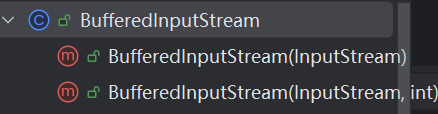
对应IO的BufferedInputStream
public class BufferedInputStream extends FilterInputStream {
测试:
public class DecoratorTest {
    public static void main(String[] args) {
        // 1. 基础美式咖啡
        Coffee coffee = new AmericanCoffee();
        System.out.println(coffee.getDescription() + " | 价格:" + coffee.getCost());

        // 2. 动态添加牛奶(装饰一次)
        coffee = new MilkDecorator(coffee);
        System.out.println(coffee.getDescription() + " | 价格:" + coffee.getCost());

        // 3. 再动态添加糖(多层装饰)
        coffee = new SugarDecorator(coffee);
        System.out.println(coffee.getDescription() + " | 价格:" + coffee.getCost());
    }
}
结果:
美式咖啡 | 价格:10.0
美式咖啡 + 牛奶 | 价格:12.0
美式咖啡 + 牛奶 + 糖 | 价格:13.0
对应IO:
public void bufferedInputStreamTest() {
        if (resource == null) return;
        File file = new File(resource.getFile(), "test.txt");
        if (file.exists()) {
            //使用基础组件FileInputStream被BufferedInputStream进行装饰 装饰后让FileInputStream具有缓冲流功能
            //还可以在装饰一个转换流 在转换流有写
            try (BufferedInputStream bis = new BufferedInputStream(new FileInputStream(file))) {
                byte[] bytes = new byte[1024]; // 缓冲区:一次读1024字节(1KB),越大效率越高

                int read = 0; // 记录实际读取的字节数

                while ((read = bis.read(bytes)) != -1) {
                    System.out.println(new String(bytes, 0, read));
                }

            } catch (IOException e) {
                System.out.println(e.getMessage());
            }
        }
    }
○ 字符输入输出流
文件字符流专门用于读写纯文本文件,核心解决字节流读中文的乱码问题,核心类是 FileReader(读)和 FileWriter(写)。
△ FileReader
(字符输入流:读文本)
核心作用
从文本文件中读取字符数据,自动处理中文编码,无乱码。
int read()	读取 1 个字符,返回字符的 Unicode 值,读完返回-1
int read(char[] cbuf)	读取字符到字符数组,返回实际读取的字符数,读完返回-1
public void fileReaderTest() {
        if (resource == null) return;
        File file = new File(resource.getFile(), "test.txt");
        if (file.exists()) {
            try (FileReader fr = new FileReader(file)) {
                char[] cache = new char[1024]; // 字符缓冲区
                int len;

                while ((len = fr.read(cache)) != -1) {
                    // 转换为字符串输出,无中文乱码
                    System.out.print(new String(cache, 0, len));
                }
            } catch (IOException e) {
                System.out.println(e.getMessage());
            }
        }
    }
△ FileWriter
(字符输出流:写文本)
核心作用
将字符数据写入文本文件,自动处理中文编码,无乱码。
void write(int c)	写入 1 个字符
void write(char[] cbuf)	写入字符数组
void write(char[] cbuf, int off, int len)	写入字符数组的一部分
void write(String str)	直接写入字符串
void write(String str, int off, int len)	写入字符串的一部分
public void fileWriterTest() {
        if (resource == null) return;
        File file = new File(resource.getFile(), "test.txt");
        if (file.exists()) {
            try (FileWriter fw = new FileWriter(file, true)) {
                //定义要写入的文本
                String content = "你好世界\n";
                fw.write(content, 0, content.length());
                fw.flush();
            } catch (IOException e) {
                System.out.println(e.getMessage());
            }
        }
    }
△ PrintWriter[写入常用]
PrintWriter是Writer的子类,他是一个比FileWriter更高级的IO类
- FileWriter写的类型只能是字符串非常局限,而PrintWriter可以写任意类型的数据
- FileWriter写的时候只能自己加换行符,因为接收方需要readLine()读取,而PrintWriter可以直接println换行不需要手动换行
- FileWriter可以直接写入文件,PrintWriter不行但可以装饰一下FileWriter执行文件写入
- PrintWriter声明时加true参数是为了直接刷新缓冲区把数据推出去,如果不加这个true,那么只有当输入的数据打到缓冲区的临界值时才会被自动推出去,这样就不能实时发送消息了
- PrintWriter不会抛异常,需要checkError()方法检查
public static void main(String[] args) throws IOException {
        System.out.println("【发送方】准备连接...");
        // 1. 建立连接:指定目标的 IP 和 端口
        // "127.0.0.1" 代表本机,如果对方在别的电脑,就填那台电脑的 IP
        try (Socket socket = new Socket("127.0.0.1", 8888)) {

            System.out.println("【发送方】连接成功!请在控制台输入消息(输入 bye 退出):");
            // 2. 获取输出流(OutputStream):准备发送数据
            // PrintWriter 是个好东西,第二个参数 true 表示自动刷新缓冲区 (Auto Flush)
            // 如果不开启自动刷新,你的消息可能会卡在内存里发不出去!
            PrintWriter writer = new PrintWriter(new OutputStreamWriter(socket.getOutputStream()), true);
            // 3. 从键盘读取输入(模拟用户打字)
            Scanner scanner = new Scanner(System.in);

            while (true) {
                String line = scanner.nextLine(); // 阻塞等待键盘输入

                // 4. 发送数据
                writer.println(line); // println 自带换行符,这点很重要!因为接收方用的是 readLine()
                if ("bye".equals(line)) {
                    break;
                }
            }
        } catch (IOException e) {
            System.err.println("【发送方】连接失败,请检查接收方是否已启动!");
        }
    }
○ 对象序列化
- 序列化:输出数据到某地时同时保留数据类型和数据值
- 反序列化:读取数据时还原数据的数据类型和数据值
- 序列化和反序列化时读写顺序要一致
对对象进行序列化必须让类实现Serializable接口
对象输入流[装饰者模式]
ObjectInputStream → 对象输入流(序列化专用)
✅ 作用:读取「序列化后的字节数据」,并还原成 Java 对象(反序列化);
✅ 配套使用:必须和ObjectOutputStream一起用,专门处理 Java 对象的读写;
✅ 适用场景:把对象保存到文件、在网络中传输对象;
✅ 特点:只有实现了Serializable接口的类,才能被它读取。
public void objectInputStreamTest() {
        if (resource == null) return;
        File file = new File(resource.getFile(), "test.txt");
        if (file.exists()) {
            try (ObjectInputStream ois = new ObjectInputStream(new FileInputStream(file))) {
                int i = ois.readInt();
                User user = (User) ois.readObject();
                System.out.println((user.getUsername() + user.getBalance()));
            } catch (IOException | ClassNotFoundException e) {
                System.out.println(e.getMessage());
            }
        }
    }
对象输出流[装饰者模式]
- ObjectOutputStream → 对象输出流(序列化专用)
✅ 作用:把 Java 对象转换成「序列化的字节数据」,写入到文件 / 网络(序列化);
✅ 配套使用:和 ObjectInputStream 成对出现,实现对象的持久化存储。
public void objectOutputStreamTest() {
        if (resource == null) return;
        File file = new File(resource.getFile(), "test.txt");
        if (file.exists()) {
            try (ObjectOutputStream oos = new ObjectOutputStream(new FileOutputStream(file, false))) {
                oos.writeInt(100); //保存数据时指定数据类型 writeXXX
                oos.writeObject(User.builder().username("张三").balance(1234).build());

                oos.flush();
            } catch (IOException e) {
                System.out.println(e.getMessage());
            }
        }
    }
○ 字符转换流[InputStreamReader\Writer]
✅ 作用:字节流 → 字符流 的桥梁,可以手动指定「字符编码」(比如 UTF-8、GBK);
✅ 解决的痛点:FileReader 有个致命缺陷 —— 默认使用系统编码(Windows 是 GBK,Linux 是 UTF-8),如果文件编码和系统编码不一致,还是会乱码!InputStreamReader 可以手动指定编码,彻底解决所有中文乱码问题;
✅ 用法:new InputStreamReader(new FileInputStream(“test.txt”), “UTF-8”);
✅ 开发地位:所有字符流的底层都是它,FileReader 其实就是 InputStreamReader 的简化版(默认系统编码)。
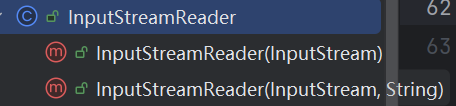
InputStreamReader的构造方法参数为[字节流]
InputStreamReader 的构造方法接收的是 InputStream 而非 Reader,核心原因是:InputStreamReader 是 “字节流” 到 “字符流” 的转换桥梁,它的核心职责就是处理字节流并将其解码为字符流,因此必须以字节流(InputStream)作为输入源,而非已经是字符流的 Reader。
| readLine()方法 |
|---|
| 可以读取文件一行,如果读取结束则返回null可用循环判断 |
public void inputStreamReaderTest() {
        if (resource == null) return;
        File file = new File(resource.getFile(), "test.txt");
        if (file.exists()) {
            try (InputStreamReader isr = new InputStreamReader(new FileInputStream(file), StandardCharsets.UTF_8)) {
                //再次将转换流装饰一下增加缓冲流的功能 [装饰者模式]
                BufferedReader br = new BufferedReader(isr);
                String line;
                while ((line = br.readLine()) != null) {
                    System.out.println(line);
                }
            } catch (IOException e) {
                System.out.println(e.getMessage());
            }
        }
    }
输出流
public void outputStreamWriterTest() {
        if (resource == null) return;
        File file = new File(resource.getFile(), "test.txt");
        if (file.exists()) {
            try (OutputStreamWriter osw = new OutputStreamWriter(new FileOutputStream(file, true),
                    StandardCharsets.UTF_8)) {

                BufferedWriter bw = new BufferedWriter(osw);
                bw.write("你好世界");
                bw.flush();
            } catch (IOException e) {
                System.out.println(e.getMessage());
            }
        }
    }
○ Properties类
它专门解决「硬编码参数」的问题(比如把数据库账号密码写死在代码里),让配置和代码分离,维护起来超方便。
java.util.Properties 是 专门处理 .properties 配置文件的键值对集合类,本质是继承自Hashtable的 Map 集合,但只存String类型的键和值(区别于普通 Map 的 Object 类型)。
setProperty(String key, String value)	往 Properties 对象里设置键值对	相当于 Map 的 put (),但只接受 String

getProperty(String key)	根据键取值,不存在则返回null	最常用的取值方法

getProperty(String key, String defaultValue)	根据键取值,不存在则返回默认值	推荐用这个,避免空指针

load(Reader reader)	从字符流读取配置文件内容	推荐用(支持指定编码,解决中文乱码)

load(InputStream in)	从字节流读取配置文件内容	注意:默认编码是 ISO-8859-1,读中文会乱码

store(Writer writer, String comments)	将键值对写入配置文件(字符流)	comments 是配置文件的注释,可为空

store(OutputStream out, String comments)	将键值对写入配置文件(字节流)	同样有编码问题,推荐用 Writer 版
使用properties读:
public void propertiesTest() {
        if (resource == null) return;
        File file = new File(resource.getFile(), "mysql.properties");
        if (file.exists()) {
            Properties properties = new Properties();
            try (BufferedReader bufferedInputStream = new BufferedReader(new InputStreamReader(new FileInputStream(file)))) {
                //加载配置文件
                properties.load(bufferedInputStream);
                //根据key值获取配置信息value
                String driverClassName = properties.getProperty("driverClassName");
                System.out.println(driverClassName);
            } catch (IOException e) {
                System.out.println(e.getMessage());
            }

        }
    }
使用properties存:
public void propertiesTest() {
        if (resource == null) return;
        File file = new File(resource.getFile(), "mysql.properties");
        if (file.exists()) {
            Properties properties = new Properties();
            try (BufferedWriter bufferedInputStream = new BufferedWriter(new OutputStreamWriter(new FileOutputStream(file, true)))) {
                //设置properties的值
                properties.setProperty("username", "root");
                properties.setProperty("password", "123456");
                //键值对保存到文件
                properties.store(bufferedInputStream, null);
            } catch (IOException e) {
                System.out.println(e.getMessage());
            }

        }
    }

汇聚全球AI编程工具,助力开发者即刻编程。
更多推荐

 6
6 0
0- 0


 已为社区贡献10条内容

所有评论(0)