
11. Linux 防火墙管理
Firewalld 配置
Firewalld 配置方法
1. 直接编辑 /etc/firewalld/ 中的配置文件
2. firewall-cmd 命令行工具
3. firewall-config 图形工具
Firewalld 配置文件
Firewalld 配置配置文件存放在:
/usr/lib/firewalld/目录,Firewalld软件包自带配置位置。
/etc/firewalld/目录,目录结构与/usr/lib/firewalld/一致,管理员自定义配置保存在该位置。
提示:我们不建议大家通过修改/etc/firewalld/目录配置防火墙。
查看zone配置
[root@centos7 ~]# cd /usr/lib/firewalld/
[root@centos7 firewalld]# ls
helpers icmptypes ipsets services zones
# 查看zone配置
[root@centos7 firewalld]# ls zones/
block.xml drop.xml     home.xml     public.xml   work.xml
dmz.xml   external.xml internal.xml trusted.xml
[root@centos7 firewalld]# cat zones/trusted.xml
<?xml version="1.0" encoding="utf-8"?>
<zone target="ACCEPT">
 <short>Trusted</short>
 <description>All network connections are accepted.</description>
</zone>
[root@centos7 firewalld]# cat zones/block.xml
<?xml version="1.0" encoding="utf-8"?>
<zone target="%%REJECT%%">
 <short>Block</short>
 <description>Unsolicited incoming network packets are rejected.
Incoming packets that are related to outgoing network connections are
accepted. Outgoing network connections are allowed.</description>
</zone>
[root@centos7 firewalld]# cat zones/drop.xml
<?xml version="1.0" encoding="utf-8"?>
<zone target="DROP">
 <short>Drop</short>
 <description>Unsolicited incoming network packets are dropped.
Incoming packets that are related to outgoing network connections are
accepted. Outgoing network connections are allowed.</description>
</zone>
查看服务配置
[root@centos7 firewalld]# ls -1 services
amanda-client.xml
......
[root@centos7 firewalld]# cat services/http.xml
<?xml version="1.0" encoding="utf-8"?>
<service>
 <short>WWW (HTTP)</short>
 <description>HTTP is the protocol used to serve Web pages. If you
plan to make your Web server publicly available, enable this option.
This option is not required for viewing pages locally or developing Web
pages.</description>
 <port protocol="tcp" port="80"/>
</service>
[root@centos7 firewalld]# cat services/https.xml
<?xml version="1.0" encoding="utf-8"?>
<service>
 <short>Secure WWW (HTTPS)</short>
 <description>HTTPS is a modified HTTP used to serve Web pages when
security is important. Examples are sites that require logins like
stores or web mail. This option is not required for viewing pages
locally or developing Web pages. You need the httpd package installed
for this option to be useful.</description>
 <port protocol="tcp" port="443"/>
</service>
firewall-cmd 命令行工具
两个基本概念
配置防火墙必须知道两个基本概念:
防火墙的配置有两个状态:
runtime(运行时),命令行执行是的默认状态,该状态下的配置立刻生效。
permanent(永久),通过选项 --permanent 指定,该状态下的配置不会立刻生 效,而是写入配置文件,需要通过选项 --reload 重新reload才会生效,重新reload将 导致运行时状态下未保存的配置丢失,但会保留当前连接状态。如果使用选项 -- complete-reload 重新reload永久配置,将导致当前连接状态也丢失。
建议配置防火墙一次性写两条规则:
第一条使用选项 --permanent 永久生效;
第二条不使用选项 --permanent 立刻生效。
配置防火墙的规则必须一个区域内(直接规则除外),如果不使用选项 --zone 明确指明区 域,则使用默认区域。默认区域是public。
zone 管理
# 查看zone清单
[root@centos7 ~]# firewall-cmd --get-zones
block dmz drop external home internal public trusted work
# 查看激活的zone清单,也就是分配了interface和source的zone
[root@centos7 ~]# firewall-cmd --get-active-zones
public
 interfaces: ens32
# 查看默认zone
[root@centos7 ~]# firewall-cmd --get-default-zone
public
# 设置默认zone,例如设置为trusted,该操作同时设置永久态默认zone
[root@centos7 ~]# firewall-cmd --set-default-zone=trusted
[root@centos7 ~]# firewall-cmd --get-default-zone
trusted
# 再次设置回来
[root@centos7 ~]# firewall-cmd --set-default-zone=public
######################## 以下关于 zone的命令-请自学
########################
# 如果有需要还可以创建新zone,必须配合--permanent
[root@centos7 ~]# firewall-cmd --permanent --new-zone=myweb
[root@centos7 ~]# firewall-cmd --permanent --get-zones
block dmz drop external home internal myweb public trusted work
[root@centos7 ~]# firewall-cmd --get-zones
block dmz drop external home internal public trusted work
# 使用--reload选项重新加载所有防火墙规则,再次查看zone清单
[root@centos7 ~]# firewall-cmd --reload
[root@centos7 ~]# firewall-cmd --get-zones
block dmz drop external home internal myweb public trusted work
# 查看zone target
[root@centos7 ~]# firewall-cmd --permanent --zone=myweb --get-target
default
# 设置zone target,可用target值为:
#   default,默认值,也就是拒绝数据包进入用户空间。
#   ACCEPT,允许数据包进入用户空间。
#   DROP,丢弃数据包,不对客户端做出任何响应。
#   REJECT,拒绝数据包进入用户空间。
[root@centos7 ~]# firewall-cmd --permanent --zone=myweb --settarget=REJECT
[root@centos7
 ~]# firewall-cmd --permanent --zone=myweb --get-target
REJECT
# zone不需要的时候,也可以删除,必须配合--permanent
[root@centos7 ~]# firewall-cmd --permanent --delete-zone=myweb
[root@centos7 ~]# firewall-cmd --permanent --get-zones
block dmz drop external home internal public trusted work
[root@centos7 ~]# firewall-cmd --reload
[root@centos7 ~]# firewall-cmd --get-zones
block dmz drop external home internal public trusted work
# 查看所有zone中的规则
[root@centos7 ~]# firewall-cmd --list-all-zones
block
 target: %%REJECT%%
 icmp-block-inversion: no
 interfaces:
 sources:
services:
 ports:
 protocols:
 masquerade: no
 forward-ports:
 source-ports:
 icmp-blocks:
 rich rules:

dmz
 target: default
......
drop
 target: DROP
......
external
 target: default
......
home
 target: default
......
internal
 target: default
......
public (active)
 target: default
......
trusted
 target: ACCEPT
......
work
 target: default
......

# 查看默认zone中的规则
[root@centos7 ~]# firewall-cmd --list-all
public (active)
 target: default
 icmp-block-inversion: no
 interfaces: ens32
 sources:
 services: cockpit dhcpv6-client ssh
 ports:
protocols:
 masquerade: no
 forward-ports:
 source-ports:
 icmp-blocks:
 rich rules:
# 查看特定zone中的规则
[root@centos7 ~]# firewall-cmd --list-all --zone=home
home
 target: default
 icmp-block-inversion: no
 interfaces:
 sources:
 services: dhcpv6-client mdns samba-client ssh
 ports:
 protocols:
 masquerade: no
 forward-ports:
 source-ports:
 icmp-blocks:
 rich rules:
source 管理
# 来源于特定source的数据包交给特定zone处理
[root@centos7 ~]# firewall-cmd --add-source=192.168.1.0/24 --zone=home
# 查看source清单
[root@centos7 ~]# firewall-cmd --list-sources --zone=home
192.168.1.0/24
# 查看source属于哪个zone
[root@centos7 ~]# firewall-cmd --get-zone-of-source=192.168.1.0/24
home
# 查看source是否添加
[root@centos7 ~]# firewall-cmd --query-source=192.168.1.0/24 --
zone=home
yes
# 变更source到其他zone
[root@centos7 ~]# firewall-cmd --change-source=192.168.1.0/24 --
zone=public
# 删除zone中source
[root@centos7 ~]# firewall-cmd --remove-source=192.168.1.0/24 --
zone=public
interface 管理
# 查看zone中interface
[root@centos7 ~]# firewall-cmd --list-interfaces
ens32
# 查看interface属于哪个zone
[root@centos7 ~]# firewall-cmd --get-zone-of-interface=ens32
public
# 查看interface是否添加
[root@centos7 ~]# firewall-cmd --query-interface=ens32
yes
# 将interface变更到其他zone
[root@centos7 ~]# firewall-cmd --change-interface=ens32 --zone=home
# 删除zone中interface
[root@centos7 ~]# firewall-cmd --remove-interface=ens32 --zone=home
# 如果interface不属于任何zone,使用以下命令将interface绑定到特定zone
[root@centos7 ~]# firewall-cmd --add-interface=ens32 --zone=public
service 管理
yum install -y httpd
systemctl start httpd
# 查看系统中预定义了哪些服务
[root@centos7 ~]# firewall-cmd --get-services
# 添加放行服务
[root@centos7 ~]# firewall-cmd --add-service=http
# 查看放行服务列表
[root@centos7 ~]# firewall-cmd --list-services
cockpit dhcpv6-client http ssh
# 查看服务是否放行
[root@centos7 ~]# firewall-cmd --query-service=http
yes
# 删除服务
[root@centos7 ~]# firewall-cmd --remove-service=http
firewall-cmd命令行还可以定义新的服务。 常用选项如下:
--permanent --new-service=service
   Add a new permanent and empty service.
--permanent --delete-service=service
   Delete an existing permanent service.
--permanent --service=service --set-description=description
   Set new description to service
--permanent --service=service --get-description
   Print description for service
--permanent --service=service --set-short=description
   Set short description to service
--permanent --service=service --get-short
   Print short description for service
--permanent --service=service --add-port=portid[-portid]/protocol
   Add a new port to the permanent service.
--permanent --service=service --remove-port=portid[-portid]/protocol
   Remove a port from the permanent service.
--permanent --service=service --get-ports
   List ports added to the permanent service.
--permanent --service=service --add-protocol=protocol
   Add a new protocol to the permanent service.
--permanent --service=service --remove-protocol=protocol
   Remove a protocol from the permanent service.
--permanent --service=service --get-protocols
   List protocols added to the permanent service.
--permanent --service=service --add-source-port=portid[-
portid]/protocol
   Add a new source port to the permanent service.
--permanent --service=service --remove-source-port=portid[-
portid]/protocol
   Remove a source port from the permanent service.
--permanent --service=service --get-source-ports
   List source ports added to the permanent service.
port 管理
# 添加放行端口
[root@centos7 ~]# firewall-cmd --add-port=5900/tcp
# 查看端口放行列表
[root@centos7 ~]# firewall-cmd --list-ports
5900/tcp
# 查看端口是否放行
[root@centos7 ~]# firewall-cmd --query-port=5900/tcp
yes
# 删除端口
[root@centos7 ~]# firewall-cmd --remove-port=5900/tcp
masquerade 管理
# 查看masquerade是否启动
[root@centos7 ~]# firewall-cmd --query-masquerade
no
# 启动 masquerade
[root@centos7 ~]# firewall-cmd --add-masquerade
[root@centos7 ~]# firewall-cmd --query-masquerade
yes
# 禁用masquerade
[root@centos7 ~]# firewall-cmd --remove-masquerade
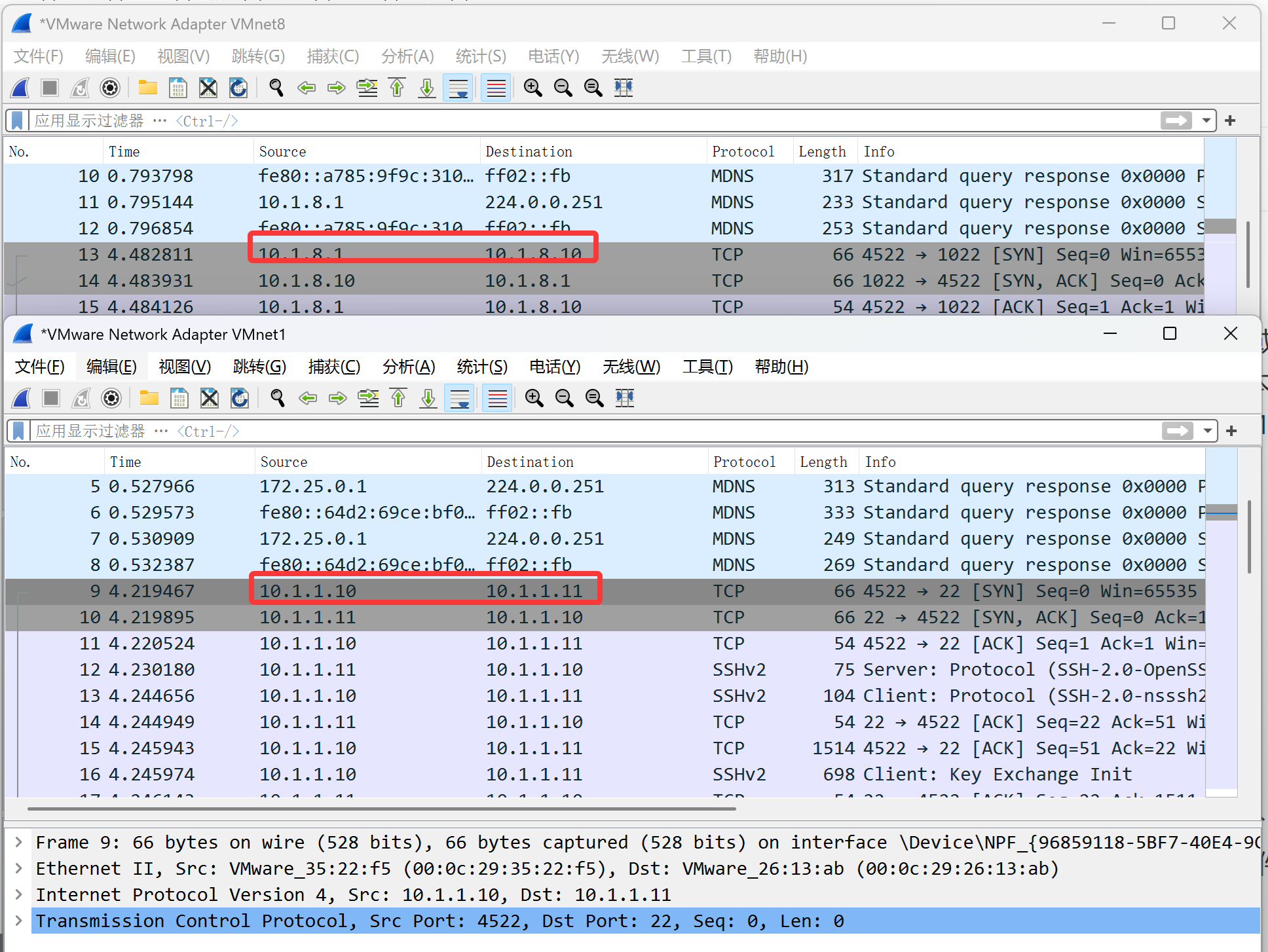
网络模型:
client:10.1.1.11 网关 10.1.1.10
server: 10.1.1.10、10.1.8.10(可以访问公网)
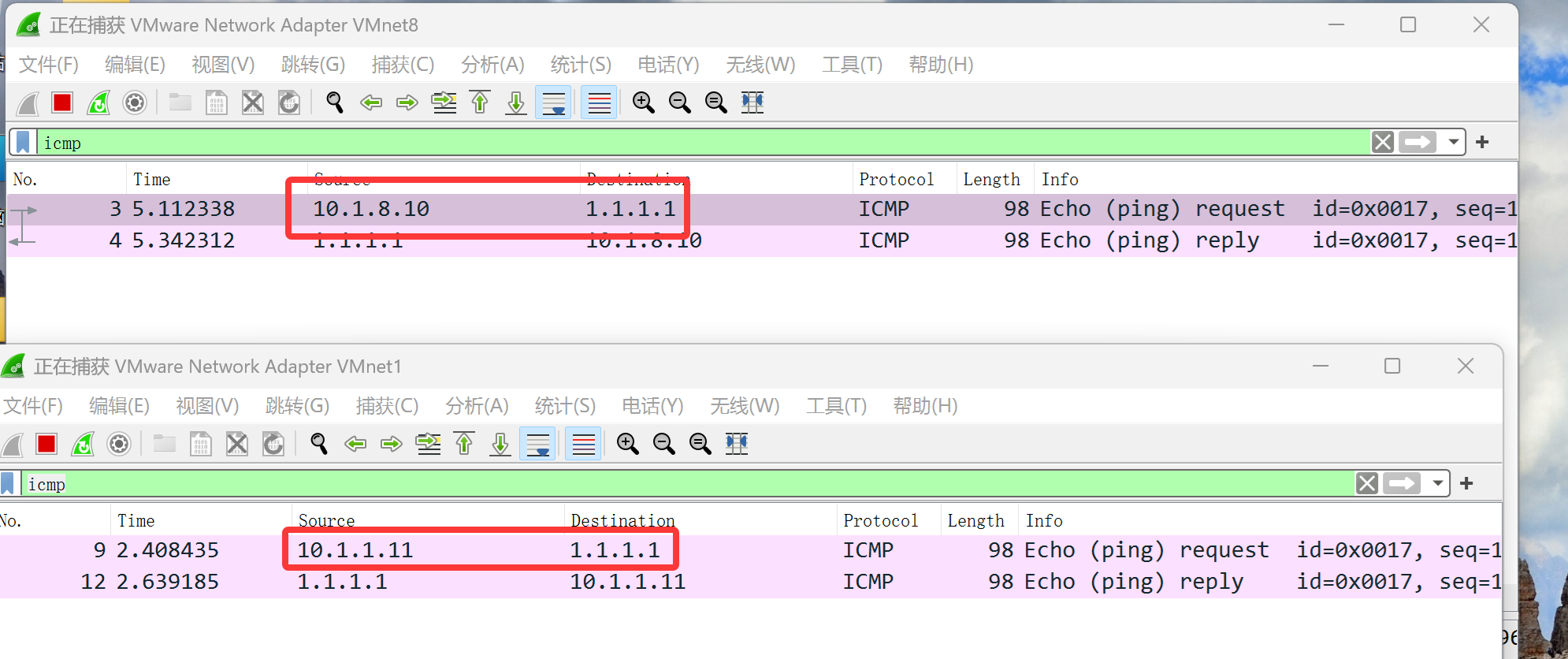
forward-port 管理
使用 port forward前,确保对应zone启用masquerade功能。
# 启动 masquerade
[root@centos7 ~]# firewall-cmd --add-masquerade
# 添加端口转发,语法:
--add-forward-port=port=portid[-portid]:proto=protocol[:toport=portid[-
portid]][:toaddr=address[/mask]]

# 访问本机端口8000转发到本机80
[root@centos7 ~]# firewall-cmd --add-forwardport=port=8000:proto=tcp:toport=80
#
查看是否具有特定端口转发规则
[root@centos7 ~]# firewall-cmd --query-forwardport=port=8000:proto=tcp:toport=80
yes
#
访问本机端口1022转发到10.1.1.11:22
[root@centos7 ~]# firewall-cmd --add-forwardport=port=1022:proto=tcp:toport=22:toaddr=10.1.1.11
#
查询端口转发清单
[root@centos7 ~]# firewall-cmd --list-forward-ports
port=8000:proto=tcp:toport=80:toaddr=
port=1022:proto=tcp:toport=22:toaddr=10.1.1.11
# 删除端口转发
[root@centos7 ~]# firewall-cmd --remove-forwardport=port=8000:proto=tcp:toport=80:toaddr=
[root@centos7
 ~]# firewall-cmd --remove-forwardport=port=1022:proto=tcp:toport=22:toaddr=10.1.8.80
icmp-block-inversion 管理
icmp-block-inversion默认为no,放行所有的icmp type。此时可以通过富规则禁用特定主机 ping本机。
icmp-block-inversion设置为yes,禁止所有的icmp type。此时可以通过富规则放行特定主 机ping本机。
# 查看icmp-block-inversion是否启用
[root@centos7 ~]# firewall-cmd --query-icmp-block-inversion
no
# 设置icmp-block-inversion为yes
[root@centos7 ~]# firewall-cmd --add-icmp-block-inversion
[root@centos7 ~]# firewall-cmd --add-icmp-block-inversion --permanent
[root@centos7 ~]# firewall-cmd --query-icmp-block-inversion
yes
# 客户端ping测试
[c:\~]$ ping -n 1 10.1.8.88
正在 Ping 10.1.8.88 具有 32 字节的数据:
来自 10.1.8.88 的回复: 无法访问目标主机。
10.1.8.88 的 Ping 统计信息:
   数据包: 已发送 = 1,已接收 = 1,丢失 = 0 (0% 丢失),
# 由于firewalld会保留之前的连接状态,如果此时仍能ping通,
# 则需要重启firewalld服务或使用选项 --complete-reload彻底重新加载防火墙规
则。
[root@centos7 ~]# firewall-cmd --complete-reload
# 改回默认值
[root@centos7 ~]# firewall-cmd --remove-icmp-block-inversion
[root@centos7 ~]# firewall-cmd --remove-icmp-block-inversion --
permanent
icmp-blocks 管理
# 查看系统中预定义了哪些icmptypes
[root@centos7 ~]# firewall-cmd --get-icmptypes
# 常用的ICMP类型有
#   echo-request:icmp请求报文
#   echo-reply:icmp响应回复报文
# 添加禁止通过的icmp类型,例如通过添加echo-request实现禁止ping
[root@centos7 ~]# firewall-cmd --add-icmp-block echo-request
[root@centos7 ~]# firewall-cmd --add-icmp-block echo-request --
permanent
# 查看 icmp-block 禁止清单
[root@centos7 ~]# firewall-cmd --list-icmp-blocks
echo-request
# 查看echo-request是否添加
[root@centos7 ~]# firewall-cmd --query-icmp-block echo-request
yes
# 客户端ping测试
[c:\~]$ ping -n 1 10.1.8.88
正在 Ping 10.1.8.88 具有 32 字节的数据:
来自 10.1.8.88 的回复: 无法访问目标主机。
10.1.8.88 的 Ping 统计信息:
   数据包: 已发送 = 1,已接收 = 1,丢失 = 0 (0% 丢失),
# 由于firewalld会保留之前的连接状态,如果此时仍能ping通,
# 则需要重启firewalld服务或使用选项 --complete-reload彻底重新加载防火墙规
则。
[root@centos7 ~]# firewall-cmd --complete-reload
# 改回默认值
[root@centos7 ~]# firewall-cmd --remove-icmp-block echo-request
[root@centos7 ~]# firewall-cmd --remove-icmp-block echo-request --
permanent
protocol 管理
# 添加protocol
[root@centos7 ~]# firewall-cmd --add-protocol=icmp
# 查看放行protocol清单
[root@centos7 ~]# firewall-cmd --list-protocol
icmp
# 查看protocol是否放行
[root@centos7 ~]# firewall-cmd --query-protocol=icmp
yes
# 删除放行protocol
[root@centos7 ~]# firewall-cmd --remove-protocol=icmp

汇聚全球AI编程工具,助力开发者即刻编程。
更多推荐



 15
15 0
0- 0


 已为社区贡献20条内容

所有评论(0)