
javaFX打包exe可执行文件总结方法(三),使用pom.xml launch4j插件打包,这种打包方式有个好处,直接可以将jar一体打包为exe。java环境为java17。
在pom.xml中新建2个插件,这个插件是打包为jar
            <plugin>
                <groupId>org.apache.maven.plugins</groupId>
                <artifactId>maven-shade-plugin</artifactId>
                <version>2.4</version>
                <executions>
                    <execution>
                        <phase>package</phase>
                        <goals>
                            <goal>shade</goal>
                        </goals>
                        <configuration>
                            <transformers>
                                <transformer implementation="org.apache.maven.plugins.shade.resource.ManifestResourceTransformer">
                                    <mainClass>com.example.socket.App</mainClass>
                                </transformer>
                                <transformer implementation="org.apache.maven.plugins.shade.resource.AppendingTransformer">
                                    <resource>META-INF/spring.handlers</resource>
                                </transformer>
                                <transformer implementation="org.apache.maven.plugins.shade.resource.AppendingTransformer">
                                    <resource>META-INF/spring.tooling</resource>
                                </transformer>
                                <transformer implementation="org.apache.maven.plugins.shade.resource.AppendingTransformer">
                                    <resource>META-INF/spring.schemas</resource>
                                </transformer>
                            </transformers>
                        </configuration>
                    </execution>
                </executions>
                <configuration>
                    <filters>
                        <filter>
                            <artifact>*:*</artifact>
                            <excludes>
                                <exclude>META-INF/*.SF</exclude>
                                <exclude>META-INF/*.DSA</exclude>
                                <exclude>META-INF/*.RSA</exclude>
                            </excludes>
                        </filter>
                    </filters>
                    <shadedArtifactAttached>true</shadedArtifactAttached>
                    <shadedClassifierName>shaded</shadedClassifierName>
                </configuration>
            </plugin>
以下是介绍。
maven-shade-plugin,其主要功能是在项目构建生命周期中的package阶段执行,用于创建一个“影子”JAR(也称为Uber JAR),即将项目的所有依赖项合并到单个可执行的JAR文件中。这样做的好处是简化了部署和运行过程,因为所有依赖都已包含在内。
1.<execution>部分:
phase:指定此插件在Maven构建生命周期的哪个阶段执行,此处为package阶段,即编译测试成功后准备打包的阶段。
goals:指定了要执行的目标,这里只有一个目标shade,即进行shade操作。
2.<transformers>部分:
通过三个AppendingTransformer分别处理META-INF/spring.handlers、META-INF/spring.tooling和META-INF/spring.schemas资源,将多个依赖库中同名文件的内容追加在一起,以避免Spring框架在处理这些资源配置时出现冲突。
使用ManifestResourceTransformer来设置最终生成的JAR包的主类,即程序启动入口,这里是com.freelance.client.radiology.main.MainBase。
3.<configuration>下的<filters>部分:
定义了一个过滤器规则,对所有(*: *)依赖排除掉.SF、.DSA、.RSA这三个签名相关的元信息文件,防止由于签名信息重复导致的jar包冲突或错误。
4.最后的两个属性配置:
<shadedArtifactAttached>true</shadedArtifactAttached>表示会附加一个经过shade处理后的单独artifact,它会被赋予额外的分类名称(classifier)。
<shadedClassifierName>shaded</shadedClassifierName>指定了这个shade处理后的artifact的分类名称为shaded,所以最终输出的JAR文件名将会带有-shaded.jar后缀。
这个插件是将jar打包为exe。
<plugin>
                <groupId>com.akathist.maven.plugins.launch4j</groupId>
                <artifactId>launch4j-maven-plugin</artifactId>
                <version>2.1.1</version>
                <executions>
                    <!-- GUI exe -->
                    <execution>
                        <id>l4j-gui</id>
                        <phase>package</phase>
                        <goals>
                            <goal>launch4j</goal>
                        </goals>
                        <configuration>
                            <headerType>gui</headerType>
                            <outfile>target/app-gui.exe</outfile>
                            <jar>target/${project.artifactId}-${project.version}-shaded.jar</jar>
<!--                            <jar>target/Socket-1.0-SNAPSHOT-shaded.jar</jar>-->
                            <errTitle>App Err</errTitle>
                            <classPath>
                                <mainClass>com.example.socket.App</mainClass>
                            </classPath>
                            <icon>F:\Works\java\JavaFX_Socket_Test\Socket\src\main\resources\com\example\socket\tugou.ico</icon>
                            <jre>
                                <minVersion>17.0</minVersion>
                                <maxVersion>19.0</maxVersion>
                                <initialHeapSize>128</initialHeapSize>
                                <maxHeapSize>1024</maxHeapSize>
                            </jre>
                            <versionInfo>
                                <fileVersion>1.0.0.0</fileVersion>
                                <txtFileVersion>1.0.0.0</txtFileVersion>
                                <fileDescription>Desc</fileDescription>
                                <copyright>C</copyright>
                                <productVersion>1.0.0.0</productVersion>
                                <txtProductVersion>1.0.0.0</txtProductVersion>
                                <productName>Product</productName>
                                <internalName>Product</internalName>
                                <originalFilename>App.exe</originalFilename>
                            </versionInfo>
                        </configuration>
                    </execution>
                    <!-- Command-line exe -->
                    <execution>
                        <id>l4j-cli</id>
                        <phase>package</phase>
                        <goals>
                            <goal>launch4j</goal>
                        </goals>
                        <configuration>
                            <headerType>console</headerType>
                            <outfile>target/app-cli.exe</outfile>
                            <jar>target/${project.artifactId}-${project.version}-shaded.jar</jar>
<!--                            <jar>target/Socket-1.0-SNAPSHOT-shaded.jar</jar>-->
                            <errTitle>App Err</errTitle>
                            <classPath>
                                <mainClass>com.example.socket.App</mainClass>
                            </classPath>
                            <icon>F:\Works\java\JavaFX_Socket_Test\Socket\src\main\resources\com\example\socket\tugou.ico</icon>
                            <jre>
                                <minVersion>17.0</minVersion>
                                <maxVersion>19.0</maxVersion>
                                <initialHeapSize>128</initialHeapSize>
                                <maxHeapSize>1024</maxHeapSize>
                            </jre>
                        </configuration>
                    </execution>
                </executions>
            </plugin>
然后编译maven
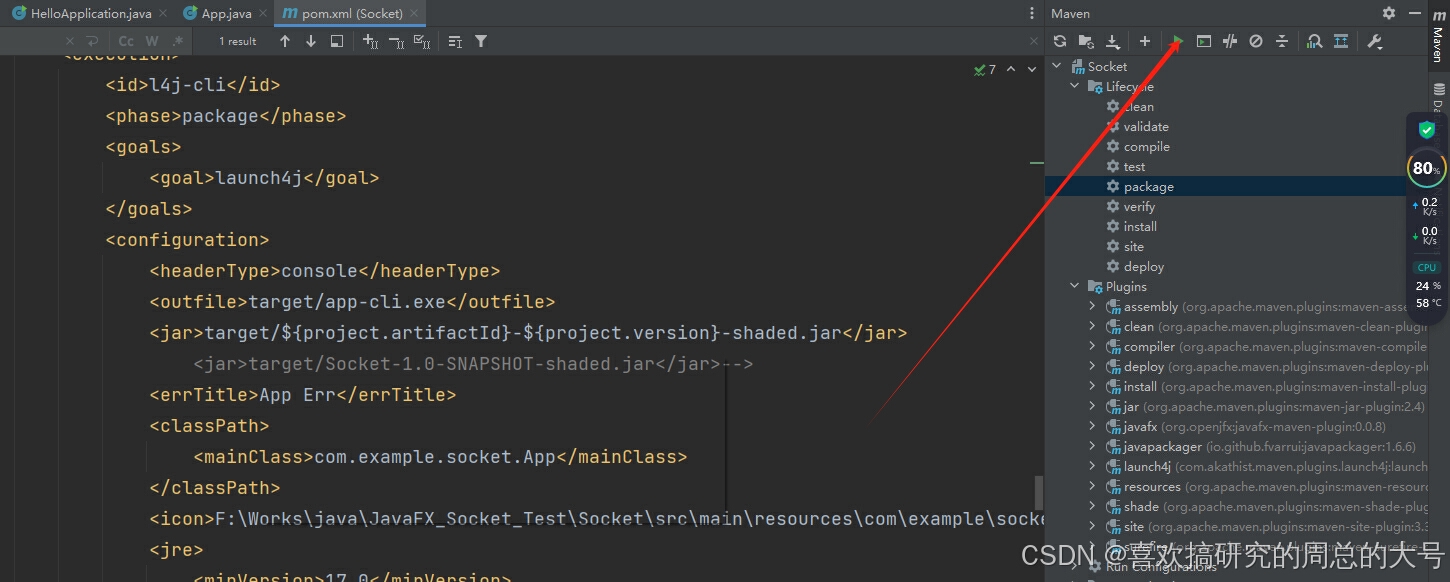
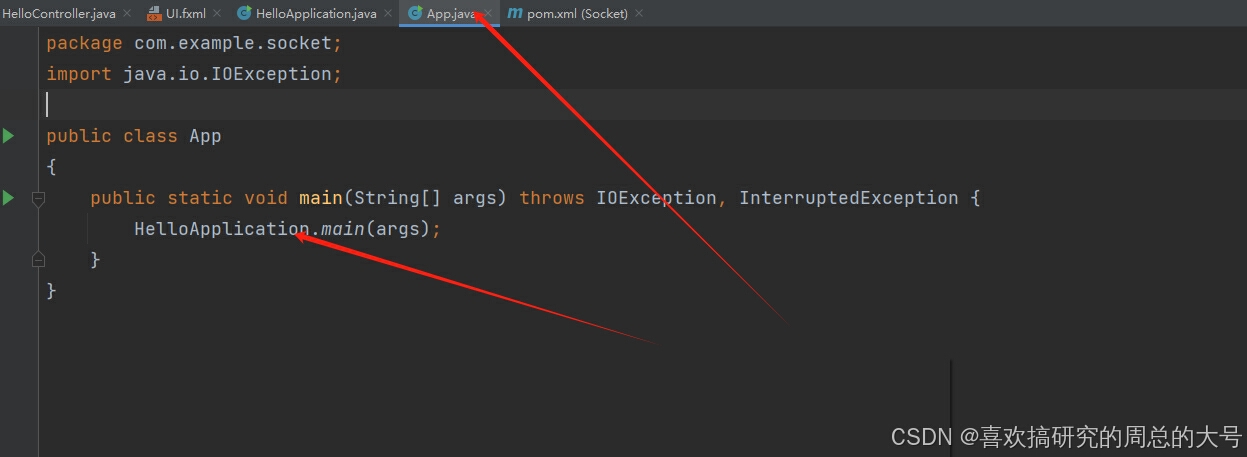
为了保险起见,还是给javafx运行类,重新生成一个APP入口类
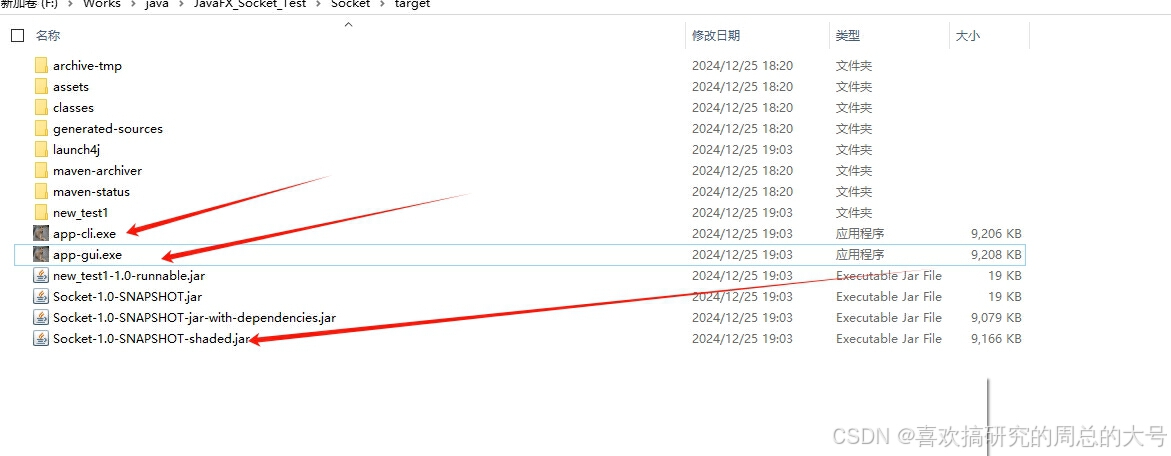
maven编译运行后将成功生成jar和exe。
关于launchj4指令码介绍
- outfile元素定义了生成的可执行文件的输出路径。
- jar元素指定了要使用的JAR文件。
- errTitle元素定义了错误消息的标题。
- classPath元素指定了应用程序的主类。
- icon元素定义了应用程序的图标。
- jre元素定义了JRE的版本和内存设置。

汇聚全球AI编程工具,助力开发者即刻编程。
更多推荐



 5
5 0
0- 0


 已为社区贡献1条内容

所有评论(0)