
GTSRB 德国交通标志识别数据集与YOLO训练方案
·
GTSRB 德国交通标志识别数据集与YOLO训练方案
下面是 GTSRB(德国交通标志识别基准)数据集 的详细信息、整理说明,以及基于YOLOv5的训练代码实现。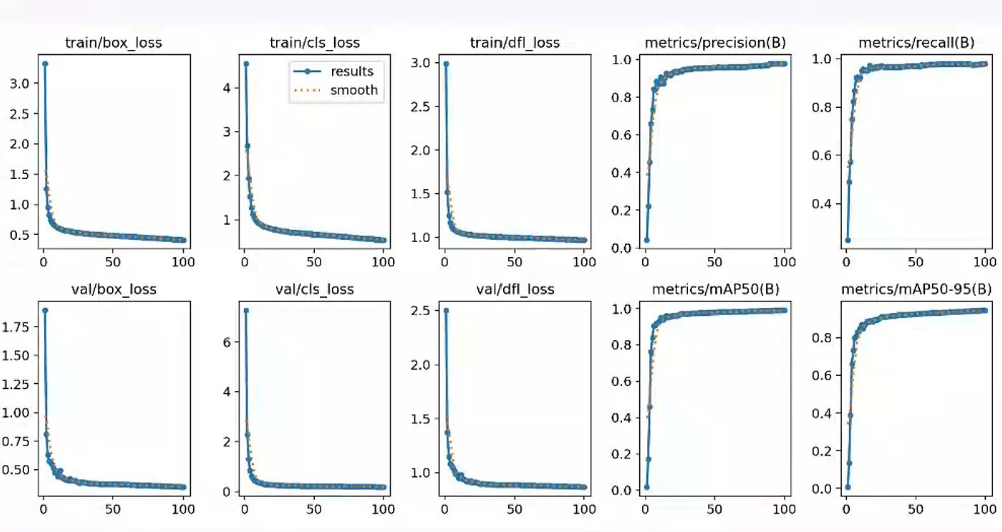
一、数据集信息表
| 项目 | 详情 |
|---|---|
| 数据集名称 | GTSRB(German Traffic Sign Recognition Benchmark) |
| 任务类型 | 交通标志分类/目标检测 |
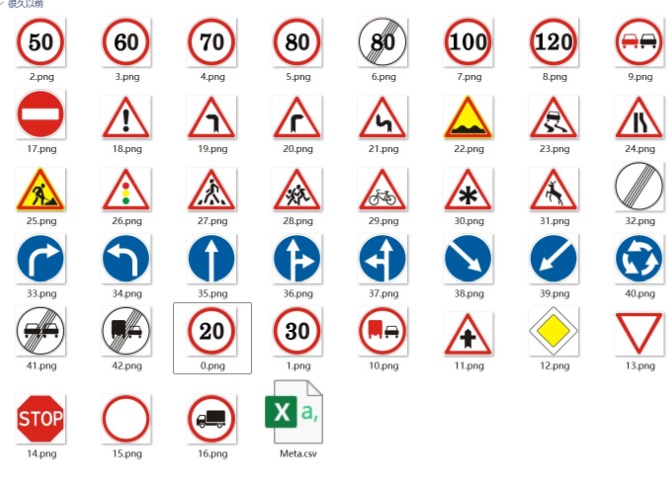
| 类别数量 | 43类不同的交通标志 |
| 原始数据格式 | 图片(ppm格式),CSV标注文件 |
| 整理后格式 | PNG图片 + YOLO TXT标签格式 |
| 原始数据规模 | 训练集:39,209张 测试集:12,630张 |
| YOLO划分 | 训练集:31,367张(原始训练集按8:2划分) 验证集:7,842张 测试集:12,630张(保持原始) |
| 模型性能 | YOLOv5 训练100轮,mAP@0.5 = 0.947 |
| 标注信息 | CSV文件包含:文件名、图像宽高、边界框坐标(x1,y1,x2,y2)、类别ID |
—
二、YOLO格式数据集转换与使用
1. 数据集目录结构
GTSRB-YOLO/
├── images/
│   ├── train/      # 31367张训练图片
│   ├── val/        # 7842张验证图片
│   └── test/       # 12630张测试图片
├── labels/
│   ├── train/      # 对应图片的YOLO标签文件
│   ├── val/
│   └── test/
└── dataset.yaml    # YOLO配置文件
2. 数据集配置文件 dataset.yaml
path: ./GTSRB-YOLO
train: images/train
val: images/val
test: images/test

nc: 43
names:
  0: Speed limit 20
  1: Speed limit 30
  2: Speed limit 50
  3: Speed limit 60
  4: Speed limit 70
  5: Speed limit 80
  6: End of speed limit 80
  7: Speed limit 100
  8: Speed limit 120
  9: No overtaking
  10: No overtaking trucks
  11: Right-of-way at intersection
  12: Priority road
  13: Yield
  14: Stop
  15: No vehicles
  16: No trucks
  17: No entry
  18: General caution
  19: Dangerous curve left
  20: Dangerous curve right
  21: Double curve
  22: Bumpy road
  23: Slippery road
  24: Road narrows right
  25: Road work
  26: Traffic signals
  27: Pedestrians
  28: Children crossing
  29: Bicycles crossing
  30: Beware of ice/snow
  31: Wild animals crossing
  32: End speed + overtaking
  33: Turn right ahead
  34: Turn left ahead
  35: Ahead only
  36: Go straight or right
  37: Go straight or left
  38: Keep right
  39: Keep left
  40: Roundabout mandatory
  41: End of no overtaking
  42: End of no overtaking trucks
3. CSV标注转YOLO格式脚本
import os
import csv
import cv2

def convert_gtsrb_csv_to_yolo(csv_path, img_dir, output_label_dir):
    os.makedirs(output_label_dir, exist_ok=True)
    with open(csv_path, "r") as f:
        reader = csv.DictReader(f, delimiter=";")
        for row in reader:
            filename = row["Filename"]
            width = int(row["Width"])
            height = int(row["Height"])
            x1 = int(row["Roi.x1"])
            y1 = int(row["Roi.y1"])
            x2 = int(row["Roi.x2"])
            y2 = int(row["Roi.y2"])
            class_id = int(row["ClassId"])

            # 转换为YOLO格式(归一化中心坐标和宽高)
            x_center = (x1 + x2) / 2.0 / width
            y_center = (y1 + y2) / 2.0 / height
            w = (x2 - x1) / width
            h = (y2 - y1) / height

            label_filename = os.path.splitext(filename)[0] + ".txt"
            label_path = os.path.join(output_label_dir, label_filename)
            with open(label_path, "w") as lf:
                lf.write(f"{class_id} {x_center:.6f} {y_center:.6f} {w:.6f} {h:.6f}\n")

# 使用示例
# convert_gtsrb_csv_to_yolo("Train.csv", "images/train", "labels/train")
三、YOLOv5训练代码
from ultralytics import YOLO

def train_gtsrb():
    # 加载YOLOv5模型
    model = YOLO("yolov5s.pt")

    # 训练配置
    results = model.train(
        data="dataset.yaml",
        epochs=100,
        batch=32,
        imgsz=640,
        device=0,
        workers=8,
        project="runs/gtsrb",
        name="yolov5s_train",
        pretrained=True,
        augment=True,
        mosaic=0.7,
        hsv_h=0.015,
        hsv_s=0.7,
        hsv_v=0.4,
        fliplr=0.5,
        cache=True
    )

    # 训练完成后评估
    metrics = model.val()
    print(f"训练完成,mAP@0.5: {metrics.box.map50:.3f}")
    print("最优模型路径:", results.best)

if __name__ == "__main__":
    train_gtsrb()
四、训练曲线解读
从你提供的训练曲线图可以看出:
- 损失函数:
train/box_loss、train/cls_loss、train/dfl_loss都随着训练轮次下降并趋于稳定,说明模型在不断学习边界框和分类特征。 - 验证集损失:
val/box_loss、val/cls_loss也同步下降,没有出现明显过拟合现象。 - 精度指标:
precision、recall、mAP@0.5随着训练轮次上升,最终mAP@0.5达到0.947,说明模型对交通标志的识别效果很好。
五、使用说明
- 环境准备:
conda create -n gtsrb python=3.10 -y conda activate gtsrb pip install ultralytics opencv-python pandas - 数据准备:
- 运行上面的
convert_gtsrb_csv_to_yolo脚本,将CSV标注转换为YOLO格式。 - 确保
dataset.yaml中的路径指向正确的数据集目录。
- 运行上面的
- 模型训练:运行
python train.py,训练完成后最优模型会保存在runs/gtsrb/yolov5s_train/weights/best.pt。 - 模型推理:
from ultralytics import YOLO
model = YOLO("runs/gtsrb/yolov5s_train/weights/best.pt")
results = model("test_image.png", conf=0.25)
results[0].show()
如果你需要,我可以帮你:
- 把这份代码改成YOLOv8/11版本的训练脚本
- 提供一个完整的可视化检测界面(类似之前的苹果病害系统)来运行这个交通标志识别模型

汇聚全球AI编程工具,助力开发者即刻编程。
更多推荐



 5
5 0
0- 0


 已为社区贡献3条内容

所有评论(0)