
边缘AI:在边缘设备上运行机器学习
·
边缘AI:在边缘设备上运行机器学习
大家好,我是欧阳瑞(Rich Own)。今天想和大家聊聊边缘AI这个热门话题。作为一个全栈开发者,边缘AI正在改变我们构建智能应用的方式。今天就来分享一下在边缘设备上运行机器学习的实战经验。
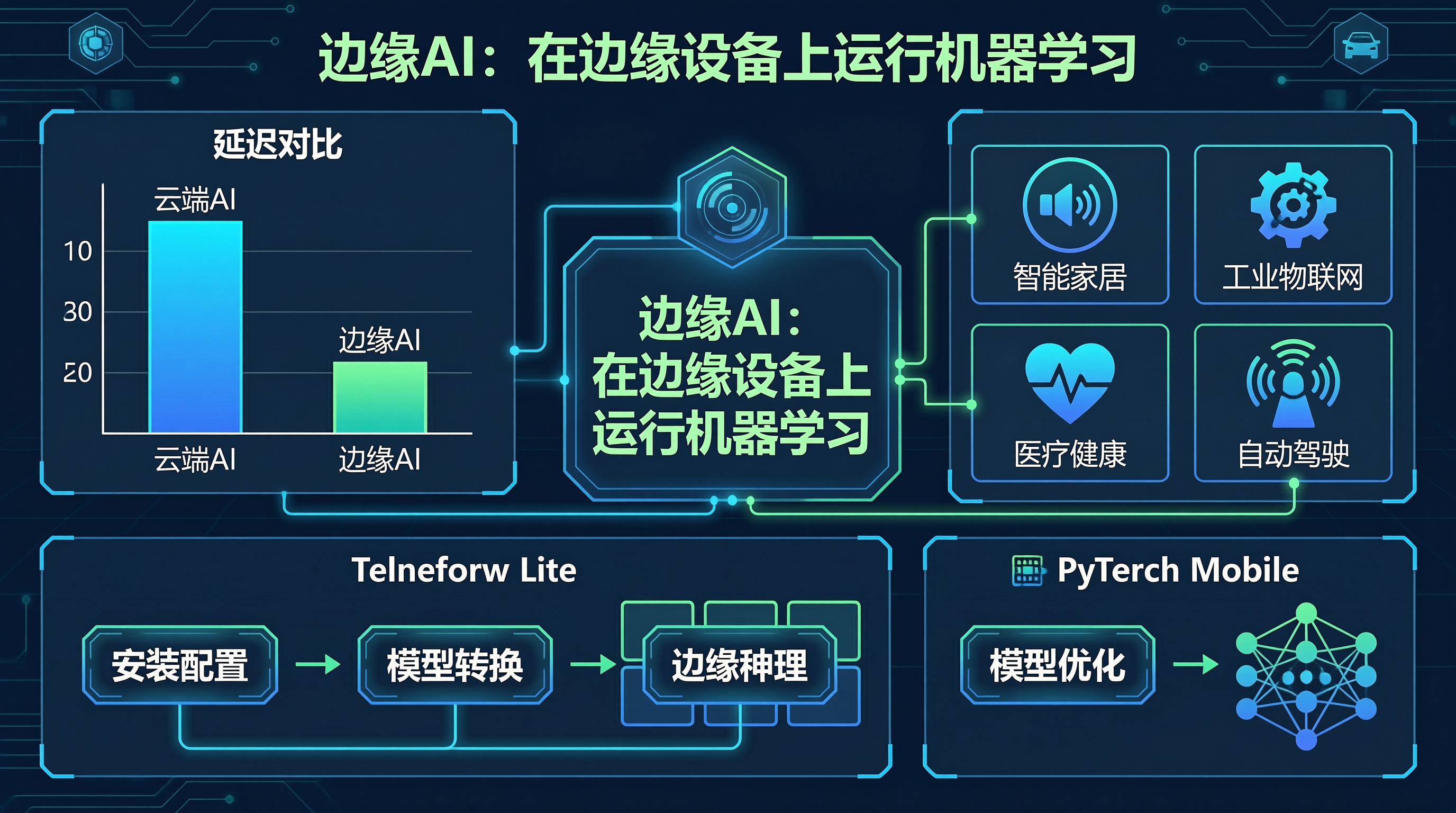
边缘AI概述
什么是边缘AI?
边缘AI是指在边缘设备上运行机器学习模型
不需要依赖云端服务器
实现实时推理和隐私保护
优势对比
| 特性 | 云端AI | 边缘AI |
|---|---|---|
| 延迟 | 高 | 低 |
| 隐私 | 数据上传 | 本地处理 |
| 带宽 | 需要网络 | 无需网络 |
| 成本 | 云端费用 | 一次性设备成本 |
应用场景
智能家居 → 语音助手、安防监控
工业物联网 → 设备预测性维护
医疗健康 → 实时健康监测
自动驾驶 → 实时环境感知
TensorFlow Lite
安装和配置
# 安装TensorFlow Lite
pip install tflite-runtime

# 安装完整TensorFlow(含转换工具)
pip install tensorflow
模型转换
import tensorflow as tf

# 加载预训练模型
model = tf.keras.applications.MobileNetV2(weights='imagenet')

# 转换为TFLite格式
converter = tf.lite.TFLiteConverter.from_keras_model(model)
tflite_model = converter.convert()

# 保存模型
with open('mobilenet_v2.tflite', 'wb') as f:
    f.write(tflite_model)
边缘推理
import tflite_runtime.interpreter as tflite

# 加载模型
interpreter = tflite.Interpreter(model_path='mobilenet_v2.tflite')
interpreter.allocate_tensors()

# 获取输入输出张量
input_details = interpreter.get_input_details()
output_details = interpreter.get_output_details()

# 准备输入数据
input_shape = input_details[0]['shape']
input_data = prepare_input(image_path, input_shape)

# 执行推理
interpreter.set_tensor(input_details[0]['index'], input_data)
interpreter.invoke()

# 获取输出
output_data = interpreter.get_tensor(output_details[0]['index'])
PyTorch Mobile
模型优化
import torch
import torchvision.models as models

# 加载模型
model = models.mobilenet_v2(pretrained=True)
model.eval()

# 优化模型
example_input = torch.randn(1, 3, 224, 224)
optimized_model = torch.jit.trace(model, example_input)

# 保存模型
optimized_model.save('mobilenet_v2.pt')
边缘部署
import torch

# 加载优化后的模型
model = torch.jit.load('mobilenet_v2.pt')
model.eval()

# 准备输入
input_tensor = preprocess(image)

# 执行推理
with torch.no_grad():
    output = model(input_tensor)
    predictions = torch.nn.functional.softmax(output, dim=1)
实战案例:实时物体检测
class ObjectDetector:
    def __init__(self, model_path, labels_path):
        self.interpreter = tflite.Interpreter(model_path=model_path)
        self.interpreter.allocate_tensors()

        with open(labels_path, 'r') as f:
            self.labels = [line.strip() for line in f.readlines()]

    def detect(self, image):
        input_details = self.interpreter.get_input_details()
        output_details = self.interpreter.get_output_details()

        # 预处理图像
        input_shape = input_details[0]['shape']
        input_data = self.preprocess(image, input_shape)

        # 执行推理
        self.interpreter.set_tensor(input_details[0]['index'], input_data)
        self.interpreter.invoke()

        # 解析结果
        boxes = self.interpreter.get_tensor(output_details[0]['index'])[0]
        classes = self.interpreter.get_tensor(output_details[1]['index'])[0]
        scores = self.interpreter.get_tensor(output_details[2]['index'])[0]

        results = []
        for i in range(len(scores)):
            if scores[i] > 0.5:
                results.append({
                    'label': self.labels[int(classes[i])],
                    'score': scores[i],
                    'box': boxes[i]
                })

        return results

    def preprocess(self, image, input_shape):
        # 图像预处理逻辑
        pass
最佳实践
1. 模型量化
# 量化模型以减小体积和提高速度
converter = tf.lite.TFLiteConverter.from_keras_model(model)
converter.optimizations = [tf.lite.Optimize.DEFAULT]
converter.target_spec.supported_types = [tf.float16]
tflite_model = converter.convert()
2. 性能优化
# 使用多线程
interpreter.set_num_threads(4)

# 使用GPU加速(如果可用)
if tf.test.is_gpu_available():
    converter.target_spec.supported_ops = [
        tf.lite.OpsSet.TFLITE_BUILTINS,
        tf.lite.OpsSet.SELECT_TF_OPS
    ]
总结
边缘AI是未来AI发展的重要方向。通过在边缘设备上运行机器学习模型,可以实现低延迟、隐私保护和离线运行。
我的鬃狮蜥Hash对边缘AI也有自己的理解——它总是在本地做出决策,不需要依赖其他蟋蟀,这也许就是自然界的"边缘AI"吧!
如果你对边缘AI有任何问题,欢迎留言交流!我是欧阳瑞,极客之路,永无止境!
技术栈:边缘AI · TensorFlow Lite · PyTorch Mobile

汇聚全球AI编程工具,助力开发者即刻编程。
更多推荐

 13
13 0
0- 0


 已为社区贡献40条内容

所有评论(0)